🌐 What Is Routing?
Routing is the logic your server uses to send a different response depending on which URL was requested.
The Problem (Before Routing)
🌍 Currently, no matter what URL is visited (
/,/product,/anything), the server always sends back the same response.🔀 We need the server to behave differently depending on the requested path — e.g.:
📋
/overview→ show an Overview page📦
/product→ show a Product page
Note: In large real-world applications, routing gets very complex, so tools like Express are used to handle it (covered later in the course). For now, we're learning to build routing from scratch using plain Node.js.
📨 Step 1: Inspecting the Request URL
Every request has a .url property containing the requested path:
console.log(req.url);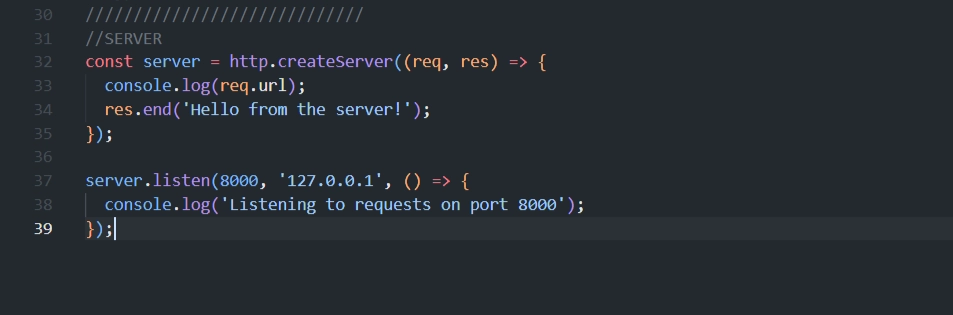
After restarting the server and reloading the browser, you'll notice two logs appear for a single page visit:
The actual path (e.g.,
/)/favicon.ico

🤔 Why Two Requests?
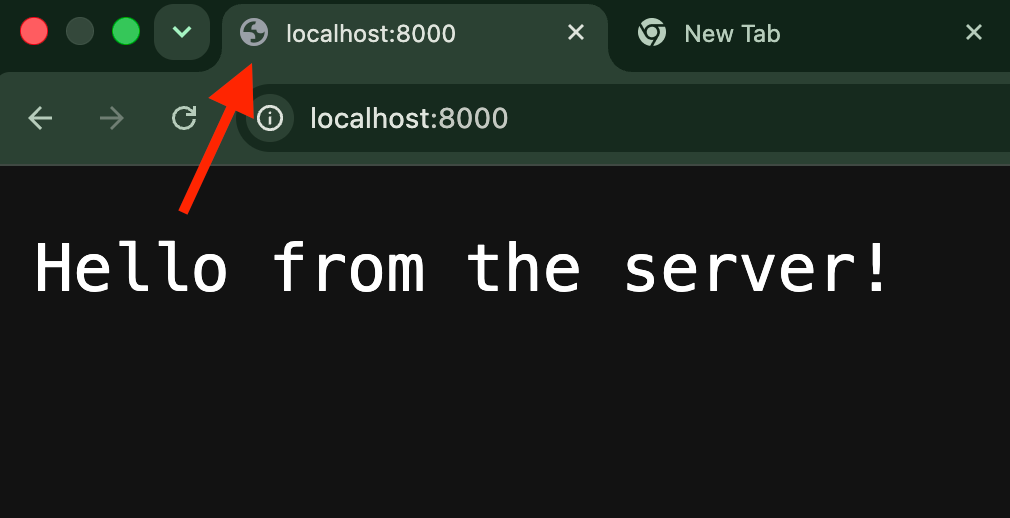
🌐 Browsers automatically send a separate request for the site's favicon (the small icon shown in browser tabs).
🚫 Since we don't have a favicon set up, this request can simply be ignored.
🧩 Step 2: Understanding the url Module
📦 Node has a built-in
urlmodule for parsing complex URLs — especially ones with query parameters, like:/product?id=23&something=else🗂️ The
urlmodule can convert these parameters into a clean, structured object.⏳ Not needed yet for simple routes like
/overviewor/product— it will be used later for more complex URLs.
🔀 Step 3: Implementing Basic Routing with If/Else
Save the URL Path
const pathName = req.url;Basic Routing Logic
if (pathName === '/overview' || pathName === '/') {
  res.end('This is the OVERVIEW');
} else if (pathName === '/product') {
  res.end('This is the PRODUCT');
} else {
  res.end('<h1>Page not found!</h1>');
}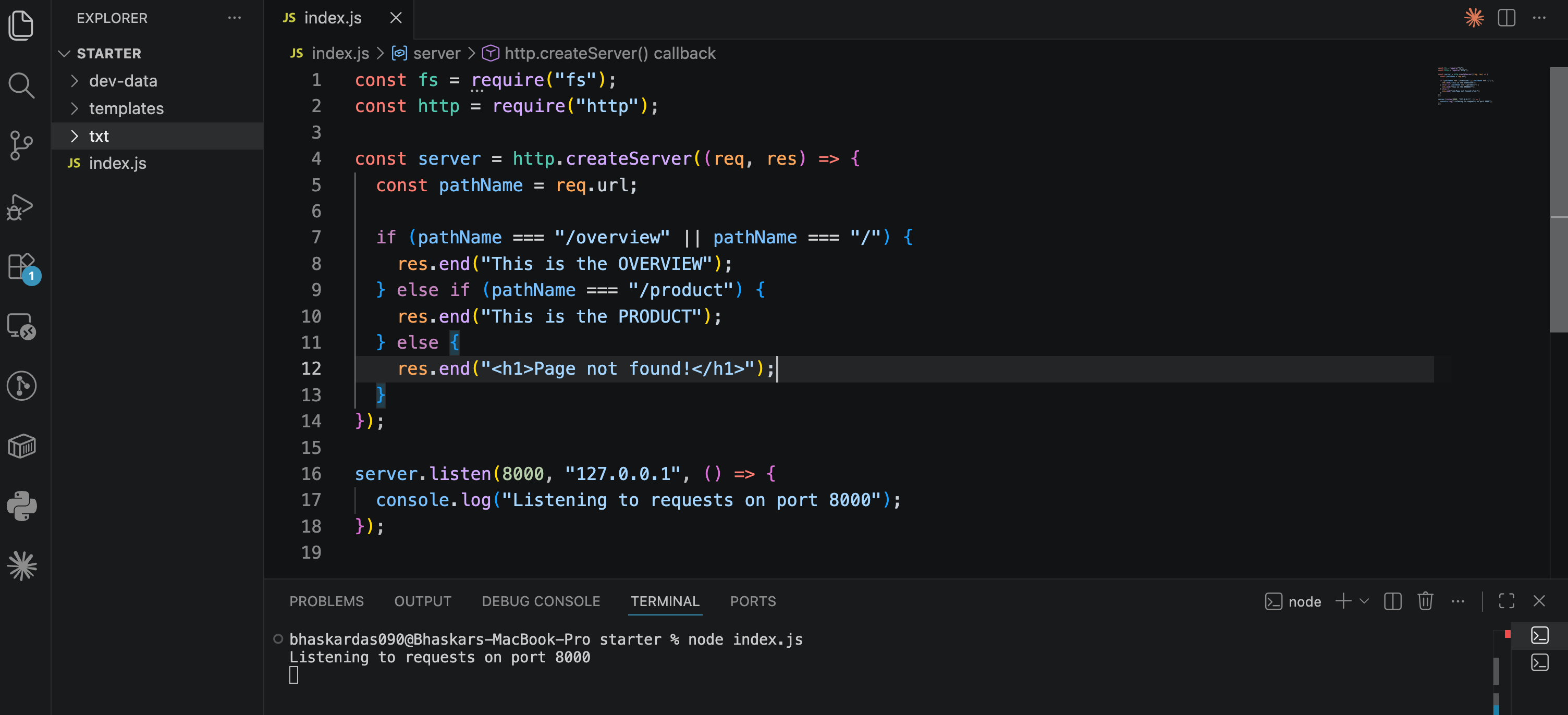
Explanation
🏠
pathName === '/overview' || pathName === '/'→ Both the root URL (/) and/overviewshow the same Overview page.📦
pathName === '/product'→ Shows the Product page.🚫
else→ Handles any URL that doesn't match a defined route. A fallback.
⚠️ Without an
elsefallback, requesting an undefined route (like/something-random) causes the browser to hang indefinitely — the loading spinner keeps spinning because the server never sends any response back. Always include a fallback case.
📄 Step 4: Sending Status Codes and Headers
What Is a Status Code?
🔢 An HTTP status code is a number sent back with the response, indicating the outcome of the request.
❌
404is the well-known code for "Page Not Found."✅
200means "OK" (a successful response) — this is the default when no other code is explicitly set.
What Is a Header?
📝 An HTTP header is a piece of metadata about the response (or request) — extra context sent alongside the actual content.
Setting Both with writeHead
res.writeHead(404, {
  'Content-Type': 'text/html',
  'my-own-header': 'hello-world'
});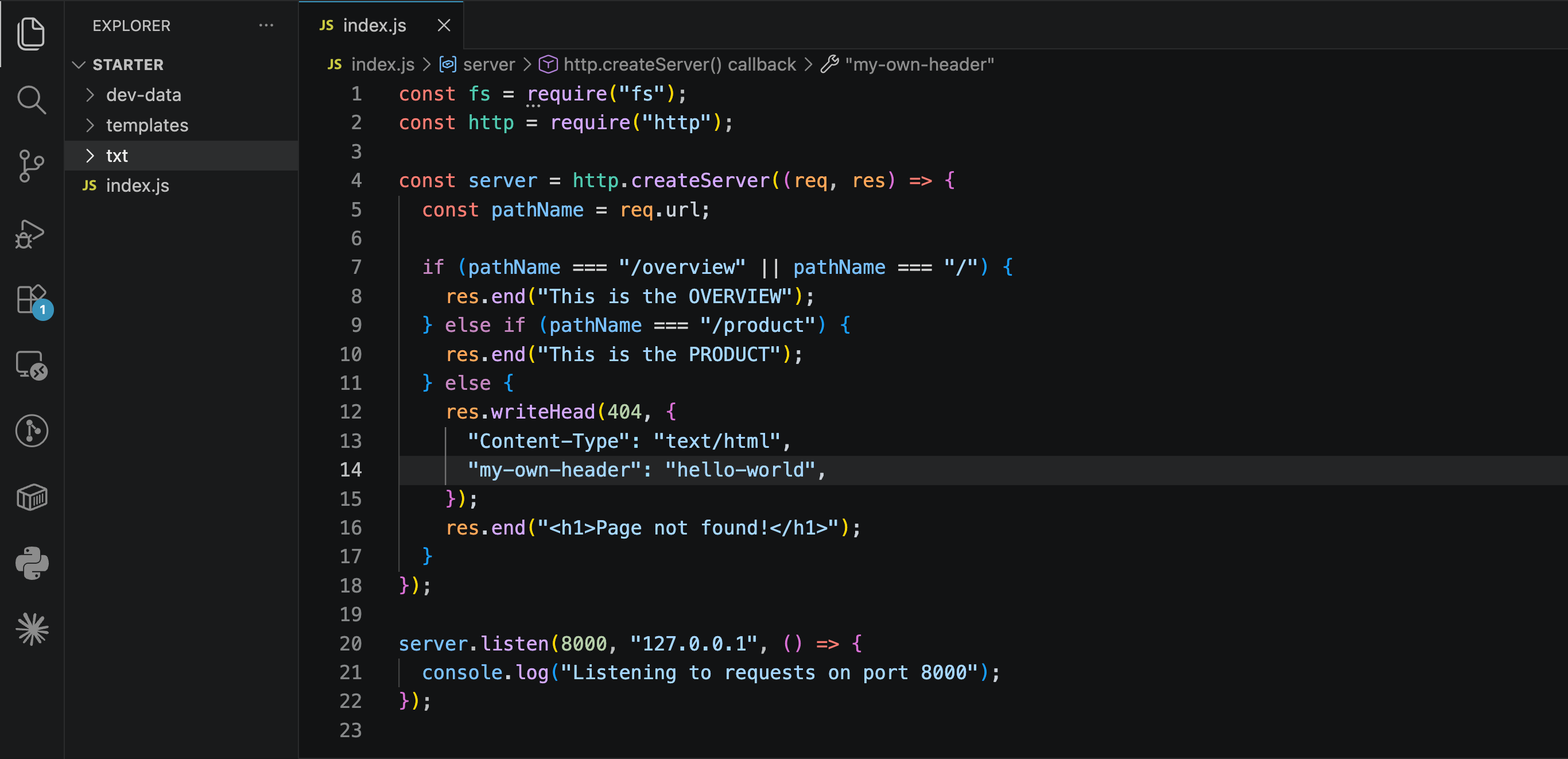
🔢 The first argument is the status code (
404).📦 The second argument is an object containing whichever headers you want to send.
🧐 Learn More on Headers
Common Standard Header: Content-Type
'Content-Type': 'text/html'🌐 This tells the browser to expect HTML in the response body.
🖥️ Once set, you can send actual HTML content:
res.end('<h1>Page not found!</h1>');The browser will now render this as an <h1> heading instead of displaying it as plain text.
Custom Headers
🛠️ You can also define your own custom headers, for example:
'my-own-header': 'hello-world'🤫 Verifying Status Codes and Headers
🛠️ Open Developer Tools:
Mac:
Cmd + J(or right-click → Inspect)Windows:
Alt + Ctrl + J(or View → Developer → Developer Tools)
🌐 Go to the Network tab.
🔄 Reload the page — you'll see the request listed with a
404status (often shown in red) and, if you click into it, a Response Headers section showing both standard and custom headers.
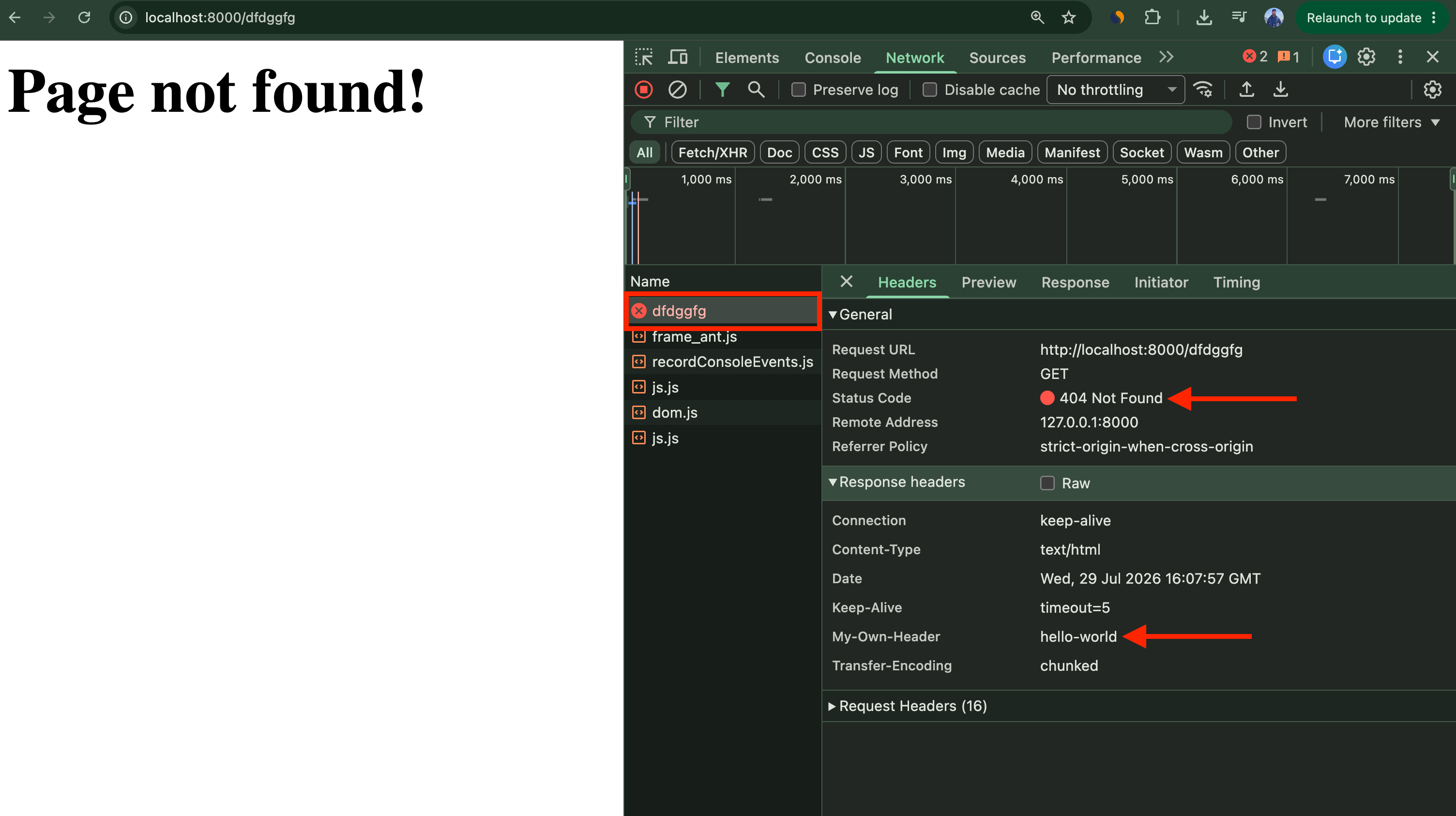
⚠️ Important Rule
⏳ Status codes and headers must be set before the response body is sent.
🚫 You can't send headers after calling
res.end()with content — they always need to go throughres.writeHead()first.
🧪 Testing Everything
🔄 Restart the server (Ctrl + C, then
node index.js) after every code change.🌐 Visit:
🏠
/or/overview→ shows "This is the OVERVIEW"📦
/product→ shows "This is the PRODUCT"❌ Any other path (e.g.,
/random) → shows "Page not found!" with a 404 status and custom headers.
🔍 Check the Network tab in Dev Tools to confirm:
✅ Status code (200 for success, 404 for not found)
📋 Response headers (
Content-Type, custom headers, etc.)
❌ Important Clarification: Routes ≠ File System
Routes like
/overviewor/productaren't tied to actual folders/files in your project.Visiting
/templateswon't automatically load atemplatesfolder.To make
/templateswork, you have to explicitly define it in your routing logic and manually send back a response.
📚 Key Takeaways
📌 Concept | 🎯 Purpose |
|---|---|
| 🌐 Gives you the path requested by the client |
If/Else on | 🔀 Implements basic routing — different responses for different URLs |
| 🛑 Prevents the server from hanging on undefined routes |
| 📨 Sets the HTTP status code and headers (must be called before |
| 🖥️ Tells the browser to render the response as HTML |
| ❌ Standard code for "Page Not Found" |
Routes vs File System | 📂 Routes are custom-defined in code — they don't map automatically to folders/files |
<div class="infographic-vscodeterm" id="vt">
<style>
.infographic-vscodeterm {
--ink: #1a1a1a;
--ink-soft: #5c5c5c;
--paper: #ffffff;
--paper-alt: #f0ece4;
--accent: #2563eb;
--accent-deep: #1942a8;
--accent-soft: #e3ebfd;
--line: #ddd6c9;
--radius: 8px;
--display-font: 'Fraunces', Georgia, serif;
--body-font: 'Inter', system-ui, sans-serif;
--mono-font: 'IBM Plex Mono', monospace;
max-width: 880px;
margin: 0 auto;
box-sizing: border-box;
background: transparent;
color: var(--ink);
font-family: var(--body-font);
}
.infographic-vscodeterm[data-theme="dark"] {
--ink: #e8e6e1;
--ink-soft: #9a968c;
--paper: #13171f;
--paper-alt: #1c212b;
--accent: #5b8def;
--accent-deep: #8fb4ff;
--accent-soft: #20293f;
--line: #2c313d;
}
.infographic-vscodeterm * { box-sizing: border-box; min-width: 0; }
.vt-eyebrow {
font-family: var(--mono-font); font-size: 0.72rem; letter-spacing: 0.1em;
text-transform: uppercase; color: var(--accent); margin: 0 0 0.45rem;
display: flex; align-items: center; justify-content: center; gap: 0.4rem;
}
.vt-eyebrow::before { content: ""; width: 14px; height: 2px; background: var(--accent); display: inline-block; }
.vt-title {
font-family: var(--display-font); font-size: clamp(1.5rem, 4vw, 2.3rem); text-align: center;
margin: 0 0 0.5rem; line-height: 1.14; letter-spacing: -0.01em;
}
.vt-sub { color: var(--ink-soft); font-size: 0.95rem; text-align: center; margin: 0 0 1.7rem; }
/* ===== VS Code window — fixed dark theme regardless of page mode ===== */
.vt-window { border-radius: 8px; overflow: hidden; box-shadow: 0 16px 40px -14px rgba(0,0,0,0.45); border: 1px solid #1e1e1e; font-family: var(--mono-font); }
.vt-titlebar { background: #323233; display: flex; align-items: center; padding: 0.5rem 0.8rem; position: relative; }
.vt-dots { display: flex; gap: 0.4rem; }
.vt-dots span { width: 10px; height: 10px; border-radius: 50%; display: block; }
.vt-dots span:nth-child(1) { background: #ff5f56; }
.vt-dots span:nth-child(2) { background: #ffbd2e; }
.vt-dots span:nth-child(3) { background: #27c93f; }
.vt-titlebar-text { position: absolute; left: 50%; transform: translateX(-50%); font-size: 0.72rem; color: #cccccc; }
.vt-body { display: flex; height: 300px; }
.vt-resize-h { width: 5px; cursor: col-resize; background: transparent; flex-shrink: 0; transition: background 0.15s; touch-action: none; }
.vt-resize-h:hover, .vt-resize-h.is-dragging { background: #0078d4; }
.vt-resize-v { height: 5px; cursor: row-resize; background: transparent; flex-shrink: 0; transition: background 0.15s; touch-action: none; }
.vt-resize-v:hover, .vt-resize-v.is-dragging { background: #0078d4; }
.vt-window-resize {
height: 9px; background: #252526; cursor: row-resize; display: flex; align-items: center;
justify-content: center; border-top: 1px solid #1e1e1e; touch-action: none;
}
.vt-window-resize span { width: 30px; height: 3px; border-radius: 2px; background: #4a4a52; }
.vt-window-resize:hover span, .vt-window-resize.is-dragging span { background: #0078d4; }
.vt-toggle-btn {
background: none; border: none; color: #9a9a9a; cursor: pointer; display: flex; align-items: center;
padding: 0.3rem; border-radius: 3px; flex-shrink: 0;
}
.vt-toggle-btn:hover { background: #2a2d2e; color: #fff; }
.vt-toggle-btn svg { width: 13px; height: 13px; }
.vt-sidebar.is-hidden { width: 0 !important; overflow: hidden; border-right: none; }
.vt-terminal.is-collapsed { height: auto !important; }
.vt-terminal.is-collapsed .vt-term-body { display: none; }
.vt-terminal.is-collapsed .vt-term-toggle svg { transform: rotate(-90deg); }
.vt-activitybar { width: 40px; background: #333333; display: flex; flex-direction: column; align-items: center; padding-top: 0.7rem; gap: 1.1rem; flex-shrink: 0; }
.vt-activitybar svg { width: 18px; height: 18px; opacity: 0.55; }
.vt-activitybar svg.is-on { opacity: 1; }
.vt-sidebar { width: 170px; background: #252526; flex-shrink: 0; overflow-y: auto; border-right: 1px solid #1e1e1e; }
.vt-sidebar-head { font-size: 0.65rem; font-weight: 700; letter-spacing: 0.06em; color: #bbbbbb; padding: 0.6rem 0.8rem 0.3rem; }
.vt-sidebar-root { font-size: 0.74rem; color: #cccccc; padding: 0.2rem 0.7rem; display: flex; align-items: center; gap: 0.3rem; }
.vt-sidebar-folder { font-size: 0.74rem; color: #cccccc; padding: 0.2rem 0.7rem 0.2rem 1.4rem; display: flex; align-items: center; gap: 0.3rem; }
.vt-sidebar-folder.lvl2 { padding-left: 2.6rem; }
.vt-row {
display: flex; align-items: center; gap: 0.35rem; width: 100%; background: none; border: none;
color: #cccccc; font: inherit; font-size: 0.74rem; padding: 0.24rem 0.7rem 0.24rem 2.1rem;
cursor: pointer; text-align: left; border-left: 2px solid transparent;
}
.vt-row.lvl2 { padding-left: 3.4rem; }
.vt-row:hover { background: #2a2d2e; }
.vt-row.is-selected { background: #37373d; border-left-color: #0078d4; }
.vt-badge { width: 15px; height: 15px; border-radius: 3px; flex-shrink: 0; display: flex; align-items: center; justify-content: center; font-size: 0.46rem; font-weight: 700; color: #1a1a1a; background: #29b6f6; }
.vt-main { flex: 1; display: flex; flex-direction: column; min-width: 0; }
.vt-tabbar { display: flex; background: #252526; border-bottom: 1px solid #1e1e1e; overflow-x: auto; }
.vt-tab {
display: flex; align-items: center; gap: 0.35rem; background: #1e1e1e; color: #808080; font: inherit;
font-size: 0.72rem; padding: 0.45rem 0.8rem; border: none; border-right: 1px solid #1e1e1e;
border-top: 2px solid transparent; cursor: pointer; white-space: nowrap;
}
.vt-tab.is-active { color: #d4d4d4; border-top-color: #0078d4; background: #1e1e1e; }
.vt-tab .vt-badge { width: 13px; height: 13px; font-size: 0.42rem; }
.vt-code-wrap { flex: 1; background: #1e1e1e; overflow: auto; padding: 0.85rem 1rem; }
.vt-code-wrap pre { margin: 0; }
.vt-code-wrap code { font-family: var(--mono-font); font-size: 0.72rem; line-height: 1.7; color: #d4d4d8; white-space: pre; }
.tok-kw { color: #c678dd; }
.tok-tag { color: #e06c75; }
.tok-type { color: #61afef; }
.tok-attr { color: #d19a66; }
.tok-str { color: #98c379; }
.tok-expr { color: #56b6c2; }
.tok-punc { color: #6b7280; }
.vt-flash { background: rgba(220,38,38,0.22); }
/* ===== terminal ===== */
.vt-terminal { background: #181818; border-top: 1px solid #2c2c2c; display: flex; flex-direction: column; height: 150px; flex-shrink: 0; }
.vt-term-head { display: flex; align-items: center; gap: 0.4rem; font-size: 0.62rem; letter-spacing: 0.05em; color: #9a9a9a; padding: 0.35rem 0.8rem; border-bottom: 1px solid #262626; text-transform: uppercase; }
.vt-term-body { flex: 1; overflow-y: auto; padding: 0.5rem 0.9rem; font-size: 0.72rem; line-height: 1.65; }
.vt-term-line { color: #d4d4d4; white-space: pre; opacity: 0; transform: translateY(2px); animation: vt-line-in 0.25s ease forwards; }
@keyframes vt-line-in { to { opacity: 1; transform: none; } }
.vt-term-line.is-cmd { color: #7ee787; }
.vt-term-line.is-ok { color: #7ee787; font-weight: 600; }
.vt-term-prompt { color: #7ee787; }
.vt-run-row { display: flex; align-items: center; gap: 0.5rem; margin-top: 0.2rem; }
.vt-run-btn {
font: inherit; font-size: 0.68rem; font-weight: 600; color: #1a1a1a; background: #7ee787;
border: none; border-radius: 4px; padding: 0.3rem 0.7rem; cursor: pointer; display: flex; align-items: center; gap: 0.3rem;
}
.vt-run-btn:disabled { opacity: 0.5; cursor: default; }
.vt-run-btn svg { width: 9px; height: 9px; }
.vt-run-hint { color: #6b7280; font-size: 0.68rem; }
@media (max-width: 620px) {
.vt-sidebar { width: 130px; }
.vt-body { height: 320px; }
}
@media (max-width: 480px) { .vt-activitybar { display: none; } }
/* ===== browser output ===== */
.vt-output-label {
font-family: var(--mono-font); font-size: 0.68rem; letter-spacing: 0.1em; text-transform: uppercase;
color: var(--ink-soft); text-align: center; margin: 1.5rem 0 0.7rem;
}
.vt-browser {
border: 1px solid var(--line); border-radius: var(--radius); overflow: hidden; max-width: 380px; margin: 0 auto;
box-shadow: 0 10px 24px -12px rgba(26,26,26,0.18);
opacity: 0; transform: translateY(8px); transition: opacity 0.4s ease, transform 0.4s ease; pointer-events: none;
}
.vt-browser.is-shown { opacity: 1; transform: none; pointer-events: auto; }
.vt-browser-bar { background: #e9e9e9; padding: 0.5rem 0.7rem; display: flex; align-items: center; gap: 0.5rem; }
.vt-browser-bar .vt-dots span { width: 8px; height: 8px; }
.vt-browser-url { font-family: var(--mono-font); font-size: 0.65rem; color: #555; background: #fff; border-radius: 4px; padding: 0.2rem 0.5rem; flex: 1; }
.vt-browser-page { background: #fff; padding: 1.2rem 1.2rem 1.6rem; text-align: center; }
.vt-output-placeholder { text-align: center; font-size: 0.82rem; color: var(--ink-soft); }
.vt-route-row { display: flex; gap: 0.35rem; justify-content: center; margin-bottom: 1rem; flex-wrap: wrap; }
.vt-route-btn {
font-family: var(--mono-font); font-size: 0.66rem; font-weight: 600; color: #555;
background: #f0f0f0; border: 1px solid #ddd; border-radius: 999px; padding: 0.25rem 0.6rem; cursor: pointer;
}
.vt-route-btn.is-on { background: #2563eb; border-color: #2563eb; color: #fff; }
.vt-route-body { font-family: var(--mono-font); font-size: 0.88rem; color: #000; margin: 0; }
.vt-route-status {
display: inline-block; font-family: var(--mono-font); font-size: 0.66rem; font-weight: 700;
color: #b3261e; background: #fbe6e6; border: 1px solid #b3261e; border-radius: 999px;
padding: 0.15rem 0.55rem; margin-bottom: 0.5rem;
}
.vt-route-headers {
font-family: var(--mono-font); font-size: 0.62rem; color: #777; margin-top: 0.5rem; line-height: 1.6;
}
.vt-route-headers b { color: #333; }
.vt-takeaway {
margin-top: 1.7rem; padding: 0.95rem 1.2rem; background: var(--accent-soft); border-left: 3px solid var(--accent);
border-radius: 4px; font-size: 0.9rem; color: var(--ink); line-height: 1.5; max-width: 620px; margin-left: auto; margin-right: auto;
}
.vt-takeaway b { color: var(--accent-deep); }
@media (prefers-reduced-motion: reduce) {
.infographic-vscodeterm *, .infographic-vscodeterm *::before, .infographic-vscodeterm *::after {
transition-duration: 0.001ms !important; animation-duration: 0.001ms !important;
}
}
</style>
<div class="vt-window">
<div class="vt-titlebar">
<div class="vt-dots"><span></span><span></span><span></span></div>
<div class="vt-titlebar-text">node-server — Visual Studio Code</div>
</div>
<div class="vt-body">
<div class="vt-activitybar">
<svg class="is-on" viewBox="0 0 24 24" fill="none" aria-hidden="true"><rect x="3" y="4" width="7" height="7" rx="1" stroke="#fff" stroke-width="1.6"/><rect x="14" y="4" width="7" height="7" rx="1" stroke="#fff" stroke-width="1.6"/><rect x="3" y="15" width="7" height="7" rx="1" stroke="#fff" stroke-width="1.6"/><rect x="14" y="15" width="7" height="7" rx="1" stroke="#fff" stroke-width="1.6"/></svg>
<svg viewBox="0 0 24 24" fill="none" aria-hidden="true"><circle cx="10" cy="10" r="6.5" stroke="#fff" stroke-width="1.6"/><line x1="15" y1="15" x2="20" y2="20" stroke="#fff" stroke-width="1.6" stroke-linecap="round"/></svg>
</div>
<div class="vt-sidebar">
<div class="vt-sidebar-head">EXPLORER</div>
<div class="vt-sidebar-root">▾ NODE-SERVER</div>
<button class="vt-row is-selected" data-file="index" type="button"><span class="vt-badge">JS</span><span>index.js</span></button>
</div>
<div class="vt-resize-h" id="vtSidebarHandle" title="Drag to resize sidebar"></div>
<div class="vt-main">
<div class="vt-tabbar">
<button class="vt-toggle-btn" id="vtToggleSidebar" type="button" aria-label="Toggle sidebar" title="Toggle sidebar">
<svg viewBox="0 0 16 16" fill="none" aria-hidden="true"><rect x="1.5" y="2" width="13" height="12" rx="1.5" stroke="currentColor" stroke-width="1.3"/><line x1="6" y1="2" x2="6" y2="14" stroke="currentColor" stroke-width="1.3"/></svg>
</button>
<button class="vt-tab is-active" data-file="index" type="button"><span class="vt-badge">JS</span><span>index.js</span></button>
</div>
<div class="vt-code-wrap">
<pre><code id="vtCode"></code></pre>
</div>
<div class="vt-resize-v" id="vtTerminalHandle" title="Drag to resize terminal"></div>
<div class="vt-terminal">
<div class="vt-term-head">
<button class="vt-toggle-btn vt-term-toggle" id="vtToggleTerminal" type="button" aria-label="Toggle terminal" title="Toggle terminal">
<svg viewBox="0 0 16 16" fill="none" aria-hidden="true"><path d="M4 6l4 4 4-4" stroke="currentColor" stroke-width="1.6" stroke-linecap="round" stroke-linejoin="round"/></svg>
</button>
<span>Terminal</span>
</div>
<div class="vt-term-body">
<div id="vtTermLines"><div class="vt-term-line" style="animation-delay:0s;"><span class="vt-term-prompt">$</span> </div></div>
<div class="vt-run-row">
<button class="vt-run-btn" id="vtRunBtn" type="button">
<svg viewBox="0 0 12 12" aria-hidden="true"><path d="M2.5 1.5v9l7-4.5z" fill="currentColor"/></svg>
<span id="vtRunLabel">node index.js</span>
</button>
<span class="vt-run-hint" id="vtRunHint">starts the server</span>
</div>
</div>
</div>
</div>
</div>
<div class="vt-window-resize" id="vtWindowHandle" title="Drag to resize window"><span></span></div>
</div>
<div class="vt-output-label">Output</div>
<div id="vtOutputArea">
<p class="vt-output-placeholder">Run <code style="font-family:var(--mono-font)">node index.js</code> above, then visit the server to see it here.</p>
<div class="vt-browser" id="vtBrowser">
<div class="vt-browser-bar">
<div class="vt-dots"><span></span><span></span><span></span></div>
<div class="vt-browser-url" id="vtUrl">127.0.0.1:8000</div>
</div>
<div class="vt-browser-page">
<div class="vt-route-row" id="vtRouteRow">
<button class="vt-route-btn is-on" data-path="/" type="button">/</button>
<button class="vt-route-btn" data-path="/product" type="button">/product</button>
<button class="vt-route-btn" data-path="/random" type="button">/random</button>
</div>
<div id="vtRouteResult">
<p class="vt-route-body">This is the OVERVIEW</p>
</div>
</div>
</div>
</div>
</div>
<link rel="preconnect" href="https://fonts.googleapis.com">
<link href="https://fonts.googleapis.com/css2?family=Fraunces:wght@500;600&family=Inter:wght@400;500;600;700&family=IBM+Plex+Mono:wght@400;500&display=swap" rel="stylesheet">
<script>
(function () {
var root = document.getElementById('vt');
if (!root) return;
/* --- dark mode detection: body attribute > cookie > postMessage > light --- */
function applyDark(dark) {
if (dark) root.setAttribute('data-theme', 'dark');
else root.removeAttribute('data-theme');
}
var bodyAttr = document.body.getAttribute('data-darkmode');
var dark;
if (bodyAttr === 'true') dark = true;
else if (bodyAttr === 'false') dark = false;
else {
var match = document.cookie.match(/(?:^|;\s*)darkMode=([^;]+)/);
dark = match ? match[1] === 'true' : false;
}
applyDark(dark);
window.addEventListener('message', function (e) {
if (e.data && e.data.type === 'darkMode') applyDark(!!e.data.value);
});
/* --- file switching (single file here, kept for template consistency) --- */
var files = {
index:
'<span class="tok-kw">const</span> fs <span class="tok-punc">=</span> require<span class="tok-punc">(</span><span class="tok-str">\'fs\'</span><span class="tok-punc">);</span>\n' +
'<span class="tok-kw">const</span> http <span class="tok-punc">=</span> require<span class="tok-punc">(</span><span class="tok-str">\'http\'</span><span class="tok-punc">);</span>\n' +
'<span class="tok-kw">const</span> url <span class="tok-punc">=</span> require<span class="tok-punc">(</span><span class="tok-str">\'url\'</span><span class="tok-punc">);</span>\n' +
'<span class="tok-punc">////////////////////////////</span>\n' +
'<span class="tok-punc">//FILES</span>\n\n' +
'<span class="tok-punc">//Blocking, Synchronous way</span>\n' +
'<span class="tok-punc">//const textIn = fs.readFileSync(\'./txt/input.txt\', \'utf-8\');</span>\n' +
'<span class="tok-punc">//console.log(textIn);</span>\n\n' +
'<span class="tok-punc">//const textOut = `This is what we know about the avocado: ${textIn}.\\nCreated on ${Date.now()}`;</span>\n' +
'<span class="tok-punc">//fs.writeFileSync(\'./txt/output.txt\', textOut);</span>\n\n' +
'<span class="tok-punc">//console.log(\'File written!\');</span>\n\n' +
'<span class="tok-punc">//Non-blocking, Asynchronous way</span>\n' +
'<span class="tok-punc">// fs.readFile(\'./txt/start.txt\', \'utf8\', (err, data1) => {</span>\n' +
'<span class="tok-punc">// fs.readFile(`./txt/${data1}.txt`, \'utf8\', (err, data2) => {</span>\n' +
'<span class="tok-punc">// console.log(data2);</span>\n\n' +
'<span class="tok-punc">// fs.readFile(\'./txt/append.txt\', \'utf8\', (err, data3) => {</span>\n' +
'<span class="tok-punc">// console.log(data2, data3);</span>\n\n' +
'<span class="tok-punc">// fs.writeFile(\'./txt/final.txt\', `${data2}\\n${data3}`, \'utf8\', (err) => {</span>\n' +
'<span class="tok-punc">// console.log(\'Your file has been written \uD83C\uDF89\');</span>\n' +
'<span class="tok-punc">// });</span>\n' +
'<span class="tok-punc">// });</span>\n' +
'<span class="tok-punc">// });</span>\n' +
'<span class="tok-punc">// });</span>\n' +
'<span class="tok-punc">/////////////////////////////</span>\n' +
'<span class="tok-punc">//SERVER</span>\n' +
'<span class="tok-kw">const</span> server <span class="tok-punc">=</span> http<span class="tok-punc">.</span><span class="tok-type">createServer</span><span class="tok-punc">((</span>req<span class="tok-punc">,</span> res<span class="tok-punc">) => {</span>\n' +
' <span class="tok-kw">const</span> pathName <span class="tok-punc">=</span> req<span class="tok-punc">.</span>url<span class="tok-punc">;</span>\n' +
'<span class="vt-flash"> <span class="tok-kw">if</span> <span class="tok-punc">(</span>pathName <span class="tok-punc">===</span> <span class="tok-str">\'/overview\'</span> <span class="tok-punc">||</span> pathName <span class="tok-punc">===</span> <span class="tok-str">\'/\'</span><span class="tok-punc">) {</span>\n' +
' res<span class="tok-punc">.</span><span class="tok-type">end</span><span class="tok-punc">(</span><span class="tok-str">\'This is the OVERVIEW\'</span><span class="tok-punc">);</span>\n' +
'<span class="tok-punc">}</span> <span class="tok-kw">else if</span> <span class="tok-punc">(</span>pathName <span class="tok-punc">===</span> <span class="tok-str">\'/product\'</span><span class="tok-punc">) {</span>\n' +
' res<span class="tok-punc">.</span><span class="tok-type">end</span><span class="tok-punc">(</span><span class="tok-str">\'This is the PRODUCT\'</span><span class="tok-punc">);</span>\n' +
'<span class="tok-punc">}</span> <span class="tok-kw">else</span> <span class="tok-punc">{</span>\n' +
' res<span class="tok-punc">.</span><span class="tok-type">writeHead</span><span class="tok-punc">(</span><span class="tok-expr">404</span><span class="tok-punc">, {</span>\n' +
' <span class="tok-attr">\'Content-Type\'</span><span class="tok-punc">:</span> <span class="tok-str">\'text/html\'</span><span class="tok-punc">,</span>\n' +
' <span class="tok-attr">\'my-own-header\'</span><span class="tok-punc">:</span> <span class="tok-str">\'hello-world\'</span>\n' +
' <span class="tok-punc">});</span>\n' +
' res<span class="tok-punc">.</span><span class="tok-type">end</span><span class="tok-punc">(</span><span class="tok-str">\'<h1>Page not found!</h1>\'</span><span class="tok-punc">);</span>\n' +
'<span class="tok-punc">}</span></span>\n' +
'<span class="tok-punc">});</span>\n\n' +
'server<span class="tok-punc">.</span><span class="tok-type">listen</span><span class="tok-punc">(</span><span class="tok-expr">8000</span><span class="tok-punc">,</span> <span class="tok-str">\'127.0.0.1\'</span><span class="tok-punc">, () => {</span>\n' +
' console<span class="tok-punc">.</span><span class="tok-type">log</span><span class="tok-punc">(</span><span class="tok-str">\'Listening to requests on port 8000\'</span><span class="tok-punc">);</span>\n' +
'<span class="tok-punc">});</span>'
};
var codeEl = root.querySelector('#vtCode');
var rows = root.querySelectorAll('.vt-row');
var tabs = root.querySelectorAll('.vt-tab');
function selectFile(id) {
codeEl.innerHTML = files[id];
rows.forEach(function (r) { r.classList.toggle('is-selected', r.getAttribute('data-file') === id); });
tabs.forEach(function (t) { t.classList.toggle('is-active', t.getAttribute('data-file') === id); });
}
rows.forEach(function (r) { r.addEventListener('click', function () { selectFile(r.getAttribute('data-file')); }); });
tabs.forEach(function (t) { t.addEventListener('click', function () { selectFile(t.getAttribute('data-file')); }); });
selectFile('index');
/* --- terminal run simulation --- */
var termLines = root.querySelector('#vtTermLines');
var runBtn = root.querySelector('#vtRunBtn');
var runLabel = root.querySelector('#vtRunLabel');
var runHint = root.querySelector('#vtRunHint');
var browser = root.querySelector('#vtBrowser');
var placeholder = root.querySelector('.vt-output-placeholder');
var running = false;
var lines = [
{ text: '$ node index.js', cls: 'is-cmd', delay: 0 },
{ text: 'Listening to requests on port 8000', cls: 'is-ok', delay: 700 }
];
runBtn.addEventListener('click', function () {
if (running) return;
running = true;
runBtn.disabled = true;
runLabel.textContent = 'running\u2026';
browser.classList.remove('is-shown');
placeholder.style.display = 'block';
termLines.innerHTML = '';
lines.forEach(function (line) {
setTimeout(function () {
var div = document.createElement('div');
div.className = 'vt-term-line ' + line.cls;
div.textContent = line.text;
termLines.appendChild(div);
}, line.delay);
});
setTimeout(function () {
placeholder.style.display = 'none';
browser.classList.add('is-shown');
runBtn.disabled = false;
runLabel.textContent = 'node index.js';
runHint.textContent = 'server running \u2014 rerun anytime';
running = false;
showRoute('/');
}, 1600);
});
/* --- route buttons: simulate visiting each path --- */
var vtUrl = root.querySelector('#vtUrl');
var routeResult = root.querySelector('#vtRouteResult');
var routeBtns = root.querySelectorAll('.vt-route-btn');
var routeData = {
'/': { body: 'This is the OVERVIEW' },
'/product': { body: 'This is the PRODUCT' }
};
function showRoute(path) {
routeBtns.forEach(function (b) { b.classList.toggle('is-on', b.getAttribute('data-path') === path); });
vtUrl.textContent = '127.0.0.1:8000' + (path === '/' ? '' : path);
var match = routeData[path];
if (match) {
routeResult.innerHTML = '<p class="vt-route-body">' + match.body + '</p>';
} else {
routeResult.innerHTML =
'<span class="vt-route-status">404 Not Found</span>' +
'<p class="vt-route-body">Page not found!</p>' +
'<div class="vt-route-headers">Content-Type: <b>text/html</b><br>my-own-header: <b>hello-world</b></div>';
}
}
routeBtns.forEach(function (btn) {
btn.addEventListener('click', function () { showRoute(btn.getAttribute('data-path')); });
});
/* --- resize handles (pointer-capture drag) --- */
function makeResizable(handle, opts) {
var dragging = false, startPos = 0, startSize = 0;
handle.addEventListener('pointerdown', function (e) {
dragging = true;
handle.classList.add('is-dragging');
startPos = opts.axis === 'x' ? e.clientX : e.clientY;
startSize = opts.target.getBoundingClientRect()[opts.axis === 'x' ? 'width' : 'height'];
handle.setPointerCapture(e.pointerId);
e.preventDefault();
});
handle.addEventListener('pointermove', function (e) {
if (!dragging) return;
var pos = opts.axis === 'x' ? e.clientX : e.clientY;
var delta = pos - startPos;
if (opts.invert) delta = -delta;
var size = Math.min(opts.max, Math.max(opts.min, startSize + delta));
opts.target.style[opts.prop] = size + 'px';
if (opts.onResize) opts.onResize(size);
});
function stop() { dragging = false; handle.classList.remove('is-dragging'); }
handle.addEventListener('pointerup', stop);
handle.addEventListener('pointercancel', stop);
}
var sidebar = root.querySelector('.vt-sidebar');
var sidebarHandle = root.querySelector('#vtSidebarHandle');
var lastSidebarWidth = sidebar.getBoundingClientRect().width || 170;
makeResizable(sidebarHandle, {
axis: 'x', target: sidebar, prop: 'width', min: 100, max: 280, invert: false,
onResize: function (s) { lastSidebarWidth = s; }
});
var terminal = root.querySelector('.vt-terminal');
var terminalHandle = root.querySelector('#vtTerminalHandle');
var lastTerminalHeight = terminal.getBoundingClientRect().height || 150;
makeResizable(terminalHandle, {
axis: 'y', target: terminal, prop: 'height', min: 60, max: 280, invert: true,
onResize: function (s) { lastTerminalHeight = s; }
});
var vtBody = root.querySelector('.vt-body');
var windowHandle = root.querySelector('#vtWindowHandle');
makeResizable(windowHandle, {
axis: 'y', target: vtBody, prop: 'height', min: 300, max: 600, invert: false
});
/* --- show/hide toggles --- */
var toggleSidebarBtn = root.querySelector('#vtToggleSidebar');
var sidebarHidden = false;
toggleSidebarBtn.addEventListener('click', function () {
sidebarHidden = !sidebarHidden;
if (sidebarHidden) {
var w = sidebar.getBoundingClientRect().width;
if (w > 0) lastSidebarWidth = w;
sidebar.classList.add('is-hidden');
sidebarHandle.style.display = 'none';
} else {
sidebar.classList.remove('is-hidden');
sidebar.style.width = lastSidebarWidth + 'px';
sidebarHandle.style.display = '';
}
});
var toggleTerminalBtn = root.querySelector('#vtToggleTerminal');
var terminalCollapsed = false;
toggleTerminalBtn.addEventListener('click', function () {
terminalCollapsed = !terminalCollapsed;
if (terminalCollapsed) {
var h = terminal.getBoundingClientRect().height;
if (h > 30) lastTerminalHeight = h;
terminal.classList.add('is-collapsed');
terminalHandle.style.display = 'none';
} else {
terminal.classList.remove('is-collapsed');
terminal.style.height = lastTerminalHeight + 'px';
terminalHandle.style.display = '';
}
});
})();
</script>