🛠️ Creating a FastAPI Application
In this course, we will use Visual Studio Code as our primary editor. You can also use any IDE you’re comfortable with, such as PyCharm.
In FastAPI, a GET request fetches data from the server. It does not modify any data — it simply retrieves information.
Step 1: Create a FastAPI Project (Quick Setup)
Create a new project folder
FastAPI
Through the desktop →
Through the terminal (recommended) →
Open it in your editor (for this course, we’ll be using VS Code).
Create a virtual environment to isolate your project from other projects (recommended).
mac users →
// Create.
python3 -m venv fastapienv

// Activate.
source fastapienv/bin/activate
windows users →
// Create
python -m venv fastapienv

// Activate
fastapienv/scripts/activate.bat ---> command prompt
fastapienv/scripts/activate.ps1 ---> powershell
Install FastAPI and Uvicorn.
mac users →
pip3 install fastapi
pip3 install "uvicorn[standard]"

// pip3 ensures pip is using the same Python version as python3.
windows users →
pip install fastapi
pip install uvicorn[standard]
Step 2: Create the Application File
Create a file named books.py inside your project folder.
📂 Project Structure
FastAPI/
 └── books.py
Step 3: Write Your First FastAPI Code
🗂️ books.py
from fastapi import FastAPI
# Import the FastAPI class to create an API application.

app = FastAPI()
# Create an instance of the FastAPI app.

@app.get("/api-endpoint")
# Define a GET endpoint at "/api-endpoint."
async def first_api():
    return {"message": "Hello world"}
# Function that returns a JSON response.
🧠 Understanding Our Python Function
To make our Python function accessible from the web, we connect it to an HTTP GET request using a decorator (@).
@app.get("/api-endpoint")Here, /api-endpoint is the URL path where this function will be available.
Let’s break down the function we created:
async def first_api():
    return {"message": "Hello world"}
🔹 The async keyword makes the function asynchronous, but it is optional.
FastAPI can handle async behavior automatically when needed.
🔹 Apart from that, this is just a normal Python function that returns data (a dictionary).
🚀 Starting the FastAPI Application
Run this command in the terminal:
uvicorn books:app --reload🔧 What this command means:
uvicorn → The server that runs FastAPI apps.
books → Name of the Python file (
books.py).app → The FastAPI instance inside that file.
- - reload → Automatically restarts the server when you change code.
💻**terminal**
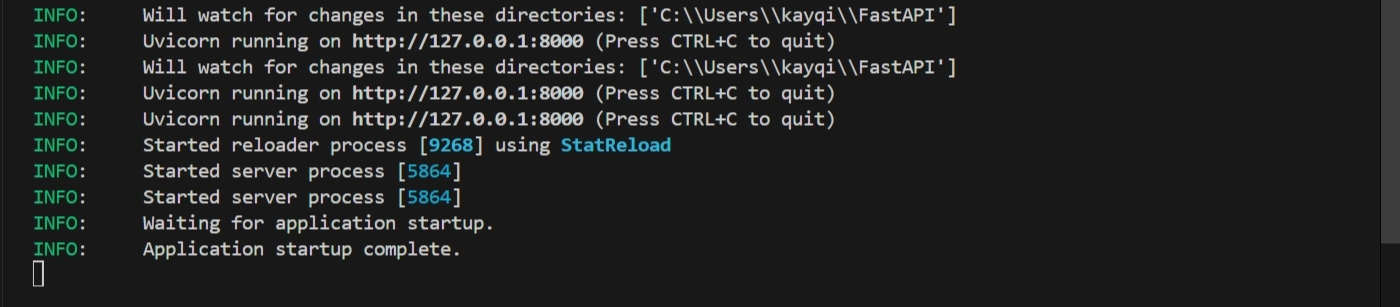
🌐 Accessing the Endpoint from the Browser
When you start the FastAPI app, a local server runs at:
🔗 127.0.0.1:8000
To call the function, open this URL in your browser:
🌍 127.0.0.1:8000/api-endpoint
You will see the response:
{"message":"Hello world"}🌐**browser**
🔁 Returning a List of Books Instead of a Message
Now let’s return real data instead of a simple text response.
📚 Sample Book Data
🗂️ books.py
from fastapi import FastAPI

app = FastAPI()

BOOKS = [
    {"title": "Title One", "author": "Author One", "category": "science"},
    {"title": "Title Two", "author": "Author Two", "category": "science"},
    {"title": "Title Three", "author": "Author Three", "category": "history"},
    {"title": "Title Four", "author": "Author Four", "category": "math"},
    {"title": "Title Five", "author": "Author Five", "category": "math"}
] #sample book data.

@app.get("/api-endpoint") #we will update this soon.
async def first_api():
    return {"message": "Hello world"} #returns a message.
🔄 Update the Endpoint
❌ Old endpoint
@app.get("/api-endpoint") #old endpoint.
async def first_api():
    return {"message": "Hello world"}
✅ New endpoint
@app.get("/books") #updated endpoint.
async def read_all_books():
    return BOOKS #returns a list of books.
✅ Final Result
🗂️ books.py
from fastapi import FastAPI

app = FastAPI()

BOOKS = [
    {"title": "Title One", "author": "Author One", "category": "science"},
    {"title": "Title Two", "author": "Author Two", "category": "science"},
    {"title": "Title Three", "author": "Author Three", "category": "history"},
    {"title": "Title Four", "author": "Author Four", "category": "math"},
    {"title": "Title Five", "author": "Author Five", "category": "math"}
]

@app.get("/books")
async def read_all_books():
    return BOOKS
✅ View All Books
Restart the server and open:
🌍 127.0.0.1:8000/books
NOTE →
If you have an issue restarting the server, kill the terminal,
ctrl + Cthen start the terminal again.
uvicorn books:app --reload🌐**browser**
You will now see a JSON response containing all books.
📌 Summary
GET requests are used to fetch data from the server.
FastAPI connects URLs to Python functions using decorators → @
Uvicorn runs the application locally.
Endpoints can easily return different data (like a list of books).
This simple pattern is the foundation for building real-world FastAPI applications.