📖 What Is an API?
🔌 API = Application Programming Interface.
💬 On a high level: a piece of software that another piece of software can use, allowing applications to talk to each other.
🌍 A web API: the server app sends data to a client whenever a request comes in — two pieces of software (client + server) communicating. This is the kind of API this course builds, and the most common type overall.
💡 APIs Are a Broader Concept (Not Just Web APIs)
"API" applies to any relatively standalone piece of software:
📁 Node's
fs/httpmodules — usingreadFile= using the FS API (hence "Node APIs").🌐 DOM manipulation — uses the browser's DOM API, not JavaScript itself.
🏗️ A class's public methods — those methods are its API, letting other code interact with it.
<div class="infographic-webapis">
  <style>
    .infographic-webapis {
      --ink:        #1a1a1a;
      --ink-soft:   #5c5c5c;
      --paper:      #ffffff;
      --paper-alt:  #f0ece4;
      --accent:     #2563eb;
      --accent-soft:#e3ebfd;
      --line:       #ddd6c9;
      box-sizing: border-box;
      max-width: 880px;
      margin: 0 auto;
      background: var(--paper);
      color: var(--ink);
      font-family: 'Inter', -apple-system, BlinkMacSystemFont, sans-serif;
    }
    .infographic-webapis[data-theme="dark"] {
      --ink:        #e8e6e1;
      --ink-soft:   #9a968c;
      --paper:      #121212;
      --paper-alt:  #1e1e26;
      --accent:     #5b8def;
      --accent-soft:#202942;
      --line:       #2c313d;
    }
    .infographic-webapis * { box-sizing: border-box; }
    .wa-inner { padding: clamp(1.25rem, 5vw, 3rem) 0; }
    .wa-diagram-wrap {
      border: 1px solid var(--line);
      border-radius: 10px;
      background: var(--paper-alt);
      overflow-x: auto;
    }
    .wa-diagram-wrap svg { display: block; width: 100%; height: auto; min-width: 560px; }
  </style>

  <div class="wa-inner">
    <div class="wa-diagram-wrap">
      <svg viewBox="0 -14 1000 614" xmlns="http://www.w3.org/2000/svg" role="img" aria-label="Diagram: a database feeds JSON data into an API, which browsers, iOS, Android, macOS, and Windows apps all read from and write to.">
        <defs>
          <marker id="wa-arrow" markerWidth="8" markerHeight="8" refX="6" refY="3" orient="auto" markerUnits="userSpaceOnUse">
            <path d="M0,0 L6,3 L0,6 Z" fill="var(--accent)"></path>
          </marker>
          <marker id="wa-arrow-soft" markerWidth="8" markerHeight="8" refX="6" refY="3" orient="auto" markerUnits="userSpaceOnUse">
            <path d="M0,0 L6,3 L0,6 Z" fill="var(--ink-soft)" opacity="0.6"></path>
          </marker>
        </defs>

        <!-- Left chain: Database -> JSON Data -> API -->
        <line x1="155" y1="300" x2="215" y2="300" stroke="var(--ink-soft)" stroke-width="2.5" opacity="0.6" marker-end="url(#wa-arrow-soft)"></line>
        <line x1="345" y1="300" x2="384" y2="300" stroke="var(--ink-soft)" stroke-width="2.5" opacity="0.6" marker-end="url(#wa-arrow-soft)"></line>

        <circle cx="90" cy="300" r="55" fill="var(--accent)"></circle>
        <text x="90" y="306" text-anchor="middle" font-size="13.5" font-weight="700" fill="var(--paper)" letter-spacing="0.02em">DATABASE</text>

        <circle cx="280" cy="300" r="55" fill="var(--accent)"></circle>
        <text x="280" y="297" text-anchor="middle" font-size="14" font-weight="700" fill="var(--paper)">JSON</text>
        <text x="280" y="315" text-anchor="middle" font-size="14" font-weight="700" fill="var(--paper)">DATA</text>

        <circle cx="460" cy="300" r="66" fill="var(--accent)"></circle>
        <g transform="translate(460,278) scale(0.058)" fill="var(--paper)">
          <g transform="translate(-480,480)">
            <path d="m480-400-80-80 80-80 80 80-80 80Zm-85-228.08-83.84-83.84L480-880.77l168.84 168.85L565-628.08l-85-85-85 85ZM248.08-311.16 79.23-480l168.85-168.84L331.92-565l-85 85 85 85-83.84 83.84Zm463.84 0L628.08-395l85-85-85-85 83.84-83.84L880.77-480 711.92-311.16ZM480-79.23 311.16-248.08 395-331.92l85 85 85-85 83.84 83.84L480-79.23Z"></path>
          </g>
        </g>
        <text x="460" y="330" text-anchor="middle" font-size="15" font-weight="700" fill="var(--paper)" letter-spacing="0.04em">API</text>

        <!-- Connectors: API <-> each client, paired request/response arrows -->
        <g stroke="var(--accent)" stroke-width="2" fill="none">
          <path d="M 520.4,272.5 Q 649.6,156.2 813.9,99.4" marker-end="url(#wa-arrow)"></path>
          <path d="M 806.8,87.3 Q 642.5,144.2 513.3,260.4" marker-end="url(#wa-arrow)"></path>

          <path d="M 525.4,288.8 Q 662.0,233.1 807.6,209.2" marker-end="url(#wa-arrow)"></path>
          <path d="M 803.8,195.8 Q 658.2,219.7 521.6,275.3" marker-end="url(#wa-arrow)"></path>

          <path d="M 526.0,307.0 Q 665.0,307.0 804.0,307.0" marker-end="url(#wa-arrow)"></path>
          <path d="M 804.0,293.0 Q 665.0,293.0 526.0,293.0" marker-end="url(#wa-arrow)"></path>

          <path d="M 521.6,324.7 Q 658.2,380.3 803.8,404.2" marker-end="url(#wa-arrow)"></path>
          <path d="M 807.6,390.8 Q 662.0,366.9 525.4,311.2" marker-end="url(#wa-arrow)"></path>

          <path d="M 513.3,339.6 Q 642.5,455.8 806.8,512.7" marker-end="url(#wa-arrow)"></path>
          <path d="M 813.9,500.6 Q 649.6,443.8 520.4,327.5" marker-end="url(#wa-arrow)"></path>
        </g>

        <!-- Browsers -->
        <text x="850" y="10" text-anchor="middle" font-size="12" font-weight="700" fill="var(--ink)" letter-spacing="0.06em">BROWSERS</text>
        <circle cx="850" cy="70" r="46" fill="var(--paper)" stroke="var(--line)" stroke-width="1.5"></circle>
        <g transform="translate(833,53) scale(1.4)" fill="none" stroke="var(--accent)" stroke-width="1.7" stroke-linecap="round" stroke-linejoin="round">
          <circle cx="12" cy="12" r="10"></circle>
          <path d="M12 2a14.5 14.5 0 0 0 0 20 14.5 14.5 0 0 0 0-20"></path>
          <path d="M2 12h20"></path>
        </g>

        <!-- iOS -->
        <text x="850" y="130" text-anchor="middle" font-size="12" font-weight="700" fill="var(--ink)" letter-spacing="0.06em">iOS APP</text>
        <circle cx="850" cy="190" r="46" fill="var(--paper)" stroke="var(--line)" stroke-width="1.5"></circle>
        <g transform="translate(833,173) scale(1.4)" fill="var(--ink)">
          <path d="M12.152 6.896c-.948 0-2.415-1.078-3.96-1.04-2.04.027-3.91 1.183-4.961 3.014-2.117 3.675-.546 9.103 1.519 12.09 1.013 1.454 2.208 3.09 3.792 3.039 1.52-.065 2.09-.987 3.935-.987 1.831 0 2.35.987 3.96.948 1.637-.026 2.676-1.48 3.676-2.948 1.156-1.688 1.636-3.325 1.662-3.415-.039-.013-3.182-1.221-3.22-4.857-.026-3.04 2.48-4.494 2.597-4.559-1.429-2.09-3.623-2.324-4.39-2.376-2-.156-3.675 1.09-4.61 1.09zM15.53 3.83c.843-1.012 1.4-2.427 1.245-3.83-1.207.052-2.662.805-3.532 1.818-.78.896-1.454 2.338-1.273 3.714 1.338.104 2.715-.688 3.559-1.701"></path>
        </g>

        <!-- Android -->
        <text x="850" y="240" text-anchor="middle" font-size="12" font-weight="700" fill="var(--ink)" letter-spacing="0.06em">ANDROID APP</text>
        <circle cx="850" cy="300" r="46" fill="var(--paper)" stroke="var(--line)" stroke-width="1.5"></circle>
        <g transform="translate(833,283) scale(1.4)" fill="#3ddc84">
          <path d="M18.4395 5.5586c-.675 1.1664-1.352 2.3318-2.0274 3.498-.0366-.0155-.0742-.0286-.1113-.043-1.8249-.6957-3.484-.8-4.42-.787-1.8551.0185-3.3544.4643-4.2597.8203-.084-.1494-1.7526-3.021-2.0215-3.4864a1.1451 1.1451 0 0 0-.1406-.1914c-.3312-.364-.9054-.4859-1.379-.203-.475.282-.7136.9361-.3886 1.5019 1.9466 3.3696-.0966-.2158 1.9473 3.3593.0172.031-.4946.2642-1.3926 1.0177C2.8987 12.176.452 14.772 0 18.9902h24c-.119-1.1108-.3686-2.099-.7461-3.0683-.7438-1.9118-1.8435-3.2928-2.7402-4.1836a12.1048 12.1048 0 0 0-2.1309-1.6875c.6594-1.122 1.312-2.2559 1.9649-3.3848.2077-.3615.1886-.7956-.0079-1.1191a1.1001 1.1001 0 0 0-.8515-.5332c-.5225-.0536-.9392.3128-1.0488.5449zm-.0391 8.461c.3944.5926.324 1.3306-.1563 1.6503-.4799.3197-1.188.0985-1.582-.4941-.3944-.5927-.324-1.3307.1563-1.6504.4727-.315 1.1812-.1086 1.582.4941zM7.207 13.5273c.4803.3197.5506 1.0577.1563 1.6504-.394.5926-1.1038.8138-1.584.4941-.48-.3197-.5503-1.0577-.1563-1.6504.4008-.6021 1.1087-.8106 1.584-.4941z"></path>
        </g>

        <!-- macOS -->
        <text x="850" y="350" text-anchor="middle" font-size="12" font-weight="700" fill="var(--ink)" letter-spacing="0.06em">macOS APP</text>
        <circle cx="850" cy="410" r="46" fill="var(--paper)" stroke="var(--line)" stroke-width="1.5"></circle>
        <g transform="translate(833,393) scale(1.4)" fill="var(--ink)">
          <path d="M12.152 6.896c-.948 0-2.415-1.078-3.96-1.04-2.04.027-3.91 1.183-4.961 3.014-2.117 3.675-.546 9.103 1.519 12.09 1.013 1.454 2.208 3.09 3.792 3.039 1.52-.065 2.09-.987 3.935-.987 1.831 0 2.35.987 3.96.948 1.637-.026 2.676-1.48 3.676-2.948 1.156-1.688 1.636-3.325 1.662-3.415-.039-.013-3.182-1.221-3.22-4.857-.026-3.04 2.48-4.494 2.597-4.559-1.429-2.09-3.623-2.324-4.39-2.376-2-.156-3.675 1.09-4.61 1.09zM15.53 3.83c.843-1.012 1.4-2.427 1.245-3.83-1.207.052-2.662.805-3.532 1.818-.78.896-1.454 2.338-1.273 3.714 1.338.104 2.715-.688 3.559-1.701"></path>
        </g>

        <!-- Windows -->
        <text x="850" y="470" text-anchor="middle" font-size="12" font-weight="700" fill="var(--ink)" letter-spacing="0.06em">WINDOWS APP</text>
        <circle cx="850" cy="530" r="46" fill="var(--paper)" stroke="var(--line)" stroke-width="1.5"></circle>
        <g transform="translate(834,513) scale(1.4)" fill="#00a4ef">
          <path d="M6.555 1.375 0 2.237v5.45h6.555zM0 13.795l6.555.933V8.313H0zm7.278-5.4.026 6.378L16 16V8.395zM16 0 7.33 1.244v6.414H16z"></path>
        </g>
      </svg>
    </div>
  </div>

  <script>
    (function () {
      const wrapper = document.currentScript.closest('.infographic-webapis')
        || document.querySelector('.infographic-webapis');
      const bodyAttr = document.body.getAttribute('data-darkmode');
      let dark;
      if (bodyAttr === 'true') {
        dark = true;
      } else if (bodyAttr === 'false') {
        dark = false;
      } else {
        const match = document.cookie.match(/(?:^|;\s*)darkMode=([^;]+)/);
        dark = match ? match[1] === 'true' : false;
      }
      if (dark) wrapper.setAttribute('data-theme', 'dark');
    })();
  </script>
</div>
🎯 For this course, the relevant meaning is specifically web APIs.
🏛️ REST Architecture
🔤 REST = Representational State Transfer.
🧩 A logical way of building web APIs that makes them easy to consume.
✅ APIs that follow REST = RESTful APIs.
⭐ The Core REST Principles
📦 Separate the API into logical resources.
🛣️ Expose resources using structured, resource-based URLs (endpoints).
🔄 Use the correct HTTP methods (not the URL) to perform actions on data.
📄 Send/receive data using the JSON format.
🚫 APIs must be stateless.
📦 Principle 1 & 2: Resources and Endpoints
📦 A resource = an object/representation of something with associated data (e.g.
tours,users,reviewsin the Natours example).🏷️ Any nameable piece of information can be a resource — must be a noun, not a verb.
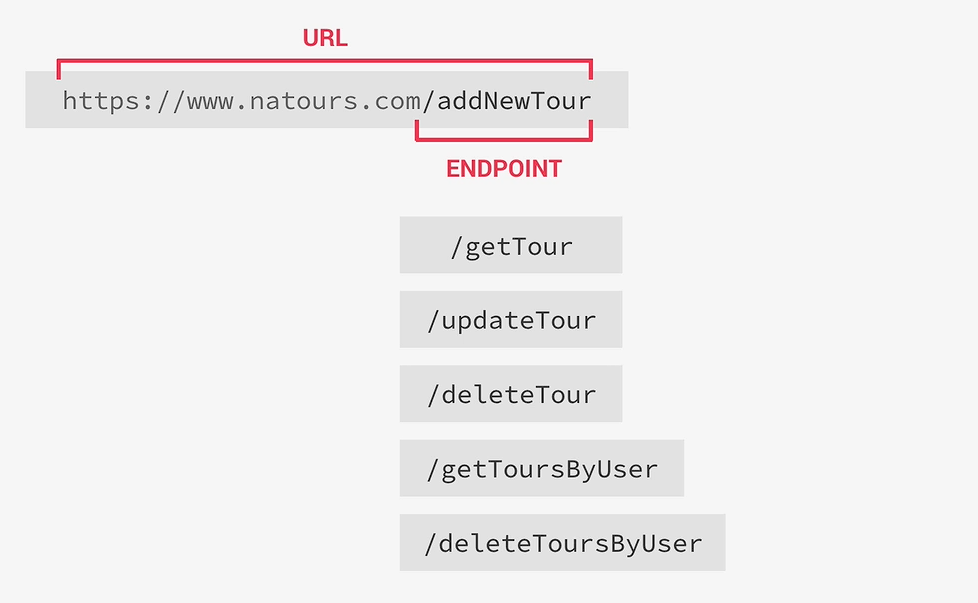
🌐 Resources are exposed via structured URLs. Example:
<https://www.natours.com/addNewTour>This whole address is the URL; /addNewTour is the API endpoint.
❌ The Problem With Verb-Based Endpoints
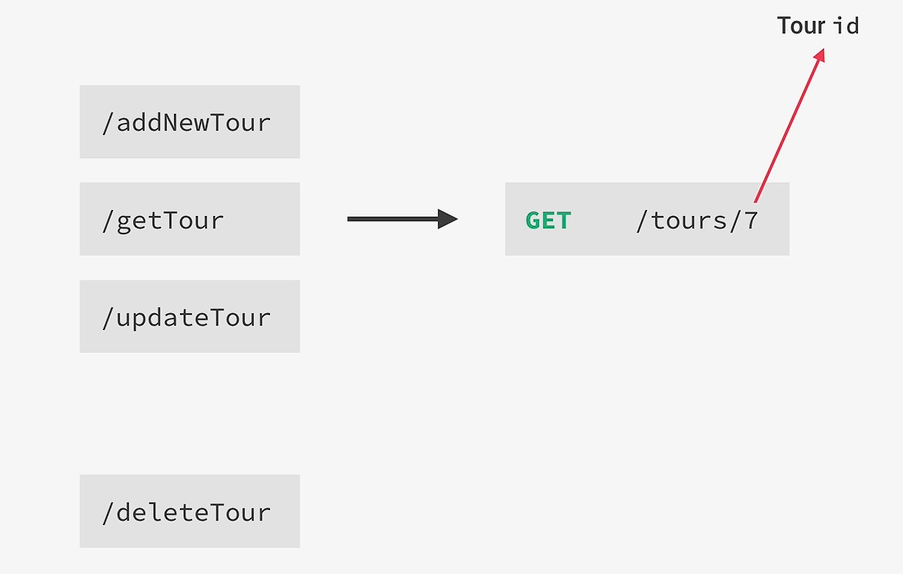
Bad practice: /getTour, /addNewTour, /deleteTour — these mix actions (verbs) into the URL. This becomes a nightmare to maintain.
✅ The REST Fix: Use HTTP Methods, Not Verbs in URLs
/getTour→ should just be/tours, accessed with a GET request.Resource names in the URL should be plural (
/tours, not/tour).Calling
/tourswith GET → returns all tours.To get a single tour (e.g. ID 7):
/tours/7(via URL segment or a unique identifier).
🔄 Principle 3: HTTP Methods Map to CRUD Operations
CRUD = Create, Read, Update, Delete — the four basic data operations.
🌐 HTTP Method | 📝 CRUD Action | 💡 Notes |
|---|---|---|
GET | 📖 Read | Retrieve data (e.g. all tours or one tour) |
POST | ➕ Create | Send data to create a new resource; ID is usually auto-generated by the server (not sent by client) |
PUT | ✏️ Update | Client sends the entire updated object |
PATCH | 🩹 Update | Client sends only the changed parts of the object |
DELETE | 🗑️ Delete | Deletes the resource identified by ID/unique identifier in the URL; usually requires authentication |
💡 Key insight: The endpoint name stays the same (
/tours) — only the HTTP method changes to indicate the action. GET on/toursreads data; POST on/tourscreates data.
⚙️ Non-CRUD Actions
Some actions don't map to CRUD or a specific resource (e.g. login, search) — for these, get creative with endpoint names:
/login
/search
🔗 Combining Multiple Resources in One Endpoint
Example translations:
👤
/getToursByUser→/users/3/tours(get all tours booked by user 3)🗑️ Delete tour 9 belonging to user 3 → similar nested endpoint with a DELETE request
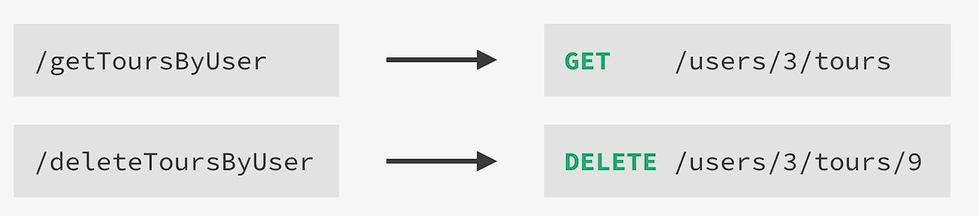
💡 Only implement the resource combinations that actually make sense for your app/client — no need to build every possible combination.
📄 Principle 4: JSON Data Format
📦 JSON = lightweight data-interchange format, used across virtually all web APIs (not JavaScript-specific).
👍 Popular because it's easy for both humans and computers to read/write.
📋 Similar to a JS object (key-value pairs), but:
📝 All keys must be strings.
🔢 Values are typically strings, but can also be numbers, booleans, other objects, or arrays.
📬 Response Formatting — JSON Standard
Raw data usually gets wrapped before sending, using a formatting standard. This course uses a simple one called JSend:
{
  "status": "success",
  "data": {
    "id": 5,
    "name": "The Sea Explorer"
  }
}
✅
status— informs the client:success,fail, orerror.📦
data— contains the actual requested data.📨 Wrapping data inside an extra object like this is called enveloping — a common practice that helps mitigate certain security issues.
📚 Other formatting standards exist too (e.g. JSON:API, OData JSON Protocol).
🚫 Principle 5: Statelessness
In a stateless RESTful API, all state is handled on the client, never the server.
State = any piece of data in the app that can change over time (e.g. whether a user is logged in, which page you're currently on).
💡 Meaning: every request must contain all the information needed to process it — the server should never have to "remember" a previous request.
📖 Example — Pagination
❌ Bad (stateful) approach:
/tours/nextPageThis forces the server to remember what "current page" the client was on — the server has to track state. This is what REST avoids.
✅ Good (stateless) approach:
/tours/page/6The client already knows it was on page 5 and requests page 6 directly. The server doesn't need to remember anything — it just returns page 6 as asked.
✅ Key Takeaway
REST = a structured, logical way to build web APIs.
5 core principles: resources, structured URLs (endpoints), correct HTTP methods for actions, JSON format, and statelessness.
HTTP methods map to CRUD: GET = Read, POST = Create, PUT/PATCH = Update, DELETE = Delete.
Endpoint names should describe resources (nouns, plural), never actions (verbs) — the HTTP method conveys the action.
Responses are typically formatted (e.g. via JSend) and enveloped in a wrapper object with a status field.
Statelessness means every request is self-contained — the server holds no memory of past requests.