🌍 The Project: Natours
🧳 A tour-booking application: view tours, book them, create accounts, log in, leave reviews, etc.
🏗️ The course builds this in two phases:
First: build the API (working with raw data only).
Later: build the dynamically rendered website on top of it.
🎯 Building the API first makes it easier to focus purely on learning Express, MongoDB, and Mongoose without also worrying about UI/design at the same time.
👀 Quick Look at the Final API (via Postman)
🌐 Base endpoint:
localhost:3000/api/v1📥 GET
/api/v1/tours→ returns all tours (matches the data seen on the rendered site).🔍 GET
/api/v1/tours/:id→ returns just that one tour, with much more detail (start locations, tour guides — which reference other IDs, locations, reviews, etc.).There's also a
usersresource, but it requires authentication to access.
💡 This is just a preview — these advanced features get built up gradually through the course.
🛠️ Implementing: GET /api/v1/tours
🔹 Step 1: Remove/comment out the old test route
💬 The earlier
/GET/POST test routes are commented out (not deleted) since they're no longer needed.
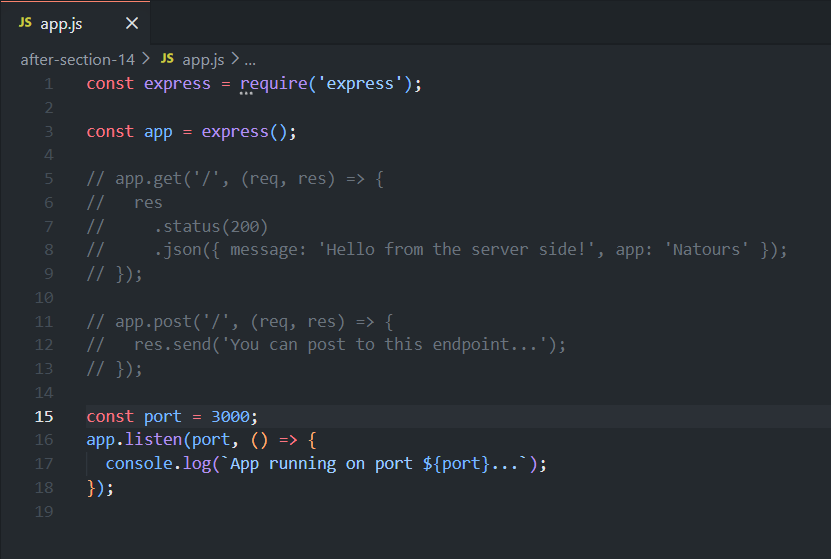
🔹 Step 2: Set up the route with API versioning
app.get('/api/v1/tours', (req, res) => {
  // route handler
});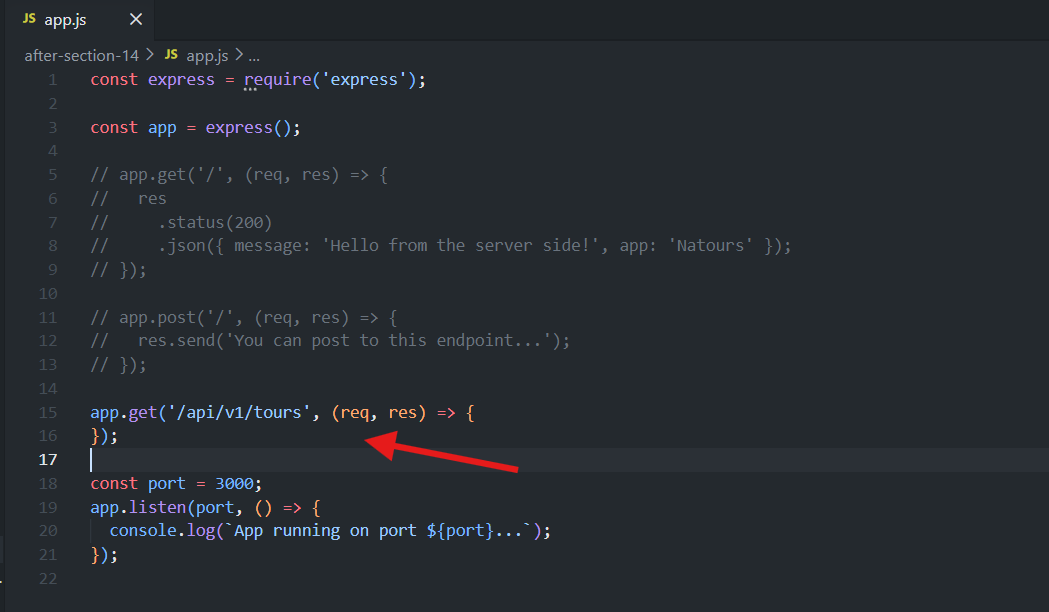
The callback function passed to
.get()is called the route handler.v1in the URL = API versioning — good practice.If breaking changes are needed later, a new
v2endpoint can be created without disrupting anyone still usingv1.Versioning could also be done via subdomain, but including it in the URL path is simpler.
🔹 Step 3: Read the tours data — outside the route handler, at top-level
Import the
fsmoduleCore modules are conventionally required first, at the top of the file.
const fs = require('fs');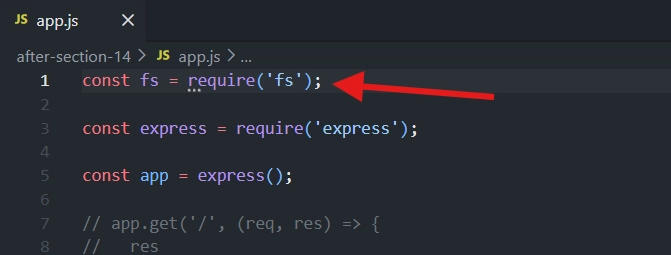
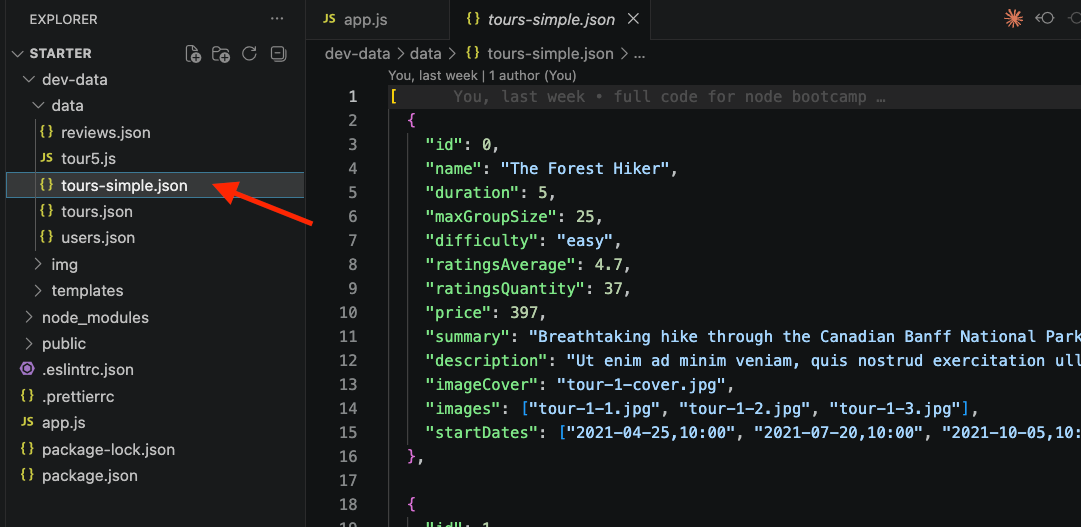
Data lives in
dev-data/data/tours-simple.json— a JSON array of tour objects (similar structure tonode-js course"node farm" project data).
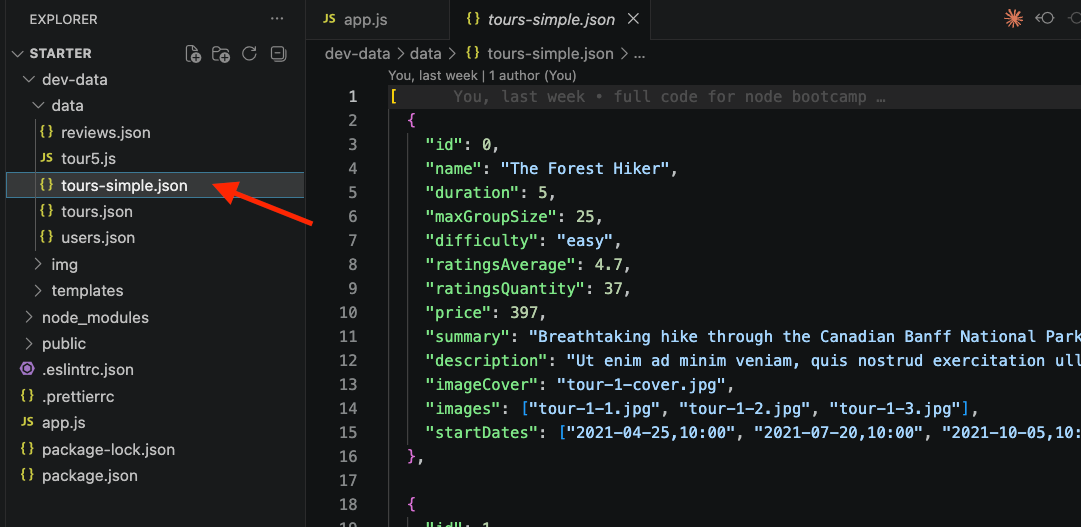
Access JSON data in app.js
const tours = JSON.parse(
  fs.readFileSync(`${__dirname}/dev-data/data/tours-simple.json`)
);
📂 Reading the JSON File
❓ Why read the file at the top of the file instead of inside the route handler?
🚀 Top-level code runs only once when the server starts.
⚡ This avoids reading the file on every incoming request.
✅ Since it's outside the request handler, using
readFileSync()is acceptable.
📖
fs.readFileSync(path)Reads the file synchronously and returns its contents.
📁
__dirnameRefers to the absolute path of the current file's directory.
Helps build the correct file path regardless of where the app is run.
🔄
JSON.parse()Converts the JSON string into a JavaScript object or array.
🔹 Step 4: Send the data back using the JSend format
app.get('/api/v1/tours', (req, res) => {
  res.status(200).json({
    status: 'success',
    results: tours.length,
    data: {
      tours: tours,
    },
  });
});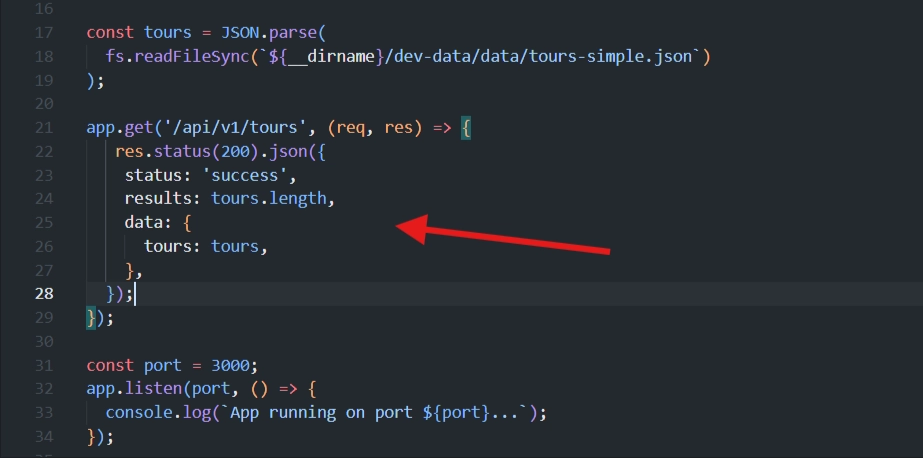
✅
res.status(200)Sets the HTTP status code.
Although
200is the default, explicitly setting it is considered good practice.
✅
statusIndicates whether the request was successful.
Possible values:
🟢
success→ Successful request (2xx)🟡
fail→ Client error (4xx)🔴
error→ Server error (5xx)
📂
dataContains the actual response payload.
Typically named after the resource being returned (e.g.,
tours).
⭐
results(Optional)Shows the total number of items returned.
Useful when returning an array, but unnecessary for a single object.
Not part of the official JSend specification.
🔹 Step 6: Test in Postman
🌐 URL:
127.0.0.1:3000/api/v1/tours
📥 Method: GET
✅ Result:
{
  "status": "success",
  "results": 9,
  "data": {
    "tours": [ ...9 tour objects... ]
  }
}
✅ Key Takeaway
📄 This is currently a file-based API — data is read from a local JSON file, not a database (that comes later with MongoDB/Mongoose).
📐 Pattern established:
📖 Read data once, at the top level, outside any route handler.
🛣️ Use
app.get(url, callback)to define the route + handler.📦 Respond using
res.status(code).json({ status, results, data: { resourceName } })— the JSend-style envelope.
➡️ Next step: implement the POST request to allow creating new tours.
<div class="infographic-vscodeterm" id="vt">
<style>
.infographic-vscodeterm {
--ink: #1a1a1a;
--ink-soft: #5c5c5c;
--paper: #ffffff;
--paper-alt: #f0ece4;
--accent: #2563eb;
--accent-deep: #1942a8;
--accent-soft: #e3ebfd;
--line: #ddd6c9;
--radius: 8px;
--display-font: 'Fraunces', Georgia, serif;
--body-font: 'Inter', system-ui, sans-serif;
--mono-font: 'IBM Plex Mono', monospace;
max-width: 880px;
margin: 0 auto;
box-sizing: border-box;
background: transparent;
color: var(--ink);
font-family: var(--body-font);
}
.infographic-vscodeterm[data-theme="dark"] {
--ink: #e8e6e1;
--ink-soft: #9a968c;
--paper: #13171f;
--paper-alt: #1c212b;
--accent: #5b8def;
--accent-deep: #8fb4ff;
--accent-soft: #20293f;
--line: #2c313d;
}
.infographic-vscodeterm * { box-sizing: border-box; min-width: 0; }
.vt-eyebrow {
font-family: var(--mono-font); font-size: 0.72rem; letter-spacing: 0.1em;
text-transform: uppercase; color: var(--accent); margin: 0 0 0.45rem;
display: flex; align-items: center; justify-content: center; gap: 0.4rem;
}
.vt-eyebrow::before { content: ""; width: 14px; height: 2px; background: var(--accent); display: inline-block; }
.vt-title {
font-family: var(--display-font); font-size: clamp(1.5rem, 4vw, 2.3rem); text-align: center;
margin: 0 0 0.5rem; line-height: 1.14; letter-spacing: -0.01em;
}
.vt-sub { color: var(--ink-soft); font-size: 0.95rem; text-align: center; margin: 0 0 1.7rem; }
/* ===== VS Code window — fixed dark theme regardless of page mode ===== */
.vt-window { border-radius: 8px; overflow: hidden; box-shadow: 0 16px 40px -14px rgba(0,0,0,0.45); border: 1px solid #1e1e1e; font-family: var(--mono-font); }
.vt-titlebar { background: #323233; display: flex; align-items: center; padding: 0.5rem 0.8rem; position: relative; }
.vt-dots { display: flex; gap: 0.4rem; }
.vt-dots span { width: 10px; height: 10px; border-radius: 50%; display: block; }
.vt-dots span:nth-child(1) { background: #ff5f56; }
.vt-dots span:nth-child(2) { background: #ffbd2e; }
.vt-dots span:nth-child(3) { background: #27c93f; }
.vt-titlebar-text { position: absolute; left: 50%; transform: translateX(-50%); font-size: 0.72rem; color: #cccccc; }
.vt-body { display: flex; height: 416px; }
.vt-resize-h { width: 5px; cursor: col-resize; background: transparent; flex-shrink: 0; transition: background 0.15s; touch-action: none; }
.vt-resize-h:hover, .vt-resize-h.is-dragging { background: #0078d4; }
.vt-resize-v { height: 5px; cursor: row-resize; background: transparent; flex-shrink: 0; transition: background 0.15s; touch-action: none; }
.vt-resize-v:hover, .vt-resize-v.is-dragging { background: #0078d4; }
.vt-window-resize {
height: 9px; background: #252526; cursor: row-resize; display: flex; align-items: center;
justify-content: center; border-top: 1px solid #1e1e1e; touch-action: none;
}
.vt-window-resize span { width: 30px; height: 3px; border-radius: 2px; background: #4a4a52; }
.vt-window-resize:hover span, .vt-window-resize.is-dragging span { background: #0078d4; }
.vt-toggle-btn {
background: none; border: none; color: #9a9a9a; cursor: pointer; display: flex; align-items: center;
padding: 0.3rem; border-radius: 3px; flex-shrink: 0;
}
.vt-toggle-btn:hover { background: #2a2d2e; color: #fff; }
.vt-toggle-btn svg { width: 13px; height: 13px; }
.vt-sidebar.is-hidden { width: 0 !important; overflow: hidden; border-right: none; }
.vt-terminal.is-collapsed { height: auto !important; }
.vt-terminal.is-collapsed .vt-term-body { display: none; }
.vt-terminal.is-collapsed .vt-term-toggle svg { transform: rotate(-90deg); }
.vt-activitybar { width: 40px; background: #333333; display: flex; flex-direction: column; align-items: center; padding-top: 0.7rem; gap: 1.1rem; flex-shrink: 0; }
.vt-activitybar svg { width: 18px; height: 18px; opacity: 0.55; }
.vt-activitybar svg.is-on { opacity: 1; }
.vt-sidebar { width: 180px; background: #252526; flex-shrink: 0; overflow-y: auto; border-right: 1px solid #1e1e1e; }
.vt-sidebar-head { font-size: 0.65rem; font-weight: 700; letter-spacing: 0.06em; color: #bbbbbb; padding: 0.6rem 0.8rem 0.3rem; }
.vt-sidebar-root { font-size: 0.74rem; color: #cccccc; padding: 0.2rem 0.7rem; display: flex; align-items: center; gap: 0.3rem; }
.vt-sidebar-folder { font-size: 0.74rem; color: #cccccc; padding: 0.2rem 0.7rem 0.2rem 1.4rem; display: flex; align-items: center; gap: 0.3rem; }
.vt-sidebar-folder.lvl2 { padding-left: 2.6rem; }
.vt-sidebar-folder.is-highlighted { color: #ffffff; font-weight: 600; }
.vt-folder-toggle {
background: none; border: none; font: inherit; width: 100%; text-align: left; cursor: pointer;
font-size: 0.74rem; color: #cccccc; padding: 0.2rem 0.7rem 0.2rem 1.4rem; display: flex; align-items: center; gap: 0.3rem;
}
.vt-folder-toggle:hover { background: #2a2d2e; }
.vt-folder-toggle.is-highlighted { color: #ffffff; font-weight: 600; }
.vt-folder-children.is-collapsed { display: none; }
.vt-row {
display: flex; align-items: center; gap: 0.35rem; width: 100%; background: none; border: none;
color: #cccccc; font: inherit; font-size: 0.74rem; padding: 0.24rem 0.7rem 0.24rem 1.4rem;
cursor: pointer; text-align: left; border-left: 2px solid transparent;
}
.vt-row.lvl2 { padding-left: 3.4rem; }
.vt-row:hover { background: #2a2d2e; }
.vt-row.is-selected { background: #37373d; border-left-color: #0078d4; }
.vt-row-disabled { cursor: default; opacity: 0.78; }
.vt-row-disabled:hover { background: none; }
.vt-badge { width: 15px; height: 15px; border-radius: 3px; flex-shrink: 0; display: flex; align-items: center; justify-content: center; font-size: 0.44rem; font-weight: 700; color: #1a1a1a; background: #29b6f6; }
.vt-badge.json { background: #cbcb41; font-size: 0.5rem; }
.vt-main { flex: 1; display: flex; flex-direction: column; min-width: 0; }
.vt-tabbar { display: flex; background: #252526; border-bottom: 1px solid #1e1e1e; overflow-x: auto; }
.vt-tab {
display: flex; align-items: center; gap: 0.35rem; background: #1e1e1e; color: #808080; font: inherit;
font-size: 0.72rem; padding: 0.45rem 0.8rem; border: none; border-right: 1px solid #1e1e1e;
border-top: 2px solid transparent; cursor: pointer; white-space: nowrap;
}
.vt-tab.is-active { color: #d4d4d4; border-top-color: #0078d4; background: #1e1e1e; }
.vt-tab .vt-badge { width: 13px; height: 13px; font-size: 0.4rem; }
.vt-code-wrap { flex: 1; background: #1e1e1e; overflow: auto; padding: 0.85rem 1rem; }
.vt-code-wrap pre { margin: 0; }
.vt-code-wrap code { font-family: var(--mono-font); font-size: 0.72rem; line-height: 1.7; color: #d4d4d8; white-space: pre; }
.tok-kw { color: #c678dd; }
.tok-tag { color: #e06c75; }
.tok-type { color: #61afef; }
.tok-attr { color: #d19a66; }
.tok-str { color: #98c379; }
.tok-expr { color: #56b6c2; }
.tok-punc { color: #6b7280; }
.vt-flash { background: rgba(220,38,38,0.22); }
/* ===== terminal ===== */
.vt-terminal { background: #181818; border-top: 1px solid #2c2c2c; display: flex; flex-direction: column; height: 150px; flex-shrink: 0; }
.vt-term-head { display: flex; align-items: center; gap: 0.4rem; font-size: 0.62rem; letter-spacing: 0.05em; color: #9a9a9a; padding: 0.35rem 0.8rem; border-bottom: 1px solid #262626; text-transform: uppercase; }
.vt-term-body { flex: 1; overflow-y: auto; padding: 0.5rem 0.9rem; font-size: 0.72rem; line-height: 1.65; }
.vt-term-line { color: #d4d4d4; white-space: pre; opacity: 0; transform: translateY(2px); animation: vt-line-in 0.25s ease forwards; }
@keyframes vt-line-in { to { opacity: 1; transform: none; } }
.vt-term-line.is-cmd { color: #7ee787; }
.vt-term-line.is-ok { color: #7ee787; font-weight: 600; }
.vt-term-prompt { color: #7ee787; }
.vt-run-row { display: flex; align-items: center; gap: 0.5rem; margin-top: 0.2rem; }
.vt-run-btn {
font: inherit; font-size: 0.68rem; font-weight: 600; color: #1a1a1a; background: #7ee787;
border: none; border-radius: 4px; padding: 0.3rem 0.7rem; cursor: pointer; display: flex; align-items: center; gap: 0.3rem;
}
.vt-run-btn:disabled { opacity: 0.5; cursor: default; }
.vt-run-btn svg { width: 9px; height: 9px; }
.vt-run-hint { color: #6b7280; font-size: 0.68rem; }
@media (max-width: 620px) {
.vt-sidebar { width: 140px; }
.vt-body { height: 442px; }
}
@media (max-width: 480px) { .vt-activitybar { display: none; } }
/* ===== browser output ===== */
.vt-output-label {
font-family: var(--mono-font); font-size: 0.68rem; letter-spacing: 0.1em; text-transform: uppercase;
color: var(--ink-soft); text-align: center; margin: 1.5rem 0 0.7rem;
}
.vt-browser {
border: 1px solid var(--line); border-radius: var(--radius); overflow: hidden; max-width: 420px; margin: 0 auto;
box-shadow: 0 10px 24px -12px rgba(26,26,26,0.18);
opacity: 0; transform: translateY(8px); transition: opacity 0.4s ease, transform 0.4s ease; pointer-events: none;
}
.vt-browser.is-shown { opacity: 1; transform: none; pointer-events: auto; }
.vt-browser-bar { background: #e9e9e9; padding: 0.5rem 0.7rem; display: flex; align-items: center; gap: 0.5rem; }
.vt-browser-bar .vt-dots span { width: 8px; height: 8px; }
.vt-browser-url { font-family: var(--mono-font); font-size: 0.65rem; color: #555; background: #fff; border-radius: 4px; padding: 0.2rem 0.5rem; flex: 1; }
.vt-browser-page { background: #fff; padding: 1rem 1.1rem; text-align: left; font-family: var(--mono-font); }
.vt-json-pre { margin: 0; font-size: 0.76rem; line-height: 1.65; white-space: pre-wrap; word-break: break-word; }
.vt-json-key { color: #881391; }
.vt-json-str { color: #c41a16; }
.vt-json-punc { color: #1a1a1a; }
.vt-output-placeholder { text-align: center; font-size: 0.82rem; color: var(--ink-soft); }
.vt-takeaway {
margin-top: 1.7rem; padding: 0.95rem 1.2rem; background: var(--accent-soft); border-left: 3px solid var(--accent);
border-radius: 4px; font-size: 0.9rem; color: var(--ink); line-height: 1.5; max-width: 660px; margin-left: auto; margin-right: auto;
}
.vt-takeaway b { color: var(--accent-deep); }
@media (prefers-reduced-motion: reduce) {
.infographic-vscodeterm *, .infographic-vscodeterm *::before, .infographic-vscodeterm *::after {
transition-duration: 0.001ms !important; animation-duration: 0.001ms !important;
}
}
</style>
<div class="vt-window">
<div class="vt-titlebar">
<div class="vt-dots"><span></span><span></span><span></span></div>
<div class="vt-titlebar-text">starter — Visual Studio Code</div>
</div>
<div class="vt-body">
<div class="vt-activitybar">
<svg class="is-on" viewBox="0 0 24 24" fill="none" aria-hidden="true"><rect x="3" y="4" width="7" height="7" rx="1" stroke="#fff" stroke-width="1.6"/><rect x="14" y="4" width="7" height="7" rx="1" stroke="#fff" stroke-width="1.6"/><rect x="3" y="15" width="7" height="7" rx="1" stroke="#fff" stroke-width="1.6"/><rect x="14" y="15" width="7" height="7" rx="1" stroke="#fff" stroke-width="1.6"/></svg>
<svg viewBox="0 0 24 24" fill="none" aria-hidden="true"><circle cx="10" cy="10" r="6.5" stroke="#fff" stroke-width="1.6"/><line x1="15" y1="15" x2="20" y2="20" stroke="#fff" stroke-width="1.6" stroke-linecap="round"/></svg>
</div>
<div class="vt-sidebar">
<div class="vt-sidebar-head">EXPLORER</div>
<div class="vt-sidebar-root">▾ STARTER</div>
<button class="vt-folder-toggle is-highlighted" id="vtDevDataToggle" type="button"><span id="vtDevDataChevron">▸</span> dev-data</button>
<div class="vt-folder-children is-collapsed" id="vtDevDataChildren">
<div class="vt-sidebar-folder lvl2 is-highlighted">▾ data</div>
<button class="vt-row lvl2" data-file="tours" type="button"><span class="vt-badge json">{}</span><span>tours-simple.json</span></button>
</div>
<div class="vt-sidebar-folder">▸ node_modules</div>
<div class="vt-sidebar-folder">▸ public</div>
<button class="vt-row vt-row-disabled" type="button"><span class="vt-badge json">{}</span><span>.eslintrc.json</span></button>
<button class="vt-row vt-row-disabled" type="button"><span class="vt-badge json">{}</span><span>.prettierrc</span></button>
<button class="vt-row is-selected" data-file="app" type="button"><span class="vt-badge">JS</span><span>app.js</span></button>
<button class="vt-row vt-row-disabled" type="button"><span class="vt-badge json">{}</span><span>package-lock.json</span></button>
<button class="vt-row vt-row-disabled" type="button"><span class="vt-badge json">{}</span><span>package.json</span></button>
</div>
<div class="vt-resize-h" id="vtSidebarHandle" title="Drag to resize sidebar"></div>
<div class="vt-main">
<div class="vt-tabbar">
<button class="vt-toggle-btn" id="vtToggleSidebar" type="button" aria-label="Toggle sidebar" title="Toggle sidebar">
<svg viewBox="0 0 16 16" fill="none" aria-hidden="true"><rect x="1.5" y="2" width="13" height="12" rx="1.5" stroke="currentColor" stroke-width="1.3"/><line x1="6" y1="2" x2="6" y2="14" stroke="currentColor" stroke-width="1.3"/></svg>
</button>
<button class="vt-tab is-active" data-file="app" type="button"><span class="vt-badge">JS</span><span>app.js</span></button>
<button class="vt-tab" data-file="tours" type="button"><span class="vt-badge json">{}</span><span>tours-simple.json</span></button>
</div>
<div class="vt-code-wrap">
<pre><code id="vtCode"></code></pre>
</div>
<div class="vt-resize-v" id="vtTerminalHandle" title="Drag to resize terminal"></div>
<div class="vt-terminal">
<div class="vt-term-head">
<button class="vt-toggle-btn vt-term-toggle" id="vtToggleTerminal" type="button" aria-label="Toggle terminal" title="Toggle terminal">
<svg viewBox="0 0 16 16" fill="none" aria-hidden="true"><path d="M4 6l4 4 4-4" stroke="currentColor" stroke-width="1.6" stroke-linecap="round" stroke-linejoin="round"/></svg>
</button>
<span>Terminal</span>
</div>
<div class="vt-term-body">
<div id="vtTermLines"><div class="vt-term-line" style="animation-delay:0s;"><span class="vt-term-prompt">$</span> </div></div>
<div class="vt-run-row">
<button class="vt-run-btn" id="vtRunBtn" type="button">
<svg viewBox="0 0 12 12" aria-hidden="true"><path d="M2.5 1.5v9l7-4.5z" fill="currentColor"/></svg>
<span id="vtRunLabel">npm start</span>
</button>
<span class="vt-run-hint" id="vtRunHint">starts the API</span>
</div>
</div>
</div>
</div>
</div>
<div class="vt-window-resize" id="vtWindowHandle" title="Drag to resize window"><span></span></div>
</div>
<div class="vt-output-label">Output</div>
<div id="vtOutputArea">
<p class="vt-output-placeholder">Run <code style="font-family:var(--mono-font)">npm start</code> above, then visit <code style="font-family:var(--mono-font)">localhost:3000/api/v1/tours</code>.</p>
<div class="vt-browser" id="vtBrowser">
<div class="vt-browser-bar">
<div class="vt-dots"><span></span><span></span><span></span></div>
<div class="vt-browser-url">localhost:3000/api/v1/tours</div>
</div>
<div class="vt-browser-page">
<pre class="vt-json-pre"><span class="vt-json-punc">{</span>
<span class="vt-json-key">"status"</span><span class="vt-json-punc">:</span> <span class="vt-json-str">"success"</span><span class="vt-json-punc">,</span>
<span class="vt-json-key">"results"</span><span class="vt-json-punc">:</span> 9<span class="vt-json-punc">,</span>
<span class="vt-json-key">"data"</span><span class="vt-json-punc">:</span> <span class="vt-json-punc">{</span>
<span class="vt-json-key">"tours"</span><span class="vt-json-punc">:</span> <span class="vt-json-punc">[</span>
<span class="vt-json-punc">{</span> <span class="vt-json-key">"id"</span><span class="vt-json-punc">:</span> 0<span class="vt-json-punc">,</span> <span class="vt-json-key">"name"</span><span class="vt-json-punc">:</span> <span class="vt-json-str">"The Forest Hiker"</span><span class="vt-json-punc">, </span>…<span class="vt-json-punc"> },</span>
<span class="vt-json-punc">{</span> <span class="vt-json-key">"id"</span><span class="vt-json-punc">:</span> 1<span class="vt-json-punc">,</span> <span class="vt-json-key">"name"</span><span class="vt-json-punc">:</span> <span class="vt-json-str">"The Sea Explorer"</span><span class="vt-json-punc">, </span>…<span class="vt-json-punc"> },</span>
<span class="vt-json-punc" style="opacity:0.6">// 7 more tours</span>
<span class="vt-json-punc">]</span>
<span class="vt-json-punc">}</span>
<span class="vt-json-punc">}</span></pre>
</div>
</div>
</div>
</div>
<link rel="preconnect" href="https://fonts.googleapis.com">
<link href="https://fonts.googleapis.com/css2?family=Fraunces:wght@500;600&family=Inter:wght@400;500;600;700&family=IBM+Plex+Mono:wght@400;500&display=swap" rel="stylesheet">
<script>
(function () {
var root = document.getElementById('vt');
if (!root) return;
/* --- dark mode detection: body attribute > cookie > postMessage > light --- */
function applyDark(dark) {
if (dark) root.setAttribute('data-theme', 'dark');
else root.removeAttribute('data-theme');
}
var bodyAttr = document.body.getAttribute('data-darkmode');
var dark;
if (bodyAttr === 'true') dark = true;
else if (bodyAttr === 'false') dark = false;
else {
var match = document.cookie.match(/(?:^|;\s*)darkMode=([^;]+)/);
dark = match ? match[1] === 'true' : false;
}
applyDark(dark);
window.addEventListener('message', function (e) {
if (e.data && e.data.type === 'darkMode') applyDark(!!e.data.value);
});
/* --- file switching --- */
var files = {
app:
'<span class="tok-kw">const</span> fs <span class="tok-punc">=</span> require<span class="tok-punc">(</span><span class="tok-str">\'fs\'</span><span class="tok-punc">);</span>\n' +
'\n' +
'<span class="tok-kw">const</span> express <span class="tok-punc">=</span> require<span class="tok-punc">(</span><span class="tok-str">\'express\'</span><span class="tok-punc">);</span>\n' +
'\n' +
'<span class="tok-kw">const</span> app <span class="tok-punc">=</span> express<span class="tok-punc">();</span>\n' +
'\n' +
'<span class="tok-punc">// app.get(\'/\', (req, res) => {</span>\n' +
'<span class="tok-punc">// res</span>\n' +
'<span class="tok-punc">// .status(200)</span>\n' +
'<span class="tok-punc">// .json({ message: \'Hello from the server side!\', app: \'Natours\' });</span>\n' +
'<span class="tok-punc">// });</span>\n' +
'\n' +
'<span class="tok-punc">// app.post(\'/\', (req, res) => {</span>\n' +
'<span class="tok-punc">// res.send(\'You can post to this endpoint...\');</span>\n' +
'<span class="tok-punc">// });</span>\n' +
'\n' +
'<span class="tok-kw">const</span> tours <span class="tok-punc">=</span> JSON<span class="tok-punc">.</span><span class="tok-attr">parse</span><span class="tok-punc">(</span>\n' +
' fs<span class="tok-punc">.</span><span class="tok-attr">readFileSync</span><span class="tok-punc">(</span><span class="tok-expr">`${__dirname}/dev-data/data/tours-simple.json`</span><span class="tok-punc">)</span>\n' +
'<span class="tok-punc">);</span>\n' +
'\n' +
'app<span class="tok-punc">.</span><span class="tok-attr">get</span><span class="tok-punc">(</span><span class="tok-str">\'/api/v1/tours\'</span><span class="tok-punc">, (</span>req<span class="tok-punc">,</span> res<span class="tok-punc">) => {</span>\n' +
' res<span class="tok-punc">.</span><span class="tok-attr">status</span><span class="tok-punc">(</span>200<span class="tok-punc">)</span><span class="tok-punc">.</span><span class="tok-attr">json</span><span class="tok-punc">({</span>\n' +
' status<span class="tok-punc">:</span> <span class="tok-str">\'success\'</span><span class="tok-punc">,</span>\n' +
' results<span class="tok-punc">:</span> tours<span class="tok-punc">.</span>length<span class="tok-punc">,</span>\n' +
' data<span class="tok-punc">:</span> <span class="tok-punc">{</span>\n' +
' tours<span class="tok-punc">:</span> tours<span class="tok-punc">,</span>\n' +
' <span class="tok-punc">},</span>\n' +
' <span class="tok-punc">});</span>\n' +
'<span class="tok-punc">});</span>\n' +
'\n' +
'<span class="tok-kw">const</span> port <span class="tok-punc">=</span> 3000<span class="tok-punc">;</span>\n' +
'app<span class="tok-punc">.</span><span class="tok-attr">listen</span><span class="tok-punc">(</span>port<span class="tok-punc">, () => {</span>\n' +
' console<span class="tok-punc">.</span><span class="tok-attr">log</span><span class="tok-punc">(</span><span class="tok-expr">`App running on port ${port}...`</span><span class="tok-punc">);</span>\n' +
'<span class="tok-punc">});</span>',
tours:
`<span class="tok-punc">[</span>\n <span class="tok-punc">{</span>\n <span class="tok-attr">"id"</span><span class="tok-punc">:</span> 0<span class="tok-punc">,</span>\n <span class="tok-attr">"name"</span><span class="tok-punc">:</span> <span class="tok-str">"The Forest Hiker"</span><span class="tok-punc">,</span>\n <span class="tok-attr">"duration"</span><span class="tok-punc">:</span> 5<span class="tok-punc">,</span>\n <span class="tok-attr">"maxGroupSize"</span><span class="tok-punc">:</span> 25<span class="tok-punc">,</span>\n <span class="tok-attr">"difficulty"</span><span class="tok-punc">:</span> <span class="tok-str">"easy"</span><span class="tok-punc">,</span>\n <span class="tok-attr">"ratingsAverage"</span><span class="tok-punc">:</span> 4.7<span class="tok-punc">,</span>\n <span class="tok-attr">"ratingsQuantity"</span><span class="tok-punc">:</span> 37<span class="tok-punc">,</span>\n <span class="tok-attr">"price"</span><span class="tok-punc">:</span> 397<span class="tok-punc">,</span>\n <span class="tok-attr">"summary"</span><span class="tok-punc">:</span> <span class="tok-str">"Breathtaking hike through the Canadian Banff National Park"</span><span class="tok-punc">,</span>\n <span class="tok-attr">"imageCover"</span><span class="tok-punc">:</span> <span class="tok-str">"tour-1-cover.jpg"</span><span class="tok-punc">,</span>\n <span class="tok-attr">"images"</span><span class="tok-punc">:</span> <span class="tok-punc">[</span>\n <span class="tok-str">"tour-1-1.jpg"</span><span class="tok-punc">,</span>\n <span class="tok-str">"tour-1-2.jpg"</span><span class="tok-punc">,</span>\n <span class="tok-str">"tour-1-3.jpg"</span>\n <span class="tok-punc">]</span><span class="tok-punc">,</span>\n <span class="tok-attr">"startDates"</span><span class="tok-punc">:</span> <span class="tok-punc">[</span>\n <span class="tok-str">"2021-04-25,10:00"</span><span class="tok-punc">,</span>\n <span class="tok-str">"2021-07-20,10:00"</span><span class="tok-punc">,</span>\n <span class="tok-str">"2021-10-05,10:00"</span>\n <span class="tok-punc">]</span>\n <span class="tok-punc">}</span><span class="tok-punc">,</span>\n <span class="tok-punc">{</span>\n <span class="tok-attr">"id"</span><span class="tok-punc">:</span> 1<span class="tok-punc">,</span>\n <span class="tok-attr">"name"</span><span class="tok-punc">:</span> <span class="tok-str">"The Sea Explorer"</span><span class="tok-punc">,</span>\n <span class="tok-attr">"duration"</span><span class="tok-punc">:</span> 7<span class="tok-punc">,</span>\n <span class="tok-attr">"maxGroupSize"</span><span class="tok-punc">:</span> 15<span class="tok-punc">,</span>\n <span class="tok-attr">"difficulty"</span><span class="tok-punc">:</span> <span class="tok-str">"medium"</span><span class="tok-punc">,</span>\n <span class="tok-attr">"ratingsAverage"</span><span class="tok-punc">:</span> 4.8<span class="tok-punc">,</span>\n <span class="tok-attr">"ratingsQuantity"</span><span class="tok-punc">:</span> 23<span class="tok-punc">,</span>\n <span class="tok-attr">"price"</span><span class="tok-punc">:</span> 497<span class="tok-punc">,</span>\n <span class="tok-attr">"summary"</span><span class="tok-punc">:</span> <span class="tok-str">"Exploring the jaw-dropping US east coast by foot and by boat"</span><span class="tok-punc">,</span>\n <span class="tok-attr">"imageCover"</span><span class="tok-punc">:</span> <span class="tok-str">"tour-2-cover.jpg"</span><span class="tok-punc">,</span>\n <span class="tok-attr">"images"</span><span class="tok-punc">:</span> <span class="tok-punc">[</span>\n <span class="tok-str">"tour-2-1.jpg"</span><span class="tok-punc">,</span>\n <span class="tok-str">"tour-2-2.jpg"</span><span class="tok-punc">,</span>\n <span class="tok-str">"tour-2-3.jpg"</span>\n <span class="tok-punc">]</span><span class="tok-punc">,</span>\n <span class="tok-attr">"startDates"</span><span class="tok-punc">:</span> <span class="tok-punc">[</span>\n <span class="tok-str">"2021-06-19,10:00"</span><span class="tok-punc">,</span>\n <span class="tok-str">"2021-07-20,10:00"</span><span class="tok-punc">,</span>\n <span class="tok-str">"2021-08-18,10:00"</span>\n <span class="tok-punc">]</span>\n <span class="tok-punc">}</span><span class="tok-punc">,</span>\n <span class="tok-punc">{</span>\n <span class="tok-attr">"id"</span><span class="tok-punc">:</span> 2<span class="tok-punc">,</span>\n <span class="tok-attr">"name"</span><span class="tok-punc">:</span> <span class="tok-str">"The Snow Adventurer"</span><span class="tok-punc">,</span>\n <span class="tok-attr">"duration"</span><span class="tok-punc">:</span> 4<span class="tok-punc">,</span>\n <span class="tok-attr">"maxGroupSize"</span><span class="tok-punc">:</span> 10<span class="tok-punc">,</span>\n <span class="tok-attr">"difficulty"</span><span class="tok-punc">:</span> <span class="tok-str">"difficult"</span><span class="tok-punc">,</span>\n <span class="tok-attr">"ratingsAverage"</span><span class="tok-punc">:</span> 4.5<span class="tok-punc">,</span>\n <span class="tok-attr">"ratingsQuantity"</span><span class="tok-punc">:</span> 13<span class="tok-punc">,</span>\n <span class="tok-attr">"price"</span><span class="tok-punc">:</span> 997<span class="tok-punc">,</span>\n <span class="tok-attr">"summary"</span><span class="tok-punc">:</span> <span class="tok-str">"Exciting adventure in the snow with snowboarding and skiing"</span><span class="tok-punc">,</span>\n <span class="tok-attr">"imageCover"</span><span class="tok-punc">:</span> <span class="tok-str">"tour-3-cover.jpg"</span><span class="tok-punc">,</span>\n <span class="tok-attr">"images"</span><span class="tok-punc">:</span> <span class="tok-punc">[</span>\n <span class="tok-str">"tour-3-1.jpg"</span><span class="tok-punc">,</span>\n <span class="tok-str">"tour-3-2.jpg"</span><span class="tok-punc">,</span>\n <span class="tok-str">"tour-3-3.jpg"</span>\n <span class="tok-punc">]</span><span class="tok-punc">,</span>\n <span class="tok-attr">"startDates"</span><span class="tok-punc">:</span> <span class="tok-punc">[</span>\n <span class="tok-str">"2022-01-05,10:00"</span><span class="tok-punc">,</span>\n <span class="tok-str">"2022-02-12,10:00"</span><span class="tok-punc">,</span>\n <span class="tok-str">"2023-01-06,10:00"</span>\n <span class="tok-punc">]</span>\n <span class="tok-punc">}</span><span class="tok-punc">,</span>\n <span class="tok-punc">{</span>\n <span class="tok-attr">"id"</span><span class="tok-punc">:</span> 3<span class="tok-punc">,</span>\n <span class="tok-attr">"name"</span><span class="tok-punc">:</span> <span class="tok-str">"The City Wanderer"</span><span class="tok-punc">,</span>\n <span class="tok-attr">"duration"</span><span class="tok-punc">:</span> 9<span class="tok-punc">,</span>\n <span class="tok-attr">"maxGroupSize"</span><span class="tok-punc">:</span> 20<span class="tok-punc">,</span>\n <span class="tok-attr">"difficulty"</span><span class="tok-punc">:</span> <span class="tok-str">"easy"</span><span class="tok-punc">,</span>\n <span class="tok-attr">"ratingsAverage"</span><span class="tok-punc">:</span> 4.6<span class="tok-punc">,</span>\n <span class="tok-attr">"ratingsQuantity"</span><span class="tok-punc">:</span> 54<span class="tok-punc">,</span>\n <span class="tok-attr">"price"</span><span class="tok-punc">:</span> 1197<span class="tok-punc">,</span>\n <span class="tok-attr">"summary"</span><span class="tok-punc">:</span> <span class="tok-str">"Living the life of Wanderlust in the US' most beatiful cities"</span><span class="tok-punc">,</span>\n <span class="tok-attr">"imageCover"</span><span class="tok-punc">:</span> <span class="tok-str">"tour-4-cover.jpg"</span><span class="tok-punc">,</span>\n <span class="tok-attr">"images"</span><span class="tok-punc">:</span> <span class="tok-punc">[</span>\n <span class="tok-str">"tour-4-1.jpg"</span><span class="tok-punc">,</span>\n <span class="tok-str">"tour-4-2.jpg"</span><span class="tok-punc">,</span>\n <span class="tok-str">"tour-4-3.jpg"</span>\n <span class="tok-punc">]</span><span class="tok-punc">,</span>\n <span class="tok-attr">"startDates"</span><span class="tok-punc">:</span> <span class="tok-punc">[</span>\n <span class="tok-str">"2021-03-11,10:00"</span><span class="tok-punc">,</span>\n <span class="tok-str">"2021-05-02,10:00"</span><span class="tok-punc">,</span>\n <span class="tok-str">"2021-06-09,10:00"</span>\n <span class="tok-punc">]</span>\n <span class="tok-punc">}</span><span class="tok-punc">,</span>\n <span class="tok-punc">{</span>\n <span class="tok-attr">"id"</span><span class="tok-punc">:</span> 4<span class="tok-punc">,</span>\n <span class="tok-attr">"name"</span><span class="tok-punc">:</span> <span class="tok-str">"The Park Camper"</span><span class="tok-punc">,</span>\n <span class="tok-attr">"duration"</span><span class="tok-punc">:</span> 10<span class="tok-punc">,</span>\n <span class="tok-attr">"maxGroupSize"</span><span class="tok-punc">:</span> 15<span class="tok-punc">,</span>\n <span class="tok-attr">"difficulty"</span><span class="tok-punc">:</span> <span class="tok-str">"medium"</span><span class="tok-punc">,</span>\n <span class="tok-attr">"ratingsAverage"</span><span class="tok-punc">:</span> 4.9<span class="tok-punc">,</span>\n <span class="tok-attr">"ratingsQuantity"</span><span class="tok-punc">:</span> 19<span class="tok-punc">,</span>\n <span class="tok-attr">"price"</span><span class="tok-punc">:</span> 1497<span class="tok-punc">,</span>\n <span class="tok-attr">"summary"</span><span class="tok-punc">:</span> <span class="tok-str">"Breathing in Nature in America's most spectacular National Parks"</span><span class="tok-punc">,</span>\n <span class="tok-attr">"imageCover"</span><span class="tok-punc">:</span> <span class="tok-str">"tour-5-cover.jpg"</span><span class="tok-punc">,</span>\n <span class="tok-attr">"images"</span><span class="tok-punc">:</span> <span class="tok-punc">[</span>\n <span class="tok-str">"tour-5-1.jpg"</span><span class="tok-punc">,</span>\n <span class="tok-str">"tour-5-2.jpg"</span><span class="tok-punc">,</span>\n <span class="tok-str">"tour-5-3.jpg"</span>\n <span class="tok-punc">]</span><span class="tok-punc">,</span>\n <span class="tok-attr">"startDates"</span><span class="tok-punc">:</span> <span class="tok-punc">[</span>\n <span class="tok-str">"2021-08-05,10:00"</span><span class="tok-punc">,</span>\n <span class="tok-str">"2022-03-20,10:00"</span><span class="tok-punc">,</span>\n <span class="tok-str">"2022-08-12,10:00"</span>\n <span class="tok-punc">]</span>\n <span class="tok-punc">}</span><span class="tok-punc">,</span>\n <span class="tok-punc">{</span>\n <span class="tok-attr">"id"</span><span class="tok-punc">:</span> 5<span class="tok-punc">,</span>\n <span class="tok-attr">"name"</span><span class="tok-punc">:</span> <span class="tok-str">"The Sports Lover"</span><span class="tok-punc">,</span>\n <span class="tok-attr">"duration"</span><span class="tok-punc">:</span> 14<span class="tok-punc">,</span>\n <span class="tok-attr">"maxGroupSize"</span><span class="tok-punc">:</span> 8<span class="tok-punc">,</span>\n <span class="tok-attr">"difficulty"</span><span class="tok-punc">:</span> <span class="tok-str">"difficult"</span><span class="tok-punc">,</span>\n <span class="tok-attr">"ratingsAverage"</span><span class="tok-punc">:</span> 4.7<span class="tok-punc">,</span>\n <span class="tok-attr">"ratingsQuantity"</span><span class="tok-punc">:</span> 28<span class="tok-punc">,</span>\n <span class="tok-attr">"price"</span><span class="tok-punc">:</span> 2997<span class="tok-punc">,</span>\n <span class="tok-attr">"summary"</span><span class="tok-punc">:</span> <span class="tok-str">"Surfing, skating, parajumping, rock climbing and more, all in one tour"</span><span class="tok-punc">,</span>\n <span class="tok-attr">"imageCover"</span><span class="tok-punc">:</span> <span class="tok-str">"tour-6-cover.jpg"</span><span class="tok-punc">,</span>\n <span class="tok-attr">"images"</span><span class="tok-punc">:</span> <span class="tok-punc">[</span>\n <span class="tok-str">"tour-6-1.jpg"</span><span class="tok-punc">,</span>\n <span class="tok-str">"tour-6-2.jpg"</span><span class="tok-punc">,</span>\n <span class="tok-str">"tour-6-3.jpg"</span>\n <span class="tok-punc">]</span><span class="tok-punc">,</span>\n <span class="tok-attr">"startDates"</span><span class="tok-punc">:</span> <span class="tok-punc">[</span>\n <span class="tok-str">"2021-07-19,10:00"</span><span class="tok-punc">,</span>\n <span class="tok-str">"2021-09-06,10:00"</span><span class="tok-punc">,</span>\n <span class="tok-str">"2022-03-18,10:00"</span>\n <span class="tok-punc">]</span>\n <span class="tok-punc">}</span><span class="tok-punc">,</span>\n <span class="tok-punc">{</span>\n <span class="tok-attr">"id"</span><span class="tok-punc">:</span> 6<span class="tok-punc">,</span>\n <span class="tok-attr">"name"</span><span class="tok-punc">:</span> <span class="tok-str">"The Wine Taster"</span><span class="tok-punc">,</span>\n <span class="tok-attr">"duration"</span><span class="tok-punc">:</span> 5<span class="tok-punc">,</span>\n <span class="tok-attr">"maxGroupSize"</span><span class="tok-punc">:</span> 8<span class="tok-punc">,</span>\n <span class="tok-attr">"difficulty"</span><span class="tok-punc">:</span> <span class="tok-str">"easy"</span><span class="tok-punc">,</span>\n <span class="tok-attr">"ratingsAverage"</span><span class="tok-punc">:</span> 4.5<span class="tok-punc">,</span>\n <span class="tok-attr">"ratingsQuantity"</span><span class="tok-punc">:</span> 35<span class="tok-punc">,</span>\n <span class="tok-attr">"price"</span><span class="tok-punc">:</span> 1997<span class="tok-punc">,</span>\n <span class="tok-attr">"summary"</span><span class="tok-punc">:</span> <span class="tok-str">"Exquisite wines, scenic views, exclusive barrel tastings, and much more"</span><span class="tok-punc">,</span>\n <span class="tok-attr">"imageCover"</span><span class="tok-punc">:</span> <span class="tok-str">"tour-7-cover.jpg"</span><span class="tok-punc">,</span>\n <span class="tok-attr">"images"</span><span class="tok-punc">:</span> <span class="tok-punc">[</span>\n <span class="tok-str">"tour-7-1.jpg"</span><span class="tok-punc">,</span>\n <span class="tok-str">"tour-7-2.jpg"</span><span class="tok-punc">,</span>\n <span class="tok-str">"tour-7-3.jpg"</span>\n <span class="tok-punc">]</span><span class="tok-punc">,</span>\n <span class="tok-attr">"startDates"</span><span class="tok-punc">:</span> <span class="tok-punc">[</span>\n <span class="tok-str">"2021-02-12,10:00"</span><span class="tok-punc">,</span>\n <span class="tok-str">"2021-04-14,10:00"</span><span class="tok-punc">,</span>\n <span class="tok-str">"2021-09-01,10:00"</span>\n <span class="tok-punc">]</span>\n <span class="tok-punc">}</span><span class="tok-punc">,</span>\n <span class="tok-punc">{</span>\n <span class="tok-attr">"id"</span><span class="tok-punc">:</span> 7<span class="tok-punc">,</span>\n <span class="tok-attr">"name"</span><span class="tok-punc">:</span> <span class="tok-str">"The Star Gazer"</span><span class="tok-punc">,</span>\n <span class="tok-attr">"duration"</span><span class="tok-punc">:</span> 9<span class="tok-punc">,</span>\n <span class="tok-attr">"maxGroupSize"</span><span class="tok-punc">:</span> 8<span class="tok-punc">,</span>\n <span class="tok-attr">"difficulty"</span><span class="tok-punc">:</span> <span class="tok-str">"medium"</span><span class="tok-punc">,</span>\n <span class="tok-attr">"ratingsAverage"</span><span class="tok-punc">:</span> 4.7<span class="tok-punc">,</span>\n <span class="tok-attr">"ratingsQuantity"</span><span class="tok-punc">:</span> 28<span class="tok-punc">,</span>\n <span class="tok-attr">"price"</span><span class="tok-punc">:</span> 2997<span class="tok-punc">,</span>\n <span class="tok-attr">"summary"</span><span class="tok-punc">:</span> <span class="tok-str">"The most remote and stunningly beautiful places for seeing the night sky"</span><span class="tok-punc">,</span>\n <span class="tok-attr">"imageCover"</span><span class="tok-punc">:</span> <span class="tok-str">"tour-8-cover.jpg"</span><span class="tok-punc">,</span>\n <span class="tok-attr">"images"</span><span class="tok-punc">:</span> <span class="tok-punc">[</span>\n <span class="tok-str">"tour-8-1.jpg"</span><span class="tok-punc">,</span>\n <span class="tok-str">"tour-8-2.jpg"</span><span class="tok-punc">,</span>\n <span class="tok-str">"tour-8-3.jpg"</span>\n <span class="tok-punc">]</span><span class="tok-punc">,</span>\n <span class="tok-attr">"startDates"</span><span class="tok-punc">:</span> <span class="tok-punc">[</span>\n <span class="tok-str">"2021-03-23,10:00"</span><span class="tok-punc">,</span>\n <span class="tok-str">"2021-10-25,10:00"</span><span class="tok-punc">,</span>\n <span class="tok-str">"2022-01-30,10:00"</span>\n <span class="tok-punc">]</span>\n <span class="tok-punc">}</span><span class="tok-punc">,</span>\n <span class="tok-punc">{</span>\n <span class="tok-attr">"id"</span><span class="tok-punc">:</span> 8<span class="tok-punc">,</span>\n <span class="tok-attr">"name"</span><span class="tok-punc">:</span> <span class="tok-str">"The Northern Lights"</span><span class="tok-punc">,</span>\n <span class="tok-attr">"duration"</span><span class="tok-punc">:</span> 3<span class="tok-punc">,</span>\n <span class="tok-attr">"maxGroupSize"</span><span class="tok-punc">:</span> 12<span class="tok-punc">,</span>\n <span class="tok-attr">"difficulty"</span><span class="tok-punc">:</span> <span class="tok-str">"easy"</span><span class="tok-punc">,</span>\n <span class="tok-attr">"ratingsAverage"</span><span class="tok-punc">:</span> 4.9<span class="tok-punc">,</span>\n <span class="tok-attr">"ratingsQuantity"</span><span class="tok-punc">:</span> 33<span class="tok-punc">,</span>\n <span class="tok-attr">"price"</span><span class="tok-punc">:</span> 1497<span class="tok-punc">,</span>\n <span class="tok-attr">"summary"</span><span class="tok-punc">:</span> <span class="tok-str">"Enjoy the Northern Lights in one of the best places in the world"</span><span class="tok-punc">,</span>\n <span class="tok-attr">"imageCover"</span><span class="tok-punc">:</span> <span class="tok-str">"tour-9-cover.jpg"</span><span class="tok-punc">,</span>\n <span class="tok-attr">"images"</span><span class="tok-punc">:</span> <span class="tok-punc">[</span>\n <span class="tok-str">"tour-9-1.jpg"</span><span class="tok-punc">,</span>\n <span class="tok-str">"tour-9-2.jpg"</span><span class="tok-punc">,</span>\n <span class="tok-str">"tour-9-3.jpg"</span>\n <span class="tok-punc">]</span><span class="tok-punc">,</span>\n <span class="tok-attr">"startDates"</span><span class="tok-punc">:</span> <span class="tok-punc">[</span>\n <span class="tok-str">"2021-12-16,10:00"</span><span class="tok-punc">,</span>\n <span class="tok-str">"2022-01-16,10:00"</span><span class="tok-punc">,</span>\n <span class="tok-str">"2022-12-12,10:00"</span>\n <span class="tok-punc">]</span>\n <span class="tok-punc">}</span>\n<span class="tok-punc">]</span>`
};
var codeEl = root.querySelector('#vtCode');
/* --- dev-data folder expand/collapse --- */
var devDataToggle = root.querySelector('#vtDevDataToggle');
var devDataChildren = root.querySelector('#vtDevDataChildren');
var devDataChevron = root.querySelector('#vtDevDataChevron');
devDataToggle.addEventListener('click', function () {
var collapsed = devDataChildren.classList.toggle('is-collapsed');
devDataChevron.textContent = collapsed ? '\u25b8' : '\u25be';
});
var rows = root.querySelectorAll('.vt-row[data-file]');
var tabs = root.querySelectorAll('.vt-tab[data-file]');
function selectFile(id) {
codeEl.innerHTML = files[id];
rows.forEach(function (r) { r.classList.toggle('is-selected', r.getAttribute('data-file') === id); });
tabs.forEach(function (t) { t.classList.toggle('is-active', t.getAttribute('data-file') === id); });
}
rows.forEach(function (r) { r.addEventListener('click', function () { selectFile(r.getAttribute('data-file')); }); });
tabs.forEach(function (t) { t.addEventListener('click', function () { selectFile(t.getAttribute('data-file')); }); });
selectFile('app');
/* --- terminal run simulation --- */
var termLines = root.querySelector('#vtTermLines');
var runBtn = root.querySelector('#vtRunBtn');
var runLabel = root.querySelector('#vtRunLabel');
var runHint = root.querySelector('#vtRunHint');
var browser = root.querySelector('#vtBrowser');
var placeholder = root.querySelector('.vt-output-placeholder');
var running = false;
var lines = [
{ text: '$ npm start', cls: 'is-cmd', delay: 0 },
{ text: '> starter@1.0.0 start', cls: '', delay: 500 },
{ text: '> node app.js', cls: '', delay: 800 },
{ text: 'App running on port 3000...', cls: 'is-ok', delay: 1500 }
];
runBtn.addEventListener('click', function () {
if (running) return;
running = true;
runBtn.disabled = true;
runLabel.textContent = 'running\u2026';
browser.classList.remove('is-shown');
placeholder.style.display = 'block';
termLines.innerHTML = '';
lines.forEach(function (line) {
setTimeout(function () {
var div = document.createElement('div');
div.className = 'vt-term-line ' + line.cls;
div.textContent = line.text;
termLines.appendChild(div);
}, line.delay);
});
setTimeout(function () {
placeholder.style.display = 'none';
browser.classList.add('is-shown');
runBtn.disabled = false;
runLabel.textContent = 'npm start';
runHint.textContent = 'server running \u2014 rerun anytime';
running = false;
}, 2200);
});
/* --- resize handles (pointer-capture drag) --- */
function makeResizable(handle, opts) {
var dragging = false, startPos = 0, startSize = 0;
handle.addEventListener('pointerdown', function (e) {
dragging = true;
handle.classList.add('is-dragging');
startPos = opts.axis === 'x' ? e.clientX : e.clientY;
startSize = opts.target.getBoundingClientRect()[opts.axis === 'x' ? 'width' : 'height'];
handle.setPointerCapture(e.pointerId);
e.preventDefault();
});
handle.addEventListener('pointermove', function (e) {
if (!dragging) return;
var pos = opts.axis === 'x' ? e.clientX : e.clientY;
var delta = pos - startPos;
if (opts.invert) delta = -delta;
var size = Math.min(opts.max, Math.max(opts.min, startSize + delta));
opts.target.style[opts.prop] = size + 'px';
if (opts.onResize) opts.onResize(size);
});
function stop() { dragging = false; handle.classList.remove('is-dragging'); }
handle.addEventListener('pointerup', stop);
handle.addEventListener('pointercancel', stop);
}
var sidebar = root.querySelector('.vt-sidebar');
var sidebarHandle = root.querySelector('#vtSidebarHandle');
var lastSidebarWidth = sidebar.getBoundingClientRect().width || 180;
makeResizable(sidebarHandle, {
axis: 'x', target: sidebar, prop: 'width', min: 110, max: 300, invert: false,
onResize: function (s) { lastSidebarWidth = s; }
});
var terminal = root.querySelector('.vt-terminal');
var terminalHandle = root.querySelector('#vtTerminalHandle');
var lastTerminalHeight = terminal.getBoundingClientRect().height || 150;
makeResizable(terminalHandle, {
axis: 'y', target: terminal, prop: 'height', min: 60, max: 280, invert: true,
onResize: function (s) { lastTerminalHeight = s; }
});
var vtBody = root.querySelector('.vt-body');
var windowHandle = root.querySelector('#vtWindowHandle');
makeResizable(windowHandle, {
axis: 'y', target: vtBody, prop: 'height', min: 300, max: 620, invert: false
});
/* --- show/hide toggles --- */
var toggleSidebarBtn = root.querySelector('#vtToggleSidebar');
var sidebarHidden = false;
toggleSidebarBtn.addEventListener('click', function () {
sidebarHidden = !sidebarHidden;
if (sidebarHidden) {
var w = sidebar.getBoundingClientRect().width;
if (w > 0) lastSidebarWidth = w;
sidebar.classList.add('is-hidden');
sidebarHandle.style.display = 'none';
} else {
sidebar.classList.remove('is-hidden');
sidebar.style.width = lastSidebarWidth + 'px';
sidebarHandle.style.display = '';
}
});
var toggleTerminalBtn = root.querySelector('#vtToggleTerminal');
var terminalCollapsed = false;
toggleTerminalBtn.addEventListener('click', function () {
terminalCollapsed = !terminalCollapsed;
if (terminalCollapsed) {
var h = terminal.getBoundingClientRect().height;
if (h > 30) lastTerminalHeight = h;
terminal.classList.add('is-collapsed');
terminalHandle.style.display = 'none';
} else {
terminal.classList.remove('is-collapsed');
terminal.style.height = lastTerminalHeight + 'px';
terminalHandle.style.display = '';
}
});
})();
</script>