🤔 What is a Wireless LAN? (Basic Idea)
A Wireless LAN (WLAN) is a local area network that allows devices to connect without using physical cables, using radio waves.
📌 In simple words:
Wireless LAN lets devices communicate and access the Internet without wires.
🧠 Simple Definition
📌 Wireless LAN (WLAN) is a type of local area network that uses wireless communication (radio waves) to connect devices within a limited area.
🌍 What is Wi-Fi?
Wi-Fi is the most common technology used to implement Wireless LANs.
📌 Wi-Fi is based on the IEEE 802.11 standards.
👉 When we say Wi-Fi, we usually mean Wireless LAN.
🧠 Real-Life Analogy
📻 FM Radio Example
Radio station broadcasts signals
Many radios receive signals wirelessly
👉 Wi-Fi works similarly:
Router broadcasts signals
Devices receive them wirelessly
🧭 Where Is Wireless LAN Used?
Wireless LAN is used in:
🏠 Homes
🏫 Colleges & universities
🏢 Offices
☕ Cafes & airports
🏥 Hospitals
📌 Anywhere cabling is difficult or expensive.
🧩 Basic Components of a Wireless LAN
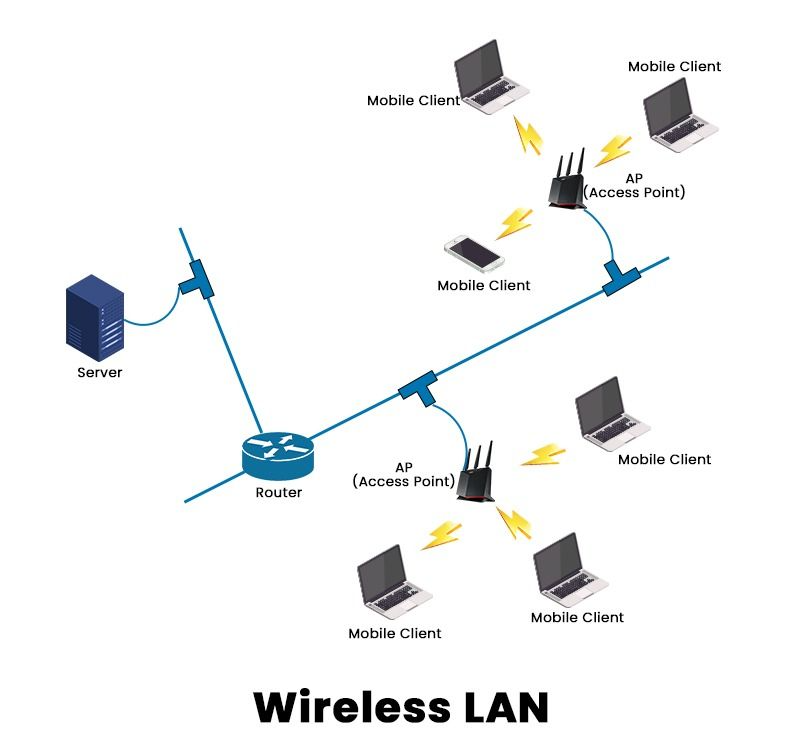
A Wireless LAN mainly consists of:
📌 The central device in a WLAN.
Functions:
Transmits wireless signals
Connects wireless devices to wired network
👉 Common example: Wi-Fi Router
Devices that connect to Wi-Fi:
Laptops 💻
Smartphones 📱
Tablets
Smart TVs
📌 Each client has a wireless network adapter.
Usually a wired Ethernet network
Connects access points to the Internet
🧠 How Wi-Fi Works (Simple Flow)
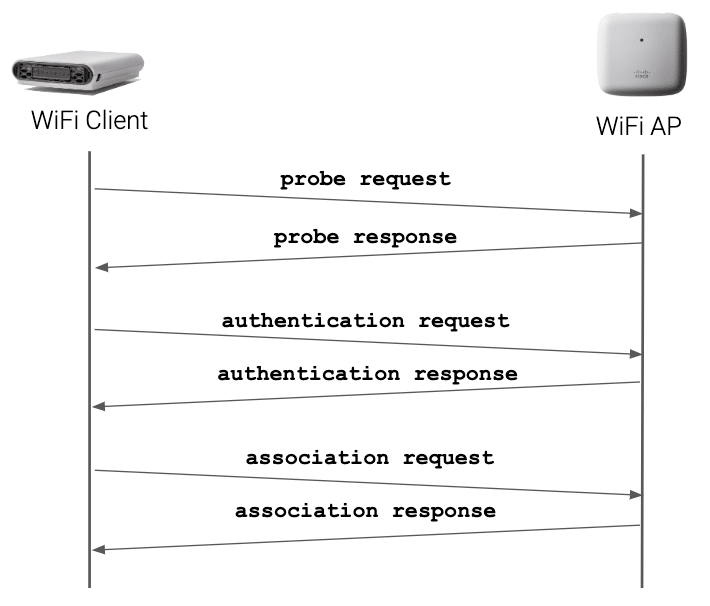
1️⃣ Access Point broadcasts Wi-Fi signal
2️⃣ Device scans for available networks
3️⃣ Device sends connection request
4️⃣ Authentication is done
5️⃣ Data transfer begins wirelessly
📌 All communication happens using radio waves.
📶 Wi-Fi Frequency Bands
Wi-Fi operates mainly on:
Band | Frequency | Features |
|---|---|---|
2.4 GHz | Lower frequency | Longer range, slower speed |
5 GHz | Higher frequency | Shorter range, faster speed |
6 GHz | Very high | Very fast, latest Wi-Fi 6E |
📌 Higher frequency → Higher speed → Lower range
📜 IEEE 802.11 Standards (Exam Important ⭐)
Standard | Band | Speed |
|---|---|---|
802.11b | 2.4 GHz | 11 Mbps |
802.11g | 2.4 GHz | 54 Mbps |
802.11n | 2.4/5 GHz | 600 Mbps |
802.11ac | 5 GHz | >1 Gbps |
802.11ax (Wi-Fi 6) | 2.4/5 GHz | Very high |
📌 802.11ax = Latest & fastest.
🧠 Modes of Wireless LAN
🔁 Infrastructure Mode (Most Common)
Devices connect via Access Point
Used in homes & offices
📌 Example: Mobile → Wi-Fi Router → Internet
🔗 Ad-Hoc Mode
Devices connect directly to each other
No access point
📌 Example: File sharing between two laptops
🔐 Security in Wireless LAN
Wireless signals are broadcast, so security is critical.
No password
Very insecure
Old
Weak encryption
Easily breakable ❌
Stronger encryption
Uses passwords
Strongest security
Recommended today ✔️
🧠 Advantages of Wireless LAN
🚶 Mobility (move freely)
🔌 No cables
⚡ Easy installation
📱 Supports many devices
❌ Disadvantages of Wireless LAN
🔐 Security risks
📉 Interference
📶 Limited range
🐢 Slower than wired LAN (sometimes)
📊 Wireless LAN vs Wired LAN
Feature | Wireless LAN | Wired LAN |
|---|---|---|
Medium | Radio waves | Cables |
Mobility | High | Low |
Speed | Moderate–High | Very High |
Security | Lower | Higher |
Setup | Easy | Complex |
🧠 Memory Tricks
Wi-Fi = Wireless LAN
AP = Access Point
2.4 GHz = Range
5 GHz = Speed
⭐ One-Line Summary
🔹 Wireless LAN (Wi-Fi) allows devices to connect and communicate wirelessly within a limited area using IEEE 802.11 standards.