🤔 What is Bluetooth? (Basic Idea)
Bluetooth is a short-range wireless communication technology used to connect devices without cables, usually over small distances.
📌 In simple words:
Bluetooth allows nearby devices to communicate wirelessly at low power.
🧠 Simple Definition
📌 Bluetooth is a wireless personal area network (WPAN) technology used for short-range data exchange between devices using radio waves.
🧠 Real-Life Analogy
🤝 Handshake Example
Two people stand close
They exchange information by hand
👉 Bluetooth works the same way:
Devices must be close
They exchange small amounts of data
📍 Where is Bluetooth Used?
Bluetooth is commonly used in:
🎧 Wireless headphones & earbuds
⌨️ Keyboards & mice
📱 Smartphones
⌚ Smartwatches
🚗 Car infotainment systems
🌡️ IoT & smart devices
📌 Designed for personal device connectivity.
🧭 Bluetooth in OSI Model
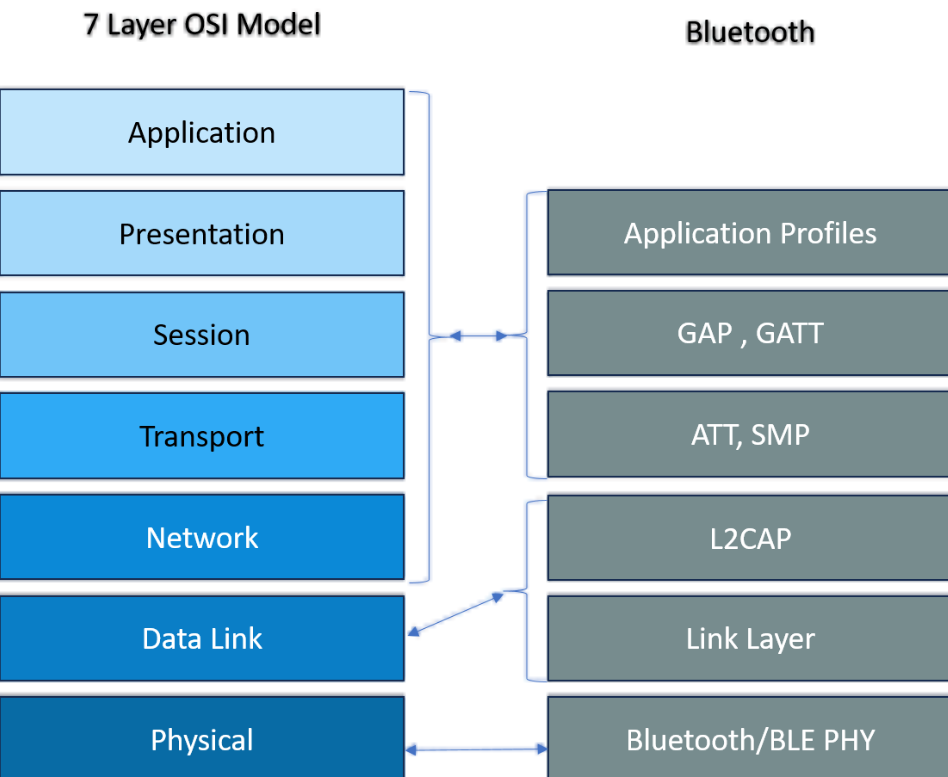
Bluetooth works mainly at:
Physical Layer
Data Link Layer
Application profiles
📌 It does not strictly follow OSI, but maps loosely.
📡 Bluetooth Frequency Band
Bluetooth operates in the:
2.4 GHz ISM band
Same band as Wi-Fi & microwave ovens
📌 To avoid interference, Bluetooth uses frequency hopping.
🔁 Frequency Hopping Spread Spectrum (FHSS)
🧠 What is Frequency Hopping?
Bluetooth rapidly switches between frequencies
Happens 1600 times per second
👉 This:
Reduces interference
Improves reliability
📌 Think of it as changing radio channels very fast 📻
🧩 Bluetooth Architecture
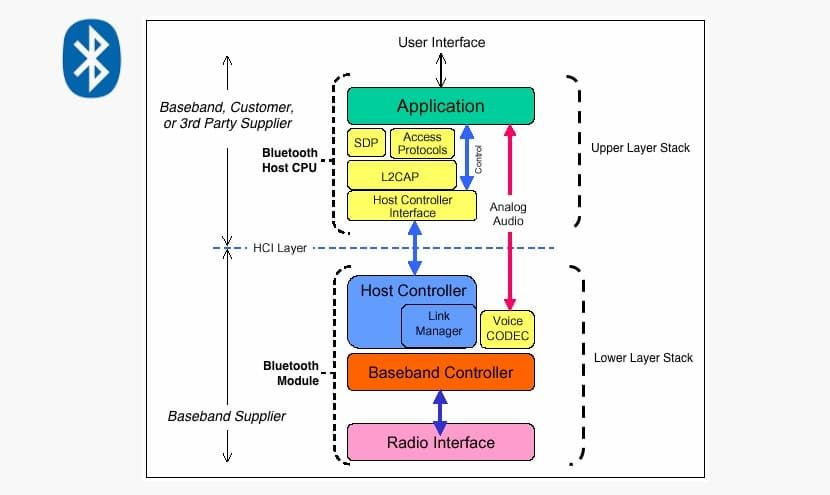
Bluetooth networks are organized as:
🔗 1. Piconet
📌 A small Bluetooth network.
1 Master device
Up to 7 active slave devices
🧠 Example:
Phone (Master)
Earbuds, smartwatch (Slaves)
🌐 2. Scatternet
📌 Multiple piconets connected together.
One device can be:
Master in one piconet
Slave in another
👉 Enables larger Bluetooth networks.
🧠 Bluetooth Communication Modes
🔹 Master Device
Controls communication
Manages timing & frequency hopping
🔹 Slave Device
Responds to master
Follows master’s instructions
📌 Bluetooth is master-controlled communication.
📜 Bluetooth Versions (Exam Important ⭐)
Version | Features |
|---|---|
Bluetooth 1.x | Basic, low speed |
Bluetooth 2.0 | EDR (faster) |
Bluetooth 3.0 | High Speed |
Bluetooth 4.0 | BLE (Low Energy) |
Bluetooth 5.0 | Longer range, higher speed |
📌 Bluetooth 4.x & 5.x are widely used today.
⚡ Bluetooth Low Energy (BLE)
🧠 What is BLE?
BLE is designed for:
🔋 Very low power consumption
⏱️ Infrequent data transfer
📌 Used in:
Fitness bands
Smart sensors
Medical devices
👉 Battery lasts months or years ✔️
📶 Bluetooth Range & Speed
Class | Range | Power |
|---|---|---|
Class 1 | ~100 meters | High |
Class 2 | ~10 meters | Medium |
Class 3 | ~1 meter | Low |
📌 Most phones use Class 2.
🔐 Security in Bluetooth
Bluetooth provides:
🔑 Device authentication
🔒 Encryption
🤝 Pairing mechanisms
🧠 Pairing Process
1️⃣ Devices discover each other
2️⃣ Pairing request sent
3️⃣ PIN / confirmation
4️⃣ Secure link established
📌 Modern Bluetooth uses secure simple pairing.
⚠️ Bluetooth Security Issues
Bluejacking (spam messages)
Bluesnarfing (data theft)
Bluebugging (device control)
📌 Modern versions largely prevent these.
🧠 Bluetooth vs Wi-Fi
Feature | Bluetooth | Wi-Fi |
|---|---|---|
Range | Short | Long |
Speed | Low–Medium | High |
Power usage | Very low | High |
Use case | Personal devices | Internet access |
Network size | Small | Large |
🧠 Advantages of Bluetooth
🔌 Cable-free
🔋 Low power consumption
📱 Easy to use
🌍 Widely supported
❌ Disadvantages of Bluetooth
📶 Limited range
🐢 Lower speed
🔐 Security concerns (older versions)
📉 Not suitable for large data transfer
🧠 Memory Tricks
Blue = Short range
Piconet = Small network
BLE = Battery Life Extension 🔋
⭐ One-Line Summary
🔹 Bluetooth is a low-power, short-range wireless technology used to connect personal devices without cables.