🤔 What is SNMP? (Basic Idea)
In a network, there are many devices like:
Routers
Switches
Servers
Printers
📌 These devices can fail, overload, or misbehave.
👉 How do we monitor and manage all these devices centrally?
💡 Answer: SNMP
🧠 Simple Definition
📌 SNMP (Simple Network Management Protocol) is an application-layer protocol used to monitor, manage, and control network devices remotely.
🧠 Real-Life Analogy
🏢 Building Management Example
Manager sits in control room
Watches CCTV, power, elevators
Gets alerts if something fails
👉 SNMP manager = Building manager
👉 Network devices = Elevators, lights, CCTV
🎯 Why SNMP is Needed?
SNMP helps to:
📈 Monitor network performance
🚨 Detect faults and failures
📊 Collect statistics
🔧 Configure devices remotely
⏱️ Reduce downtime
📌 Without SNMP, network management would be manual and chaotic ❌
🧭 Where Does SNMP Belong in OSI Model?
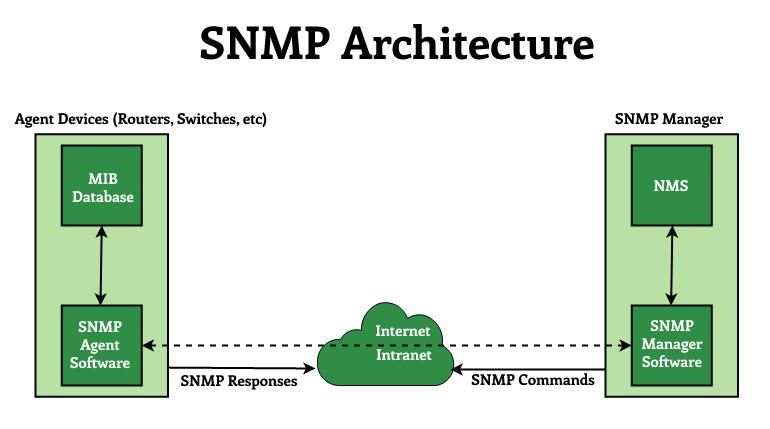
SNMP is an Application Layer protocol
Uses UDP for communication (fast & lightweight)
🔌 Port Numbers Used by SNMP
Purpose | Port |
|---|---|
SNMP Agent | 161 (UDP) |
SNMP Manager (Traps) | 162 (UDP) |
🧩 Main Components of SNMP
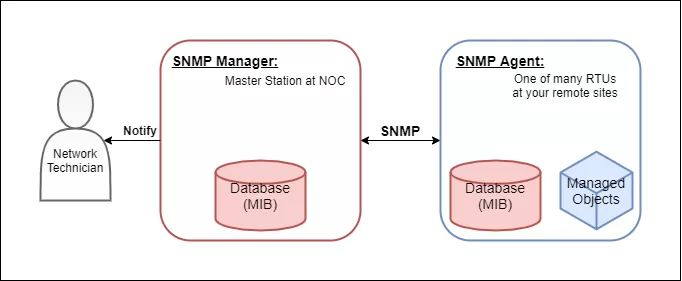
SNMP has three core components:
📌 The central system that:
Monitors network devices
Sends requests
Receives responses & alerts
Examples:
Network management software
Monitoring servers
📌 A small program running on:
Routers
Switches
Servers
Agent:
Collects device information
Responds to manager requests
Sends alerts (traps)
📌 MIB is a virtual database that stores:
Device parameters
Performance statistics
Examples:
CPU usage
Memory usage
Interface status
📌 Data is stored in a tree-like structure.
📦 What is OID?
📌 OID (Object Identifier) uniquely identifies each variable in MIB.
Example:
1.3.6.1.2.1.1.3👉 Each number represents a node in the MIB tree.
🔄 How SNMP Works (Step-by-Step)?
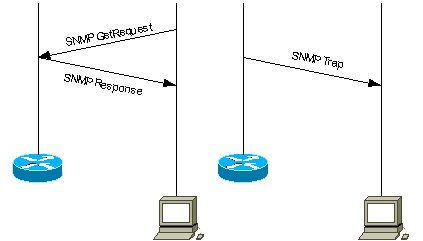
1️⃣ Manager sends request to agent
2️⃣ Agent reads value from MIB
3️⃣ Agent sends response back
4️⃣ If failure occurs → Agent sends trap
5️⃣ Manager displays alert
📌 Simple and efficient ✔️
📩 SNMP Messages / Operations
Message | Purpose |
|---|---|
GET | Read data from agent |
SET | Write/configure data |
GET-NEXT | Read next OID |
GET-BULK | Read large data |
RESPONSE | Reply from agent |
TRAP | Alert from agent |
INFORM | Acknowledged trap |
🚨 SNMP Trap
📌 A Trap is:
Unsolicited message
Sent by agent to manager
Indicates emergency or failure
Examples:
Link down
Device reboot
High CPU usage
👉 No request needed from manager.
🧠 SNMP Versions
Oldest version
Simple
Poor security ❌
Improved performance
Bulk data support
Still weak security ❌
Secure version ✔️
Authentication
Encryption
Access control
📌 Most recommended version today.
⚖️ SNMP Versions Comparison
Feature | v1 | v2c | v3 |
|---|---|---|---|
Security | ❌ | ❌ | ✅ |
Encryption | ❌ | ❌ | ✅ |
Performance | Low | Better | Best |
Usage | Obsolete | Limited | Modern |
🔐 Security in SNMP
❌ SNMPv1 & v2c
Community strings in plain text
Easy to hack
✅ SNMPv3
Username-based authentication
Data encryption
Message integrity
🧠 Advantages of SNMP
Centralized monitoring
Low overhead
Scalable
Automatic alerts
❌ Disadvantages of SNMP
Security issues in older versions
Complex MIB structure
UDP-based (no guaranteed delivery)
🧠 Memory Tricks
SNMP = Simple Network Monitoring Protocol
161 = Ask agent
162 = Trap alert
v3 = Secure
⭐ One-Line Summary
🔹 SNMP is an application-layer protocol used to monitor, manage, and control network devices using managers, agents, and MIBs.