🤔 Why Do We Need Ports & Sockets? (Basic Idea)
A single computer can run many applications at the same time:
🌐 Web browser
📧 Email client
🎮 Game
📂 File transfer
📌 All of them use the network simultaneously.
👉 Question:
How does the OS know which data belongs to which application?
💡 Answer: Ports & Sockets
🧠 Simple Definitions
🔢 Port
📌 A port is a logical number used by the Transport Layer to identify a specific application or service on a device.
🔌 Socket
📌 A socket is a combination of IP address and port number that uniquely identifies an endpoint of communication.
🧠 Real-Life Analogy
🏢 Apartment Building Example
Building address 🏠 → IP address
Flat number 🚪 → Port number
Full address (Building + Flat) → Socket
👉 Parcel reaches right flat, not just the building.
🌍 Role of Ports in Transport Layer
Ports enable:
📦 Application-to-application communication
🔀 Multiplexing (many apps sending data)
🔁 Demultiplexing (delivering data to correct app)
📌 Without ports, Transport Layer cannot work.
🔢 Port Number Basics
Port numbers are 16-bit numbers
Range: 0 to 65535
📌 Total possible ports = 65,536
🧩 Types of Port Numbers
Ports are divided into three categories:
🟢 1. Well-Known Ports (0 – 1023)
📌 Reserved for standard services
Service | Port |
|---|---|
HTTP | 80 |
HTTPS | 443 |
FTP | 21 |
SMTP | 25 |
DNS | 53 |
SSH | 22 |
📌 Managed by IANA
📌 Cannot be freely used by normal applications
🔵 2. Registered Ports (1024 – 49151)
📌 Used by specific applications but not system-critical
Examples:
MySQL → 3306
PostgreSQL → 5432
📌 Can be registered officially.
🟡 3. Dynamic / Ephemeral Ports (49152 – 65535)
📌 Used temporarily by client applications
Example:
Browser opens a random port to connect to server
📌 Automatically assigned by OS.
🧠 Client–Server Communication Using Ports
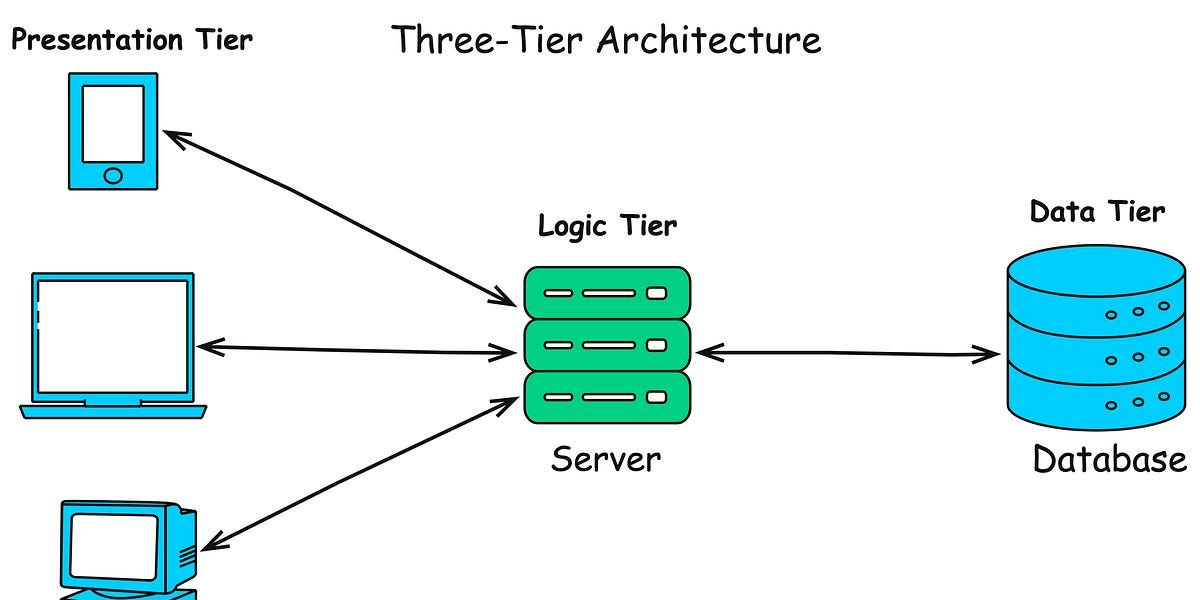
🧠 Example: Web Browsing
Client:
IP: 192.168.1.10
Port: 52345 (dynamic)
Server:
IP: 142.250.195.46
Port: 80 (HTTP)
👉 Communication happens smoothly because of ports.
🔀 Multiplexing & Demultiplexing
📤 Multiplexing
Multiple applications send data
Transport Layer combines data streams
Uses different port numbers
📥 Demultiplexing
Receiver gets data
Uses port number
Delivers data to correct application
📌 Ports make this possible.
🔌 What is a Socket? (Deep Understanding)
🧠 Socket = IP Address + Port Number
📌 Example:
192.168.1.10 :8080👉 This combination uniquely identifies:
A device
A specific application on that device
🧠 Socket Pair (Very Important ⭐)
A complete communication is identified by:
(Source IP,Source Port, Destination IP, Destination Port)📌 This is called a Socket Pair or 4-tuple.
🧠 Example
Field | Value |
|---|---|
Source IP | 192.168.1.10 |
Source Port | 52345 |
Destination IP | 142.250.195.46 |
Destination Port | 80 |
👉 This uniquely identifies one TCP connection.
🧠 Types of Sockets
🔹 TCP Socket
Reliable
Connection-oriented
Uses TCP protocol
📌 Used for:
Web
Email
File transfer
🔹 UDP Socket
Fast
Connectionless
Uses UDP protocol
📌 Used for:
Streaming
Gaming
DNS
🧠 Ports in TCP vs UDP
Feature | TCP | UDP |
|---|---|---|
Uses Ports | Yes | Yes |
Connection | Yes | No |
Reliability | Guaranteed | Not guaranteed |
📌 Port numbers exist in both TCP & UDP headers.
📦 Port Numbers in TCP Header (Preview)
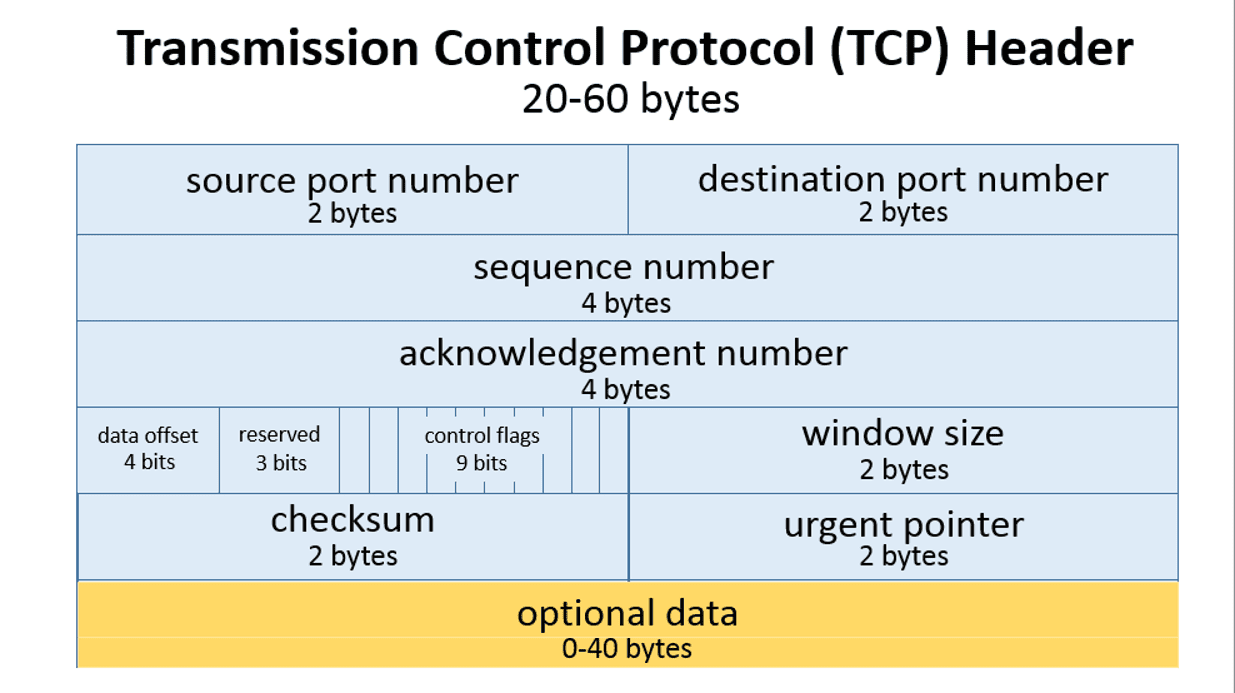
TCP Header contains:
Source Port (16 bits)
Destination Port (16 bits)
👉 Same for UDP (simpler header).
⚠️ Why Port Numbers Are Important
Without ports:
Multiple applications cannot run simultaneously ❌
Data reaches device but not application ❌
Internet services fail ❌
👉 Ports are essential for Transport Layer.
✍️ Definitions
📌 Port:
A port is a logical address used by the Transport Layer to identify an application or service.
📌 Socket:
A socket is an endpoint of communication identified by an IP address and a port number.
⭐ Memory Tricks
IP = House address
Port = Door number
Socket = Full address
⭐ One-Line Summary
🔹 Ports identify applications, and sockets uniquely identify communication endpoints in Transport Layer communication.