🤔 Why Do We Need SSL/TLS? (Basic Idea)
When data travels over the Internet 🌍, it passes through:
Routers
ISPs
Public networks
📌 Without protection:
Passwords can be stolen 🕵️
Data can be modified ✍️
Fake websites can trick users 🚨
👉 SSL/TLS protects data while it is in transit.
🧠 Simple Definition
📌 SSL/TLS is a security protocol that encrypts communication between a client and a server to ensure confidentiality, integrity, and authentication.
🧠 What is SSL and TLS?
Protocol | Description |
|---|---|
SSL | Secure Sockets Layer (older, deprecated) |
TLS | Transport Layer Security (newer, secure) |
📌 TLS is the modern and secure version of SSL, but we still say “SSL” commonly.
🧠 Real-Life Analogy
📞 Secure Phone Call
Two people talk
Language is scrambled
Only they understand it
👉 SSL/TLS:
Scrambles data
Only sender & receiver can read it
🧭 Where Does SSL/TLS Work?
SSL/TLS works between:
Application Layer (HTTP)
Transport Layer (TCP)
📌 That’s why HTTPS = HTTP + SSL/TLS
🔒 What Security Does SSL/TLS Provide?
SSL/TLS ensures four major security services:
🔐 1. Confidentiality
Data is encrypted
Hackers cannot read it
✍️ 2. Integrity
Ensures data is not altered
Uses hashing & MAC
🧾 3. Authentication
Confirms server identity
Uses digital certificates
🚫 4. Non-Repudiation (Indirect)
Sender cannot deny communication
Achieved using certificates & signatures
🔑 Core Components of SSL/TLS
SSL/TLS uses:
🔐 Encryption algorithms
🔑 Symmetric & asymmetric keys
🧾 Digital certificates
🔢 Hash functions
📜 Digital Certificates
📌 A digital certificate:
Proves server identity
Issued by a Certificate Authority (CA)
Examples of CA:
DigiCert
GlobalSign
Let’s Encrypt
🧾 Certificate Contains
Website name
Public key
CA signature
Validity period
📌 Browser trusts CA → trusts website ✔️
🔁 How SSL/TLS Works (Step-by-Step Handshake)
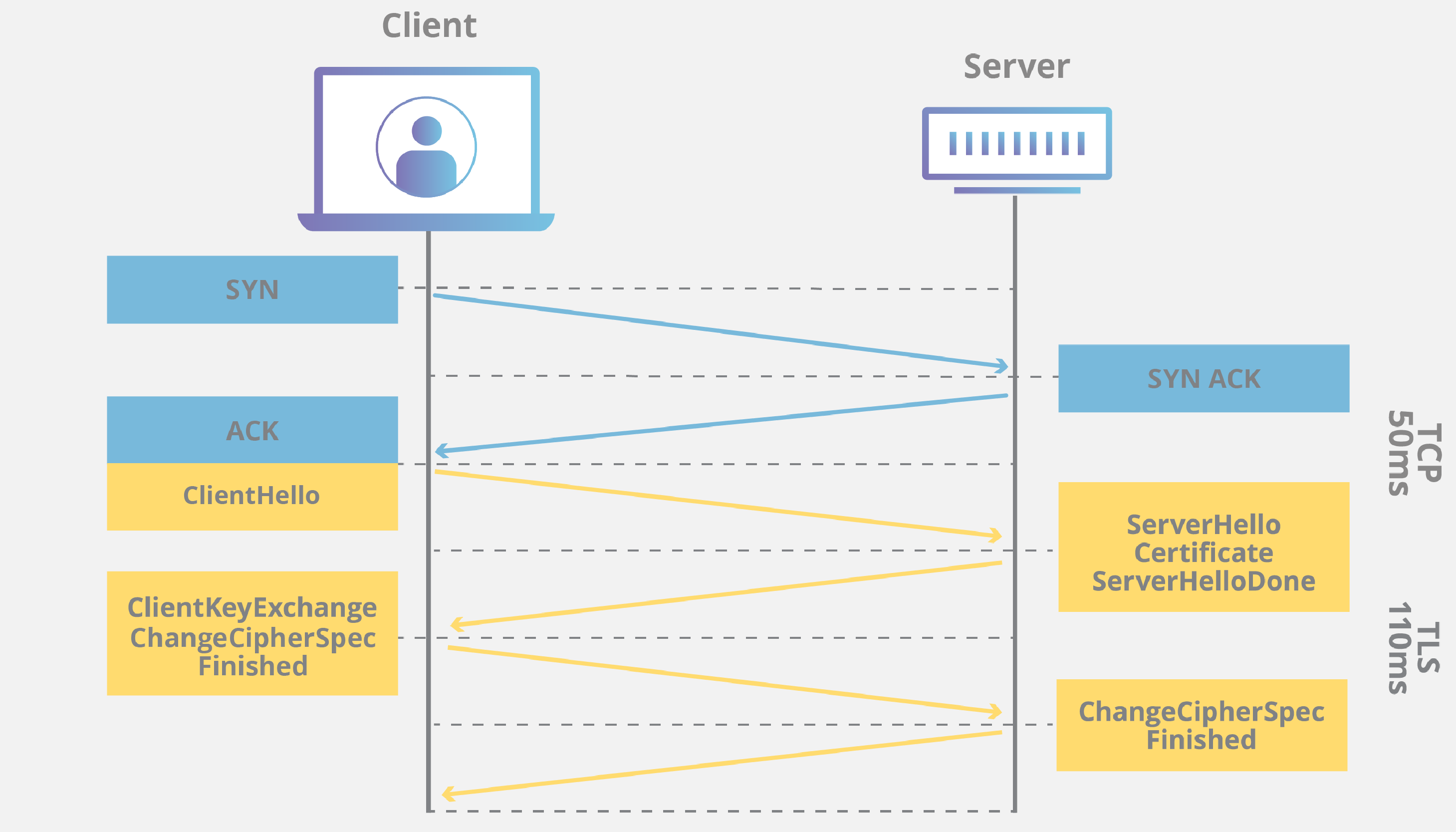
Let’s understand the TLS Handshake simply 👇
🪜 Step-by-Step SSL/TLS Handshake
1️⃣ Client sends Hello
2️⃣ Server sends Certificate
3️⃣ Client verifies certificate
4️⃣ Secure key is exchanged
5️⃣ Session key generated
6️⃣ Encrypted communication begins
📌 After handshake → fast symmetric encryption is used ⚡
🔄 Why Both Symmetric & Asymmetric Encryption Are Used?
Stage | Encryption Used | Reason |
|---|---|---|
Handshake | Asymmetric | Secure key exchange |
Data transfer | Symmetric | Fast performance |
👉 Best of both worlds ✔️
🌐 SSL/TLS in Real Life
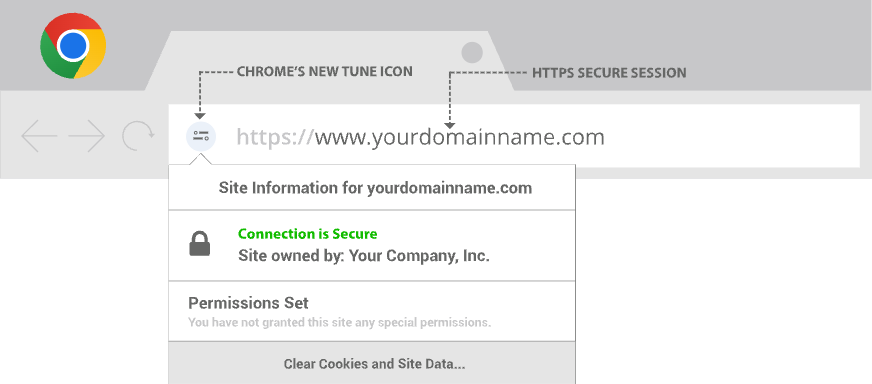
SSL/TLS is used in:
HTTPS 🔒
Online banking 💳
Secure email 📧
VPN 🌍
Cloud services ☁️
📌 Look for 🔒 lock icon in browser.
🔌 Ports Used with SSL/TLS
Service | Port |
|---|---|
HTTPS | 443 |
SMTPS | 465 |
IMAPS | 993 |
POP3S | 995 |
⚠️ SSL vs TLS
Feature | SSL | TLS |
|---|---|---|
Security | Weak | Strong |
Status | Deprecated | Active |
Speed | Slower | Faster |
Usage | Obsolete | Modern |
📌 Always use TLS.
❌ Attacks Prevented by SSL/TLS
Eavesdropping 🕵️
Man-in-the-middle
Data tampering
Fake websites
⚠️ Limitations of SSL/TLS
Does not protect endpoint ❌
Cannot stop malware ❌
Needs correct certificate management
📌 SSL/TLS secures data in transit only.
🧠 Memory Tricks
SSL = Secure Socket
TLS = Tough Lock System 🔐
443 = Secure Web
🔒 Icon = SSL/TLS active
⭐ One-Line Summary
🔹 SSL/TLS is a security protocol that encrypts communication, authenticates servers, and ensures data integrity over the Internet.