🤔 What is DHCP? (Basic Idea)
When a device joins a network, it needs:
IP address 🧾
Subnet mask
Default gateway
DNS server
📌 Manually assigning these to every device is difficult and error-prone.
👉 DHCP automates this entire process.
🧠 Simple Definition
📌 DHCP (Dynamic Host Configuration Protocol) is a network protocol that automatically assigns IP addresses and other network configuration parameters to devices.
🧠 Why DHCP is Needed?
Without DHCP ❌:
Manual IP configuration
IP conflicts
Time-consuming
High chance of errors
With DHCP ✅:
Automatic configuration
No IP conflicts
Plug-and-play networking
📌 That’s why DHCP is used everywhere (home, office, campus).
🧠 Real-Life Analogy
🏨 Hotel Room Allocation
Guest checks in
Hotel assigns room automatically
Room reused when guest leaves
👉 DHCP:
Device connects
IP assigned
IP reused when device disconnects
🧭 Where Does DHCP Work?
DHCP is an Application Layer protocol
Uses UDP (fast & lightweight)
🔌 Ports Used by DHCP
Device | Port |
|---|---|
DHCP Client | 68 (UDP) |
DHCP Server | 67 (UDP) |
🧩 Main Components of DHCP
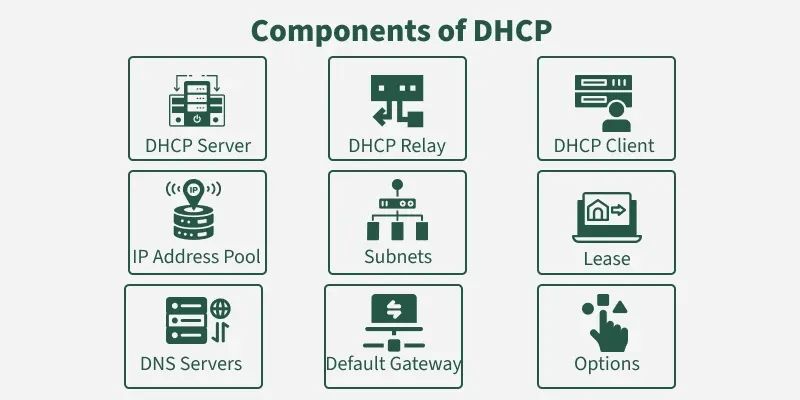
1️⃣ DHCP Client – Device requesting IP
2️⃣ DHCP Server – Assigns IP & config
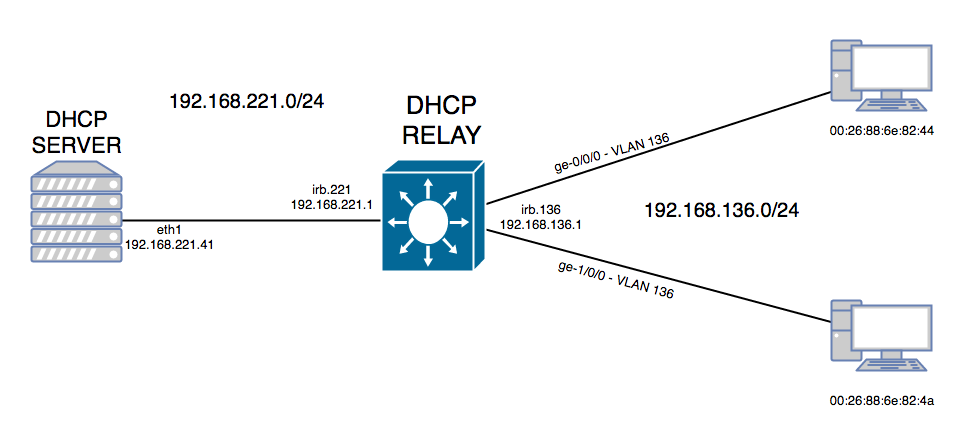
3️⃣ DHCP Relay Agent – For different networks
📦 What Information Does DHCP Provide?
DHCP assigns:
IP address
Subnet mask
Default gateway
DNS server
Lease time
📌 All in one automatic process ✔️
🔄 How DHCP Works (DORA Process)
DHCP follows 4 simple steps, called DORA:
📌 Client broadcasts:
“Is there any DHCP server?”
Source IP: 0.0.0.0
Destination IP: 255.255.255.255
📌 DHCP server replies:
“I can give you this IP.”
Includes:
Offered IP
Configuration info
📌 Client responds:
“I want to use this IP.”
Confirms selection
📌 Server confirms:
“IP assigned successfully.”
👉 Device is now part of network ✔️
⏱️ DHCP Lease Time
📌 IP addresses are assigned for a limited time, called lease.
Can be renewed
Prevents IP wastage
📌 After lease expires → IP returned to pool.
🧠 Types of DHCP IP Allocation
🔹 1. Dynamic Allocation
IP assigned temporarily
Most common
🔹 2. Automatic Allocation
Permanent IP after first assignment
🔹 3. Manual Allocation (Reservation)
Fixed IP based on MAC address
📌 Used for:
Servers
Printers
🌍 DHCP Relay Agent
📌 Used when:
Client & server are on different networks
👉 Relay forwards DHCP messages between them.
🔐 Security Issues with DHCP
Rogue DHCP servers
IP spoofing
Unauthorized access
📌 Protection methods:
DHCP snooping
Network access control
⚖️ DHCP vs Manual IP Configuration
Feature | DHCP | Manual |
|---|---|---|
IP assignment | Automatic | Manual |
Errors | Very low | High |
Scalability | High | Low |
Management | Easy | Difficult |
🧠 Advantages of DHCP
Easy configuration ⚡
No IP conflicts
Centralized management
Time saving
❌ Disadvantages of DHCP
DHCP server failure affects network
Security risks
Less control per device
🧠 Memory Tricks
DHCP = Don’t Handle Config Personally 😄
DORA = Dora the Explorer 🧭
67 = Server
68 = Client
⭐ One-Line Summary
🔹 DHCP automatically assigns IP addresses and network configuration to devices, enabling easy and error-free networking.