🤔 What is ARP? (Basic Idea)
In a network:
Devices communicate using IP addresses (logical)
But actual data delivery happens using MAC addresses (physical)
📌 Problem:
How does a device find the MAC address of another device when it only knows the IP address?
👉 Answer: ARP
🧠 Simple Definition
📌 ARP (Address Resolution Protocol) is a protocol used to map an IP address to its corresponding MAC address within a local network.
🧠 Why ARP is Needed?
Let’s understand the mismatch:
Layer | Address Used |
|---|---|
Network Layer | IP Address |
Data Link Layer | MAC Address |
📌 IP is used for routing,
📌 MAC is used for actual delivery.
👉 ARP acts as a bridge between these two layers.
🧠 Real-Life Analogy
🏠 House Address vs Door Number
You know someone’s house address (IP)
But to deliver a parcel, you need the door number (MAC)
👉 ARP finds the door number for you 📦
🧭 Where Does ARP Work?
ARP works between:
Network Layer
Data Link Layer
📌 Often called a cross-layer protocol.
🔢 What Addresses Does ARP Use?
Logical Address → IP Address
Physical Address → MAC Address
Example:
IPAddress:192.168.1.10
MACAddress:00:1A:2B:3C:4D:5E
🧾 ARP Table
📌 Every device maintains an ARP table (ARP cache).
🧠 What is ARP Table?
Stores IP ↔ MAC mappings
Speeds up communication
Avoids repeated ARP requests
🧾 Example ARP Table
IP Address | MAC Address |
|---|---|
192.168.1.1 | AA:BB:CC:DD:EE:FF |
192.168.1.10 | 00:1A:2B:3C:4D:5E |
📌 Entries have a timeout (TTL).
🔄 How ARP Works (Step-by-Step)
Let’s say:
Device A wants to send data to Device B
Device A knows IP of B, not MAC
🪜 ARP Working Steps
1️⃣ Device A checks its ARP table
2️⃣ MAC not found ❌
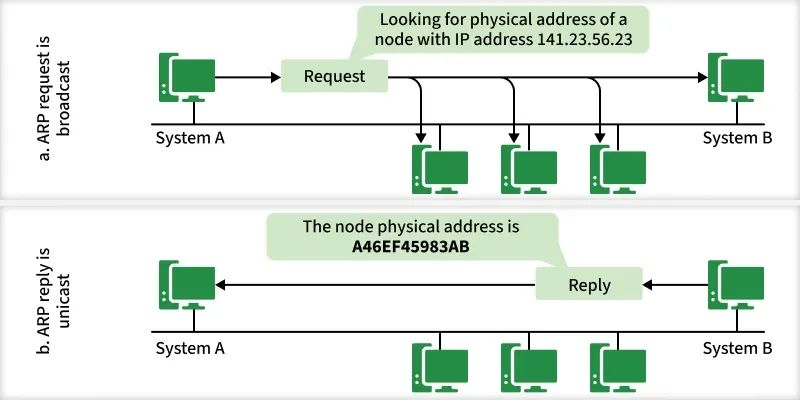
3️⃣ Device A sends ARP Request (Broadcast)
4️⃣ All devices receive request
5️⃣ Device B replies with ARP Reply (Unicast)
6️⃣ Device A stores MAC in ARP table
7️⃣ Data transmission starts
📌 Simple and fast ⚡
📡 ARP Request vs ARP Reply
Message | Type | Purpose |
|---|---|---|
ARP Request | Broadcast | Ask “Who has this IP?” |
ARP Reply | Unicast | Answer with MAC address |
📦 ARP Packet Format (Basic Idea)
ARP packet contains:
Sender IP
Sender MAC
Target IP
Target MAC
📌 Used to exchange address information.
🧠 Types of ARP
Automatically learned
Stored temporarily in ARP table
📌 Most common type ✔️
Manually configured
Permanent entry
📌 More secure but less flexible.
Device announces its own IP–MAC mapping
Used to:
Detect IP conflicts
Update ARP tables
⚠️ ARP Security Issues (ARP Spoofing)
🧠 What is ARP Spoofing?
Attacker sends fake ARP replies
Victim updates ARP table wrongly
Attacker becomes man-in-the-middle
📌 Very dangerous attack 🚨
🛡️ Prevention
Static ARP entries
ARP inspection
Switch security features
🧠 ARP vs RARP (Quick Note)
Protocol | Purpose |
|---|---|
ARP | IP → MAC |
RARP | MAC → IP |
📌 RARP is mostly obsolete.
🧠 Memory Tricks
ARP = Ask for MAC
Request = Broadcast 📢
Reply = Unicast 📩
IP → MAC
⭐ One-Line Summary
🔹 ARP is a protocol that resolves an IP address into a MAC address to enable data delivery within a local network.