🤔 What is NAT? (Basic Idea)
In the Internet:
IPv4 addresses are limited
Every device cannot have a public IP ❌
📌 NAT allows multiple devices to use a single public IP address to access the Internet.
👉 NAT acts as a translator between private and public IP addresses.
🧠 Simple Definition
📌 NAT (Network Address Translation) is a technique used by routers to translate private IP addresses into public IP addresses and vice versa.
🧠 Why NAT is Needed
NAT solves three major problems:
1️⃣ IPv4 address shortage
2️⃣ Security (hides internal IPs)
3️⃣ Cost reduction (fewer public IPs needed)
📌 Without NAT → Internet would have run out of IPv4 long ago ❌
🧠 Real-Life Analogy
🏢 Office Reception Desk
Many employees inside (private IPs)
One official phone number (public IP)
Receptionist forwards calls to correct employee
👉 Router = Receptionist
👉 NAT = Call forwarding system
🧭 Where Is NAT Implemented?
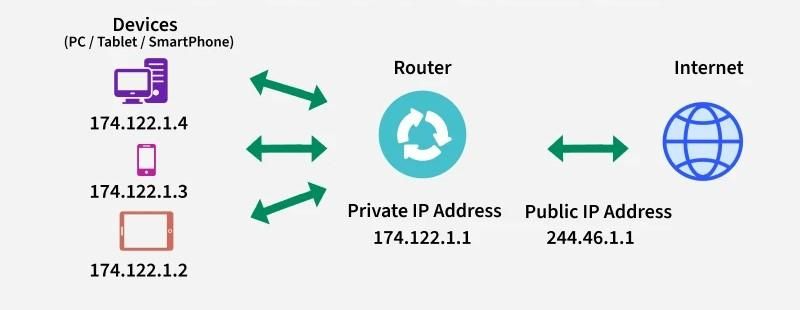
Implemented on routers / firewalls
Located between:
Private network
Public Internet
📌 NAT works at the Network Layer.
🧱 Private IP Address Ranges
These IPs are NOT routable on the Internet:
Class | Range |
|---|---|
Class A | 10.0.0.0 – 10.255.255.255 |
Class B | 172.16.0.0 – 172.31.255.255 |
Class C | 192.168.0.0 – 192.168.255.255 |
📌 NAT translates these into public IPs.
🔄 How NAT Works (Step-by-Step)
1️⃣ Device sends packet with private IP
2️⃣ Router receives packet
3️⃣ NAT replaces private IP with public IP
4️⃣ Entry stored in NAT table
5️⃣ Response comes back to public IP
6️⃣ Router translates back to private IP
7️⃣ Packet delivered to correct device
📌 All this happens automatically ⚡
📋 NAT Translation Table
📌 Router maintains a table like this:
Private IP | Private Port | Public IP | Public Port |
|---|---|---|---|
192.168.1.10 | 5001 | 203.0.113.5 | 30001 |
192.168.1.11 | 5002 | 203.0.113.5 | 30002 |
👉 This table ensures correct packet delivery.
🧩 Types of NAT
🧠 What is Static NAT?
One private IP ↔ One public IP
Fixed mapping
📌 Used for:
Web servers
Mail servers
✅ Pros
Predictable
Easy external access
❌ Cons
Wastes public IPs
🧠 What is Dynamic NAT?
Private IP mapped to any available public IP
Uses a pool of public IPs
📌 Mapping is temporary.
❌ Limitations
Still needs multiple public IPs
Not scalable
🧠 What is PAT?
Multiple private IPs share one public IP
Differentiation using port numbers
📌 Most common NAT type ✔️
🧠 Example
192.168.1.10:5001 → 203.0.113.5:30001
192.168.1.11:5002 → 203.0.113.5:30002
✅ Advantages
Saves IPv4 addresses
Highly scalable
⚖️ Static vs Dynamic vs PAT
Feature | Static NAT | Dynamic NAT | PAT |
|---|---|---|---|
Mapping | 1:1 | Many:Many | Many:1 |
Public IP use | High | Medium | Very Low |
Scalability | Low | Medium | High |
Usage | Servers | Medium networks | Home/ISP |
🔐 Security Benefits of NAT
Hides internal IP addresses
Blocks unsolicited inbound traffic
Acts as basic firewall
📌 NAT is not a full firewall, but adds security.
⚠️ Limitations of NAT
Breaks end-to-end connectivity
Issues with VoIP, P2P, gaming
Requires NAT traversal techniques
📌 IPv6 reduces NAT dependency.
🌐 NAT and IPv6 (Quick Note)
IPv6 has huge address space
NAT is not mandatory in IPv6
Still used sometimes for security
🧠 NAT vs Proxy (Quick Comparison)
Feature | NAT | Proxy |
|---|---|---|
Layer | Network Layer | Application Layer |
Transparency | Transparent | Not transparent |
Speed | Faster | Slower |
Security | Basic | High |
🧠 Memory Tricks
NAT = Network Address Translator
Static = Fixed
Dynamic = From pool
PAT = Ports save IPs 🔢
⭐ One-Line Summary
🔹 NAT allows multiple private devices to access the Internet using one or few public IP addresses by translating IP and port information.