🏗️ Quick Recall: OSI Model Layers
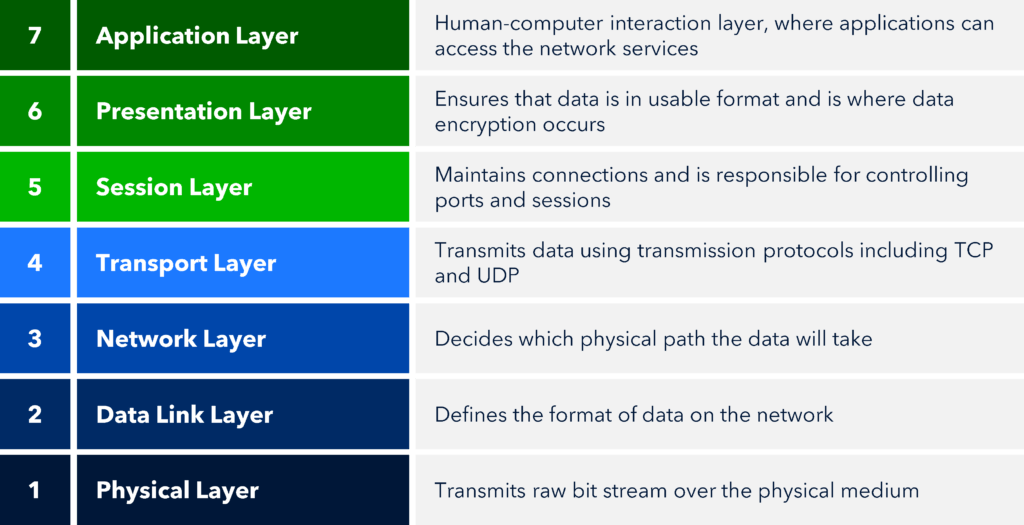
From top to bottom:
7️⃣ Application
6️⃣ Presentation
5️⃣ Session
4️⃣ Transport
3️⃣ Network
2️⃣ Data Link
1️⃣ Physical
🧠 Mnemonic:
All People Seem To Need Data Processing
🔝 Layer 7: Application Layer
Provides network services directly to the user.
📌 This is the layer where users interact with the network.
🌐 Web access
📧 Email services
📂 File transfer
🧑💻 Remote login
HTTP / HTTPS
FTP
SMTP
DNS
Opening a website using a browser like Chrome.
📌 Application layer provides network services to end users.
🎨 Layer 6: Presentation Layer
Ensures that data sent by the sender is understood by the receiver.
📌 Acts as a translator 🗣️.
🔄 Data translation (format conversion)
🔐 Encryption
🔓 Decryption
📦 Data compression
HTTPS encrypting data
ZIP file compression
📌 Presentation layer handles data formatting, encryption, and compression.
🪢 Layer 5: Session Layer
Manages sessions (connections) between two devices.
📌 Controls start, maintain, and end of communication.
Session establishment
Session maintenance
Session termination
Synchronization (checkpoints)
Zoom meeting session:
Join meeting
Stay connected
Leave meeting
📌 Session layer establishes, manages, and terminates sessions.
🚚 Layer 4: Transport Layer
Ensures end-to-end delivery of data reliably and efficiently.
📌 One of the most important layers.
✂️ Segmentation & reassembly
❌ Error control
🚦 Flow control
🔢 Port addressing
TCP (Reliable)
UDP (Fast)
Courier service delivering parcels safely to the correct address.
📌 Transport layer ensures reliable end-to-end data delivery.
🌍 Layer 3: Network Layer
Handles routing and logical addressing.
📌 Decides best path for data to travel.
IP addressing
Packet routing
Path selection
Packet forwarding
IP
ICMP
Routing protocols (RIP, OSPF)
Google Maps choosing the best route.
📌 Network layer determines the best path for data delivery.
🔀 Layer 2: Data Link Layer
Provides node-to-node delivery within the same network.
📌 Ensures data reaches the correct physical device.
Framing
MAC addressing
Error detection
Flow control
Access control (MAC)
Switch
Bridge
Delivering a parcel to the correct house on a street.
📌 Data Link layer ensures error-free transmission between adjacent nodes.
⚡ Layer 1: Physical Layer
Handles actual physical transmission of bits (0s and 1s).
📌 Lowest layer of OSI model.
Bit transmission
Voltage levels
Cable specifications
Data rates
Physical topology
Cables
Hub
Repeater
NIC (physical aspect)
Roads that allow vehicles to move.
📌 Physical layer transmits raw bits over a physical medium.
📊 Complete Summary Table
Layer | Name | Core Function |
|---|---|---|
7 | Application | User interaction |
6 | Presentation | Format & security |
5 | Session | Session control |
4 | Transport | Reliable delivery |
3 | Network | Routing |
2 | Data Link | MAC & framing |
1 | Physical | Bit transmission |
⭐ One-Line Summary
🔹 Each OSI layer has a specific role, and together they enable smooth and reliable network communication.