🤔 What is Framing? (Basic Idea)
When data is sent over a network, it does not travel as one big message.
📌 Instead:
Data is broken into smaller pieces
Each piece is packed into a frame
These frames are sent one by one
👉 This process is called Framing.
🧠 Simple Definition
📌 Framing is the process of dividing data into manageable units called frames and adding control information to ensure correct delivery.
🧠 Why Framing is Needed
Imagine sending a huge book 📚 through courier:
❌ Sending it as one piece is risky
✅ Sending it chapter by chapter is safer
📌 Similarly, in networking:
Large data → broken into frames
Easier to transmit
Easier to detect errors
Easier to retransmit if lost
🧱 Where Does Framing Occur?
Framing is performed by the Data Link Layer
It works between two directly connected devices
📌 Example:
Computer ↔ Switch
Switch ↔ Router
📦 What is a Frame?
A Frame is a data packet at the Data Link Layer.
📌 It contains:
Actual data
Control information
Address information
Error-checking information
🧩 Basic Structure of a Frame
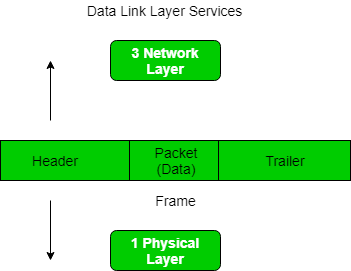
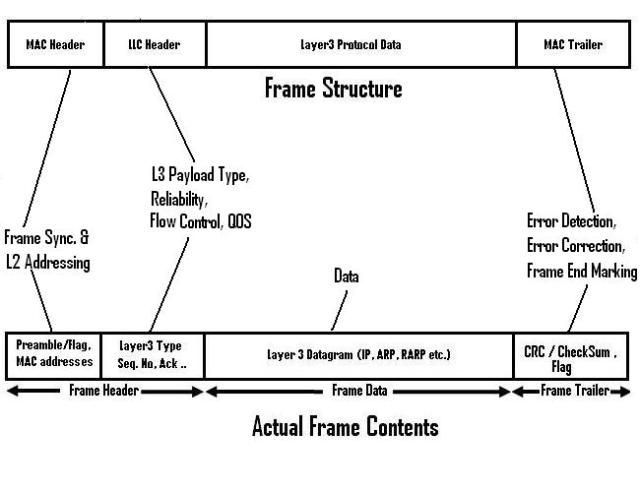
A typical frame contains:
1️⃣ Header
2️⃣ Data (Payload)
3️⃣ Trailer
🔹1. Frame Header
Contains:
🏷️ Source MAC Address
🏷️ Destination MAC Address
Control information
📌 Helps identify who sent the data and who should receive it.
🔹 2. Data (Payload)
Actual information being sent
Comes from the Network Layer
📌 This is the main content.
🔹 3. Frame Trailer
Contains:
❌ Error detection bits (CRC)
📌 Helps check whether data was damaged during transmission.
🔍 Key Responsibilities of Framing
Framing helps in:
📦 Dividing data into frames
🏷️ Adding physical (MAC) addresses
❌ Detecting transmission errors
🔄 Synchronizing sender and receiver
🧠 Types of Framing Techniques
There are four main framing methods:
1️⃣ Character Count Framing
2️⃣ Byte Stuffing
3️⃣ Bit Stuffing
4️⃣ Physical Layer Coding Violations
We’ll explain each one by one 👇
🔢 1. Character Count Framing
🧠 How It Works
Header contains number of characters
Receiver reads that many characters
📌 Example:
Header says 10 bytes, receiver reads next 10 bytes as frame.
❌ Problem
If count is corrupted → entire frame lost
📌 Rarely used today.
🔡 2. Byte Stuffing
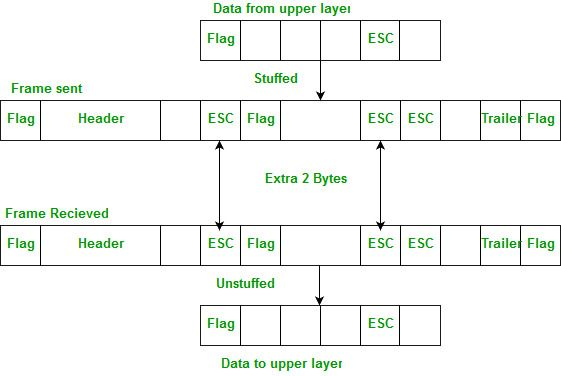
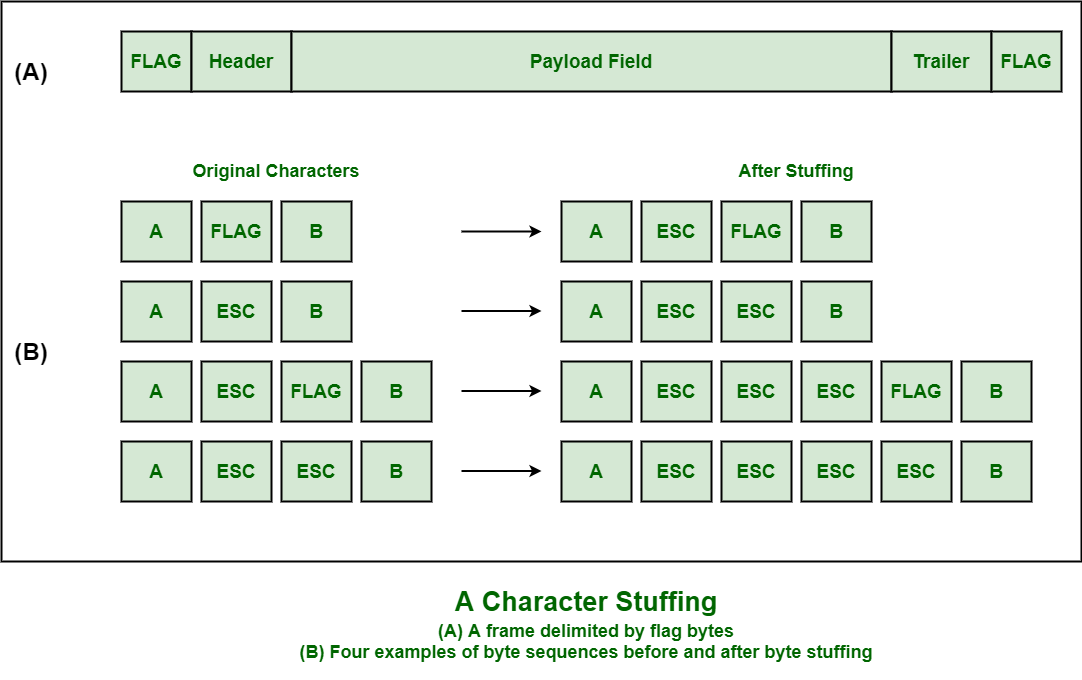
🧠 How It Works
Special byte marks:
Start of frame
End of frame
If same byte appears in data → extra byte added (stuffed)
🧠 Example
Flag byte:
01111110If appears in data → extra escape byte added
✅ Advantage
Reliable
Easy to implement
❌ Disadvantage
Increases frame size
🔢 3. Bit Stuffing
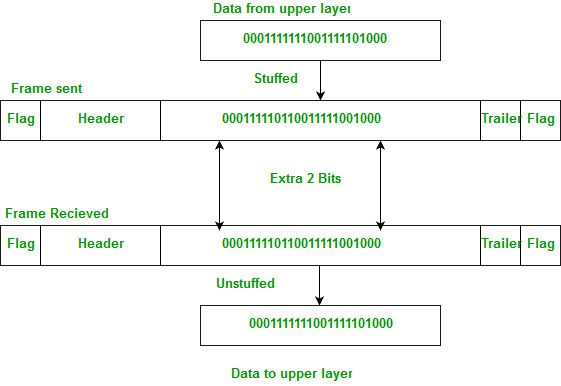
🧠 How It Works
Frame marked by special bit pattern
If data has 5 consecutive 1s, a 0 is inserted
📌 Receiver removes the extra 0.
🧠 Example
Data: 111110
Stuffed: 1111100
✅ Advantages
Efficient
Used in modern protocols
❌ Disadvantages
Slight processing overhead
📌 Used in HDLC protocol
⚡ 4. Physical Layer Coding Violations
🧠 How It Works
Uses special signal patterns
These patterns never occur in normal data
📌 Used to mark:
Start of frame
End of frame
❌ Limitation
Depends on physical layer encoding
Not universally applicable
🧠 Framing vs Packet vs Segment (Common Confusion)
Layer | Data Unit |
|---|---|
Application | Data |
Transport | Segment |
Network | Packet |
Data Link | Frame |
Physical | Bits |
📌 Remember this table – very important
⭐ Advantages of Framing
Improves reliability
Enables error detection
Helps synchronization
Efficient data transmission
⭐ One-Line Summary
🔹 Framing is the Data Link Layer process of dividing data into frames and adding control information for reliable communication.