🤔 What is the OSI Model?
The OSI Model stands for Open Systems Interconnection Model.
📌 It is a conceptual (theoretical) model that explains:
How data travels from one computer to another over a network
Instead of handling networking as one big complex task, OSI divides it into 7 smaller layers, where each layer has a specific job.
🧠 Why Do We Need the OSI Model?
Without a model:
Networking becomes confusing ❌
Troubleshooting is difficult ❌
No standard structure ❌
With OSI Model:
Easy understanding ✅
Easy troubleshooting ✅
Standardized communication ✅
Vendor-independent design ✅
🧱 The 7 Layers of the OSI Model
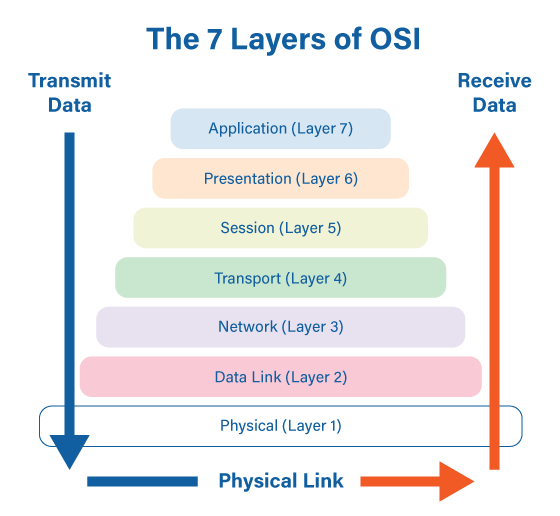
From top to bottom:
Layer No | Layer Name |
|---|---|
7️⃣ | Application |
6️⃣ | Presentation |
5️⃣ | Session |
4️⃣ | Transport |
3️⃣ | Network |
2️⃣ | Data Link |
1️⃣ | Physical |
🧠 Mnemonic (Easy to Remember):
All People Seem To Need Data Processing
🧭 How Data Moves in OSI Model
🔽 Sender side → Data moves top to bottom (Layer 7 → 1)
🔼 Receiver side → Data moves bottom to top (Layer 1 → 7)
🔝 Layer 7: Application Layer
Provides network services directly to the user.
📌 This is the closest layer to the user.
Allows users to access network
Interface between user and network
Does NOT provide services to applications, but provides network access
Web browsing 🌐
Email 📧
File transfer 📂
HTTP
FTP
SMTP
DNS
🧠 Real-Life Example
Using Chrome browser to open a website.
🧩 Layer 6: Presentation Layer
Responsible for data format and representation.
📌 It ensures that data sent by sender is understood by receiver.
Data translation
Encryption 🔐
Decryption
Compression 📦
Converting data into readable format
Encrypting data before sending
ZIP file compression or HTTPS encryption.
🔗 Layer 5: Session Layer
Manages sessions (connections) between devices.
📌 It controls start, maintain, and end of communication.
Session establishment
Session maintenance
Session termination
Synchronization
Video call session
Login session
Logging into Zoom → staying connected → logging out.
🚚 Layer 4: Transport Layer
Ensures reliable data delivery between sender and receiver.
📌 This is a very important layer.
Segmentation
Error control
Flow control
Data reassembly
TCP (Reliable)
UDP (Fast but unreliable)
Courier service ensuring parcel reaches correct person.
🧭 Layer 3: Network Layer
Handles logical addressing and routing.
📌 It decides best path for data.
IP addressing
Routing
Packet forwarding
IP
ICMP
Routing protocols
Google Maps choosing best route.
🔀 Layer 2: Data Link Layer
Provides node-to-node delivery.
📌 It ensures data reaches correct device in same network.
Framing
MAC addressing
Error detection
Flow control
Switch
Bridge
Delivering parcel to correct house in a street.
⚡ Layer 1: Physical Layer
Responsible for physical transmission of data.
📌 Deals with bits (0s and 1s).
Transmission of raw bits
Voltage levels
Cable types
Data rates
Cables
Hub
Repeater
Roads used to transport vehicles.
📊 Summary Table
Layer | Name | Key Function |
|---|---|---|
7 | Application | User interaction |
6 | Presentation | Format & encryption |
5 | Session | Connection management |
4 | Transport | Reliable delivery |
3 | Network | Routing |
2 | Data Link | MAC & framing |
1 | Physical | Bit transmission |
⭐ Advantages of OSI Model
Easy troubleshooting
Standard reference model
Layer independence
Vendor-neutral
✍️ Definition
📌 OSI Model is a 7-layer reference model that explains how data communication occurs in a computer network.
⭐ One-Line Summary
🔹 The OSI Model divides network communication into 7 layers, each with a specific responsibility.