🤔 What is a Router? (Basic Idea)
A Router is a network device that connects two or more different networks and decides where to send data packets next.
📌 In simple words:
A router is like a traffic police officer for data packets.
🧠 Real-Life Analogy
🚦 Road Junction Example
Many roads meet at a junction
Vehicles arrive from different directions
Traffic police decides:
Which road to take next
Based on destination
👉 Router does the same job for data packets.
🧠 Simple Definition
📌 A router is a network layer device that forwards data packets between different networks using IP addresses.
📍 Where Does a Router Work in OSI Model?
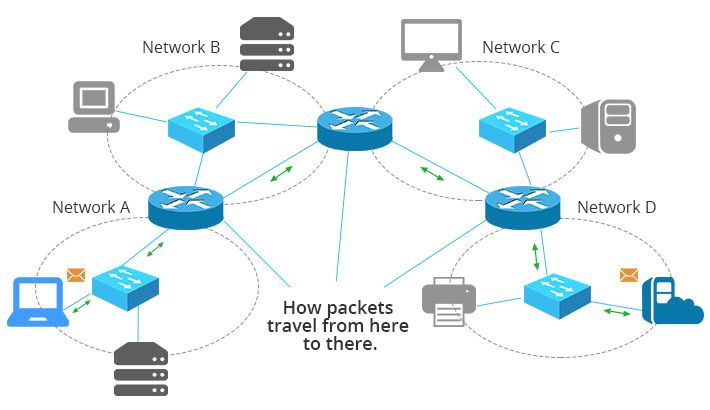
Works mainly at Layer 3 – Network Layer
Uses IP addresses
Makes routing decisions
📌 Routers do NOT use MAC addresses for routing decisions.
🧭 Main Functions of a Router
A router performs the following key functions:
1️⃣ Path Selection (Routing)
2️⃣ Packet Forwarding
3️⃣ Network Interconnection
4️⃣ Traffic Control
We’ll focus mainly on Packet Forwarding in this topic.
📦 What is a Packet?
At the Network Layer, data is called a packet.
📌 A packet contains:
Source IP address
Destination IP address
Data
Control information
🔁 What is Packet Forwarding?
🧠 Basic Idea
Packet Forwarding is the process of moving a packet from an incoming interface to the correct outgoing interface on a router.
📌 In simple words:
Packet forwarding is how a router sends a packet to the next router or destination.
🧠 Routing vs Packet Forwarding
Routing | Packet Forwarding |
|---|---|
Decides the path | Moves packet to next hop |
Control plane | Data plane |
Happens occasionally | Happens for every packet |
Uses routing algorithms | Uses routing table |
📌 Routing thinks, forwarding acts.
🧠 How a Router Forwards a Packet (Step-by-Step)
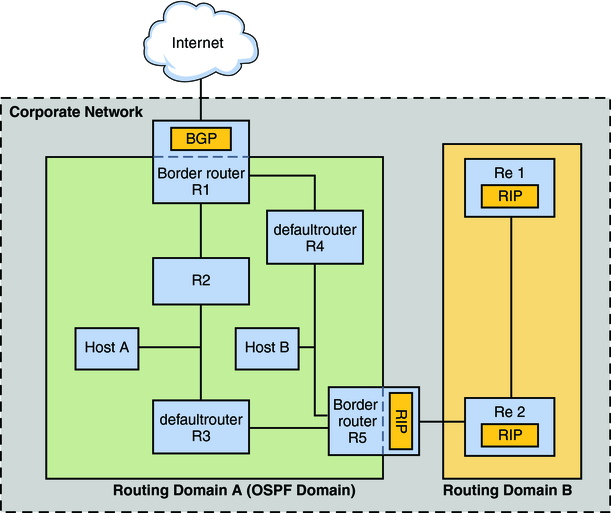
Let’s understand this very clearly 👇
🪜 Step 1: Packet Arrives at Router
Packet comes to router through an incoming interface
Router reads the destination IP address
🪜 Step 2: Routing Table Lookup
Router checks its routing table to find:
Best matching destination network
Corresponding next hop
Outgoing interface
📌 This uses the longest prefix match rule.
🪜 Step 3: Update Packet Header
Decrease TTL (Time To Live) by 1
Recalculate header checksum
📌 Prevents infinite looping 🔁
🪜 Step 4: Encapsulation
Packet is encapsulated into a new frame
Uses MAC address of next hop
📌 IP remains same, MAC changes.
🪜 Step 5: Forward Packet
Packet is sent through outgoing interface
Goes to next router or destination network
🧠 Routing Table Structure (Revisited)
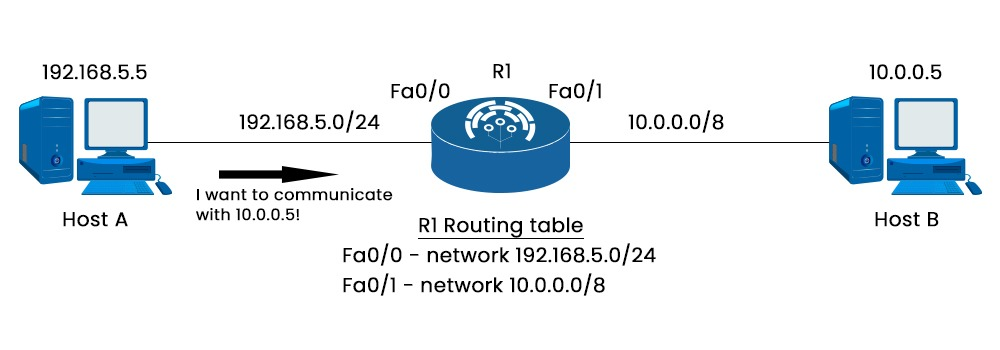
Let’s understand this very clearly 👇
🪜 Step 1: Packet Arrives at Router
Packet comes to router through an incoming interface
Router reads the destination IP address
🪜 Step 2: Routing Table Lookup
Router checks its routing table to find:
Best matching destination network
Corresponding next hop
Outgoing interface
📌 This uses the longest prefix match rule.
🪜 Step 3: Update Packet Header
Decrease TTL (Time To Live) by 1
Recalculate header checksum
📌 Prevents infinite looping 🔁
🪜 Step 4: Encapsulation
Packet is encapsulated into a new frame
Uses MAC address of next hop
📌 IP remains same, MAC changes.
🪜 Step 5: Forward Packet
Packet is sent through outgoing interface
Goes to next router or destination network
🧠 Routing Table Structure (Revisited)
A routing table contains:
Destination Network
Subnet Mask / Prefix
Next Hop IP
Interface
Metric
📌 Router always selects best route.
🔑 Longest Prefix Match
When multiple routes match:
Router selects route with most specific subnet mask
📌 Example:
/24preferred over/16/26preferred over/24
👉 More bits = more specific = better match.
🧠 Types of Routers (Conceptual)
🔹 Core Router
Used in ISP backbone
Very high speed
🔹 Edge Router
Connects internal network to Internet
🔹 Wireless Router
Used in homes
Combines router + switch + access point
🔐 Additional Functions of Modern Routers
NAT (Network Address Translation)
Firewall filtering
QoS (Quality of Service)
Load balancing
📌 These are value-added features.
🧠 Packet Forwarding Example (Simple)
Source IP: 192.168.1.10
Destination IP: 8.8.8.8
Process:
Router checks routing table
No local network match
Uses default route
Forwards packet to ISP router
🚫 What Happens if No Route Is Found?
Packet is dropped
ICMP error message may be sent
Communication fails ❌
🧠 Router vs Switch (Quick Recall)
Feature | Router | Switch |
|---|---|---|
OSI Layer | Network (L3) | Data Link (L2) |
Address Used | IP | MAC |
Connects | Networks | Devices |
Routing | Yes | No |
⭐ Advantages of Routers
Connect multiple networks 🌍
Efficient data delivery
Reduce broadcast traffic
Enable Internet communication
⭐ One-Line Summary
🔹 Routers forward data packets between networks by examining IP addresses and using routing tables to choose the best path.