🤔 What is Network Topology?
A Network Topology refers to the physical or logical arrangement of computers and devices in a network.
📌 In simple words:
Network topology describes how computers are connected to each other.
Just like:
🏘️ Houses in a city can be arranged in different ways
Similarly, computers in a network can also be arranged in different ways
🧠 Why Do We Need Network Topology?
Choosing the right topology is important because it affects:
⚡ Network performance
💰 Cost of installation
🔧 Ease of maintenance
🔐 Network reliability
📈 Scalability (future expansion)
🧭 Types of Network Topologies
The most commonly used network topologies are:
1️⃣ Bus Topology
2️⃣ Star Topology
3️⃣ Ring Topology
4️⃣ Mesh Topology
5️⃣ Tree Topology
6️⃣ Hybrid Topology
We’ll study each one in detail 👇
🚌 Bus Topology
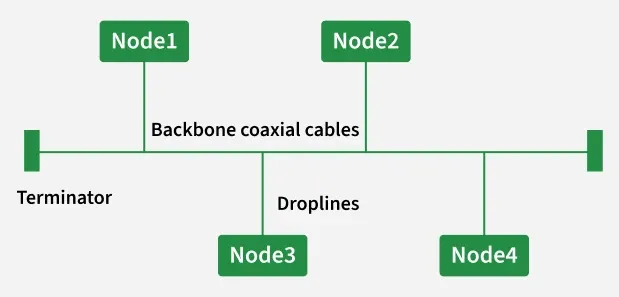
🔹 What is Bus Topology?
In Bus Topology, all computers are connected to a single main cable called the bus.
📌 Data travels in both directions along the cable.
🧠 Simple Analogy
Think of a single road 🛣️ where:
All houses are connected to the same road
Vehicles pass by every house
⭐ Advantages
Easy to install
Low cost
Requires less cable
❌ Disadvantages
If main cable fails → entire network fails
Difficult to troubleshoot
Performance decreases with more devices
⭐ Star Topology
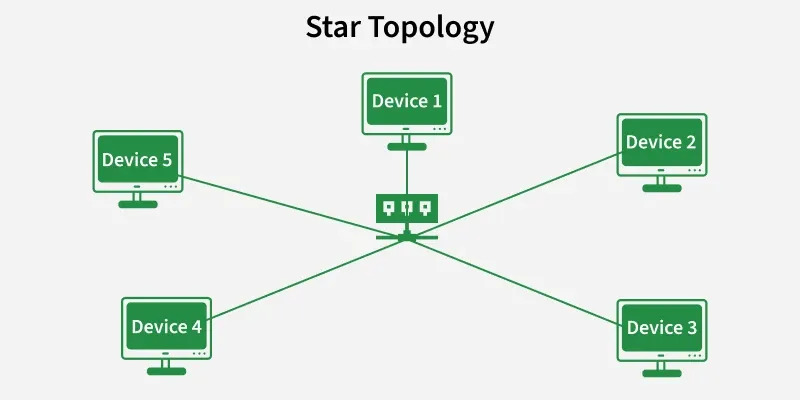
🔹 What is Star Topology?
In Star Topology, all computers are connected to a central device (Hub or Switch).
📌 All communication passes through the central node.
🧠 Simple Analogy
Think of a teacher 👩🏫 in a classroom:
Students talk through the teacher
Teacher manages communication
⭐ Advantages
Easy to manage
Failure of one node does not affect others
Easy to add or remove devices
❌ Disadvantages
Central device failure breaks network
More cabling required
Higher cost than bus topology
📌 Most commonly used topology today
🔁 Ring Topology
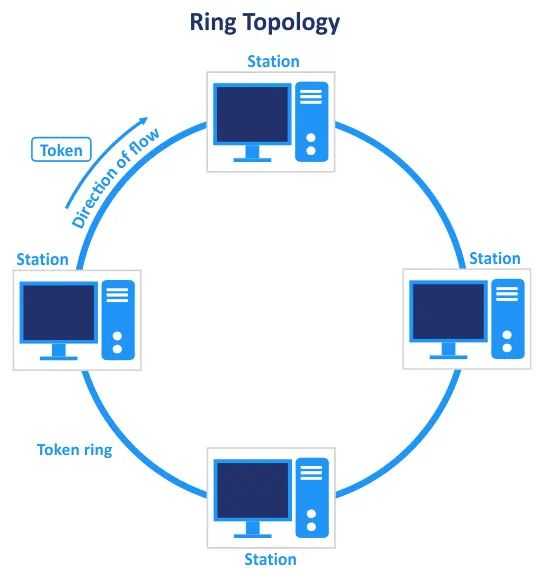
🔹 What is Ring Topology?
In Ring Topology, each computer is connected to two neighboring computers, forming a circle (ring).
📌 Data travels in one direction (usually).
🧠 Simple Analogy
Think of people sitting in a circle and passing a message clockwise ⏰.
⭐ Advantages
Equal access for all nodes
No data collision
Better than bus in heavy traffic
❌ Disadvantages
Failure of one node can break network
Difficult to reconfigure
Slower than star topology
🕸️ Mesh Topology
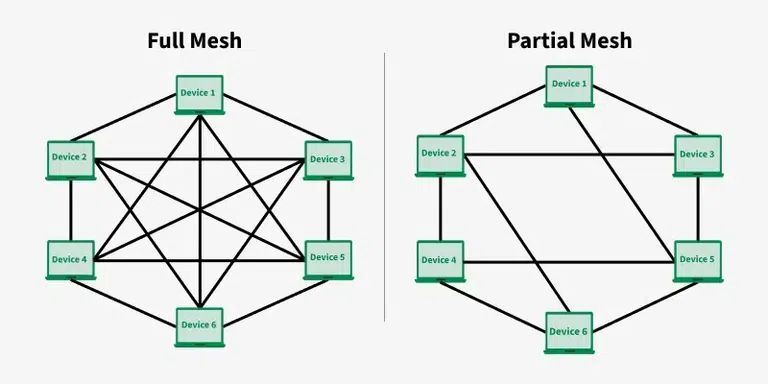
🔹 What is Mesh Topology?
In Mesh Topology, each computer is connected to every other computer.
📌 Can be:
Full Mesh
Partial Mesh
🧠 Simple Analogy
Think of WhatsApp group where everyone can message everyone directly 📲.
⭐ Advantages
Very reliable
No single point of failure
High security
❌ Disadvantages
Very expensive
Complex installation
Not practical for large networks
📌 Used in military and critical systems
🌳 Tree Topology
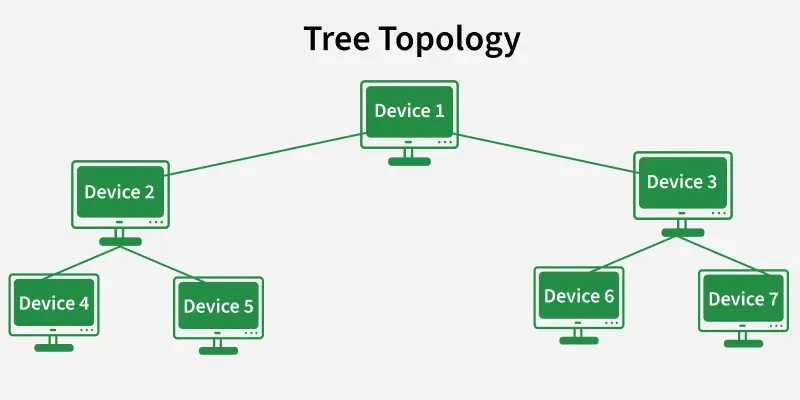
🔹 What is Tree Topology?
Tree Topology is a combination of Star and Bus topology.
📌 Structure looks like an inverted tree 🌳.
🧠 Simple Analogy
Think of a family tree:
Root → branches → leaves
⭐ Advantages
Easy expansion
Structured management
Suitable for large networks
❌ Disadvantages
Failure of backbone affects branches
Complex configuration
Costly
🔀 Hybrid Topology
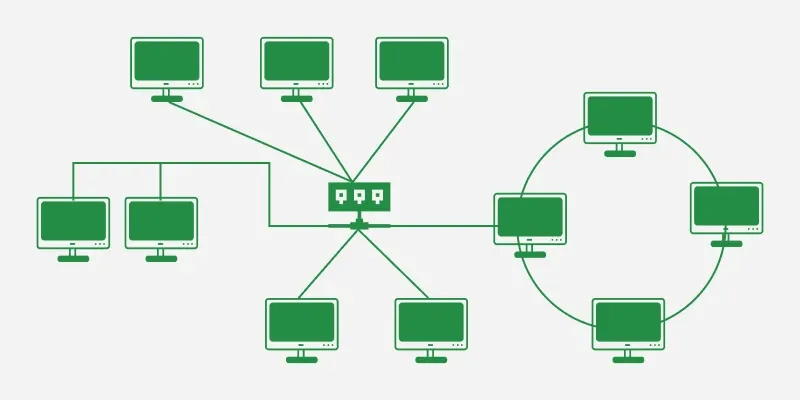
🔹 What is Hybrid Topology?
Hybrid Topology is a combination of two or more topologies.
📌 Example:
Star + Bus
Star + Ring
⭐ Advantages
Flexible
Highly reliable
Scalable
❌ Disadvantages
Complex design
High cost
Difficult maintenance
📌 Used in large organizations
📊 Comparison Table
Topology | Cost | Reliability | Scalability | Usage |
|---|---|---|---|---|
Bus | Low | Low | Poor | Small networks |
Star | Medium | High | Good | Homes, offices |
Ring | Medium | Medium | Poor | Rarely used |
Mesh | Very High | Very High | Poor | Critical systems |
Tree | High | Medium | Good | Enterprises |
Hybrid | Very High | High | Excellent | Large networks |
✍️ Definition
📌 Network topology is the physical or logical arrangement of network devices and communication links in a computer network.
⭐ One-Line Summary
🔹 Network topology defines how computers are connected and how data flows in a network.