🤔 What is Flow Control? (Basic Idea)
In a network, sender and receiver may not work at the same speed.
📌 Example:
Sender is very fast 💨
Receiver is slow 🐢
👉 If sender sends data too fast:
Receiver’s buffer gets full ❌
Data is lost ❌
Errors occur ❌
📌 To avoid this problem, we use Flow Control.
🧠 Simple Definition
📌 Flow control is a technique that controls the rate of data transmission so that the sender does not overwhelm the receiver.
🧠 Real-Life Analogy
🚰 Water Tap & Bucket Example
Tap = Sender
Bucket = Receiver
If water flows too fast:
Bucket overflows ❌
👉 Solution: Control water flow
That is exactly what flow control does in networking.
🎯 Why Flow Control is Needed
Flow control helps to:
🛑 Prevent buffer overflow
✔️ Avoid data loss
⚡ Improve efficiency
🔄 Maintain smooth communication
📶 Match sender speed with receiver speed
🧱 Where is Flow Control Used?
Flow control is mainly used in:
Data Link Layer
Transport Layer
📌 In this module, we focus on Data Link Layer flow control.
🧭 Main Flow Control Techniques
There are two main flow control methods:
1️⃣ Stop-and-Wait Flow Control
2️⃣ Sliding Window Flow Control
We’ll understand both in detail 👇
⏸️ 1. Stop-and-Wait Flow Control
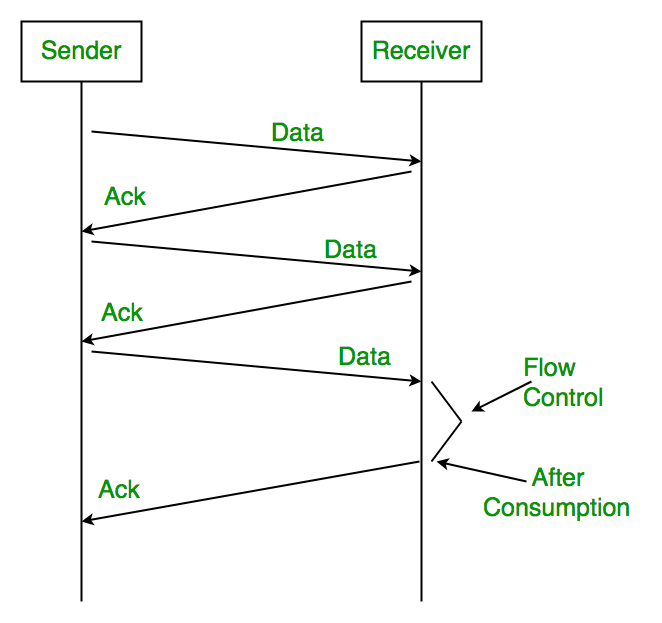
🔹 What is Stop-and-Wait?
In this method:
Sender sends one frame
Then waits for acknowledgment (ACK)
After ACK, sender sends next frame
📌 Only one frame at a time is in transit.
🧠 Step-by-Step Working
1️⃣ Sender sends Frame 1
2️⃣ Sender waits
3️⃣ Receiver receives Frame 1
4️⃣ Receiver sends ACK
5️⃣ Sender sends Frame 2
➡️ Process repeats 🔁
🧠 Simple Example
Think of WhatsApp voice note 🎤:
Send one message
Wait for “Delivered”
Send next message
✅ Advantages
Very simple
Easy to implement
No buffer overflow
❌ Disadvantages
Very slow ❌
Poor channel utilization
Wastes bandwidth
📌 Suitable only for small or slow networks.
🪟 2. Sliding Window Flow Control
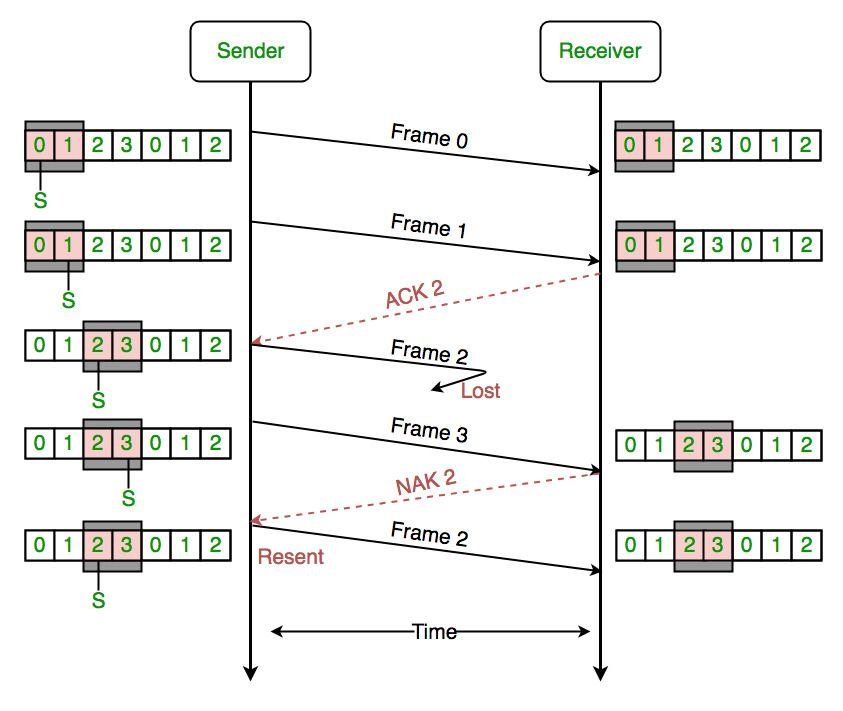
🔹 What is Sliding Window?
Sliding Window allows the sender to:
Send multiple frames at a time
Without waiting for ACK of each frame
📌 Number of frames allowed = Window Size
🧠 Key Concept: Window
Sender Window → Frames sender can send
Receiver Window → Frames receiver can accept
👉 Window slides forward as ACKs are received.
🧠 Step-by-Step Working
1️⃣ Sender sends multiple frames (within window size)
2️⃣ Receiver accepts frames
3️⃣ Receiver sends ACKs
4️⃣ Window slides forward
5️⃣ New frames are sent
🧠 Simple Analogy
📦 Courier Truck Example:
Truck can carry multiple boxes
Doesn’t wait after every box
Delivers efficiently
✅ Advantages
High efficiency ⚡
Better bandwidth utilization
Faster transmission
❌ Disadvantages
More complex
Needs buffer memory
Harder to implement
🧩 Types of Sliding Window Protocols
(Important for exams 📚)
1️⃣ Go-Back-N
2️⃣ Selective Repeat
📌 These are part of ARQ, but also support flow control.
We’ll study them in detail in later topics.
📊 Stop-and-Wait vs Sliding Window
Feature | Stop-and-Wait | Sliding Window |
|---|---|---|
Frames in transit | 1 | Multiple |
Speed | Slow | Fast |
Efficiency | Low | High |
Complexity | Simple | Complex |
Bandwidth usage | Poor | Good |
🧠 Flow Control vs Error Control (Common Confusion)
Aspect | Flow Control | Error Control |
|---|---|---|
Purpose | Control speed | Control errors |
Prevents | Buffer overflow | Data corruption |
Focus | Rate of data | Accuracy of data |
📌 Both work together, but they are different concepts.
⭐ One-Line Summary
🔹 Flow control ensures that a fast sender does not overwhelm a slow receiver in a network.