🤔 What is FTP? (Basic Idea)
Sometimes we need to:
Upload files to a server ⬆️
Download files from a server ⬇️
Manage files remotely 📁
👉 This is done using FTP.
🧠 Simple Definition
📌 FTP (File Transfer Protocol) is an application-layer protocol used to transfer files between a client and a server over a network.
🧠 Why FTP is Needed
FTP is used when:
Files are large
Regular email attachment is not suitable
Files must be stored on a remote server
📌 Examples:
Website file upload
Software distribution
Backup storage
🧠 Real-Life Analogy
🏦 Bank Locker Example
You go to the bank (server)
You authenticate (login)
You deposit or withdraw files (upload/download)
👉 FTP works the same way.
🧭 Where Does FTP Belong in OSI Model?
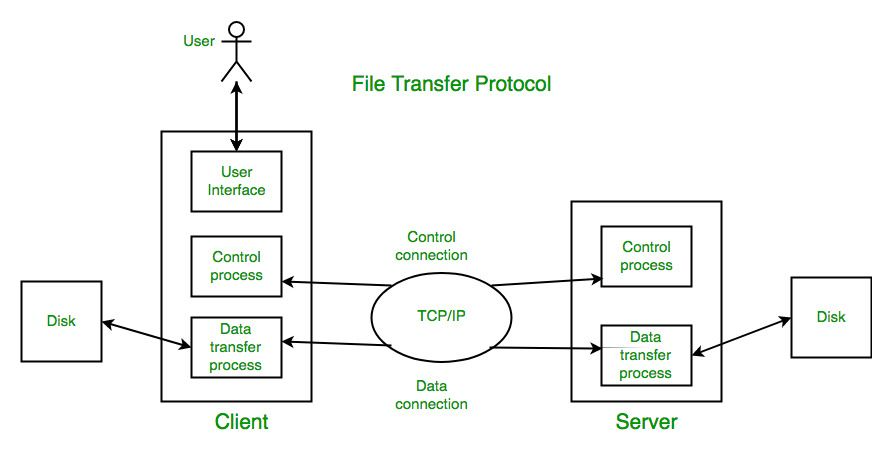
FTP is an Application Layer protocol
Uses TCP for reliable transfer
🔌 Ports Used by FTP
FTP uses two different connections:
Connection | Port | Purpose |
|---|---|---|
Control Connection | 21 | Commands & responses |
Data Connection | 20 (or dynamic) | Actual file transfer |
📌 This makes FTP different from most protocols.
🧩 Two Connections in FTP (Key Concept)
🔹 Control Connection
Established first
Remains open throughout session
Used for:
Login
Commands
Responses
🔹 Data Connection
Created only when needed
Used for:
Upload
Download
Directory listing
📌 Closed after transfer completes.
🔐 FTP Authentication
FTP supports:
👤 Username
🔑 Password
📌 Two login modes:
🔓 Anonymous FTP
Username:
anonymousPassword: email (optional)
📌 Used for public downloads.
🔒 Authenticated FTP
Requires valid username/password
Used for secure access
🔁 FTP Working (Step-by-Step)
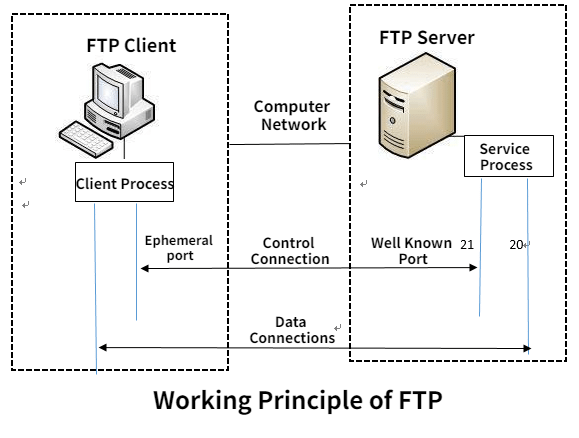
1️⃣ Client connects to server on port 21
2️⃣ Server asks for username/password
3️⃣ Client authenticated
4️⃣ Control connection stays open
5️⃣ Data connection opened when file transfer requested
6️⃣ File transferred
7️⃣ Data connection closed
8️⃣ Session ends
🔄 Modes of FTP: Active vs Passive
⚡ 1. Active FTP
🧠 How Active FTP Works
1️⃣ Client opens control connection to server
2️⃣ Client tells server its port
3️⃣ Server opens data connection from port 20 to client
📌 Server initiates data connection.
❌ Problems
Firewalls block incoming connections
Client security issues
🧲 2. Passive FTP
🧠 How Passive FTP Works
1️⃣ Client opens control connection
2️⃣ Client requests passive mode
3️⃣ Server provides a port number
4️⃣ Client opens data connection to server
📌 Client initiates both connections ✔️
✅ Advantages
Firewall friendly
Most commonly used today
⚖️ Active vs Passive FTP
Feature | Active FTP | Passive FTP |
|---|---|---|
Data connection initiated by | Server | Client |
Firewall friendly | ❌ No | ✅ Yes |
Security | Lower | Higher |
Usage | Rare today | Common |
📜 Common FTP Commands
Command | Purpose |
|---|---|
USER | Send username |
PASS | Send password |
LIST | List directory |
RETR | Download file |
STOR | Upload file |
QUIT | End session |
❌ Security Issues with FTP
FTP has major security problems:
❌ Username sent in plain text
❌ Password sent in plain text
❌ Data not encrypted
📌 Anyone can sniff data 🚨
🔐 Secure Alternatives to FTP
Protocol | Description |
|---|---|
SFTP | FTP over SSH |
FTPS | FTP over SSL/TLS |
SCP | Secure copy |
📌 Used in modern systems.
🧠 FTP vs HTTP (Quick Comparison)
Feature | FTP | HTTP |
|---|---|---|
Purpose | File transfer | Web data |
Connections | Two | One |
State | Stateful | Stateless |
Security | Low | High (HTTPS) |
🧠 Memory Tricks
FTP = File Transfer
21 = Control
20 = Data
Passive = Client starts everything
⭐ One-Line Summary
🔹 FTP is an application-layer protocol that transfers files using separate control and data connections over TCP.