🤔 How Does Email Work?
When you send an email, three different tasks happen:
1️⃣ Sending the email
2️⃣ Storing the email
3️⃣ Retrieving the email
📌 One protocol cannot do all these tasks.
👉 That’s why we have three email protocols:
SMTP → Sending emails
POP3 → Receiving emails (download & delete)
IMAP → Receiving emails (sync & manage)
🧠 Simple Definitions
📤 SMTP (Simple Mail Transfer Protocol)
📌 Used to send emails from client to server and between mail servers.
📥 POP3 (Post Office Protocol v3)
📌 Used to receive emails by downloading them from server to client.
🔄 IMAP (Internet Message Access Protocol)
📌 Used to access and manage emails directly on the mail server.
🧠 Real-Life Analogy (Very Easy to Remember)
📮 Post Office Example
✉️ SMTP → Sending letter
📥 POP3 → Taking letters home (post office becomes empty)
📬 IMAP → Reading letters at post office (copies stay there)
🧭 Where Do These Protocols Work?
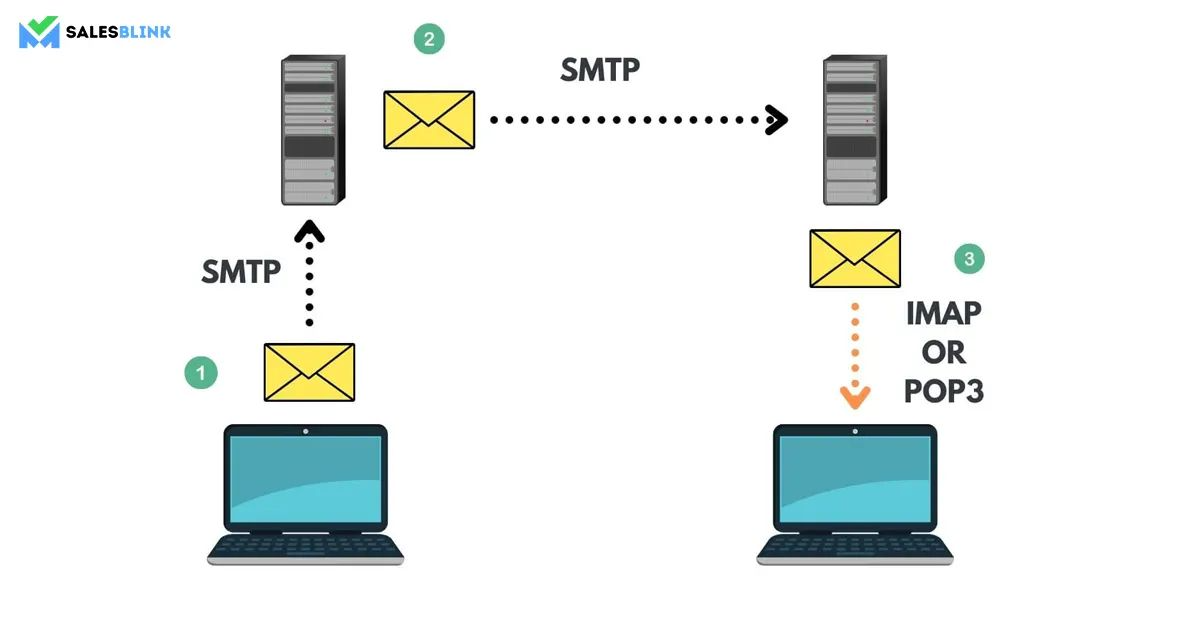
All three protocols belong to the:
Application Layer
Use TCP for reliable communication
📤 SMTP – Sending Emails
🧠 What is SMTP?
SMTP is responsible for:
Sending email from sender to sender’s mail server
Transferring email between mail servers
📌 SMTP is push-based (it pushes mail forward).
🔌 SMTP Port Numbers (Important ⭐)
Type | Port |
|---|---|
SMTP (default) | 25 |
SMTP (secure) | 465 / 587 |
🔁 SMTP Working (Simple Flow)
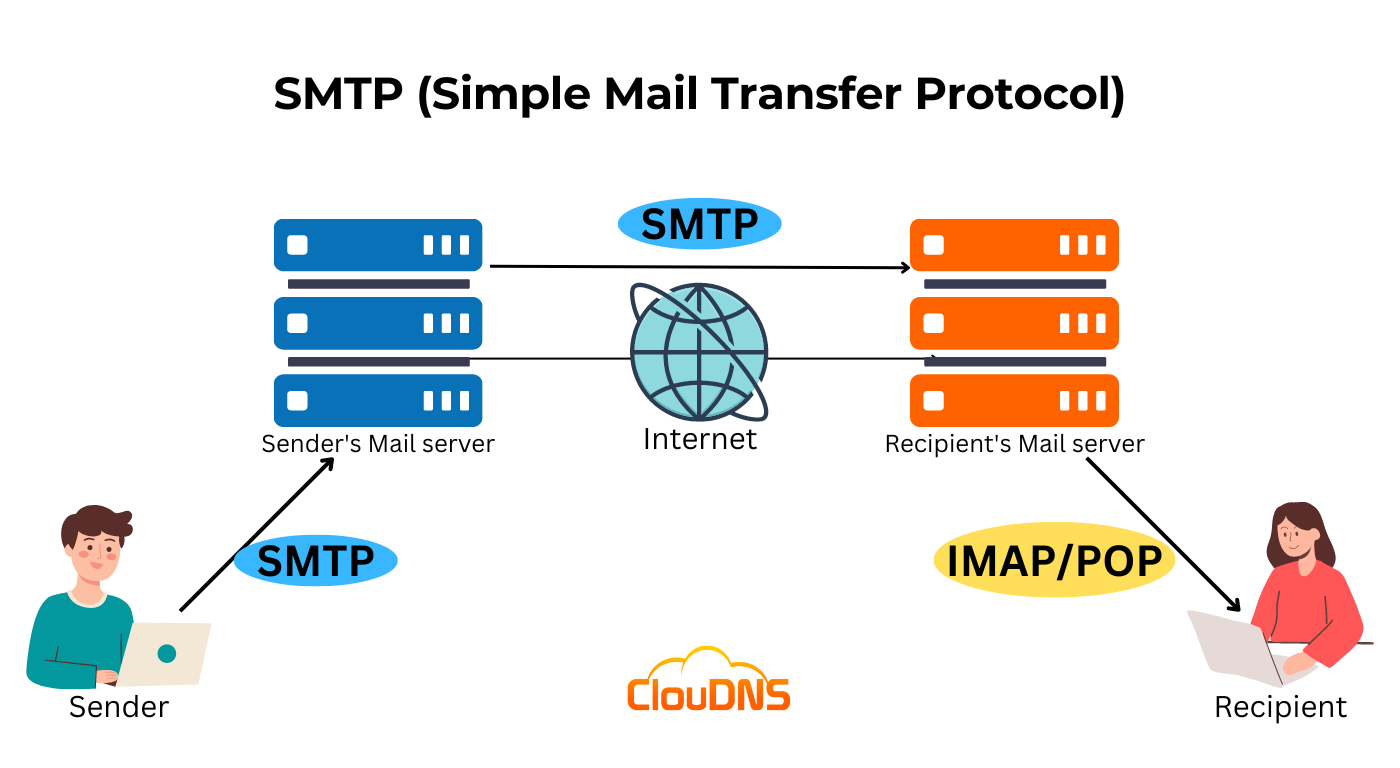
1️⃣ User writes email
2️⃣ Email client connects to SMTP server
3️⃣ SMTP sends mail to recipient’s mail server
4️⃣ Mail stored in recipient mailbox
📌 SMTP does not retrieve emails ❌
❌ Limitations of SMTP
Cannot download emails
No mailbox management
👉 That’s why POP3/IMAP are needed.
📥 POP3 – Receiving Emails (Download Mode)
🧠 What is POP3?
POP3 allows a client to:
Download emails from server
Usually delete emails from server after download
📌 POP3 is pull-based.
🔌 POP3 Port Numbers
Type | Port |
|---|---|
POP3 | 110 |
POP3S (secure) | 995 |
🔁 POP3 Working
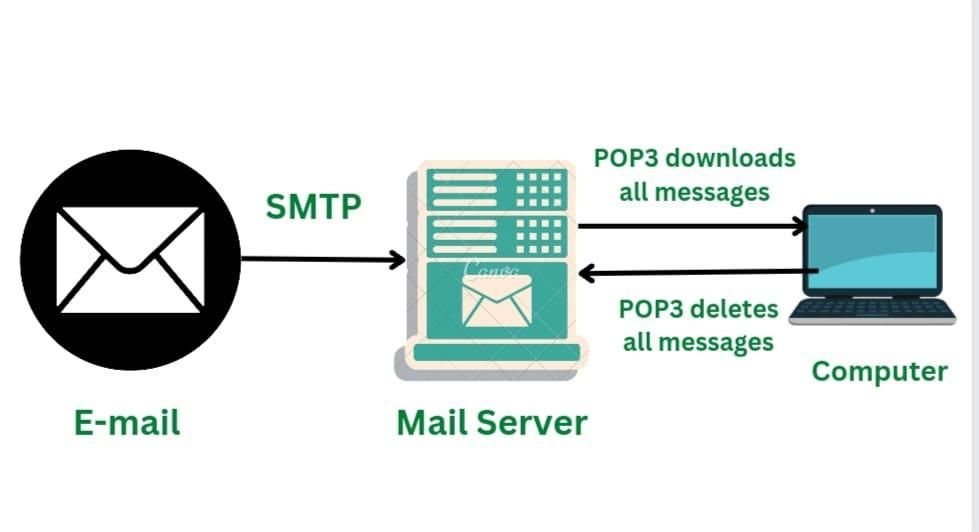
1️⃣ Client connects to POP3 server
2️⃣ Emails are downloaded
3️⃣ Emails removed from server
4️⃣ User reads emails locally
❌ POP3 Limitations
Emails stored on one device only
No synchronization
Not suitable for multiple devices
🔄 IMAP – Receiving Emails (Sync Mode)
🧠 What is IMAP?
IMAP allows:
Emails to stay on server
Access from multiple devices
Real-time synchronization
📌 IMAP is server-centric.
🔌 IMAP Port Numbers
Type | Port |
|---|---|
IMAP | 143 |
IMAPS (secure) | 993 |
🔁 IMAP Working
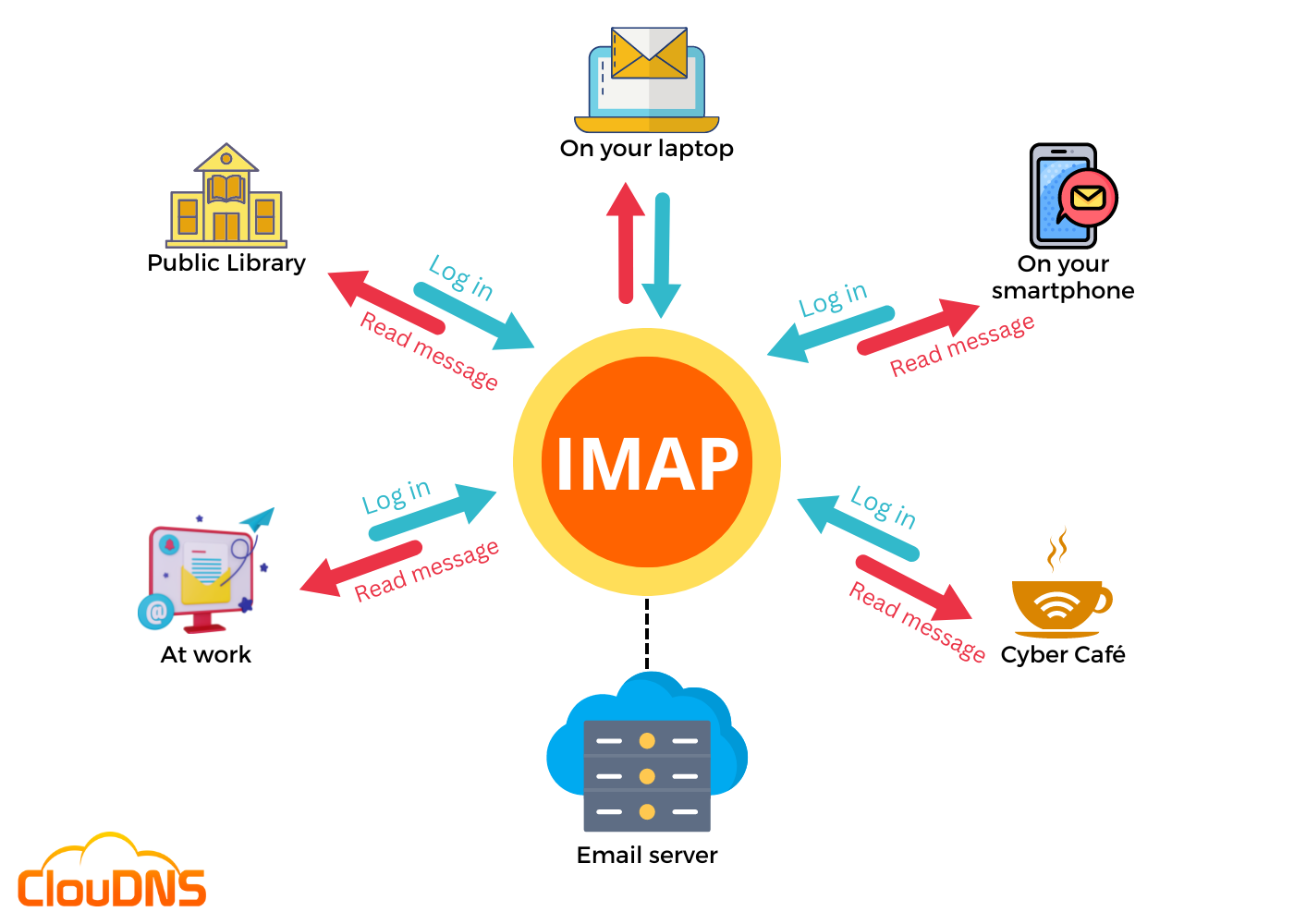
1️⃣ Client connects to IMAP server
2️⃣ Emails remain on server
3️⃣ Actions synced across devices
4️⃣ User sees same mailbox everywhere
✅ Advantages of IMAP
Multi-device access 📱💻
Folder management
Server-side storage
Better for modern email usage
⚖️ SMTP vs POP3 vs IMAP
Feature | SMTP | POP3 | IMAP |
|---|---|---|---|
Purpose | Send email | Receive email | Receive & manage email |
Direction | Client → Server | Server → Client | Server ↔ Client |
Storage | No | Local | Server |
Sync | ❌ No | ❌ No | ✅ Yes |
Multi-device | ❌ No | ❌ No | ✅ Yes |
Usage | Mandatory | Old systems | Modern systems |
🧠 Which Protocol Is Used When?
Action | Protocol |
|---|---|
Sending email | SMTP |
Receiving email (single device) | POP3 |
Receiving email (multiple devices) | IMAP |
🔐 Security Aspect (Important)
Modern systems use:
SMTPS
POP3S
IMAPS
📌 These use SSL/TLS encryption.
🧠 Memory Tricks
SMTP = Send
POP3 = Pull & Delete
IMAP = Internet Mail Anywhere 📱💻
⭐ One-Line Summary
🔹 SMTP sends emails, POP3 downloads emails to a local device, and IMAP synchronizes emails across multiple devices while keeping them on the server.