🤔 What is HTTP? (Basic Idea)
When you open a website, your browser must:
Ask the server for a web page
Receive data (HTML, images, videos)
📌 This communication happens using HTTP.
🧠 Simple Definition of HTTP
📌 HTTP (HyperText Transfer Protocol) is an application-layer protocol used for transferring web pages between a client (browser) and a server.
🌍 Why Is It Called HyperText?
HyperText → Text containing links
Clicking a link → loads another page
👉 HTTP was designed mainly for web documents.
🔄 How HTTP Works (Request–Response Model)
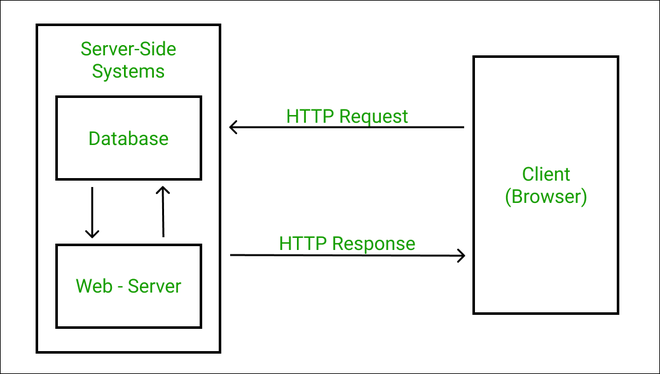
🧠 Step-by-Step
1️⃣ Browser sends HTTP Request
2️⃣ Server processes request
3️⃣ Server sends HTTP Response
4️⃣ Browser displays content
📌 Very simple and fast ⚡
📤 HTTP Request Contains
Method (GET, POST, etc.)
URL
Headers
(Optional) Data
📥 HTTP Response Contains
Status code (200, 404, etc.)
Headers
Content (HTML, JSON, etc.)
📜 Common HTTP Methods
Method | Purpose |
|---|---|
GET | Fetch data |
POST | Send data |
PUT | Update data |
DELETE | Remove data |
⚠️ Problem with HTTP
HTTP sends data:
❌ In plain text
❌ No encryption
❌ Easy to intercept
📌 Anyone on the network can:
Read passwords
Modify data
Steal information
👉 This is very dangerous 🚨
🔐 What is HTTPS?
HTTPS is the secure version of HTTP.
📌 HTTPS = HTTP + Security
🧠 Simple Definition of HTTPS
📌 HTTPS (HyperText Transfer Protocol Secure) is a secure version of HTTP that encrypts data using SSL/TLS.
🧠 How HTTPS Solves HTTP’s Problems
HTTPS provides:
🔐 Encryption
🛡️ Data integrity
🧾 Authentication
👉 Makes web communication secure.
🔑 Role of SSL / TLS in HTTPS
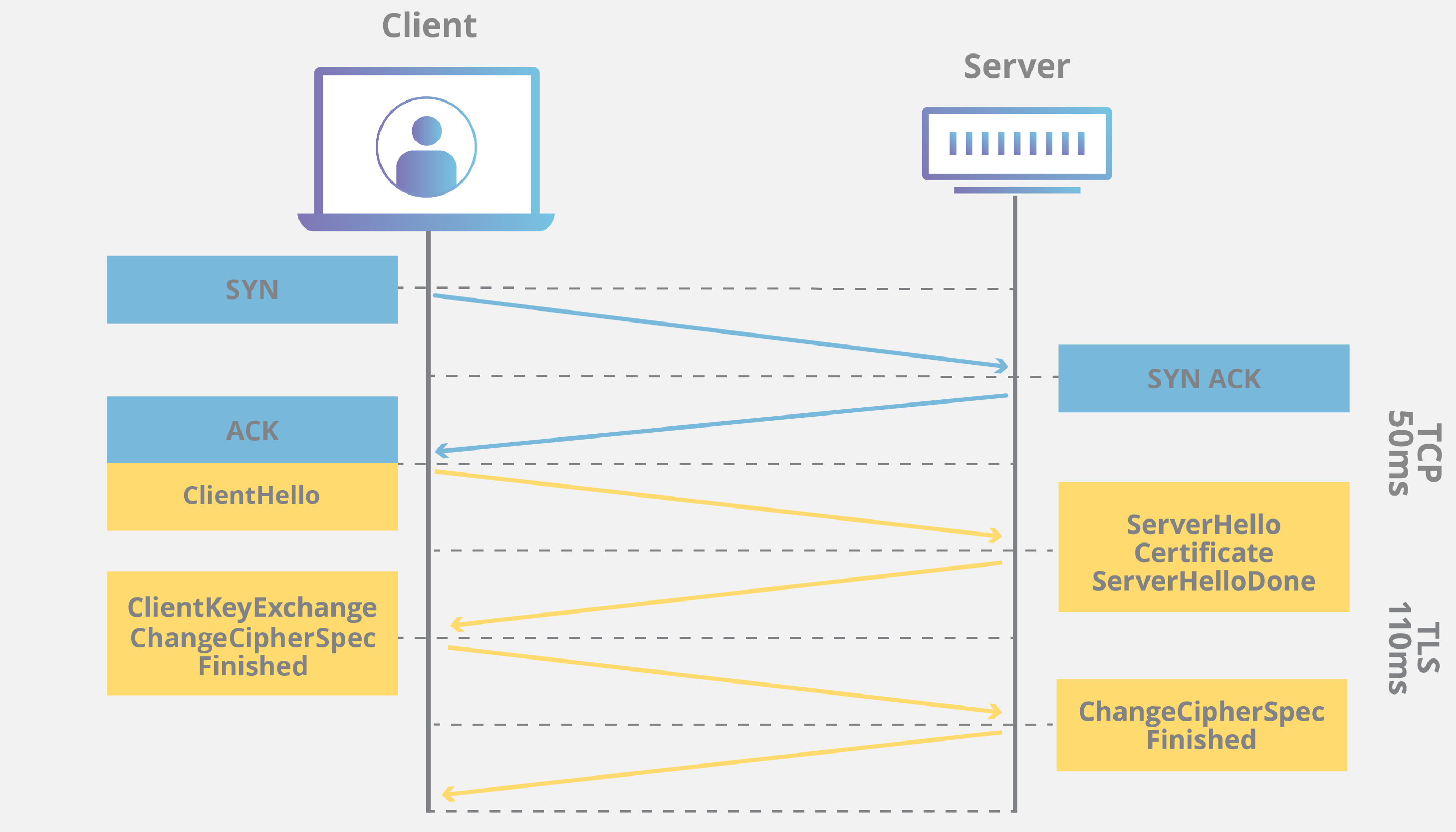
HTTPS uses:
SSL (Secure Sockets Layer)
TLS (Transport Layer Security)
📌 TLS is the modern version (SSL is outdated).
🧠 What SSL/TLS Does
Encrypts data 🔐
Verifies server identity 🧾
Prevents man-in-the-middle attacks 🚫
🤝 HTTPS Connection Setup (Simplified)
1️⃣ Browser connects to server
2️⃣ Server sends digital certificate
3️⃣ Browser verifies certificate
4️⃣ Secure key is created
5️⃣ Encrypted communication starts
📌 All this happens automatically ⚡
🔒 What is a Digital Certificate?
📌 A digital certificate:
Proves website identity
Issued by Certificate Authority (CA)
Example:
Google
Amazon
Banking websites
🟢 How to Identify HTTPS in Browser
🔒 Lock symbol in address bar
URL starts with
https://
📌 If lock is missing → not secure ❌
⚖️ HTTP vs HTTPS
Feature | HTTP | HTTPS |
|---|---|---|
Full Form | HyperText Transfer Protocol | HyperText Transfer Protocol Secure |
Security | ❌ Not secure | ✅ Secure |
Encryption | ❌ No | ✅ Yes |
Data Transfer | Plain text | Encrypted |
Port Number | 80 | 443 |
Certificate | Not required | Required |
SEO Ranking | Lower | Higher |
Usage | Old / unsafe | Modern / recommended |
🌐 Where Are HTTP & HTTPS Used?
📌 HTTP (Rare Today)
Internal testing
Non-sensitive content
📌 HTTPS (Mandatory)
Banking 💳
Shopping 🛒
Login pages 🔑
Social media 📱
📌 Modern browsers warn users for HTTP sites ⚠️
🧠 Performance: Is HTTPS Slower?
Earlier:
HTTPS was slower ❌
Now:
Modern hardware + TLS optimization
HTTPS is almost as fast as HTTP ✔️
👉 Security without speed loss 🚀
🧠 Memory Tricks
HTTP = No Lock 🔓
HTTPS = Lock 🔒 Secure
S in HTTPS = Security
⭐ One-Line Summary
🔹 HTTP transfers web data in plain text, while HTTPS encrypts communication to ensure security, privacy, and trust.