🧠 Core Idea
Lambda runs code without servers, but functions aren't directly accessible over the internet. If clients — websites, mobile apps, external users — need to reach your Lambda functions, something has to expose them as web APIs.
That's Amazon API Gateway: the front door to your serverless app, receiving client requests and forwarding them to backend services like Lambda.
🌐 What is API Gateway?
A fully managed service for creating, publishing, securing, and monitoring APIs. AWS handles the infrastructure — you focus on the application logic.
🤔 Why Do We Need API Gateway?
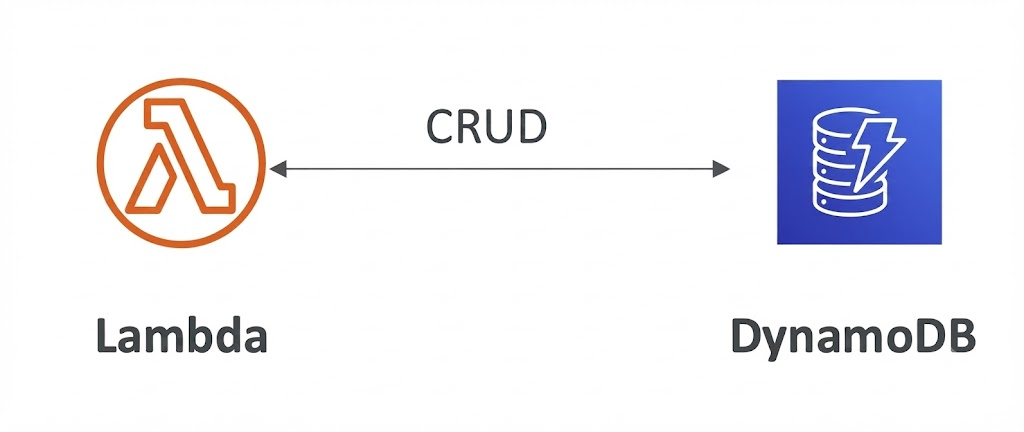
Picture a serverless app built with Lambda and DynamoDB. Lambda can process requests and read/write data — but users on the internet can't invoke a Lambda function directly.

Something needs to expose that function as a web endpoint. API Gateway does exactly that: it accepts requests from external clients and forwards them to the right Lambda function.
🏗️ How It Works
<div class="infographic-apiflow">
<style>
.infographic-apiflow {
--paper: #ffffff;
--ink: #1a1a1a;
--client-color: #1c2b3a;
--gw-color: #c9252e;
--lambda-color: #d2691e;
--ddb-color: #2f4ec7;
--line: #666666;
--accent: #2563eb;
--body-font: 'Inter', -apple-system, sans-serif;
max-width: 980px;
margin: 0 auto;
box-sizing: border-box;
font-family: var(--body-font);
color: var(--ink);
background: var(--paper);
}
.infographic-apiflow[data-theme="dark"] {
--paper: #121212;
--ink: #e8e6e1;
--line: #9a968c;
}
.infographic-apiflow * { box-sizing: border-box; }
.infographic-apiflow .af-inner { padding: clamp(1rem, 4vw, 1.5rem); }
.infographic-apiflow .af-controls {
display: flex;
gap: 0.6rem;
margin-bottom: 1.25rem;
}
.infographic-apiflow .af-btn {
display: inline-flex;
align-items: center;
gap: 0.4rem;
background: var(--accent);
color: #fff;
border: none;
padding: 0.5rem 1rem;
font: inherit;
font-weight: 600;
font-size: 0.82rem;
cursor: pointer;
}
.infographic-apiflow .af-btn.af-reset {
background: none;
color: var(--ink);
border: 1px solid var(--line);
}
.infographic-apiflow .af-btn:disabled { opacity: 0.5; cursor: default; }
.infographic-apiflow .af-btn svg { width: 12px; height: 12px; }
.infographic-apiflow svg.af-diagram { display: block; width: 100%; height: auto; }
.infographic-apiflow .af-label {
font-size: 28px;
font-weight: 700;
fill: var(--ink);
font-family: var(--body-font);
text-anchor: middle;
}
.infographic-apiflow .af-arrow-label {
font-size: 21px;
font-weight: 600;
fill: var(--ink);
font-family: var(--body-font);
text-anchor: middle;
}
.infographic-apiflow .af-connector {
stroke: var(--line);
stroke-width: 2;
transition: stroke 0.2s, stroke-width 0.2s;
}
.infographic-apiflow .af-connector.is-lit-fwd,
.infographic-apiflow .af-connector.is-lit-back {
stroke: var(--accent);
stroke-width: 3;
}
.infographic-apiflow .af-node {
transition: filter 0.25s, transform 0.25s;
transform-box: fill-box;
transform-origin: center;
}
.infographic-apiflow .af-node.is-pulsing {
transform: scale(1.08);
filter: drop-shadow(0 0 8px rgba(37,99,235,0.65));
}
.infographic-apiflow .af-packet {
fill: var(--accent);
opacity: 0;
transition: cx 1.1s ease-in-out, opacity 0.2s;
}
.infographic-apiflow .af-packet.is-visible { opacity: 1; }
@media (prefers-reduced-motion: reduce) {
.infographic-apiflow .af-packet { transition: opacity 0.2s; }
.infographic-apiflow .af-node { transition: opacity 0.2s; }
}
</style>
<div class="af-inner">
<div class="af-controls">
<button class="af-btn" id="afPlay">
<svg viewBox="0 0 24 24" fill="currentColor"><polygon points="5,3 21,12 5,21"/></svg>
Play
</button>
<button class="af-btn af-reset" id="afReset">
<svg viewBox="0 0 24 24" fill="none" stroke="currentColor" stroke-width="2" stroke-linecap="round"><path d="M3 12a9 9 0 1 1 3 6.7"/><path d="M3 21v-6h6"/></svg>
Reset
</button>
</div>
<svg class="af-diagram" viewBox="0 0 1300 240" xmlns="http://www.w3.org/2000/svg">
<defs>
<marker id="afArrowR" markerWidth="9" markerHeight="9" refX="6" refY="4.5" orient="auto">
<path d="M0 0 L9 4.5 L0 9 Z" fill="var(--line)"/>
</marker>
<marker id="afArrowL" markerWidth="9" markerHeight="9" refX="3" refY="4.5" orient="auto">
<path d="M9 0 L0 4.5 L9 9 Z" fill="var(--line)"/>
</marker>
</defs>
<!-- Client (Supericons: lucide:monitor) -->
<g class="af-node" id="nodeClient" transform="translate(55,55) scale(2.9) translate(-12,-12)" fill="none" stroke="var(--client-color)" stroke-width="1.5" stroke-linecap="round" stroke-linejoin="round">
<rect width="20" height="14" x="2" y="3" rx="2"/>
<line x1="8" x2="16" y1="21" y2="21"/>
<line x1="12" x2="12" y1="17" y2="21"/>
</g>
<text x="55" y="147" text-anchor="middle" class="af-label">Client</text>
<!-- connector 1: Client <-> API Gateway -->
<line class="af-connector" id="lineC" x1="185" y1="60" x2="345" y2="60" marker-end="url(#afArrowR)" marker-start="url(#afArrowL)"/>
<text x="265" y="40" class="af-arrow-label">REST API</text>
<!-- API Gateway (Supericons: lucide:door-open) -->
<g class="af-node" id="nodeGW">
<rect x="345" y="15" width="90" height="90" fill="var(--gw-color)"/>
<g transform="translate(367,37) scale(1.9)" fill="none" stroke="#ffffff" stroke-width="1.8" stroke-linecap="round" stroke-linejoin="round">
<path d="M11 20H2"/>
<path d="M11 4.562v16.157a1 1 0 0 0 1.242.97L19 20V5.562a2 2 0 0 0-1.515-1.94l-4-1A2 2 0 0 0 11 4.561z"/>
<path d="M11 4H8a2 2 0 0 0-2 2v14"/>
<path d="M14 12h.01"/>
<path d="M22 20h-3"/>
</g>
</g>
<text x="390" y="147" class="af-label">API Gateway</text>
<!-- connector 2: API Gateway <-> Lambda -->
<line class="af-connector" id="lineG" x1="440" y1="60" x2="705" y2="60" marker-end="url(#afArrowR)" marker-start="url(#afArrowL)"/>
<text x="572" y="40" class="af-arrow-label">PROXY REQUESTS</text>
<!-- Lambda (lambda glyph in circle) -->
<g class="af-node" id="nodeLambda">
<circle cx="755" cy="60" r="48" fill="none" stroke="var(--lambda-color)" stroke-width="3"/>
<text x="755" y="82" text-anchor="middle" font-size="58" font-family="Georgia, serif" fill="var(--lambda-color)">λ</text>
</g>
<text x="755" y="147" class="af-label">Lambda</text>
<!-- connector 3: Lambda <-> DynamoDB -->
<line class="af-connector" id="lineL" x1="805" y1="60" x2="1090" y2="60" marker-end="url(#afArrowR)" marker-start="url(#afArrowL)"/>
<text x="947" y="40" class="af-arrow-label">CRUD</text>
<!-- DynamoDB (Supericons: lucide:database) -->
<g class="af-node" id="nodeDDB">
<rect x="1095" y="15" width="90" height="90" fill="var(--ddb-color)"/>
<g transform="translate(1117,37) scale(1.9)" fill="none" stroke="#ffffff" stroke-width="1.8" stroke-linecap="round" stroke-linejoin="round">
<ellipse cx="12" cy="5" rx="9" ry="3"/>
<path d="M3 5V19A9 3 0 0 0 21 19V5"/>
<path d="M3 12A9 3 0 0 0 21 12"/>
</g>
</g>
<text x="1140" y="147" class="af-label">DynamoDB</text>
<!-- travelling packet -->
<circle class="af-packet" id="afPacket" cx="185" cy="60" r="9"/>
</svg>
</div>
<script>
(function () {
var wrapper = document.currentScript.closest('.infographic-apiflow')
|| document.querySelector('.infographic-apiflow');
var bodyAttr = document.body.getAttribute('data-darkmode');
var dark;
if (bodyAttr === 'true') {
dark = true;
} else if (bodyAttr === 'false') {
dark = false;
} else {
var match = document.cookie.match(/(?:^|;\s*)darkMode=([^;]+)/);
dark = match ? match[1] === 'true' : false;
}
if (dark) wrapper.setAttribute('data-theme', 'dark');
var playBtn = wrapper.querySelector('#afPlay');
var resetBtn = wrapper.querySelector('#afReset');
var packet = wrapper.querySelector('#afPacket');
var lineC = wrapper.querySelector('#lineC');
var lineG = wrapper.querySelector('#lineG');
var lineL = wrapper.querySelector('#lineL');
var nodeClient = wrapper.querySelector('#nodeClient');
var nodeGW = wrapper.querySelector('#nodeGW');
var nodeLambda = wrapper.querySelector('#nodeLambda');
var nodeDDB = wrapper.querySelector('#nodeDDB');
var allLines = [lineC, lineG, lineL];
var allNodes = [nodeClient, nodeGW, nodeLambda, nodeDDB];
var timers = [];
function clearTimers() { timers.forEach(clearTimeout); timers = []; }
function resetState() {
clearTimers();
allLines.forEach(function (l) { l.classList.remove('is-lit-fwd', 'is-lit-back'); });
allNodes.forEach(function (n) { n.classList.remove('is-pulsing'); });
packet.classList.remove('is-visible');
packet.setAttribute('cx', 185);
playBtn.disabled = false;
}
function play() {
resetState();
playBtn.disabled = true;
var d = 1150;
var t = 0;
// request: client -> gateway -> lambda -> dynamodb
nodeClient.classList.add('is-pulsing');
packet.classList.add('is-visible');
timers.push(setTimeout(function () {
nodeClient.classList.remove('is-pulsing');
lineC.classList.add('is-lit-fwd');
packet.setAttribute('cx', 345);
}, t += 450));
timers.push(setTimeout(function () {
lineC.classList.remove('is-lit-fwd');
nodeGW.classList.add('is-pulsing');
}, t += d));
timers.push(setTimeout(function () {
nodeGW.classList.remove('is-pulsing');
lineG.classList.add('is-lit-fwd');
packet.setAttribute('cx', 705);
}, t += 600));
timers.push(setTimeout(function () {
lineG.classList.remove('is-lit-fwd');
nodeLambda.classList.add('is-pulsing');
}, t += d));
timers.push(setTimeout(function () {
nodeLambda.classList.remove('is-pulsing');
lineL.classList.add('is-lit-fwd');
packet.setAttribute('cx', 1090);
}, t += 600));
timers.push(setTimeout(function () {
lineL.classList.remove('is-lit-fwd');
nodeDDB.classList.add('is-pulsing');
packet.classList.remove('is-visible');
}, t += d));
// response: dynamodb -> lambda -> gateway -> client
timers.push(setTimeout(function () {
nodeDDB.classList.remove('is-pulsing');
lineL.classList.add('is-lit-back');
packet.setAttribute('cx', 805);
packet.classList.add('is-visible');
}, t += 750));
timers.push(setTimeout(function () {
lineL.classList.remove('is-lit-back');
nodeLambda.classList.add('is-pulsing');
}, t += d));
timers.push(setTimeout(function () {
nodeLambda.classList.remove('is-pulsing');
lineG.classList.add('is-lit-back');
packet.setAttribute('cx', 440);
}, t += 600));
timers.push(setTimeout(function () {
lineG.classList.remove('is-lit-back');
nodeGW.classList.add('is-pulsing');
}, t += d));
timers.push(setTimeout(function () {
nodeGW.classList.remove('is-pulsing');
lineC.classList.add('is-lit-back');
packet.setAttribute('cx', 185);
}, t += 600));
timers.push(setTimeout(function () {
lineC.classList.remove('is-lit-back');
nodeClient.classList.add('is-pulsing');
packet.classList.remove('is-visible');
}, t += d));
timers.push(setTimeout(function () {
nodeClient.classList.remove('is-pulsing');
playBtn.disabled = false;
}, t += 600));
}
playBtn.addEventListener('click', play);
resetBtn.addEventListener('click', resetState);
})();
</script>
</div>Client sends an HTTP request
API Gateway receives it
Forwards it to a Lambda function
Lambda processes the request, reads/writes DynamoDB if needed
Response flows back through API Gateway to the client
Together, API Gateway (requests) + Lambda (logic) + DynamoDB (data) form a fully serverless app — no servers to provision or manage.
API Gateway is serverless itself: no infrastructure to manage, automatic scaling, built-in high availability. Traffic spikes are handled automatically.
REST APIs — standard HTTP methods (GET, POST, PUT, DELETE); used by websites, mobile/web apps, third-party integrations
WebSocket APIs — connections stay open for real-time communication; used for live chat, gaming, dashboards, notifications, streaming
Authentication — only authorized users/apps can invoke the API
API keys — identify clients, control access, track usage
Throttling — limits requests per period to prevent abuse and control costs
Monitoring — tracks traffic, request volume, performance, and errors
Whether you get a few requests a day or thousands per second, API Gateway scales automatically — no manual intervention needed.
🌟 Why Use API Gateway?
Fully managed, serverless
Automatic scaling
Easy to create and secure APIs
Built-in auth, API keys, throttling, monitoring
Native Lambda integration
🎓 Exam Tips
API Gateway = entry point for serverless APIs
Lambda functions aren't exposed directly to the internet — API Gateway is the front door
Commonly paired with Lambda and DynamoDB
Supports both REST and WebSocket APIs
Built-in: authentication, API keys, throttling, monitoring, auto-scaling
"Expose a Lambda function as an HTTP API" → Amazon API Gateway
🧠 Key Takeaways
API Gateway is a fully managed service for building and securing APIs
It lets external clients reach Lambda functions securely
Serverless and auto-scaling by design
Supports REST and WebSocket APIs
Built-in authentication, API keys, throttling, and monitoring
Common architecture: Client → API Gateway → Lambda → DynamoDB