🧠 Core Idea
Not every workload needs to run continuously — some just need to process data at set times or when a batch of tasks is ready. These are batch jobs.
Instead of you provisioning and managing servers for them, AWS Batch automatically provisions infrastructure, runs the jobs, scales with demand, and tears resources down when done.
📦 What is AWS Batch?
A fully managed batch processing service that runs hundreds, thousands, even hundreds of thousands of batch jobs — without you manually launching EC2 instances every time you need more compute.
How AWS Batch Works
Submit or schedule a job
It enters a Batch Queue
AWS Batch determines the compute needed
It launches the right compute environment
The job runs
Resources scale down once idle
All automatic.
🕒 What is a Batch Job?
A task with a defined start and end (e.g. runs 1:00 AM → 3:00 AM, then finishes) — unlike an app that runs continuously.
🔹 | ⏱️ Batch Jobs | 🔄 Continuous Jobs |
|---|---|---|
Duration | Start and end | Run indefinitely |
Completion | Finishes after processing | Never stops |
Best for | Scheduled workloads | Real-time applications |
Jobs don't run immediately — they wait in a Batch Queue until compute resources are available. AWS Batch continuously monitors the queue and schedules jobs as resources free up, so large volumes of jobs get handled efficiently.
AWS Batch dynamically provisions EC2 or EC2 Spot Instances based on queue demand — scaling up as jobs arrive, and terminating resources as the workload drops.
It also automatically sizes the CPU, memory, and compute capacity each job needs — no manual server sizing required.
Every Batch job is packaged as a Docker image — app, libraries, dependencies, and runtime included — so jobs run consistently no matter the environment.
Batch can run these containers on:
Amazon ECS
Amazon EKS
AWS Fargate
Pick whichever container platform fits your architecture.
Compute only spins up when needed — no idle servers. Combine that with automatic scaling and optional Spot Instances, and infrastructure costs stay low while AWS handles the resource management.
🏗️ Example Architecture: Image Processing
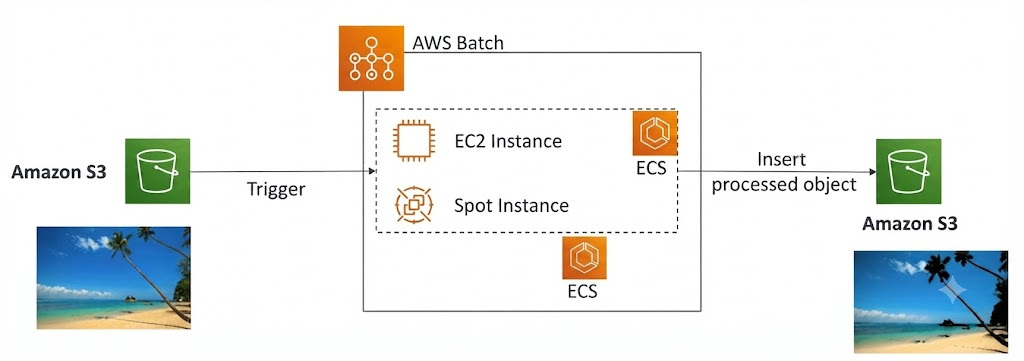
User uploads an image to S3
Upload triggers a batch job
Job enters the Batch Queue
AWS Batch provisions EC2/Spot Instances
Docker containers process the images
Processed images land in another S3 bucket
Compute scales automatically with how many jobs are queued.
⚖️ AWS Batch vs. AWS Lambda
🔹 | 📦 AWS Batch | ⚡ AWS Lambda |
|---|---|---|
Execution time | No practical limit | Max 15 minutes |
Compute | EC2/Spot Instances, managed by AWS | Fully serverless |
Runtime | Any runtime via Docker image | Supported/custom runtimes only |
Storage | EBS or Instance Store | Limited temp storage |
Best for | Long-running, compute-intensive jobs | Short-lived, event-driven functions |
🔍 When to Use AWS Batch
Processing large datasets
Scheduled workloads
Long-running jobs
Thousands of independent tasks
Workloads needing heavy CPU, memory, or storage
🎓 Exam Tips
Batch jobs have a defined start and end time
Jobs go into a Batch Queue
Packaged as Docker images
Runs on ECS, EKS, or Fargate
Provisions EC2 or Spot Instances automatically
AWS Batch is a managed service — not serverless
Large-scale/long-running/scheduled workloads → AWS Batch
Short-lived, event-driven, ≤15 min → AWS Lambda
🧠 Key Takeaways
AWS Batch is a fully managed service for large-scale batch computing
Batch jobs have a clear start and end, unlike continuous apps
Jobs queue up, then AWS Batch provisions EC2/Spot Instances automatically
Packaged as Docker images, runnable on ECS, EKS, or Fargate
No execution time limit — unlike Lambda's 15-minute cap
AWS Batch = large-scale batch processing, managed infrastructure, Docker-based