🎯 Goal of This Note
Write actual code to observe the event loop's behavior firsthand — testing timers, setImmediate, process.nextTick, file I/O, and the thread pool — to see if the theory from the previous lecture holds up in practice.
🛠️ Setup
📥 Grab the starter files for this section and open the project folder.
Download the Repo & Open
starterFolder :2-how-node-works
https://github.com/codevedadev/complete-node-bootcamp📄 Create a new file:
event-loop.js📁 There's also a starter file:
test-file.txt(used for a file-read demo).
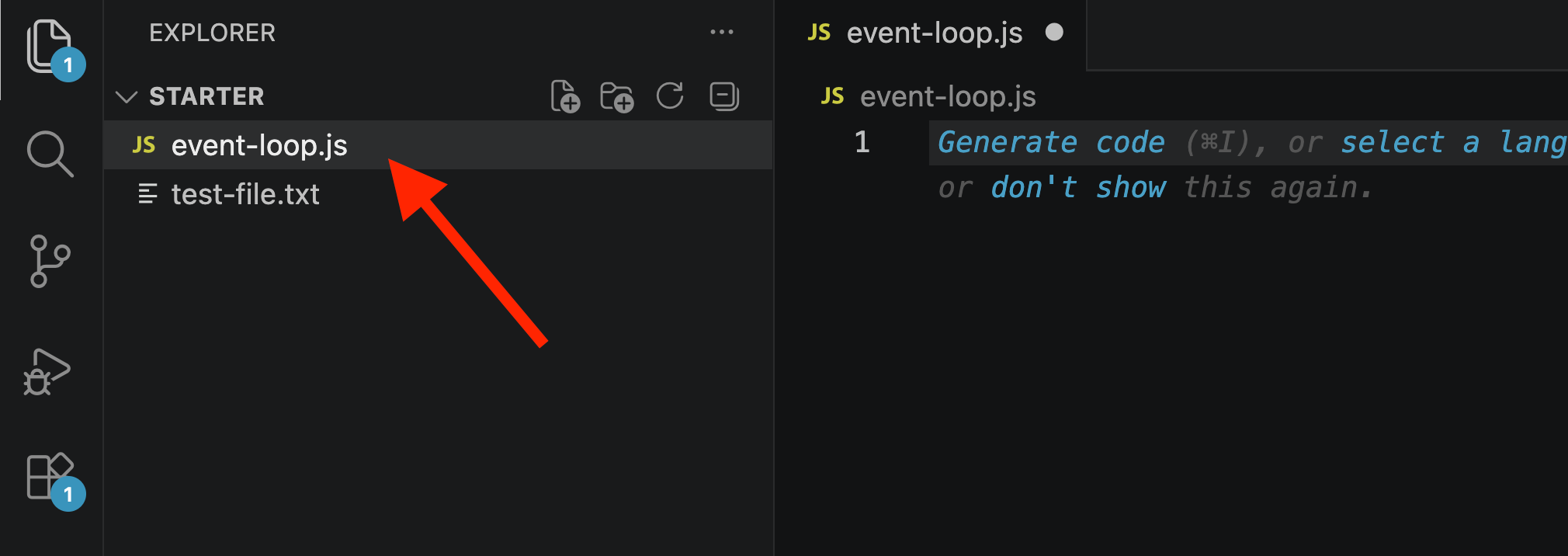
⚠️ Note: It's genuinely hard to fully simulate the event loop locally, since in a real production app, many callbacks would be queued up simultaneously (e.g., from thousands of incoming requests). Still, useful experiments can be done with a handful of async operations.
1️⃣ Writing the Initial Test Code
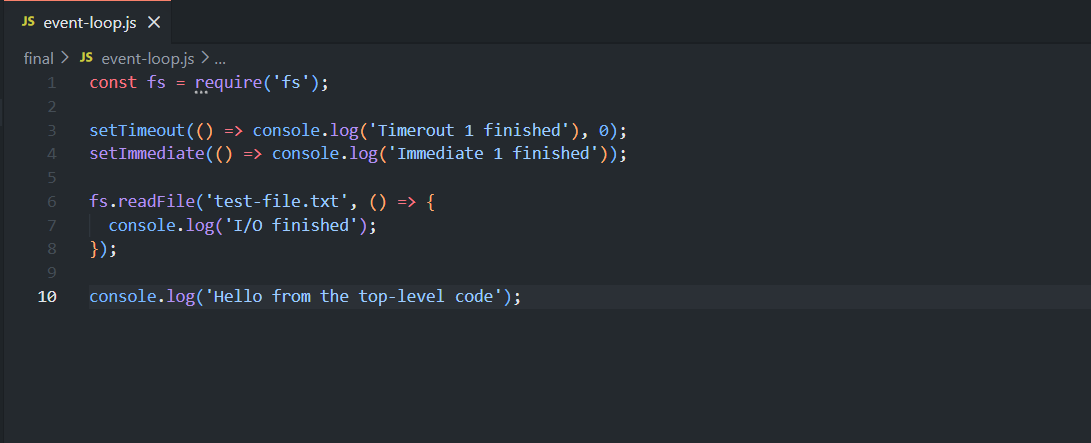
📝 What Each Piece Represents
💻 Code | 📌 Represents |
|---|---|
| 📦 Module loading — happens at startup, before the event loop starts |
| ⏰ A timer — Phase 1 of the event loop |
| ⚡ Runs right after the I/O polling phase — Phase 3 |
| 📁 An I/O task — Phase 2 (I/O polling/callbacks) |
| 🚀 Top-level code — runs immediately, before the event loop even starts |
2️⃣ Running the Code — First Observations
✅ Expected Behavior
Top-level code always runs first — since it's executed immediately when the module loads, before the event loop starts.
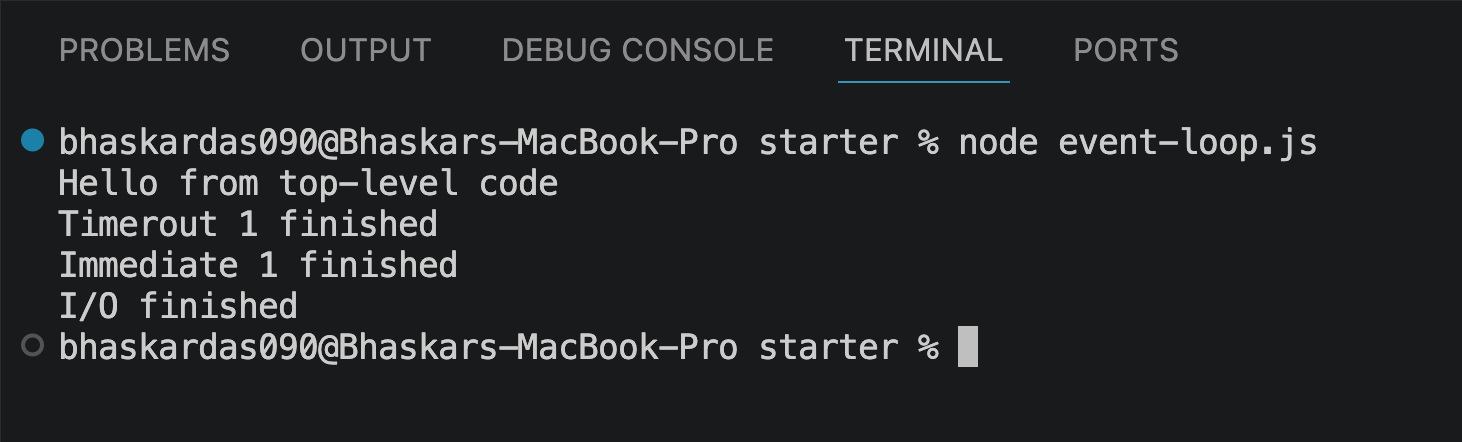
📋 Actual Result
Hello from the top-level code
[the other three logs, in no fixed/predictable order]
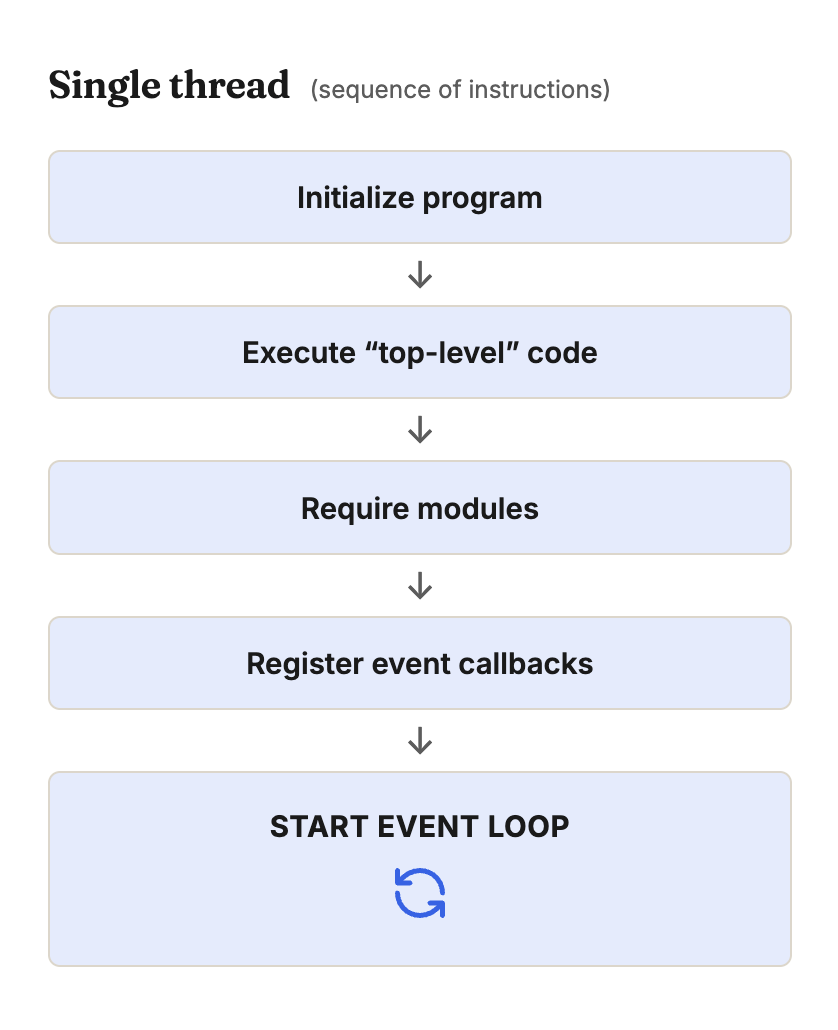
🤔 Why the Other Three Logs Have No Fixed Order (Yet)
<!DOCTYPE html>
<html lang="en">
<head>
<meta charset="UTF-8">
<meta name="viewport" content="width=device-width, initial-scale=1.0">
<title>Step through it</title>
</head>
<body>
<div class="trace-info" id="traceinfo">
<style>
.trace-info {
--ink: #1a1a1a;
--ink-soft: #5c5c5c;
--paper: #ffffff;
--paper-alt: #f0ece4;
--accent: #2563eb;
--accent-soft: #e3ebfd;
--line: #ddd6c9;
--display-font: 'Fraunces', Georgia, serif;
--body-font: 'Inter', system-ui, sans-serif;
--mono-font: 'IBM Plex Mono', monospace;
max-width: 880px;
margin: 0 auto;
box-sizing: border-box;
padding: 2rem;
font-family: var(--body-font);
color: var(--ink);
background: var(--paper);
}
.trace-info[data-theme="dark"] {
--ink: #e8e6e1;
--ink-soft: #9a968c;
--paper: #121212;
--paper-alt: #1c212b;
--accent: #5b8def;
--accent-soft: #202942;
--line: #2c313d;
}
.trace-info * { box-sizing: border-box; }
.tr-eyebrow {
font-family: var(--mono-font); font-size: 0.68rem; letter-spacing: 0.14em; text-transform: uppercase;
color: var(--accent); text-align: center; margin: 1.5rem 0 0.3rem;
}
.tr-title {
font-family: var(--display-font); font-size: clamp(1.35rem, 5vw, 1.8rem); text-align: center;
margin: 0 0 0.5rem; letter-spacing: -0.01em;
}
.tr-sub { color: var(--ink-soft); font-size: 0.88rem; text-align: center; margin: 0 0 1.4rem; max-width: 480px; margin-left: auto; margin-right: auto; }
.tr-code-wrap { background: #1e1e1e; border-radius: 8px; padding: 0.7rem 0; margin-bottom: 1rem; overflow-x: auto; }
.tr-code-line { display: flex; gap: 0.9rem; padding: 0.12rem 1rem; font-family: var(--mono-font); font-size: 0.74rem; line-height: 1.7; white-space: pre; transition: background 0.25s; }
.tr-code-line.is-current { background: rgba(97, 175, 239, 0.16); }
.tr-ln { color: #5a5a5a; user-select: none; width: 14px; text-align: right; flex-shrink: 0; }
.tr-code-line.is-current .tr-ln { color: #61afef; }
.tr-src { color: #d4d4d8; }
.tok-kw { color: #c678dd; }
.tok-fn { color: #61afef; }
.tok-str { color: #98c379; }
.tok-punc { color: #6b7280; }
.tok-expr { color: #56b6c2; }
.tr-panels { display: flex; gap: 0.8rem; margin-bottom: 1rem; flex-wrap: wrap; }
.tr-panel { flex: 1 1 220px; border: 1px solid var(--line); border-radius: 8px; background: var(--paper-alt); padding: 0.75rem 0.9rem; }
.tr-panel-label { font-size: 0.64rem; font-weight: 700; letter-spacing: 0.06em; text-transform: uppercase; color: var(--ink-soft); margin-bottom: 0.5rem; }
.tr-chip-row { display: flex; flex-direction: column; gap: 0.35rem; min-height: 24px; }
.tr-chip {
display: flex; align-items: center; justify-content: space-between; gap: 0.4rem;
font-family: var(--mono-font); font-size: 0.72rem; padding: 0.3rem 0.55rem;
border: 1px solid var(--line); border-radius: 5px; background: var(--paper); color: var(--ink-soft);
opacity: 0; transform: translateY(-4px); animation: tr-in 0.25s ease forwards;
}
@keyframes tr-in { to { opacity: 1; transform: none; } }
.tr-chip.is-done { color: var(--accent); border-color: var(--accent); background: var(--accent-soft); }
.tr-chip-check { width: 12px; height: 12px; flex-shrink: 0; color: var(--accent); opacity: 0; transition: opacity 0.2s; }
.tr-chip.is-done .tr-chip-check { opacity: 1; }
.tr-out-line { font-family: var(--mono-font); font-size: 0.72rem; color: var(--ink); opacity: 0; transform: translateY(-4px); animation: tr-in 0.25s ease forwards; }
.tr-out-line.is-sync { color: var(--accent); font-weight: 700; }
.tr-loop-banner {
display: flex; align-items: center; justify-content: center; gap: 0.5rem;
border: 1px dashed var(--line); border-radius: 8px; padding: 0.6rem; margin-bottom: 1rem;
font-family: var(--mono-font); font-size: 0.74rem; font-weight: 700; color: var(--ink-soft);
opacity: 0.4; transition: opacity 0.3s, border-color 0.3s, color 0.3s, background 0.3s;
}
.tr-loop-banner svg { width: 15px; height: 15px; }
.tr-loop-banner.is-active { opacity: 1; border-color: var(--accent); border-style: solid; background: var(--accent-soft); color: var(--accent); }
.tr-loop-banner.is-active svg { animation: tr-spin 1s linear infinite; }
@keyframes tr-spin { to { transform: rotate(360deg); } }
.tr-caption { text-align: center; font-size: 0.84rem; color: var(--ink-soft); line-height: 1.5; min-height: 2.6em; margin-bottom: 1rem; }
.tr-caption b { color: var(--ink); }
.tr-controls { display: flex; justify-content: center; align-items: center; gap: 0.7rem; margin-bottom: 0.6rem; }
.tr-btn {
font-family: var(--mono-font); font-size: 0.82rem; font-weight: 600; padding: 0.55rem 1.1rem;
border-radius: 5px; border: 1px solid var(--accent); background: var(--accent); color: #fff; cursor: pointer;
}
.tr-btn.is-ghost { background: var(--paper); color: var(--ink-soft); border-color: var(--line); }
.tr-btn:disabled { opacity: 0.4; cursor: default; }
.tr-step-count { font-family: var(--mono-font); font-size: 0.74rem; color: var(--ink-soft); }
.tr-hint { text-align: center; font-size: 0.78rem; color: var(--ink-soft); margin: 0.8rem 0 2rem; }
@media (prefers-reduced-motion: reduce) {
.trace-info *, .trace-info *::before, .trace-info *::after { transition-duration: 0.001ms !important; animation-duration: 0.001ms !important; }
.tr-loop-banner.is-active svg { animation: none; }
}
</style>
<div class="tr-code-wrap" id="trCode">
<div class="tr-code-line" data-line="1"><span class="tr-ln">1</span><span class="tr-src"><span class="tok-kw">const</span> fs = <span class="tok-fn">require</span><span class="tok-punc">(</span><span class="tok-str">'fs'</span><span class="tok-punc">);</span></span></div>
<div class="tr-code-line" data-line="2"><span class="tr-ln">2</span><span class="tr-src"> </span></div>
<div class="tr-code-line" data-line="3"><span class="tr-ln">3</span><span class="tr-src"><span class="tok-fn">setTimeout</span><span class="tok-punc">(() =></span> console.<span class="tok-fn">log</span><span class="tok-punc">(</span><span class="tok-str">'Timeout finished'</span><span class="tok-punc">),</span> <span class="tok-expr">0</span><span class="tok-punc">);</span></span></div>
<div class="tr-code-line" data-line="4"><span class="tr-ln">4</span><span class="tr-src"><span class="tok-fn">setImmediate</span><span class="tok-punc">(() =></span> console.<span class="tok-fn">log</span><span class="tok-punc">(</span><span class="tok-str">'Immediate finished'</span><span class="tok-punc">));</span></span></div>
<div class="tr-code-line" data-line="5"><span class="tr-ln">5</span><span class="tr-src"> </span></div>
<div class="tr-code-line" data-line="6"><span class="tr-ln">6</span><span class="tr-src">fs.<span class="tok-fn">readFile</span><span class="tok-punc">(</span><span class="tok-str">'test-file.txt'</span><span class="tok-punc">, () =></span> <span class="tok-punc">{</span></span></div>
<div class="tr-code-line" data-line="7"><span class="tr-ln">7</span><span class="tr-src"> console.<span class="tok-fn">log</span><span class="tok-punc">(</span><span class="tok-str">'I/O finished'</span><span class="tok-punc">);</span></span></div>
<div class="tr-code-line" data-line="8"><span class="tr-ln">8</span><span class="tr-src"><span class="tok-punc">});</span></span></div>
<div class="tr-code-line" data-line="9"><span class="tr-ln">9</span><span class="tr-src"> </span></div>
<div class="tr-code-line" data-line="10"><span class="tr-ln">10</span><span class="tr-src">console.<span class="tok-fn">log</span><span class="tok-punc">(</span><span class="tok-str">'Hello from the top-level code'</span><span class="tok-punc">);</span></span></div>
</div>
<div class="tr-loop-banner" id="trLoopBanner">
<svg xmlns="http://www.w3.org/2000/svg" viewBox="0 0 24 24" fill="none" stroke="currentColor" stroke-width="2" stroke-linecap="round" stroke-linejoin="round"><path d="M21 12a9 9 0 0 0-9-9 9.75 9.75 0 0 0-6.74 2.74L3 8"/><path d="M3 3v5h5"/><path d="M3 12a9 9 0 0 0 9 9 9.75 9.75 0 0 0 6.74-2.74L21 16"/><path d="M16 16h5v5"/></svg>
<span id="trLoopText">call stack busy — event loop waiting</span>
</div>
<div class="tr-panels">
<div class="tr-panel">
<div class="tr-panel-label">Registered callbacks</div>
<div class="tr-chip-row" id="trQueue"></div>
</div>
<div class="tr-panel">
<div class="tr-panel-label">Console output</div>
<div class="tr-chip-row" id="trOutput"></div>
</div>
</div>
<p class="tr-caption" id="trCaption">Press Next to run the first line.</p>
<div class="tr-controls">
<button type="button" class="tr-btn is-ghost" id="trResetBtn">↻ Restart</button>
<button type="button" class="tr-btn" id="trNextBtn">Next step →</button>
</div>
<div class="tr-controls">
<span class="tr-step-count" id="trStepCount">Step 0 / 9</span>
</div>
<p class="tr-hint">Restart to see the last two steps land in a different order.</p>
</div>
<link rel="preconnect" href="https://fonts.googleapis.com">
<link href="https://fonts.googleapis.com/css2?family=Fraunces:wght@500;600&family=Inter:wght@400;500;600;700&family=IBM+Plex+Mono:wght@400;500&display=swap" rel="stylesheet">
<script>
(function () {
var root = document.getElementById('traceinfo');
if (!root) return;
var bodyAttr = document.body.getAttribute('data-darkmode');
var dark;
if (bodyAttr === 'true') dark = true;
else if (bodyAttr === 'false') dark = false;
else {
var match = document.cookie.match(/(?:^|;\s*)darkMode=([^;]+)/);
dark = match ? match[1] === 'true' : false;
}
if (dark) root.setAttribute('data-theme', 'dark');
var codeLines = root.querySelectorAll('.tr-code-line');
var loopBanner = root.querySelector('#trLoopBanner');
var loopText = root.querySelector('#trLoopText');
var queueEl = root.querySelector('#trQueue');
var outputEl = root.querySelector('#trOutput');
var caption = root.querySelector('#trCaption');
var nextBtn = root.querySelector('#trNextBtn');
var resetBtn = root.querySelector('#trResetBtn');
var stepCount = root.querySelector('#trStepCount');
var CHECK = '<svg class="tr-chip-check" xmlns="http://www.w3.org/2000/svg" viewBox="0 0 24 24" fill="none" stroke="currentColor" stroke-width="3" stroke-linecap="round" stroke-linejoin="round"><path d="m20 6-11 11-5-5"/></svg>';
function highlightLine(n) {
codeLines.forEach(function (l) {
l.classList.toggle('is-current', l.getAttribute('data-line') === String(n));
});
}
function addChip(container, id, text) {
var chip = document.createElement('div');
chip.className = 'tr-chip';
chip.setAttribute('data-id', id);
chip.innerHTML = '<span>' + text + '</span>' + CHECK;
container.appendChild(chip);
return chip;
}
function markDone(container, id) {
var chip = container.querySelector('[data-id="' + id + '"]');
if (chip) chip.classList.add('is-done');
}
function addOutput(text, isSync) {
var div = document.createElement('div');
div.className = 'tr-out-line' + (isSync ? ' is-sync' : '');
div.textContent = text;
outputEl.appendChild(div);
}
var order, steps, stepIndex, total;
function buildSteps() {
var timeoutFirst = Math.random() < 0.5;
order = timeoutFirst ? ['timeout', 'immediate'] : ['immediate', 'timeout'];
var firstName = order[0] === 'timeout' ? 'Timeout' : 'Immediate';
var secondName = order[1] === 'timeout' ? 'Timeout' : 'Immediate';
steps = [
{ line: 1, caption: 'require(fs) runs immediately — plain synchronous code.', action: function () {} },
{ line: 3, caption: '<b>setTimeout</b> registers its callback for later and returns right away — it does not run now.', action: function () { addChip(queueEl, 'timeout', 'Timeout callback'); } },
{ line: 4, caption: '<b>setImmediate</b> registers its callback too, and also returns immediately.', action: function () { addChip(queueEl, 'immediate', 'Immediate callback'); } },
{ line: 6, caption: '<b>fs.readFile</b> hands the read off to the libuv thread pool and moves on — the disk read happens in the background.', action: function () { addChip(queueEl, 'io', 'I/O callback'); } },
{ line: 10, caption: 'Still synchronous — this prints <b>before</b> any queued callback, guaranteed.', action: function () { addOutput('Hello from the top-level code', true); } },
{ line: null, caption: 'Top-level code is done. The call stack is empty — <b>now</b> the event loop can start.', action: function () { loopBanner.classList.add('is-active'); loopText.textContent = 'event loop running'; } },
{ line: null, caption: 'First queued: <b>' + firstName + '</b>. This slot is where the order can flip between runs.', action: function () {
var label = order[0] === 'timeout' ? 'Timeout finished' : 'Immediate finished';
addOutput(label, false);
markDone(queueEl, order[0]);
} },
{ line: null, caption: 'Then: <b>' + secondName + '</b>.', action: function () {
var label = order[1] === 'timeout' ? 'Timeout finished' : 'Immediate finished';
addOutput(label, false);
markDone(queueEl, order[1]);
} },
{ line: null, caption: '<b>I/O finished</b> lands last — reading a file just takes measurably longer than a 0ms timer.', action: function () {
addOutput('I/O finished', false);
markDone(queueEl, 'io');
loopBanner.classList.remove('is-active');
loopText.textContent = 'tick complete';
} }
];
total = steps.length;
}
function reset() {
buildSteps();
stepIndex = 0;
codeLines.forEach(function (l) { l.classList.remove('is-current'); });
queueEl.innerHTML = '';
outputEl.innerHTML = '';
loopBanner.classList.remove('is-active');
loopText.textContent = 'call stack busy \u2014 event loop waiting';
caption.innerHTML = 'Press Next to run the first line.';
stepCount.textContent = 'Step 0 / ' + total;
nextBtn.disabled = false;
nextBtn.textContent = 'Next step \u2192';
}
nextBtn.addEventListener('click', function () {
if (stepIndex >= total) return;
var s = steps[stepIndex];
highlightLine(s.line);
s.action();
caption.innerHTML = s.caption;
stepIndex++;
stepCount.textContent = 'Step ' + stepIndex + ' / ' + total;
if (stepIndex >= total) {
nextBtn.disabled = true;
nextBtn.textContent = 'Done';
highlightLine(null);
}
});
resetBtn.addEventListener('click', reset);
reset();
})();
</script>
</body>
</html>At this point,
setTimeout,setImmediate, andfs.readFileare all called from top-level code — meaning they're not yet running inside a callback function that's itself inside the event loop.Since none of these calls are nested inside another callback, their relative order isn't governed by event loop phase rules yet — it can vary between runs.
The file-read log (
I/O finished) is usually last because reading files takes measurably longer than a0second timer or an immediate callback.
💡 To actually observe event loop ordering rules, these callbacks need to be inside callback functions — i.e., nested deeper, simulating a more realistic async chain.
3️⃣ Adding More Timers to Test Program Exit Behavior
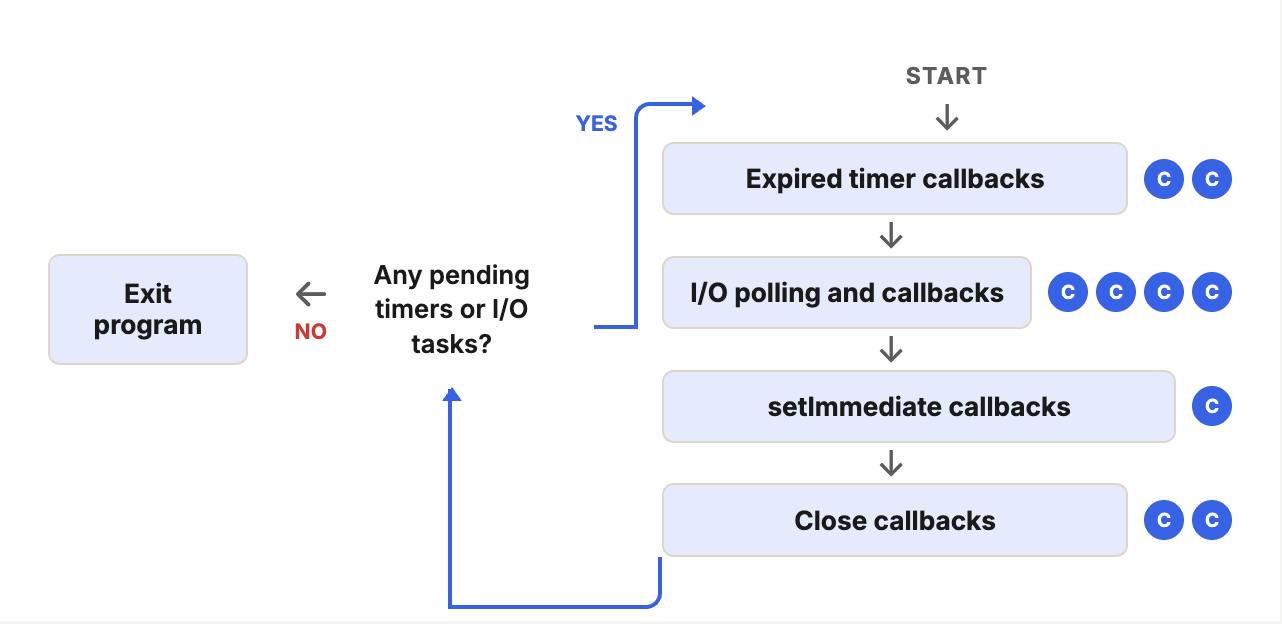
<!DOCTYPE html>
<html lang="en">
<head>
<meta charset="UTF-8">
<meta name="viewport" content="width=device-width, initial-scale=1.0">
<title>Why the program didn't exit immediately</title>
</head>
<body>
<div class="exit-info" id="exitinfo">
<style>
.exit-info {
--ink: #1a1a1a;
--ink-soft: #5c5c5c;
--paper: #ffffff;
--paper-alt: #f0ece4;
--accent: #2563eb;
--accent-soft: #e3ebfd;
--line: #ddd6c9;
--err: #dc2626;
--err-soft: #fbe4e2;
--display-font: 'Fraunces', Georgia, serif;
--body-font: 'Inter', system-ui, sans-serif;
--mono-font: 'IBM Plex Mono', monospace;
max-width: 880px;
margin: 0 auto;
box-sizing: border-box;
padding: 2rem;
font-family: var(--body-font);
color: var(--ink);
background: var(--paper);
}
.exit-info[data-theme="dark"] {
--ink: #e8e6e1;
--ink-soft: #9a968c;
--paper: #121212;
--paper-alt: #1c212b;
--accent: #5b8def;
--accent-soft: #202942;
--line: #2c313d;
--err: #f87171;
--err-soft: #3a1f1f;
}
.exit-info * { box-sizing: border-box; }
.ex-eyebrow {
font-family: var(--mono-font); font-size: 0.68rem; letter-spacing: 0.14em; text-transform: uppercase;
color: var(--accent); text-align: center; margin: 1.5rem 0 0.3rem;
}
.ex-title {
font-family: var(--display-font); font-size: clamp(1.35rem, 5vw, 1.8rem); text-align: center;
margin: 0 0 0.5rem; letter-spacing: -0.01em;
}
.ex-sub { color: var(--ink-soft); font-size: 0.88rem; text-align: center; margin: 0 0 1.4rem; max-width: 460px; margin-left: auto; margin-right: auto; }
.ex-code { background: #1e1e1e; border-radius: 8px; padding: 0.8rem 1rem; margin-bottom: 1.3rem; font-family: var(--mono-font); font-size: 0.72rem; line-height: 1.7; overflow-x: auto; }
.ex-code code { white-space: pre; color: #d4d4d8; }
.tok-fn { color: #61afef; }
.tok-str { color: #98c379; }
.tok-punc { color: #6b7280; }
.tok-expr { color: #56b6c2; }
.ex-code .hl { background: rgba(220, 38, 38, 0.14); display: inline-block; width: 100%; border-radius: 3px; }
.ex-code .cm { color: #6a9955; font-style: italic; }
.ex-toggle { display: flex; justify-content: center; gap: 0.5rem; margin-bottom: 1.5rem; flex-wrap: wrap; }
.ex-toggle-btn {
font-family: var(--body-font); font-size: 0.82rem; font-weight: 600; padding: 0.5rem 0.9rem;
border-radius: 20px; border: 1px solid var(--line); background: var(--paper); color: var(--ink-soft); cursor: pointer;
}
.ex-toggle-btn.is-selected { border-color: var(--accent); background: var(--accent-soft); color: var(--accent); }
.ex-diagram { display: flex; align-items: center; justify-content: center; gap: 0.5rem; margin-bottom: 1.2rem; flex-wrap: wrap; }
.ex-node { display: flex; flex-direction: column; align-items: center; gap: 0.4rem; width: 108px; }
.ex-node-badge {
width: 52px; height: 52px; border-radius: 10px; display: flex; align-items: center; justify-content: center;
border: 1px solid var(--line); background: var(--paper-alt); transition: border-color 0.25s, background 0.25s, transform 0.25s;
}
.ex-node-badge svg { width: 22px; height: 22px; color: var(--ink-soft); transition: color 0.25s; }
.ex-node.is-active .ex-node-badge { border-color: var(--accent); background: var(--accent-soft); transform: scale(1.08); }
.ex-node.is-active .ex-node-badge svg { color: var(--accent); }
.ex-node.is-exit .ex-node-badge { border-radius: 50%; }
.ex-node.is-exit.is-active .ex-node-badge { border-color: var(--err); background: var(--err-soft); }
.ex-node.is-exit.is-active .ex-node-badge svg { color: var(--err); }
.ex-node-label { font-size: 0.72rem; font-weight: 700; text-align: center; color: var(--ink-soft); }
.ex-node.is-active .ex-node-label { color: var(--accent); }
.ex-node.is-exit.is-active .ex-node-label { color: var(--err); }
.ex-arrow { color: var(--line); font-size: 1.1rem; flex-shrink: 0; }
.ex-countdown { text-align: center; margin-bottom: 1.2rem; opacity: 0; transition: opacity 0.3s; min-height: 60px; }
.ex-countdown.is-shown { opacity: 1; }
.ex-countdown-num { font-family: var(--mono-font); font-size: 1.6rem; font-weight: 700; color: var(--accent); }
.ex-countdown-bar-track { width: 220px; height: 6px; border-radius: 3px; background: var(--paper-alt); border: 1px solid var(--line); margin: 0.5rem auto 0; overflow: hidden; }
.ex-countdown-bar-fill { height: 100%; background: var(--accent); width: 0%; transition: width 0.1s linear; }
.ex-status-row { display: flex; align-items: center; justify-content: center; gap: 0.6rem; margin-bottom: 0.5rem; }
.ex-dot { width: 10px; height: 10px; border-radius: 50%; background: var(--line); transition: background 0.3s, box-shadow 0.3s; }
.ex-dot.is-alive { background: var(--accent); box-shadow: 0 0 0 4px var(--accent-soft); }
.ex-dot.is-exited { background: var(--err); box-shadow: 0 0 0 4px var(--err-soft); }
.ex-status-text { font-family: var(--mono-font); font-size: 0.8rem; color: var(--ink-soft); }
.ex-status-text b { color: var(--ink); }
.ex-caption { text-align: center; font-size: 0.84rem; color: var(--ink-soft); line-height: 1.5; min-height: 2.6em; margin-bottom: 1.3rem; }
.ex-caption b { color: var(--ink); }
.ex-controls { display: flex; justify-content: center; margin-bottom: 0.5rem; }
.ex-btn {
font-family: var(--mono-font); font-size: 0.82rem; font-weight: 600; padding: 0.6rem 1.2rem;
border-radius: 5px; border: 1px solid var(--accent); background: var(--accent); color: #fff; cursor: pointer;
}
.ex-btn:disabled { opacity: 0.55; cursor: default; }
.ex-hint { text-align: center; font-size: 0.78rem; color: var(--ink-soft); margin: 0.9rem 0 2rem; }
@media (prefers-reduced-motion: reduce) {
.exit-info *, .exit-info *::before, .exit-info *::after { transition-duration: 0.001ms !important; animation-duration: 0.001ms !important; }
}
</style>
<div class="ex-code"><code>fs.<span class="tok-fn">readFile</span><span class="tok-punc">(</span><span class="tok-str">'test-file.txt'</span><span class="tok-punc">,</span> <span class="tok-punc">() =></span> <span class="tok-punc">{</span>
<span class="cm">// ...other quick callbacks finish fast...</span>
<span class="hl"><span class="tok-fn">setTimeout</span><span class="tok-punc">(() =></span> console.<span class="tok-fn">log</span><span class="tok-punc">(</span><span class="tok-str">'Timeout 3 finished'</span><span class="tok-punc">),</span> <span class="tok-expr">3000</span><span class="tok-punc">);</span></span>
<span class="tok-punc">});</span></code></div>
<div class="ex-toggle">
<button type="button" class="ex-toggle-btn is-selected" data-scenario="without">Without Timeout 3</button>
<button type="button" class="ex-toggle-btn" data-scenario="with">With Timeout 3 (3000ms)</button>
</div>
<div class="ex-diagram">
<div class="ex-node" id="exNodeRun">
<div class="ex-node-badge"><svg xmlns="http://www.w3.org/2000/svg" viewBox="0 0 24 24" fill="none" stroke="currentColor" stroke-width="2" stroke-linecap="round" stroke-linejoin="round"><path d="M21 12a9 9 0 0 0-9-9 9.75 9.75 0 0 0-6.74 2.74L3 8"/><path d="M3 3v5h5"/><path d="M3 12a9 9 0 0 0 9 9 9.75 9.75 0 0 0 6.74-2.74L21 16"/><path d="M16 16h5v5"/></svg></div>
<span class="ex-node-label">Callbacks run</span>
</div>
<span class="ex-arrow">→</span>
<div class="ex-node" id="exNodePending">
<div class="ex-node-badge"><svg xmlns="http://www.w3.org/2000/svg" viewBox="0 0 24 24" fill="none" stroke="currentColor" stroke-width="2" stroke-linecap="round" stroke-linejoin="round"><line x1="10" x2="14" y1="2" y2="2"/><line x1="12" x2="15" y1="14" y2="11"/><circle cx="12" cy="14" r="8"/></svg></div>
<span class="ex-node-label">Pending timer?</span>
</div>
<span class="ex-arrow">→</span>
<div class="ex-node is-exit" id="exNodeExit">
<div class="ex-node-badge"><svg xmlns="http://www.w3.org/2000/svg" viewBox="0 0 24 24" fill="none" stroke="currentColor" stroke-width="2" stroke-linecap="round" stroke-linejoin="round"><path d="M12 2v10"/><path d="M18.4 6.6a9 9 0 1 1-12.77.04"/></svg></div>
<span class="ex-node-label">Exit</span>
</div>
</div>
<div class="ex-countdown" id="exCountdown">
<div class="ex-countdown-num" id="exCountdownNum">3000ms</div>
<div class="ex-countdown-bar-track"><div class="ex-countdown-bar-fill" id="exCountdownBar"></div></div>
</div>
<div class="ex-status-row">
<div class="ex-dot" id="exDot"></div>
<span class="ex-status-text" id="exStatusText">Not started</span>
</div>
<p class="ex-caption" id="exCaption"> </p>
<div class="ex-controls">
<button type="button" class="ex-btn" id="exRunBtn">▶ node event-loop.js</button>
</div>
<p class="ex-hint">The countdown below runs in real time — this is genuinely how long Node waits.</p>
</div>
<link rel="preconnect" href="https://fonts.googleapis.com">
<link href="https://fonts.googleapis.com/css2?family=Fraunces:wght@500;600&family=Inter:wght@400;500;600;700&family=IBM+Plex+Mono:wght@400;500&display=swap" rel="stylesheet">
<script>
(function () {
var root = document.getElementById('exitinfo');
if (!root) return;
var bodyAttr = document.body.getAttribute('data-darkmode');
var dark;
if (bodyAttr === 'true') dark = true;
else if (bodyAttr === 'false') dark = false;
else {
var match = document.cookie.match(/(?:^|;\s*)darkMode=([^;]+)/);
dark = match ? match[1] === 'true' : false;
}
if (dark) root.setAttribute('data-theme', 'dark');
var toggleBtns = root.querySelectorAll('.ex-toggle-btn');
var runBtn = root.querySelector('#exRunBtn');
var nodeRun = root.querySelector('#exNodeRun');
var nodePending = root.querySelector('#exNodePending');
var nodeExit = root.querySelector('#exNodeExit');
var countdown = root.querySelector('#exCountdown');
var countdownNum = root.querySelector('#exCountdownNum');
var countdownBar = root.querySelector('#exCountdownBar');
var dot = root.querySelector('#exDot');
var statusText = root.querySelector('#exStatusText');
var caption = root.querySelector('#exCaption');
var scenario = 'without';
var running = false;
var timerHandle = null;
toggleBtns.forEach(function (btn) {
btn.addEventListener('click', function () {
if (running) return;
scenario = btn.getAttribute('data-scenario');
toggleBtns.forEach(function (b) { b.classList.toggle('is-selected', b === btn); });
resetVisual();
});
});
function resetVisual() {
if (timerHandle) { clearInterval(timerHandle); timerHandle = null; }
nodeRun.classList.remove('is-active');
nodePending.classList.remove('is-active');
nodeExit.classList.remove('is-active');
countdown.classList.remove('is-shown');
countdownNum.textContent = '3000ms';
countdownBar.style.width = '0%';
dot.className = 'ex-dot';
statusText.textContent = 'Not started';
caption.innerHTML = '\u00a0';
}
runBtn.addEventListener('click', function () {
if (running) return;
running = true;
runBtn.disabled = true;
toggleBtns.forEach(function (b) { b.disabled = true; });
resetVisual();
nodeRun.classList.add('is-active');
dot.className = 'ex-dot is-alive';
statusText.innerHTML = '<b>Running</b> queued callbacks\u2026';
caption.innerHTML = 'The quick callbacks (timers, immediates, I/O) all finish fast.';
setTimeout(function () {
nodeRun.classList.remove('is-active');
nodePending.classList.add('is-active');
if (scenario === 'without') {
statusText.innerHTML = 'Pending timer? <b>No</b>';
caption.innerHTML = 'Nothing left to wait on \u2014 Node exits right away.';
setTimeout(function () {
nodePending.classList.remove('is-active');
nodeExit.classList.add('is-active');
dot.className = 'ex-dot is-exited';
statusText.innerHTML = '<b>Process exited</b>';
running = false;
runBtn.disabled = false;
toggleBtns.forEach(function (b) { b.disabled = false; });
}, 700);
} else {
statusText.innerHTML = 'Pending timer? <b>Yes</b> \u2014 Timeout 3';
caption.innerHTML = 'The 3-second timer is still waiting to fire. Node keeps the loop \u2014 and the process \u2014 alive until it does.';
countdown.classList.add('is-shown');
var total = 3000;
var start = Date.now();
timerHandle = setInterval(function () {
var elapsed = Date.now() - start;
var remaining = Math.max(0, total - elapsed);
countdownNum.textContent = Math.ceil(remaining) + 'ms';
countdownBar.style.width = (100 * elapsed / total) + '%';
if (remaining <= 0) {
clearInterval(timerHandle);
timerHandle = null;
countdownNum.textContent = '0ms';
countdownBar.style.width = '100%';
nodePending.classList.remove('is-active');
statusText.innerHTML = 'Pending timer? <b>No</b>';
caption.innerHTML = 'Timeout 3 just fired. Nothing left pending \u2014 <b>now</b> Node exits.';
setTimeout(function () {
nodeExit.classList.add('is-active');
dot.className = 'ex-dot is-exited';
statusText.innerHTML = '<b>Process exited</b>';
running = false;
runBtn.disabled = false;
toggleBtns.forEach(function (b) { b.disabled = false; });
}, 700);
}
}, 80);
}
}, 900);
});
resetVisual();
})();
</script>
</body>
</html>❓ Why the Program Didn't Exit Immediately
Node checks whether there are any pending timers or I/O tasks before deciding to exit.
In the very first example (before adding Timer 3), once all callbacks finished, there was nothing left pending — so the program exited right away.
Now, with a 3-second timer added, Node keeps the event loop running (and the process alive) until that timer fires — only then does the program finally exit.
4️⃣ Understanding Why setImmediate Ran Before the Timers
<!DOCTYPE html>
<html lang="en">
<head>
<meta charset="UTF-8">
<meta name="viewport" content="width=device-width, initial-scale=1.0">
<title>The whole script, in order</title>
</head>
<body>
<div class="why-info" id="whyinfo">
<style>
.why-info {
--ink: #1a1a1a;
--ink-soft: #5c5c5c;
--paper: #ffffff;
--paper-alt: #f0ece4;
--accent: #2563eb;
--accent-soft: #e3ebfd;
--line: #ddd6c9;
--display-font: 'Fraunces', Georgia, serif;
--body-font: 'Inter', system-ui, sans-serif;
--mono-font: 'IBM Plex Mono', monospace;
max-width: 880px;
margin: 0 auto;
box-sizing: border-box;
padding: 2rem;
font-family: var(--body-font);
color: var(--ink);
background: var(--paper);
}
.why-info[data-theme="dark"] {
--ink: #e8e6e1;
--ink-soft: #9a968c;
--paper: #121212;
--paper-alt: #1c212b;
--accent: #5b8def;
--accent-soft: #202942;
--line: #2c313d;
}
.why-info * { box-sizing: border-box; }
.wh-eyebrow {
font-family: var(--mono-font); font-size: 0.68rem; letter-spacing: 0.14em; text-transform: uppercase;
color: var(--accent); text-align: center; margin: 1.5rem 0 0.3rem;
}
.wh-title {
font-family: var(--display-font); font-size: clamp(1.4rem, 5vw, 1.85rem); text-align: center;
margin: 0 0 0.5rem; letter-spacing: -0.01em;
}
.wh-sub { color: var(--ink-soft); font-size: 0.88rem; text-align: center; margin: 0 0 1.3rem; max-width: 460px; margin-left: auto; margin-right: auto; }
.wh-tick-row { display: flex; justify-content: center; gap: 0.4rem; margin-bottom: 1rem; flex-wrap: wrap; }
.wh-tick-pill {
font-family: var(--mono-font); font-size: 0.7rem; font-weight: 700; padding: 0.3rem 0.7rem;
border-radius: 12px; border: 1px solid var(--line); color: var(--ink-soft); background: var(--paper-alt);
}
.wh-tick-pill.is-current { border-color: var(--accent); color: var(--accent); background: var(--accent-soft); }
/* ---- circular diagram (proven pattern reused) ---- */
.wh-circle-wrap { display: flex; justify-content: center; margin: 2.2rem 0 3.2rem; }
.wh-circle { position: relative; width: min(260px, 78vw); aspect-ratio: 1 / 1; }
.wh-circle > svg { position: absolute; inset: 0; width: 100%; height: 100%; overflow: visible; }
.wh-arc { fill: none; stroke: var(--line); stroke-width: 2.5; transition: stroke 0.25s; }
.wh-arc.is-live { stroke: var(--accent); }
.wh-node { position: absolute; width: 0; height: 0; }
.wh-node-badge {
position: absolute; left: 0; top: 0; transform: translate(-50%, -50%);
width: 56px; height: 56px; border-radius: 12px;
border: 1px solid var(--line); background: var(--paper);
display: flex; align-items: center; justify-content: center;
transition: border-color 0.25s, background 0.25s, transform 0.25s;
}
.wh-node-badge svg { display: block; width: 24px; height: 24px; color: var(--ink-soft); transition: color 0.25s; }
.wh-node.is-active .wh-node-badge { border-color: var(--accent); background: var(--accent-soft); transform: translate(-50%, -50%) scale(1.1); }
.wh-node.is-active .wh-node-badge svg { color: var(--accent); }
.wh-node-label {
position: absolute; left: 0; top: 38px; transform: translateX(-50%);
white-space: nowrap; font-size: 0.68rem; font-weight: 700; color: var(--ink-soft); text-align: center; transition: color 0.25s;
}
.wh-node.is-active .wh-node-label { color: var(--accent); }
.wh-chip-zone {
position: absolute; left: 0; top: -46px; transform: translateX(-50%);
display: flex; flex-direction: column; gap: 0.25rem; align-items: center;
}
.wh-chip {
font-family: var(--mono-font); font-size: 0.6rem; font-weight: 700; padding: 0.15rem 0.4rem;
border-radius: 8px; border: 1px solid var(--line); background: var(--paper); color: var(--ink-soft);
white-space: nowrap; opacity: 0; transform: translateY(4px); transition: opacity 0.25s, transform 0.25s, border-color 0.25s, color 0.25s;
}
.wh-chip.is-shown { opacity: 1; transform: none; }
.wh-chip.is-consumed { border-color: var(--accent); color: var(--accent); background: var(--accent-soft); text-decoration: line-through; }
.wh-caption { text-align: center; font-size: 0.83rem; color: var(--ink-soft); line-height: 1.5; min-height: 3em; margin-bottom: 1.2rem; }
.wh-caption b { color: var(--ink); }
.wh-output { background: #181818; border-radius: 8px; padding: 0.7rem 0.9rem; margin-bottom: 1.2rem; min-height: 100px; }
.wh-output-line { font-family: var(--mono-font); font-size: 0.74rem; line-height: 1.65; color: #d4d4d4; opacity: 0; transform: translateY(2px); animation: wh-in 0.2s ease forwards; }
@keyframes wh-in { to { opacity: 1; transform: none; } }
.wh-output-line.is-hl { color: #7ee787; font-weight: 700; }
.wh-output-line.is-dim { color: #6b7280; }
.wh-controls { display: flex; justify-content: center; margin-bottom: 0.5rem; }
.wh-btn {
font-family: var(--mono-font); font-size: 0.82rem; font-weight: 600; padding: 0.6rem 1.2rem;
border-radius: 5px; border: 1px solid var(--accent); background: var(--accent); color: #fff; cursor: pointer;
}
.wh-btn:disabled { opacity: 0.55; cursor: default; }
.wh-hint { text-align: center; font-size: 0.78rem; color: var(--ink-soft); margin: 0.8rem 0 2rem; }
@media (prefers-reduced-motion: reduce) {
.why-info *, .why-info *::before, .why-info *::after { transition-duration: 0.001ms !important; animation-duration: 0.001ms !important; }
}
</style>
<div class="wh-tick-row">
<span class="wh-tick-pill" id="whTick1">Tick 1</span>
<span class="wh-tick-pill" id="whTick2">Tick 2</span>
<span class="wh-tick-pill" id="whTick3">Tick 3</span>
</div>
<div class="wh-circle-wrap">
<div class="wh-circle">
<svg viewBox="0 0 240 240" aria-hidden="true">
<path class="wh-arc" data-arc="0" d="M120,20 A100,100 0 0,1 220,120"></path>
<path class="wh-arc" data-arc="1" d="M220,120 A100,100 0 0,1 120,220"></path>
<path class="wh-arc" data-arc="2" d="M120,220 A100,100 0 0,1 20,120"></path>
<path class="wh-arc" data-arc="3" d="M20,120 A100,100 0 0,1 120,20"></path>
</svg>
<div class="wh-node" data-phase="timers" style="left:50%; top:8.33%;">
<div class="wh-node-badge"><svg xmlns="http://www.w3.org/2000/svg" viewBox="0 0 24 24" fill="none" stroke="currentColor" stroke-width="2" stroke-linecap="round" stroke-linejoin="round"><line x1="10" x2="14" y1="2" y2="2"/><line x1="12" x2="15" y1="14" y2="11"/><circle cx="12" cy="14" r="8"/></svg></div>
<span class="wh-node-label">Timers</span>
<div class="wh-chip-zone" id="whChipTimers"></div>
</div>
<div class="wh-node" data-phase="poll" style="left:91.67%; top:50%;">
<div class="wh-node-badge"><svg xmlns="http://www.w3.org/2000/svg" viewBox="0 0 24 24" fill="none" stroke="currentColor" stroke-width="2" stroke-linecap="round" stroke-linejoin="round"><path d="M22 12h-2.48a2 2 0 0 0-1.93 1.46l-2.35 8.36a.25.25 0 0 1-.48 0L9.24 2.18a.25.25 0 0 0-.48 0l-2.35 8.36A2 2 0 0 1 4.49 12H2"/></svg></div>
<span class="wh-node-label">I/O polling</span>
<div class="wh-chip-zone" id="whChipPoll"></div>
</div>
<div class="wh-node" data-phase="immediate" style="left:50%; top:91.67%;">
<div class="wh-node-badge"><svg xmlns="http://www.w3.org/2000/svg" viewBox="0 0 24 24" fill="none" stroke="currentColor" stroke-width="2" stroke-linecap="round" stroke-linejoin="round"><path d="M4 14a1 1 0 0 1-.78-1.63l9.9-10.2a.5.5 0 0 1 .86.46l-1.92 6.02A1 1 0 0 0 13 10h7a1 1 0 0 1 .78 1.63l-9.9 10.2a.5.5 0 0 1-.86-.46l1.92-6.02A1 1 0 0 0 11 14z"/></svg></div>
<span class="wh-node-label">setImmediate</span>
</div>
<div class="wh-node" data-phase="close" style="left:8.33%; top:50%;">
<div class="wh-node-badge"><svg xmlns="http://www.w3.org/2000/svg" viewBox="0 0 24 24" fill="none" stroke="currentColor" stroke-width="2" stroke-linecap="round" stroke-linejoin="round"><path d="m19 5 3-3"/><path d="m2 22 3-3"/><path d="M6.3 20.3a2.4 2.4 0 0 0 3.4 0L12 18l-6-6-2.3 2.3a2.4 2.4 0 0 0 0 3.4Z"/><path d="M7.5 13.5 10 11"/><path d="M10.5 16.5 13 14"/><path d="m12 6 6 6 2.3-2.3a2.4 2.4 0 0 0 0-3.4l-2.6-2.6a2.4 2.4 0 0 0-3.4 0Z"/></svg></div>
<span class="wh-node-label">Close callbacks</span>
</div>
</div>
</div>
<p class="wh-caption" id="whCaption">Ten lines of code. Press play and watch the order they actually run in.</p>
<div class="wh-output" id="whOutput"></div>
<div class="wh-controls">
<button type="button" class="wh-btn" id="whRunBtn">▶ node event-loop.js</button>
</div>
<p class="wh-hint">The full output, top to bottom — watch which phase prints each line.</p>
</div>
<link rel="preconnect" href="https://fonts.googleapis.com">
<link href="https://fonts.googleapis.com/css2?family=Fraunces:wght@500;600&family=Inter:wght@400;500;600;700&family=IBM+Plex+Mono:wght@400;500&display=swap" rel="stylesheet">
<script>
(function () {
var root = document.getElementById('whyinfo');
if (!root) return;
var bodyAttr = document.body.getAttribute('data-darkmode');
var dark;
if (bodyAttr === 'true') dark = true;
else if (bodyAttr === 'false') dark = false;
else {
var match = document.cookie.match(/(?:^|;\s*)darkMode=([^;]+)/);
dark = match ? match[1] === 'true' : false;
}
if (dark) root.setAttribute('data-theme', 'dark');
var nodes = root.querySelectorAll('.wh-node');
var arcs = root.querySelectorAll('.wh-arc');
var tick1Pill = root.querySelector('#whTick1');
var tick2Pill = root.querySelector('#whTick2');
var tick3Pill = root.querySelector('#whTick3');
var chipTimers = root.querySelector('#whChipTimers');
var chipPoll = root.querySelector('#whChipPoll');
var caption = root.querySelector('#whCaption');
var output = root.querySelector('#whOutput');
var runBtn = root.querySelector('#whRunBtn');
var running = false;
function setActive(phase) {
nodes.forEach(function (n) { n.classList.toggle('is-active', n.getAttribute('data-phase') === phase); });
}
function setArc(i, on) {
arcs.forEach(function (a) { if (parseInt(a.getAttribute('data-arc'), 10) === i) a.classList.toggle('is-live', on); });
}
function addOutput(text, cls) {
var div = document.createElement('div');
div.className = 'wh-output-line' + (cls ? ' ' + cls : '');
div.textContent = text;
output.appendChild(div);
}
function clearAll() {
nodes.forEach(function (n) { n.classList.remove('is-active'); });
arcs.forEach(function (a) { a.classList.remove('is-live'); });
tick1Pill.classList.remove('is-current');
tick2Pill.classList.remove('is-current');
tick3Pill.classList.remove('is-current');
chipTimers.innerHTML = '';
chipPoll.innerHTML = '';
output.innerHTML = '';
caption.innerHTML = 'Ten lines of code. Press play and watch the order they actually run in.';
}
var steps = [
{ run: function () {
caption.innerHTML = '<b>Synchronous code runs first,</b> top to bottom \u2014 before the loop even starts.';
addOutput('Hello from top-level code', 'is-hl');
} },
{ run: function () {
tick1Pill.classList.add('is-current');
setActive('timers');
caption.innerHTML = '<b>Tick 1, Timers phase.</b> The 0ms timer is already expired.';
addOutput('Timeout 1 finished', null);
} },
{ run: function () {
setArc(0, true);
setActive('poll');
caption.innerHTML = 'Poll phase \u2014 the file isn\u2019t ready yet. Nothing to do here this tick.';
} },
{ run: function () {
setArc(0, false); setArc(1, true);
setActive('immediate');
caption.innerHTML = 'setImmediate phase \u2014 Immediate 1 was already waiting.';
addOutput('Immediate 1 finished', null);
} },
{ run: function () {
setArc(1, false); setArc(2, true);
setActive('close');
caption.innerHTML = 'Close callbacks \u2014 nothing here either.';
} },
{ run: function () {
setArc(2, false); setArc(3, true);
tick1Pill.classList.remove('is-current');
tick2Pill.classList.add('is-current');
caption.innerHTML = 'A few ticks pass while the file read happens in the background\u2026';
} },
{ run: function () {
setArc(3, false); setArc(0, true);
setActive('poll');
caption.innerHTML = '\u2026the file is ready. Its callback runs here, registering two new things.';
addOutput('I/O finished', null);
addOutput('----------------', 'is-dim');
var c1 = document.createElement('span'); c1.className = 'wh-chip'; c1.id = 'whChipTimeout2'; c1.textContent = 'Timeout 2';
chipTimers.appendChild(c1);
var c2 = document.createElement('span'); c2.className = 'wh-chip'; c2.id = 'whChipImm2'; c2.textContent = 'Immediate 2';
chipPoll.appendChild(c2);
setTimeout(function () { c1.classList.add('is-shown'); c2.classList.add('is-shown'); }, 30);
} },
{ run: function () {
setArc(0, false); setArc(1, true);
setActive('immediate');
var chip = root.querySelector('#whChipImm2');
if (chip) chip.classList.add('is-consumed');
addOutput('Immediate 2 finished', 'is-hl');
caption.innerHTML = 'Same tick: setImmediate phase is right here, so Immediate 2 fires immediately.';
} },
{ run: function () {
setArc(1, false); setArc(2, true);
setActive('close');
caption.innerHTML = 'Close callbacks again \u2014 still nothing.';
} },
{ run: function () {
setArc(2, false); setArc(3, true);
tick2Pill.classList.remove('is-current');
tick3Pill.classList.add('is-current');
caption.innerHTML = 'New tick begins.';
} },
{ run: function () {
setArc(3, false);
setActive('timers');
var chip = root.querySelector('#whChipTimeout2');
if (chip) chip.classList.add('is-consumed');
addOutput('Timeout 2 finished', 'is-hl');
caption.innerHTML = '<b>Tick 3, Timers phase.</b> Only now does the loop check timers again \u2014 Timeout 2 finally runs.';
} },
{ run: function () {
setActive('timers');
caption.innerHTML = 'Timeout 3 (3000ms) is still pending \u2014 the loop keeps ticking, mostly idle, until\u2026 it fires.';
addOutput('Timeout 3 finished', 'is-hl');
} }
];
var stepIndex = 0;
runBtn.addEventListener('click', function () {
if (running) return;
running = true;
runBtn.disabled = true;
clearAll();
stepIndex = 0;
function next() {
if (stepIndex >= steps.length) {
running = false;
runBtn.disabled = false;
return;
}
steps[stepIndex].run();
stepIndex++;
setTimeout(next, 1150);
}
next();
});
})();
</script>
</body>
</html>😲 The Surprising Result
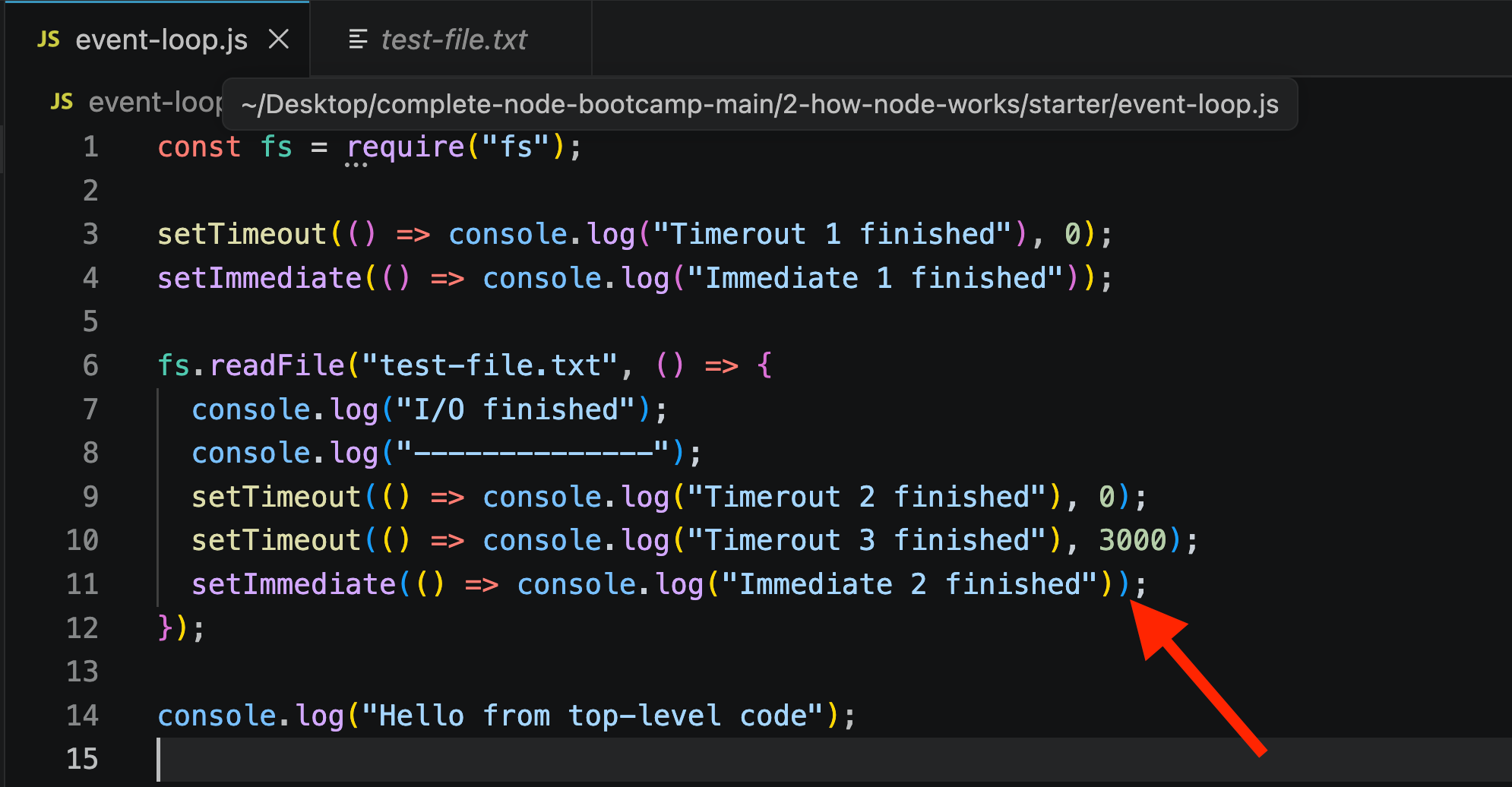
Even though setTimeout(..., 0) might seem like it should run at the same "priority level" as setImmediate, in practice:
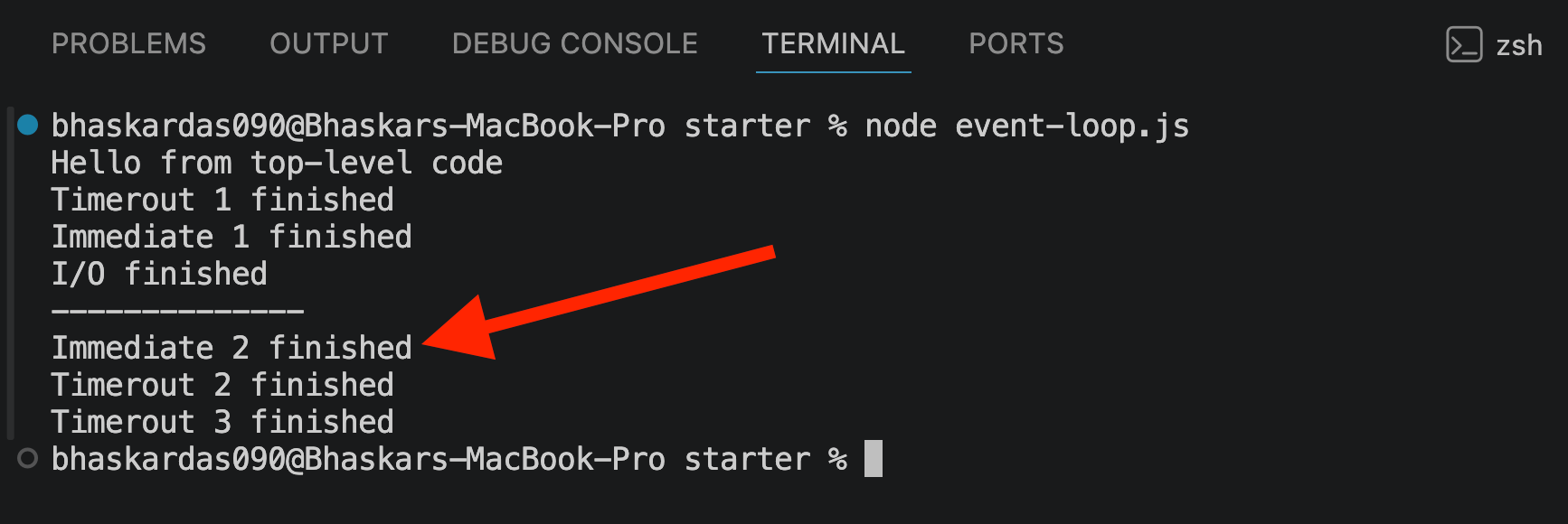
🧠 Why Does This Happen?
We skipped this detail earlier to keep the event loop explanation simple.
When the poll phase has no I/O tasks to process, the event loop waits there for new work.
If a
setImmediate()callback is already waiting, it runs immediately after the poll phase.Because of this,
setImmediate()can sometimes run before an expiredsetTimeout()callback.
📌 Takeaway: Although it may seem surprising, this is the normal behavior of the Node.js event loop in certain situations.
5️⃣ Adding process.nextTick()
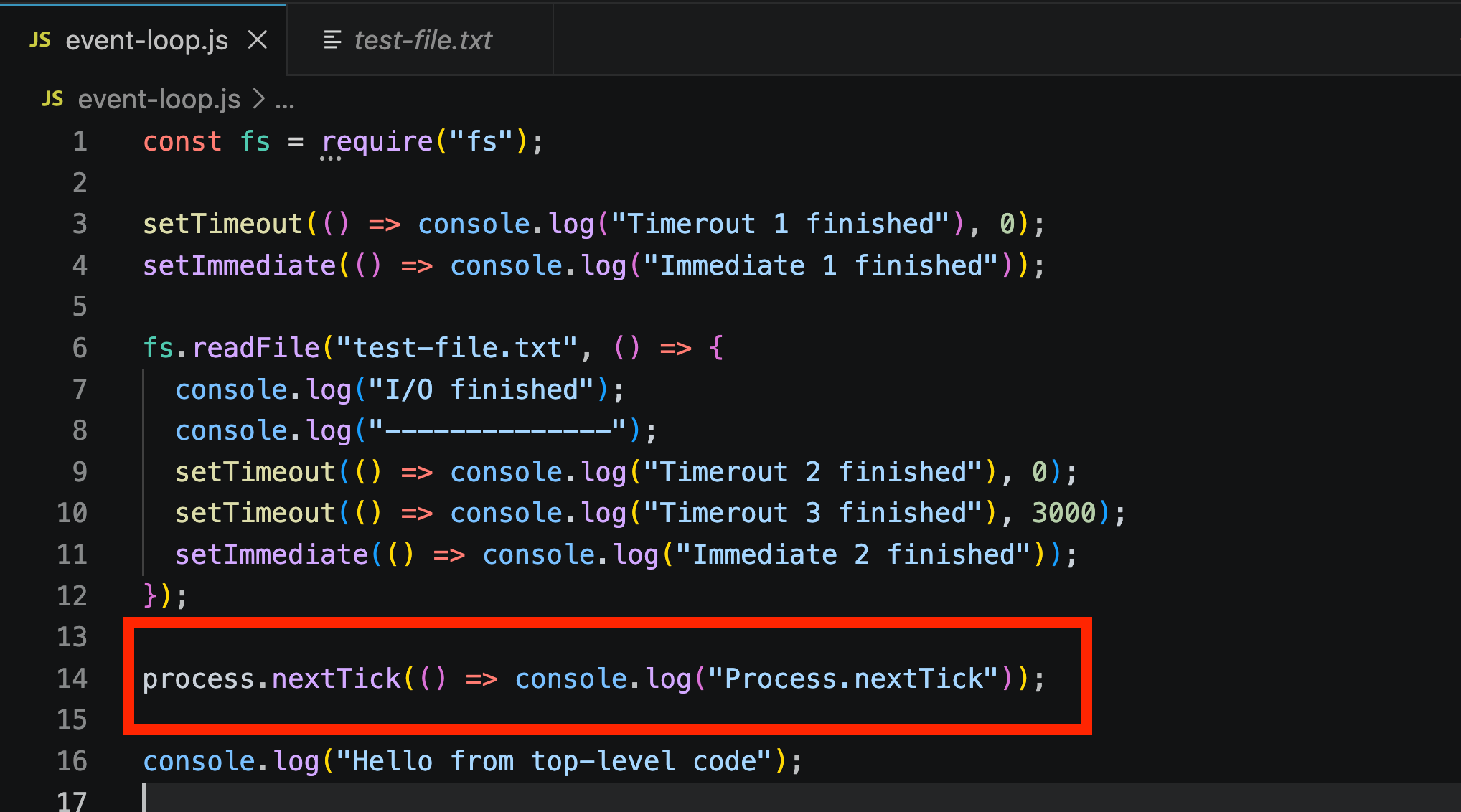
✅ The Result
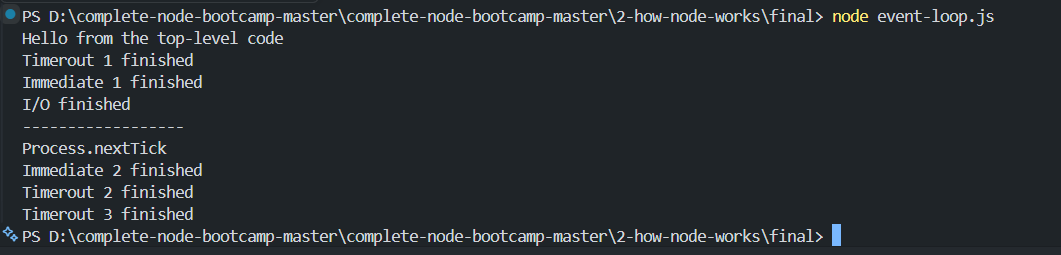
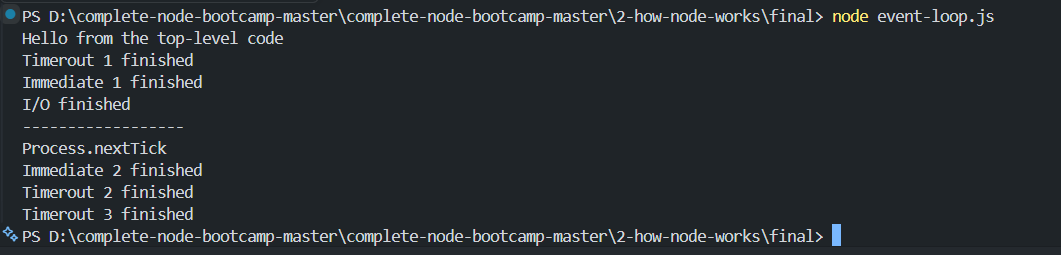
Process.nextTick was the very first callback to run — even before the timers and setImmediate calls.
🤔 Why This Happens
process.nextTick()belongs to the microtasks queue, which runs after every single phase of the event loop — not just once per full loop cycle ("tick").So its callback gets squeezed in immediately after the current phase completes, before the event loop even moves to the next phase.
🔀 The Confusing Naming Problem
nextTicksounds like it should run at the start of the next full loop cycle.setImmediatesounds like it should run immediately.🔄 In reality:
🚀
process.nextTick()→ runs almost immediately.⚡
setImmediate()→ runs once per full loop cycle (after the poll phase).
💡 Practical Advice
It's best to pick one and stick with it consistently in your code.
We generally recommends
setImmediateoverprocess.nextTick().Both are considered advanced tools.
6️⃣ Demonstrating the Thread Pool with Cryptography
🔐 The New Tool: crypto Module
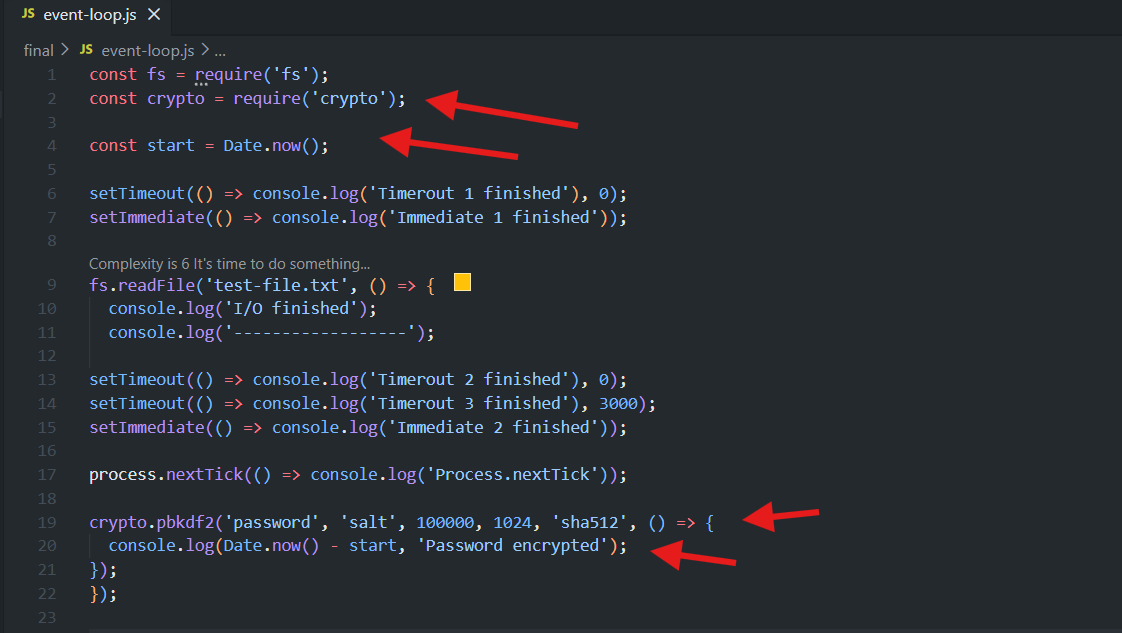
📖 Breaking Down pbkdf2()
📌 Argument | 📝 Meaning |
|---|---|
| 🔑 The secret string being encrypted |
| 🧂 Adds randomness/security |
| 🔄 Number of iterations |
| 📏 Key length |
| 🛡️ Hashing algorithm |
Callback | ✅ Runs once encryption finishes |
🎯 The focus is on timing and thread pool behavior, not cryptography itself.
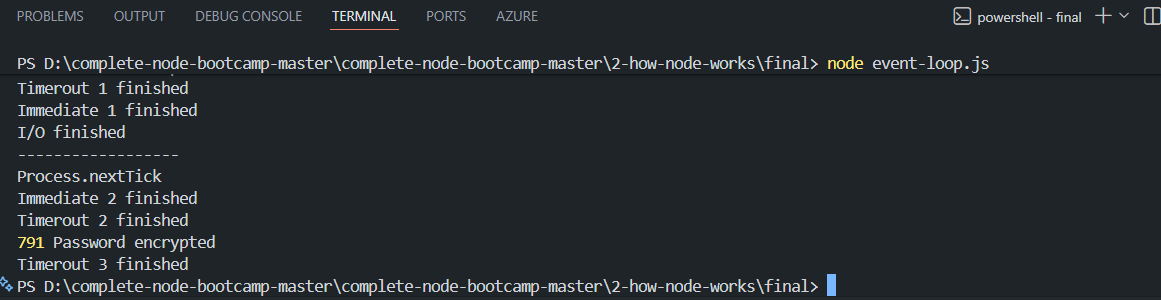
⏱️ Measuring Time Taken
Date.now()gives the current time in milliseconds.Subtracting the start time shows how long the operation took.
🧪 First Test: One Encryption
Result: ~1855 milliseconds (~1.8 seconds).
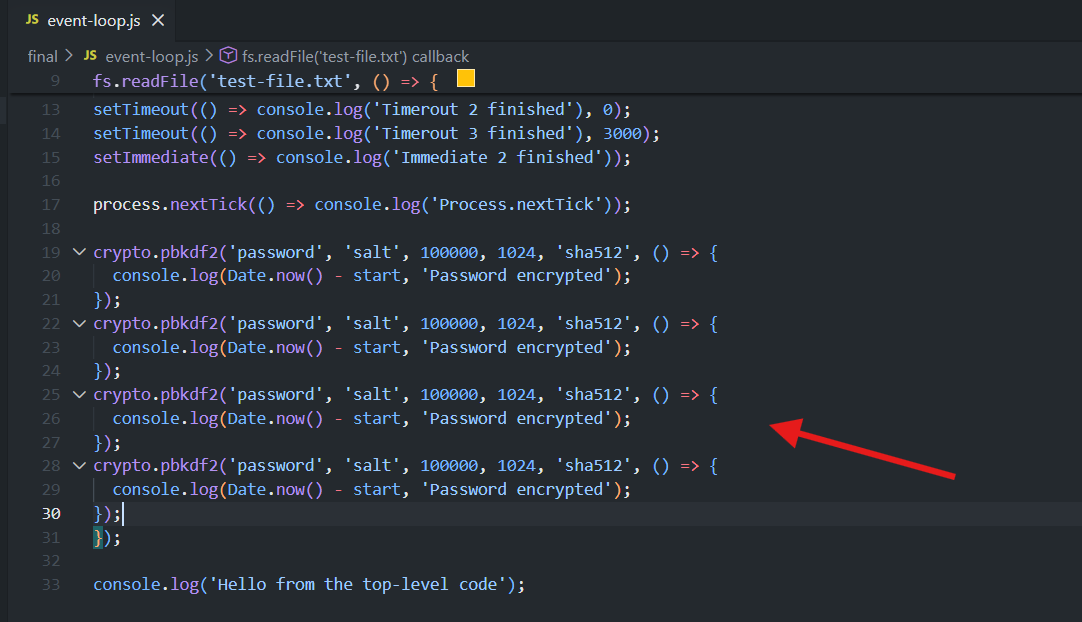
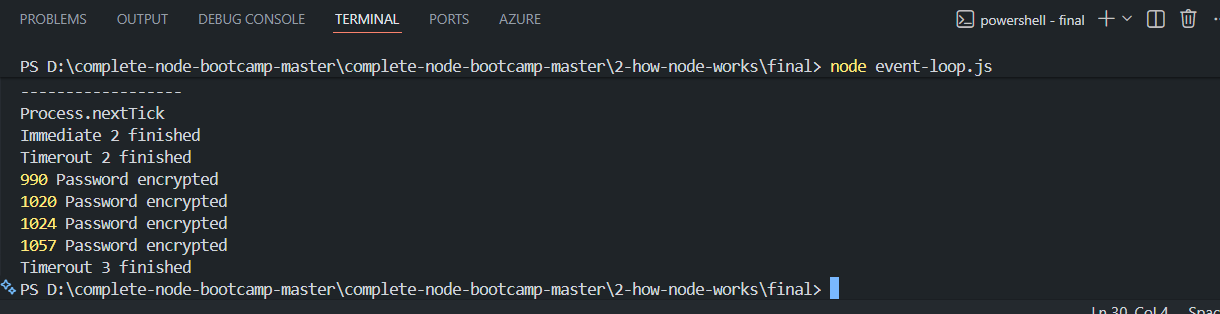
🧪 Second Test: Four Simultaneous Encryptions
Result: All four encryptions finished in approximately the same amount of time.
🤔 Why?
🧵 The default thread pool size is 4.
Each encryption gets its own thread and runs in parallel.
7️⃣ Changing the Thread Pool Size
UV_THREADPOOL_SIZE only matters for operations that actually use the thread pool — mainly fs (file operations), crypto (hashing/encryption), dns.lookup, and zlib (compression). It has no effect on setTimeout, setImmediate, or fs.readFile-style I/O that goes through the OS's own async mechanisms on some platforms — but for the classic thread-pool-bound example (like crypto.pbkdf2), here's what changes:
Pool Size | Effect on 4 Parallel Tasks |
|---|---|
Default (4) | All 4 run simultaneously — finish in ~same time as 1 |
2 | Only 2 run at once — the other 2 wait for a free thread, so total time roughly doubles |
1 | Fully sequential — one at a time, total time ≈ 4× a single task |
8 | Room for more parallel tasks — but only helps if you actually have more than 4 running at once |
⚙️ UV_THREADPOOL_SIZE controls the number of available worker threads.
process.env.UV_THREADPOOL_SIZE = 1/2/3/4The above code is asynchronous
8️⃣ Sync vs. Async Crypto — Blocking the Event Loop
Async (
pbkdf2) — uses a callback, runs in the background, doesn't block anything.Sync (
pbkdf2Sync) — no callback, runs directly on the main thread, blocks everything until done.
❌ The Sync Version (Blocking)
No callback.
Blocks execution until finished.
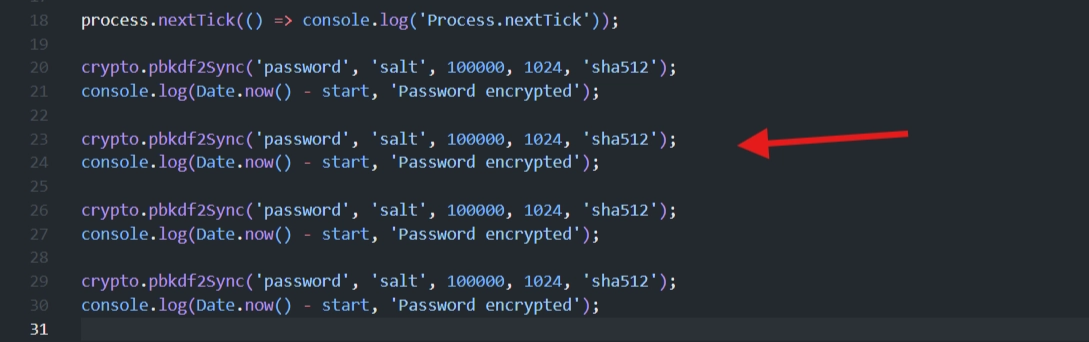
Let's replace the asynchronous
pbkdf2()with the synchronouspbkdf2Sync()
😲 The Dramatic Result
All four synchronous encryptions ran one after another.
⏰ Timers,
setImmediate, andprocess.nextTick()were all delayed until the synchronous work finished
🧠 Why This Happened
pbkdf2Sync()runs directly on the main thread.The event loop couldn't process any callbacks until the blocking code completed.
Even
UV_THREADPOOL_SIZEdoesn’t work here since its sync code.
⚠️ This clearly demonstrates why blocking the event loop is dangerous.
🔑 Key Takeaways
📌 Concept | ✅ Observed Behavior |
|---|---|
Top-level code | Always runs first |
|
|
| Runs almost immediately — highest priority |
Naming confusion |
|
Thread pool default | 4 threads |
| Controls pool size |
Async functions | Offloaded to thread pool — non-blocking |
Sync functions | Run on main thread — block everything |
Real-world danger | Blocking delays every other pending callback |
➡️ Big picture: phase ordering can be subtle, but the core lesson is simple — sync code blocks everything; async code keeps Node responsive.
Full Code In The event-loop.js File:
const fs = require("fs");
const crypto = require("crypto");
const start = Date.now();
process.env.UV_THREADPOOL_SIZE = 4;

setTimeout(() => console.log("Timer 1 finished"), 0);
setImmediate(() => console.log("Immediate 1 finished"));

fs.readFile("test-file.txt", () => {
  console.log("I/O finished");
  console.log("----------------");

  setTimeout(() => console.log("Timer 2 finished"), 0);
  setTimeout(() => console.log("Timer 3 finished"), 3000);
  setImmediate(() => console.log("Immediate 2 finished"));
  process.nextTick(() => console.log("Process.nextTick"));

  crypto.pbkdf2("password", "salt", 100000, 1024, "sha512", () => {
    console.log(Date.now() - start, "Password encrypted");
  });
  crypto.pbkdf2("password", "salt", 100000, 1024, "sha512", () => {
    console.log(Date.now() - start, "Password encrypted");
  });
  crypto.pbkdf2("password", "salt", 100000, 1024, "sha512", () => {
    console.log(Date.now() - start, "Password encrypted");
  });
  crypto.pbkdf2("password", "salt", 100000, 1024, "sha512", () => {
    console.log(Date.now() - start, "Password encrypted");
  });
});

console.log("Hello from the top-level code");
const fs = require('fs');
const crypto = require('crypto');
const start = Date.now();
process.env.UV_THREADPOOL_SIZE = 4;
setTimeout(() => console.log('Timerout 1 finished'), 0);
setImmediate(() => console.log('Immediate 1 finished'));
fs.readFile('test-file.txt', () => {
console.log('I/O finished');
console.log('------------------');
setTimeout(() => console.log('Timerout 2 finished'), 0);
setTimeout(() => console.log('Timerout 3 finished'), 3000);
setImmediate(() => console.log('Immediate 2 finished'));
process.nextTick(() => console.log('Process.nextTick'));
crypto.pbkdf2Sync('password', 'salt', 100000, 1024, 'sha512');
console.log(Date.now() - start, 'Password encrypted');
crypto.pbkdf2Sync('password', 'salt', 100000, 1024, 'sha512');
console.log(Date.now() - start, 'Password encrypted');
crypto.pbkdf2Sync('password', 'salt', 100000, 1024, 'sha512');
console.log(Date.now() - start, 'Password encrypted');
crypto.pbkdf2Sync('password', 'salt', 100000, 1024, 'sha512');
console.log(Date.now() - start, 'Password encrypted');
});
console.log('Hello from the top-level code');