🎯 Goal of This Note
Take the HTML templates built earlier (template-overview, template-card, template-product) and replace their placeholders with real data from the JSON file, so the pages become truly dynamic.
🗂️ Step 1: Organize the Code with Comments
📝 Add comment sections to keep the routing logic organized in index.js
// OVERVIEW PAGE
// PRODUCT PAGE
// API
// NOT FOUND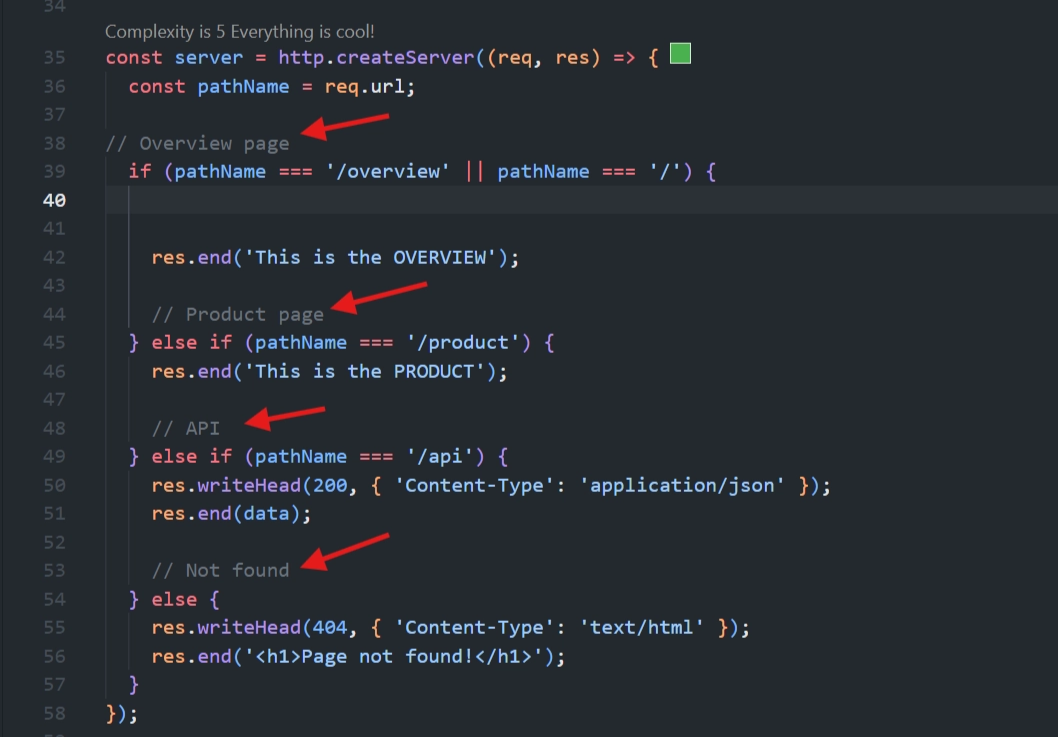
⚡ Step 2: Load All Templates Once (Top-Level Code)
📖 Just like the JSON data was read once at the top level (not inside the request callback), the same approach applies to templates — they never change, so there's no need to re-read them on every request.
index.js
const tempOverview = fs.readFileSync(`${__dirname}/templates/template-overview.html`, 'utf-8');
const tempCard = fs.readFileSync(`${__dirname}/templates/template-card.html`, 'utf-8');
const tempProduct = fs.readFileSync(`${__dirname}/templates/template-product.html`, 'utf-8');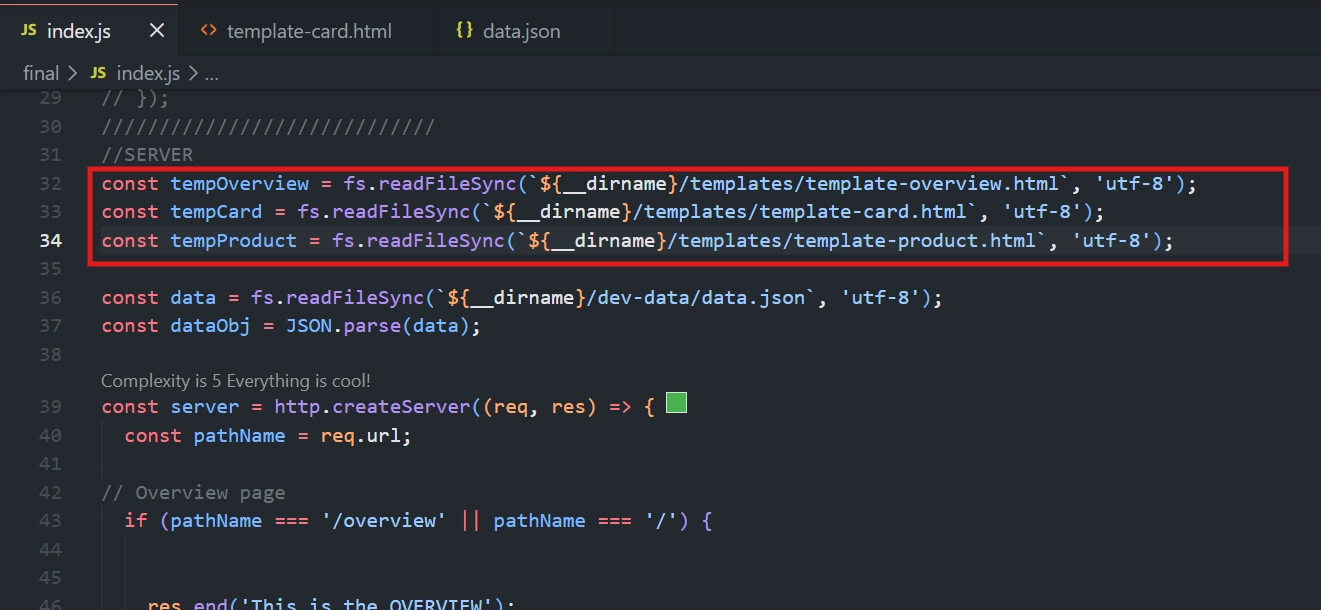
🤔💡 Why Synchronous (readFileSync) Is Fine Here
🚀 This code runs only once, when the app starts (top-level code).
⚠️ If it were inside the
createServercallback, it would block execution on every single request — a serious performance problem under heavy traffic.✅ Since it's outside the callback, blocking briefly at startup is harmless.
🧪 Step 3: Test by Sending the Raw Template First
👀 Before adding replacement logic, first confirm the template loads correctly:
if (pathName === '/' || pathName === '/overview') {
  res.writeHead(200, { 'Content-Type': 'text/html' });
  res.end(tempOverview);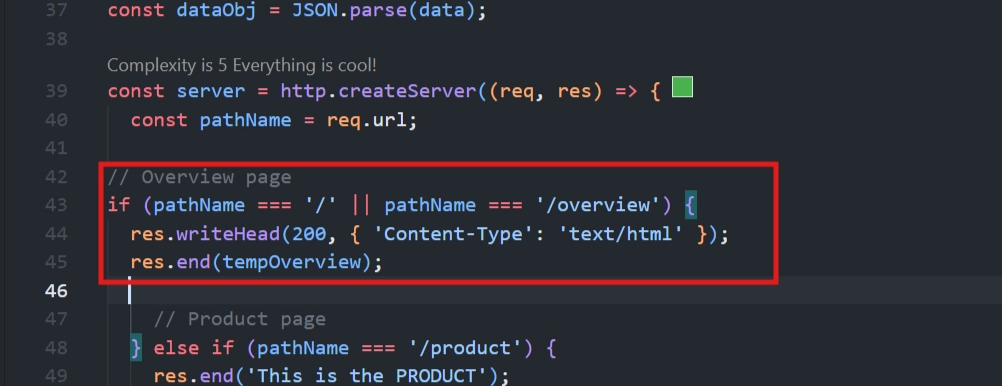
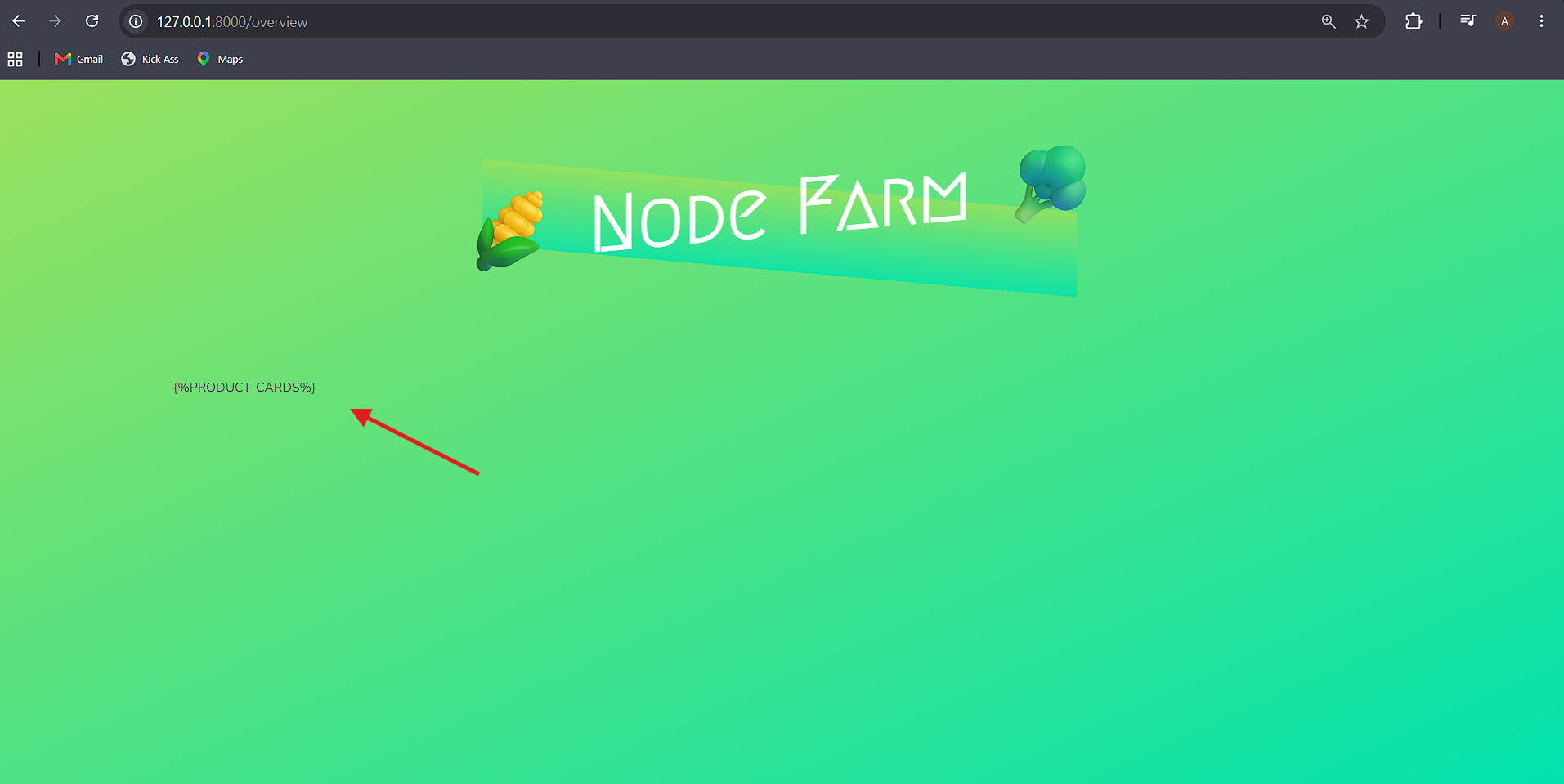
🔄 Restart the server and reload the browser.
👀 You should see the styled page, but the product cards will be missing — because the
%PRODUCT_CARDS%placeholder hasn't been replaced yet.
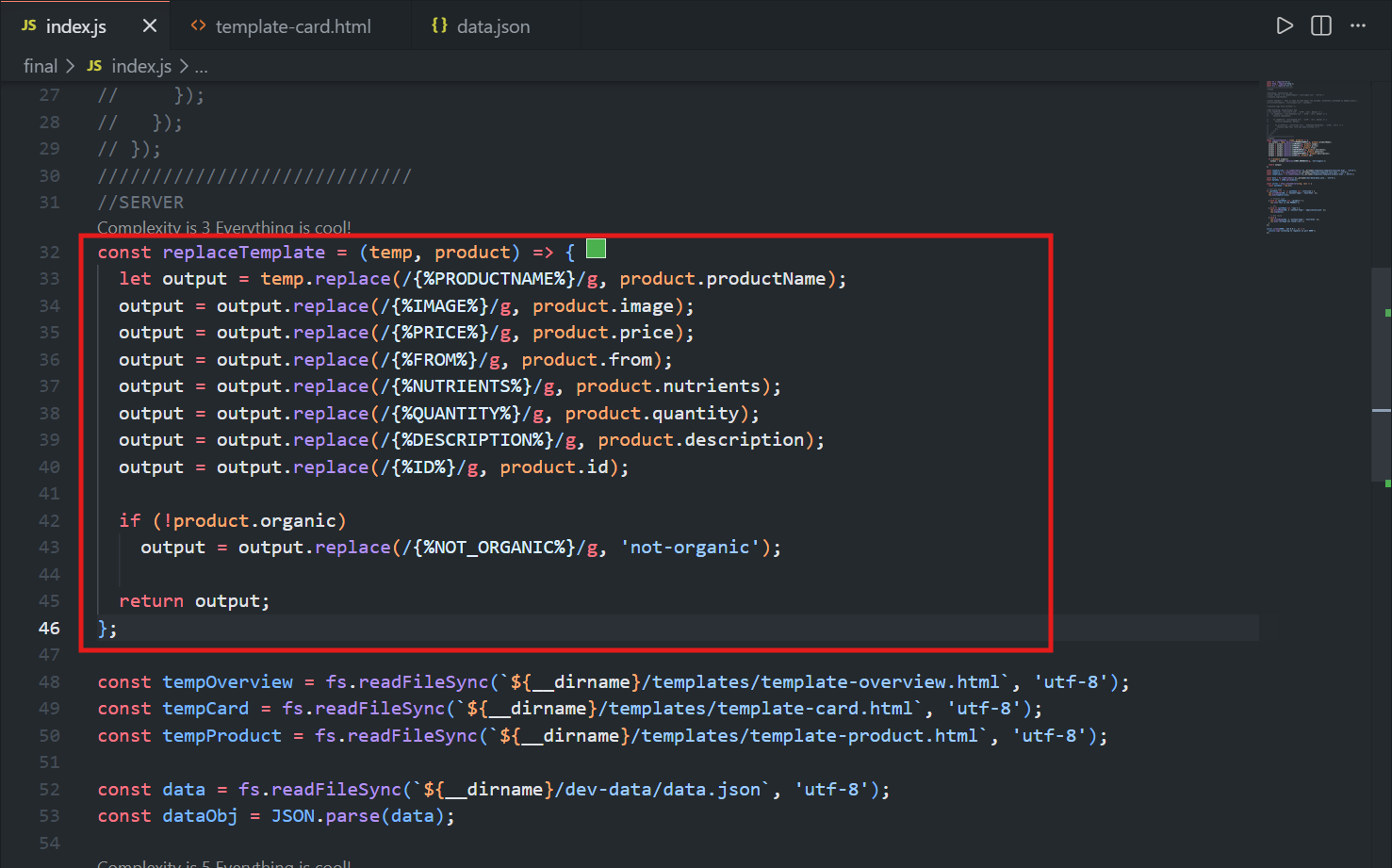
🛠️ Step 4: Build a Reusable replaceTemplate Function
♻️ Since each product card needs the same set of placeholders replaced (just with different data), it makes sense to create one reusable function.
const replaceTemplate = (temp, product) => {
  let output = temp.replace(/{%PRODUCTNAME%}/g, product.productName);
  output = output.replace(/{%IMAGE%}/g, product.image);
  output = output.replace(/{%PRICE%}/g, product.price);
  output = output.replace(/{%FROM%}/g, product.from);
  output = output.replace(/{%NUTRIENTS%}/g, product.nutrients);
  output = output.replace(/{%QUANTITY%}/g, product.quantity);
  output = output.replace(/{%DESCRIPTION%}/g, product.description);
  output = output.replace(/{%ID%}/g, product.id);

  if (!product.organic)
    output = output.replace(/{%NOT_ORGANIC%}/g, 'not-organic');

  return output;
};
1. Function Parameters
temp— the template string (e.g.tempCard)const tempCard = fs.readFileSync(`${__dirname}/templates/template-card.html`, 'utf-8');product— a single product object (e.g. one entry from the JSON array)
2. Why let Instead of const
A new variable
outputis created instead of modifyingtempdirectly, since mutating function arguments is bad practice.outputgets reassigned each time a placeholder is replaced, so it has to be declared withlet—constwouldn't allow that.
3. Why a Regular Expression Instead of a Plain String
temp.replace(/{%PRODUCTNAME%}/g, product.productName)String.replace()with a plain string only replaces the first match.A regex with the
g(global) flag replaces every occurrence — necessary since some placeholders (like%IMAGE%) can appear more than once in the template.
4. Handling the Organic Placeholder (Special Case)
product.organicis a boolean (true/false) in the JSON.If a product is not organic,
%NOT_ORGANIC%is replaced with the CSS classnot-organic, which hides the organic badge via CSS.If it is organic, the placeholder is replaced with an empty string — no extra class gets added, so the badge stays visible.
5. Returning the Result
The function returns
output, the final HTML string with every placeholder filled in.
🔁 Step 5: Generate a Card for Every Product Using .map()
const cardsHtml = dataObj.map(el => replaceTemplate(tempCard, el)).join('');
console.log(cardsHtml);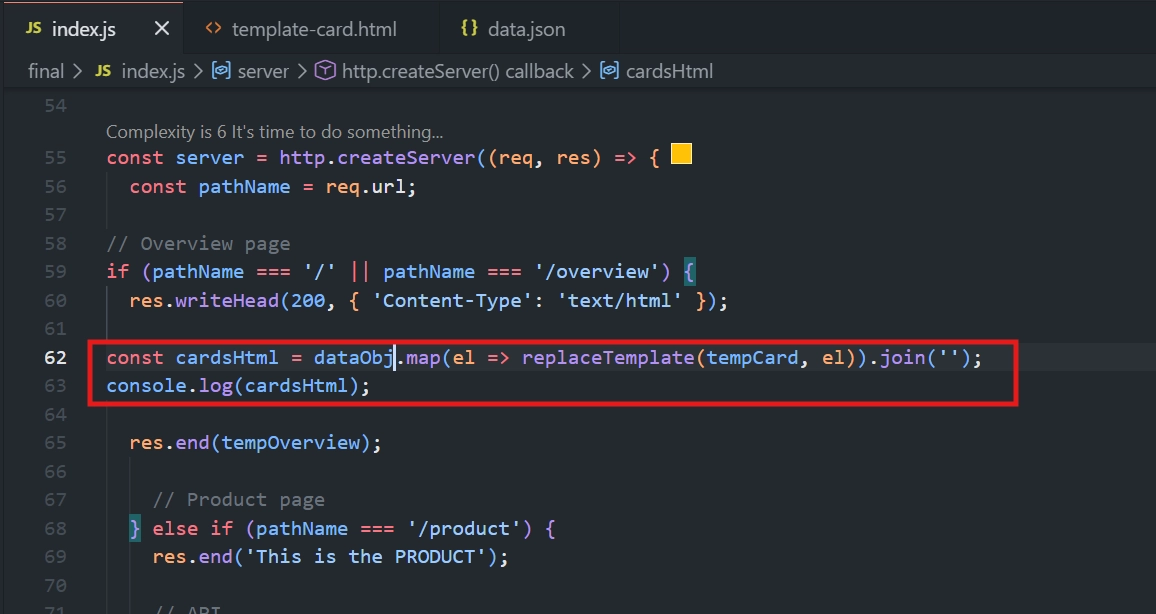
dataObjectis the array of product objects (parsed earlier from JSON)..map()loops through each product (el) in the array and returns a new array, where each item is the result of callingreplaceTemplate(tempCard, el)— a fully filled-in HTML card for that product.Because this is an arrow function without curly braces, the result is implicitly returned — no need to write
returnexplicitly.At this point,
cardsHtmlis an array of HTML strings (one per product), not yet a single string..join('')combines all array elements into one string with no separator between them, giving the final combined HTML for all the cards.
Debugging tip: it helps to console.log(cardsHtml) at intermediate steps to confirm the array/string looks right before moving on.
🧩 Step 6: Insert the Cards into the Overview Template:
Replace console.log(cardsHtml); and res.end('This is the OVERVIEW'); with this: 👇
const output = tempOverview.replace('{%PRODUCT_CARDS%}', cardsHtml);
res.end(output);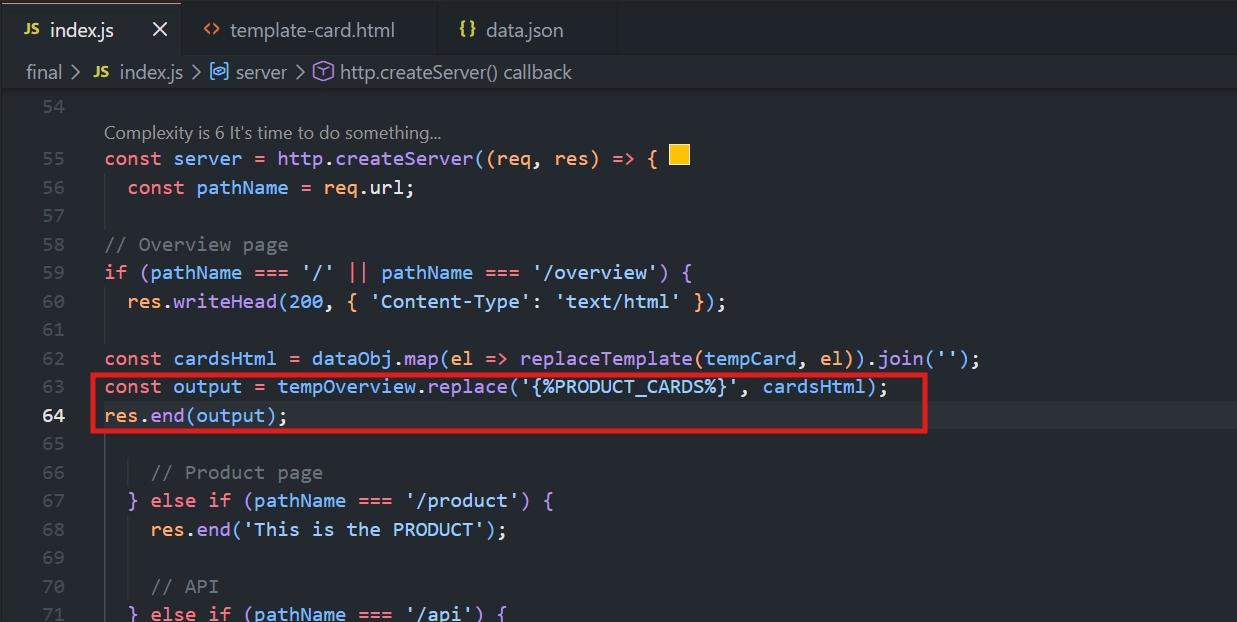
🔄 This replaces the single
%PRODUCTCARDS%placeholder intempOverviewwith the full string of all generated cards.📤 Finally, send
output(not the raw template) back as the response.
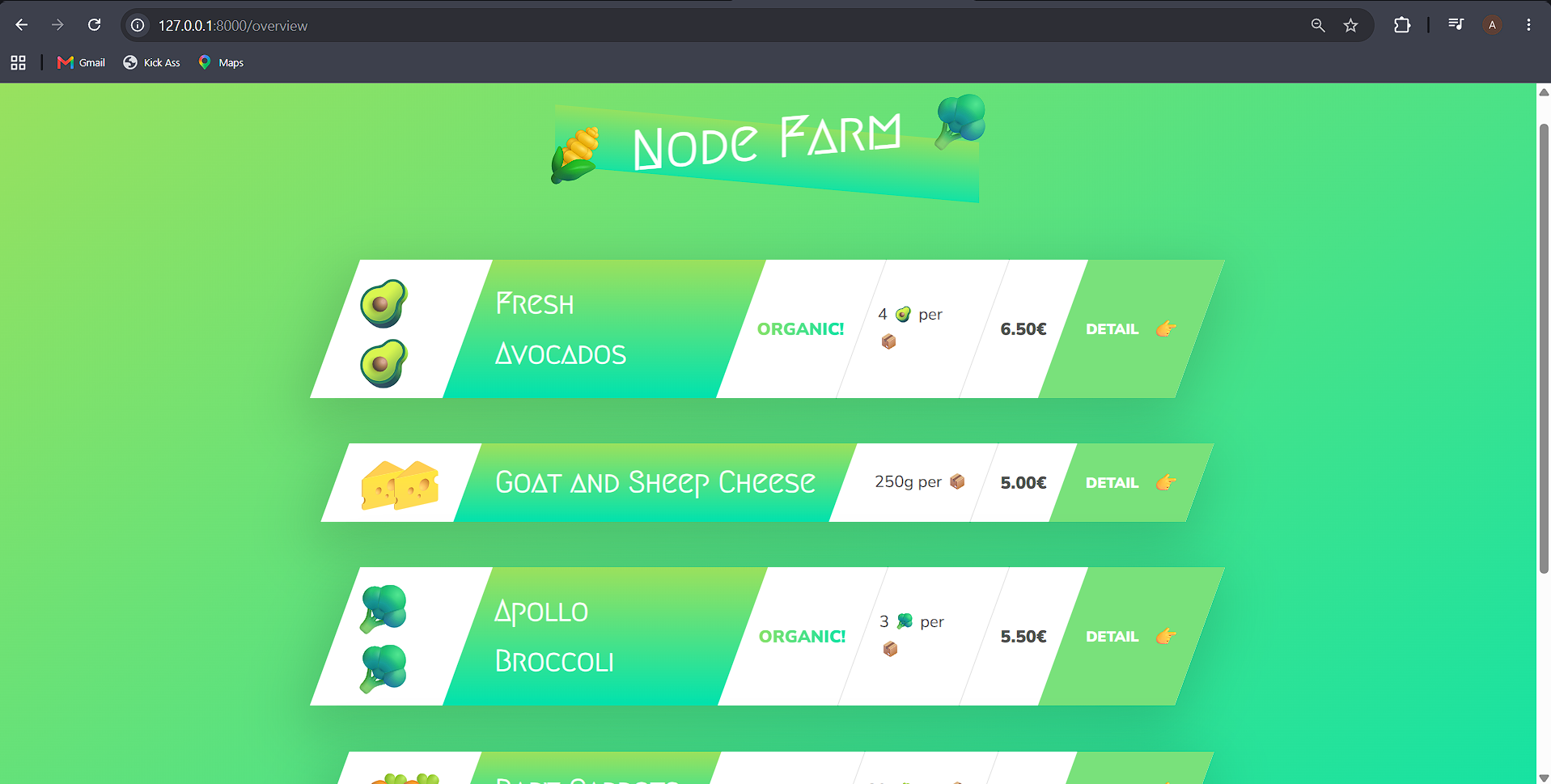
✅ Step 7: Verifying Full Dynamic Behavior
Test 1 — Removing a Product
✂️ Delete one product entry from
data.json(e.g., cut out the avocado object).🚀 Restart the server — now reload the page, and the removed product is gone.
♻️ Add the product back, restart the server again — it reappears.
✅ This confirms the page is genuinely data-driven from the JSON file.
Test 2 — Product Detail Links
🔗 When the cursor is placed over the details, a link will be displayed below.
🔗 Each card contains a link with a dynamic
id(e.g.,/product?id=0,/product?id=1, etc.), matching the product's position/ID in the JSON.
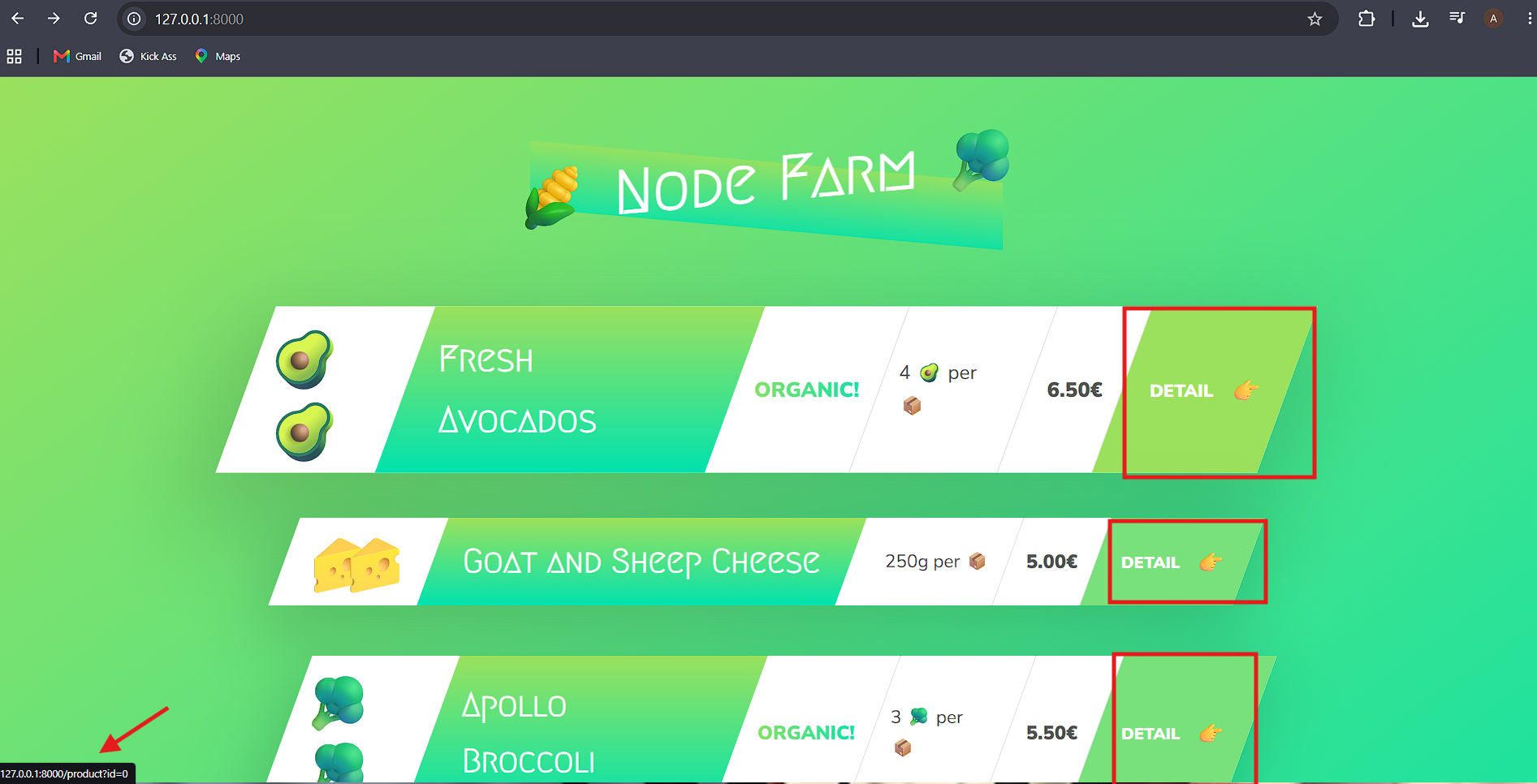
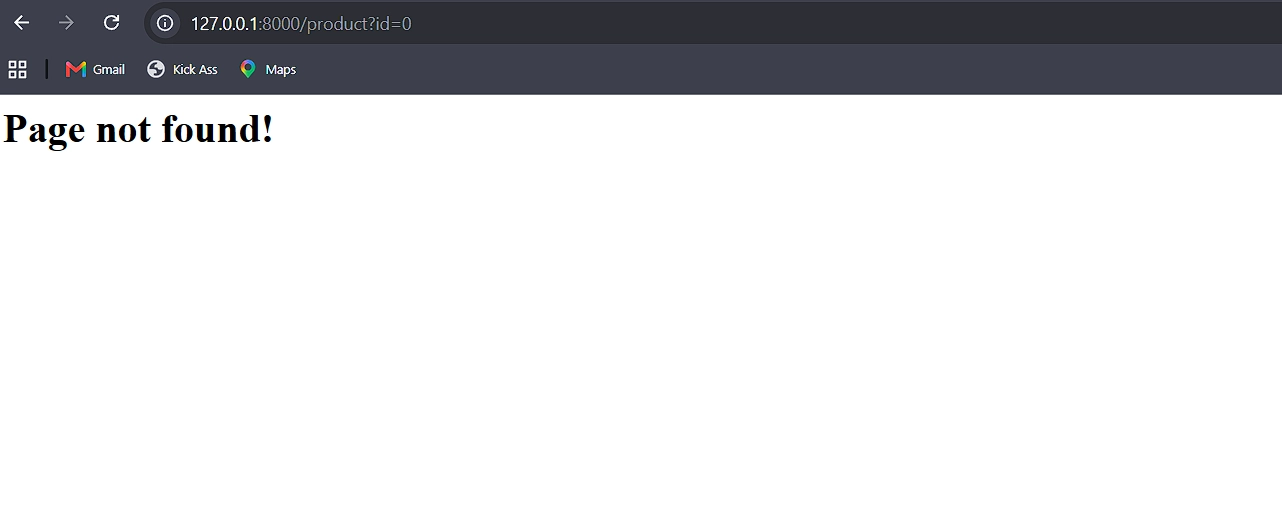
❌ Clicking one of these links currently results in "Page not found", since the
/productroute hasn't been implemented yet to handle dynamic IDs.
🚀 Next step in the course: Implement the
/productroute so each product's detail page actually displays the correct data based on its ID.
🎯📚 Key Takeaways
📌 Concept | 🎯 Purpose |
|---|---|
📂 Reading templates at the top level | Templates never change per-request, so read them once at startup for efficiency |
🔄 | Reusable function to replace all placeholders in a template with one product's data |
🌐 Regular expression with | Ensures all occurrences of a placeholder are replaced, not just the first |
🔁 | Use |
🃏 | Generates one HTML "card" per product, then combines them all into a single string |
🐞 Debugging placeholder issues | Compare your template's HTML structure against the original reference design when something looks visually wrong |
🚀 Data is only read at startup | Changes to |
<div class="infographic-vscodeterm" id="vt">
<style>
.infographic-vscodeterm {
--ink: #1a1a1a;
--ink-soft: #5c5c5c;
--paper: #ffffff;
--paper-alt: #f0ece4;
--accent: #2563eb;
--accent-deep: #1942a8;
--accent-soft: #e3ebfd;
--line: #ddd6c9;
--radius: 8px;
--display-font: 'Fraunces', Georgia, serif;
--body-font: 'Inter', system-ui, sans-serif;
--mono-font: 'IBM Plex Mono', monospace;
max-width: 880px;
margin: 0 auto;
box-sizing: border-box;
background: transparent;
color: var(--ink);
font-family: var(--body-font);
}
.infographic-vscodeterm[data-theme="dark"] {
--ink: #e8e6e1;
--ink-soft: #9a968c;
--paper: #13171f;
--paper-alt: #1c212b;
--accent: #5b8def;
--accent-deep: #8fb4ff;
--accent-soft: #20293f;
--line: #2c313d;
}
.infographic-vscodeterm * { box-sizing: border-box; min-width: 0; }
.vt-eyebrow {
font-family: var(--mono-font); font-size: 0.72rem; letter-spacing: 0.1em;
text-transform: uppercase; color: var(--accent); margin: 0 0 0.45rem;
display: flex; align-items: center; justify-content: center; gap: 0.4rem;
}
.vt-eyebrow::before { content: ""; width: 14px; height: 2px; background: var(--accent); display: inline-block; }
.vt-title {
font-family: var(--display-font); font-size: clamp(1.5rem, 4vw, 2.3rem); text-align: center;
margin: 0 0 0.5rem; line-height: 1.14; letter-spacing: -0.01em;
}
.vt-sub { color: var(--ink-soft); font-size: 0.95rem; text-align: center; margin: 0 0 1.7rem; }
/* ===== VS Code window — fixed dark theme regardless of page mode ===== */
.vt-window { border-radius: 8px; overflow: hidden; box-shadow: 0 16px 40px -14px rgba(0,0,0,0.45); border: 1px solid #1e1e1e; font-family: var(--mono-font); }
.vt-titlebar { background: #323233; display: flex; align-items: center; padding: 0.5rem 0.8rem; position: relative; }
.vt-dots { display: flex; gap: 0.4rem; }
.vt-dots span { width: 10px; height: 10px; border-radius: 50%; display: block; }
.vt-dots span:nth-child(1) { background: #ff5f56; }
.vt-dots span:nth-child(2) { background: #ffbd2e; }
.vt-dots span:nth-child(3) { background: #27c93f; }
.vt-titlebar-text { position: absolute; left: 50%; transform: translateX(-50%); font-size: 0.72rem; color: #cccccc; }
.vt-body { display: flex; height: 300px; }
.vt-resize-h { width: 5px; cursor: col-resize; background: transparent; flex-shrink: 0; transition: background 0.15s; touch-action: none; }
.vt-resize-h:hover, .vt-resize-h.is-dragging { background: #0078d4; }
.vt-resize-v { height: 5px; cursor: row-resize; background: transparent; flex-shrink: 0; transition: background 0.15s; touch-action: none; }
.vt-resize-v:hover, .vt-resize-v.is-dragging { background: #0078d4; }
.vt-window-resize {
height: 9px; background: #252526; cursor: row-resize; display: flex; align-items: center;
justify-content: center; border-top: 1px solid #1e1e1e; touch-action: none;
}
.vt-window-resize span { width: 30px; height: 3px; border-radius: 2px; background: #4a4a52; }
.vt-window-resize:hover span, .vt-window-resize.is-dragging span { background: #0078d4; }
.vt-toggle-btn {
background: none; border: none; color: #9a9a9a; cursor: pointer; display: flex; align-items: center;
padding: 0.3rem; border-radius: 3px; flex-shrink: 0;
}
.vt-toggle-btn:hover { background: #2a2d2e; color: #fff; }
.vt-toggle-btn svg { width: 13px; height: 13px; }
.vt-sidebar.is-hidden { width: 0 !important; overflow: hidden; border-right: none; }
.vt-terminal.is-collapsed { height: auto !important; }
.vt-terminal.is-collapsed .vt-term-body { display: none; }
.vt-terminal.is-collapsed .vt-term-toggle svg { transform: rotate(-90deg); }
.vt-activitybar { width: 40px; background: #333333; display: flex; flex-direction: column; align-items: center; padding-top: 0.7rem; gap: 1.1rem; flex-shrink: 0; }
.vt-activitybar svg { width: 18px; height: 18px; opacity: 0.55; }
.vt-activitybar svg.is-on { opacity: 1; }
.vt-sidebar { width: 170px; background: #252526; flex-shrink: 0; overflow-y: auto; border-right: 1px solid #1e1e1e; }
.vt-sidebar-head { font-size: 0.65rem; font-weight: 700; letter-spacing: 0.06em; color: #bbbbbb; padding: 0.6rem 0.8rem 0.3rem; }
.vt-sidebar-root { font-size: 0.74rem; color: #cccccc; padding: 0.2rem 0.7rem; display: flex; align-items: center; gap: 0.3rem; }
.vt-sidebar-folder { font-size: 0.74rem; color: #cccccc; padding: 0.2rem 0.7rem 0.2rem 1.4rem; display: flex; align-items: center; gap: 0.3rem; }
.vt-sidebar-folder.lvl2 { padding-left: 2.6rem; }
.vt-row {
display: flex; align-items: center; gap: 0.35rem; width: 100%; background: none; border: none;
color: #cccccc; font: inherit; font-size: 0.74rem; padding: 0.24rem 0.7rem 0.24rem 2.1rem;
cursor: pointer; text-align: left; border-left: 2px solid transparent;
}
.vt-row.lvl1 { padding-left: 1.4rem; }
.vt-row.lvl2 { padding-left: 3.4rem; }
.vt-row:hover { background: #2a2d2e; }
.vt-row.is-selected { background: #37373d; border-left-color: #0078d4; }
.vt-badge { width: 15px; height: 15px; border-radius: 3px; flex-shrink: 0; display: flex; align-items: center; justify-content: center; font-size: 0.46rem; font-weight: 700; color: #1a1a1a; background: #29b6f6; }
.vt-main { flex: 1; display: flex; flex-direction: column; min-width: 0; }
.vt-tabbar { display: flex; background: #252526; border-bottom: 1px solid #1e1e1e; overflow-x: auto; }
.vt-tab {
display: flex; align-items: center; gap: 0.35rem; background: #1e1e1e; color: #808080; font: inherit;
font-size: 0.72rem; padding: 0.45rem 0.8rem; border: none; border-right: 1px solid #1e1e1e;
border-top: 2px solid transparent; cursor: pointer; white-space: nowrap;
}
.vt-tab.is-active { color: #d4d4d4; border-top-color: #0078d4; background: #1e1e1e; }
.vt-tab .vt-badge { width: 13px; height: 13px; font-size: 0.42rem; }
.vt-code-wrap { flex: 1; background: #1e1e1e; overflow: auto; padding: 0.85rem 1rem; }
.vt-code-wrap pre { margin: 0; }
.vt-code-wrap code { font-family: var(--mono-font); font-size: 0.72rem; line-height: 1.7; color: #d4d4d8; white-space: pre; }
.tok-kw { color: #c678dd; }
.tok-tag { color: #e06c75; }
.tok-type { color: #61afef; }
.tok-attr { color: #d19a66; }
.tok-str { color: #98c379; }
.tok-expr { color: #56b6c2; }
.tok-punc { color: #6b7280; }
.vt-flash { background: rgba(220,38,38,0.22); }
/* ===== terminal ===== */
.vt-terminal { background: #181818; border-top: 1px solid #2c2c2c; display: flex; flex-direction: column; height: 150px; flex-shrink: 0; }
.vt-term-head { display: flex; align-items: center; gap: 0.4rem; font-size: 0.62rem; letter-spacing: 0.05em; color: #9a9a9a; padding: 0.35rem 0.8rem; border-bottom: 1px solid #262626; text-transform: uppercase; }
.vt-term-body { flex: 1; overflow-y: auto; padding: 0.5rem 0.9rem; font-size: 0.72rem; line-height: 1.65; }
.vt-term-line { color: #d4d4d4; white-space: pre; opacity: 0; transform: translateY(2px); animation: vt-line-in 0.25s ease forwards; }
@keyframes vt-line-in { to { opacity: 1; transform: none; } }
.vt-term-line.is-cmd { color: #7ee787; }
.vt-term-line.is-ok { color: #7ee787; font-weight: 600; }
.vt-term-prompt { color: #7ee787; }
.vt-run-row { display: flex; align-items: center; gap: 0.5rem; margin-top: 0.2rem; }
.vt-run-btn {
font: inherit; font-size: 0.68rem; font-weight: 600; color: #1a1a1a; background: #7ee787;
border: none; border-radius: 4px; padding: 0.3rem 0.7rem; cursor: pointer; display: flex; align-items: center; gap: 0.3rem;
}
.vt-run-btn:disabled { opacity: 0.5; cursor: default; }
.vt-run-btn svg { width: 9px; height: 9px; }
.vt-run-hint { color: #6b7280; font-size: 0.68rem; }
@media (max-width: 620px) {
.vt-sidebar { width: 130px; }
.vt-body { height: 320px; }
}
@media (max-width: 480px) { .vt-activitybar { display: none; } }
/* ===== browser output ===== */
.vt-output-label {
font-family: var(--mono-font); font-size: 0.68rem; letter-spacing: 0.1em; text-transform: uppercase;
color: var(--ink-soft); text-align: center; margin: 1.5rem 0 0.7rem;
}
.vt-browser {
border: 1px solid var(--line); border-radius: var(--radius); overflow: hidden; max-width: 560px; margin: 0 auto;
box-shadow: 0 10px 24px -12px rgba(26,26,26,0.18);
opacity: 0; transform: translateY(8px); transition: opacity 0.4s ease, transform 0.4s ease; pointer-events: none;
}
.vt-browser.is-shown { opacity: 1; transform: none; pointer-events: auto; }
.vt-browser-bar { background: #e9e9e9; padding: 0.5rem 0.7rem; display: flex; align-items: center; gap: 0.5rem; }
.vt-browser-bar .vt-dots span { width: 8px; height: 8px; }
.vt-browser-url { font-family: var(--mono-font); font-size: 0.65rem; color: #555; background: #fff; border-radius: 4px; padding: 0.2rem 0.5rem; flex: 1; }
.vt-browser-page { background: #fff; padding: 1.2rem 1.2rem 1.6rem; text-align: center; }
.vt-output-placeholder { text-align: center; font-size: 0.82rem; color: var(--ink-soft); }
.vt-route-row { display: flex; gap: 0.35rem; justify-content: center; margin-bottom: 1rem; flex-wrap: wrap; }
.vt-route-btn {
font-family: var(--mono-font); font-size: 0.66rem; font-weight: 600; color: #555;
background: #f0f0f0; border: 1px solid #ddd; border-radius: 999px; padding: 0.25rem 0.6rem; cursor: pointer;
}
.vt-route-btn.is-on { background: #2563eb; border-color: #2563eb; color: #fff; }
.vt-route-body { font-family: var(--mono-font); font-size: 0.88rem; color: #000; margin: 0; }
.vt-route-status {
display: inline-block; font-family: var(--mono-font); font-size: 0.66rem; font-weight: 700;
color: #b3261e; background: #fbe6e6; border: 1px solid #b3261e; border-radius: 999px;
padding: 0.15rem 0.55rem; margin-bottom: 0.5rem;
}
.vt-route-status.is-ok { color: #1f9d55; background: #e5f6ec; border-color: #1f9d55; }
.vt-json-preview {
text-align: left; font-family: var(--mono-font); font-size: 0.6rem; line-height: 1.5; color: #333;
background: #f7f7f5; border: 1px solid #e2e2de; border-radius: 6px; padding: 0.5rem 0.65rem;
max-height: 140px; overflow: auto; margin: 0; white-space: pre-wrap;
}
.vt-overview-wrap {
width: 520px; height: 400px; overflow: hidden; border-radius: 6px; border: 1px solid #e2e2de;
margin: 0 auto; background: #fff;
}
.vt-overview-frame {
width: 950px; height: 1900px; border: none; display: block;
transform: scale(0.5474); transform-origin: top left;
}
.vt-route-headers {
font-family: var(--mono-font); font-size: 0.62rem; color: #777; margin-top: 0.5rem; line-height: 1.6;
}
.vt-route-headers b { color: #333; }
.vt-takeaway {
margin-top: 1.7rem; padding: 0.95rem 1.2rem; background: var(--accent-soft); border-left: 3px solid var(--accent);
border-radius: 4px; font-size: 0.9rem; color: var(--ink); line-height: 1.5; max-width: 620px; margin-left: auto; margin-right: auto;
}
.vt-takeaway b { color: var(--accent-deep); }
@media (prefers-reduced-motion: reduce) {
.infographic-vscodeterm *, .infographic-vscodeterm *::before, .infographic-vscodeterm *::after {
transition-duration: 0.001ms !important; animation-duration: 0.001ms !important;
}
}
</style>
<div class="vt-window">
<div class="vt-titlebar">
<div class="vt-dots"><span></span><span></span><span></span></div>
<div class="vt-titlebar-text">node-server — Visual Studio Code</div>
</div>
<div class="vt-body">
<div class="vt-activitybar">
<svg class="is-on" viewBox="0 0 24 24" fill="none" aria-hidden="true"><rect x="3" y="4" width="7" height="7" rx="1" stroke="#fff" stroke-width="1.6"/><rect x="14" y="4" width="7" height="7" rx="1" stroke="#fff" stroke-width="1.6"/><rect x="3" y="15" width="7" height="7" rx="1" stroke="#fff" stroke-width="1.6"/><rect x="14" y="15" width="7" height="7" rx="1" stroke="#fff" stroke-width="1.6"/></svg>
<svg viewBox="0 0 24 24" fill="none" aria-hidden="true"><circle cx="10" cy="10" r="6.5" stroke="#fff" stroke-width="1.6"/><line x1="15" y1="15" x2="20" y2="20" stroke="#fff" stroke-width="1.6" stroke-linecap="round"/></svg>
</div>
<div class="vt-sidebar">
<div class="vt-sidebar-head">EXPLORER</div>
<div class="vt-sidebar-root">▾ NODE-SERVER</div>
<button class="vt-row lvl1 is-selected" data-file="index" type="button"><span class="vt-badge">JS</span><span>index.js</span></button>
<div class="vt-sidebar-folder">▾ dev-data</div>
<button class="vt-row lvl2" data-file="data" type="button"><span class="vt-badge" style="background:#dcb67a;">{}</span><span>data.json</span></button>
<div class="vt-sidebar-folder">▾ templates</div>
<button class="vt-row lvl2" data-file="card" type="button"><span class="vt-badge" style="background:#e37933;">H</span><span>template-card.html</span></button>
<button class="vt-row lvl2" data-file="overview" type="button"><span class="vt-badge" style="background:#e37933;">H</span><span>template-overview.html</span></button>
<button class="vt-row lvl2" data-file="product" type="button"><span class="vt-badge" style="background:#e37933;">H</span><span>template-product.html</span></button>
</div>
<div class="vt-resize-h" id="vtSidebarHandle" title="Drag to resize sidebar"></div>
<div class="vt-main">
<div class="vt-tabbar">
<button class="vt-toggle-btn" id="vtToggleSidebar" type="button" aria-label="Toggle sidebar" title="Toggle sidebar">
<svg viewBox="0 0 16 16" fill="none" aria-hidden="true"><rect x="1.5" y="2" width="13" height="12" rx="1.5" stroke="currentColor" stroke-width="1.3"/><line x1="6" y1="2" x2="6" y2="14" stroke="currentColor" stroke-width="1.3"/></svg>
</button>
<button class="vt-tab is-active" data-file="index" type="button"><span class="vt-badge">JS</span><span>index.js</span></button>
<button class="vt-tab" data-file="data" type="button"><span class="vt-badge" style="background:#dcb67a;">{}</span><span>data.json</span></button>
<button class="vt-tab" data-file="card" type="button"><span class="vt-badge" style="background:#e37933;">H</span><span>template-card.html</span></button>
<button class="vt-tab" data-file="overview" type="button"><span class="vt-badge" style="background:#e37933;">H</span><span>template-overview.html</span></button>
<button class="vt-tab" data-file="product" type="button"><span class="vt-badge" style="background:#e37933;">H</span><span>template-product.html</span></button>
</div>
<div class="vt-code-wrap">
<pre><code id="vtCode"></code></pre>
</div>
<div class="vt-resize-v" id="vtTerminalHandle" title="Drag to resize terminal"></div>
<div class="vt-terminal">
<div class="vt-term-head">
<button class="vt-toggle-btn vt-term-toggle" id="vtToggleTerminal" type="button" aria-label="Toggle terminal" title="Toggle terminal">
<svg viewBox="0 0 16 16" fill="none" aria-hidden="true"><path d="M4 6l4 4 4-4" stroke="currentColor" stroke-width="1.6" stroke-linecap="round" stroke-linejoin="round"/></svg>
</button>
<span>Terminal</span>
</div>
<div class="vt-term-body">
<div id="vtTermLines"><div class="vt-term-line" style="animation-delay:0s;"><span class="vt-term-prompt">$</span> </div></div>
<div class="vt-run-row">
<button class="vt-run-btn" id="vtRunBtn" type="button">
<svg viewBox="0 0 12 12" aria-hidden="true"><path d="M2.5 1.5v9l7-4.5z" fill="currentColor"/></svg>
<span id="vtRunLabel">node index.js</span>
</button>
<span class="vt-run-hint" id="vtRunHint">starts the server</span>
</div>
</div>
</div>
</div>
</div>
<div class="vt-window-resize" id="vtWindowHandle" title="Drag to resize window"><span></span></div>
</div>
<div class="vt-output-label">Output</div>
<div id="vtOutputArea">
<p class="vt-output-placeholder">Run <code style="font-family:var(--mono-font)">node index.js</code> above, then visit the server to see it here.</p>
<div class="vt-browser" id="vtBrowser">
<div class="vt-browser-bar">
<div class="vt-dots"><span></span><span></span><span></span></div>
<div class="vt-browser-url" id="vtUrl">127.0.0.1:8000</div>
</div>
<div class="vt-browser-page">
<div class="vt-route-row" id="vtRouteRow">
<button class="vt-route-btn is-on" data-path="/" type="button">/</button>
<button class="vt-route-btn" data-path="/product" type="button">/product</button>
<button class="vt-route-btn" data-path="/api" type="button">/api</button>
<button class="vt-route-btn" data-path="/random" type="button">/random</button>
</div>
<div id="vtRouteResult">
<p class="vt-route-body">This is the OVERVIEW</p>
</div>
</div>
</div>
</div>
</div>
<link rel="preconnect" href="https://fonts.googleapis.com">
<link href="https://fonts.googleapis.com/css2?family=Fraunces:wght@500;600&family=Inter:wght@400;500;600;700&family=IBM+Plex+Mono:wght@400;500&display=swap" rel="stylesheet">
<script>
(function () {
var root = document.getElementById('vt');
if (!root) return;
/* --- dark mode detection: body attribute > cookie > postMessage > light --- */
function applyDark(dark) {
if (dark) root.setAttribute('data-theme', 'dark');
else root.removeAttribute('data-theme');
}
var bodyAttr = document.body.getAttribute('data-darkmode');
var dark;
if (bodyAttr === 'true') dark = true;
else if (bodyAttr === 'false') dark = false;
else {
var match = document.cookie.match(/(?:^|;\s*)darkMode=([^;]+)/);
dark = match ? match[1] === 'true' : false;
}
applyDark(dark);
window.addEventListener('message', function (e) {
if (e.data && e.data.type === 'darkMode') applyDark(!!e.data.value);
});
/* --- file switching (single file here, kept for template consistency) --- */
var files = {
index:
'<span class="tok-kw">const</span> fs <span class="tok-punc">=</span> require<span class="tok-punc">(</span><span class="tok-str">\'fs\'</span><span class="tok-punc">);</span>\n' +
'<span class="tok-kw">const</span> http <span class="tok-punc">=</span> require<span class="tok-punc">(</span><span class="tok-str">\'http\'</span><span class="tok-punc">);</span>\n' +
'<span class="tok-kw">const</span> url <span class="tok-punc">=</span> require<span class="tok-punc">(</span><span class="tok-str">\'url\'</span><span class="tok-punc">);</span>\n' +
'<span class="tok-punc">////////////////////////////</span>\n' +
'<span class="tok-punc">//FILES</span>\n\n' +
'<span class="tok-punc">//Blocking, Synchronous way</span>\n' +
'<span class="tok-punc">//const textIn = fs.readFileSync(\'./txt/input.txt\', \'utf-8\');</span>\n' +
'<span class="tok-punc">//console.log(textIn);</span>\n\n' +
'<span class="tok-punc">//const textOut = `This is what we know about the avocado: ${textIn}.\\nCreated on ${Date.now()}`;</span>\n' +
'<span class="tok-punc">//fs.writeFileSync(\'./txt/output.txt\', textOut);</span>\n\n' +
'<span class="tok-punc">//console.log(\'File written!\');</span>\n\n' +
'<span class="tok-punc">//Non-blocking, Asynchronous way</span>\n' +
'<span class="tok-punc">// fs.readFile(\'./txt/start.txt\', \'utf8\', (err, data1) => {</span>\n' +
'<span class="tok-punc">// fs.readFile(`./txt/${data1}.txt`, \'utf8\', (err, data2) => {</span>\n' +
'<span class="tok-punc">// console.log(data2);</span>\n\n' +
'<span class="tok-punc">// fs.readFile(\'./txt/append.txt\', \'utf8\', (err, data3) => {</span>\n' +
'<span class="tok-punc">// console.log(data2, data3);</span>\n\n' +
'<span class="tok-punc">// fs.writeFile(\'./txt/final.txt\', `${data2}\\n${data3}`, \'utf8\', (err) => {</span>\n' +
'<span class="tok-punc">// console.log(\'Your file has been written \uD83C\uDF89\');</span>\n' +
'<span class="tok-punc">// });</span>\n' +
'<span class="tok-punc">// });</span>\n' +
'<span class="tok-punc">// });</span>\n' +
'<span class="tok-punc">// });</span>\n' +
'<span class="tok-punc">/////////////////////////////</span>\n' +
'<span class="tok-punc">//SERVER</span>\n' +
'<span class="tok-kw">const</span> replaceTemplate <span class="tok-punc">=</span> <span class="tok-punc">(</span>temp<span class="tok-punc">,</span> product<span class="tok-punc">) => {</span>\n' +
' <span class="tok-kw">let</span> output <span class="tok-punc">=</span> temp<span class="tok-punc">.</span><span class="tok-type">replace</span><span class="tok-punc">(</span><span class="tok-str">/{%PRODUCTNAME%}/g</span><span class="tok-punc">,</span> product<span class="tok-punc">.</span>productName<span class="tok-punc">);</span>\n' +
' output <span class="tok-punc">=</span> output<span class="tok-punc">.</span><span class="tok-type">replace</span><span class="tok-punc">(</span><span class="tok-str">/{%IMAGE%}/g</span><span class="tok-punc">,</span> product<span class="tok-punc">.</span>image<span class="tok-punc">);</span>\n' +
' output <span class="tok-punc">=</span> output<span class="tok-punc">.</span><span class="tok-type">replace</span><span class="tok-punc">(</span><span class="tok-str">/{%PRICE%}/g</span><span class="tok-punc">,</span> product<span class="tok-punc">.</span>price<span class="tok-punc">);</span>\n' +
' output <span class="tok-punc">=</span> output<span class="tok-punc">.</span><span class="tok-type">replace</span><span class="tok-punc">(</span><span class="tok-str">/{%FROM%}/g</span><span class="tok-punc">,</span> product<span class="tok-punc">.</span>from<span class="tok-punc">);</span>\n' +
' output <span class="tok-punc">=</span> output<span class="tok-punc">.</span><span class="tok-type">replace</span><span class="tok-punc">(</span><span class="tok-str">/{%NUTRIENTS%}/g</span><span class="tok-punc">,</span> product<span class="tok-punc">.</span>nutrients<span class="tok-punc">);</span>\n' +
' output <span class="tok-punc">=</span> output<span class="tok-punc">.</span><span class="tok-type">replace</span><span class="tok-punc">(</span><span class="tok-str">/{%QUANTITY%}/g</span><span class="tok-punc">,</span> product<span class="tok-punc">.</span>quantity<span class="tok-punc">);</span>\n' +
' output <span class="tok-punc">=</span> output<span class="tok-punc">.</span><span class="tok-type">replace</span><span class="tok-punc">(</span><span class="tok-str">/{%DESCRIPTION%}/g</span><span class="tok-punc">,</span> product<span class="tok-punc">.</span>description<span class="tok-punc">);</span>\n' +
' output <span class="tok-punc">=</span> output<span class="tok-punc">.</span><span class="tok-type">replace</span><span class="tok-punc">(</span><span class="tok-str">/{%ID%}/g</span><span class="tok-punc">,</span> product<span class="tok-punc">.</span>id<span class="tok-punc">);</span>\n\n' +
' <span class="tok-kw">if</span> <span class="tok-punc">(!</span>product<span class="tok-punc">.</span>organic<span class="tok-punc">)</span>\n' +
' output <span class="tok-punc">=</span> output<span class="tok-punc">.</span><span class="tok-type">replace</span><span class="tok-punc">(</span><span class="tok-str">/{%NOT_ORGANIC%}/g</span><span class="tok-punc">,</span> <span class="tok-str">\'not-organic\'</span><span class="tok-punc">);</span>\n\n' +
' <span class="tok-kw">return</span> output<span class="tok-punc">;</span>\n' +
'<span class="tok-punc">};</span>\n\n' +
'<span class="tok-kw">const</span> tempOverview <span class="tok-punc">=</span> fs<span class="tok-punc">.</span><span class="tok-type">readFileSync</span><span class="tok-punc">(`</span><span class="tok-expr">${__dirname}</span><span class="tok-punc">/templates/template-overview.html`,</span> <span class="tok-str">\'utf-8\'</span><span class="tok-punc">);</span>\n' +
'<span class="tok-kw">const</span> tempCard <span class="tok-punc">=</span> fs<span class="tok-punc">.</span><span class="tok-type">readFileSync</span><span class="tok-punc">(`</span><span class="tok-expr">${__dirname}</span><span class="tok-punc">/templates/template-card.html`,</span> <span class="tok-str">\'utf-8\'</span><span class="tok-punc">);</span>\n' +
'<span class="tok-kw">const</span> tempProduct <span class="tok-punc">=</span> fs<span class="tok-punc">.</span><span class="tok-type">readFileSync</span><span class="tok-punc">(`</span><span class="tok-expr">${__dirname}</span><span class="tok-punc">/templates/template-product.html`,</span> <span class="tok-str">\'utf-8\'</span><span class="tok-punc">);</span>\n\n' +
'<span class="tok-kw">const</span> data <span class="tok-punc">=</span> fs<span class="tok-punc">.</span><span class="tok-type">readFileSync</span><span class="tok-punc">(`</span><span class="tok-expr">${__dirname}</span><span class="tok-punc">/dev-data/data.json`,</span> <span class="tok-str">\'utf-8\'</span><span class="tok-punc">);</span>\n' +
'<span class="tok-kw">const</span> dataObj <span class="tok-punc">=</span> <span class="tok-type">JSON</span><span class="tok-punc">.</span><span class="tok-type">parse</span><span class="tok-punc">(</span>data<span class="tok-punc">);</span>\n\n' +
'<span class="tok-kw">const</span> server <span class="tok-punc">=</span> http<span class="tok-punc">.</span><span class="tok-type">createServer</span><span class="tok-punc">((</span>req<span class="tok-punc">,</span> res<span class="tok-punc">) => {</span>\n' +
' <span class="tok-kw">const</span> pathName <span class="tok-punc">=</span> req<span class="tok-punc">.</span>url<span class="tok-punc">;</span>\n\n' +
'<span class="tok-punc">// Overview page</span>\n' +
'<span class="vt-flash"><span class="tok-kw">if</span> <span class="tok-punc">(</span>pathName <span class="tok-punc">===</span> <span class="tok-str">\'/\'</span> <span class="tok-punc">||</span> pathName <span class="tok-punc">===</span> <span class="tok-str">\'/overview\'</span><span class="tok-punc">) {</span>\n' +
' res<span class="tok-punc">.</span><span class="tok-type">writeHead</span><span class="tok-punc">(</span><span class="tok-expr">200</span><span class="tok-punc">, {</span> <span class="tok-attr">\'Content-Type\'</span><span class="tok-punc">:</span> <span class="tok-str">\'text/html\'</span> <span class="tok-punc">});</span>\n\n' +
'const cardsHtml <span class="tok-punc">=</span> dataObj<span class="tok-punc">.</span><span class="tok-type">map</span><span class="tok-punc">(</span>el <span class="tok-punc">=></span> replaceTemplate<span class="tok-punc">(</span>tempCard<span class="tok-punc">,</span> el<span class="tok-punc">)).</span><span class="tok-type">join</span><span class="tok-punc">(</span><span class="tok-str">\'\'</span><span class="tok-punc">);</span>\n' +
'const output <span class="tok-punc">=</span> tempOverview<span class="tok-punc">.</span><span class="tok-type">replace</span><span class="tok-punc">(</span><span class="tok-str">\'{%PRODUCT_CARDS%}\'</span><span class="tok-punc">,</span> cardsHtml<span class="tok-punc">);</span>\n' +
'res<span class="tok-punc">.</span><span class="tok-type">end</span><span class="tok-punc">(</span>output<span class="tok-punc">);</span></span>\n\n' +
' <span class="tok-punc">// Product page</span>\n' +
' <span class="tok-punc">}</span> <span class="tok-kw">else if</span> <span class="tok-punc">(</span>pathName <span class="tok-punc">===</span> <span class="tok-str">\'/product\'</span><span class="tok-punc">) {</span>\n' +
' res<span class="tok-punc">.</span><span class="tok-type">end</span><span class="tok-punc">(</span><span class="tok-str">\'This is the PRODUCT\'</span><span class="tok-punc">);</span>\n\n' +
' <span class="tok-punc">// API</span>\n' +
' <span class="tok-punc">}</span> <span class="tok-kw">else if</span> <span class="tok-punc">(</span>pathName <span class="tok-punc">===</span> <span class="tok-str">\'/api\'</span><span class="tok-punc">) {</span>\n' +
' res<span class="tok-punc">.</span><span class="tok-type">writeHead</span><span class="tok-punc">(</span><span class="tok-expr">200</span><span class="tok-punc">, {</span> <span class="tok-attr">\'Content-Type\'</span><span class="tok-punc">:</span> <span class="tok-str">\'application/json\'</span> <span class="tok-punc">});</span>\n' +
' res<span class="tok-punc">.</span><span class="tok-type">end</span><span class="tok-punc">(</span>data<span class="tok-punc">);</span>\n\n' +
' <span class="tok-punc">// Not found</span>\n' +
' <span class="tok-punc">}</span> <span class="tok-kw">else</span> <span class="tok-punc">{</span>\n' +
' res<span class="tok-punc">.</span><span class="tok-type">writeHead</span><span class="tok-punc">(</span><span class="tok-expr">404</span><span class="tok-punc">, {</span> <span class="tok-attr">\'Content-Type\'</span><span class="tok-punc">:</span> <span class="tok-str">\'text/html\'</span> <span class="tok-punc">});</span>\n' +
' res<span class="tok-punc">.</span><span class="tok-type">end</span><span class="tok-punc">(</span><span class="tok-str">\'<h1>Page not found!</h1>\'</span><span class="tok-punc">);</span>\n' +
' <span class="tok-punc">}</span>\n' +
'<span class="tok-punc">});</span>\n\n' +
'server<span class="tok-punc">.</span><span class="tok-type">listen</span><span class="tok-punc">(</span><span class="tok-expr">8000</span><span class="tok-punc">,</span> <span class="tok-str">\'127.0.0.1\'</span><span class="tok-punc">, () => {</span>\n' +
' console<span class="tok-punc">.</span><span class="tok-type">log</span><span class="tok-punc">(</span><span class="tok-str">\'Listening to requests on port 8000\'</span><span class="tok-punc">);</span>\n' +
'<span class="tok-punc">});</span>'
,
data:
'<span class="tok-punc">[</span>\n' +
' <span class="tok-punc">{</span>\n' +
' <span class="tok-punc">"</span><span class="tok-attr">id</span><span class="tok-punc">": </span><span class="tok-expr">0</span><span class="tok-punc">,</span>\n' +
' <span class="tok-punc">"</span><span class="tok-attr">productName</span><span class="tok-punc">": </span><span class="tok-str">"Fresh Avocados"</span><span class="tok-punc">,</span>\n' +
' <span class="tok-punc">"</span><span class="tok-attr">image</span><span class="tok-punc">": </span><span class="tok-str">"🥑"</span><span class="tok-punc">,</span>\n' +
' <span class="tok-punc">"</span><span class="tok-attr">from</span><span class="tok-punc">": </span><span class="tok-str">"Spain"</span><span class="tok-punc">,</span>\n' +
' <span class="tok-punc">"</span><span class="tok-attr">nutrients</span><span class="tok-punc">": </span><span class="tok-str">"Vitamin B, Vitamin K"</span><span class="tok-punc">,</span>\n' +
' <span class="tok-punc">"</span><span class="tok-attr">quantity</span><span class="tok-punc">": </span><span class="tok-str">"4 🥑"</span><span class="tok-punc">,</span>\n' +
' <span class="tok-punc">"</span><span class="tok-attr">price</span><span class="tok-punc">": </span><span class="tok-str">"6.50"</span><span class="tok-punc">,</span>\n' +
' <span class="tok-punc">"</span><span class="tok-attr">organic</span><span class="tok-punc">": </span><span class="tok-kw">true</span><span class="tok-punc">,</span>\n' +
' <span class="tok-punc">"</span><span class="tok-attr">description</span><span class="tok-punc">": </span><span class="tok-str">"A ripe avocado yields to gentle pressure when held in the palm of the hand and squeezed. The fruit is not sweet, but distinctly and subtly flavored, with smooth texture. The avocado is popular in vegetarian cuisine as a substitute for meats in sandwiches and salads because of its high fat content. Generally, avocado is served raw, though some cultivars, including the common \'Hass\', can be cooked for a short time without becoming bitter. It is used as the base for the Mexican dip known as guacamole, as well as a spread on corn tortillas or toast, served with spices."</span><span class="tok-punc"></span>\n' +
' <span class="tok-punc">}</span><span class="tok-punc">,</span>\n' +
' <span class="tok-punc">{</span>\n' +
' <span class="tok-punc">"</span><span class="tok-attr">id</span><span class="tok-punc">": </span><span class="tok-expr">1</span><span class="tok-punc">,</span>\n' +
' <span class="tok-punc">"</span><span class="tok-attr">productName</span><span class="tok-punc">": </span><span class="tok-str">"Goat and Sheep Cheese"</span><span class="tok-punc">,</span>\n' +
' <span class="tok-punc">"</span><span class="tok-attr">image</span><span class="tok-punc">": </span><span class="tok-str">"🧀"</span><span class="tok-punc">,</span>\n' +
' <span class="tok-punc">"</span><span class="tok-attr">from</span><span class="tok-punc">": </span><span class="tok-str">"Portugal"</span><span class="tok-punc">,</span>\n' +
' <span class="tok-punc">"</span><span class="tok-attr">nutrients</span><span class="tok-punc">": </span><span class="tok-str">"Vitamin A, Calcium"</span><span class="tok-punc">,</span>\n' +
' <span class="tok-punc">"</span><span class="tok-attr">quantity</span><span class="tok-punc">": </span><span class="tok-str">"250g"</span><span class="tok-punc">,</span>\n' +
' <span class="tok-punc">"</span><span class="tok-attr">price</span><span class="tok-punc">": </span><span class="tok-str">"5.00"</span><span class="tok-punc">,</span>\n' +
' <span class="tok-punc">"</span><span class="tok-attr">organic</span><span class="tok-punc">": </span><span class="tok-kw">false</span><span class="tok-punc">,</span>\n' +
' <span class="tok-punc">"</span><span class="tok-attr">description</span><span class="tok-punc">": </span><span class="tok-str">"Creamy and distinct in flavor, goat cheese is a dairy product enjoyed around the world. Goat cheese comes in a wide variety of flavors and textures, from soft and spreadable fresh cheese to salty, crumbly aged cheese. Although it\'s made using the same coagulation and separation process as cheese made from cow\'s milk, goat cheese differs in nutrient content."</span><span class="tok-punc"></span>\n' +
' <span class="tok-punc">}</span><span class="tok-punc">,</span>\n' +
' <span class="tok-punc">{</span>\n' +
' <span class="tok-punc">"</span><span class="tok-attr">id</span><span class="tok-punc">": </span><span class="tok-expr">2</span><span class="tok-punc">,</span>\n' +
' <span class="tok-punc">"</span><span class="tok-attr">productName</span><span class="tok-punc">": </span><span class="tok-str">"Apollo Broccoli"</span><span class="tok-punc">,</span>\n' +
' <span class="tok-punc">"</span><span class="tok-attr">image</span><span class="tok-punc">": </span><span class="tok-str">"🥦"</span><span class="tok-punc">,</span>\n' +
' <span class="tok-punc">"</span><span class="tok-attr">from</span><span class="tok-punc">": </span><span class="tok-str">"Portugal"</span><span class="tok-punc">,</span>\n' +
' <span class="tok-punc">"</span><span class="tok-attr">nutrients</span><span class="tok-punc">": </span><span class="tok-str">"Vitamin C, Vitamin K"</span><span class="tok-punc">,</span>\n' +
' <span class="tok-punc">"</span><span class="tok-attr">quantity</span><span class="tok-punc">": </span><span class="tok-str">"3 🥦"</span><span class="tok-punc">,</span>\n' +
' <span class="tok-punc">"</span><span class="tok-attr">price</span><span class="tok-punc">": </span><span class="tok-str">"5.50"</span><span class="tok-punc">,</span>\n' +
' <span class="tok-punc">"</span><span class="tok-attr">organic</span><span class="tok-punc">": </span><span class="tok-kw">true</span><span class="tok-punc">,</span>\n' +
' <span class="tok-punc">"</span><span class="tok-attr">description</span><span class="tok-punc">": </span><span class="tok-str">"Broccoli is known to be a hearty and tasty vegetable which is rich in dozens of nutrients. It is said to pack the most nutritional punch of any vegetable. When we think about green vegetables to include in our diet, broccoli is one of the foremost veggies to come to our mind. Broccoli is a cruciferous vegetable and part of the cabbage family, which includes vegetables such as Brussel sprouts and kale. Although the tastes are different, broccoli and these other vegetables are from the same family."</span><span class="tok-punc"></span>\n' +
' <span class="tok-punc">}</span><span class="tok-punc">,</span>\n' +
' <span class="tok-punc">{</span>\n' +
' <span class="tok-punc">"</span><span class="tok-attr">id</span><span class="tok-punc">": </span><span class="tok-expr">3</span><span class="tok-punc">,</span>\n' +
' <span class="tok-punc">"</span><span class="tok-attr">productName</span><span class="tok-punc">": </span><span class="tok-str">"Baby Carrots"</span><span class="tok-punc">,</span>\n' +
' <span class="tok-punc">"</span><span class="tok-attr">image</span><span class="tok-punc">": </span><span class="tok-str">"🥕"</span><span class="tok-punc">,</span>\n' +
' <span class="tok-punc">"</span><span class="tok-attr">from</span><span class="tok-punc">": </span><span class="tok-str">"France"</span><span class="tok-punc">,</span>\n' +
' <span class="tok-punc">"</span><span class="tok-attr">nutrients</span><span class="tok-punc">": </span><span class="tok-str">"Vitamin A, Vitamin K"</span><span class="tok-punc">,</span>\n' +
' <span class="tok-punc">"</span><span class="tok-attr">quantity</span><span class="tok-punc">": </span><span class="tok-str">"20 🥕"</span><span class="tok-punc">,</span>\n' +
' <span class="tok-punc">"</span><span class="tok-attr">price</span><span class="tok-punc">": </span><span class="tok-str">"3.00"</span><span class="tok-punc">,</span>\n' +
' <span class="tok-punc">"</span><span class="tok-attr">organic</span><span class="tok-punc">": </span><span class="tok-kw">true</span><span class="tok-punc">,</span>\n' +
' <span class="tok-punc">"</span><span class="tok-attr">description</span><span class="tok-punc">": </span><span class="tok-str">"The carrot is a root vegetable that is often claimed to be the perfect health food. It is crunchy, tasty and highly nutritious. Carrots are a particularly good source of beta-carotene, fiber, vitamin K, potassium and antioxidants. Carrots have a number of health benefits. They are a weight loss friendly food and have been linked to lower cholesterol levels and improved eye health."</span><span class="tok-punc"></span>\n' +
' <span class="tok-punc">}</span><span class="tok-punc">,</span>\n' +
' <span class="tok-punc">{</span>\n' +
' <span class="tok-punc">"</span><span class="tok-attr">id</span><span class="tok-punc">": </span><span class="tok-expr">4</span><span class="tok-punc">,</span>\n' +
' <span class="tok-punc">"</span><span class="tok-attr">productName</span><span class="tok-punc">": </span><span class="tok-str">"Sweet Corncobs"</span><span class="tok-punc">,</span>\n' +
' <span class="tok-punc">"</span><span class="tok-attr">image</span><span class="tok-punc">": </span><span class="tok-str">"🌽"</span><span class="tok-punc">,</span>\n' +
' <span class="tok-punc">"</span><span class="tok-attr">from</span><span class="tok-punc">": </span><span class="tok-str">"Germany"</span><span class="tok-punc">,</span>\n' +
' <span class="tok-punc">"</span><span class="tok-attr">nutrients</span><span class="tok-punc">": </span><span class="tok-str">"Vitamin C, Magnesium"</span><span class="tok-punc">,</span>\n' +
' <span class="tok-punc">"</span><span class="tok-attr">quantity</span><span class="tok-punc">": </span><span class="tok-str">"2 🌽"</span><span class="tok-punc">,</span>\n' +
' <span class="tok-punc">"</span><span class="tok-attr">price</span><span class="tok-punc">": </span><span class="tok-str">"2.00"</span><span class="tok-punc">,</span>\n' +
' <span class="tok-punc">"</span><span class="tok-attr">organic</span><span class="tok-punc">": </span><span class="tok-kw">false</span><span class="tok-punc">,</span>\n' +
' <span class="tok-punc">"</span><span class="tok-attr">description</span><span class="tok-punc">": </span><span class="tok-str">"Also known as maize, corn is one of the most popular cereal grains in the world. Popcorn and sweet corn are commonly eaten varieties, but refined corn products are also widely consumed, frequently as ingredients in foods. These include tortillas, tortilla chips, polenta, cornmeal, corn flour, corn syrup, and corn oil. Whole-grain corn is as healthy as any cereal grain, rich in fiber and many vitamins, minerals, and antioxidants."</span><span class="tok-punc"></span>\n' +
' <span class="tok-punc">}</span>\n' +
'<span class="tok-punc">]</span>\n'
,
card:
' <span class="tok-punc"><</span><span class="tok-tag">figure</span> <span class="tok-attr">class</span><span class="tok-punc">=</span><span class="tok-str">"card"</span><span class="tok-punc">></span>\n' +
' <span class="tok-punc"><</span><span class="tok-tag">div</span> <span class="tok-attr">class</span><span class="tok-punc">=</span><span class="tok-str">"card__emoji"</span><span class="tok-punc">></span><span class="tok-expr">{%IMAGE%}</span><span class="tok-expr">{%IMAGE%}</span><span class="tok-punc"></</span><span class="tok-tag">div</span><span class="tok-punc">></span>\n' +
' <span class="tok-punc"><</span><span class="tok-tag">div</span> <span class="tok-attr">class</span><span class="tok-punc">=</span><span class="tok-str">"card__title-box"</span><span class="tok-punc">></span>\n' +
' <span class="tok-punc"><</span><span class="tok-tag">h2</span> <span class="tok-attr">class</span><span class="tok-punc">=</span><span class="tok-str">"card__title"</span><span class="tok-punc">></span><span class="tok-expr">{%PRODUCTNAME%}</span><span class="tok-punc"></</span><span class="tok-tag">h2</span><span class="tok-punc">></span>\n' +
' <span class="tok-punc"></</span><span class="tok-tag">div</span><span class="tok-punc">></span>\n' +
'\n' +
' <span class="tok-punc"><</span><span class="tok-tag">div</span> <span class="tok-attr">class</span><span class="tok-punc">=</span><span class="tok-str">"card__details"</span><span class="tok-punc">></span>\n' +
' <span class="tok-punc"><</span><span class="tok-tag">div</span> <span class="tok-attr">class</span><span class="tok-punc">=</span><span class="tok-str">"card__detail-box {%NOT_ORGANIC%}"</span><span class="tok-punc">></span>\n' +
' <span class="tok-punc"><</span><span class="tok-tag">h6</span> <span class="tok-attr">class</span><span class="tok-punc">=</span><span class="tok-str">"card__detail card__detail--organic"</span><span class="tok-punc">></span>Organic!<span class="tok-punc"></</span><span class="tok-tag">h6</span><span class="tok-punc">></span>\n' +
' <span class="tok-punc"></</span><span class="tok-tag">div</span><span class="tok-punc">></span>\n' +
'\n' +
' <span class="tok-punc"><</span><span class="tok-tag">div</span> <span class="tok-attr">class</span><span class="tok-punc">=</span><span class="tok-str">"card__detail-box"</span><span class="tok-punc">></span>\n' +
' <span class="tok-punc"><</span><span class="tok-tag">h6</span> <span class="tok-attr">class</span><span class="tok-punc">=</span><span class="tok-str">"card__detail"</span><span class="tok-punc">></span><span class="tok-expr">{%QUANTITY%}</span> per 📦<span class="tok-punc"></</span><span class="tok-tag">h6</span><span class="tok-punc">></span>\n' +
' <span class="tok-punc"></</span><span class="tok-tag">div</span><span class="tok-punc">></span>\n' +
' \n' +
' <span class="tok-punc"><</span><span class="tok-tag">div</span> <span class="tok-attr">class</span><span class="tok-punc">=</span><span class="tok-str">"card__detail-box"</span><span class="tok-punc">></span>\n' +
' <span class="tok-punc"><</span><span class="tok-tag">h6</span> <span class="tok-attr">class</span><span class="tok-punc">=</span><span class="tok-str">"card__detail card__detail--price"</span><span class="tok-punc">></span><span class="tok-expr">{%PRICE%}</span>€<span class="tok-punc"></</span><span class="tok-tag">h6</span><span class="tok-punc">></span>\n' +
' <span class="tok-punc"></</span><span class="tok-tag">div</span><span class="tok-punc">></span>\n' +
' <span class="tok-punc"></</span><span class="tok-tag">div</span><span class="tok-punc">></span>\n' +
'\n' +
' <span class="tok-punc"><</span><span class="tok-tag">a</span> <span class="tok-attr">class</span><span class="tok-punc">=</span><span class="tok-str">"card__link"</span> <span class="tok-attr">href</span><span class="tok-punc">=</span><span class="tok-str">"/product?id={%ID%}"</span><span class="tok-punc">></span>\n' +
' <span class="tok-punc"><</span><span class="tok-tag">span</span><span class="tok-punc">></span>Detail <span class="tok-punc"><</span><span class="tok-tag">i</span> <span class="tok-attr">class</span><span class="tok-punc">=</span><span class="tok-str">"emoji-right"</span><span class="tok-punc">></span>👉<span class="tok-punc"></</span><span class="tok-tag">i</span><span class="tok-punc">></span><span class="tok-punc"></</span><span class="tok-tag">span</span><span class="tok-punc">></span>\n' +
' <span class="tok-punc"></</span><span class="tok-tag">a</span><span class="tok-punc">></span>\n' +
' <span class="tok-punc"></</span><span class="tok-tag">figure</span><span class="tok-punc">></span> \n' +
'\n',
overview:
'<span class="tok-punc"><!DOCTYPE html></span>\n' +
'<span class="tok-punc"><</span><span class="tok-tag">html</span> <span class="tok-attr">lang</span><span class="tok-punc">=</span><span class="tok-str">"en"</span><span class="tok-punc">></span>\n' +
' <span class="tok-punc"><</span><span class="tok-tag">head</span><span class="tok-punc">></span>\n' +
' <span class="tok-punc"><</span><span class="tok-tag">meta</span> <span class="tok-attr">charset</span><span class="tok-punc">=</span><span class="tok-str">"UTF-8"</span> <span class="tok-punc">/></span>\n' +
' <span class="tok-punc"><</span><span class="tok-tag">meta</span> <span class="tok-attr">name</span><span class="tok-punc">=</span><span class="tok-str">"viewport"</span> <span class="tok-attr">content</span><span class="tok-punc">=</span><span class="tok-str">"width=device-width, initial-scale=1.0"</span> <span class="tok-punc">/></span>\n' +
' <span class="tok-punc"><</span><span class="tok-tag">meta</span> <span class="tok-attr">http-equiv</span><span class="tok-punc">=</span><span class="tok-str">"X-UA-Compatible"</span> <span class="tok-attr">content</span><span class="tok-punc">=</span><span class="tok-str">"ie=edge"</span> <span class="tok-punc">/></span>\n' +
' <span class="tok-punc"><</span><span class="tok-tag">link</span>\n' +
' <span class="tok-attr">href</span><span class="tok-punc">=</span><span class="tok-str">"https://fonts.googleapis.com/css?family=Megrim|Nunito+Sans:400,900"</span>\n' +
' <span class="tok-attr">rel</span><span class="tok-punc">=</span><span class="tok-str">"stylesheet"</span>\n' +
' <span class="tok-punc">/></span>\n' +
' <span class="tok-punc"><</span><span class="tok-tag">link</span>\n' +
' <span class="tok-attr">rel</span><span class="tok-punc">=</span><span class="tok-str">"icon"</span>\n' +
' <span class="tok-attr">href</span><span class="tok-punc">=</span><span class="tok-str">"https://emojipedia-us.s3.dualstack.us-west-1.amazonaws.com/thumbs/240/apple/155/ear-of-maize_1f33d.png"</span>\n' +
' <span class="tok-punc">/></span>\n' +
'\n' +
' <span class="tok-punc"><</span><span class="tok-tag">title</span><span class="tok-punc">></span>NODE FARM<span class="tok-punc"></</span><span class="tok-tag">title</span><span class="tok-punc">></span>\n' +
'\n' +
' <span class="tok-punc"><style></span>\n' +
' <span class="tok-tag">*,</span>\n' +
' <span class="tok-tag">*::before,</span>\n' +
' <span class="tok-tag">*::after</span> <span class="tok-punc">{</span>\n' +
' <span class="tok-attr">margin</span><span class="tok-punc">:</span> <span class="tok-str">0</span><span class="tok-punc">;</span>\n' +
' <span class="tok-attr">padding</span><span class="tok-punc">:</span> <span class="tok-str">0</span><span class="tok-punc">;</span>\n' +
' <span class="tok-attr">box-sizing</span><span class="tok-punc">:</span> <span class="tok-str">inherit</span><span class="tok-punc">;</span>\n' +
' <span class="tok-punc">}</span>\n' +
'\n' +
' <span class="tok-tag">html</span> <span class="tok-punc">{</span>\n' +
' <span class="tok-attr">font-size</span><span class="tok-punc">:</span> <span class="tok-str">62.5%</span><span class="tok-punc">;</span>\n' +
' <span class="tok-attr">box-sizing</span><span class="tok-punc">:</span> <span class="tok-str">border-box</span><span class="tok-punc">;</span>\n' +
' <span class="tok-punc">}</span>\n' +
'\n' +
' <span class="tok-tag">body</span> <span class="tok-punc">{</span>\n' +
' <span class="tok-attr">padding</span><span class="tok-punc">:</span> <span class="tok-str">5rem 5rem 10rem</span><span class="tok-punc">;</span>\n' +
' <span class="tok-attr">line-height</span><span class="tok-punc">:</span> <span class="tok-str">1.7</span><span class="tok-punc">;</span>\n' +
' <span class="tok-attr">font-family</span><span class="tok-punc">:</span> <span class="tok-str">\'Nunito Sans\', sans-serif</span><span class="tok-punc">;</span>\n' +
' <span class="tok-attr">color</span><span class="tok-punc">:</span> <span class="tok-str">#555</span><span class="tok-punc">;</span>\n' +
' <span class="tok-attr">min-height</span><span class="tok-punc">:</span> <span class="tok-str">100vh</span><span class="tok-punc">;</span>\n' +
' <span class="tok-attr">background</span><span class="tok-punc">:</span> <span class="tok-str">linear-gradient(to bottom right, #9be15d, #00e3ae)</span><span class="tok-punc">;</span>\n' +
' <span class="tok-punc">}</span>\n' +
'\n' +
' <span class="tok-tag">h1</span> <span class="tok-punc">{</span>\n' +
' <span class="tok-attr">font-family</span><span class="tok-punc">:</span> <span class="tok-str">\'Megrim\', sans-serif</span><span class="tok-punc">;</span>\n' +
' <span class="tok-attr">font-size</span><span class="tok-punc">:</span> <span class="tok-str">6rem</span><span class="tok-punc">;</span>\n' +
' <span class="tok-attr">color</span><span class="tok-punc">:</span> <span class="tok-str">white</span><span class="tok-punc">;</span>\n' +
' <span class="tok-attr">transform</span><span class="tok-punc">:</span> <span class="tok-str">skewY(-5deg)</span><span class="tok-punc">;</span>\n' +
' <span class="tok-attr">text-align</span><span class="tok-punc">:</span> <span class="tok-str">center</span><span class="tok-punc">;</span>\n' +
' <span class="tok-attr">position</span><span class="tok-punc">:</span> <span class="tok-str">relative</span><span class="tok-punc">;</span>\n' +
' <span class="tok-attr">word-spacing</span><span class="tok-punc">:</span> <span class="tok-str">3px</span><span class="tok-punc">;</span>\n' +
' <span class="tok-punc">}</span>\n' +
'\n' +
' <span class="tok-tag">h1::before</span> <span class="tok-punc">{</span>\n' +
' <span class="tok-attr">content</span><span class="tok-punc">:</span> <span class="tok-str">\'\'</span><span class="tok-punc">;</span>\n' +
' <span class="tok-attr">display</span><span class="tok-punc">:</span> <span class="tok-str">block</span><span class="tok-punc">;</span>\n' +
' <span class="tok-attr">height</span><span class="tok-punc">:</span> <span class="tok-str">65%</span><span class="tok-punc">;</span>\n' +
' <span class="tok-attr">width</span><span class="tok-punc">:</span> <span class="tok-str">49%</span><span class="tok-punc">;</span>\n' +
' <span class="tok-attr">position</span><span class="tok-punc">:</span> <span class="tok-str">absolute</span><span class="tok-punc">;</span>\n' +
' <span class="tok-attr">top</span><span class="tok-punc">:</span> <span class="tok-str">105%</span><span class="tok-punc">;</span>\n' +
' <span class="tok-attr">left</span><span class="tok-punc">:</span> <span class="tok-str">50%</span><span class="tok-punc">;</span>\n' +
' <span class="tok-attr">background</span><span class="tok-punc">:</span> <span class="tok-str">linear-gradient(to bottom, #9be15d, #00e3ae)</span><span class="tok-punc">;</span>\n' +
' <span class="tok-attr">opacity</span><span class="tok-punc">:</span> <span class="tok-str">0.8</span><span class="tok-punc">;</span>\n' +
' <span class="tok-attr">z-index</span><span class="tok-punc">:</span> <span class="tok-str">-1</span><span class="tok-punc">;</span>\n' +
' <span class="tok-attr">transform</span><span class="tok-punc">:</span> <span class="tok-str">skewY(370deg) translate(-50%, -50%)</span><span class="tok-punc">;</span>\n' +
' <span class="tok-punc">}</span>\n' +
'\n' +
' <span class="tok-tag">.container</span> <span class="tok-punc">{</span>\n' +
' <span class="tok-attr">width</span><span class="tok-punc">:</span> <span class="tok-str">95rem</span><span class="tok-punc">;</span>\n' +
' <span class="tok-attr">margin</span><span class="tok-punc">:</span> <span class="tok-str">0 auto</span><span class="tok-punc">;</span>\n' +
' <span class="tok-punc">}</span>\n' +
'\n' +
' <span class="tok-tag">.cards-container</span> <span class="tok-punc">{</span>\n' +
' <span class="tok-attr">margin-top</span><span class="tok-punc">:</span> <span class="tok-str">8rem</span><span class="tok-punc">;</span>\n' +
' <span class="tok-punc">}</span>\n' +
'\n' +
' <span class="tok-tag">.card</span> <span class="tok-punc">{</span>\n' +
' <span class="tok-attr">background</span><span class="tok-punc">:</span> <span class="tok-str">white</span><span class="tok-punc">;</span>\n' +
' <span class="tok-attr">box-shadow</span><span class="tok-punc">:</span> <span class="tok-str">0 2rem 6rem 1rem rgba(0, 0, 0, 0.15)</span><span class="tok-punc">;</span>\n' +
' <span class="tok-attr">margin-bottom</span><span class="tok-punc">:</span> <span class="tok-str">5rem</span><span class="tok-punc">;</span>\n' +
' <span class="tok-attr">transform</span><span class="tok-punc">:</span> <span class="tok-str">skewX(-20deg)</span><span class="tok-punc">;</span>\n' +
' <span class="tok-attr">display</span><span class="tok-punc">:</span> <span class="tok-str">flex</span><span class="tok-punc">;</span>\n' +
' <span class="tok-attr">transition</span><span class="tok-punc">:</span> <span class="tok-str">all 0.5s</span><span class="tok-punc">;</span>\n' +
' <span class="tok-punc">}</span>\n' +
'\n' +
' <span class="tok-tag">.card__emoji</span> <span class="tok-punc">{</span>\n' +
' <span class="tok-attr">font-size</span><span class="tok-punc">:</span> <span class="tok-str">5.5rem</span><span class="tok-punc">;</span>\n' +
' <span class="tok-attr">line-height</span><span class="tok-punc">:</span> <span class="tok-str">1.2</span><span class="tok-punc">;</span>\n' +
' <span class="tok-attr">padding</span><span class="tok-punc">:</span> <span class="tok-str">1.5rem 6rem 0.5rem 1.5rem</span><span class="tok-punc">;</span>\n' +
' <span class="tok-attr">letter-spacing</span><span class="tok-punc">:</span> <span class="tok-str">-4rem</span><span class="tok-punc">;</span>\n' +
' <span class="tok-attr">transform</span><span class="tok-punc">:</span> <span class="tok-str">skewX(20deg)</span><span class="tok-punc">;</span>\n' +
' <span class="tok-punc">}</span>\n' +
'\n' +
' <span class="tok-tag">.card__title-box</span> <span class="tok-punc">{</span>\n' +
' <span class="tok-attr">background</span><span class="tok-punc">:</span> <span class="tok-str">linear-gradient(to bottom, #9be15d, #00e3ae)</span><span class="tok-punc">;</span>\n' +
' <span class="tok-attr">margin-right</span><span class="tok-punc">:</span> <span class="tok-str">auto</span><span class="tok-punc">;</span>\n' +
' <span class="tok-attr">display</span><span class="tok-punc">:</span> <span class="tok-str">flex</span><span class="tok-punc">;</span>\n' +
' <span class="tok-attr">align-items</span><span class="tok-punc">:</span> <span class="tok-str">center</span><span class="tok-punc">;</span>\n' +
' <span class="tok-attr">padding</span><span class="tok-punc">:</span> <span class="tok-str">0 3rem</span><span class="tok-punc">;</span>\n' +
' <span class="tok-punc">}</span>\n' +
'\n' +
' <span class="tok-tag">.card__title</span> <span class="tok-punc">{</span>\n' +
' <span class="tok-attr">font-family</span><span class="tok-punc">:</span> <span class="tok-str">\'Megrim\', sans-serif</span><span class="tok-punc">;</span>\n' +
' <span class="tok-attr">color</span><span class="tok-punc">:</span> <span class="tok-str">white</span><span class="tok-punc">;</span>\n' +
' <span class="tok-attr">font-size</span><span class="tok-punc">:</span> <span class="tok-str">3.25rem</span><span class="tok-punc">;</span>\n' +
' <span class="tok-attr">transform</span><span class="tok-punc">:</span> <span class="tok-str">skewX(20deg)</span><span class="tok-punc">;</span>\n' +
' <span class="tok-punc">}</span>\n' +
'\n' +
' <span class="tok-tag">.card__details</span> <span class="tok-punc">{</span>\n' +
' <span class="tok-attr">display</span><span class="tok-punc">:</span> <span class="tok-str">flex</span><span class="tok-punc">;</span>\n' +
' <span class="tok-punc">}</span>\n' +
'\n' +
' <span class="tok-tag">.card__detail-box</span> <span class="tok-punc">{</span>\n' +
' <span class="tok-attr">align-self</span><span class="tok-punc">:</span> <span class="tok-str">stretch</span><span class="tok-punc">;</span>\n' +
' <span class="tok-attr">border-right</span><span class="tok-punc">:</span> <span class="tok-str">1px solid #ddd</span><span class="tok-punc">;</span>\n' +
' <span class="tok-attr">display</span><span class="tok-punc">:</span> <span class="tok-str">flex</span><span class="tok-punc">;</span>\n' +
' <span class="tok-attr">align-items</span><span class="tok-punc">:</span> <span class="tok-str">center</span><span class="tok-punc">;</span>\n' +
' <span class="tok-punc">}</span>\n' +
'\n' +
' <span class="tok-tag">.card__detail-box:last-child</span> <span class="tok-punc">{</span>\n' +
' <span class="tok-attr">border</span><span class="tok-punc">:</span> <span class="tok-str">none</span><span class="tok-punc">;</span>\n' +
' <span class="tok-punc">}</span>\n' +
'\n' +
' <span class="tok-tag">.card__detail</span> <span class="tok-punc">{</span>\n' +
' <span class="tok-attr">font-weight</span><span class="tok-punc">:</span> <span class="tok-str">400</span><span class="tok-punc">;</span>\n' +
' <span class="tok-attr">font-size</span><span class="tok-punc">:</span> <span class="tok-str">1.8rem</span><span class="tok-punc">;</span>\n' +
' <span class="tok-attr">transform</span><span class="tok-punc">:</span> <span class="tok-str">skewX(20deg)</span><span class="tok-punc">;</span>\n' +
' <span class="tok-attr">padding</span><span class="tok-punc">:</span> <span class="tok-str">1.75rem</span><span class="tok-punc">;</span>\n' +
' <span class="tok-punc">}</span>\n' +
'\n' +
' <span class="tok-tag">.card__detail--organic</span> <span class="tok-punc">{</span>\n' +
' <span class="tok-attr">font-weight</span><span class="tok-punc">:</span> <span class="tok-str">900</span><span class="tok-punc">;</span>\n' +
' <span class="tok-attr">text-transform</span><span class="tok-punc">:</span> <span class="tok-str">uppercase</span><span class="tok-punc">;</span>\n' +
' <span class="tok-attr">font-size</span><span class="tok-punc">:</span> <span class="tok-str">1.9rem</span><span class="tok-punc">;</span>\n' +
' <span class="tok-attr">background-image</span><span class="tok-punc">:</span> <span class="tok-str">linear-gradient(to right, #9be15d, #00e3ae)</span><span class="tok-punc">;</span>\n' +
' <span class="tok-attr">-webkit-background-clip</span><span class="tok-punc">:</span> <span class="tok-str">text</span><span class="tok-punc">;</span>\n' +
' <span class="tok-attr">background-clip</span><span class="tok-punc">:</span> <span class="tok-str">text</span><span class="tok-punc">;</span>\n' +
' <span class="tok-attr">color</span><span class="tok-punc">:</span> <span class="tok-str">transparent</span><span class="tok-punc">;</span>\n' +
' <span class="tok-punc">}</span>\n' +
'\n' +
' <span class="tok-tag">.card__detail--price</span> <span class="tok-punc">{</span>\n' +
' <span class="tok-attr">font-weight</span><span class="tok-punc">:</span> <span class="tok-str">900</span><span class="tok-punc">;</span>\n' +
' <span class="tok-attr">font-size</span><span class="tok-punc">:</span> <span class="tok-str">1.9rem</span><span class="tok-punc">;</span>\n' +
' <span class="tok-punc">}</span>\n' +
'\n' +
' <span class="tok-tag">.card__link:link,</span>\n' +
' <span class="tok-tag">.card__link:visited</span> <span class="tok-punc">{</span>\n' +
' <span class="tok-attr">flex</span><span class="tok-punc">:</span> <span class="tok-str">0 0 auto</span><span class="tok-punc">;</span>\n' +
' <span class="tok-attr">background-color</span><span class="tok-punc">:</span> <span class="tok-str">#79e17b</span><span class="tok-punc">;</span>\n' +
' <span class="tok-attr">color</span><span class="tok-punc">:</span> <span class="tok-str">white</span><span class="tok-punc">;</span>\n' +
' <span class="tok-attr">font-size</span><span class="tok-punc">:</span> <span class="tok-str">1.6rem</span><span class="tok-punc">;</span>\n' +
' <span class="tok-attr">font-weight</span><span class="tok-punc">:</span> <span class="tok-str">900</span><span class="tok-punc">;</span>\n' +
' <span class="tok-attr">text-transform</span><span class="tok-punc">:</span> <span class="tok-str">uppercase</span><span class="tok-punc">;</span>\n' +
' <span class="tok-attr">text-decoration</span><span class="tok-punc">:</span> <span class="tok-str">none</span><span class="tok-punc">;</span>\n' +
' <span class="tok-attr">padding</span><span class="tok-punc">:</span> <span class="tok-str">2.5rem</span><span class="tok-punc">;</span>\n' +
' <span class="tok-attr">text-align</span><span class="tok-punc">:</span> <span class="tok-str">center</span><span class="tok-punc">;</span>\n' +
' <span class="tok-attr">display</span><span class="tok-punc">:</span> <span class="tok-str">flex</span><span class="tok-punc">;</span>\n' +
' <span class="tok-attr">align-items</span><span class="tok-punc">:</span> <span class="tok-str">center</span><span class="tok-punc">;</span>\n' +
' <span class="tok-attr">justify-content</span><span class="tok-punc">:</span> <span class="tok-str">center</span><span class="tok-punc">;</span>\n' +
' <span class="tok-attr">transition</span><span class="tok-punc">:</span> <span class="tok-str">all 0.3s</span><span class="tok-punc">;</span>\n' +
' <span class="tok-punc">}</span>\n' +
'\n' +
' <span class="tok-tag">.card__link:hover,</span>\n' +
' <span class="tok-tag">.card__link:active</span> <span class="tok-punc">{</span>\n' +
' <span class="tok-attr">background-color</span><span class="tok-punc">:</span> <span class="tok-str">#9be15d</span><span class="tok-punc">;</span>\n' +
' <span class="tok-punc">}</span>\n' +
'\n' +
' <span class="tok-tag">.card__link span</span> <span class="tok-punc">{</span>\n' +
' <span class="tok-attr">transform</span><span class="tok-punc">:</span> <span class="tok-str">skewX(20deg)</span><span class="tok-punc">;</span>\n' +
' <span class="tok-punc">}</span>\n' +
'\n' +
' <span class="tok-tag">.card:hover</span> <span class="tok-punc">{</span>\n' +
' <span class="tok-attr">transform</span><span class="tok-punc">:</span> <span class="tok-str">skewX(-20deg) scale(1.08)</span><span class="tok-punc">;</span>\n' +
' <span class="tok-attr">box-shadow</span><span class="tok-punc">:</span> <span class="tok-str">0 3rem 8rem 2rem rgba(0, 0, 0, 0.15)</span><span class="tok-punc">;</span>\n' +
' <span class="tok-punc">}</span>\n' +
'\n' +
' <span class="tok-tag">.emoji-left</span> <span class="tok-punc">{</span>\n' +
' <span class="tok-attr">font-size</span><span class="tok-punc">:</span> <span class="tok-str">2rem</span><span class="tok-punc">;</span>\n' +
' <span class="tok-attr">margin-right</span><span class="tok-punc">:</span> <span class="tok-str">1rem</span><span class="tok-punc">;</span>\n' +
' <span class="tok-punc">}</span>\n' +
'\n' +
' <span class="tok-tag">.emoji-right</span> <span class="tok-punc">{</span>\n' +
' <span class="tok-attr">font-size</span><span class="tok-punc">:</span> <span class="tok-str">2rem</span><span class="tok-punc">;</span>\n' +
' <span class="tok-attr">margin-left</span><span class="tok-punc">:</span> <span class="tok-str">1rem</span><span class="tok-punc">;</span>\n' +
' <span class="tok-punc">}</span>\n' +
'\n' +
' <span class="tok-tag">.not-organic</span> <span class="tok-punc">{</span>\n' +
' <span class="tok-attr">display</span><span class="tok-punc">:</span> <span class="tok-str">none</span><span class="tok-punc">;</span>\n' +
' <span class="tok-punc">}</span>\n' +
' <span class="tok-punc"></style></span>\n' +
' <span class="tok-punc"></</span><span class="tok-tag">head</span><span class="tok-punc">></span>\n' +
'\n' +
' <span class="tok-punc"><</span><span class="tok-tag">body</span><span class="tok-punc">></span>\n' +
' <span class="tok-punc"><</span><span class="tok-tag">div</span> <span class="tok-attr">class</span><span class="tok-punc">=</span><span class="tok-str">"container"</span><span class="tok-punc">></span>\n' +
' <span class="tok-punc"><</span><span class="tok-tag">h1</span><span class="tok-punc">></span>🌽 Node Farm 🥦<span class="tok-punc"></</span><span class="tok-tag">h1</span><span class="tok-punc">></span>\n' +
'\n' +
' <span class="tok-punc"><</span><span class="tok-tag">div</span> <span class="tok-attr">class</span><span class="tok-punc">=</span><span class="tok-str">"cards-container"</span><span class="tok-punc">></span>\n' +
' <span class="tok-expr">{%PRODUCT_CARDS%}</span>\n' +
' <span class="tok-punc"></</span><span class="tok-tag">div</span><span class="tok-punc">></span>\n' +
' <span class="tok-punc"></</span><span class="tok-tag">div</span><span class="tok-punc">></span>\n' +
' <span class="tok-punc"></</span><span class="tok-tag">body</span><span class="tok-punc">></span>\n' +
'<span class="tok-punc"></</span><span class="tok-tag">html</span><span class="tok-punc">></span>\n' +
'\n',
product:
'<span class="tok-punc"><!DOCTYPE html></span>\n' +
'<span class="tok-punc"><</span><span class="tok-tag">html</span> <span class="tok-attr">lang</span><span class="tok-punc">=</span><span class="tok-str">"en"</span><span class="tok-punc">></span>\n' +
' <span class="tok-punc"><</span><span class="tok-tag">head</span><span class="tok-punc">></span>\n' +
' <span class="tok-punc"><</span><span class="tok-tag">meta</span> <span class="tok-attr">charset</span><span class="tok-punc">=</span><span class="tok-str">"UTF-8"</span> <span class="tok-punc">/></span>\n' +
' <span class="tok-punc"><</span><span class="tok-tag">meta</span> <span class="tok-attr">name</span><span class="tok-punc">=</span><span class="tok-str">"viewport"</span> <span class="tok-attr">content</span><span class="tok-punc">=</span><span class="tok-str">"width=device-width, initial-scale=1.0"</span> <span class="tok-punc">/></span>\n' +
' <span class="tok-punc"><</span><span class="tok-tag">meta</span> <span class="tok-attr">http-equiv</span><span class="tok-punc">=</span><span class="tok-str">"X-UA-Compatible"</span> <span class="tok-attr">content</span><span class="tok-punc">=</span><span class="tok-str">"ie=edge"</span> <span class="tok-punc">/></span>\n' +
' <span class="tok-punc"><</span><span class="tok-tag">link</span>\n' +
' <span class="tok-attr">href</span><span class="tok-punc">=</span><span class="tok-str">"https://fonts.googleapis.com/css?family=Megrim|Nunito+Sans:400,900"</span>\n' +
' <span class="tok-attr">rel</span><span class="tok-punc">=</span><span class="tok-str">"stylesheet"</span>\n' +
' <span class="tok-punc">/></span>\n' +
' <span class="tok-punc"><</span><span class="tok-tag">link</span>\n' +
' <span class="tok-attr">rel</span><span class="tok-punc">=</span><span class="tok-str">"icon"</span>\n' +
' <span class="tok-attr">href</span><span class="tok-punc">=</span><span class="tok-str">"https://emojipedia-us.s3.dualstack.us-west-1.amazonaws.com/thumbs/240/apple/155/ear-of-maize_1f33d.png"</span>\n' +
' <span class="tok-punc">/></span>\n' +
'\n' +
' <span class="tok-punc"><</span><span class="tok-tag">title</span><span class="tok-punc">></span><span class="tok-expr">{%PRODUCTNAME%}</span> <span class="tok-expr">{%IMAGE%}</span> /// NODE FARM<span class="tok-punc"></</span><span class="tok-tag">title</span><span class="tok-punc">></span>\n' +
'\n' +
' <span class="tok-punc"><style></span>\n' +
' <span class="tok-tag">*,</span>\n' +
' <span class="tok-tag">*::before,</span>\n' +
' <span class="tok-tag">*::after</span> <span class="tok-punc">{</span>\n' +
' <span class="tok-attr">margin</span><span class="tok-punc">:</span> <span class="tok-str">0</span><span class="tok-punc">;</span>\n' +
' <span class="tok-attr">padding</span><span class="tok-punc">:</span> <span class="tok-str">0</span><span class="tok-punc">;</span>\n' +
' <span class="tok-attr">box-sizing</span><span class="tok-punc">:</span> <span class="tok-str">inherit</span><span class="tok-punc">;</span>\n' +
' <span class="tok-punc">}</span>\n' +
'\n' +
' <span class="tok-tag">html</span> <span class="tok-punc">{</span>\n' +
' <span class="tok-attr">font-size</span><span class="tok-punc">:</span> <span class="tok-str">62.5%</span><span class="tok-punc">;</span>\n' +
' <span class="tok-attr">box-sizing</span><span class="tok-punc">:</span> <span class="tok-str">border-box</span><span class="tok-punc">;</span>\n' +
' <span class="tok-punc">}</span>\n' +
'\n' +
' <span class="tok-tag">body</span> <span class="tok-punc">{</span>\n' +
' <span class="tok-attr">padding</span><span class="tok-punc">:</span> <span class="tok-str">5rem 5rem 10rem</span><span class="tok-punc">;</span>\n' +
' <span class="tok-attr">line-height</span><span class="tok-punc">:</span> <span class="tok-str">1.7</span><span class="tok-punc">;</span>\n' +
' <span class="tok-attr">font-family</span><span class="tok-punc">:</span> <span class="tok-str">\'Nunito Sans\', sans-serif</span><span class="tok-punc">;</span>\n' +
' <span class="tok-attr">color</span><span class="tok-punc">:</span> <span class="tok-str">#555</span><span class="tok-punc">;</span>\n' +
' <span class="tok-attr">min-height</span><span class="tok-punc">:</span> <span class="tok-str">100vh</span><span class="tok-punc">;</span>\n' +
' <span class="tok-attr">background</span><span class="tok-punc">:</span> <span class="tok-str">linear-gradient(to bottom right, #9be15d, #00e3ae)</span><span class="tok-punc">;</span>\n' +
' <span class="tok-punc">}</span>\n' +
'\n' +
' <span class="tok-tag">h1</span> <span class="tok-punc">{</span>\n' +
' <span class="tok-attr">font-family</span><span class="tok-punc">:</span> <span class="tok-str">\'Megrim\', sans-serif</span><span class="tok-punc">;</span>\n' +
' <span class="tok-attr">font-size</span><span class="tok-punc">:</span> <span class="tok-str">6rem</span><span class="tok-punc">;</span>\n' +
' <span class="tok-attr">color</span><span class="tok-punc">:</span> <span class="tok-str">white</span><span class="tok-punc">;</span>\n' +
' <span class="tok-attr">transform</span><span class="tok-punc">:</span> <span class="tok-str">skewY(-5deg)</span><span class="tok-punc">;</span>\n' +
' <span class="tok-attr">text-align</span><span class="tok-punc">:</span> <span class="tok-str">center</span><span class="tok-punc">;</span>\n' +
' <span class="tok-attr">position</span><span class="tok-punc">:</span> <span class="tok-str">relative</span><span class="tok-punc">;</span>\n' +
' <span class="tok-attr">word-spacing</span><span class="tok-punc">:</span> <span class="tok-str">3px</span><span class="tok-punc">;</span>\n' +
' <span class="tok-punc">}</span>\n' +
'\n' +
' <span class="tok-tag">h1::before</span> <span class="tok-punc">{</span>\n' +
' <span class="tok-attr">content</span><span class="tok-punc">:</span> <span class="tok-str">\'\'</span><span class="tok-punc">;</span>\n' +
' <span class="tok-attr">display</span><span class="tok-punc">:</span> <span class="tok-str">block</span><span class="tok-punc">;</span>\n' +
' <span class="tok-attr">height</span><span class="tok-punc">:</span> <span class="tok-str">65%</span><span class="tok-punc">;</span>\n' +
' <span class="tok-attr">width</span><span class="tok-punc">:</span> <span class="tok-str">49%</span><span class="tok-punc">;</span>\n' +
' <span class="tok-attr">position</span><span class="tok-punc">:</span> <span class="tok-str">absolute</span><span class="tok-punc">;</span>\n' +
' <span class="tok-attr">top</span><span class="tok-punc">:</span> <span class="tok-str">105%</span><span class="tok-punc">;</span>\n' +
' <span class="tok-attr">left</span><span class="tok-punc">:</span> <span class="tok-str">50%</span><span class="tok-punc">;</span>\n' +
' <span class="tok-attr">background</span><span class="tok-punc">:</span> <span class="tok-str">linear-gradient(to bottom, #9be15d, #00e3ae)</span><span class="tok-punc">;</span>\n' +
' <span class="tok-attr">opacity</span><span class="tok-punc">:</span> <span class="tok-str">0.8</span><span class="tok-punc">;</span>\n' +
' <span class="tok-attr">z-index</span><span class="tok-punc">:</span> <span class="tok-str">-1</span><span class="tok-punc">;</span>\n' +
' <span class="tok-attr">transform</span><span class="tok-punc">:</span> <span class="tok-str">skewY(370deg) translate(-50%, -50%)</span><span class="tok-punc">;</span>\n' +
' <span class="tok-punc">}</span>\n' +
'\n' +
' <span class="tok-tag">.container</span> <span class="tok-punc">{</span>\n' +
' <span class="tok-attr">width</span><span class="tok-punc">:</span> <span class="tok-str">95rem</span><span class="tok-punc">;</span>\n' +
' <span class="tok-attr">margin</span><span class="tok-punc">:</span> <span class="tok-str">0 auto</span><span class="tok-punc">;</span>\n' +
' <span class="tok-punc">}</span>\n' +
'\n' +
' <span class="tok-tag">.product</span> <span class="tok-punc">{</span>\n' +
' <span class="tok-attr">width</span><span class="tok-punc">:</span> <span class="tok-str">60rem</span><span class="tok-punc">;</span>\n' +
' <span class="tok-attr">margin</span><span class="tok-punc">:</span> <span class="tok-str">0 auto</span><span class="tok-punc">;</span>\n' +
' <span class="tok-attr">margin-top</span><span class="tok-punc">:</span> <span class="tok-str">9rem</span><span class="tok-punc">;</span>\n' +
' <span class="tok-attr">background</span><span class="tok-punc">:</span> <span class="tok-str">white</span><span class="tok-punc">;</span>\n' +
' <span class="tok-attr">box-shadow</span><span class="tok-punc">:</span> <span class="tok-str">0 3rem 6rem 1rem rgba(0, 0, 0, 0.2)</span><span class="tok-punc">;</span>\n' +
' <span class="tok-attr">position</span><span class="tok-punc">:</span> <span class="tok-str">relative</span><span class="tok-punc">;</span>\n' +
' <span class="tok-punc">}</span>\n' +
'\n' +
' <span class="tok-tag">.product__hero</span> <span class="tok-punc">{</span>\n' +
' <span class="tok-attr">position</span><span class="tok-punc">:</span> <span class="tok-str">relative</span><span class="tok-punc">;</span>\n' +
' <span class="tok-attr">height</span><span class="tok-punc">:</span> <span class="tok-str">22rem</span><span class="tok-punc">;</span>\n' +
' <span class="tok-attr">overflow</span><span class="tok-punc">:</span> <span class="tok-str">hidden</span><span class="tok-punc">;</span>\n' +
' <span class="tok-punc">}</span>\n' +
'\n' +
' <span class="tok-tag">.product__hero::before</span> <span class="tok-punc">{</span>\n' +
' <span class="tok-attr">content</span><span class="tok-punc">:</span> <span class="tok-str">\'\'</span><span class="tok-punc">;</span>\n' +
' <span class="tok-attr">display</span><span class="tok-punc">:</span> <span class="tok-str">block</span><span class="tok-punc">;</span>\n' +
' <span class="tok-attr">height</span><span class="tok-punc">:</span> <span class="tok-str">100%</span><span class="tok-punc">;</span>\n' +
' <span class="tok-attr">width</span><span class="tok-punc">:</span> <span class="tok-str">100%</span><span class="tok-punc">;</span>\n' +
' <span class="tok-attr">position</span><span class="tok-punc">:</span> <span class="tok-str">absolute</span><span class="tok-punc">;</span>\n' +
' <span class="tok-attr">top</span><span class="tok-punc">:</span> <span class="tok-str">0</span><span class="tok-punc">;</span>\n' +
' <span class="tok-attr">left</span><span class="tok-punc">:</span> <span class="tok-str">0</span><span class="tok-punc">;</span>\n' +
' <span class="tok-attr">background-image</span><span class="tok-punc">:</span> <span class="tok-str">linear-gradient(to left bottom, #9be15d, #00e3ae)</span><span class="tok-punc">;</span>\n' +
' <span class="tok-attr">opacity</span><span class="tok-punc">:</span> <span class="tok-str">0.5</span><span class="tok-punc">;</span>\n' +
' <span class="tok-attr">z-index</span><span class="tok-punc">:</span> <span class="tok-str">100</span><span class="tok-punc">;</span>\n' +
' <span class="tok-punc">}</span>\n' +
'\n' +
' <span class="tok-tag">.product__emoji</span> <span class="tok-punc">{</span>\n' +
' <span class="tok-attr">font-size</span><span class="tok-punc">:</span> <span class="tok-str">15rem</span><span class="tok-punc">;</span>\n' +
' <span class="tok-attr">position</span><span class="tok-punc">:</span> <span class="tok-str">absolute</span><span class="tok-punc">;</span>\n' +
' <span class="tok-punc">}</span>\n' +
'\n' +
' <span class="tok-tag">.product__emoji--1</span> <span class="tok-punc">{</span>\n' +
' <span class="tok-attr">top</span><span class="tok-punc">:</span> <span class="tok-str">-4rem</span><span class="tok-punc">;</span>\n' +
' <span class="tok-attr">left</span><span class="tok-punc">:</span> <span class="tok-str">-2rem</span><span class="tok-punc">;</span>\n' +
' <span class="tok-attr">z-index</span><span class="tok-punc">:</span> <span class="tok-str">10</span><span class="tok-punc">;</span>\n' +
' <span class="tok-punc">}</span>\n' +
'\n' +
' <span class="tok-tag">.product__emoji--2</span> <span class="tok-punc">{</span>\n' +
' <span class="tok-attr">top</span><span class="tok-punc">:</span> <span class="tok-str">-6rem</span><span class="tok-punc">;</span>\n' +
' <span class="tok-attr">left</span><span class="tok-punc">:</span> <span class="tok-str">9rem</span><span class="tok-punc">;</span>\n' +
' <span class="tok-punc">}</span>\n' +
'\n' +
' <span class="tok-tag">.product__emoji--3</span> <span class="tok-punc">{</span>\n' +
' <span class="tok-attr">top</span><span class="tok-punc">:</span> <span class="tok-str">-4rem</span><span class="tok-punc">;</span>\n' +
' <span class="tok-attr">right</span><span class="tok-punc">:</span> <span class="tok-str">15rem</span><span class="tok-punc">;</span>\n' +
' <span class="tok-punc">}</span>\n' +
'\n' +
' <span class="tok-tag">.product__emoji--4</span> <span class="tok-punc">{</span>\n' +
' <span class="tok-attr">top</span><span class="tok-punc">:</span> <span class="tok-str">-5rem</span><span class="tok-punc">;</span>\n' +
' <span class="tok-attr">right</span><span class="tok-punc">:</span> <span class="tok-str">2rem</span><span class="tok-punc">;</span>\n' +
' <span class="tok-attr">z-index</span><span class="tok-punc">:</span> <span class="tok-str">10</span><span class="tok-punc">;</span>\n' +
' <span class="tok-punc">}</span>\n' +
'\n' +
' <span class="tok-tag">.product__emoji--5</span> <span class="tok-punc">{</span>\n' +
' <span class="tok-attr">bottom</span><span class="tok-punc">:</span> <span class="tok-str">-9rem</span><span class="tok-punc">;</span>\n' +
' <span class="tok-attr">left</span><span class="tok-punc">:</span> <span class="tok-str">18rem</span><span class="tok-punc">;</span>\n' +
' <span class="tok-punc">}</span>\n' +
'\n' +
' <span class="tok-tag">.product__emoji--6</span> <span class="tok-punc">{</span>\n' +
' <span class="tok-attr">bottom</span><span class="tok-punc">:</span> <span class="tok-str">-8rem</span><span class="tok-punc">;</span>\n' +
' <span class="tok-attr">left</span><span class="tok-punc">:</span> <span class="tok-str">5rem</span><span class="tok-punc">;</span>\n' +
' <span class="tok-punc">}</span>\n' +
'\n' +
' <span class="tok-tag">.product__emoji--7</span> <span class="tok-punc">{</span>\n' +
' <span class="tok-attr">bottom</span><span class="tok-punc">:</span> <span class="tok-str">-12rem</span><span class="tok-punc">;</span>\n' +
' <span class="tok-attr">right</span><span class="tok-punc">:</span> <span class="tok-str">14rem</span><span class="tok-punc">;</span>\n' +
' <span class="tok-punc">}</span>\n' +
'\n' +
' <span class="tok-tag">.product__emoji--8</span> <span class="tok-punc">{</span>\n' +
' <span class="tok-attr">bottom</span><span class="tok-punc">:</span> <span class="tok-str">-8rem</span><span class="tok-punc">;</span>\n' +
' <span class="tok-attr">right</span><span class="tok-punc">:</span> <span class="tok-str">-2rem</span><span class="tok-punc">;</span>\n' +
' <span class="tok-punc">}</span>\n' +
'\n' +
' <span class="tok-tag">.product__emoji--9</span> <span class="tok-punc">{</span>\n' +
' <span class="tok-attr">top</span><span class="tok-punc">:</span> <span class="tok-str">-7rem</span><span class="tok-punc">;</span>\n' +
' <span class="tok-attr">left</span><span class="tok-punc">:</span> <span class="tok-str">19rem</span><span class="tok-punc">;</span>\n' +
' <span class="tok-punc">}</span>\n' +
'\n' +
' <span class="tok-tag">.product__organic</span> <span class="tok-punc">{</span>\n' +
' <span class="tok-attr">position</span><span class="tok-punc">:</span> <span class="tok-str">absolute</span><span class="tok-punc">;</span>\n' +
' <span class="tok-attr">top</span><span class="tok-punc">:</span> <span class="tok-str">-4rem</span><span class="tok-punc">;</span>\n' +
' <span class="tok-attr">right</span><span class="tok-punc">:</span> <span class="tok-str">-4rem</span><span class="tok-punc">;</span>\n' +
' <span class="tok-attr">z-index</span><span class="tok-punc">:</span> <span class="tok-str">1000</span><span class="tok-punc">;</span>\n' +
' <span class="tok-attr">height</span><span class="tok-punc">:</span> <span class="tok-str">11rem</span><span class="tok-punc">;</span>\n' +
' <span class="tok-attr">width</span><span class="tok-punc">:</span> <span class="tok-str">11rem</span><span class="tok-punc">;</span>\n' +
' <span class="tok-attr">background-image</span><span class="tok-punc">:</span> <span class="tok-str">linear-gradient(to bottom, #9be15d, #00e3ae)</span><span class="tok-punc">;</span>\n' +
' <span class="tok-attr">border-radius</span><span class="tok-punc">:</span> <span class="tok-str">50%</span><span class="tok-punc">;</span>\n' +
' <span class="tok-attr">transform</span><span class="tok-punc">:</span> <span class="tok-str">rotate(15deg)</span><span class="tok-punc">;</span>\n' +
' <span class="tok-attr">box-shadow</span><span class="tok-punc">:</span> <span class="tok-str">0 2rem 4rem rgba(0, 0, 0, 0.4)</span><span class="tok-punc">;</span>\n' +
' <span class="tok-attr">display</span><span class="tok-punc">:</span> <span class="tok-str">flex</span><span class="tok-punc">;</span>\n' +
' <span class="tok-attr">align-items</span><span class="tok-punc">:</span> <span class="tok-str">center</span><span class="tok-punc">;</span>\n' +
' <span class="tok-attr">justify-content</span><span class="tok-punc">:</span> <span class="tok-str">center</span><span class="tok-punc">;</span>\n' +
' <span class="tok-punc">}</span>\n' +
'\n' +
' <span class="tok-tag">.product__organic h5</span> <span class="tok-punc">{</span>\n' +
' <span class="tok-attr">font-weight</span><span class="tok-punc">:</span> <span class="tok-str">900</span><span class="tok-punc">;</span>\n' +
' <span class="tok-attr">text-transform</span><span class="tok-punc">:</span> <span class="tok-str">uppercase</span><span class="tok-punc">;</span>\n' +
' <span class="tok-attr">font-size</span><span class="tok-punc">:</span> <span class="tok-str">1.8rem</span><span class="tok-punc">;</span>\n' +
' <span class="tok-attr">color</span><span class="tok-punc">:</span> <span class="tok-str">white</span><span class="tok-punc">;</span>\n' +
' <span class="tok-punc">}</span>\n' +
'\n' +
' <span class="tok-tag">.product__back:link,</span>\n' +
' <span class="tok-tag">.product__back:visited</span> <span class="tok-punc">{</span>\n' +
' <span class="tok-attr">position</span><span class="tok-punc">:</span> <span class="tok-str">absolute</span><span class="tok-punc">;</span>\n' +
' <span class="tok-attr">top</span><span class="tok-punc">:</span> <span class="tok-str">2rem</span><span class="tok-punc">;</span>\n' +
' <span class="tok-attr">left</span><span class="tok-punc">:</span> <span class="tok-str">2rem</span><span class="tok-punc">;</span>\n' +
' <span class="tok-attr">font-size</span><span class="tok-punc">:</span> <span class="tok-str">1.5rem</span><span class="tok-punc">;</span>\n' +
' <span class="tok-attr">font-weight</span><span class="tok-punc">:</span> <span class="tok-str">700</span><span class="tok-punc">;</span>\n' +
' <span class="tok-attr">text-transform</span><span class="tok-punc">:</span> <span class="tok-str">uppercase</span><span class="tok-punc">;</span>\n' +
' <span class="tok-attr">text-decoration</span><span class="tok-punc">:</span> <span class="tok-str">none</span><span class="tok-punc">;</span>\n' +
' <span class="tok-attr">z-index</span><span class="tok-punc">:</span> <span class="tok-str">1000</span><span class="tok-punc">;</span>\n' +
' <span class="tok-attr">color</span><span class="tok-punc">:</span> <span class="tok-str">#555</span><span class="tok-punc">;</span>\n' +
' <span class="tok-attr">background-color</span><span class="tok-punc">:</span> <span class="tok-str">white</span><span class="tok-punc">;</span>\n' +
' <span class="tok-attr">box-shadow</span><span class="tok-punc">:</span> <span class="tok-str">0 1rem 3rem rgba(0, 0, 0, 0.3)</span><span class="tok-punc">;</span>\n' +
' <span class="tok-attr">border-radius</span><span class="tok-punc">:</span> <span class="tok-str">100rem</span><span class="tok-punc">;</span>\n' +
' <span class="tok-attr">padding</span><span class="tok-punc">:</span> <span class="tok-str">0 2rem</span><span class="tok-punc">;</span>\n' +
' <span class="tok-attr">transition</span><span class="tok-punc">:</span> <span class="tok-str">all 0.3s</span><span class="tok-punc">;</span>\n' +
' <span class="tok-attr">display</span><span class="tok-punc">:</span> <span class="tok-str">flex</span><span class="tok-punc">;</span>\n' +
' <span class="tok-attr">align-items</span><span class="tok-punc">:</span> <span class="tok-str">center</span><span class="tok-punc">;</span>\n' +
' <span class="tok-punc">}</span>\n' +
'\n' +
' <span class="tok-tag">.product__back:hover,</span>\n' +
' <span class="tok-tag">.product__back:active</span> <span class="tok-punc">{</span>\n' +
' <span class="tok-attr">background-color</span><span class="tok-punc">:</span> <span class="tok-str">#79e17b</span><span class="tok-punc">;</span>\n' +
' <span class="tok-punc">}</span>\n' +
'\n' +
' <span class="tok-tag">.product__name</span> <span class="tok-punc">{</span>\n' +
' <span class="tok-attr">background</span><span class="tok-punc">:</span> <span class="tok-str">linear-gradient(to bottom, #9be15d, #00e3ae)</span><span class="tok-punc">;</span>\n' +
' <span class="tok-attr">padding</span><span class="tok-punc">:</span> <span class="tok-str">1rem</span><span class="tok-punc">;</span>\n' +
' <span class="tok-attr">font-family</span><span class="tok-punc">:</span> <span class="tok-str">\'Megrim\', sans-serif</span><span class="tok-punc">;</span>\n' +
' <span class="tok-attr">font-size</span><span class="tok-punc">:</span> <span class="tok-str">4rem</span><span class="tok-punc">;</span>\n' +
' <span class="tok-attr">color</span><span class="tok-punc">:</span> <span class="tok-str">white</span><span class="tok-punc">;</span>\n' +
' <span class="tok-attr">text-align</span><span class="tok-punc">:</span> <span class="tok-str">center</span><span class="tok-punc">;</span>\n' +
' <span class="tok-attr">word-spacing</span><span class="tok-punc">:</span> <span class="tok-str">2px</span><span class="tok-punc">;</span>\n' +
' <span class="tok-punc">}</span>\n' +
'\n' +
' <span class="tok-tag">.product__details</span> <span class="tok-punc">{</span>\n' +
' <span class="tok-attr">background-color</span><span class="tok-punc">:</span> <span class="tok-str">#eee</span><span class="tok-punc">;</span>\n' +
' <span class="tok-attr">padding</span><span class="tok-punc">:</span> <span class="tok-str">4rem 6rem</span><span class="tok-punc">;</span>\n' +
' <span class="tok-attr">font-size</span><span class="tok-punc">:</span> <span class="tok-str">1.9rem</span><span class="tok-punc">;</span>\n' +
' <span class="tok-attr">display</span><span class="tok-punc">:</span> <span class="tok-str">grid</span><span class="tok-punc">;</span>\n' +
' <span class="tok-attr">grid-template-columns</span><span class="tok-punc">:</span> <span class="tok-str">1fr 1fr</span><span class="tok-punc">;</span>\n' +
' <span class="tok-attr">grid-gap</span><span class="tok-punc">:</span> <span class="tok-str">1.5rem</span><span class="tok-punc">;</span>\n' +
' <span class="tok-punc">}</span>\n' +
'\n' +
' <span class="tok-tag">.product__description</span> <span class="tok-punc">{</span>\n' +
' <span class="tok-attr">padding</span><span class="tok-punc">:</span> <span class="tok-str">5rem 6rem</span><span class="tok-punc">;</span>\n' +
' <span class="tok-attr">font-size</span><span class="tok-punc">:</span> <span class="tok-str">1.6rem</span><span class="tok-punc">;</span>\n' +
' <span class="tok-attr">line-height</span><span class="tok-punc">:</span> <span class="tok-str">1.8</span><span class="tok-punc">;</span>\n' +
' <span class="tok-punc">}</span>\n' +
'\n' +
' <span class="tok-tag">.product__link:link,</span>\n' +
' <span class="tok-tag">.product__link:visited</span> <span class="tok-punc">{</span>\n' +
' <span class="tok-attr">display</span><span class="tok-punc">:</span> <span class="tok-str">block</span><span class="tok-punc">;</span>\n' +
' <span class="tok-attr">background-color</span><span class="tok-punc">:</span> <span class="tok-str">#79e17b</span><span class="tok-punc">;</span>\n' +
' <span class="tok-attr">color</span><span class="tok-punc">:</span> <span class="tok-str">white</span><span class="tok-punc">;</span>\n' +
' <span class="tok-attr">font-size</span><span class="tok-punc">:</span> <span class="tok-str">1.6rem</span><span class="tok-punc">;</span>\n' +
' <span class="tok-attr">font-weight</span><span class="tok-punc">:</span> <span class="tok-str">700</span><span class="tok-punc">;</span>\n' +
' <span class="tok-attr">text-transform</span><span class="tok-punc">:</span> <span class="tok-str">uppercase</span><span class="tok-punc">;</span>\n' +
' <span class="tok-attr">text-decoration</span><span class="tok-punc">:</span> <span class="tok-str">none</span><span class="tok-punc">;</span>\n' +
' <span class="tok-attr">padding</span><span class="tok-punc">:</span> <span class="tok-str">1.5rem</span><span class="tok-punc">;</span>\n' +
' <span class="tok-attr">text-align</span><span class="tok-punc">:</span> <span class="tok-str">center</span><span class="tok-punc">;</span>\n' +
' <span class="tok-attr">transform</span><span class="tok-punc">:</span> <span class="tok-str">scale(1.07) skewX(-20deg)</span><span class="tok-punc">;</span>\n' +
' <span class="tok-attr">box-shadow</span><span class="tok-punc">:</span> <span class="tok-str">0 2rem 6rem rgba(0, 0, 0, 0.2)</span><span class="tok-punc">;</span>\n' +
' <span class="tok-attr">display</span><span class="tok-punc">:</span> <span class="tok-str">flex</span><span class="tok-punc">;</span>\n' +
' <span class="tok-attr">align-items</span><span class="tok-punc">:</span> <span class="tok-str">center</span><span class="tok-punc">;</span>\n' +
' <span class="tok-attr">justify-content</span><span class="tok-punc">:</span> <span class="tok-str">center</span><span class="tok-punc">;</span>\n' +
' <span class="tok-attr">transition</span><span class="tok-punc">:</span> <span class="tok-str">all 0.3s</span><span class="tok-punc">;</span>\n' +
' <span class="tok-punc">}</span>\n' +
'\n' +
' <span class="tok-tag">.product__link:hover,</span>\n' +
' <span class="tok-tag">.product__link:active</span> <span class="tok-punc">{</span>\n' +
' <span class="tok-attr">background-color</span><span class="tok-punc">:</span> <span class="tok-str">#9be15d</span><span class="tok-punc">;</span>\n' +
' <span class="tok-attr">transform</span><span class="tok-punc">:</span> <span class="tok-str">scale(1.1) skewX(-20deg)</span><span class="tok-punc">;</span>\n' +
' <span class="tok-punc">}</span>\n' +
'\n' +
' <span class="tok-tag">.product__link span</span> <span class="tok-punc">{</span>\n' +
' <span class="tok-attr">transform</span><span class="tok-punc">:</span> <span class="tok-str">skewX(20deg)</span><span class="tok-punc">;</span>\n' +
' <span class="tok-punc">}</span>\n' +
'\n' +
' <span class="tok-tag">.emoji-left</span> <span class="tok-punc">{</span>\n' +
' <span class="tok-attr">font-size</span><span class="tok-punc">:</span> <span class="tok-str">2rem</span><span class="tok-punc">;</span>\n' +
' <span class="tok-attr">margin-right</span><span class="tok-punc">:</span> <span class="tok-str">1rem</span><span class="tok-punc">;</span>\n' +
' <span class="tok-punc">}</span>\n' +
'\n' +
' <span class="tok-tag">.emoji-right</span> <span class="tok-punc">{</span>\n' +
' <span class="tok-attr">font-size</span><span class="tok-punc">:</span> <span class="tok-str">2rem</span><span class="tok-punc">;</span>\n' +
' <span class="tok-attr">margin-left</span><span class="tok-punc">:</span> <span class="tok-str">1rem</span><span class="tok-punc">;</span>\n' +
' <span class="tok-punc">}</span>\n' +
'\n' +
' <span class="tok-tag">.not-organic</span> <span class="tok-punc">{</span>\n' +
' <span class="tok-attr">display</span><span class="tok-punc">:</span> <span class="tok-str">none</span><span class="tok-punc">;</span>\n' +
' <span class="tok-punc">}</span>\n' +
' <span class="tok-punc"></style></span>\n' +
' <span class="tok-punc"></</span><span class="tok-tag">head</span><span class="tok-punc">></span>\n' +
'\n' +
' <span class="tok-punc"><</span><span class="tok-tag">body</span><span class="tok-punc">></span>\n' +
' <span class="tok-punc"><</span><span class="tok-tag">div</span> <span class="tok-attr">class</span><span class="tok-punc">=</span><span class="tok-str">"container"</span><span class="tok-punc">></span>\n' +
' <span class="tok-punc"><</span><span class="tok-tag">h1</span><span class="tok-punc">></span>🌽 Node Farm 🥦<span class="tok-punc"></</span><span class="tok-tag">h1</span><span class="tok-punc">></span>\n' +
'\n' +
' <span class="tok-punc"><</span><span class="tok-tag">figure</span> <span class="tok-attr">class</span><span class="tok-punc">=</span><span class="tok-str">"product"</span><span class="tok-punc">></span>\n' +
' <span class="tok-punc"><</span><span class="tok-tag">div</span> <span class="tok-attr">class</span><span class="tok-punc">=</span><span class="tok-str">"product__organic {%NOT_ORGANIC%}"</span><span class="tok-punc">></span><span class="tok-punc"><</span><span class="tok-tag">h5</span><span class="tok-punc">></span>Organic<span class="tok-punc"></</span><span class="tok-tag">h5</span><span class="tok-punc">></span><span class="tok-punc"></</span><span class="tok-tag">div</span><span class="tok-punc">></span>\n' +
' <span class="tok-punc"><</span><span class="tok-tag">a</span> <span class="tok-attr">href</span><span class="tok-punc">=</span><span class="tok-str">"/overview"</span> <span class="tok-attr">class</span><span class="tok-punc">=</span><span class="tok-str">"product__back"</span><span class="tok-punc">></span>\n' +
' <span class="tok-punc"><</span><span class="tok-tag">span</span> <span class="tok-attr">class</span><span class="tok-punc">=</span><span class="tok-str">"emoji-left"</span><span class="tok-punc">></span>👈<span class="tok-punc"></</span><span class="tok-tag">span</span><span class="tok-punc">></span>Back\n' +
' <span class="tok-punc"></</span><span class="tok-tag">a</span><span class="tok-punc">></span>\n' +
' <span class="tok-punc"><</span><span class="tok-tag">div</span> <span class="tok-attr">class</span><span class="tok-punc">=</span><span class="tok-str">"product__hero"</span><span class="tok-punc">></span>\n' +
' <span class="tok-punc"><</span><span class="tok-tag">span</span> <span class="tok-attr">class</span><span class="tok-punc">=</span><span class="tok-str">"product__emoji product__emoji--1"</span><span class="tok-punc">></span><span class="tok-expr">{%IMAGE%}</span><span class="tok-punc"></</span><span class="tok-tag">span</span><span class="tok-punc">></span>\n' +
' <span class="tok-punc"><</span><span class="tok-tag">span</span> <span class="tok-attr">class</span><span class="tok-punc">=</span><span class="tok-str">"product__emoji product__emoji--2"</span><span class="tok-punc">></span><span class="tok-expr">{%IMAGE%}</span><span class="tok-punc"></</span><span class="tok-tag">span</span><span class="tok-punc">></span>\n' +
' <span class="tok-punc"><</span><span class="tok-tag">span</span> <span class="tok-attr">class</span><span class="tok-punc">=</span><span class="tok-str">"product__emoji product__emoji--3"</span><span class="tok-punc">></span><span class="tok-expr">{%IMAGE%}</span><span class="tok-punc"></</span><span class="tok-tag">span</span><span class="tok-punc">></span>\n' +
' <span class="tok-punc"><</span><span class="tok-tag">span</span> <span class="tok-attr">class</span><span class="tok-punc">=</span><span class="tok-str">"product__emoji product__emoji--4"</span><span class="tok-punc">></span><span class="tok-expr">{%IMAGE%}</span><span class="tok-punc"></</span><span class="tok-tag">span</span><span class="tok-punc">></span>\n' +
' <span class="tok-punc"><</span><span class="tok-tag">span</span> <span class="tok-attr">class</span><span class="tok-punc">=</span><span class="tok-str">"product__emoji product__emoji--5"</span><span class="tok-punc">></span><span class="tok-expr">{%IMAGE%}</span><span class="tok-punc"></</span><span class="tok-tag">span</span><span class="tok-punc">></span>\n' +
' <span class="tok-punc"><</span><span class="tok-tag">span</span> <span class="tok-attr">class</span><span class="tok-punc">=</span><span class="tok-str">"product__emoji product__emoji--6"</span><span class="tok-punc">></span><span class="tok-expr">{%IMAGE%}</span><span class="tok-punc"></</span><span class="tok-tag">span</span><span class="tok-punc">></span>\n' +
' <span class="tok-punc"><</span><span class="tok-tag">span</span> <span class="tok-attr">class</span><span class="tok-punc">=</span><span class="tok-str">"product__emoji product__emoji--7"</span><span class="tok-punc">></span><span class="tok-expr">{%IMAGE%}</span><span class="tok-punc"></</span><span class="tok-tag">span</span><span class="tok-punc">></span>\n' +
' <span class="tok-punc"><</span><span class="tok-tag">span</span> <span class="tok-attr">class</span><span class="tok-punc">=</span><span class="tok-str">"product__emoji product__emoji--8"</span><span class="tok-punc">></span><span class="tok-expr">{%IMAGE%}</span><span class="tok-punc"></</span><span class="tok-tag">span</span><span class="tok-punc">></span>\n' +
' <span class="tok-punc"><</span><span class="tok-tag">span</span> <span class="tok-attr">class</span><span class="tok-punc">=</span><span class="tok-str">"product__emoji product__emoji--9"</span><span class="tok-punc">></span><span class="tok-expr">{%IMAGE%}</span><span class="tok-punc"></</span><span class="tok-tag">span</span><span class="tok-punc">></span>\n' +
' <span class="tok-punc"></</span><span class="tok-tag">div</span><span class="tok-punc">></span>\n' +
' <span class="tok-punc"><</span><span class="tok-tag">h2</span> <span class="tok-attr">class</span><span class="tok-punc">=</span><span class="tok-str">"product__name"</span><span class="tok-punc">></span><span class="tok-expr">{%PRODUCTNAME%}</span><span class="tok-punc"></</span><span class="tok-tag">h2</span><span class="tok-punc">></span>\n' +
' <span class="tok-punc"><</span><span class="tok-tag">div</span> <span class="tok-attr">class</span><span class="tok-punc">=</span><span class="tok-str">"product__details"</span><span class="tok-punc">></span>\n' +
' <span class="tok-punc"><</span><span class="tok-tag">p</span><span class="tok-punc">></span><span class="tok-punc"><</span><span class="tok-tag">span</span> <span class="tok-attr">class</span><span class="tok-punc">=</span><span class="tok-str">"emoji-left"</span><span class="tok-punc">></span>🌍<span class="tok-punc"></</span><span class="tok-tag">span</span><span class="tok-punc">></span>From <span class="tok-expr">{%FROM%}</span><span class="tok-punc"></</span><span class="tok-tag">p</span><span class="tok-punc">></span>\n' +
' <span class="tok-punc"><</span><span class="tok-tag">p</span><span class="tok-punc">></span><span class="tok-punc"><</span><span class="tok-tag">span</span> <span class="tok-attr">class</span><span class="tok-punc">=</span><span class="tok-str">"emoji-left"</span><span class="tok-punc">></span>❤️<span class="tok-punc"></</span><span class="tok-tag">span</span><span class="tok-punc">></span><span class="tok-expr">{%NUTRIENTS%}</span><span class="tok-punc"></</span><span class="tok-tag">p</span><span class="tok-punc">></span>\n' +
' <span class="tok-punc"><</span><span class="tok-tag">p</span><span class="tok-punc">></span><span class="tok-punc"><</span><span class="tok-tag">span</span> <span class="tok-attr">class</span><span class="tok-punc">=</span><span class="tok-str">"emoji-left"</span><span class="tok-punc">></span>📦<span class="tok-punc"></</span><span class="tok-tag">span</span><span class="tok-punc">></span><span class="tok-expr">{%QUANTITY%}</span><span class="tok-punc"></</span><span class="tok-tag">p</span><span class="tok-punc">></span>\n' +
' <span class="tok-punc"><</span><span class="tok-tag">p</span><span class="tok-punc">></span><span class="tok-punc"><</span><span class="tok-tag">span</span> <span class="tok-attr">class</span><span class="tok-punc">=</span><span class="tok-str">"emoji-left"</span><span class="tok-punc">></span>🏷<span class="tok-punc"></</span><span class="tok-tag">span</span><span class="tok-punc">></span><span class="tok-expr">{%PRICE%}</span>€<span class="tok-punc"></</span><span class="tok-tag">p</span><span class="tok-punc">></span>\n' +
' <span class="tok-punc"></</span><span class="tok-tag">div</span><span class="tok-punc">></span>\n' +
' \n' +
' <span class="tok-punc"><</span><span class="tok-tag">a</span> <span class="tok-attr">href</span><span class="tok-punc">=</span><span class="tok-str">"#"</span> <span class="tok-attr">class</span><span class="tok-punc">=</span><span class="tok-str">"product__link"</span><span class="tok-punc">></span>\n' +
' <span class="tok-punc"><</span><span class="tok-tag">span</span> <span class="tok-attr">class</span><span class="tok-punc">=</span><span class="tok-str">"emoji-left"</span><span class="tok-punc">></span>🛒<span class="tok-punc"></</span><span class="tok-tag">span</span><span class="tok-punc">></span>\n' +
' <span class="tok-punc"><</span><span class="tok-tag">span</span><span class="tok-punc">></span>Add to shopping card (<span class="tok-expr">{%PRICE%}</span>€)<span class="tok-punc"></</span><span class="tok-tag">span</span><span class="tok-punc">></span>\n' +
' <span class="tok-punc"></</span><span class="tok-tag">a</span><span class="tok-punc">></span>\n' +
' \n' +
' <span class="tok-punc"><</span><span class="tok-tag">p</span> <span class="tok-attr">class</span><span class="tok-punc">=</span><span class="tok-str">"product__description"</span><span class="tok-punc">></span>\n' +
' <span class="tok-expr">{%DESCRIPTION%}</span>\n' +
' <span class="tok-punc"></</span><span class="tok-tag">p</span><span class="tok-punc">></span>\n' +
' <span class="tok-punc"></</span><span class="tok-tag">figure</span><span class="tok-punc">></span>\n' +
' \n' +
' <span class="tok-punc"></</span><span class="tok-tag">div</span><span class="tok-punc">></span>\n' +
' <span class="tok-punc"></</span><span class="tok-tag">body</span><span class="tok-punc">></span>\n' +
'<span class="tok-punc"></</span><span class="tok-tag">html</span><span class="tok-punc">></span>\n' +
'\n'
};
var codeEl = root.querySelector('#vtCode');
var rows = root.querySelectorAll('.vt-row');
var tabs = root.querySelectorAll('.vt-tab');
function selectFile(id) {
codeEl.innerHTML = files[id];
rows.forEach(function (r) { r.classList.toggle('is-selected', r.getAttribute('data-file') === id); });
tabs.forEach(function (t) { t.classList.toggle('is-active', t.getAttribute('data-file') === id); });
}
rows.forEach(function (r) { r.addEventListener('click', function () { selectFile(r.getAttribute('data-file')); }); });
tabs.forEach(function (t) { t.addEventListener('click', function () { selectFile(t.getAttribute('data-file')); }); });
selectFile('index');
/* --- terminal run simulation --- */
var termLines = root.querySelector('#vtTermLines');
var runBtn = root.querySelector('#vtRunBtn');
var runLabel = root.querySelector('#vtRunLabel');
var runHint = root.querySelector('#vtRunHint');
var browser = root.querySelector('#vtBrowser');
var placeholder = root.querySelector('.vt-output-placeholder');
var running = false;
var lines = [
{ text: '$ node index.js', cls: 'is-cmd', delay: 0 },
{ text: 'Listening to requests on port 8000', cls: 'is-ok', delay: 700 }
];
runBtn.addEventListener('click', function () {
if (running) return;
running = true;
runBtn.disabled = true;
runLabel.textContent = 'running\u2026';
browser.classList.remove('is-shown');
placeholder.style.display = 'block';
termLines.innerHTML = '';
lines.forEach(function (line) {
setTimeout(function () {
var div = document.createElement('div');
div.className = 'vt-term-line ' + line.cls;
div.textContent = line.text;
termLines.appendChild(div);
}, line.delay);
});
setTimeout(function () {
placeholder.style.display = 'none';
browser.classList.add('is-shown');
runBtn.disabled = false;
runLabel.textContent = 'node index.js';
runHint.textContent = 'server running \u2014 rerun anytime';
running = false;
showRoute('/');
}, 1600);
});
/* --- route buttons: simulate visiting each path --- */
var vtUrl = root.querySelector('#vtUrl');
var routeResult = root.querySelector('#vtRouteResult');
var routeBtns = root.querySelectorAll('.vt-route-btn');
var routeData = {
'/product': { body: 'This is the PRODUCT' }
};
function detok(html) {
return html.replace(/<[^>]+>/g, '')
.replace(/</g, '<').replace(/>/g, '>').replace(/&/g, '&');
}
function apiPreview() {
try {
var obj = JSON.parse(detok(files.data));
return JSON.stringify(obj, null, 2);
} catch (e) {
return '[ ...5 products... ]';
}
}
function replaceTemplate(temp, product) {
var output = temp.replace(/\{%PRODUCTNAME%\}/g, product.productName);
output = output.replace(/\{%IMAGE%\}/g, product.image);
output = output.replace(/\{%PRICE%\}/g, product.price);
output = output.replace(/\{%FROM%\}/g, product.from);
output = output.replace(/\{%NUTRIENTS%\}/g, product.nutrients);
output = output.replace(/\{%QUANTITY%\}/g, product.quantity);
output = output.replace(/\{%DESCRIPTION%\}/g, product.description);
output = output.replace(/\{%ID%\}/g, product.id);
if (!product.organic) output = output.replace(/\{%NOT_ORGANIC%\}/g, 'not-organic');
return output;
}
function buildOverviewHtml() {
try {
var dataObj = JSON.parse(detok(files.data));
var tempCardPlain = detok(files.card);
var tempOverviewPlain = detok(files.overview);
var cardsHtml = dataObj.map(function (el) { return replaceTemplate(tempCardPlain, el); }).join('');
return tempOverviewPlain.replace('{%PRODUCT_CARDS%}', cardsHtml);
} catch (e) {
return '<p style="font-family:sans-serif;padding:2rem;">Preview failed to render.</p>';
}
}
function showRoute(fullPath) {
routeBtns.forEach(function (b) { b.classList.toggle('is-on', b.getAttribute('data-path') === fullPath); });
vtUrl.textContent = '127.0.0.1:8000' + (fullPath === '/' ? '' : fullPath);
if (fullPath === '/' || fullPath === '/overview') {
routeResult.innerHTML = '<div class="vt-overview-wrap" id="vtOverviewWrap"></div>';
var wrap = routeResult.querySelector('#vtOverviewWrap');
var iframe = document.createElement('iframe');
iframe.className = 'vt-overview-frame';
iframe.setAttribute('scrolling', 'no');
iframe.srcdoc = buildOverviewHtml();
iframe.addEventListener('load', function () {
try {
var links = iframe.contentDocument.querySelectorAll('.card__link');
links.forEach(function (link) {
link.addEventListener('click', function (e) {
e.preventDefault();
var href = link.getAttribute('href') || '/product';
showRoute(href);
});
});
} catch (e) { /* ignore */ }
});
wrap.appendChild(iframe);
return;
}
if (fullPath === '/api') {
routeResult.innerHTML =
'<span class="vt-route-status is-ok">200 OK \u2014 application/json</span>' +
'<pre class="vt-json-preview">' + apiPreview().replace(/&/g, '&').replace(/</g, '<') + '</pre>';
return;
}
// pathName === '/product' is a STRICT equality check against req.url,
// which includes any query string — so '/product?id=1' never matches this.
var match = routeData[fullPath];
if (match) {
routeResult.innerHTML = '<p class="vt-route-body">' + match.body + '</p>';
} else {
var mismatchNote = fullPath.indexOf('/product?') === 0
? '<div class="vt-route-headers">req.url is <b>' + fullPath + '</b> \u2014 not strictly equal to <b>\'/product\'</b>, so it falls to <b>else</b></div>'
: '';
routeResult.innerHTML =
'<span class="vt-route-status">404 Not Found</span>' +
'<p class="vt-route-body">Page not found!</p>' +
'<div class="vt-route-headers">Content-Type: <b>text/html</b></div>' + mismatchNote;
}
}
routeBtns.forEach(function (btn) {
btn.addEventListener('click', function () { showRoute(btn.getAttribute('data-path')); });
});
/* --- resize handles (pointer-capture drag) --- */
function makeResizable(handle, opts) {
var dragging = false, startPos = 0, startSize = 0;
handle.addEventListener('pointerdown', function (e) {
dragging = true;
handle.classList.add('is-dragging');
startPos = opts.axis === 'x' ? e.clientX : e.clientY;
startSize = opts.target.getBoundingClientRect()[opts.axis === 'x' ? 'width' : 'height'];
handle.setPointerCapture(e.pointerId);
e.preventDefault();
});
handle.addEventListener('pointermove', function (e) {
if (!dragging) return;
var pos = opts.axis === 'x' ? e.clientX : e.clientY;
var delta = pos - startPos;
if (opts.invert) delta = -delta;
var size = Math.min(opts.max, Math.max(opts.min, startSize + delta));
opts.target.style[opts.prop] = size + 'px';
if (opts.onResize) opts.onResize(size);
});
function stop() { dragging = false; handle.classList.remove('is-dragging'); }
handle.addEventListener('pointerup', stop);
handle.addEventListener('pointercancel', stop);
}
var sidebar = root.querySelector('.vt-sidebar');
var sidebarHandle = root.querySelector('#vtSidebarHandle');
var lastSidebarWidth = sidebar.getBoundingClientRect().width || 170;
makeResizable(sidebarHandle, {
axis: 'x', target: sidebar, prop: 'width', min: 100, max: 280, invert: false,
onResize: function (s) { lastSidebarWidth = s; }
});
var terminal = root.querySelector('.vt-terminal');
var terminalHandle = root.querySelector('#vtTerminalHandle');
var lastTerminalHeight = terminal.getBoundingClientRect().height || 150;
makeResizable(terminalHandle, {
axis: 'y', target: terminal, prop: 'height', min: 60, max: 280, invert: true,
onResize: function (s) { lastTerminalHeight = s; }
});
var vtBody = root.querySelector('.vt-body');
var windowHandle = root.querySelector('#vtWindowHandle');
makeResizable(windowHandle, {
axis: 'y', target: vtBody, prop: 'height', min: 300, max: 600, invert: false
});
/* --- show/hide toggles --- */
var toggleSidebarBtn = root.querySelector('#vtToggleSidebar');
var sidebarHidden = false;
toggleSidebarBtn.addEventListener('click', function () {
sidebarHidden = !sidebarHidden;
if (sidebarHidden) {
var w = sidebar.getBoundingClientRect().width;
if (w > 0) lastSidebarWidth = w;
sidebar.classList.add('is-hidden');
sidebarHandle.style.display = 'none';
} else {
sidebar.classList.remove('is-hidden');
sidebar.style.width = lastSidebarWidth + 'px';
sidebarHandle.style.display = '';
}
});
var toggleTerminalBtn = root.querySelector('#vtToggleTerminal');
var terminalCollapsed = false;
toggleTerminalBtn.addEventListener('click', function () {
terminalCollapsed = !terminalCollapsed;
if (terminalCollapsed) {
var h = terminal.getBoundingClientRect().height;
if (h > 30) lastTerminalHeight = h;
terminal.classList.add('is-collapsed');
terminalHandle.style.display = 'none';
} else {
terminal.classList.remove('is-collapsed');
terminal.style.height = lastTerminalHeight + 'px';
terminalHandle.style.display = '';
}
});
})();
</script>