🐞 Exploring Debugging Methods
In JavaScript, console methods are essential tools for debugging and inspecting your code during development. These methods display messages in the browser's Developer Console, helping developers identify issues or trace program execution.
✅ 1. console.log() – General Output
🔸Purpose:
Used to log regular information, such as variable values, flow checkpoints, or function outputs.
♨️Syntax:
console.log(message);🔹Example:
<script>
  let name = "Shailee";
  console.log("User Name is: " + name);
  console.log({name: name, status: "active"});
</script>
(in browser console) :
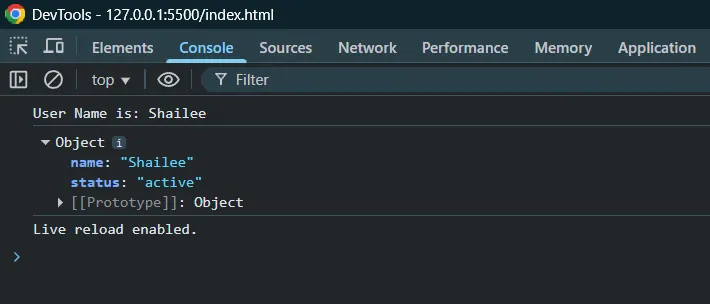
📍Use Cases:
Checking variable values
Debugging loops and conditions
Inspecting objects/arrays
⚠️ 2. console.warn() – Warnings
🪧Purpose:
Used to display warnings about potentially risky or undesired behavior that doesn't stop execution but may need attention.
🖇️ Syntax:
console.warn(message);🔰Example:
<script>
  let password = "";
  if (password === "") {
    console.warn("Password field is empty. Consider adding validation.");
  }
</script>
A yellow warning triangle in console with message :
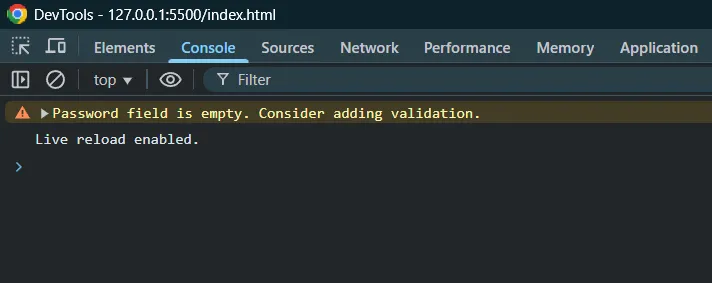
✍️Use Cases:
Alerting about deprecated code
Cautioning users about unsafe values
Logging suspicious behavior without stopping the script
❌ 3. console.error() – Errors
🌀Purpose:
Used to log error messages when something goes wrong. It's shown with a red cross or error icon and helps in error tracking.
Syntax:
console.error(message);🚩Example:
<script>
  try {
    // Intentional ReferenceError
    console.log(user); // user is not defined
  } catch (error) {
    console.error("An error occurred: " + error.message);
  }
</script>
A red error message like:
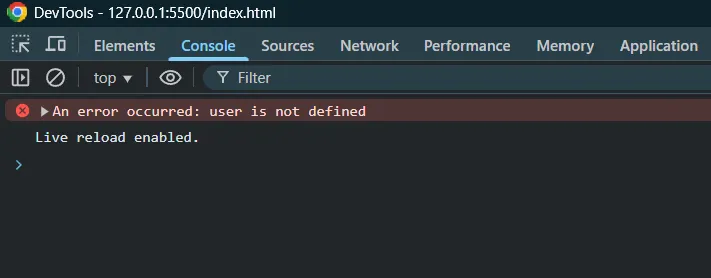
📥Use Cases:
Handling try-catch error reporting
Logging caught exceptions
Marking critical problems during execution
📊 Summary Table
Method | Purpose | Console Appearance | Use When |
|---|---|---|---|
| Standard debug/info message | Regular white text | Checking variables, tracking execution |
| Warnings without halting code | Yellow triangle ⚠️ | Alerting about risky/non-recommended use |
| Critical errors or exceptions | Red cross ❌ | Displaying errors, failed operations |
🧪 Combined Example
<!DOCTYPE html>
<html>
<head>
  <title>Console Debugging</title>
</head>
<body>

<script>
  console.log("Script started");

  let username = "Shailee";
  console.log("Username:", username);

  let age = -5;
  if (age < 0) {
    console.warn("Age cannot be negative!");
  }

  try {
    nonExistentFunction(); // This will cause ReferenceError
  } catch (err) {
    console.error("Caught error:", err.message);
  }

  console.log("Script ended");
</script>

</body>
</html>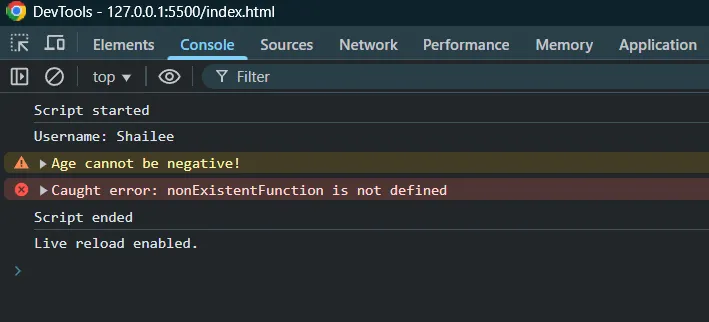
✅ Best Practices
Use
console.log()for normal tracing/debugging.Use
console.warn()to indicate potential issues that aren’t fatal.Use
console.error()to report critical or unexpected failures.Clear console regularly using
console.clear()if needed.Remove unnecessary console logs in production (
console.logcan expose data).