📊 Adding Status Code Responses for Successful Requests
In FastAPI, successful requests return 200 OK by default.
However, explicitly defining status codes:
Improves clarity
Enhances professionalism
Provides precise feedback to API consumers
Aligns your API with REST best practices
Let’s implement proper status codes for each HTTP method.
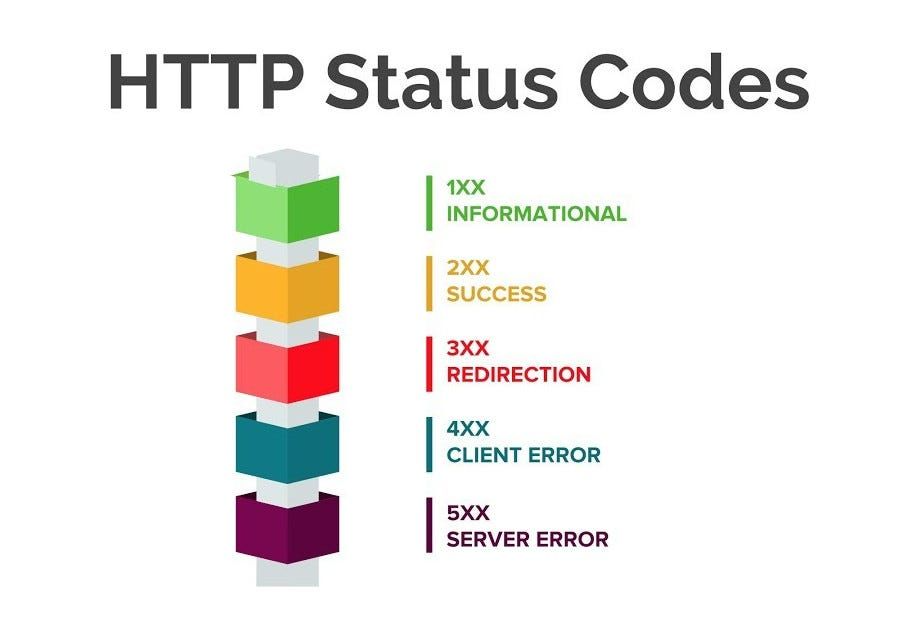
🔧 Step 1: Import Status Codes
FastAPI uses status code constants provided by Starlette.
Import the status module:
from typing import Optional
from fastapi import FastAPI, Path, Query, HTTPException
from pydantic import BaseModel, Field
from starlette import status
Using status.HTTP_XXX makes your code:
More readable
Less error-prone
Standardized
✅ Step 2: Customizing Status Codes for GET Requests
For successful GET requests, the correct status code is:
200 OK
This indicates that the request succeeded and data is being returned.
@app.get("/books", status_code=status.HTTP_200_OK)

@app.get("/books/{book_id}", status_code=status.HTTP_200_OK)

@app.get("/books/", status_code=status.HTTP_200_OK)

@app.get("/books/publish/", status_code=status.HTTP_200_OK)
🌐 Testing in the Browser
Open Swagger UI and test each GET endpoint.
Confirm that every successful request returns:
200 OKThis verifies that retrieval operations are correctly classified as successful responses.
➕ Step 3: Status Codes for POST Requests
For POST requests (resource creation), the appropriate status code is:
201 Created
@app.post("/create-book", status_code=status.HTTP_201_CREATED)Why 201?
A new resource was successfully created
The server confirms successful creation
This is more accurate than returning 200 OK.
🌐 Testing in the Browser
Use Swagger UI to create a new book.
Create a book to confirm the response status:
201 CreatedThis ensures the API correctly signals resource creation.
✏️ Step 4: Status Codes for PUT Requests
For PUT requests (updating existing resources), the recommended status code is:
204 No Content
@app.put("/books/update", status_code=status.HTTP_204_NO_CONTENT)Why 204?
The update succeeded
No response body is returned
The client does not need additional content
This keeps responses clean and REST-compliant.
🌐 Testing in the Browser
Update an existing book via Swagger UI.
Confirm the response:
204 No ContentThis indicates a successful update without unnecessary payload.
🗑️ Step 5: Status Codes for DELETE Requests
For DELETE operations, the recommended status code is also:
204 No Content
@app.delete("/books/{book_id}", status_code=status.HTTP_204_NO_CONTENT)Why 204 Again?
The deletion succeeded
No response body is required
The resource is gone
🌐 Testing in the Browser
Delete a book using Swagger UI.
Confirm the response:
204 No ContentThis confirms the deletion was processed correctly.
🗂️ books2.py
from typing import Optional
from fastapi import FastAPI, Path, Query, HTTPException, Body
from pydantic import BaseModel, Field
from starlette import status

app = FastAPI()

class Book:
    id: int
    title: str
    author: str
    description: str
    rating: int
    published_date: int

    def __init__(self, id, title, author, description, rating, published_date):
        self.id = id
        self.title = title
        self.author = author
        self.description = description
        self.rating = rating
        self.published_date = published_date

class BookRequest(BaseModel):
    id: Optional[int] = Field(description='ID is not needed on create', default=None)
    title: str = Field(min_length=3)
    author: str = Field(min_length=1)
    description: str = Field(min_length=1, max_length=100)
    rating: int = Field(gt=0, lt=6)
    published_date: int = Field(gt=1999, lt=2031)

    model_config = {
        "json_schema_extra": {
            "example": {
                "title": "A new book",
                "author": "codingwithroby",
                "description": "A new description of a book",
                "rating": 5,
                'published_date': 2029
            }
        }
    }


BOOKS = [
    Book(1, 'Computer Science Pro', 'codingwithroby', 'A very nice book!', 5, 2030),
    Book(2, 'Be Fast with FastAPI', 'codingwithroby', 'A great book!', 5, 2030),
    Book(3, 'Master Endpoints', 'codingwithroby', 'A awesome book!', 5, 2029),
    Book(4, 'HP1', 'Author 1', 'Book Description', 2, 2028),
    Book(5, 'HP2', 'Author 2', 'Book Description', 3, 2027),
    Book(6, 'HP3', 'Author 3', 'Book Description', 1, 2026)
]

@app.get("/books", status_code=status.HTTP_200_OK)
async def read_all_books():
    return BOOKS

@app.get("/books/{book_id}", status_code=status.HTTP_200_OK)
async def read_book(book_id: int = Path(gt=0)):
    for book in BOOKS:
        if book.id == book_id:
            return book
    raise HTTPException(status_code=404, detail='Item not found')

@app.get("/books/", status_code=status.HTTP_200_OK)
async def read_book_by_rating(book_rating: int = Query(gt=0, lt=6)):
    books_to_return = []
    for book in BOOKS:
        if book.rating == book_rating:
            books_to_return.append(book)
    return books_to_return

@app.get("/books/publish/", status_code=status.HTTP_200_OK)
async def read_books_by_publish_date(published_date: int = Query(gt=1999, lt=2031)):
    books_to_return = []
    for book in BOOKS:
        if book.published_date == published_date:
            books_to_return.append(book)
    return books_to_return

@app.post("/create-book", status_code=status.HTTP_201_CREATED)
async def create_book(book_request: BookRequest):
    new_book = Book(**book_request.model_dump())
    BOOKS.append(find_book_id(new_book))

def find_book_id(book: Book):
    book.id = 1 if len(BOOKS) == 0 else BOOKS[-1].id + 1
    return book

@app.put("/books/update_book", status_code=status.HTTP_204_NO_CONTENT)
async def update_book(book: BookRequest):
    book_changed = False
    for i in range(len(BOOKS)):
        if BOOKS[i].id == book.id:
            BOOKS[i] = book
            book_changed = True
    if not book_changed:
        raise HTTPException(status_code=404, detail='Item not found')

@app.delete("/books/{book_id}", status_code=status.HTTP_204_NO_CONTENT)
async def delete_book(book_id: int = Path(gt=0)):
    book_changed = False
    for i in range(len(BOOKS)):
        if BOOKS[i].id == book_id:
            BOOKS.pop(i)
            book_changed = True
            break
    if not book_changed:
        raise HTTPException(status_code=404, detail='Item not found')