📖 Context
The ultimate goal is to split the current single file into multiple files:
📄 One file for tour routes
📄 One file for user routes
🎮 One file for tour handlers/controllers
🎮 One file for user handlers/controllers
Before that split can happen, a separate router needs to be created for each resource (tours and users). This lecture covers how to create and mount these routers — a bit more advanced, but a key step toward better file organization.
🔹 Step 1: Understanding the Current Setup
Right now, all four routes (2 for tours, 2 for users) are defined on the same router — which is really the
appobject itself.To eventually separate tour routes from user routes into different files, each resource needs its own router.
🔹 Step 2: Creating a Router for Tours
const tourRouter = express.Router();This creates a new router instance, saved into a variable. It's used in place of app for the tour-specific routes:
tourRouter
  .route('/')
  .get(getAllTours)
  .post(createTour);

tourRouter
  .route('/:id')
  .get(getTour)
  .patch(updateTour)
  .delete(deleteTour);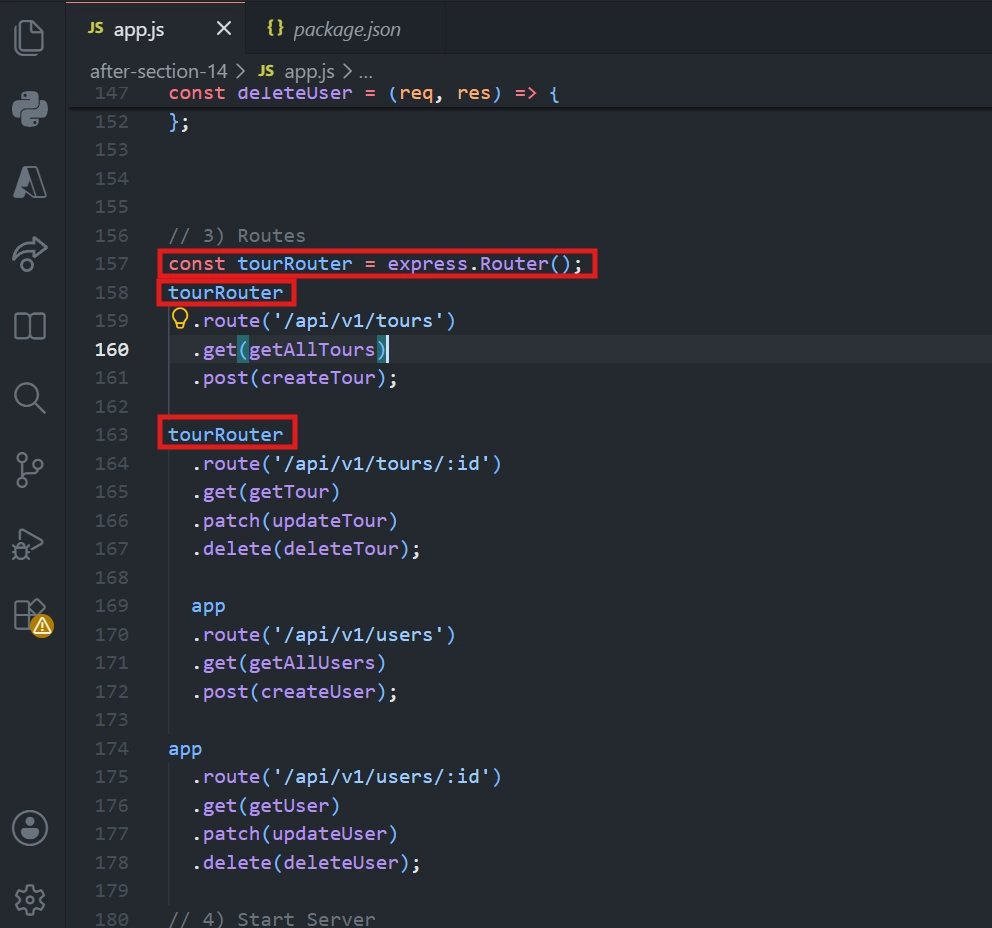
💡 Why the Route Paths Changed
Previously these were
/api/v1/toursand/api/v1/tours/:id.Now they're simplified to just
/and/:id.
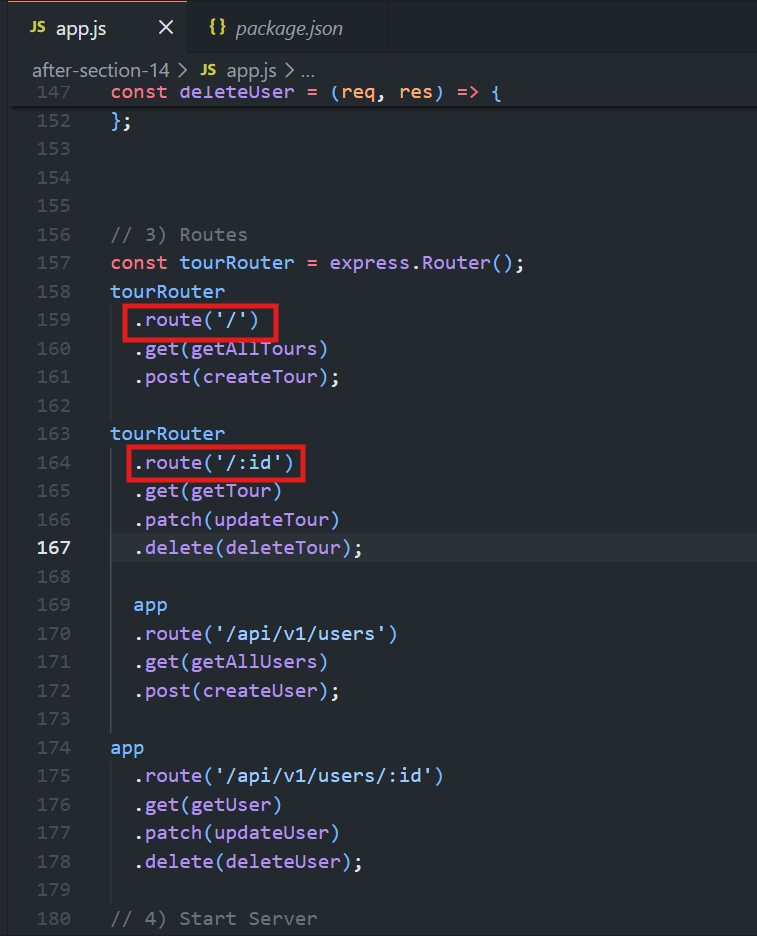
This is because
tourRouterwill only ever be reached after a request already matches/api/v1/tours— so within the router,/effectively means/api/v1/tours, and/:idmeans/api/v1/tours/:id.Think of
tourRouteras a small sub-application (mini app) — its own internal routes are relative to wherever it gets mounted.
🔹 Step 3: Mounting the Router (Connecting It to the App)
app.use('/api/v1/tours', tourRouter);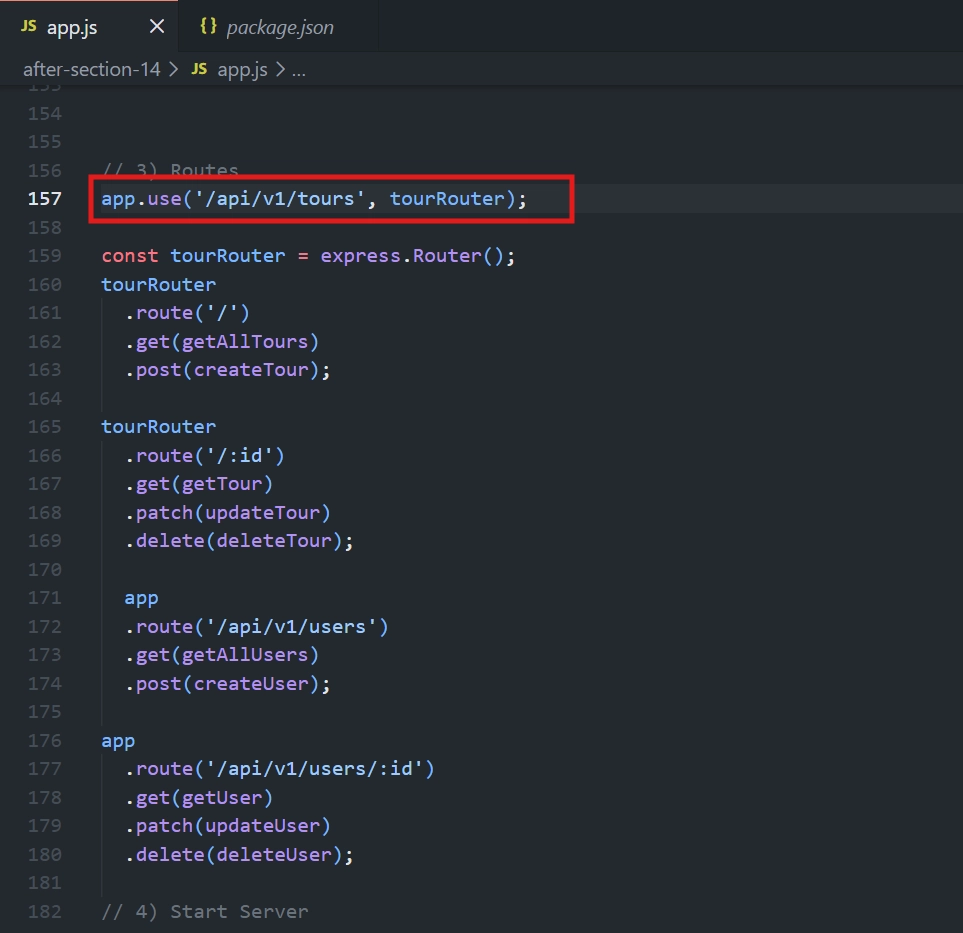
💡 Why this works
A router created via
express.Router()is itself a genuine middleware function.app.use()is used to apply that middleware — but only for requests matching the specified URL (/api/v1/tours).This process — attaching a router to a specific base URL — is called mounting.
🔄 How a Request Flows Through This
A request comes in for
/api/v1/tours/:id(e.g. a specific tour).It travels through the middleware stack.
When it reaches
app.use('/api/v1/tours', tourRouter), the URL matches, sotourRouter(the sub-app) takes over.Inside
tourRouter, the remaining part of the URL (/:id) is matched against the router's own routes.The corresponding handler function runs based on the HTTP method used.
🔹 Step 4: Doing the Same for Users
const userRouter = express.Router();

userRouter
  .route('/')
  .get(getAllUsers)
  .post(createUser);

userRouter
  .route('/:id')
  .get(getUser)
  .patch(updateUser)
  .delete(deleteUser);

  app.use('/api/v1/users', userRouter);
⚠️ Important Ordering Note
Mounting a router (
app.use(...)) must come after the router itself has been declared (const userRouter = express.Router()) — a variable can't be used before it's defined.
🔄 Same Request-Flow Logic Applies
👤 A request to
/api/v1/users/:idmatches the mount point/api/v1/users, entersuserRouter, and then matches/:idinside that sub-application.
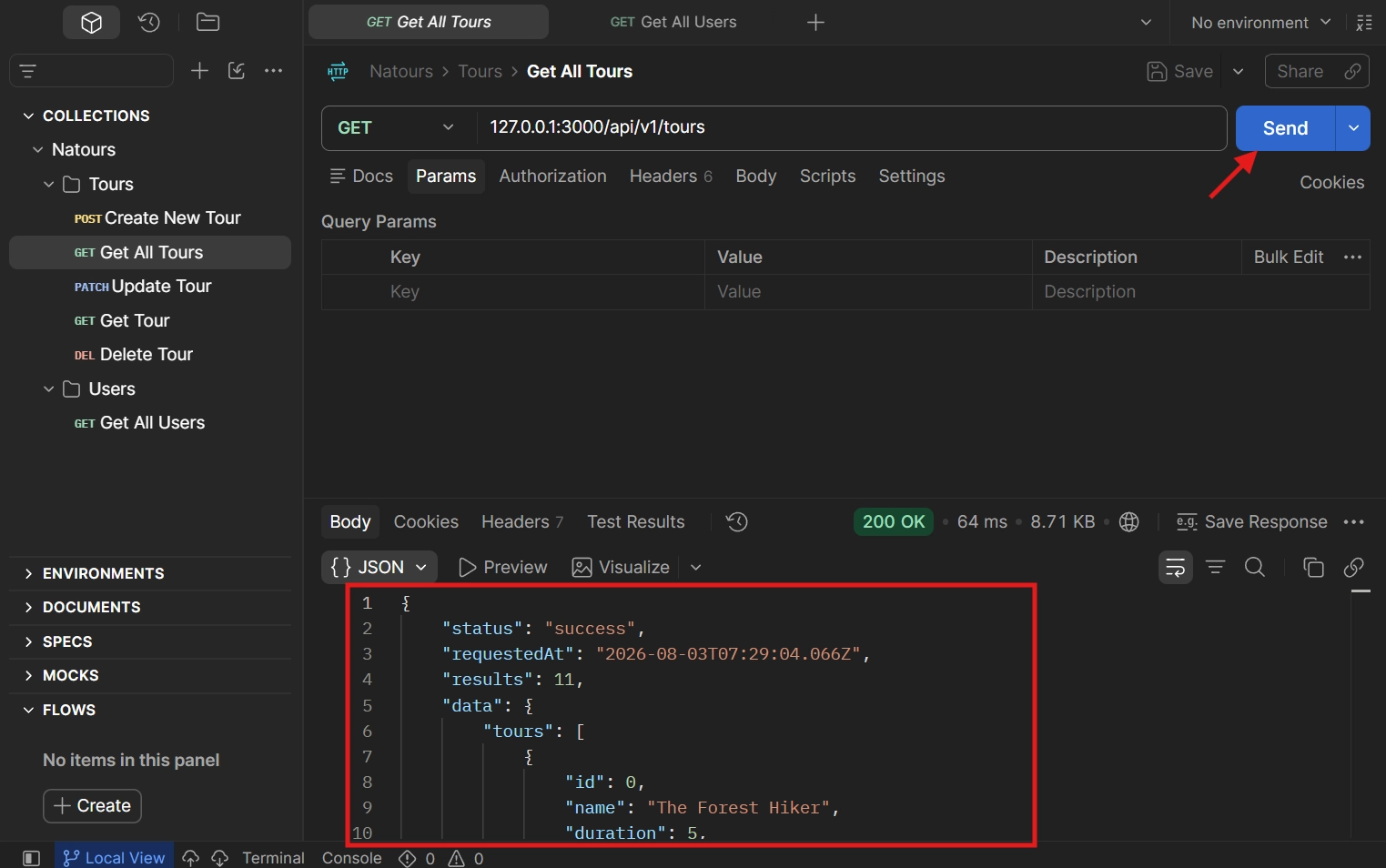
🔹 Step 5: Testing
✅ Sending a request for all tours — still works correctly.
✅ Sending a request for all users — still works correctly.
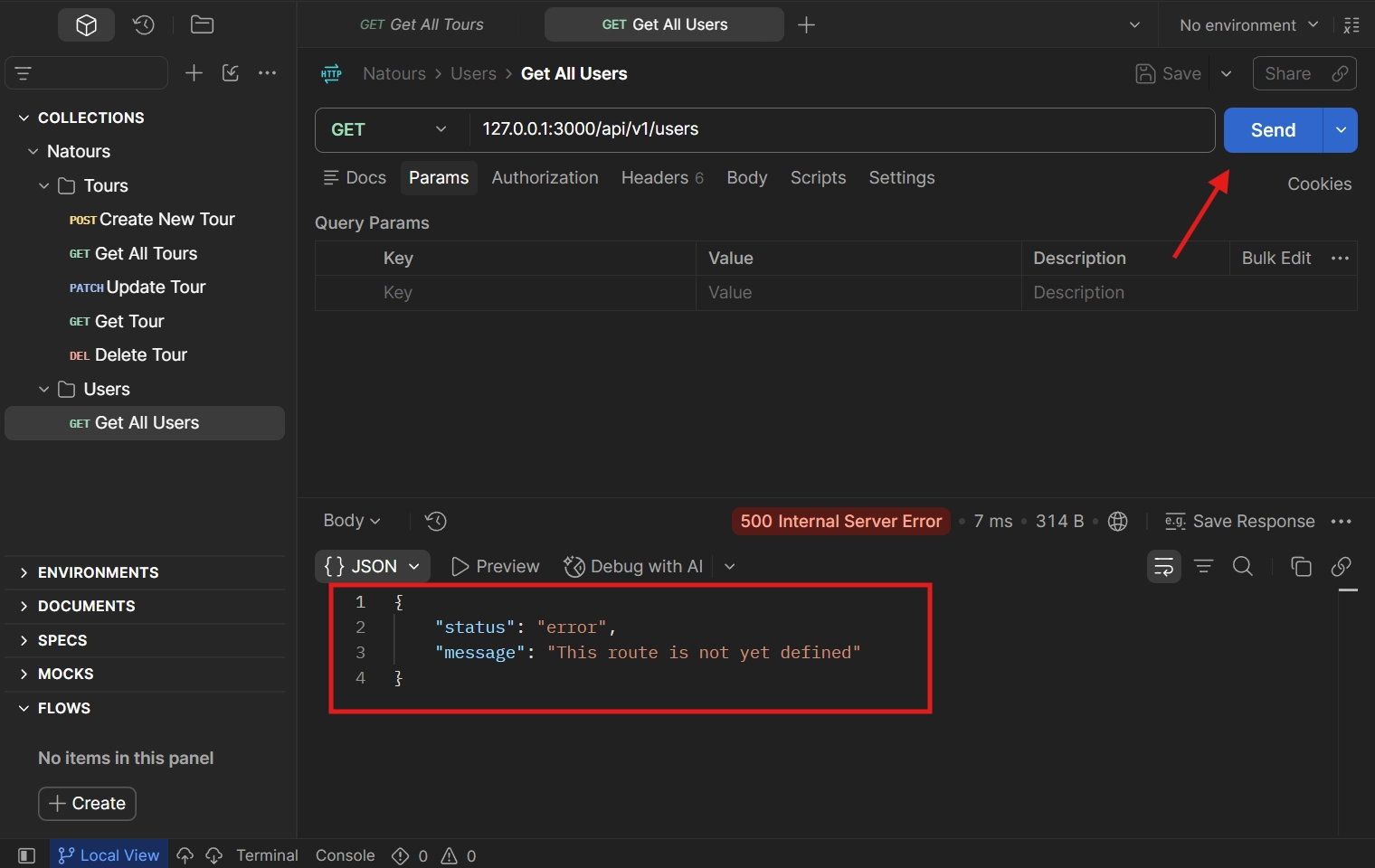
🎉 This confirms both routers are correctly created and mounted, and the refactor didn't break any existing functionality.
✅ Key Takeaway
express.Router()creates a router for a specific resource.A router is middleware and is mounted using
app.use().Routes inside the router are relative to the mount path.
Create the router before mounting it.
This setup prepares the project for separating routes and controllers into different files.
➡️ What's Next
📂 Separating the tour router, user router, and their respective controller functions into their own individual files.
<div class="infographic-vscodeterm" id="vt">
<style>
.infographic-vscodeterm {
--ink: #1a1a1a;
--ink-soft: #5c5c5c;
--paper: #ffffff;
--paper-alt: #f0ece4;
--accent: #2563eb;
--accent-deep: #1942a8;
--accent-soft: #e3ebfd;
--line: #ddd6c9;
--radius: 8px;
--display-font: 'Fraunces', Georgia, serif;
--body-font: 'Inter', system-ui, sans-serif;
--mono-font: 'IBM Plex Mono', monospace;
max-width: 880px;
margin: 0 auto;
box-sizing: border-box;
background: transparent;
color: var(--ink);
font-family: var(--body-font);
}
.infographic-vscodeterm[data-theme="dark"] {
--ink: #e8e6e1;
--ink-soft: #9a968c;
--paper: #13171f;
--paper-alt: #1c212b;
--accent: #5b8def;
--accent-deep: #8fb4ff;
--accent-soft: #20293f;
--line: #2c313d;
}
.infographic-vscodeterm * { box-sizing: border-box; min-width: 0; }
.vt-eyebrow {
font-family: var(--mono-font); font-size: 0.72rem; letter-spacing: 0.1em;
text-transform: uppercase; color: var(--accent); margin: 0 0 0.45rem;
display: flex; align-items: center; justify-content: center; gap: 0.4rem;
}
.vt-eyebrow::before { content: ""; width: 14px; height: 2px; background: var(--accent); display: inline-block; }
.vt-title {
font-family: var(--display-font); font-size: clamp(1.5rem, 4vw, 2.3rem); text-align: center;
margin: 0 0 0.5rem; line-height: 1.14; letter-spacing: -0.01em;
}
.vt-sub { color: var(--ink-soft); font-size: 0.95rem; text-align: center; margin: 0 0 1.7rem; }
/* ===== VS Code window — fixed dark theme regardless of page mode ===== */
.vt-window { border-radius: 8px; overflow: hidden; box-shadow: 0 16px 40px -14px rgba(0,0,0,0.45); border: 1px solid #1e1e1e; font-family: var(--mono-font); }
.vt-titlebar { background: #323233; display: flex; align-items: center; padding: 0.5rem 0.8rem; position: relative; }
.vt-dots { display: flex; gap: 0.4rem; }
.vt-dots span { width: 10px; height: 10px; border-radius: 50%; display: block; }
.vt-dots span:nth-child(1) { background: #ff5f56; }
.vt-dots span:nth-child(2) { background: #ffbd2e; }
.vt-dots span:nth-child(3) { background: #27c93f; }
.vt-titlebar-text { position: absolute; left: 50%; transform: translateX(-50%); font-size: 0.72rem; color: #cccccc; }
.vt-body { display: flex; height: 416px; }
.vt-resize-h { width: 5px; cursor: col-resize; background: transparent; flex-shrink: 0; transition: background 0.15s; touch-action: none; }
.vt-resize-h:hover, .vt-resize-h.is-dragging { background: #0078d4; }
.vt-resize-v { height: 5px; cursor: row-resize; background: transparent; flex-shrink: 0; transition: background 0.15s; touch-action: none; }
.vt-resize-v:hover, .vt-resize-v.is-dragging { background: #0078d4; }
.vt-window-resize {
height: 9px; background: #252526; cursor: row-resize; display: flex; align-items: center;
justify-content: center; border-top: 1px solid #1e1e1e; touch-action: none;
}
.vt-window-resize span { width: 30px; height: 3px; border-radius: 2px; background: #4a4a52; }
.vt-window-resize:hover span, .vt-window-resize.is-dragging span { background: #0078d4; }
.vt-toggle-btn {
background: none; border: none; color: #9a9a9a; cursor: pointer; display: flex; align-items: center;
padding: 0.3rem; border-radius: 3px; flex-shrink: 0;
}
.vt-toggle-btn:hover { background: #2a2d2e; color: #fff; }
.vt-toggle-btn svg { width: 13px; height: 13px; }
.vt-sidebar.is-hidden { width: 0 !important; overflow: hidden; border-right: none; }
.vt-terminal.is-collapsed { height: auto !important; }
.vt-terminal.is-collapsed .vt-term-body { display: none; }
.vt-terminal.is-collapsed .vt-term-toggle svg { transform: rotate(-90deg); }
.vt-activitybar { width: 40px; background: #333333; display: flex; flex-direction: column; align-items: center; padding-top: 0.7rem; gap: 1.1rem; flex-shrink: 0; }
.vt-activitybar svg { width: 18px; height: 18px; opacity: 0.55; }
.vt-activitybar svg.is-on { opacity: 1; }
.vt-sidebar { width: 180px; background: #252526; flex-shrink: 0; overflow-y: auto; border-right: 1px solid #1e1e1e; }
.vt-sidebar-head { font-size: 0.65rem; font-weight: 700; letter-spacing: 0.06em; color: #bbbbbb; padding: 0.6rem 0.8rem 0.3rem; }
.vt-sidebar-root { font-size: 0.74rem; color: #cccccc; padding: 0.2rem 0.7rem; display: flex; align-items: center; gap: 0.3rem; }
.vt-sidebar-folder { font-size: 0.74rem; color: #cccccc; padding: 0.2rem 0.7rem 0.2rem 1.4rem; display: flex; align-items: center; gap: 0.3rem; }
.vt-sidebar-folder.lvl2 { padding-left: 2.6rem; }
.vt-sidebar-folder.is-highlighted { color: #ffffff; font-weight: 600; }
.vt-folder-toggle {
background: none; border: none; font: inherit; width: 100%; text-align: left; cursor: pointer;
font-size: 0.74rem; color: #cccccc; padding: 0.2rem 0.7rem 0.2rem 1.4rem; display: flex; align-items: center; gap: 0.3rem;
}
.vt-folder-toggle:hover { background: #2a2d2e; }
.vt-folder-toggle.is-highlighted { color: #ffffff; font-weight: 600; }
.vt-folder-children.is-collapsed { display: none; }
.vt-row {
display: flex; align-items: center; gap: 0.35rem; width: 100%; background: none; border: none;
color: #cccccc; font: inherit; font-size: 0.74rem; padding: 0.24rem 0.7rem 0.24rem 1.4rem;
cursor: pointer; text-align: left; border-left: 2px solid transparent;
}
.vt-row.lvl2 { padding-left: 3.4rem; }
.vt-row:hover { background: #2a2d2e; }
.vt-row.is-selected { background: #37373d; border-left-color: #0078d4; }
.vt-row-disabled { cursor: default; opacity: 0.78; }
.vt-row-disabled:hover { background: none; }
.vt-badge { width: 15px; height: 15px; border-radius: 3px; flex-shrink: 0; display: flex; align-items: center; justify-content: center; font-size: 0.44rem; font-weight: 700; color: #1a1a1a; background: #29b6f6; }
.vt-badge.json { background: #cbcb41; font-size: 0.5rem; }
.vt-main { flex: 1; display: flex; flex-direction: column; min-width: 0; }
.vt-tabbar { display: flex; background: #252526; border-bottom: 1px solid #1e1e1e; overflow-x: auto; }
.vt-tab {
display: flex; align-items: center; gap: 0.35rem; background: #1e1e1e; color: #808080; font: inherit;
font-size: 0.72rem; padding: 0.45rem 0.8rem; border: none; border-right: 1px solid #1e1e1e;
border-top: 2px solid transparent; cursor: pointer; white-space: nowrap;
}
.vt-tab.is-active { color: #d4d4d4; border-top-color: #0078d4; background: #1e1e1e; }
.vt-tab .vt-badge { width: 13px; height: 13px; font-size: 0.4rem; }
.vt-code-wrap { flex: 1; background: #1e1e1e; overflow: auto; padding: 0.85rem 1rem; }
.vt-code-wrap pre { margin: 0; }
.vt-code-wrap code { font-family: var(--mono-font); font-size: 0.72rem; line-height: 1.7; color: #d4d4d8; white-space: pre; }
.tok-kw { color: #c678dd; }
.tok-tag { color: #e06c75; }
.tok-type { color: #61afef; }
.tok-attr { color: #d19a66; }
.tok-str { color: #98c379; }
.tok-expr { color: #56b6c2; }
.tok-punc { color: #6b7280; }
.vt-flash { background: rgba(220,38,38,0.22); }
/* ===== terminal ===== */
.vt-terminal { background: #181818; border-top: 1px solid #2c2c2c; display: flex; flex-direction: column; height: 150px; flex-shrink: 0; }
.vt-term-head { display: flex; align-items: center; gap: 0.4rem; font-size: 0.62rem; letter-spacing: 0.05em; color: #9a9a9a; padding: 0.35rem 0.8rem; border-bottom: 1px solid #262626; text-transform: uppercase; }
.vt-term-body { flex: 1; overflow-y: auto; padding: 0.5rem 0.9rem; font-size: 0.72rem; line-height: 1.65; }
.vt-term-line { color: #d4d4d4; white-space: pre; opacity: 0; transform: translateY(2px); animation: vt-line-in 0.25s ease forwards; }
@keyframes vt-line-in { to { opacity: 1; transform: none; } }
.vt-term-line.is-cmd { color: #7ee787; }
.vt-term-line.is-ok { color: #7ee787; font-weight: 600; }
.vt-term-line.is-warn { color: #e5c07b; font-weight: 600; }
.vt-term-line.is-error { color: #ff7b72; font-weight: 600; }
.vt-term-prompt { color: #7ee787; }
.vt-run-row { display: flex; align-items: center; gap: 0.5rem; margin-top: 0.2rem; }
.vt-run-btn {
font: inherit; font-size: 0.68rem; font-weight: 600; color: #1a1a1a; background: #7ee787;
border: none; border-radius: 4px; padding: 0.3rem 0.7rem; cursor: pointer; display: flex; align-items: center; gap: 0.3rem;
}
.vt-run-btn:disabled { opacity: 0.5; cursor: default; }
.vt-run-btn svg { width: 9px; height: 9px; }
.vt-run-hint { color: #6b7280; font-size: 0.68rem; }
@media (max-width: 620px) {
.vt-sidebar { width: 140px; }
.vt-body { height: 442px; }
}
@media (max-width: 480px) { .vt-activitybar { display: none; } }
/* ===== browser output ===== */
.vt-output-label {
font-family: var(--mono-font); font-size: 0.68rem; letter-spacing: 0.1em; text-transform: uppercase;
color: var(--ink-soft); text-align: center; margin: 1.5rem 0 0.7rem;
}
.vt-browser {
border: 1px solid var(--line); border-radius: var(--radius); overflow: hidden; max-width: 660px; margin: 0 auto;
box-shadow: 0 10px 24px -12px rgba(26,26,26,0.18);
opacity: 0; transform: translateY(8px); transition: opacity 0.4s ease, transform 0.4s ease; pointer-events: none;
}
.vt-browser.is-shown { opacity: 1; transform: none; pointer-events: auto; }
.vt-browser-bar { background: #e9e9e9; padding: 0.5rem 0.7rem; display: flex; align-items: center; gap: 0.5rem; flex-wrap: wrap; }
.vt-browser-bar .vt-dots span { width: 8px; height: 8px; }
.vt-method-group { display: flex; gap: 0.3rem; flex-shrink: 0; }
.vt-resource-group { display: flex; gap: 0.3rem; flex-shrink: 0; margin-right: 0.4rem; }
.vt-resource-btn {
font-family: var(--mono-font); font-size: 0.6rem; font-weight: 700; letter-spacing: 0.03em;
border: 1px solid transparent; border-radius: 4px; padding: 0.18rem 0.5rem; cursor: pointer;
background: #fff; color: #888;
}
.vt-resource-btn.is-active { background: #f3e8ff; color: #7e22ce; border-color: #e2b8ff; }
.vt-method-btn {
font-family: var(--mono-font); font-size: 0.6rem; font-weight: 700; letter-spacing: 0.03em;
border: 1px solid transparent; border-radius: 4px; padding: 0.18rem 0.4rem; cursor: pointer;
background: #fff; color: #888;
}
.vt-method-btn[data-method="get"].is-active { background: #e3ebfd; color: #1942a8; border-color: #b7cbfa; }
.vt-method-btn[data-method="post"].is-active { background: #ffe9d6; color: #b5540a; border-color: #f6c393; }
.vt-browser-url { font-family: var(--mono-font); font-size: 0.65rem; color: #555; background: #fff; border-radius: 4px; padding: 0.2rem 0.5rem; flex: 1; min-width: 180px; white-space: nowrap; overflow-x: auto; }
.vt-browser-page { background: #fff; padding: 1rem 1.1rem; text-align: left; font-family: var(--mono-font); }
.vt-resp { display: none; }
.vt-resp.is-active { display: block; }
.vt-post-label { font-size: 0.62rem; letter-spacing: 0.05em; text-transform: uppercase; color: #888; margin: 0 0 0.35rem; }
.vt-post-label-resp { margin-top: 0.85rem; color: #1a7f37; }
.vt-chip-group { display: flex; gap: 0.4rem; margin-bottom: 0.75rem; }
.vt-chip {
font-family: var(--mono-font); font-size: 0.62rem; border: 1px solid #ddd; border-radius: 12px;
padding: 0.16rem 0.6rem; cursor: pointer; background: #f4f4f4; color: #555;
}
.vt-chip.is-active { background: #1a1a1a; color: #fff; border-color: #1a1a1a; }
.vt-json-pre { margin: 0; font-size: 0.76rem; line-height: 1.65; white-space: pre-wrap; word-break: break-word; }
.vt-json-key { color: #881391; }
.vt-json-str { color: #c41a16; }
.vt-json-punc { color: #1a1a1a; }
.vt-json-null { color: #0000ff; }
.vt-highlight-field { border-radius: 3px; padding: 0 3px; margin: 0 -3px; }
.vt-output-placeholder { text-align: center; font-size: 0.82rem; color: var(--ink-soft); }
.vt-takeaway {
margin-top: 1.7rem; padding: 0.95rem 1.2rem; background: var(--accent-soft); border-left: 3px solid var(--accent);
border-radius: 4px; font-size: 0.9rem; color: var(--ink); line-height: 1.5; max-width: 660px; margin-left: auto; margin-right: auto;
}
.vt-takeaway b { color: var(--accent-deep); }
@media (prefers-reduced-motion: reduce) {
.infographic-vscodeterm *, .infographic-vscodeterm *::before, .infographic-vscodeterm *::after {
transition-duration: 0.001ms !important; animation-duration: 0.001ms !important;
}
}
</style>
<div class="vt-window">
<div class="vt-titlebar">
<div class="vt-dots"><span></span><span></span><span></span></div>
<div class="vt-titlebar-text">starter — Visual Studio Code</div>
</div>
<div class="vt-body">
<div class="vt-activitybar">
<svg class="is-on" viewBox="0 0 24 24" fill="none" aria-hidden="true"><rect x="3" y="4" width="7" height="7" rx="1" stroke="#fff" stroke-width="1.6"/><rect x="14" y="4" width="7" height="7" rx="1" stroke="#fff" stroke-width="1.6"/><rect x="3" y="15" width="7" height="7" rx="1" stroke="#fff" stroke-width="1.6"/><rect x="14" y="15" width="7" height="7" rx="1" stroke="#fff" stroke-width="1.6"/></svg>
<svg viewBox="0 0 24 24" fill="none" aria-hidden="true"><circle cx="10" cy="10" r="6.5" stroke="#fff" stroke-width="1.6"/><line x1="15" y1="15" x2="20" y2="20" stroke="#fff" stroke-width="1.6" stroke-linecap="round"/></svg>
</div>
<div class="vt-sidebar">
<div class="vt-sidebar-head">EXPLORER</div>
<div class="vt-sidebar-root">▾ STARTER</div>
<button class="vt-folder-toggle is-highlighted" id="vtDevDataToggle" type="button"><span id="vtDevDataChevron">▸</span> dev-data</button>
<div class="vt-folder-children is-collapsed" id="vtDevDataChildren">
<div class="vt-sidebar-folder lvl2 is-highlighted">▾ data</div>
<button class="vt-row lvl2" data-file="tours" type="button"><span class="vt-badge json">{}</span><span>tours-simple.json</span></button>
</div>
<div class="vt-sidebar-folder">▸ node_modules</div>
<div class="vt-sidebar-folder">▸ public</div>
<button class="vt-row vt-row-disabled" type="button"><span class="vt-badge json">{}</span><span>.eslintrc.json</span></button>
<button class="vt-row vt-row-disabled" type="button"><span class="vt-badge json">{}</span><span>.prettierrc</span></button>
<button class="vt-row is-selected" data-file="app" type="button"><span class="vt-badge">JS</span><span>app.js</span></button>
<button class="vt-row vt-row-disabled" type="button"><span class="vt-badge json">{}</span><span>package-lock.json</span></button>
<button class="vt-row vt-row-disabled" type="button"><span class="vt-badge json">{}</span><span>package.json</span></button>
</div>
<div class="vt-resize-h" id="vtSidebarHandle" title="Drag to resize sidebar"></div>
<div class="vt-main">
<div class="vt-tabbar">
<button class="vt-toggle-btn" id="vtToggleSidebar" type="button" aria-label="Toggle sidebar" title="Toggle sidebar">
<svg viewBox="0 0 16 16" fill="none" aria-hidden="true"><rect x="1.5" y="2" width="13" height="12" rx="1.5" stroke="currentColor" stroke-width="1.3"/><line x1="6" y1="2" x2="6" y2="14" stroke="currentColor" stroke-width="1.3"/></svg>
</button>
<button class="vt-tab is-active" data-file="app" type="button"><span class="vt-badge">JS</span><span>app.js</span></button>
<button class="vt-tab" data-file="tours" type="button"><span class="vt-badge json">{}</span><span>tours-simple.json</span></button>
</div>
<div class="vt-code-wrap">
<pre><code id="vtCode"></code></pre>
</div>
<div class="vt-resize-v" id="vtTerminalHandle" title="Drag to resize terminal"></div>
<div class="vt-terminal">
<div class="vt-term-head">
<button class="vt-toggle-btn vt-term-toggle" id="vtToggleTerminal" type="button" aria-label="Toggle terminal" title="Toggle terminal">
<svg viewBox="0 0 16 16" fill="none" aria-hidden="true"><path d="M4 6l4 4 4-4" stroke="currentColor" stroke-width="1.6" stroke-linecap="round" stroke-linejoin="round"/></svg>
</button>
<span>Terminal</span>
</div>
<div class="vt-term-body">
<div id="vtTermLines"><div class="vt-term-line" style="animation-delay:0s;"><span class="vt-term-prompt">$</span> </div></div>
<div class="vt-run-row">
<button class="vt-run-btn" id="vtRunBtn" type="button">
<svg viewBox="0 0 12 12" aria-hidden="true"><path d="M2.5 1.5v9l7-4.5z" fill="currentColor"/></svg>
<span id="vtRunLabel">npm start</span>
</button>
<span class="vt-run-hint" id="vtRunHint">starts the API</span>
</div>
</div>
</div>
</div>
</div>
<div class="vt-window-resize" id="vtWindowHandle" title="Drag to resize window"><span></span></div>
</div>
<div class="vt-output-label">Output</div>
<div id="vtOutputArea">
<p class="vt-output-placeholder">Run <code style="font-family:var(--mono-font)">npm start</code> above, then try <code style="font-family:var(--mono-font)">GET</code> or <code style="font-family:var(--mono-font)">POST /api/v1/tours</code>.</p>
<div class="vt-browser" id="vtBrowser">
<div class="vt-browser-bar">
<div class="vt-resource-group" id="vtResourceGroup">
<button class="vt-resource-btn is-active" data-resource="tours" type="button">Tours</button>
<button class="vt-resource-btn" data-resource="users" type="button">Users</button>
</div>
<div class="vt-method-group">
<button class="vt-method-btn is-active" id="vtMethodGet" data-method="get" type="button">GET</button>
<button class="vt-method-btn" id="vtMethodId" data-method="id" type="button">GET /:id</button>
<button class="vt-method-btn" id="vtMethodPost" data-method="post" type="button">POST</button>
<button class="vt-method-btn" id="vtMethodPatch" data-method="patch" type="button">PATCH /:id</button>
<button class="vt-method-btn" id="vtMethodDelete" data-method="delete" type="button">DELETE /:id</button>
</div>
<div class="vt-browser-url" id="vtBrowserUrl">localhost:3000/api/v1/tours</div>
</div>
<div class="vt-browser-page">
<div class="vt-resp is-active" id="vtRespGet">
<pre class="vt-json-pre"><span class="vt-json-punc">{</span>
<span class="vt-json-key">"status"</span><span class="vt-json-punc">:</span> <span class="vt-json-str">"success"</span><span class="vt-json-punc">,</span>
<span class="vt-highlight-field" id="vtRequestedAtLine"><span class="vt-json-key">"requestedAt"</span><span class="vt-json-punc">:</span> <span class="vt-json-str" id="vtRequestedAtValue">"2026-08-20T10:12:03.114Z"</span></span><span class="vt-json-punc">,</span>
<span class="vt-json-key">"results"</span><span class="vt-json-punc">:</span> 9<span class="vt-json-punc">,</span>
<span class="vt-json-key">"data"</span><span class="vt-json-punc">:</span> <span class="vt-json-punc">{</span>
<span class="vt-json-key">"tours"</span><span class="vt-json-punc">:</span> <span class="vt-json-punc">[</span>
<span class="vt-json-punc">{</span> <span class="vt-json-key">"id"</span><span class="vt-json-punc">:</span> 0<span class="vt-json-punc">,</span> <span class="vt-json-key">"name"</span><span class="vt-json-punc">:</span> <span class="vt-json-str">"The Forest Hiker"</span><span class="vt-json-punc">, </span>…<span class="vt-json-punc"> },</span>
<span class="vt-json-punc">{</span> <span class="vt-json-key">"id"</span><span class="vt-json-punc">:</span> 1<span class="vt-json-punc">,</span> <span class="vt-json-key">"name"</span><span class="vt-json-punc">:</span> <span class="vt-json-str">"The Sea Explorer"</span><span class="vt-json-punc">, </span>…<span class="vt-json-punc"> },</span>
<span class="vt-json-punc" style="opacity:0.6">// 7 more tours</span>
<span class="vt-json-punc">]</span>
<span class="vt-json-punc">}</span>
<span class="vt-json-punc">}</span></pre>
</div>
<div class="vt-resp" id="vtRespId">
<div class="vt-chip-group" id="vtIdChips">
<button class="vt-chip is-active" data-id="valid" type="button">id: 2 (valid)</button>
<button class="vt-chip" data-id="invalid" type="button">id: 99 (invalid)</button>
</div>
<div class="vt-resp is-active" id="vtIdValid">
<pre class="vt-json-pre"><span class="vt-json-punc">{</span>
<span class="vt-json-key">"status"</span><span class="vt-json-punc">:</span> <span class="vt-json-str">"success"</span><span class="vt-json-punc">,</span>
<span class="vt-json-key">"data"</span><span class="vt-json-punc">:</span> <span class="vt-json-punc">{</span>
<span class="vt-json-key">"tour"</span><span class="vt-json-punc">:</span> <span class="vt-json-punc">{</span>
<span class="vt-json-key">"id"</span><span class="vt-json-punc">:</span> 2<span class="vt-json-punc">,</span>
<span class="vt-json-key">"name"</span><span class="vt-json-punc">:</span> <span class="vt-json-str">"The Snow Adventurer"</span><span class="vt-json-punc">,</span>
<span class="vt-json-key">"duration"</span><span class="vt-json-punc">:</span> 4<span class="vt-json-punc">,</span>
<span class="vt-json-key">"difficulty"</span><span class="vt-json-punc">:</span> <span class="vt-json-str">"difficult"</span><span class="vt-json-punc">, </span>…
<span class="vt-json-punc">}</span>
<span class="vt-json-punc">}</span>
<span class="vt-json-punc">}</span></pre>
</div>
<div class="vt-resp" id="vtIdInvalid">
<pre class="vt-json-pre"><span class="vt-json-punc">{</span>
<span class="vt-json-key">"status"</span><span class="vt-json-punc">:</span> <span class="vt-json-str">"fail"</span><span class="vt-json-punc">,</span>
<span class="vt-json-key">"message"</span><span class="vt-json-punc">:</span> <span class="vt-json-str">"Invalid ID"</span>
<span class="vt-json-punc">}</span></pre>
</div>
</div>
<div class="vt-resp" id="vtRespPost">
<div class="vt-post-label">Request Body</div>
<pre class="vt-json-pre"><span class="vt-json-punc">{</span>
<span class="vt-json-key">"name"</span><span class="vt-json-punc">:</span> <span class="vt-json-str">"Test Tour"</span><span class="vt-json-punc">,</span>
<span class="vt-json-key">"duration"</span><span class="vt-json-punc">:</span> 10<span class="vt-json-punc">,</span>
<span class="vt-json-key">"difficulty"</span><span class="vt-json-punc">:</span> <span class="vt-json-str">"easy"</span>
<span class="vt-json-punc">}</span></pre>
<div class="vt-post-label vt-post-label-resp">Response · 201 Created</div>
<pre class="vt-json-pre"><span class="vt-json-punc">{</span>
<span class="vt-json-key">"status"</span><span class="vt-json-punc">:</span> <span class="vt-json-str">"success"</span><span class="vt-json-punc">,</span>
<span class="vt-json-key">"data"</span><span class="vt-json-punc">:</span> <span class="vt-json-punc">{</span>
<span class="vt-json-key">"tour"</span><span class="vt-json-punc">:</span> <span class="vt-json-punc">{</span>
<span class="vt-json-key">"id"</span><span class="vt-json-punc">:</span> 9<span class="vt-json-punc">,</span>
<span class="vt-json-key">"name"</span><span class="vt-json-punc">:</span> <span class="vt-json-str">"Test Tour"</span><span class="vt-json-punc">,</span>
<span class="vt-json-key">"duration"</span><span class="vt-json-punc">:</span> 10<span class="vt-json-punc">,</span>
<span class="vt-json-key">"difficulty"</span><span class="vt-json-punc">:</span> <span class="vt-json-str">"easy"</span>
<span class="vt-json-punc">}</span>
<span class="vt-json-punc">}</span>
<span class="vt-json-punc">}</span></pre>
</div>
<div class="vt-resp" id="vtRespPatch">
<div class="vt-chip-group" id="vtPatchChips">
<button class="vt-chip is-active" data-id="valid" type="button">id: 2 (valid)</button>
<button class="vt-chip" data-id="invalid" type="button">id: 99 (invalid)</button>
</div>
<div class="vt-resp is-active" id="vtPatchValid">
<pre class="vt-json-pre"><span class="vt-json-punc">{</span>
<span class="vt-json-key">"status"</span><span class="vt-json-punc">:</span> <span class="vt-json-str">"success"</span><span class="vt-json-punc">,</span>
<span class="vt-json-key">"data"</span><span class="vt-json-punc">:</span> <span class="vt-json-punc">{</span>
<span class="vt-json-key">"tour"</span><span class="vt-json-punc">:</span> <span class="vt-json-str">"<Updated tour here...>"</span>
<span class="vt-json-punc">}</span>
<span class="vt-json-punc">}</span></pre>
</div>
<div class="vt-resp" id="vtPatchInvalid">
<pre class="vt-json-pre"><span class="vt-json-punc">{</span>
<span class="vt-json-key">"status"</span><span class="vt-json-punc">:</span> <span class="vt-json-str">"fail"</span><span class="vt-json-punc">,</span>
<span class="vt-json-key">"message"</span><span class="vt-json-punc">:</span> <span class="vt-json-str">"Invalid ID"</span>
<span class="vt-json-punc">}</span></pre>
</div>
</div>
<div class="vt-resp" id="vtRespDelete">
<div class="vt-chip-group" id="vtDeleteChips">
<button class="vt-chip is-active" data-id="valid" type="button">id: 2 (valid)</button>
<button class="vt-chip" data-id="invalid" type="button">id: 99 (invalid)</button>
</div>
<div class="vt-resp is-active" id="vtDeleteValid">
<div class="vt-post-label">Response · 204 No Content</div>
<pre class="vt-json-pre"><span class="vt-json-punc">{</span>
<span class="vt-json-key">"status"</span><span class="vt-json-punc">:</span> <span class="vt-json-str">"success"</span><span class="vt-json-punc">,</span>
<span class="vt-json-key">"data"</span><span class="vt-json-punc">:</span> <span class="vt-json-null">null</span>
<span class="vt-json-punc">}</span></pre>
</div>
<div class="vt-resp" id="vtDeleteInvalid">
<pre class="vt-json-pre"><span class="vt-json-punc">{</span>
<span class="vt-json-key">"status"</span><span class="vt-json-punc">:</span> <span class="vt-json-str">"fail"</span><span class="vt-json-punc">,</span>
<span class="vt-json-key">"message"</span><span class="vt-json-punc">:</span> <span class="vt-json-str">"Invalid ID"</span>
<span class="vt-json-punc">}</span></pre>
</div>
</div>
<div class="vt-resp" id="vtRespUsers">
<pre class="vt-json-pre"><span class="vt-json-punc">{</span>
<span class="vt-json-key">"status"</span><span class="vt-json-punc">:</span> <span class="vt-json-str">"error"</span><span class="vt-json-punc">,</span>
<span class="vt-json-key">"message"</span><span class="vt-json-punc">:</span> <span class="vt-json-str">"This route is not yet defined"</span>
<span class="vt-json-punc">}</span></pre>
</div>
</div>
</div>
</div>
</div>
<link rel="preconnect" href="https://fonts.googleapis.com">
<link href="https://fonts.googleapis.com/css2?family=Fraunces:wght@500;600&family=Inter:wght@400;500;600;700&family=IBM+Plex+Mono:wght@400;500&display=swap" rel="stylesheet">
<script>
(function () {
var root = document.getElementById('vt');
if (!root) return;
/* --- dark mode detection: body attribute > cookie > postMessage > light --- */
function applyDark(dark) {
if (dark) root.setAttribute('data-theme', 'dark');
else root.removeAttribute('data-theme');
}
var bodyAttr = document.body.getAttribute('data-darkmode');
var dark;
if (bodyAttr === 'true') dark = true;
else if (bodyAttr === 'false') dark = false;
else {
var match = document.cookie.match(/(?:^|;\s*)darkMode=([^;]+)/);
dark = match ? match[1] === 'true' : false;
}
applyDark(dark);
window.addEventListener('message', function (e) {
if (e.data && e.data.type === 'darkMode') applyDark(!!e.data.value);
});
/* --- file switching --- */
var files = {
app:
'<span class="tok-kw">const</span> fs <span class="tok-punc">=</span> require<span class="tok-punc">(</span><span class="tok-str">\'fs\'</span><span class="tok-punc">);</span>\n' +
'<span class="tok-kw">const</span> express <span class="tok-punc">=</span> require<span class="tok-punc">(</span><span class="tok-str">\'express\'</span><span class="tok-punc">);</span>\n' +
'<span class="tok-kw">const</span> morgan <span class="tok-punc">=</span> require<span class="tok-punc">(</span><span class="tok-str">\'morgan\'</span><span class="tok-punc">);</span>\n' +
'\n' +
'<span class="tok-kw">const</span> app <span class="tok-punc">=</span> express<span class="tok-punc">();</span>\n' +
'<span class="tok-punc">// 1) Middleware</span>\n' +
'\n' +
'app<span class="tok-punc">.</span><span class="tok-attr">use</span><span class="tok-punc">(</span>morgan<span class="tok-punc">(</span><span class="tok-str">\'dev\'</span><span class="tok-punc">));</span>\n' +
'\n' +
'app<span class="tok-punc">.</span><span class="tok-attr">use</span><span class="tok-punc">(</span>express<span class="tok-punc">.</span><span class="tok-attr">json</span><span class="tok-punc">());</span>\n' +
'\n' +
'app<span class="tok-punc">.</span><span class="tok-attr">use</span><span class="tok-punc">((</span>req<span class="tok-punc">,</span> res<span class="tok-punc">,</span> next<span class="tok-punc">) => {</span>\n' +
' console<span class="tok-punc">.</span><span class="tok-attr">log</span><span class="tok-punc">(</span><span class="tok-str">\'Hello from the middleware 👋\'</span><span class="tok-punc">);</span>\n' +
' next<span class="tok-punc">();</span>\n' +
'<span class="tok-punc">});</span>\n' +
'\n' +
'app<span class="tok-punc">.</span><span class="tok-attr">use</span><span class="tok-punc">((</span>req<span class="tok-punc">,</span> res<span class="tok-punc">,</span> next<span class="tok-punc">) => {</span>\n' +
' req<span class="tok-punc">.</span>requestTime <span class="tok-punc">=</span> <span class="tok-kw">new</span> Date<span class="tok-punc">().</span><span class="tok-attr">toISOString</span><span class="tok-punc">();</span>\n' +
' next<span class="tok-punc">();</span>\n' +
'<span class="tok-punc">});</span>\n' +
'\n' +
'<span class="tok-kw">const</span> tours <span class="tok-punc">=</span> JSON<span class="tok-punc">.</span><span class="tok-attr">parse</span><span class="tok-punc">(</span>\n' +
' fs<span class="tok-punc">.</span><span class="tok-attr">readFileSync</span><span class="tok-punc">(</span><span class="tok-expr">`${__dirname}/dev-data/data/tours-simple.json`</span><span class="tok-punc">)</span>\n' +
'<span class="tok-punc">);</span>\n' +
'\n' +
'<span class="tok-punc">// 2) Route Handlers</span>\n' +
'<span class="tok-kw">const</span> getAllTours <span class="tok-punc">=</span> <span class="tok-punc">(</span>req<span class="tok-punc">,</span> res<span class="tok-punc">) => {</span>\n' +
' console<span class="tok-punc">.</span><span class="tok-attr">log</span><span class="tok-punc">(</span>req<span class="tok-punc">.</span>requestTime<span class="tok-punc">);</span>\n' +
'\n' +
' res<span class="tok-punc">.</span><span class="tok-attr">status</span><span class="tok-punc">(</span>200<span class="tok-punc">)</span><span class="tok-punc">.</span><span class="tok-attr">json</span><span class="tok-punc">({</span>\n' +
' status<span class="tok-punc">:</span> <span class="tok-str">\'success\'</span><span class="tok-punc">,</span>\n' +
' requestedAt<span class="tok-punc">:</span> req<span class="tok-punc">.</span>requestTime<span class="tok-punc">,</span>\n' +
' results<span class="tok-punc">:</span> tours<span class="tok-punc">.</span>length<span class="tok-punc">,</span>\n' +
' data<span class="tok-punc">:</span> <span class="tok-punc">{</span>\n' +
' tours<span class="tok-punc">:</span> tours<span class="tok-punc">,</span>\n' +
' <span class="tok-punc">},</span>\n' +
' <span class="tok-punc">});</span>\n' +
'<span class="tok-punc">};</span>\n' +
'\n' +
'<span class="tok-kw">const</span> getTour <span class="tok-punc">=</span> <span class="tok-punc">(</span>req<span class="tok-punc">,</span> res<span class="tok-punc">) => {</span>\n' +
' console<span class="tok-punc">.</span><span class="tok-attr">log</span><span class="tok-punc">(</span>req<span class="tok-punc">.</span>params<span class="tok-punc">);</span>\n' +
'\n' +
' <span class="tok-kw">const</span> id <span class="tok-punc">=</span> req<span class="tok-punc">.</span>params<span class="tok-punc">.</span>id <span class="tok-punc">*</span> 1<span class="tok-punc">;</span> <span class="tok-punc">// string → number conversion trick</span>\n' +
'\n' +
' <span class="tok-kw">const</span> tour <span class="tok-punc">=</span> tours<span class="tok-punc">.</span><span class="tok-attr">find</span><span class="tok-punc">((</span>el<span class="tok-punc">) =></span> el<span class="tok-punc">.</span>id <span class="tok-punc">===</span> id<span class="tok-punc">);</span>\n' +
'\n' +
' <span class="tok-punc">// if(id > tours.length) {</span>\n' +
' <span class="tok-kw">if</span><span class="tok-punc">(</span><span class="tok-punc">!</span>tour<span class="tok-punc">) {</span>\n' +
' <span class="tok-kw">return</span> res<span class="tok-punc">.</span><span class="tok-attr">status</span><span class="tok-punc">(</span>404<span class="tok-punc">)</span><span class="tok-punc">.</span><span class="tok-attr">json</span><span class="tok-punc">({</span>\n' +
' status<span class="tok-punc">:</span> <span class="tok-str">\'fail\'</span><span class="tok-punc">,</span>\n' +
' message<span class="tok-punc">:</span> <span class="tok-str">\'Invalid ID\'</span><span class="tok-punc">,</span>\n' +
' <span class="tok-punc">});</span>\n' +
' <span class="tok-punc">}</span>\n' +
'\n' +
' res<span class="tok-punc">.</span><span class="tok-attr">status</span><span class="tok-punc">(</span>200<span class="tok-punc">)</span><span class="tok-punc">.</span><span class="tok-attr">json</span><span class="tok-punc">({</span>\n' +
' status<span class="tok-punc">:</span> <span class="tok-str">\'success\'</span><span class="tok-punc">,</span>\n' +
' data<span class="tok-punc">:</span> <span class="tok-punc">{</span>\n' +
' tour<span class="tok-punc">,</span>\n' +
' <span class="tok-punc">},</span>\n' +
' <span class="tok-punc">});</span>\n' +
'<span class="tok-punc">};</span>\n' +
'\n' +
'<span class="tok-kw">const</span> createTour <span class="tok-punc">=</span> <span class="tok-punc">(</span>req<span class="tok-punc">,</span> res<span class="tok-punc">) => {</span>\n' +
' <span class="tok-punc">// console.log(req.body);</span>\n' +
'\n' +
' <span class="tok-kw">const</span> newId <span class="tok-punc">=</span> tours<span class="tok-punc">[</span>tours<span class="tok-punc">.</span>length <span class="tok-punc">-</span> 1<span class="tok-punc">].</span>id <span class="tok-punc">+</span> 1<span class="tok-punc">;</span>\n' +
' <span class="tok-kw">const</span> newTour <span class="tok-punc">=</span> Object<span class="tok-punc">.</span><span class="tok-attr">assign</span><span class="tok-punc">({</span> id<span class="tok-punc">:</span> newId <span class="tok-punc">},</span> req<span class="tok-punc">.</span>body<span class="tok-punc">);</span>\n' +
'\n' +
' tours<span class="tok-punc">.</span><span class="tok-attr">push</span><span class="tok-punc">(</span>newTour<span class="tok-punc">);</span>\n' +
'\n' +
' fs<span class="tok-punc">.</span><span class="tok-attr">writeFile</span><span class="tok-punc">(</span>\n' +
' <span class="tok-expr">`${__dirname}/dev-data/data/tours-simple.json`</span><span class="tok-punc">,</span>\n' +
' JSON<span class="tok-punc">.</span><span class="tok-attr">stringify</span><span class="tok-punc">(</span>tours<span class="tok-punc">),</span>\n' +
' <span class="tok-punc">(</span>err<span class="tok-punc">) => {</span>\n' +
' res<span class="tok-punc">.</span><span class="tok-attr">status</span><span class="tok-punc">(</span>201<span class="tok-punc">)</span><span class="tok-punc">.</span><span class="tok-attr">json</span><span class="tok-punc">({</span>\n' +
' status<span class="tok-punc">:</span> <span class="tok-str">\'success\'</span><span class="tok-punc">,</span>\n' +
' data<span class="tok-punc">:</span> <span class="tok-punc">{</span>\n' +
' tour<span class="tok-punc">:</span> newTour<span class="tok-punc">,</span>\n' +
' <span class="tok-punc">},</span>\n' +
' <span class="tok-punc">});</span>\n' +
' <span class="tok-punc">}</span>\n' +
' <span class="tok-punc">);</span>\n' +
'<span class="tok-punc">};</span>\n' +
'\n' +
'<span class="tok-kw">const</span> updateTour <span class="tok-punc">=</span> <span class="tok-punc">(</span>req<span class="tok-punc">,</span> res<span class="tok-punc">) => {</span>\n' +
' <span class="tok-kw">if</span> <span class="tok-punc">(</span>req<span class="tok-punc">.</span>params<span class="tok-punc">.</span>id <span class="tok-punc">*</span> 1 <span class="tok-punc">></span> tours<span class="tok-punc">.</span>length<span class="tok-punc">) {</span>\n' +
' <span class="tok-kw">return</span> res<span class="tok-punc">.</span><span class="tok-attr">status</span><span class="tok-punc">(</span>404<span class="tok-punc">)</span><span class="tok-punc">.</span><span class="tok-attr">json</span><span class="tok-punc">({</span> status<span class="tok-punc">:</span> <span class="tok-str">\'fail\'</span><span class="tok-punc">,</span> message<span class="tok-punc">:</span> <span class="tok-str">\'Invalid ID\'</span> <span class="tok-punc">});</span>\n' +
' <span class="tok-punc">}</span>\n' +
' res<span class="tok-punc">.</span><span class="tok-attr">status</span><span class="tok-punc">(</span>200<span class="tok-punc">)</span><span class="tok-punc">.</span><span class="tok-attr">json</span><span class="tok-punc">({</span> status<span class="tok-punc">:</span> <span class="tok-str">\'success\'</span><span class="tok-punc">,</span> data<span class="tok-punc">:</span> <span class="tok-punc">{</span> tour<span class="tok-punc">:</span> <span class="tok-str">\'<Updated tour here...>\'</span> <span class="tok-punc">} });</span>\n' +
'<span class="tok-punc">};</span>\n' +
'\n' +
'<span class="tok-kw">const</span> deleteTour <span class="tok-punc">=</span> <span class="tok-punc">(</span>req<span class="tok-punc">,</span> res<span class="tok-punc">) => {</span>\n' +
' <span class="tok-kw">if</span> <span class="tok-punc">(</span>req<span class="tok-punc">.</span>params<span class="tok-punc">.</span>id <span class="tok-punc">*</span> 1 <span class="tok-punc">></span> tours<span class="tok-punc">.</span>length<span class="tok-punc">) {</span>\n' +
' <span class="tok-kw">return</span> res<span class="tok-punc">.</span><span class="tok-attr">status</span><span class="tok-punc">(</span>404<span class="tok-punc">)</span><span class="tok-punc">.</span><span class="tok-attr">json</span><span class="tok-punc">({</span> status<span class="tok-punc">:</span> <span class="tok-str">\'fail\'</span><span class="tok-punc">,</span> message<span class="tok-punc">:</span> <span class="tok-str">\'Invalid ID\'</span> <span class="tok-punc">});</span>\n' +
' <span class="tok-punc">}</span>\n' +
' res<span class="tok-punc">.</span><span class="tok-attr">status</span><span class="tok-punc">(</span>204<span class="tok-punc">)</span><span class="tok-punc">.</span><span class="tok-attr">json</span><span class="tok-punc">({</span> status<span class="tok-punc">:</span> <span class="tok-str">\'success\'</span><span class="tok-punc">,</span> data<span class="tok-punc">:</span> <span class="tok-kw">null</span> <span class="tok-punc">});</span>\n' +
'<span class="tok-punc">};</span>\n' +
'\n' +
'<span class="tok-kw">const</span> getAllUsers <span class="tok-punc">=</span> <span class="tok-punc">(</span>req<span class="tok-punc">,</span> res<span class="tok-punc">) => {</span>\n' +
' res<span class="tok-punc">.</span><span class="tok-attr">status</span><span class="tok-punc">(</span>500<span class="tok-punc">)</span><span class="tok-punc">.</span><span class="tok-attr">json</span><span class="tok-punc">({</span>\n' +
' status<span class="tok-punc">:</span> <span class="tok-str">\'error\'</span><span class="tok-punc">,</span>\n' +
' message<span class="tok-punc">:</span> <span class="tok-str">\'This route is not yet defined\'</span>\n' +
' <span class="tok-punc">});</span>\n' +
'<span class="tok-punc">};</span>\n' +
'\n' +
'<span class="tok-kw">const</span> getUser <span class="tok-punc">=</span> <span class="tok-punc">(</span>req<span class="tok-punc">,</span> res<span class="tok-punc">) => {</span>\n' +
' res<span class="tok-punc">.</span><span class="tok-attr">status</span><span class="tok-punc">(</span>500<span class="tok-punc">)</span><span class="tok-punc">.</span><span class="tok-attr">json</span><span class="tok-punc">({</span>\n' +
' status<span class="tok-punc">:</span> <span class="tok-str">\'error\'</span><span class="tok-punc">,</span>\n' +
' message<span class="tok-punc">:</span> <span class="tok-str">\'This route is not yet defined\'</span>\n' +
' <span class="tok-punc">});</span>\n' +
'<span class="tok-punc">};</span>\n' +
'\n' +
'<span class="tok-kw">const</span> createUser <span class="tok-punc">=</span> <span class="tok-punc">(</span>req<span class="tok-punc">,</span> res<span class="tok-punc">) => {</span>\n' +
' res<span class="tok-punc">.</span><span class="tok-attr">status</span><span class="tok-punc">(</span>500<span class="tok-punc">)</span><span class="tok-punc">.</span><span class="tok-attr">json</span><span class="tok-punc">({</span>\n' +
' status<span class="tok-punc">:</span> <span class="tok-str">\'error\'</span><span class="tok-punc">,</span>\n' +
' message<span class="tok-punc">:</span> <span class="tok-str">\'This route is not yet defined\'</span>\n' +
' <span class="tok-punc">});</span>\n' +
'<span class="tok-punc">};</span>\n' +
'\n' +
'<span class="tok-kw">const</span> updateUser <span class="tok-punc">=</span> <span class="tok-punc">(</span>req<span class="tok-punc">,</span> res<span class="tok-punc">) => {</span>\n' +
' res<span class="tok-punc">.</span><span class="tok-attr">status</span><span class="tok-punc">(</span>500<span class="tok-punc">)</span><span class="tok-punc">.</span><span class="tok-attr">json</span><span class="tok-punc">({</span>\n' +
' status<span class="tok-punc">:</span> <span class="tok-str">\'error\'</span><span class="tok-punc">,</span>\n' +
' message<span class="tok-punc">:</span> <span class="tok-str">\'This route is not yet defined\'</span>\n' +
' <span class="tok-punc">});</span>\n' +
'<span class="tok-punc">};</span>\n' +
'\n' +
'<span class="tok-kw">const</span> deleteUser <span class="tok-punc">=</span> <span class="tok-punc">(</span>req<span class="tok-punc">,</span> res<span class="tok-punc">) => {</span>\n' +
' res<span class="tok-punc">.</span><span class="tok-attr">status</span><span class="tok-punc">(</span>500<span class="tok-punc">)</span><span class="tok-punc">.</span><span class="tok-attr">json</span><span class="tok-punc">({</span>\n' +
' status<span class="tok-punc">:</span> <span class="tok-str">\'error\'</span><span class="tok-punc">,</span>\n' +
' message<span class="tok-punc">:</span> <span class="tok-str">\'This route is not yet defined\'</span>\n' +
' <span class="tok-punc">});</span>\n' +
'<span class="tok-punc">};</span>\n' +
'\n' +
'<span class="tok-punc">// app.get(\'/api/v1/tours\', getAllTours);</span>\n' +
'<span class="tok-punc">// app.get(\'/api/v1/tours/:id\', getTour);</span>\n' +
'<span class="tok-punc">// app.post(\'/api/v1/tours\', createTour);</span>\n' +
'<span class="tok-punc">// app.patch(\'/api/v1/tours/:id\', updateTour);</span>\n' +
'<span class="tok-punc">// app.delete(\'/api/v1/tours/:id\', deleteTour);</span>\n' +
'\n' +
'<span class="tok-punc">// 3) Routes</span>\n' +
'\n' +
'<span class="tok-kw">const</span> tourRouter <span class="tok-punc">=</span> express<span class="tok-punc">.</span><span class="tok-attr">Router</span><span class="tok-punc">();</span>\n' +
'<span class="tok-kw">const</span> userRouter <span class="tok-punc">=</span> express<span class="tok-punc">.</span><span class="tok-attr">Router</span><span class="tok-punc">();</span>\n' +
'\n' +
'tourRouter\n' +
' <span class="tok-punc">.</span><span class="tok-attr">route</span><span class="tok-punc">(</span><span class="tok-str">\'/\'</span><span class="tok-punc">)</span>\n' +
' <span class="tok-punc">.</span><span class="tok-attr">get</span><span class="tok-punc">(</span>getAllTours<span class="tok-punc">)</span>\n' +
' <span class="tok-punc">.</span><span class="tok-attr">post</span><span class="tok-punc">(</span>createTour<span class="tok-punc">);</span>\n' +
'\n' +
'tourRouter\n' +
' <span class="tok-punc">.</span><span class="tok-attr">route</span><span class="tok-punc">(</span><span class="tok-str">\'/:id\'</span><span class="tok-punc">)</span>\n' +
' <span class="tok-punc">.</span><span class="tok-attr">get</span><span class="tok-punc">(</span>getTour<span class="tok-punc">)</span>\n' +
' <span class="tok-punc">.</span><span class="tok-attr">patch</span><span class="tok-punc">(</span>updateTour<span class="tok-punc">)</span>\n' +
' <span class="tok-punc">.</span><span class="tok-attr">delete</span><span class="tok-punc">(</span>deleteTour<span class="tok-punc">);</span>\n' +
'\n' +
'userRouter\n' +
' <span class="tok-punc">.</span><span class="tok-attr">route</span><span class="tok-punc">(</span><span class="tok-str">\'/\'</span><span class="tok-punc">)</span>\n' +
' <span class="tok-punc">.</span><span class="tok-attr">get</span><span class="tok-punc">(</span>getAllUsers<span class="tok-punc">)</span>\n' +
' <span class="tok-punc">.</span><span class="tok-attr">post</span><span class="tok-punc">(</span>createUser<span class="tok-punc">);</span>\n' +
'\n' +
'userRouter\n' +
' <span class="tok-punc">.</span><span class="tok-attr">route</span><span class="tok-punc">(</span><span class="tok-str">\'/:id\'</span><span class="tok-punc">)</span>\n' +
' <span class="tok-punc">.</span><span class="tok-attr">get</span><span class="tok-punc">(</span>getUser<span class="tok-punc">)</span>\n' +
' <span class="tok-punc">.</span><span class="tok-attr">patch</span><span class="tok-punc">(</span>updateUser<span class="tok-punc">)</span>\n' +
' <span class="tok-punc">.</span><span class="tok-attr">delete</span><span class="tok-punc">(</span>deleteUser<span class="tok-punc">);</span>\n' +
'\n' +
'app<span class="tok-punc">.</span><span class="tok-attr">use</span><span class="tok-punc">(</span><span class="tok-str">\'/api/v1/tours\'</span><span class="tok-punc">,</span> tourRouter<span class="tok-punc">);</span>\n' +
'app<span class="tok-punc">.</span><span class="tok-attr">use</span><span class="tok-punc">(</span><span class="tok-str">\'/api/v1/users\'</span><span class="tok-punc">,</span> userRouter<span class="tok-punc">);</span>\n' +
'\n' +
'<span class="tok-punc">// 4) Start Server</span>\n' +
'<span class="tok-kw">const</span> port <span class="tok-punc">=</span> 3000<span class="tok-punc">;</span>\n' +
'app<span class="tok-punc">.</span><span class="tok-attr">listen</span><span class="tok-punc">(</span>port<span class="tok-punc">, () => {</span>\n' +
' console<span class="tok-punc">.</span><span class="tok-attr">log</span><span class="tok-punc">(</span><span class="tok-expr">`App running on port ${port}...`</span><span class="tok-punc">);</span>\n' +
'<span class="tok-punc">});</span>',
tours:
`<span class="tok-punc">[</span>\n <span class="tok-punc">{</span>\n <span class="tok-attr">"id"</span><span class="tok-punc">:</span> 0<span class="tok-punc">,</span>\n <span class="tok-attr">"name"</span><span class="tok-punc">:</span> <span class="tok-str">"The Forest Hiker"</span><span class="tok-punc">,</span>\n <span class="tok-attr">"duration"</span><span class="tok-punc">:</span> 5<span class="tok-punc">,</span>\n <span class="tok-attr">"maxGroupSize"</span><span class="tok-punc">:</span> 25<span class="tok-punc">,</span>\n <span class="tok-attr">"difficulty"</span><span class="tok-punc">:</span> <span class="tok-str">"easy"</span><span class="tok-punc">,</span>\n <span class="tok-attr">"ratingsAverage"</span><span class="tok-punc">:</span> 4.7<span class="tok-punc">,</span>\n <span class="tok-attr">"ratingsQuantity"</span><span class="tok-punc">:</span> 37<span class="tok-punc">,</span>\n <span class="tok-attr">"price"</span><span class="tok-punc">:</span> 397<span class="tok-punc">,</span>\n <span class="tok-attr">"summary"</span><span class="tok-punc">:</span> <span class="tok-str">"Breathtaking hike through the Canadian Banff National Park"</span><span class="tok-punc">,</span>\n <span class="tok-attr">"imageCover"</span><span class="tok-punc">:</span> <span class="tok-str">"tour-1-cover.jpg"</span><span class="tok-punc">,</span>\n <span class="tok-attr">"images"</span><span class="tok-punc">:</span> <span class="tok-punc">[</span>\n <span class="tok-str">"tour-1-1.jpg"</span><span class="tok-punc">,</span>\n <span class="tok-str">"tour-1-2.jpg"</span><span class="tok-punc">,</span>\n <span class="tok-str">"tour-1-3.jpg"</span>\n <span class="tok-punc">]</span><span class="tok-punc">,</span>\n <span class="tok-attr">"startDates"</span><span class="tok-punc">:</span> <span class="tok-punc">[</span>\n <span class="tok-str">"2021-04-25,10:00"</span><span class="tok-punc">,</span>\n <span class="tok-str">"2021-07-20,10:00"</span><span class="tok-punc">,</span>\n <span class="tok-str">"2021-10-05,10:00"</span>\n <span class="tok-punc">]</span>\n <span class="tok-punc">}</span><span class="tok-punc">,</span>\n <span class="tok-punc">{</span>\n <span class="tok-attr">"id"</span><span class="tok-punc">:</span> 1<span class="tok-punc">,</span>\n <span class="tok-attr">"name"</span><span class="tok-punc">:</span> <span class="tok-str">"The Sea Explorer"</span><span class="tok-punc">,</span>\n <span class="tok-attr">"duration"</span><span class="tok-punc">:</span> 7<span class="tok-punc">,</span>\n <span class="tok-attr">"maxGroupSize"</span><span class="tok-punc">:</span> 15<span class="tok-punc">,</span>\n <span class="tok-attr">"difficulty"</span><span class="tok-punc">:</span> <span class="tok-str">"medium"</span><span class="tok-punc">,</span>\n <span class="tok-attr">"ratingsAverage"</span><span class="tok-punc">:</span> 4.8<span class="tok-punc">,</span>\n <span class="tok-attr">"ratingsQuantity"</span><span class="tok-punc">:</span> 23<span class="tok-punc">,</span>\n <span class="tok-attr">"price"</span><span class="tok-punc">:</span> 497<span class="tok-punc">,</span>\n <span class="tok-attr">"summary"</span><span class="tok-punc">:</span> <span class="tok-str">"Exploring the jaw-dropping US east coast by foot and by boat"</span><span class="tok-punc">,</span>\n <span class="tok-attr">"imageCover"</span><span class="tok-punc">:</span> <span class="tok-str">"tour-2-cover.jpg"</span><span class="tok-punc">,</span>\n <span class="tok-attr">"images"</span><span class="tok-punc">:</span> <span class="tok-punc">[</span>\n <span class="tok-str">"tour-2-1.jpg"</span><span class="tok-punc">,</span>\n <span class="tok-str">"tour-2-2.jpg"</span><span class="tok-punc">,</span>\n <span class="tok-str">"tour-2-3.jpg"</span>\n <span class="tok-punc">]</span><span class="tok-punc">,</span>\n <span class="tok-attr">"startDates"</span><span class="tok-punc">:</span> <span class="tok-punc">[</span>\n <span class="tok-str">"2021-06-19,10:00"</span><span class="tok-punc">,</span>\n <span class="tok-str">"2021-07-20,10:00"</span><span class="tok-punc">,</span>\n <span class="tok-str">"2021-08-18,10:00"</span>\n <span class="tok-punc">]</span>\n <span class="tok-punc">}</span><span class="tok-punc">,</span>\n <span class="tok-punc">{</span>\n <span class="tok-attr">"id"</span><span class="tok-punc">:</span> 2<span class="tok-punc">,</span>\n <span class="tok-attr">"name"</span><span class="tok-punc">:</span> <span class="tok-str">"The Snow Adventurer"</span><span class="tok-punc">,</span>\n <span class="tok-attr">"duration"</span><span class="tok-punc">:</span> 4<span class="tok-punc">,</span>\n <span class="tok-attr">"maxGroupSize"</span><span class="tok-punc">:</span> 10<span class="tok-punc">,</span>\n <span class="tok-attr">"difficulty"</span><span class="tok-punc">:</span> <span class="tok-str">"difficult"</span><span class="tok-punc">,</span>\n <span class="tok-attr">"ratingsAverage"</span><span class="tok-punc">:</span> 4.5<span class="tok-punc">,</span>\n <span class="tok-attr">"ratingsQuantity"</span><span class="tok-punc">:</span> 13<span class="tok-punc">,</span>\n <span class="tok-attr">"price"</span><span class="tok-punc">:</span> 997<span class="tok-punc">,</span>\n <span class="tok-attr">"summary"</span><span class="tok-punc">:</span> <span class="tok-str">"Exciting adventure in the snow with snowboarding and skiing"</span><span class="tok-punc">,</span>\n <span class="tok-attr">"imageCover"</span><span class="tok-punc">:</span> <span class="tok-str">"tour-3-cover.jpg"</span><span class="tok-punc">,</span>\n <span class="tok-attr">"images"</span><span class="tok-punc">:</span> <span class="tok-punc">[</span>\n <span class="tok-str">"tour-3-1.jpg"</span><span class="tok-punc">,</span>\n <span class="tok-str">"tour-3-2.jpg"</span><span class="tok-punc">,</span>\n <span class="tok-str">"tour-3-3.jpg"</span>\n <span class="tok-punc">]</span><span class="tok-punc">,</span>\n <span class="tok-attr">"startDates"</span><span class="tok-punc">:</span> <span class="tok-punc">[</span>\n <span class="tok-str">"2022-01-05,10:00"</span><span class="tok-punc">,</span>\n <span class="tok-str">"2022-02-12,10:00"</span><span class="tok-punc">,</span>\n <span class="tok-str">"2023-01-06,10:00"</span>\n <span class="tok-punc">]</span>\n <span class="tok-punc">}</span><span class="tok-punc">,</span>\n <span class="tok-punc">{</span>\n <span class="tok-attr">"id"</span><span class="tok-punc">:</span> 3<span class="tok-punc">,</span>\n <span class="tok-attr">"name"</span><span class="tok-punc">:</span> <span class="tok-str">"The City Wanderer"</span><span class="tok-punc">,</span>\n <span class="tok-attr">"duration"</span><span class="tok-punc">:</span> 9<span class="tok-punc">,</span>\n <span class="tok-attr">"maxGroupSize"</span><span class="tok-punc">:</span> 20<span class="tok-punc">,</span>\n <span class="tok-attr">"difficulty"</span><span class="tok-punc">:</span> <span class="tok-str">"easy"</span><span class="tok-punc">,</span>\n <span class="tok-attr">"ratingsAverage"</span><span class="tok-punc">:</span> 4.6<span class="tok-punc">,</span>\n <span class="tok-attr">"ratingsQuantity"</span><span class="tok-punc">:</span> 54<span class="tok-punc">,</span>\n <span class="tok-attr">"price"</span><span class="tok-punc">:</span> 1197<span class="tok-punc">,</span>\n <span class="tok-attr">"summary"</span><span class="tok-punc">:</span> <span class="tok-str">"Living the life of Wanderlust in the US' most beatiful cities"</span><span class="tok-punc">,</span>\n <span class="tok-attr">"imageCover"</span><span class="tok-punc">:</span> <span class="tok-str">"tour-4-cover.jpg"</span><span class="tok-punc">,</span>\n <span class="tok-attr">"images"</span><span class="tok-punc">:</span> <span class="tok-punc">[</span>\n <span class="tok-str">"tour-4-1.jpg"</span><span class="tok-punc">,</span>\n <span class="tok-str">"tour-4-2.jpg"</span><span class="tok-punc">,</span>\n <span class="tok-str">"tour-4-3.jpg"</span>\n <span class="tok-punc">]</span><span class="tok-punc">,</span>\n <span class="tok-attr">"startDates"</span><span class="tok-punc">:</span> <span class="tok-punc">[</span>\n <span class="tok-str">"2021-03-11,10:00"</span><span class="tok-punc">,</span>\n <span class="tok-str">"2021-05-02,10:00"</span><span class="tok-punc">,</span>\n <span class="tok-str">"2021-06-09,10:00"</span>\n <span class="tok-punc">]</span>\n <span class="tok-punc">}</span><span class="tok-punc">,</span>\n <span class="tok-punc">{</span>\n <span class="tok-attr">"id"</span><span class="tok-punc">:</span> 4<span class="tok-punc">,</span>\n <span class="tok-attr">"name"</span><span class="tok-punc">:</span> <span class="tok-str">"The Park Camper"</span><span class="tok-punc">,</span>\n <span class="tok-attr">"duration"</span><span class="tok-punc">:</span> 10<span class="tok-punc">,</span>\n <span class="tok-attr">"maxGroupSize"</span><span class="tok-punc">:</span> 15<span class="tok-punc">,</span>\n <span class="tok-attr">"difficulty"</span><span class="tok-punc">:</span> <span class="tok-str">"medium"</span><span class="tok-punc">,</span>\n <span class="tok-attr">"ratingsAverage"</span><span class="tok-punc">:</span> 4.9<span class="tok-punc">,</span>\n <span class="tok-attr">"ratingsQuantity"</span><span class="tok-punc">:</span> 19<span class="tok-punc">,</span>\n <span class="tok-attr">"price"</span><span class="tok-punc">:</span> 1497<span class="tok-punc">,</span>\n <span class="tok-attr">"summary"</span><span class="tok-punc">:</span> <span class="tok-str">"Breathing in Nature in America's most spectacular National Parks"</span><span class="tok-punc">,</span>\n <span class="tok-attr">"imageCover"</span><span class="tok-punc">:</span> <span class="tok-str">"tour-5-cover.jpg"</span><span class="tok-punc">,</span>\n <span class="tok-attr">"images"</span><span class="tok-punc">:</span> <span class="tok-punc">[</span>\n <span class="tok-str">"tour-5-1.jpg"</span><span class="tok-punc">,</span>\n <span class="tok-str">"tour-5-2.jpg"</span><span class="tok-punc">,</span>\n <span class="tok-str">"tour-5-3.jpg"</span>\n <span class="tok-punc">]</span><span class="tok-punc">,</span>\n <span class="tok-attr">"startDates"</span><span class="tok-punc">:</span> <span class="tok-punc">[</span>\n <span class="tok-str">"2021-08-05,10:00"</span><span class="tok-punc">,</span>\n <span class="tok-str">"2022-03-20,10:00"</span><span class="tok-punc">,</span>\n <span class="tok-str">"2022-08-12,10:00"</span>\n <span class="tok-punc">]</span>\n <span class="tok-punc">}</span><span class="tok-punc">,</span>\n <span class="tok-punc">{</span>\n <span class="tok-attr">"id"</span><span class="tok-punc">:</span> 5<span class="tok-punc">,</span>\n <span class="tok-attr">"name"</span><span class="tok-punc">:</span> <span class="tok-str">"The Sports Lover"</span><span class="tok-punc">,</span>\n <span class="tok-attr">"duration"</span><span class="tok-punc">:</span> 14<span class="tok-punc">,</span>\n <span class="tok-attr">"maxGroupSize"</span><span class="tok-punc">:</span> 8<span class="tok-punc">,</span>\n <span class="tok-attr">"difficulty"</span><span class="tok-punc">:</span> <span class="tok-str">"difficult"</span><span class="tok-punc">,</span>\n <span class="tok-attr">"ratingsAverage"</span><span class="tok-punc">:</span> 4.7<span class="tok-punc">,</span>\n <span class="tok-attr">"ratingsQuantity"</span><span class="tok-punc">:</span> 28<span class="tok-punc">,</span>\n <span class="tok-attr">"price"</span><span class="tok-punc">:</span> 2997<span class="tok-punc">,</span>\n <span class="tok-attr">"summary"</span><span class="tok-punc">:</span> <span class="tok-str">"Surfing, skating, parajumping, rock climbing and more, all in one tour"</span><span class="tok-punc">,</span>\n <span class="tok-attr">"imageCover"</span><span class="tok-punc">:</span> <span class="tok-str">"tour-6-cover.jpg"</span><span class="tok-punc">,</span>\n <span class="tok-attr">"images"</span><span class="tok-punc">:</span> <span class="tok-punc">[</span>\n <span class="tok-str">"tour-6-1.jpg"</span><span class="tok-punc">,</span>\n <span class="tok-str">"tour-6-2.jpg"</span><span class="tok-punc">,</span>\n <span class="tok-str">"tour-6-3.jpg"</span>\n <span class="tok-punc">]</span><span class="tok-punc">,</span>\n <span class="tok-attr">"startDates"</span><span class="tok-punc">:</span> <span class="tok-punc">[</span>\n <span class="tok-str">"2021-07-19,10:00"</span><span class="tok-punc">,</span>\n <span class="tok-str">"2021-09-06,10:00"</span><span class="tok-punc">,</span>\n <span class="tok-str">"2022-03-18,10:00"</span>\n <span class="tok-punc">]</span>\n <span class="tok-punc">}</span><span class="tok-punc">,</span>\n <span class="tok-punc">{</span>\n <span class="tok-attr">"id"</span><span class="tok-punc">:</span> 6<span class="tok-punc">,</span>\n <span class="tok-attr">"name"</span><span class="tok-punc">:</span> <span class="tok-str">"The Wine Taster"</span><span class="tok-punc">,</span>\n <span class="tok-attr">"duration"</span><span class="tok-punc">:</span> 5<span class="tok-punc">,</span>\n <span class="tok-attr">"maxGroupSize"</span><span class="tok-punc">:</span> 8<span class="tok-punc">,</span>\n <span class="tok-attr">"difficulty"</span><span class="tok-punc">:</span> <span class="tok-str">"easy"</span><span class="tok-punc">,</span>\n <span class="tok-attr">"ratingsAverage"</span><span class="tok-punc">:</span> 4.5<span class="tok-punc">,</span>\n <span class="tok-attr">"ratingsQuantity"</span><span class="tok-punc">:</span> 35<span class="tok-punc">,</span>\n <span class="tok-attr">"price"</span><span class="tok-punc">:</span> 1997<span class="tok-punc">,</span>\n <span class="tok-attr">"summary"</span><span class="tok-punc">:</span> <span class="tok-str">"Exquisite wines, scenic views, exclusive barrel tastings, and much more"</span><span class="tok-punc">,</span>\n <span class="tok-attr">"imageCover"</span><span class="tok-punc">:</span> <span class="tok-str">"tour-7-cover.jpg"</span><span class="tok-punc">,</span>\n <span class="tok-attr">"images"</span><span class="tok-punc">:</span> <span class="tok-punc">[</span>\n <span class="tok-str">"tour-7-1.jpg"</span><span class="tok-punc">,</span>\n <span class="tok-str">"tour-7-2.jpg"</span><span class="tok-punc">,</span>\n <span class="tok-str">"tour-7-3.jpg"</span>\n <span class="tok-punc">]</span><span class="tok-punc">,</span>\n <span class="tok-attr">"startDates"</span><span class="tok-punc">:</span> <span class="tok-punc">[</span>\n <span class="tok-str">"2021-02-12,10:00"</span><span class="tok-punc">,</span>\n <span class="tok-str">"2021-04-14,10:00"</span><span class="tok-punc">,</span>\n <span class="tok-str">"2021-09-01,10:00"</span>\n <span class="tok-punc">]</span>\n <span class="tok-punc">}</span><span class="tok-punc">,</span>\n <span class="tok-punc">{</span>\n <span class="tok-attr">"id"</span><span class="tok-punc">:</span> 7<span class="tok-punc">,</span>\n <span class="tok-attr">"name"</span><span class="tok-punc">:</span> <span class="tok-str">"The Star Gazer"</span><span class="tok-punc">,</span>\n <span class="tok-attr">"duration"</span><span class="tok-punc">:</span> 9<span class="tok-punc">,</span>\n <span class="tok-attr">"maxGroupSize"</span><span class="tok-punc">:</span> 8<span class="tok-punc">,</span>\n <span class="tok-attr">"difficulty"</span><span class="tok-punc">:</span> <span class="tok-str">"medium"</span><span class="tok-punc">,</span>\n <span class="tok-attr">"ratingsAverage"</span><span class="tok-punc">:</span> 4.7<span class="tok-punc">,</span>\n <span class="tok-attr">"ratingsQuantity"</span><span class="tok-punc">:</span> 28<span class="tok-punc">,</span>\n <span class="tok-attr">"price"</span><span class="tok-punc">:</span> 2997<span class="tok-punc">,</span>\n <span class="tok-attr">"summary"</span><span class="tok-punc">:</span> <span class="tok-str">"The most remote and stunningly beautiful places for seeing the night sky"</span><span class="tok-punc">,</span>\n <span class="tok-attr">"imageCover"</span><span class="tok-punc">:</span> <span class="tok-str">"tour-8-cover.jpg"</span><span class="tok-punc">,</span>\n <span class="tok-attr">"images"</span><span class="tok-punc">:</span> <span class="tok-punc">[</span>\n <span class="tok-str">"tour-8-1.jpg"</span><span class="tok-punc">,</span>\n <span class="tok-str">"tour-8-2.jpg"</span><span class="tok-punc">,</span>\n <span class="tok-str">"tour-8-3.jpg"</span>\n <span class="tok-punc">]</span><span class="tok-punc">,</span>\n <span class="tok-attr">"startDates"</span><span class="tok-punc">:</span> <span class="tok-punc">[</span>\n <span class="tok-str">"2021-03-23,10:00"</span><span class="tok-punc">,</span>\n <span class="tok-str">"2021-10-25,10:00"</span><span class="tok-punc">,</span>\n <span class="tok-str">"2022-01-30,10:00"</span>\n <span class="tok-punc">]</span>\n <span class="tok-punc">}</span><span class="tok-punc">,</span>\n <span class="tok-punc">{</span>\n <span class="tok-attr">"id"</span><span class="tok-punc">:</span> 8<span class="tok-punc">,</span>\n <span class="tok-attr">"name"</span><span class="tok-punc">:</span> <span class="tok-str">"The Northern Lights"</span><span class="tok-punc">,</span>\n <span class="tok-attr">"duration"</span><span class="tok-punc">:</span> 3<span class="tok-punc">,</span>\n <span class="tok-attr">"maxGroupSize"</span><span class="tok-punc">:</span> 12<span class="tok-punc">,</span>\n <span class="tok-attr">"difficulty"</span><span class="tok-punc">:</span> <span class="tok-str">"easy"</span><span class="tok-punc">,</span>\n <span class="tok-attr">"ratingsAverage"</span><span class="tok-punc">:</span> 4.9<span class="tok-punc">,</span>\n <span class="tok-attr">"ratingsQuantity"</span><span class="tok-punc">:</span> 33<span class="tok-punc">,</span>\n <span class="tok-attr">"price"</span><span class="tok-punc">:</span> 1497<span class="tok-punc">,</span>\n <span class="tok-attr">"summary"</span><span class="tok-punc">:</span> <span class="tok-str">"Enjoy the Northern Lights in one of the best places in the world"</span><span class="tok-punc">,</span>\n <span class="tok-attr">"imageCover"</span><span class="tok-punc">:</span> <span class="tok-str">"tour-9-cover.jpg"</span><span class="tok-punc">,</span>\n <span class="tok-attr">"images"</span><span class="tok-punc">:</span> <span class="tok-punc">[</span>\n <span class="tok-str">"tour-9-1.jpg"</span><span class="tok-punc">,</span>\n <span class="tok-str">"tour-9-2.jpg"</span><span class="tok-punc">,</span>\n <span class="tok-str">"tour-9-3.jpg"</span>\n <span class="tok-punc">]</span><span class="tok-punc">,</span>\n <span class="tok-attr">"startDates"</span><span class="tok-punc">:</span> <span class="tok-punc">[</span>\n <span class="tok-str">"2021-12-16,10:00"</span><span class="tok-punc">,</span>\n <span class="tok-str">"2022-01-16,10:00"</span><span class="tok-punc">,</span>\n <span class="tok-str">"2022-12-12,10:00"</span>\n <span class="tok-punc">]</span>\n <span class="tok-punc">}</span>\n<span class="tok-punc">]</span>`
};
var codeEl = root.querySelector('#vtCode');
/* --- dev-data folder expand/collapse --- */
var devDataToggle = root.querySelector('#vtDevDataToggle');
var devDataChildren = root.querySelector('#vtDevDataChildren');
var devDataChevron = root.querySelector('#vtDevDataChevron');
devDataToggle.addEventListener('click', function () {
var collapsed = devDataChildren.classList.toggle('is-collapsed');
devDataChevron.textContent = collapsed ? '\u25b8' : '\u25be';
});
var rows = root.querySelectorAll('.vt-row[data-file]');
var tabs = root.querySelectorAll('.vt-tab[data-file]');
function selectFile(id) {
codeEl.innerHTML = files[id];
rows.forEach(function (r) { r.classList.toggle('is-selected', r.getAttribute('data-file') === id); });
tabs.forEach(function (t) { t.classList.toggle('is-active', t.getAttribute('data-file') === id); });
}
rows.forEach(function (r) { r.addEventListener('click', function () { selectFile(r.getAttribute('data-file')); }); });
tabs.forEach(function (t) { t.addEventListener('click', function () { selectFile(t.getAttribute('data-file')); }); });
selectFile('app');
/* --- GET / GET :id / POST / PATCH :id response toggle --- */
var methodBtns = root.querySelectorAll('.vt-method-btn');
var respGet = root.querySelector('#vtRespGet');
var respId = root.querySelector('#vtRespId');
var respPost = root.querySelector('#vtRespPost');
var respPatch = root.querySelector('#vtRespPatch');
var respDelete = root.querySelector('#vtRespDelete');
var urlBar = root.querySelector('#vtBrowserUrl');
var idChips = root.querySelectorAll('#vtIdChips .vt-chip');
var idValid = root.querySelector('#vtIdValid');
var idInvalid = root.querySelector('#vtIdInvalid');
var currentIdState = 'valid';
var patchChips = root.querySelectorAll('#vtPatchChips .vt-chip');
var patchValid = root.querySelector('#vtPatchValid');
var patchInvalid = root.querySelector('#vtPatchInvalid');
var currentPatchState = 'valid';
var deleteChips = root.querySelectorAll('#vtDeleteChips .vt-chip');
var deleteValid = root.querySelector('#vtDeleteValid');
var deleteInvalid = root.querySelector('#vtDeleteInvalid');
var currentDeleteState = 'valid';
var respUsers = root.querySelector('#vtRespUsers');
var resourceBtns = root.querySelectorAll('.vt-resource-btn');
var currentResource = 'tours';
function updateResponseDisplay() {
var active = root.querySelector('.vt-method-btn.is-active');
var method = active ? active.getAttribute('data-method') : 'get';
if (currentResource === 'users') {
respGet.classList.remove('is-active');
respId.classList.remove('is-active');
respPost.classList.remove('is-active');
respPatch.classList.remove('is-active');
respDelete.classList.remove('is-active');
respUsers.classList.add('is-active');
} else {
respUsers.classList.remove('is-active');
respGet.classList.toggle('is-active', method === 'get');
respId.classList.toggle('is-active', method === 'id');
respPost.classList.toggle('is-active', method === 'post');
respPatch.classList.toggle('is-active', method === 'patch');
respDelete.classList.toggle('is-active', method === 'delete');
}
}
function updateUrlBar() {
var active = root.querySelector('.vt-method-btn.is-active');
var method = active ? active.getAttribute('data-method') : 'get';
var base = 'localhost:3000/api/v1/' + currentResource;
if (currentResource === 'users') {
if (method === 'id' || method === 'patch' || method === 'delete') {
urlBar.textContent = base + '/5';
} else {
urlBar.textContent = base;
}
return;
}
if (method === 'id') {
urlBar.textContent = base + '/' + (currentIdState === 'valid' ? '2' : '99');
} else if (method === 'patch') {
urlBar.textContent = base + '/' + (currentPatchState === 'valid' ? '2' : '99');
} else if (method === 'delete') {
urlBar.textContent = base + '/' + (currentDeleteState === 'valid' ? '2' : '99');
} else {
urlBar.textContent = base;
}
}
var termLines = root.querySelector('#vtTermLines');
var termBody = root.querySelector('.vt-term-body');
function logToTerminal(lines) {
lines.forEach(function (line, i) {
setTimeout(function () {
var div = document.createElement('div');
div.className = 'vt-term-line' + (line.cls ? ' ' + line.cls : '');
div.style.animationDelay = '0s';
div.textContent = line.text;
termLines.appendChild(div);
termBody.scrollTop = termBody.scrollHeight;
}, i * 180);
});
}
function getRequestInfo(method) {
if (currentResource === 'users') {
var hasId = method === 'id' || method === 'patch' || method === 'delete';
var httpMethod = method === 'get' ? 'GET' : method === 'id' ? 'GET' : method === 'post' ? 'POST' : method === 'patch' ? 'PATCH' : 'DELETE';
var url = '/api/v1/users' + (hasId ? '/5' : '');
return { httpMethod: httpMethod, url: url, status: 500, size: '64' };
}
if (method === 'get') return { httpMethod: 'GET', url: '/api/v1/tours', status: 200, size: '4021' };
if (method === 'id') {
return currentIdState === 'valid'
? { httpMethod: 'GET', url: '/api/v1/tours/2', status: 200, size: '312' }
: { httpMethod: 'GET', url: '/api/v1/tours/99', status: 404, size: '40' };
}
if (method === 'post') return { httpMethod: 'POST', url: '/api/v1/tours', status: 201, size: '96' };
if (method === 'patch') {
return currentPatchState === 'valid'
? { httpMethod: 'PATCH', url: '/api/v1/tours/2', status: 200, size: '58' }
: { httpMethod: 'PATCH', url: '/api/v1/tours/99', status: 404, size: '40' };
}
if (method === 'delete') {
return currentDeleteState === 'valid'
? { httpMethod: 'DELETE', url: '/api/v1/tours/2', status: 204, size: '-' }
: { httpMethod: 'DELETE', url: '/api/v1/tours/99', status: 404, size: '40' };
}
}
function statusClass(status) {
if (status >= 500) return 'is-error';
if (status >= 400) return 'is-warn';
return 'is-ok';
}
function simulateRequest(method) {
if (!browser.classList.contains('is-shown')) return;
var lines = [{ text: 'Hello from the middleware 👋' }];
if (method === 'get' && currentResource === 'tours') {
var now = new Date().toISOString();
lines.push({ text: now, cls: 'is-ok' });
var reqAtValue = root.querySelector('#vtRequestedAtValue');
if (reqAtValue) reqAtValue.textContent = '"' + now + '"';
}
var info = getRequestInfo(method);
var responseTime = (Math.random() * 8 + 1).toFixed(3);
var morganText = info.httpMethod + ' ' + info.url + ' ' + info.status + ' ' + responseTime + ' ms - ' + info.size;
lines.push({ text: morganText, cls: statusClass(info.status) });
logToTerminal(lines);
}
methodBtns.forEach(function (btn) {
btn.addEventListener('click', function () {
var method = btn.getAttribute('data-method');
methodBtns.forEach(function (b) { b.classList.toggle('is-active', b === btn); });
updateResponseDisplay();
updateUrlBar();
simulateRequest(method);
});
});
resourceBtns.forEach(function (btn) {
btn.addEventListener('click', function () {
currentResource = btn.getAttribute('data-resource');
resourceBtns.forEach(function (b) { b.classList.toggle('is-active', b === btn); });
updateResponseDisplay();
updateUrlBar();
var active = root.querySelector('.vt-method-btn.is-active');
var method = active ? active.getAttribute('data-method') : 'get';
simulateRequest(method);
});
});
idChips.forEach(function (chip) {
chip.addEventListener('click', function () {
currentIdState = chip.getAttribute('data-id');
idChips.forEach(function (c) { c.classList.toggle('is-active', c === chip); });
idValid.classList.toggle('is-active', currentIdState === 'valid');
idInvalid.classList.toggle('is-active', currentIdState === 'invalid');
updateUrlBar();
simulateRequest('id');
});
});
patchChips.forEach(function (chip) {
chip.addEventListener('click', function () {
currentPatchState = chip.getAttribute('data-id');
patchChips.forEach(function (c) { c.classList.toggle('is-active', c === chip); });
patchValid.classList.toggle('is-active', currentPatchState === 'valid');
patchInvalid.classList.toggle('is-active', currentPatchState === 'invalid');
updateUrlBar();
simulateRequest('patch');
});
});
deleteChips.forEach(function (chip) {
chip.addEventListener('click', function () {
currentDeleteState = chip.getAttribute('data-id');
deleteChips.forEach(function (c) { c.classList.toggle('is-active', c === chip); });
deleteValid.classList.toggle('is-active', currentDeleteState === 'valid');
deleteInvalid.classList.toggle('is-active', currentDeleteState === 'invalid');
updateUrlBar();
simulateRequest('delete');
});
});
/* --- terminal run simulation --- */
var termLines = root.querySelector('#vtTermLines');
var runBtn = root.querySelector('#vtRunBtn');
var runLabel = root.querySelector('#vtRunLabel');
var runHint = root.querySelector('#vtRunHint');
var browser = root.querySelector('#vtBrowser');
var placeholder = root.querySelector('.vt-output-placeholder');
var running = false;
var lines = [
{ text: '$ npm start', cls: 'is-cmd', delay: 0 },
{ text: '> starter@1.0.0 start', cls: '', delay: 500 },
{ text: '> node app.js', cls: '', delay: 800 },
{ text: 'App running on port 3000...', cls: 'is-ok', delay: 1500 }
];
runBtn.addEventListener('click', function () {
if (running) return;
running = true;
runBtn.disabled = true;
runLabel.textContent = 'running\u2026';
browser.classList.remove('is-shown');
placeholder.style.display = 'block';
termLines.innerHTML = '';
methodBtns.forEach(function (b) { b.classList.toggle('is-active', b.getAttribute('data-method') === 'get'); });
respGet.classList.add('is-active');
respId.classList.remove('is-active');
respPost.classList.remove('is-active');
respPatch.classList.remove('is-active');
respDelete.classList.remove('is-active');
currentIdState = 'valid';
idChips.forEach(function (c) { c.classList.toggle('is-active', c.getAttribute('data-id') === 'valid'); });
idValid.classList.add('is-active');
idInvalid.classList.remove('is-active');
currentPatchState = 'valid';
patchChips.forEach(function (c) { c.classList.toggle('is-active', c.getAttribute('data-id') === 'valid'); });
patchValid.classList.add('is-active');
patchInvalid.classList.remove('is-active');
currentDeleteState = 'valid';
deleteChips.forEach(function (c) { c.classList.toggle('is-active', c.getAttribute('data-id') === 'valid'); });
deleteValid.classList.add('is-active');
deleteInvalid.classList.remove('is-active');
currentResource = 'tours';
resourceBtns.forEach(function (b) { b.classList.toggle('is-active', b.getAttribute('data-resource') === 'tours'); });
respUsers.classList.remove('is-active');
updateUrlBar();
lines.forEach(function (line) {
setTimeout(function () {
var div = document.createElement('div');
div.className = 'vt-term-line ' + line.cls;
div.textContent = line.text;
termLines.appendChild(div);
}, line.delay);
});
setTimeout(function () {
placeholder.style.display = 'none';
browser.classList.add('is-shown');
runBtn.disabled = false;
runLabel.textContent = 'npm start';
runHint.textContent = 'server running \u2014 rerun anytime';
running = false;
}, 2200);
});
/* --- resize handles (pointer-capture drag) --- */
function makeResizable(handle, opts) {
var dragging = false, startPos = 0, startSize = 0;
handle.addEventListener('pointerdown', function (e) {
dragging = true;
handle.classList.add('is-dragging');
startPos = opts.axis === 'x' ? e.clientX : e.clientY;
startSize = opts.target.getBoundingClientRect()[opts.axis === 'x' ? 'width' : 'height'];
handle.setPointerCapture(e.pointerId);
e.preventDefault();
});
handle.addEventListener('pointermove', function (e) {
if (!dragging) return;
var pos = opts.axis === 'x' ? e.clientX : e.clientY;
var delta = pos - startPos;
if (opts.invert) delta = -delta;
var size = Math.min(opts.max, Math.max(opts.min, startSize + delta));
opts.target.style[opts.prop] = size + 'px';
if (opts.onResize) opts.onResize(size);
});
function stop() { dragging = false; handle.classList.remove('is-dragging'); }
handle.addEventListener('pointerup', stop);
handle.addEventListener('pointercancel', stop);
}
var sidebar = root.querySelector('.vt-sidebar');
var sidebarHandle = root.querySelector('#vtSidebarHandle');
var lastSidebarWidth = sidebar.getBoundingClientRect().width || 180;
makeResizable(sidebarHandle, {
axis: 'x', target: sidebar, prop: 'width', min: 110, max: 300, invert: false,
onResize: function (s) { lastSidebarWidth = s; }
});
var terminal = root.querySelector('.vt-terminal');
var terminalHandle = root.querySelector('#vtTerminalHandle');
var lastTerminalHeight = terminal.getBoundingClientRect().height || 150;
makeResizable(terminalHandle, {
axis: 'y', target: terminal, prop: 'height', min: 60, max: 280, invert: true,
onResize: function (s) { lastTerminalHeight = s; }
});
var vtBody = root.querySelector('.vt-body');
var windowHandle = root.querySelector('#vtWindowHandle');
makeResizable(windowHandle, {
axis: 'y', target: vtBody, prop: 'height', min: 300, max: 620, invert: false
});
/* --- show/hide toggles --- */
var toggleSidebarBtn = root.querySelector('#vtToggleSidebar');
var sidebarHidden = false;
toggleSidebarBtn.addEventListener('click', function () {
sidebarHidden = !sidebarHidden;
if (sidebarHidden) {
var w = sidebar.getBoundingClientRect().width;
if (w > 0) lastSidebarWidth = w;
sidebar.classList.add('is-hidden');
sidebarHandle.style.display = 'none';
} else {
sidebar.classList.remove('is-hidden');
sidebar.style.width = lastSidebarWidth + 'px';
sidebarHandle.style.display = '';
}
});
var toggleTerminalBtn = root.querySelector('#vtToggleTerminal');
var terminalCollapsed = false;
toggleTerminalBtn.addEventListener('click', function () {
terminalCollapsed = !terminalCollapsed;
if (terminalCollapsed) {
var h = terminal.getBoundingClientRect().height;
if (h > 30) lastTerminalHeight = h;
terminal.classList.add('is-collapsed');
terminalHandle.style.display = 'none';
} else {
terminal.classList.remove('is-collapsed');
terminal.style.height = lastTerminalHeight + 'px';
terminalHandle.style.display = '';
}
});
})();
</script>