📖 Context
Time for a complete restructuring of the app — moving from one large file into a proper multi-file structure. The goal is to split the code by responsibility: routers, controllers, and the server entry point.
🔹 Step 1: Creating the Routes Folder
📁 A new routes folder is created containing:
📄
tourRoutes.js📄
userRoutes.js
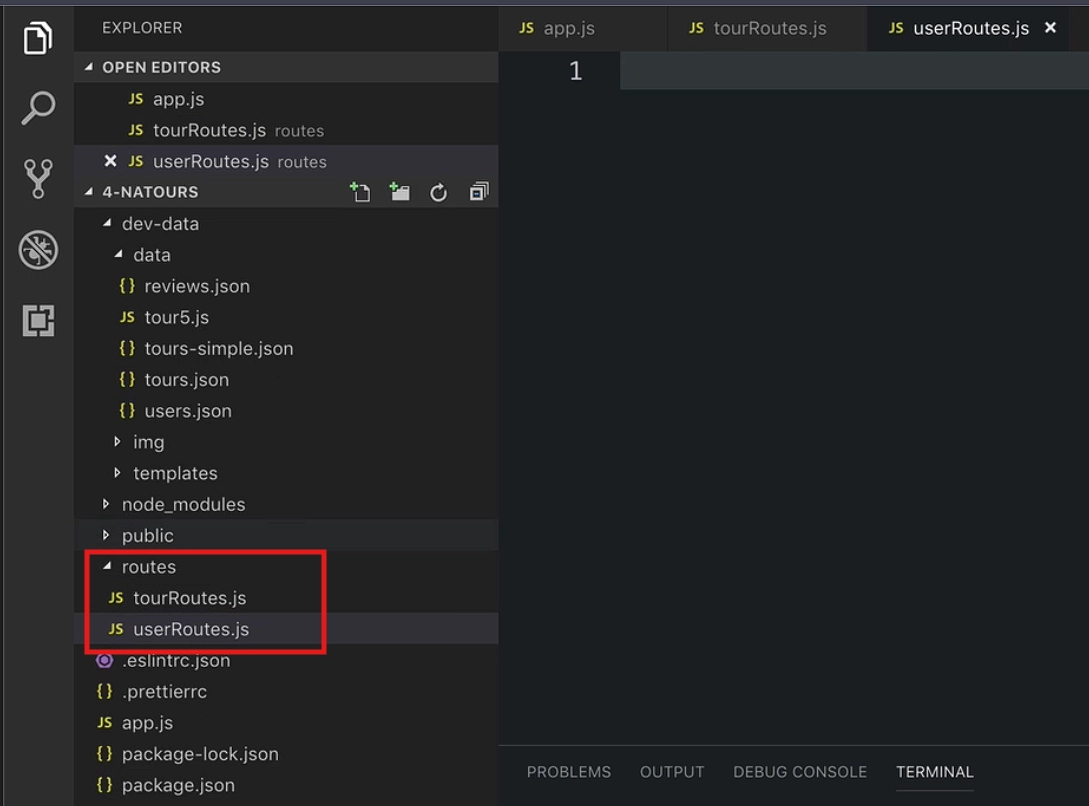
📄 Cut the tourRouter From the app.js file and paste it in the routes/tourRoutes.js file:
const express = require('express');

// (route handler functions temporarily placed here too, for now)

const router = express.Router();

router
  .route('/')
  .get(getAllTours)
  .post(createTour);

router
  .route('/:id')
  .get(getTour)
  .patch(updateTour)
  .delete(deleteTour);

module.exports = router;📥
expressneeds to be imported here separately, since this is now its own module with its own scope.
const express = require('express');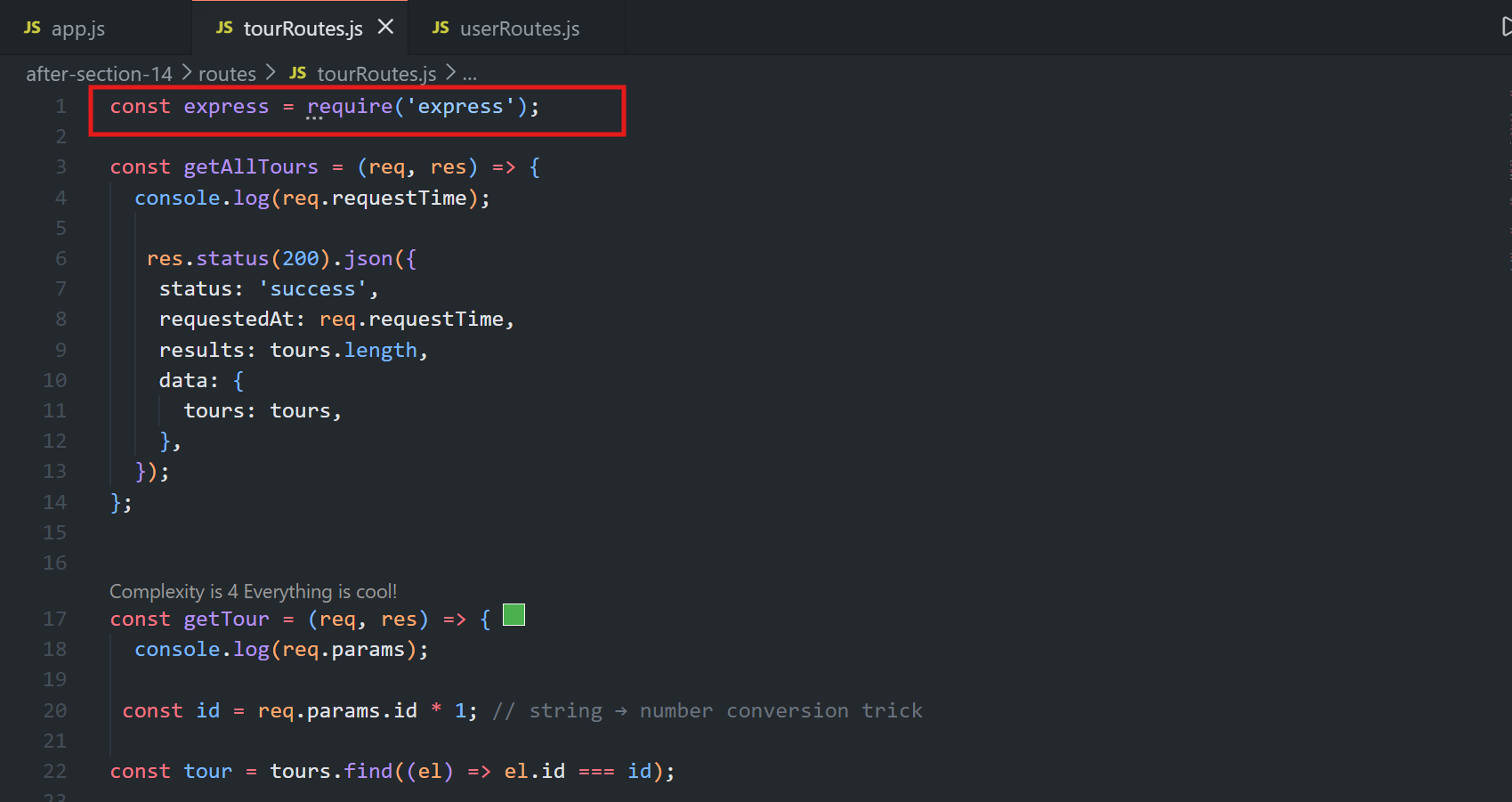
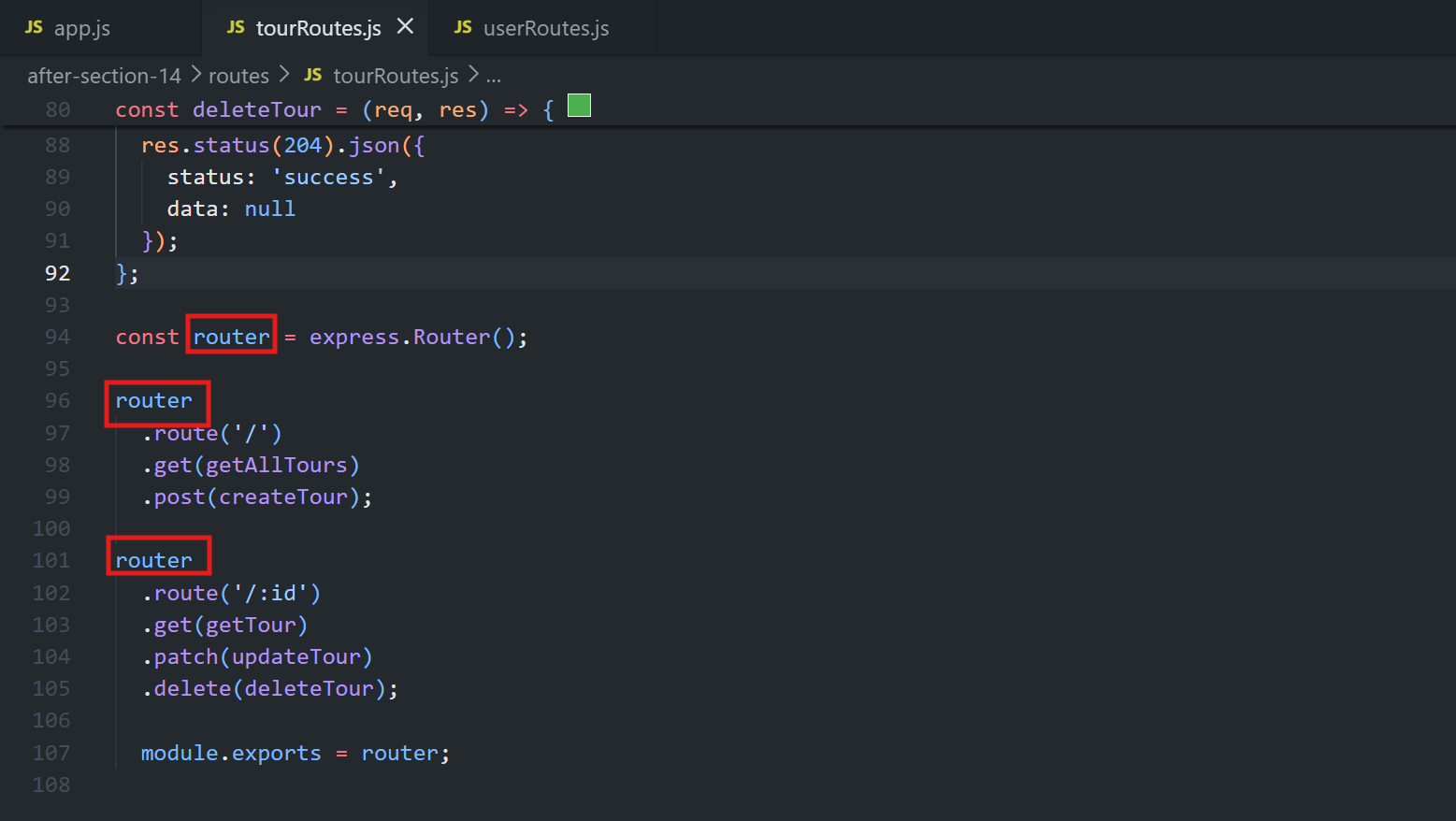
The router variable is conventionally just called
router(nottourRouter) — since the file name (tourRoutes.js) already makes clear which resource it belongs to.
📦
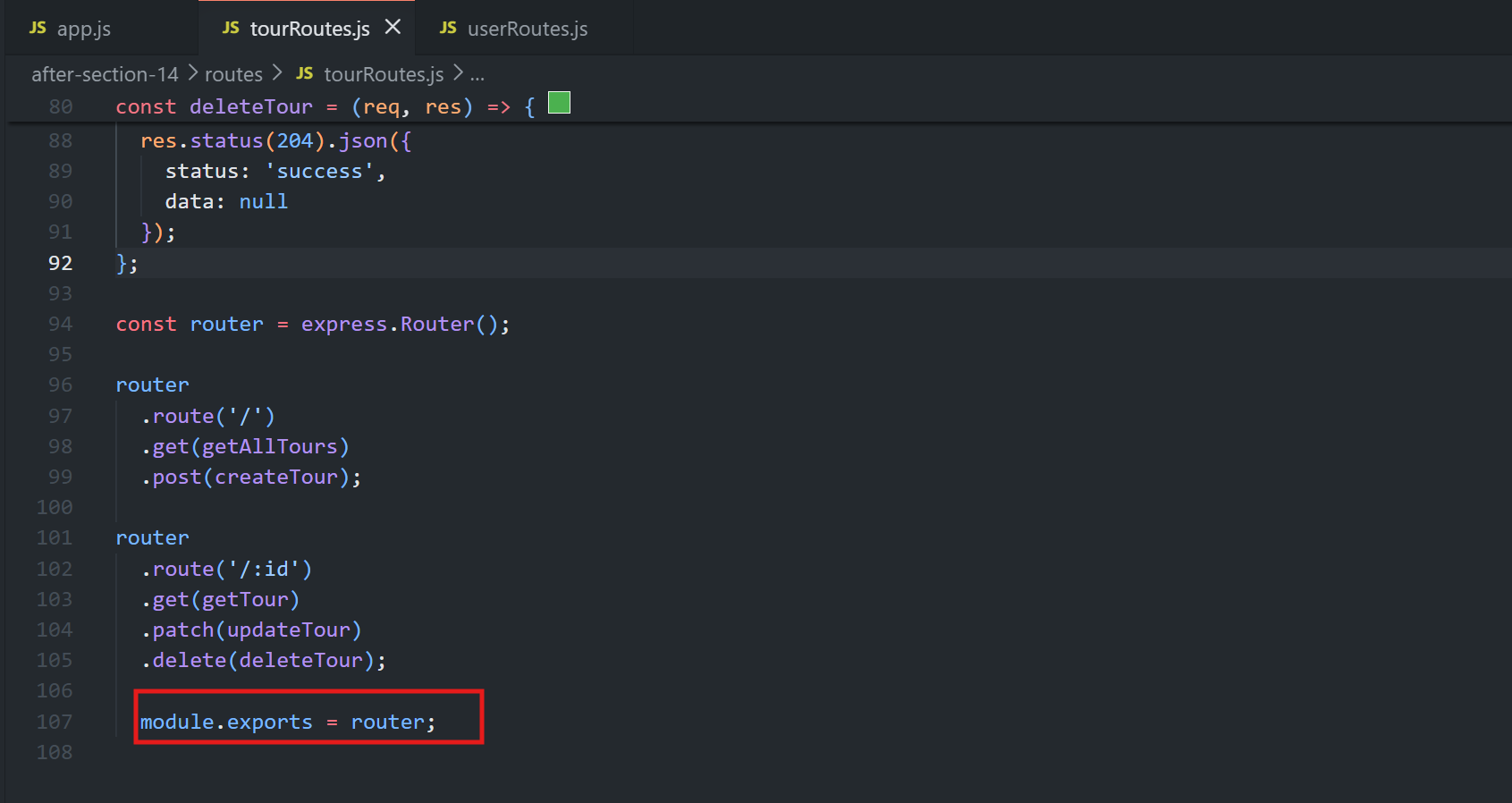
module.exports = router— since only one thing is being exported from this file,module.exportsis used directly (as opposed to attaching multiple things to theexportsobject).
The same structure is repeated for
routes/userRoutes.js.
Cut this part from the
app.jsfile add this part in thetourRoutes.jsfile:
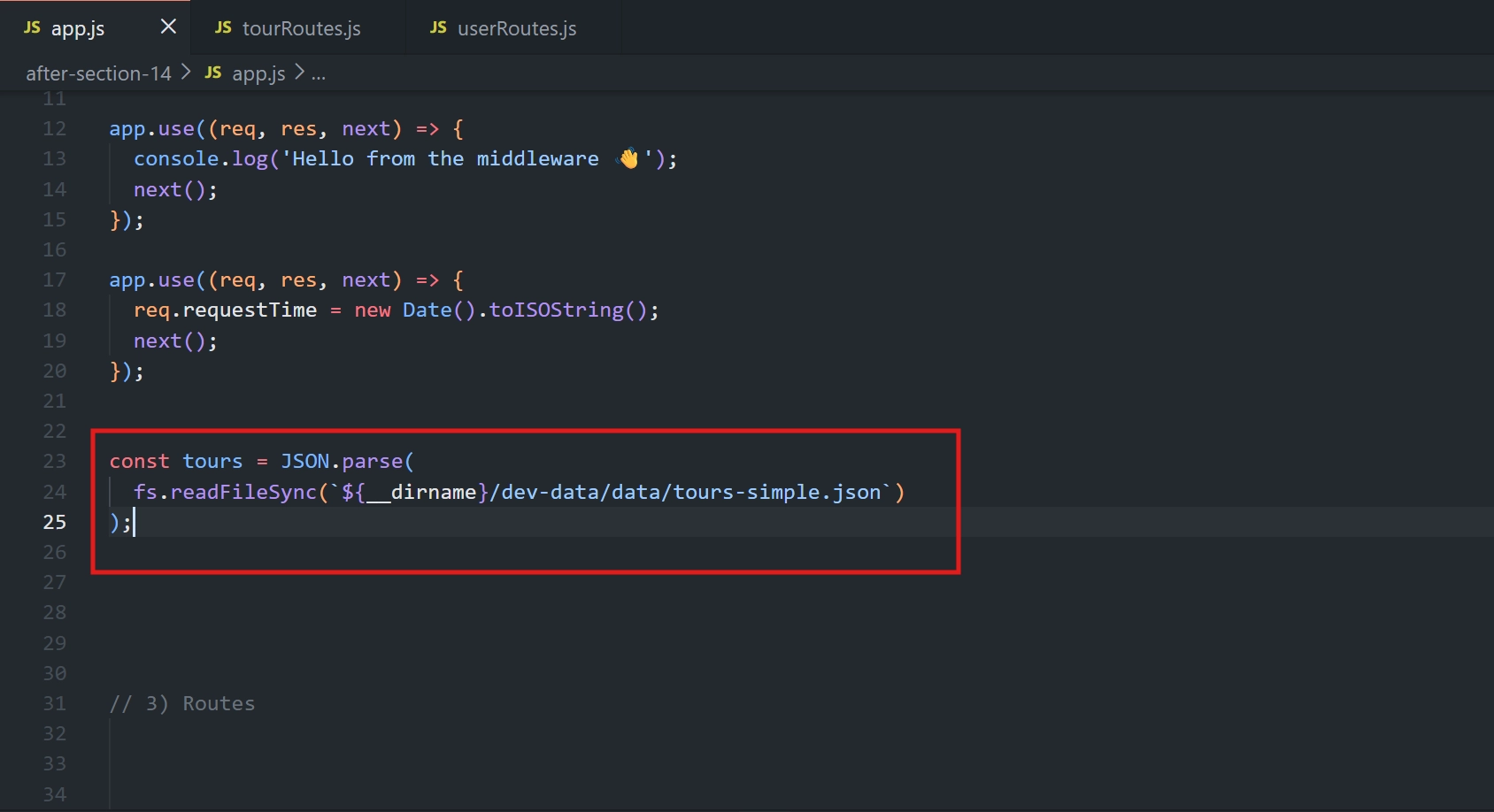
📝 Note on Naming
📁 The folder is called
routes(plural, matchingtourRoutes.js/userRoutes.js).🛣️ The variable exported from each file is called
router(singular).✅ This naming distinction is intentional and just a stylistic convention.
🔹 Step 2: Wiring the Routers Back into the Main App File
const tourRouter = require('./routes/tourRoutes');
const userRouter = require('./routes/userRoutes');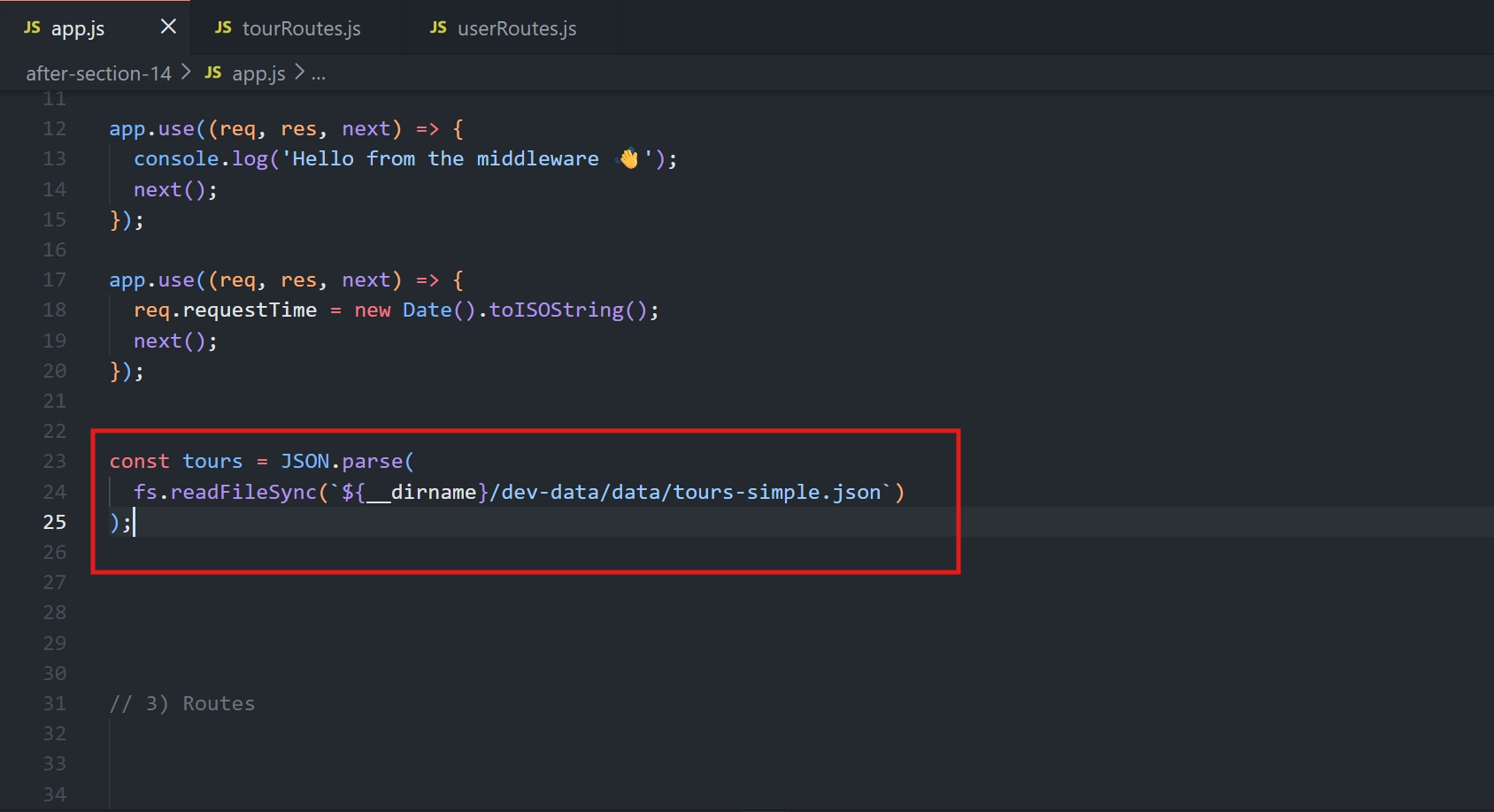
Cut the
fsmodule fromapp.jsand paste it in thetourRoutes.jsfile:
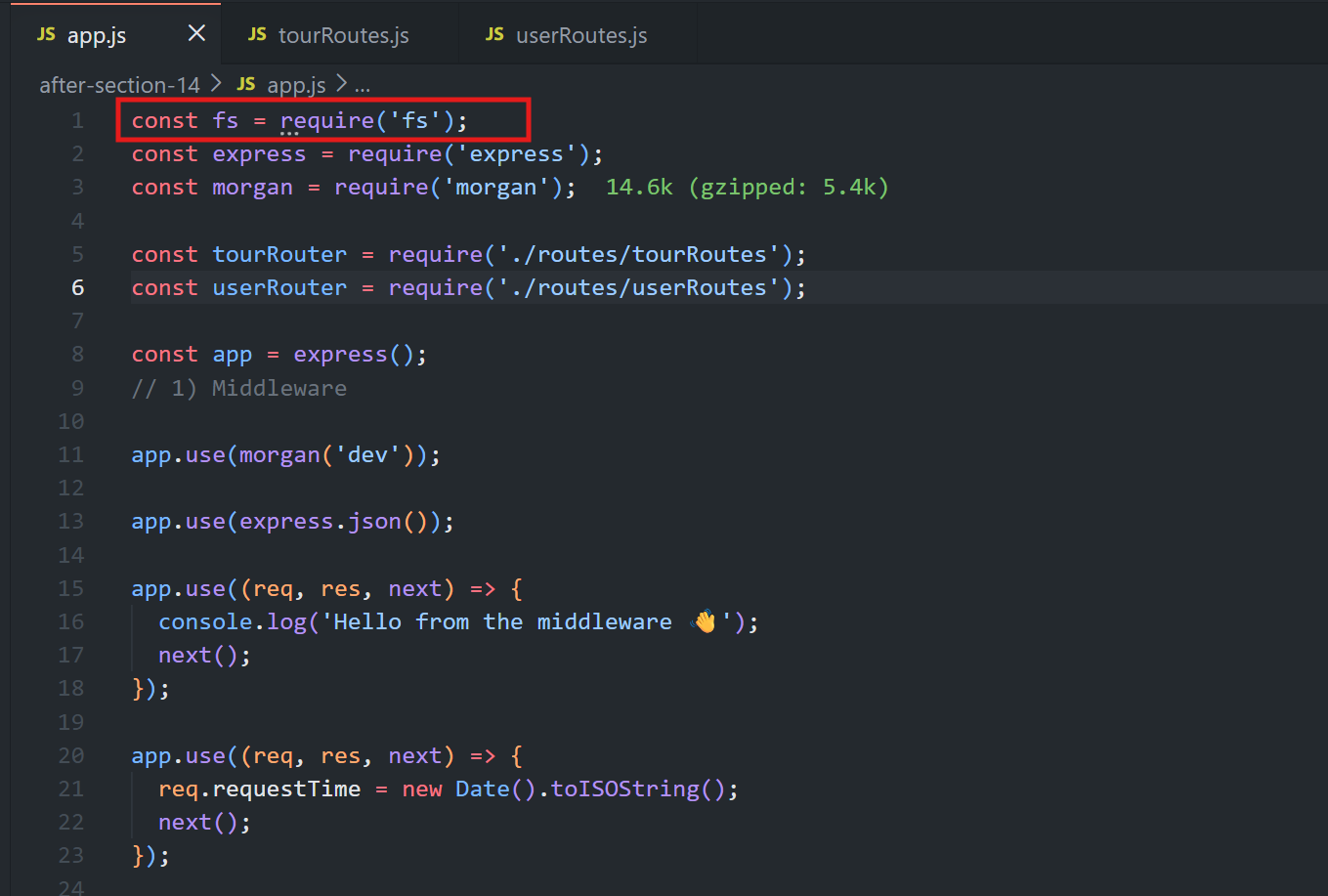
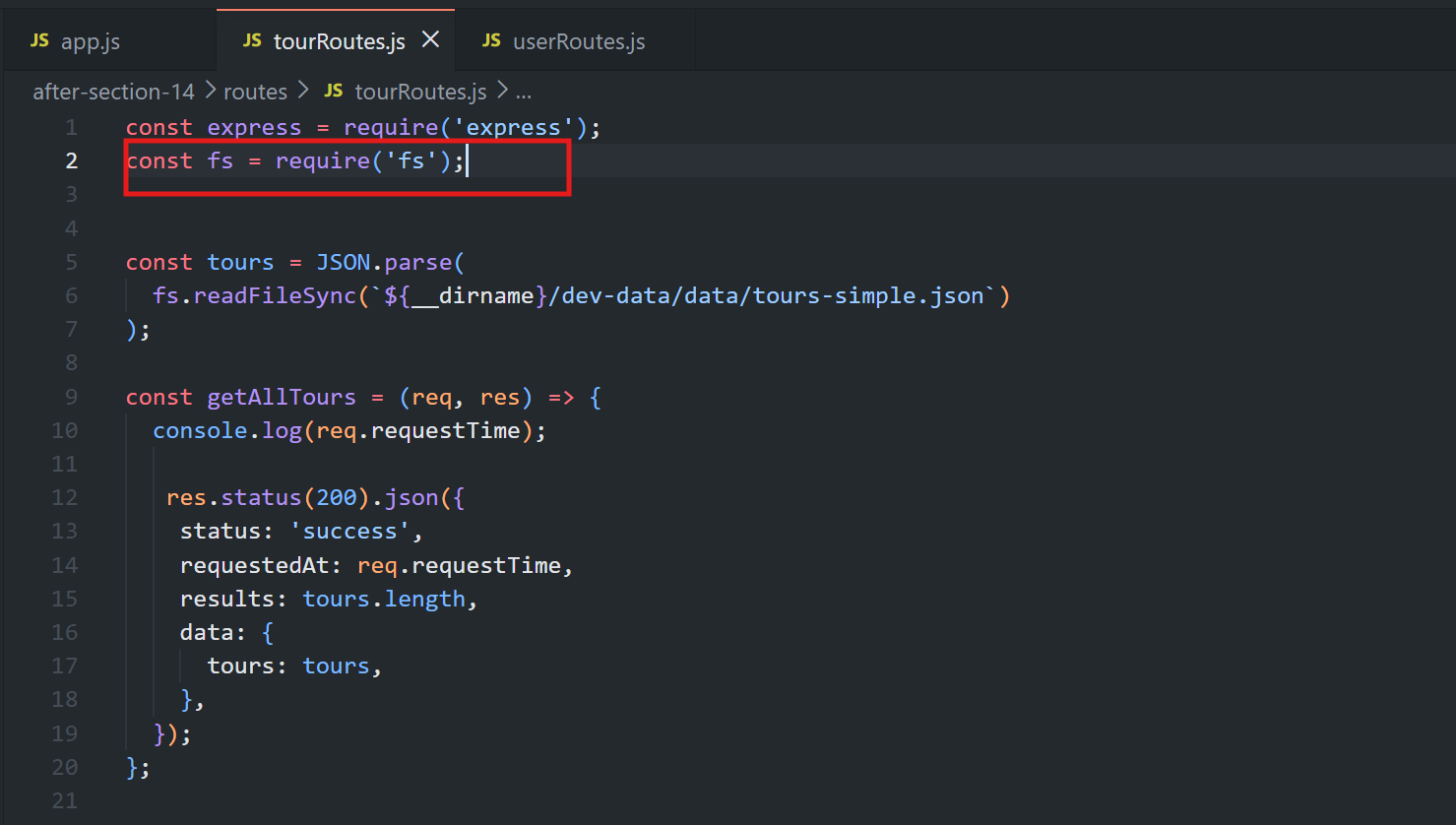
🔹 Step 3: Fixing Broken File Paths After the Move
📂 Since
tourRoutes.jsnow lives inside aroutessubfolder,__dirnamepoints to a different location than before.
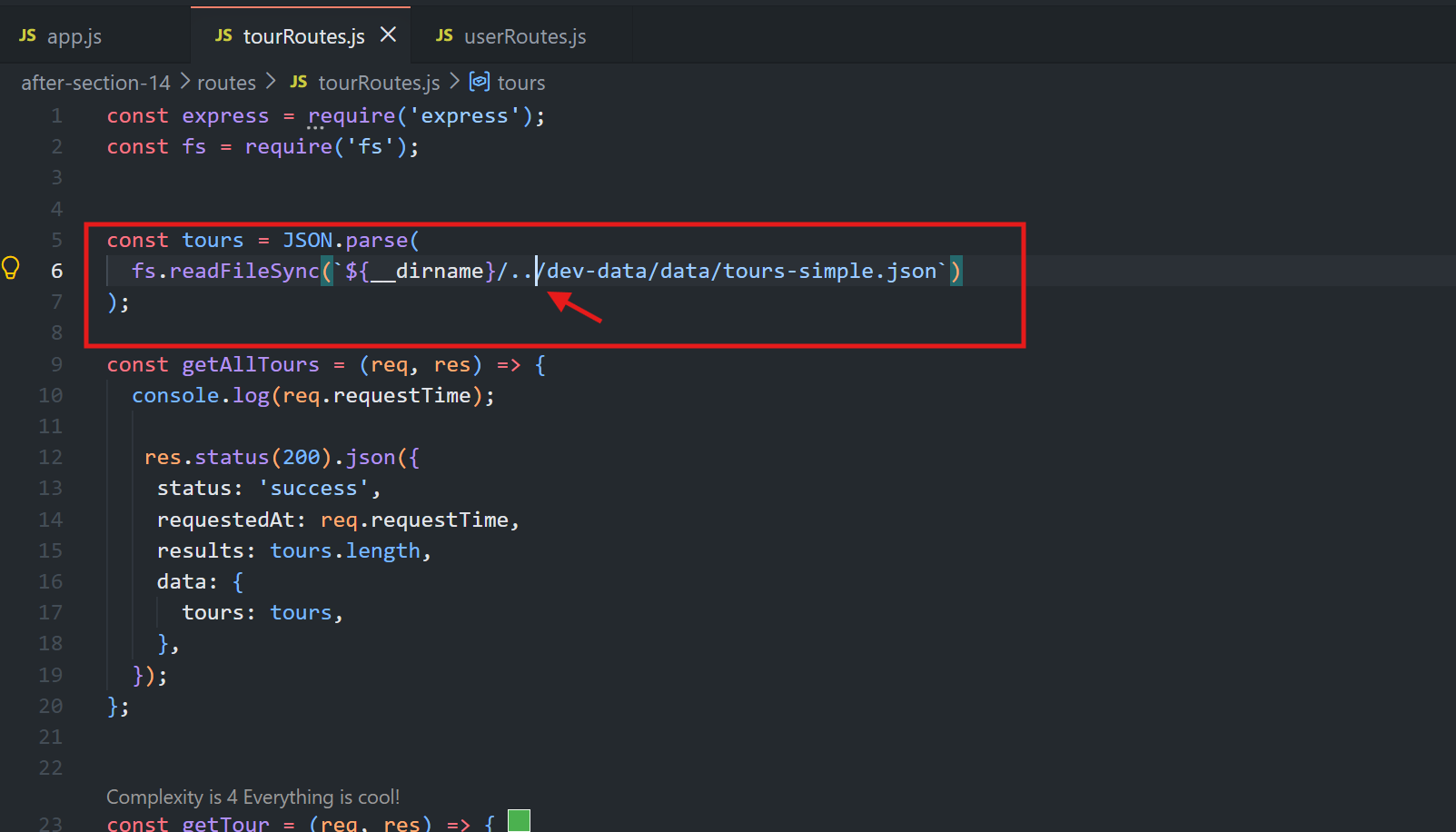
⬆️ Any file-reading code (like reading the tours JSON file) needs its path adjusted to go up one level, then into
dev-data/data/tours-simple.json.
💡 Why this matters
📍 Moving files changes what
__dirnameresolves to — a common source of "file not found" errors during this kind of refactor.🔧 Some breakage during a big refactor like this is normal and expected.
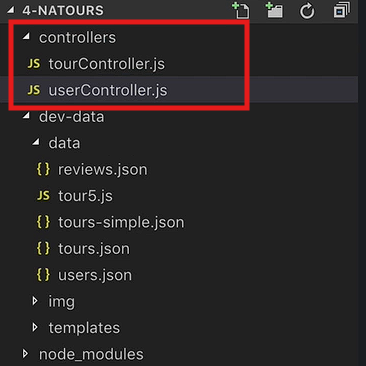
🔹 Step 4: Creating the Controllers Folder
📁 A new controllers folder is created containing:
📄
tourController.js📄
userController.js
💡 Why "controllers" and not "handlers"
🎮 The functions were previously called route handlers, but the course will later introduce the MVC (Model-View-Controller) architecture pattern, where these functions are conventionally called controllers.
🏗️ Naming the folder this way now sets up that terminology in advance.
📄 controllers/tourController.js
const fs = require('fs');

// (tours data reading logic here)

exports.getAllTours = (req, res) => { /* ... */ };
exports.getTour = (req, res) => { /* ... */ };
exports.createTour = (req, res) => { /* ... */ };
exports.updateTour = (req, res) => { /* ... */ };
exports.deleteTour = (req, res) => { /* ... */ };export controller
💡 Why exports.functionName instead of module.exports
📦 This file needs to export multiple functions, not just one.
🧩 Attaching each function directly onto the
exportsobject allows all of them to be exported together — this is a different pattern from the single-export case used in the router files.
The same is repeated for controllers/userController.js.
🔹 Step 5: Importing Controllers into the Route Files
// routes/tourRoutes.js
const tourController = require('./../controllers/tourController');

router
  .route('/')
  .get(tourController.getAllTours)
  .post(tourController.createTour);

router
  .route('/:id')
  .get(tourController.getTour)
  .patch(tourController.updateTour)
.delete(tourController.deleteTour);The same pattern is applied to
userController.jsimporting fromuserRoutes.js.
Import a module in
userRoutes.jsfile and adduserControllerin the router:
const userController = require('./../controllers/userController');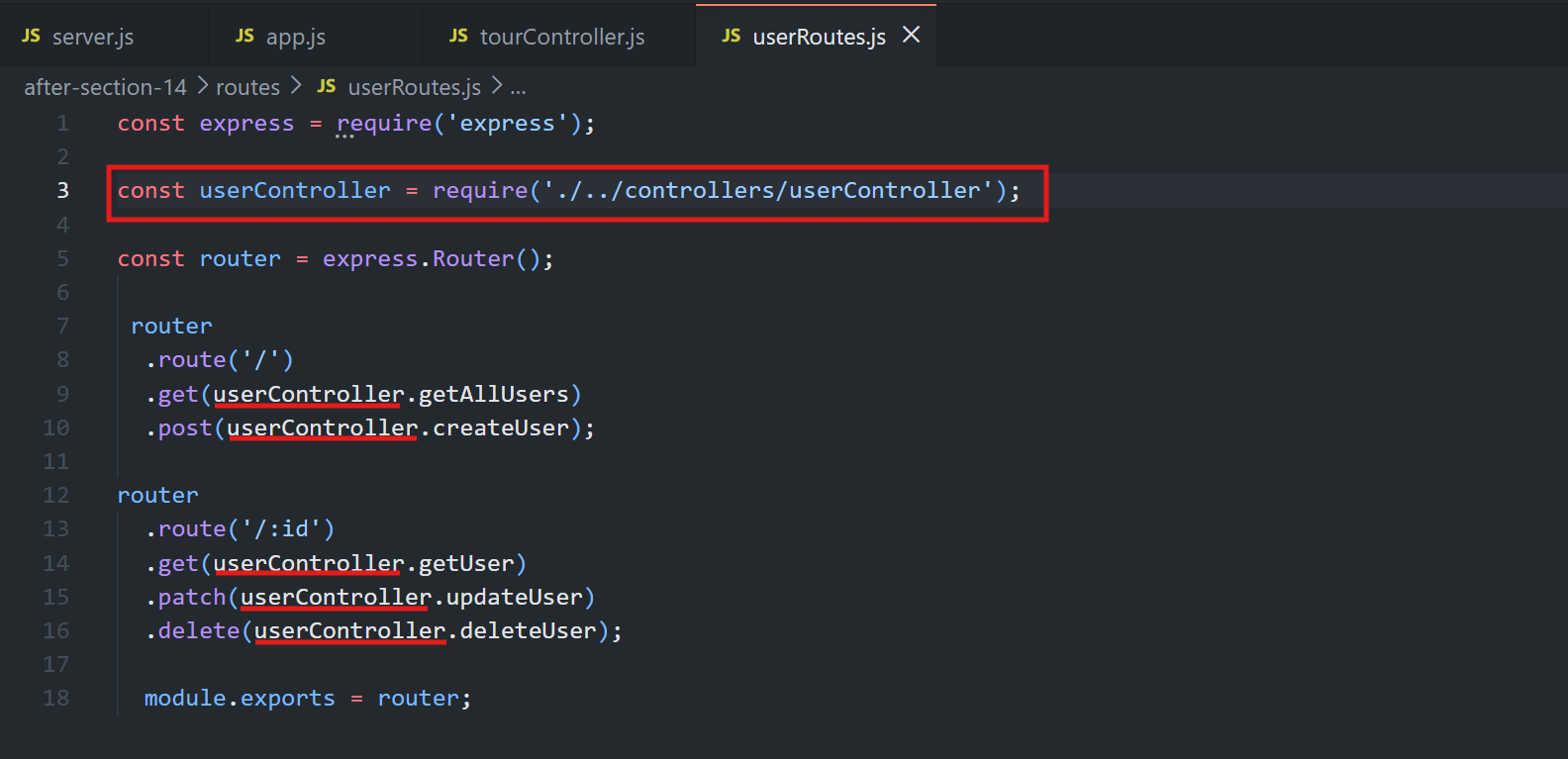
💡 Why each part works:
../controllers/tourController— needs to move up one level (out ofroutes), then intocontrollers.Since the controller file exports multiple functions onto the
exportsobject, requiring that file returns an object (tourController) where each exported function is a property — sotourController.getAllTours,tourController.createTour, etc. are all accessible.
🔹 Step 6: Recap of the Request Flow Through the New Structure
📨 A request arrives in
app.js.🛣️ Based on the URL, it enters the matching router (e.g.
tourRouter).🎮 Based on the specific route/method, the router calls the matching controller function (e.g. from
tourController.js).📤 The controller function sends the response, completing the request-response cycle.
✅ This is now spread across three distinct files/layers instead of one — routes, controllers, and the main app file.
🔹 Step 7: Creating server.js — Separating Express from the Server
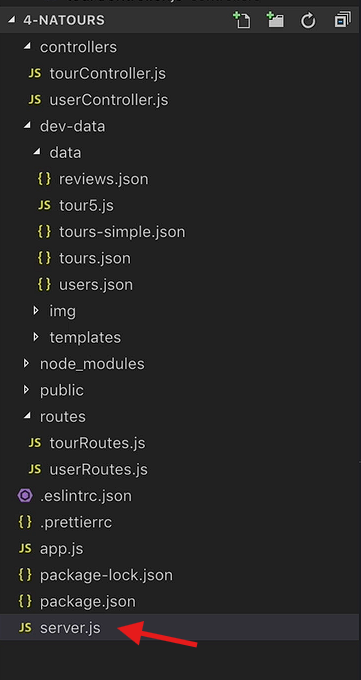
💡 Why this step exists
Best practice is to keep everything Express-related in one file (app.js) and everything server-related (starting the server, database config, environment variables, error handling, etc.) in a separate main file (server.js).
📄 server.js
const app = require('./app');

const port = 3000;
app.listen(port, () => {
  console.log(`App running on port ${port}...`);
});📄 export app.js
// ...all middleware, routers, and app configuration...

module.exports = app;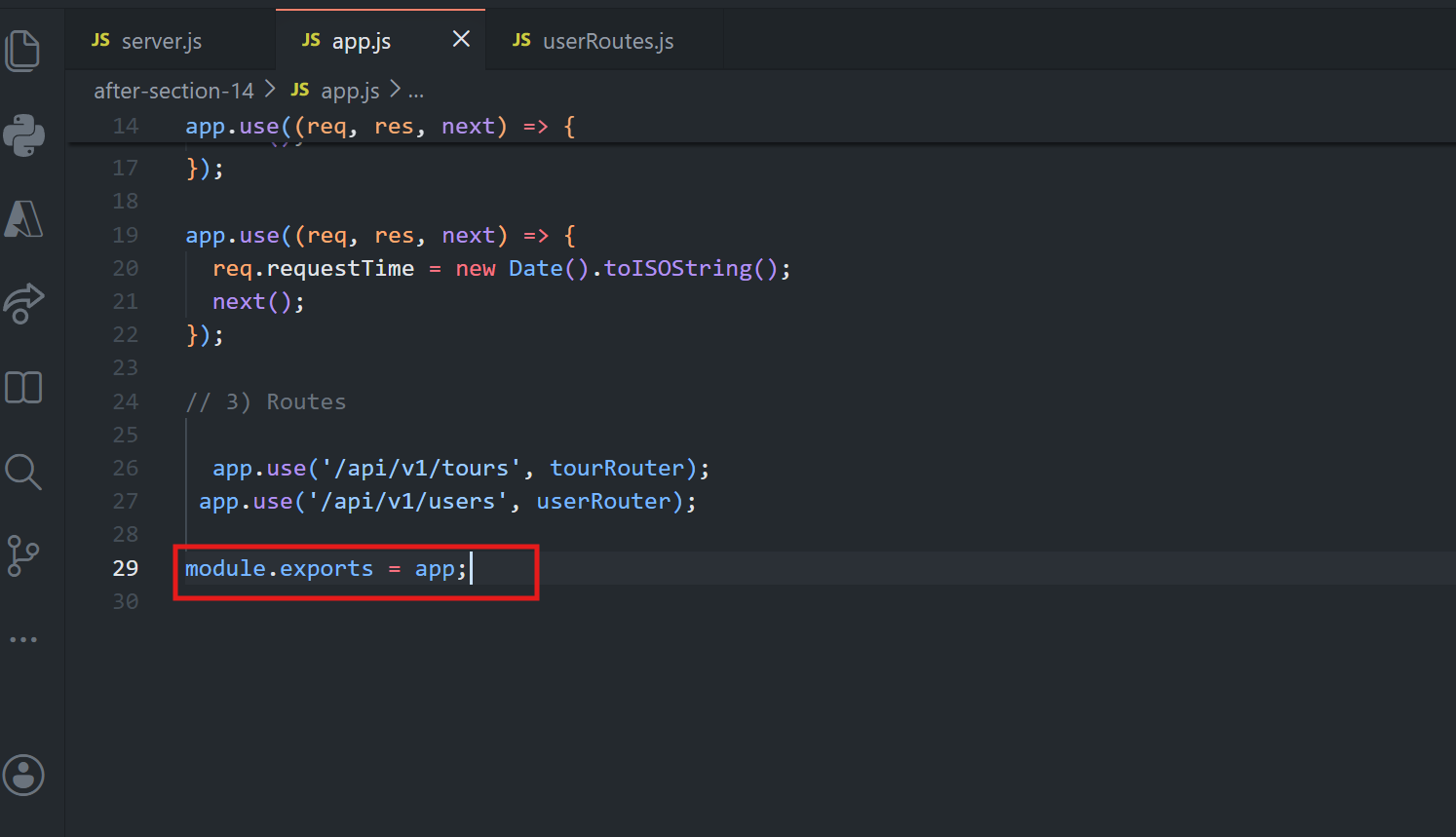
💡 Why each part works:
🚀 The
app.listen(...)call (previously at the bottom of the main file) is moved intoserver.js.📦
app.jsnow exports the configured Express app viamodule.exports = app.📥
server.jsimports it using a relative path (./app), since it's a local file in the same folder.⭐ Going forward,
server.jsbecomes the true entry point of the application — later additions like database connections and environment variable setup will live here, since those aren't strictly Express concerns.
🔹 Step 8: Changing the script and Testing App
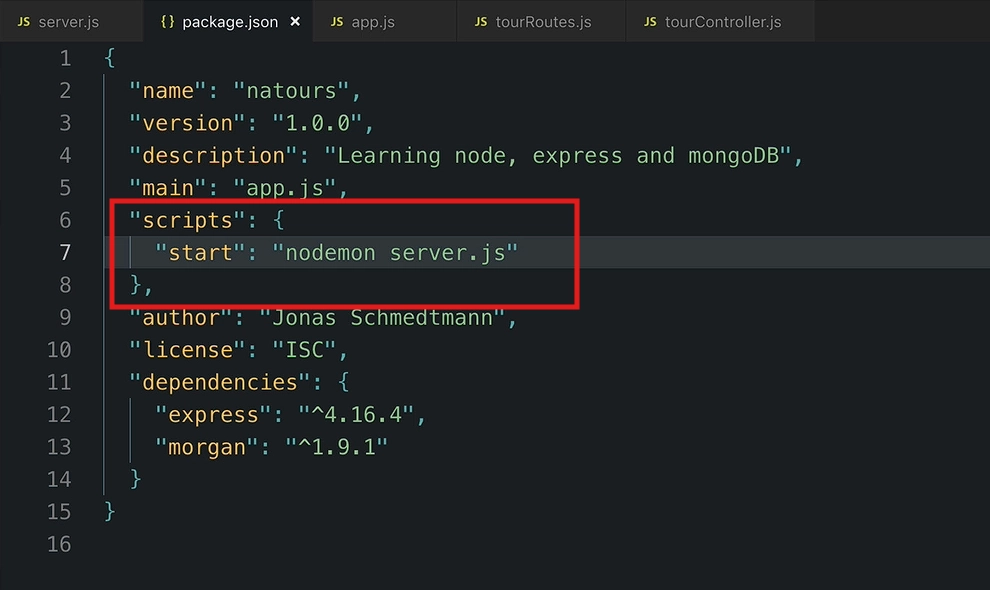
Now, since server.js is the actual entry point, lets update the npm start script tag
"scripts": {
  "start": "nodemon server.js"
}
Running the app in case not already running:
npm start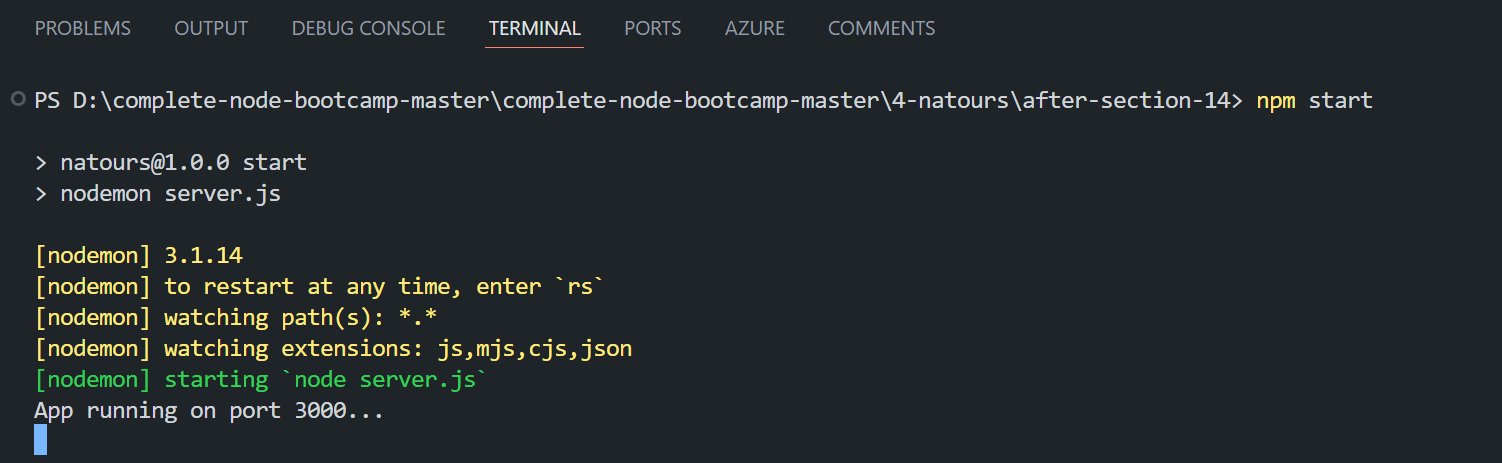
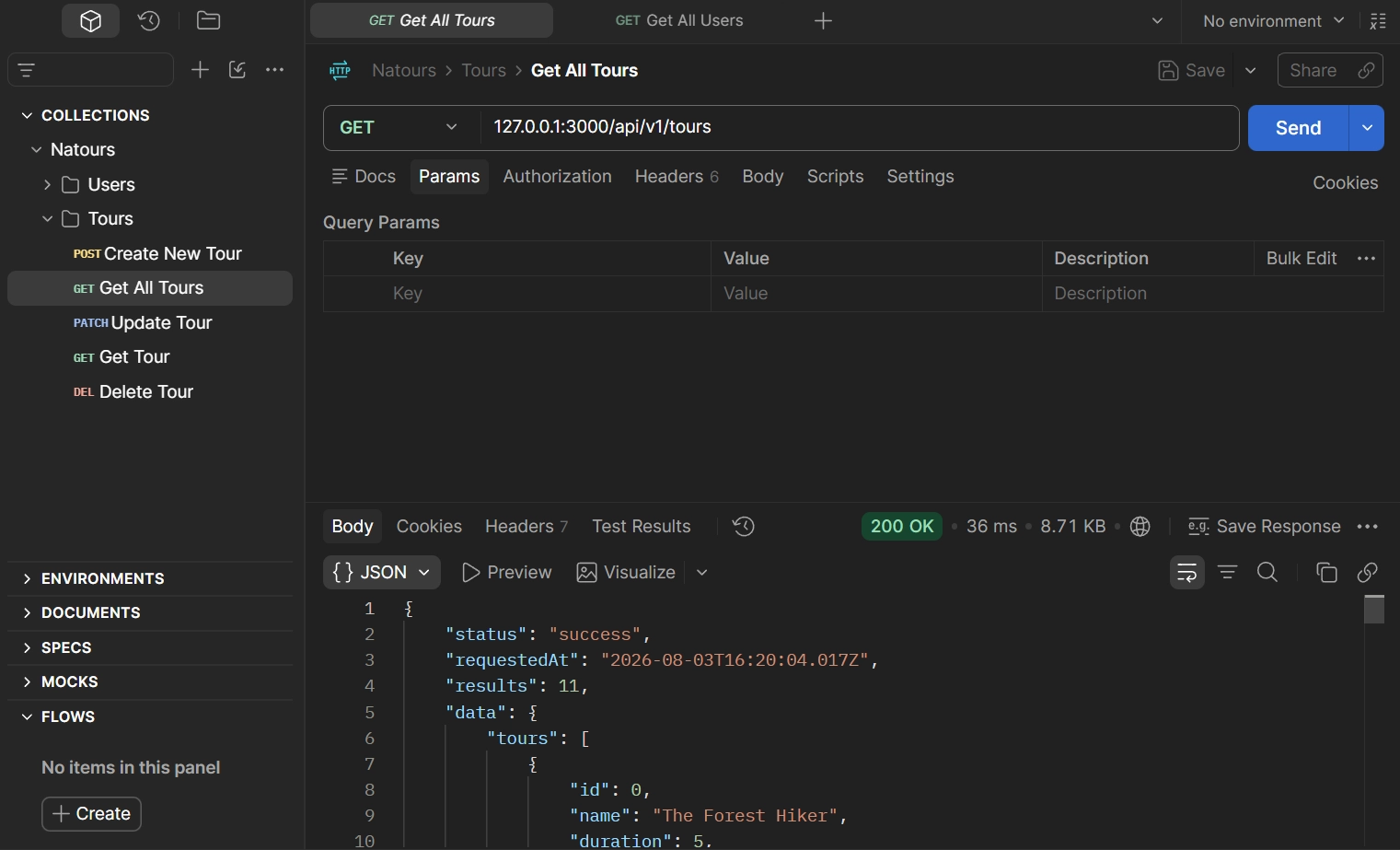
Now send the request and check the status:
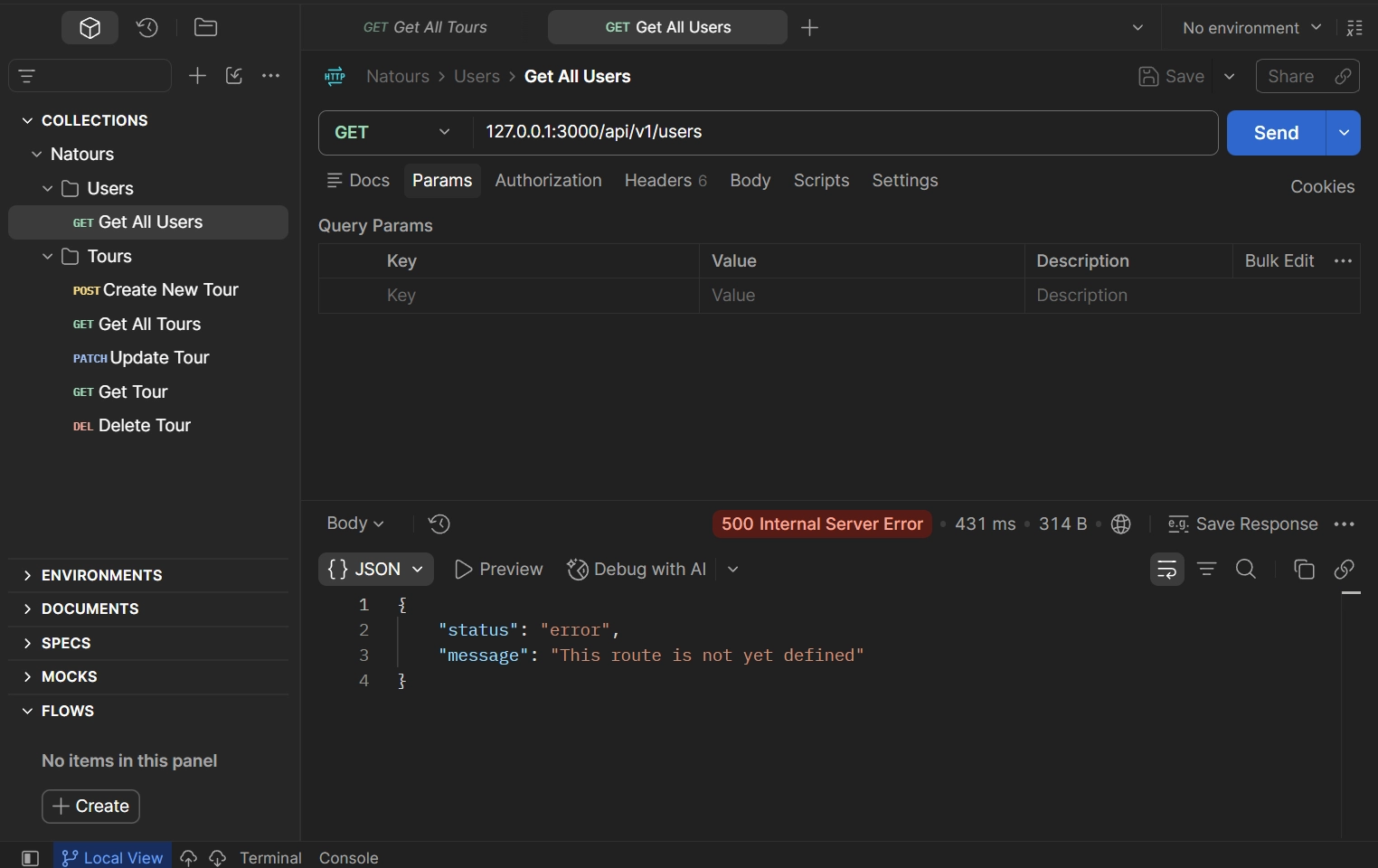
📁 Final File Structure
project/
├── controllers/
│   ├── tourController.js
│   └── userController.js
├── routes/
│   ├── tourRoutes.js
│   └── userRoutes.js
├── app.js          # Express app config + middleware + mounted routers
├── server.js       # Entry point — starts the server
└── package.json
✅ Key Takeaway
🛣️ Routes define the endpoints and map them to controllers.
🎮 Controllers contain the logic for handling requests.
⚙️
app.jsis used for Express setup (middleware and routers).🚀
server.jsstarts the server and handles app initialization.📦 Use
module.exportsfor a single export, andexportsfor multiple exports.📂 Update relative paths when moving files between folders.
▶️ Use
npm startto start the application.
🎯 Suggested Practice
🔍 Trace a request step-by-step through the new structure:
<div class="infographic-reqflow" id="reqflow">
<style>
.infographic-reqflow {
  --ink:        #1a1a1a;
  --ink-soft:   #5c5c5c;
  --paper:      #ffffff;
  --paper-alt:  #f0ece4;
  --accent:     #2563eb;
  --accent-soft:#e3ebfd;
  --line:       #ddd6c9;
  --display-font: 'Fraunces', Georgia, serif;
  --body-font: 'Inter', system-ui, sans-serif;
  --mono-font: 'IBM Plex Mono', monospace;
  max-width: 460px;
  margin: 0 auto;
  box-sizing: border-box;
  padding: 0 clamp(1.25rem, 5vw, 2rem);
  font-family: var(--body-font);
  color: var(--ink);
  background: transparent;
}
.infographic-reqflow[data-theme="dark"] {
  --ink:        #e8e6e1;
  --ink-soft:   #9a968c;
  --paper:      #121212;
  --paper-alt:  #1e1e26;
  --accent:     #5b8def;
  --accent-soft:#202942;
  --line:       #2c313d;
}
.infographic-reqflow *,
.infographic-reqflow *::before,
.infographic-reqflow *::after { box-sizing: border-box; }

.rf-head {
  display: flex; align-items: center; justify-content: space-between;
  gap: 1rem; margin: 2rem 0 1.75rem;
}
.rf-title {
  font-family: var(--display-font); font-weight: 600;
  font-size: clamp(1.3rem, 4vw, 1.7rem); margin: 0; letter-spacing: -0.01em;
}
.rf-play {
  display: inline-flex; align-items: center; gap: 0.5rem;
  background: var(--paper); color: var(--ink); border: 1px solid var(--line);
  font: inherit; font-size: 0.85rem; font-weight: 600; cursor: pointer;
  padding: 0.55rem 1rem; border-radius: 999px; transition: border-color .15s, color .15s;
  flex: 0 0 auto;
}
.rf-play:hover { border-color: var(--accent); color: var(--accent); }
.rf-play svg { width: 15px; height: 15px; display: block; }
.rf-play.is-playing { border-color: var(--accent); color: var(--accent); }

.rf-col { display: flex; flex-direction: column; align-items: stretch; padding-bottom: 2.5rem; }

.rf-node {
  display: flex; align-items: center; gap: 0.9rem;
  background: var(--paper-alt);
  border: 1px solid var(--line);
  border-radius: 10px;
  padding: 0.9rem 1.1rem;
  transition: border-color .25s, box-shadow .25s, transform .25s;
}
.rf-node .rf-icon {
  flex: 0 0 auto; width: 26px; height: 26px;
  color: var(--ink-soft); transition: color .25s;
}
.rf-node .rf-icon svg { width: 100%; height: 100%; display: block; }
.rf-node .rf-label {
  font-size: 0.95rem; font-weight: 600; line-height: 1.25;
}
.rf-node.is-active {
  border-color: var(--accent);
  box-shadow: 0 0 0 3px var(--accent-soft);
  transform: translateX(3px);
}
.rf-node.is-active .rf-icon { color: var(--accent); }

.rf-arrow {
  align-self: center;
  width: 20px; height: 32px;
  color: var(--line);
  position: relative;
}
.rf-arrow svg { width: 100%; height: 100%; display: block; overflow: visible; }
.rf-arrow .rf-path { stroke: var(--line); stroke-width: 2; fill: none; transition: stroke .2s; }
.rf-arrow .rf-head { fill: var(--line); transition: fill .2s; }
.rf-arrow .rf-dot { fill: var(--accent); opacity: 0; }
.rf-arrow.is-flowing .rf-path,
.rf-arrow.is-flowing .rf-head { stroke: var(--accent); fill: var(--accent); }
.rf-arrow.is-flowing .rf-dot {
  opacity: 1;
  animation: rf-travel 0.5s ease-in-out forwards;
}
@keyframes rf-travel {
  from { transform: translateY(0); opacity: 1; }
  85%  { opacity: 1; }
  to   { transform: translateY(22px); opacity: 0; }
}

@media (prefers-reduced-motion: reduce) {
  .rf-node, .rf-arrow .rf-path, .rf-arrow .rf-head { transition: none; }
  .rf-arrow.is-flowing .rf-dot { animation: none; opacity: 1; }
}
</style>

<div class="rf-head">
  <button class="rf-play" type="button" id="rfPlayBtn">
    <span class="rf-play-icon"></span>
    <span class="rf-play-label">Play</span>
  </button>
</div>

<div class="rf-col" id="rfCol">
  <div class="rf-node" data-node="0">
    <div class="rf-icon" data-icon="server"></div>
    <div class="rf-label">server.js</div>
  </div>

  <div class="rf-arrow" data-arrow="0">
    <svg viewBox="0 0 20 32"><path class="rf-path" d="M10 2v22"/><path class="rf-head" d="M5 21l5 8 5-8z"/><circle class="rf-dot" cx="10" cy="4" r="2.5"/></svg>
  </div>

  <div class="rf-node" data-node="1">
    <div class="rf-icon" data-icon="file-code"></div>
    <div class="rf-label">app.js</div>
  </div>

  <div class="rf-arrow" data-arrow="1">
    <svg viewBox="0 0 20 32"><path class="rf-path" d="M10 2v22"/><path class="rf-head" d="M5 21l5 8 5-8z"/><circle class="rf-dot" cx="10" cy="4" r="2.5"/></svg>
  </div>

  <div class="rf-node" data-node="2">
    <div class="rf-icon" data-icon="route"></div>
    <div class="rf-label">Router</div>
  </div>

  <div class="rf-arrow" data-arrow="2">
    <svg viewBox="0 0 20 32"><path class="rf-path" d="M10 2v22"/><path class="rf-head" d="M5 21l5 8 5-8z"/><circle class="rf-dot" cx="10" cy="4" r="2.5"/></svg>
  </div>

  <div class="rf-node" data-node="3">
    <div class="rf-icon" data-icon="cpu"></div>
    <div class="rf-label">Controller</div>
  </div>

  <div class="rf-arrow" data-arrow="3">
    <svg viewBox="0 0 20 32"><path class="rf-path" d="M10 2v22"/><path class="rf-head" d="M5 21l5 8 5-8z"/><circle class="rf-dot" cx="10" cy="4" r="2.5"/></svg>
  </div>

  <div class="rf-node" data-node="4">
    <div class="rf-icon" data-icon="upload"></div>
    <div class="rf-label">Response</div>
  </div>
</div>

<script>
(function () {
  var wrapper = document.currentScript.closest('.infographic-reqflow')
    || document.querySelector('.infographic-reqflow');
  var bodyAttr = document.body.getAttribute('data-darkmode');
  var dark;
  if (bodyAttr === 'true') { dark = true; }
  else if (bodyAttr === 'false') { dark = false; }
  else {
    var match = document.cookie.match(/(?:^|;\s*)darkMode=([^;]+)/);
    dark = match ? match[1] === 'true' : false;
  }
  if (dark) wrapper.setAttribute('data-theme', 'dark');

  var ICONS = {
    server: '<svg xmlns="http://www.w3.org/2000/svg" viewBox="0 0 24 24" fill="none" stroke="currentColor" stroke-width="2" stroke-linecap="round" stroke-linejoin="round"><rect width="20" height="8" x="2" y="2" rx="2" ry="2"/><rect width="20" height="8" x="2" y="14" rx="2" ry="2"/><line x1="6" x2="6.01" y1="6" y2="6"/><line x1="6" x2="6.01" y1="18" y2="18"/></svg>',
    'file-code': '<svg xmlns="http://www.w3.org/2000/svg" viewBox="0 0 24 24" fill="none" stroke="currentColor" stroke-width="2" stroke-linecap="round" stroke-linejoin="round"><path d="M6 22a2 2 0 0 1-2-2V4a2 2 0 0 1 2-2h8a2.4 2.4 0 0 1 1.704.706l3.588 3.588A2.4 2.4 0 0 1 20 8v12a2 2 0 0 1-2 2z"/><path d="M14 2v5a1 1 0 0 0 1 1h5"/><path d="M10 12.5 8 15l2 2.5"/><path d="m14 12.5 2 2.5-2 2.5"/></svg>',
    route: '<svg xmlns="http://www.w3.org/2000/svg" viewBox="0 0 24 24" fill="none" stroke="currentColor" stroke-width="2" stroke-linecap="round" stroke-linejoin="round"><circle cx="6" cy="19" r="3"/><path d="M9 19h8.5a3.5 3.5 0 0 0 0-7h-11a3.5 3.5 0 0 1 0-7H15"/><circle cx="18" cy="5" r="3"/></svg>',
    cpu: '<svg xmlns="http://www.w3.org/2000/svg" viewBox="0 0 24 24" fill="none" stroke="currentColor" stroke-width="2" stroke-linecap="round" stroke-linejoin="round"><path d="M12 20v2"/><path d="M12 2v2"/><path d="M17 20v2"/><path d="M17 2v2"/><path d="M2 12h2"/><path d="M2 17h2"/><path d="M2 7h2"/><path d="M20 12h2"/><path d="M20 17h2"/><path d="M20 7h2"/><path d="M7 20v2"/><path d="M7 2v2"/><rect x="4" y="4" width="16" height="16" rx="2"/><rect x="8" y="8" width="8" height="8" rx="1"/></svg>',
    upload: '<svg xmlns="http://www.w3.org/2000/svg" viewBox="0 0 24 24" fill="none" stroke="currentColor" stroke-width="2" stroke-linecap="round" stroke-linejoin="round"><path d="M12 3v12"/><path d="m17 8-5-5-5 5"/><path d="M21 15v4a2 2 0 0 1-2 2H5a2 2 0 0 1-2-2v-4"/></svg>',
    play: '<svg xmlns="http://www.w3.org/2000/svg" viewBox="0 0 24 24" fill="none" stroke="currentColor" stroke-width="2" stroke-linecap="round" stroke-linejoin="round"><path d="M5 5a2 2 0 0 1 3.008-1.728l11.997 6.998a2 2 0 0 1 .003 3.458l-12 7A2 2 0 0 1 5 19z"/></svg>'
  };

  wrapper.querySelectorAll('[data-icon]').forEach(function (el) {
    el.innerHTML = ICONS[el.getAttribute('data-icon')];
  });
  var playBtn = wrapper.querySelector('#rfPlayBtn');
  playBtn.querySelector('.rf-play-icon').innerHTML = ICONS.play;

  var nodes = Array.prototype.slice.call(wrapper.querySelectorAll('[data-node]'));
  var arrows = Array.prototype.slice.call(wrapper.querySelectorAll('[data-arrow]'));
  var timers = [];

  function clearTimers() { timers.forEach(clearTimeout); timers = []; }
  function resetAll() {
    nodes.forEach(function (n) { n.classList.remove('is-active'); });
    arrows.forEach(function (a) {
      a.classList.remove('is-flowing');
      var dot = a.querySelector('.rf-dot');
      dot.style.animation = 'none';
      void dot.offsetWidth;
      dot.style.animation = '';
    });
  }

  function play() {
    clearTimers();
    resetAll();
    playBtn.classList.add('is-playing');
    playBtn.querySelector('.rf-play-label').textContent = 'Replay';

    var step = 0;
    var HOLD = 420, FLOW = 480;
    nodes.forEach(function (node, i) {
      timers.push(setTimeout((function (node) {
        return function () { node.classList.add('is-active'); };
      })(node), step));
      step += HOLD;
      if (arrows[i]) {
        timers.push(setTimeout((function (arrow) {
          return function () { arrow.classList.add('is-flowing'); };
        })(arrows[i]), step));
        step += FLOW;
      }
    });
    timers.push(setTimeout(function () { playBtn.classList.remove('is-playing'); }, step));
  }

  playBtn.addEventListener('click', play);
})();
</script>
</div>
✅ Following this flow a few times is one of the best ways to understand how Express applications are organized.
<div class="infographic-vscodeterm" id="vt">
<style>
.infographic-vscodeterm {
--ink: #1a1a1a;
--ink-soft: #5c5c5c;
--paper: #ffffff;
--paper-alt: #f0ece4;
--accent: #2563eb;
--accent-deep: #1942a8;
--accent-soft: #e3ebfd;
--line: #ddd6c9;
--radius: 8px;
--display-font: 'Fraunces', Georgia, serif;
--body-font: 'Inter', system-ui, sans-serif;
--mono-font: 'IBM Plex Mono', monospace;
max-width: 880px;
margin: 0 auto;
box-sizing: border-box;
background: transparent;
color: var(--ink);
font-family: var(--body-font);
}
.infographic-vscodeterm[data-theme="dark"] {
--ink: #e8e6e1;
--ink-soft: #9a968c;
--paper: #13171f;
--paper-alt: #1c212b;
--accent: #5b8def;
--accent-deep: #8fb4ff;
--accent-soft: #20293f;
--line: #2c313d;
}
.infographic-vscodeterm * { box-sizing: border-box; min-width: 0; }
.vt-eyebrow {
font-family: var(--mono-font); font-size: 0.72rem; letter-spacing: 0.1em;
text-transform: uppercase; color: var(--accent); margin: 0 0 0.45rem;
display: flex; align-items: center; justify-content: center; gap: 0.4rem;
}
.vt-eyebrow::before { content: ""; width: 14px; height: 2px; background: var(--accent); display: inline-block; }
.vt-title {
font-family: var(--display-font); font-size: clamp(1.5rem, 4vw, 2.3rem); text-align: center;
margin: 0 0 0.5rem; line-height: 1.14; letter-spacing: -0.01em;
}
.vt-sub { color: var(--ink-soft); font-size: 0.95rem; text-align: center; margin: 0 0 1.7rem; }
/* ===== VS Code window — fixed dark theme regardless of page mode ===== */
.vt-window { border-radius: 8px; overflow: hidden; box-shadow: 0 16px 40px -14px rgba(0,0,0,0.45); border: 1px solid #1e1e1e; font-family: var(--mono-font); }
.vt-titlebar { background: #323233; display: flex; align-items: center; padding: 0.5rem 0.8rem; position: relative; }
.vt-dots { display: flex; gap: 0.4rem; }
.vt-dots span { width: 10px; height: 10px; border-radius: 50%; display: block; }
.vt-dots span:nth-child(1) { background: #ff5f56; }
.vt-dots span:nth-child(2) { background: #ffbd2e; }
.vt-dots span:nth-child(3) { background: #27c93f; }
.vt-titlebar-text { position: absolute; left: 50%; transform: translateX(-50%); font-size: 0.72rem; color: #cccccc; }
.vt-body { display: flex; height: 416px; }
.vt-resize-h { width: 5px; cursor: col-resize; background: transparent; flex-shrink: 0; transition: background 0.15s; touch-action: none; }
.vt-resize-h:hover, .vt-resize-h.is-dragging { background: #0078d4; }
.vt-resize-v { height: 5px; cursor: row-resize; background: transparent; flex-shrink: 0; transition: background 0.15s; touch-action: none; }
.vt-resize-v:hover, .vt-resize-v.is-dragging { background: #0078d4; }
.vt-window-resize {
height: 9px; background: #252526; cursor: row-resize; display: flex; align-items: center;
justify-content: center; border-top: 1px solid #1e1e1e; touch-action: none;
}
.vt-window-resize span { width: 30px; height: 3px; border-radius: 2px; background: #4a4a52; }
.vt-window-resize:hover span, .vt-window-resize.is-dragging span { background: #0078d4; }
.vt-toggle-btn {
background: none; border: none; color: #9a9a9a; cursor: pointer; display: flex; align-items: center;
padding: 0.3rem; border-radius: 3px; flex-shrink: 0;
}
.vt-toggle-btn:hover { background: #2a2d2e; color: #fff; }
.vt-toggle-btn svg { width: 13px; height: 13px; }
.vt-sidebar.is-hidden { width: 0 !important; overflow: hidden; border-right: none; }
.vt-terminal.is-collapsed { height: auto !important; }
.vt-terminal.is-collapsed .vt-term-body { display: none; }
.vt-terminal.is-collapsed .vt-term-toggle svg { transform: rotate(-90deg); }
.vt-activitybar { width: 40px; background: #333333; display: flex; flex-direction: column; align-items: center; padding-top: 0.7rem; gap: 1.1rem; flex-shrink: 0; }
.vt-activitybar svg { width: 18px; height: 18px; opacity: 0.55; }
.vt-activitybar svg.is-on { opacity: 1; }
.vt-sidebar { width: 180px; background: #252526; flex-shrink: 0; overflow-y: auto; border-right: 1px solid #1e1e1e; }
.vt-sidebar-head { font-size: 0.65rem; font-weight: 700; letter-spacing: 0.06em; color: #bbbbbb; padding: 0.6rem 0.8rem 0.3rem; }
.vt-sidebar-root { font-size: 0.74rem; color: #cccccc; padding: 0.2rem 0.7rem; display: flex; align-items: center; gap: 0.3rem; }
.vt-sidebar-folder { font-size: 0.74rem; color: #cccccc; padding: 0.2rem 0.7rem 0.2rem 1.4rem; display: flex; align-items: center; gap: 0.3rem; }
.vt-sidebar-folder.lvl2 { padding-left: 2.6rem; }
.vt-sidebar-folder.is-highlighted { color: #ffffff; font-weight: 600; }
.vt-folder-toggle {
background: none; border: none; font: inherit; width: 100%; text-align: left; cursor: pointer;
font-size: 0.74rem; color: #cccccc; padding: 0.2rem 0.7rem 0.2rem 1.4rem; display: flex; align-items: center; gap: 0.3rem;
}
.vt-folder-toggle:hover { background: #2a2d2e; }
.vt-folder-toggle.is-highlighted { color: #ffffff; font-weight: 600; }
.vt-folder-children.is-collapsed { display: none; }
.vt-row {
display: flex; align-items: center; gap: 0.35rem; width: 100%; background: none; border: none;
color: #cccccc; font: inherit; font-size: 0.74rem; padding: 0.24rem 0.7rem 0.24rem 1.4rem;
cursor: pointer; text-align: left; border-left: 2px solid transparent;
}
.vt-row.lvl2 { padding-left: 3.4rem; }
.vt-row:hover { background: #2a2d2e; }
.vt-row.is-selected { background: #37373d; border-left-color: #0078d4; }
.vt-row-disabled { cursor: default; opacity: 0.78; }
.vt-row-disabled:hover { background: none; }
.vt-badge { width: 15px; height: 15px; border-radius: 3px; flex-shrink: 0; display: flex; align-items: center; justify-content: center; font-size: 0.44rem; font-weight: 700; color: #1a1a1a; background: #29b6f6; }
.vt-badge.json { background: #cbcb41; font-size: 0.5rem; }
.vt-main { flex: 1; display: flex; flex-direction: column; min-width: 0; }
.vt-tabbar { display: flex; background: #252526; border-bottom: 1px solid #1e1e1e; overflow-x: auto; }
.vt-tab {
display: flex; align-items: center; gap: 0.35rem; background: #1e1e1e; color: #808080; font: inherit;
font-size: 0.72rem; padding: 0.45rem 0.8rem; border: none; border-right: 1px solid #1e1e1e;
border-top: 2px solid transparent; cursor: pointer; white-space: nowrap;
}
.vt-tab.is-active { color: #d4d4d4; border-top-color: #0078d4; background: #1e1e1e; }
.vt-tab .vt-badge { width: 13px; height: 13px; font-size: 0.4rem; }
.vt-tab-close {
display: flex; align-items: center; justify-content: center; width: 14px; height: 14px;
border-radius: 3px; font-size: 0.85rem; line-height: 1; color: #9a9a9a; margin-left: 0.1rem;
}
.vt-tab-close:hover { background: #4a4a52; color: #fff; }
.vt-code-wrap { flex: 1; background: #1e1e1e; overflow: auto; padding: 0.85rem 1rem; }
.vt-code-wrap pre { margin: 0; }
.vt-code-wrap code { font-family: var(--mono-font); font-size: 0.72rem; line-height: 1.7; color: #d4d4d8; white-space: pre; }
.tok-kw { color: #c678dd; }
.tok-tag { color: #e06c75; }
.tok-type { color: #61afef; }
.tok-attr { color: #d19a66; }
.tok-str { color: #98c379; }
.tok-expr { color: #56b6c2; }
.tok-punc { color: #6b7280; }
.vt-flash { background: rgba(220,38,38,0.22); }
/* ===== terminal ===== */
.vt-terminal { background: #181818; border-top: 1px solid #2c2c2c; display: flex; flex-direction: column; height: 150px; flex-shrink: 0; }
.vt-term-head { display: flex; align-items: center; gap: 0.4rem; font-size: 0.62rem; letter-spacing: 0.05em; color: #9a9a9a; padding: 0.35rem 0.8rem; border-bottom: 1px solid #262626; text-transform: uppercase; }
.vt-term-body { flex: 1; overflow-y: auto; padding: 0.5rem 0.9rem; font-size: 0.72rem; line-height: 1.65; }
.vt-term-line { color: #d4d4d4; white-space: pre; opacity: 0; transform: translateY(2px); animation: vt-line-in 0.25s ease forwards; }
@keyframes vt-line-in { to { opacity: 1; transform: none; } }
.vt-term-line.is-cmd { color: #7ee787; }
.vt-term-line.is-ok { color: #7ee787; font-weight: 600; }
.vt-term-line.is-warn { color: #e5c07b; font-weight: 600; }
.vt-term-line.is-error { color: #ff7b72; font-weight: 600; }
.vt-term-prompt { color: #7ee787; }
.vt-run-row { display: flex; align-items: center; gap: 0.5rem; margin-top: 0.2rem; }
.vt-run-btn {
font: inherit; font-size: 0.68rem; font-weight: 600; color: #1a1a1a; background: #7ee787;
border: none; border-radius: 4px; padding: 0.3rem 0.7rem; cursor: pointer; display: flex; align-items: center; gap: 0.3rem;
}
.vt-run-btn:disabled { opacity: 0.5; cursor: default; }
.vt-run-btn svg { width: 9px; height: 9px; }
.vt-run-hint { color: #6b7280; font-size: 0.68rem; }
@media (max-width: 620px) {
.vt-sidebar { width: 140px; }
.vt-body { height: 442px; }
}
@media (max-width: 480px) { .vt-activitybar { display: none; } }
/* ===== browser output ===== */
.vt-output-label {
font-family: var(--mono-font); font-size: 0.68rem; letter-spacing: 0.1em; text-transform: uppercase;
color: var(--ink-soft); text-align: center; margin: 1.5rem 0 0.7rem;
}
.vt-browser {
border: 1px solid var(--line); border-radius: var(--radius); overflow: hidden; max-width: 660px; margin: 0 auto;
box-shadow: 0 10px 24px -12px rgba(26,26,26,0.18);
opacity: 0; transform: translateY(8px); transition: opacity 0.4s ease, transform 0.4s ease; pointer-events: none;
}
.vt-browser.is-shown { opacity: 1; transform: none; pointer-events: auto; }
.vt-browser-bar { background: #e9e9e9; padding: 0.5rem 0.7rem; display: flex; align-items: center; gap: 0.5rem; flex-wrap: wrap; }
.vt-browser-bar .vt-dots span { width: 8px; height: 8px; }
.vt-method-group { display: flex; gap: 0.3rem; flex-shrink: 0; }
.vt-resource-group { display: flex; gap: 0.3rem; flex-shrink: 0; margin-right: 0.4rem; }
.vt-resource-btn {
font-family: var(--mono-font); font-size: 0.6rem; font-weight: 700; letter-spacing: 0.03em;
border: 1px solid transparent; border-radius: 4px; padding: 0.18rem 0.5rem; cursor: pointer;
background: #fff; color: #888;
}
.vt-resource-btn.is-active { background: #f3e8ff; color: #7e22ce; border-color: #e2b8ff; }
.vt-method-btn {
font-family: var(--mono-font); font-size: 0.6rem; font-weight: 700; letter-spacing: 0.03em;
border: 1px solid transparent; border-radius: 4px; padding: 0.18rem 0.4rem; cursor: pointer;
background: #fff; color: #888;
}
.vt-method-btn[data-method="get"].is-active { background: #e3ebfd; color: #1942a8; border-color: #b7cbfa; }
.vt-method-btn[data-method="post"].is-active { background: #ffe9d6; color: #b5540a; border-color: #f6c393; }
.vt-browser-url { font-family: var(--mono-font); font-size: 0.65rem; color: #555; background: #fff; border-radius: 4px; padding: 0.2rem 0.5rem; flex: 1; min-width: 180px; white-space: nowrap; overflow-x: auto; }
.vt-browser-page { background: #fff; padding: 1rem 1.1rem; text-align: left; font-family: var(--mono-font); }
.vt-resp { display: none; }
.vt-resp.is-active { display: block; }
.vt-post-label { font-size: 0.62rem; letter-spacing: 0.05em; text-transform: uppercase; color: #888; margin: 0 0 0.35rem; }
.vt-post-label-resp { margin-top: 0.85rem; color: #1a7f37; }
.vt-chip-group { display: flex; gap: 0.4rem; margin-bottom: 0.75rem; }
.vt-chip {
font-family: var(--mono-font); font-size: 0.62rem; border: 1px solid #ddd; border-radius: 12px;
padding: 0.16rem 0.6rem; cursor: pointer; background: #f4f4f4; color: #555;
}
.vt-chip.is-active { background: #1a1a1a; color: #fff; border-color: #1a1a1a; }
.vt-json-pre { margin: 0; font-size: 0.76rem; line-height: 1.65; white-space: pre-wrap; word-break: break-word; }
.vt-json-key { color: #881391; }
.vt-json-str { color: #c41a16; }
.vt-json-punc { color: #1a1a1a; }
.vt-json-null { color: #0000ff; }
.vt-highlight-field { border-radius: 3px; padding: 0 3px; margin: 0 -3px; }
.vt-output-placeholder { text-align: center; font-size: 0.82rem; color: var(--ink-soft); }
.vt-takeaway {
margin-top: 1.7rem; padding: 0.95rem 1.2rem; background: var(--accent-soft); border-left: 3px solid var(--accent);
border-radius: 4px; font-size: 0.9rem; color: var(--ink); line-height: 1.5; max-width: 660px; margin-left: auto; margin-right: auto;
}
.vt-takeaway b { color: var(--accent-deep); }
@media (prefers-reduced-motion: reduce) {
.infographic-vscodeterm *, .infographic-vscodeterm *::before, .infographic-vscodeterm *::after {
transition-duration: 0.001ms !important; animation-duration: 0.001ms !important;
}
}
</style>
<div class="vt-window">
<div class="vt-titlebar">
<div class="vt-dots"><span></span><span></span><span></span></div>
<div class="vt-titlebar-text">project — Visual Studio Code</div>
</div>
<div class="vt-body">
<div class="vt-activitybar">
<svg class="is-on" viewBox="0 0 24 24" fill="none" aria-hidden="true"><rect x="3" y="4" width="7" height="7" rx="1" stroke="#fff" stroke-width="1.6"/><rect x="14" y="4" width="7" height="7" rx="1" stroke="#fff" stroke-width="1.6"/><rect x="3" y="15" width="7" height="7" rx="1" stroke="#fff" stroke-width="1.6"/><rect x="14" y="15" width="7" height="7" rx="1" stroke="#fff" stroke-width="1.6"/></svg>
<svg viewBox="0 0 24 24" fill="none" aria-hidden="true"><circle cx="10" cy="10" r="6.5" stroke="#fff" stroke-width="1.6"/><line x1="15" y1="15" x2="20" y2="20" stroke="#fff" stroke-width="1.6" stroke-linecap="round"/></svg>
</div>
<div class="vt-sidebar">
<div class="vt-sidebar-head">EXPLORER</div>
<div class="vt-sidebar-root">▾ PROJECT</div>
<button class="vt-folder-toggle is-highlighted" id="vtControllersToggle" type="button"><span id="vtControllersChevron">▸</span> controllers</button>
<div class="vt-folder-children is-collapsed" id="vtControllersChildren">
<button class="vt-row lvl2" data-file="tourController" type="button"><span class="vt-badge">JS</span><span>tourController.js</span></button>
<button class="vt-row lvl2" data-file="userController" type="button"><span class="vt-badge">JS</span><span>userController.js</span></button>
</div>
<button class="vt-folder-toggle is-highlighted" id="vtRoutesToggle" type="button"><span id="vtRoutesChevron">▸</span> routes</button>
<div class="vt-folder-children is-collapsed" id="vtRoutesChildren">
<button class="vt-row lvl2" data-file="tourRoutes" type="button"><span class="vt-badge">JS</span><span>tourRoutes.js</span></button>
<button class="vt-row lvl2" data-file="userRoutes" type="button"><span class="vt-badge">JS</span><span>userRoutes.js</span></button>
</div>
<button class="vt-folder-toggle is-highlighted" id="vtDevDataToggle" type="button"><span id="vtDevDataChevron">▸</span> dev-data</button>
<div class="vt-folder-children is-collapsed" id="vtDevDataChildren">
<div class="vt-sidebar-folder lvl2 is-highlighted">▾ data</div>
<button class="vt-row lvl2" data-file="tours" type="button"><span class="vt-badge json">{}</span><span>tours-simple.json</span></button>
</div>
<div class="vt-sidebar-folder">▸ node_modules</div>
<button class="vt-row is-selected" data-file="app" type="button"><span class="vt-badge">JS</span><span>app.js</span></button>
<button class="vt-row" data-file="server" type="button"><span class="vt-badge">JS</span><span>server.js</span></button>
<button class="vt-row vt-row-disabled" type="button"><span class="vt-badge json">{}</span><span>package-lock.json</span></button>
<button class="vt-row" data-file="packageJson" type="button"><span class="vt-badge json">{}</span><span>package.json</span></button>
</div>
<div class="vt-resize-h" id="vtSidebarHandle" title="Drag to resize sidebar"></div>
<div class="vt-main">
<div class="vt-tabbar" id="vtTabbar">
<button class="vt-toggle-btn" id="vtToggleSidebar" type="button" aria-label="Toggle sidebar" title="Toggle sidebar">
<svg viewBox="0 0 16 16" fill="none" aria-hidden="true"><rect x="1.5" y="2" width="13" height="12" rx="1.5" stroke="currentColor" stroke-width="1.3"/><line x1="6" y1="2" x2="6" y2="14" stroke="currentColor" stroke-width="1.3"/></svg>
</button>
<button class="vt-tab is-active" data-file="app" type="button"><span class="vt-badge">JS</span><span>app.js</span></button>
<button class="vt-tab" data-file="server" type="button"><span class="vt-badge">JS</span><span>server.js</span></button>
</div>
<div class="vt-code-wrap">
<pre><code id="vtCode"></code></pre>
</div>
<div class="vt-resize-v" id="vtTerminalHandle" title="Drag to resize terminal"></div>
<div class="vt-terminal">
<div class="vt-term-head">
<button class="vt-toggle-btn vt-term-toggle" id="vtToggleTerminal" type="button" aria-label="Toggle terminal" title="Toggle terminal">
<svg viewBox="0 0 16 16" fill="none" aria-hidden="true"><path d="M4 6l4 4 4-4" stroke="currentColor" stroke-width="1.6" stroke-linecap="round" stroke-linejoin="round"/></svg>
</button>
<span>Terminal</span>
</div>
<div class="vt-term-body">
<div id="vtTermLines"><div class="vt-term-line" style="animation-delay:0s;"><span class="vt-term-prompt">$</span> </div></div>
<div class="vt-run-row">
<button class="vt-run-btn" id="vtRunBtn" type="button">
<svg viewBox="0 0 12 12" aria-hidden="true"><path d="M2.5 1.5v9l7-4.5z" fill="currentColor"/></svg>
<span id="vtRunLabel">npm start</span>
</button>
<span class="vt-run-hint" id="vtRunHint">starts the API</span>
</div>
</div>
</div>
</div>
</div>
<div class="vt-window-resize" id="vtWindowHandle" title="Drag to resize window"><span></span></div>
</div>
<div class="vt-output-label">Output</div>
<div id="vtOutputArea">
<p class="vt-output-placeholder">Run <code style="font-family:var(--mono-font)">npm start</code> above, then try <code style="font-family:var(--mono-font)">GET</code> or <code style="font-family:var(--mono-font)">POST /api/v1/tours</code>.</p>
<div class="vt-browser" id="vtBrowser">
<div class="vt-browser-bar">
<div class="vt-resource-group" id="vtResourceGroup">
<button class="vt-resource-btn is-active" data-resource="tours" type="button">Tours</button>
<button class="vt-resource-btn" data-resource="users" type="button">Users</button>
</div>
<div class="vt-method-group">
<button class="vt-method-btn is-active" id="vtMethodGet" data-method="get" type="button">GET</button>
<button class="vt-method-btn" id="vtMethodId" data-method="id" type="button">GET /:id</button>
<button class="vt-method-btn" id="vtMethodPost" data-method="post" type="button">POST</button>
<button class="vt-method-btn" id="vtMethodPatch" data-method="patch" type="button">PATCH /:id</button>
<button class="vt-method-btn" id="vtMethodDelete" data-method="delete" type="button">DELETE /:id</button>
</div>
<div class="vt-browser-url" id="vtBrowserUrl">localhost:3000/api/v1/tours</div>
</div>
<div class="vt-browser-page">
<div class="vt-resp is-active" id="vtRespGet">
<pre class="vt-json-pre"><span class="vt-json-punc">{</span>
<span class="vt-json-key">"status"</span><span class="vt-json-punc">:</span> <span class="vt-json-str">"success"</span><span class="vt-json-punc">,</span>
<span class="vt-highlight-field" id="vtRequestedAtLine"><span class="vt-json-key">"requestedAt"</span><span class="vt-json-punc">:</span> <span class="vt-json-str" id="vtRequestedAtValue">"2026-08-20T10:12:03.114Z"</span></span><span class="vt-json-punc">,</span>
<span class="vt-json-key">"results"</span><span class="vt-json-punc">:</span> 9<span class="vt-json-punc">,</span>
<span class="vt-json-key">"data"</span><span class="vt-json-punc">:</span> <span class="vt-json-punc">{</span>
<span class="vt-json-key">"tours"</span><span class="vt-json-punc">:</span> <span class="vt-json-punc">[</span>
<span class="vt-json-punc">{</span> <span class="vt-json-key">"id"</span><span class="vt-json-punc">:</span> 0<span class="vt-json-punc">,</span> <span class="vt-json-key">"name"</span><span class="vt-json-punc">:</span> <span class="vt-json-str">"The Forest Hiker"</span><span class="vt-json-punc">, </span>…<span class="vt-json-punc"> },</span>
<span class="vt-json-punc">{</span> <span class="vt-json-key">"id"</span><span class="vt-json-punc">:</span> 1<span class="vt-json-punc">,</span> <span class="vt-json-key">"name"</span><span class="vt-json-punc">:</span> <span class="vt-json-str">"The Sea Explorer"</span><span class="vt-json-punc">, </span>…<span class="vt-json-punc"> },</span>
<span class="vt-json-punc" style="opacity:0.6">// 7 more tours</span>
<span class="vt-json-punc">]</span>
<span class="vt-json-punc">}</span>
<span class="vt-json-punc">}</span></pre>
</div>
<div class="vt-resp" id="vtRespId">
<div class="vt-chip-group" id="vtIdChips">
<button class="vt-chip is-active" data-id="valid" type="button">id: 2 (valid)</button>
<button class="vt-chip" data-id="invalid" type="button">id: 99 (invalid)</button>
</div>
<div class="vt-resp is-active" id="vtIdValid">
<pre class="vt-json-pre"><span class="vt-json-punc">{</span>
<span class="vt-json-key">"status"</span><span class="vt-json-punc">:</span> <span class="vt-json-str">"success"</span><span class="vt-json-punc">,</span>
<span class="vt-json-key">"data"</span><span class="vt-json-punc">:</span> <span class="vt-json-punc">{</span>
<span class="vt-json-key">"tour"</span><span class="vt-json-punc">:</span> <span class="vt-json-punc">{</span>
<span class="vt-json-key">"id"</span><span class="vt-json-punc">:</span> 2<span class="vt-json-punc">,</span>
<span class="vt-json-key">"name"</span><span class="vt-json-punc">:</span> <span class="vt-json-str">"The Snow Adventurer"</span><span class="vt-json-punc">,</span>
<span class="vt-json-key">"duration"</span><span class="vt-json-punc">:</span> 4<span class="vt-json-punc">,</span>
<span class="vt-json-key">"difficulty"</span><span class="vt-json-punc">:</span> <span class="vt-json-str">"difficult"</span><span class="vt-json-punc">, </span>…
<span class="vt-json-punc">}</span>
<span class="vt-json-punc">}</span>
<span class="vt-json-punc">}</span></pre>
</div>
<div class="vt-resp" id="vtIdInvalid">
<pre class="vt-json-pre"><span class="vt-json-punc">{</span>
<span class="vt-json-key">"status"</span><span class="vt-json-punc">:</span> <span class="vt-json-str">"fail"</span><span class="vt-json-punc">,</span>
<span class="vt-json-key">"message"</span><span class="vt-json-punc">:</span> <span class="vt-json-str">"Invalid ID"</span>
<span class="vt-json-punc">}</span></pre>
</div>
</div>
<div class="vt-resp" id="vtRespPost">
<div class="vt-post-label">Request Body</div>
<pre class="vt-json-pre"><span class="vt-json-punc">{</span>
<span class="vt-json-key">"name"</span><span class="vt-json-punc">:</span> <span class="vt-json-str">"Test Tour"</span><span class="vt-json-punc">,</span>
<span class="vt-json-key">"duration"</span><span class="vt-json-punc">:</span> 10<span class="vt-json-punc">,</span>
<span class="vt-json-key">"difficulty"</span><span class="vt-json-punc">:</span> <span class="vt-json-str">"easy"</span>
<span class="vt-json-punc">}</span></pre>
<div class="vt-post-label vt-post-label-resp">Response · 201 Created</div>
<pre class="vt-json-pre"><span class="vt-json-punc">{</span>
<span class="vt-json-key">"status"</span><span class="vt-json-punc">:</span> <span class="vt-json-str">"success"</span><span class="vt-json-punc">,</span>
<span class="vt-json-key">"data"</span><span class="vt-json-punc">:</span> <span class="vt-json-punc">{</span>
<span class="vt-json-key">"tour"</span><span class="vt-json-punc">:</span> <span class="vt-json-punc">{</span>
<span class="vt-json-key">"id"</span><span class="vt-json-punc">:</span> 9<span class="vt-json-punc">,</span>
<span class="vt-json-key">"name"</span><span class="vt-json-punc">:</span> <span class="vt-json-str">"Test Tour"</span><span class="vt-json-punc">,</span>
<span class="vt-json-key">"duration"</span><span class="vt-json-punc">:</span> 10<span class="vt-json-punc">,</span>
<span class="vt-json-key">"difficulty"</span><span class="vt-json-punc">:</span> <span class="vt-json-str">"easy"</span>
<span class="vt-json-punc">}</span>
<span class="vt-json-punc">}</span>
<span class="vt-json-punc">}</span></pre>
</div>
<div class="vt-resp" id="vtRespPatch">
<div class="vt-chip-group" id="vtPatchChips">
<button class="vt-chip is-active" data-id="valid" type="button">id: 2 (valid)</button>
<button class="vt-chip" data-id="invalid" type="button">id: 99 (invalid)</button>
</div>
<div class="vt-resp is-active" id="vtPatchValid">
<pre class="vt-json-pre"><span class="vt-json-punc">{</span>
<span class="vt-json-key">"status"</span><span class="vt-json-punc">:</span> <span class="vt-json-str">"success"</span><span class="vt-json-punc">,</span>
<span class="vt-json-key">"data"</span><span class="vt-json-punc">:</span> <span class="vt-json-punc">{</span>
<span class="vt-json-key">"tour"</span><span class="vt-json-punc">:</span> <span class="vt-json-str">"<Updated tour here...>"</span>
<span class="vt-json-punc">}</span>
<span class="vt-json-punc">}</span></pre>
</div>
<div class="vt-resp" id="vtPatchInvalid">
<pre class="vt-json-pre"><span class="vt-json-punc">{</span>
<span class="vt-json-key">"status"</span><span class="vt-json-punc">:</span> <span class="vt-json-str">"fail"</span><span class="vt-json-punc">,</span>
<span class="vt-json-key">"message"</span><span class="vt-json-punc">:</span> <span class="vt-json-str">"Invalid ID"</span>
<span class="vt-json-punc">}</span></pre>
</div>
</div>
<div class="vt-resp" id="vtRespDelete">
<div class="vt-chip-group" id="vtDeleteChips">
<button class="vt-chip is-active" data-id="valid" type="button">id: 2 (valid)</button>
<button class="vt-chip" data-id="invalid" type="button">id: 99 (invalid)</button>
</div>
<div class="vt-resp is-active" id="vtDeleteValid">
<div class="vt-post-label">Response · 204 No Content</div>
<pre class="vt-json-pre"><span class="vt-json-punc">{</span>
<span class="vt-json-key">"status"</span><span class="vt-json-punc">:</span> <span class="vt-json-str">"success"</span><span class="vt-json-punc">,</span>
<span class="vt-json-key">"data"</span><span class="vt-json-punc">:</span> <span class="vt-json-null">null</span>
<span class="vt-json-punc">}</span></pre>
</div>
<div class="vt-resp" id="vtDeleteInvalid">
<pre class="vt-json-pre"><span class="vt-json-punc">{</span>
<span class="vt-json-key">"status"</span><span class="vt-json-punc">:</span> <span class="vt-json-str">"fail"</span><span class="vt-json-punc">,</span>
<span class="vt-json-key">"message"</span><span class="vt-json-punc">:</span> <span class="vt-json-str">"Invalid ID"</span>
<span class="vt-json-punc">}</span></pre>
</div>
</div>
<div class="vt-resp" id="vtRespUsers">
<pre class="vt-json-pre"><span class="vt-json-punc">{</span>
<span class="vt-json-key">"status"</span><span class="vt-json-punc">:</span> <span class="vt-json-str">"error"</span><span class="vt-json-punc">,</span>
<span class="vt-json-key">"message"</span><span class="vt-json-punc">:</span> <span class="vt-json-str">"This route is not yet defined"</span>
<span class="vt-json-punc">}</span></pre>
</div>
</div>
</div>
</div>
</div>
<link rel="preconnect" href="https://fonts.googleapis.com">
<link href="https://fonts.googleapis.com/css2?family=Fraunces:wght@500;600&family=Inter:wght@400;500;600;700&family=IBM+Plex+Mono:wght@400;500&display=swap" rel="stylesheet">
<script>
(function () {
var root = document.getElementById('vt');
if (!root) return;
/* --- dark mode detection: body attribute > cookie > postMessage > light --- */
function applyDark(dark) {
if (dark) root.setAttribute('data-theme', 'dark');
else root.removeAttribute('data-theme');
}
var bodyAttr = document.body.getAttribute('data-darkmode');
var dark;
if (bodyAttr === 'true') dark = true;
else if (bodyAttr === 'false') dark = false;
else {
var match = document.cookie.match(/(?:^|;\s*)darkMode=([^;]+)/);
dark = match ? match[1] === 'true' : false;
}
applyDark(dark);
window.addEventListener('message', function (e) {
if (e.data && e.data.type === 'darkMode') applyDark(!!e.data.value);
});
/* --- file switching --- */
var files = {
app:
'<span class="tok-kw">const</span> express <span class="tok-punc">=</span> require<span class="tok-punc">(</span><span class="tok-str">\'express\'</span><span class="tok-punc">);</span>\n' +
'<span class="tok-kw">const</span> morgan <span class="tok-punc">=</span> require<span class="tok-punc">(</span><span class="tok-str">\'morgan\'</span><span class="tok-punc">);</span>\n' +
'\n' +
'<span class="tok-kw">const</span> tourRouter <span class="tok-punc">=</span> require<span class="tok-punc">(</span><span class="tok-str">\'./routes/tourRoutes\'</span><span class="tok-punc">);</span>\n' +
'<span class="tok-kw">const</span> userRouter <span class="tok-punc">=</span> require<span class="tok-punc">(</span><span class="tok-str">\'./routes/userRoutes\'</span><span class="tok-punc">);</span>\n' +
'\n' +
'<span class="tok-kw">const</span> app <span class="tok-punc">=</span> express<span class="tok-punc">();</span>\n' +
'<span class="tok-punc">// 1) Middleware</span>\n' +
'\n' +
'app<span class="tok-punc">.</span><span class="tok-attr">use</span><span class="tok-punc">(</span>morgan<span class="tok-punc">(</span><span class="tok-str">\'dev\'</span><span class="tok-punc">));</span>\n' +
'\n' +
'app<span class="tok-punc">.</span><span class="tok-attr">use</span><span class="tok-punc">(</span>express<span class="tok-punc">.</span><span class="tok-attr">json</span><span class="tok-punc">());</span>\n' +
'\n' +
'app<span class="tok-punc">.</span><span class="tok-attr">use</span><span class="tok-punc">((</span>req<span class="tok-punc">,</span> res<span class="tok-punc">,</span> next<span class="tok-punc">) => {</span>\n' +
' console<span class="tok-punc">.</span><span class="tok-attr">log</span><span class="tok-punc">(</span><span class="tok-str">\'Hello from the middleware 👋\'</span><span class="tok-punc">);</span>\n' +
' next<span class="tok-punc">();</span>\n' +
'<span class="tok-punc">});</span>\n' +
'\n' +
'app<span class="tok-punc">.</span><span class="tok-attr">use</span><span class="tok-punc">((</span>req<span class="tok-punc">,</span> res<span class="tok-punc">,</span> next<span class="tok-punc">) => {</span>\n' +
' req<span class="tok-punc">.</span>requestTime <span class="tok-punc">=</span> <span class="tok-kw">new</span> Date<span class="tok-punc">().</span><span class="tok-attr">toISOString</span><span class="tok-punc">();</span>\n' +
' next<span class="tok-punc">();</span>\n' +
'<span class="tok-punc">});</span>\n' +
'\n' +
'<span class="tok-punc">// 3) Routes</span>\n' +
'\n' +
'app<span class="tok-punc">.</span><span class="tok-attr">use</span><span class="tok-punc">(</span><span class="tok-str">\'/api/v1/tours\'</span><span class="tok-punc">,</span> tourRouter<span class="tok-punc">);</span>\n' +
'app<span class="tok-punc">.</span><span class="tok-attr">use</span><span class="tok-punc">(</span><span class="tok-str">\'/api/v1/users\'</span><span class="tok-punc">,</span> userRouter<span class="tok-punc">);</span>\n' +
'\n' +
'module<span class="tok-punc">.</span>exports <span class="tok-punc">=</span> app<span class="tok-punc">;</span>',
server:
'<span class="tok-kw">const</span> app <span class="tok-punc">=</span> require<span class="tok-punc">(</span><span class="tok-str">\'./app\'</span><span class="tok-punc">);</span>\n' +
'\n' +
'<span class="tok-kw">const</span> port <span class="tok-punc">=</span> 3000<span class="tok-punc">;</span>\n' +
'app<span class="tok-punc">.</span><span class="tok-attr">listen</span><span class="tok-punc">(</span>port<span class="tok-punc">, () => {</span>\n' +
' console<span class="tok-punc">.</span><span class="tok-attr">log</span><span class="tok-punc">(</span><span class="tok-expr">`App running on port ${port}...`</span><span class="tok-punc">);</span>\n' +
'<span class="tok-punc">});</span>',
tourRoutes:
'<span class="tok-kw">const</span> express <span class="tok-punc">=</span> require<span class="tok-punc">(</span><span class="tok-str">\'express\'</span><span class="tok-punc">);</span>\n' +
'\n' +
'<span class="tok-kw">const</span> tourController <span class="tok-punc">=</span> require<span class="tok-punc">(</span><span class="tok-str">\'./../controllers/tourController\'</span><span class="tok-punc">);</span>\n' +
'\n' +
'<span class="tok-kw">const</span> router <span class="tok-punc">=</span> express<span class="tok-punc">.</span><span class="tok-attr">Router</span><span class="tok-punc">();</span>\n' +
'\n' +
'router\n' +
' <span class="tok-punc">.</span><span class="tok-attr">route</span><span class="tok-punc">(</span><span class="tok-str">\'/\'</span><span class="tok-punc">)</span>\n' +
' <span class="tok-punc">.</span><span class="tok-attr">get</span><span class="tok-punc">(</span>tourController<span class="tok-punc">.</span>getAllTours<span class="tok-punc">)</span>\n' +
' <span class="tok-punc">.</span><span class="tok-attr">post</span><span class="tok-punc">(</span>tourController<span class="tok-punc">.</span>createTour<span class="tok-punc">);</span>\n' +
'\n' +
'router\n' +
' <span class="tok-punc">.</span><span class="tok-attr">route</span><span class="tok-punc">(</span><span class="tok-str">\'/:id\'</span><span class="tok-punc">)</span>\n' +
' <span class="tok-punc">.</span><span class="tok-attr">get</span><span class="tok-punc">(</span>tourController<span class="tok-punc">.</span>getTour<span class="tok-punc">)</span>\n' +
' <span class="tok-punc">.</span><span class="tok-attr">patch</span><span class="tok-punc">(</span>tourController<span class="tok-punc">.</span>updateTour<span class="tok-punc">)</span>\n' +
' <span class="tok-punc">.</span><span class="tok-attr">delete</span><span class="tok-punc">(</span>tourController<span class="tok-punc">.</span>deleteTour<span class="tok-punc">);</span>\n' +
'\n' +
'module<span class="tok-punc">.</span>exports <span class="tok-punc">=</span> router<span class="tok-punc">;</span>',
userRoutes:
'<span class="tok-kw">const</span> express <span class="tok-punc">=</span> require<span class="tok-punc">(</span><span class="tok-str">\'express\'</span><span class="tok-punc">);</span>\n' +
'\n' +
'<span class="tok-kw">const</span> userController <span class="tok-punc">=</span> require<span class="tok-punc">(</span><span class="tok-str">\'./../controllers/userController\'</span><span class="tok-punc">);</span>\n' +
'\n' +
'<span class="tok-kw">const</span> router <span class="tok-punc">=</span> express<span class="tok-punc">.</span><span class="tok-attr">Router</span><span class="tok-punc">();</span>\n' +
'\n' +
'router\n' +
' <span class="tok-punc">.</span><span class="tok-attr">route</span><span class="tok-punc">(</span><span class="tok-str">\'/\'</span><span class="tok-punc">)</span>\n' +
' <span class="tok-punc">.</span><span class="tok-attr">get</span><span class="tok-punc">(</span>userController<span class="tok-punc">.</span>getAllUsers<span class="tok-punc">)</span>\n' +
' <span class="tok-punc">.</span><span class="tok-attr">post</span><span class="tok-punc">(</span>userController<span class="tok-punc">.</span>createUser<span class="tok-punc">);</span>\n' +
'\n' +
'router\n' +
' <span class="tok-punc">.</span><span class="tok-attr">route</span><span class="tok-punc">(</span><span class="tok-str">\'/:id\'</span><span class="tok-punc">)</span>\n' +
' <span class="tok-punc">.</span><span class="tok-attr">get</span><span class="tok-punc">(</span>userController<span class="tok-punc">.</span>getUser<span class="tok-punc">)</span>\n' +
' <span class="tok-punc">.</span><span class="tok-attr">patch</span><span class="tok-punc">(</span>userController<span class="tok-punc">.</span>updateUser<span class="tok-punc">)</span>\n' +
' <span class="tok-punc">.</span><span class="tok-attr">delete</span><span class="tok-punc">(</span>userController<span class="tok-punc">.</span>deleteUser<span class="tok-punc">);</span>\n' +
'\n' +
'module<span class="tok-punc">.</span>exports <span class="tok-punc">=</span> router<span class="tok-punc">;</span>',
tourController:
'<span class="tok-kw">const</span> fs <span class="tok-punc">=</span> require<span class="tok-punc">(</span><span class="tok-str">\'fs\'</span><span class="tok-punc">);</span>\n' +
'\n' +
'<span class="tok-kw">const</span> tours <span class="tok-punc">=</span> JSON<span class="tok-punc">.</span><span class="tok-attr">parse</span><span class="tok-punc">(</span>\n' +
' fs<span class="tok-punc">.</span><span class="tok-attr">readFileSync</span><span class="tok-punc">(</span><span class="tok-expr">`${__dirname}/../dev-data/data/tours-simple.json`</span><span class="tok-punc">)</span>\n' +
'<span class="tok-punc">);</span>\n' +
'\n' +
'exports<span class="tok-punc">.</span>getAllTours <span class="tok-punc">=</span> <span class="tok-punc">(</span>req<span class="tok-punc">,</span> res<span class="tok-punc">) => {</span>\n' +
' console<span class="tok-punc">.</span><span class="tok-attr">log</span><span class="tok-punc">(</span>req<span class="tok-punc">.</span>requestTime<span class="tok-punc">);</span>\n' +
'\n' +
' res<span class="tok-punc">.</span><span class="tok-attr">status</span><span class="tok-punc">(</span>200<span class="tok-punc">)</span><span class="tok-punc">.</span><span class="tok-attr">json</span><span class="tok-punc">({</span>\n' +
' status<span class="tok-punc">:</span> <span class="tok-str">\'success\'</span><span class="tok-punc">,</span>\n' +
' requestedAt<span class="tok-punc">:</span> req<span class="tok-punc">.</span>requestTime<span class="tok-punc">,</span>\n' +
' results<span class="tok-punc">:</span> tours<span class="tok-punc">.</span>length<span class="tok-punc">,</span>\n' +
' data<span class="tok-punc">:</span> <span class="tok-punc">{</span>\n' +
' tours<span class="tok-punc">:</span> tours<span class="tok-punc">,</span>\n' +
' <span class="tok-punc">},</span>\n' +
' <span class="tok-punc">});</span>\n' +
'<span class="tok-punc">};</span>\n' +
'\n' +
'exports<span class="tok-punc">.</span>getTour <span class="tok-punc">=</span> <span class="tok-punc">(</span>req<span class="tok-punc">,</span> res<span class="tok-punc">) => {</span>\n' +
' console<span class="tok-punc">.</span><span class="tok-attr">log</span><span class="tok-punc">(</span>req<span class="tok-punc">.</span>params<span class="tok-punc">);</span>\n' +
'\n' +
' <span class="tok-kw">const</span> id <span class="tok-punc">=</span> req<span class="tok-punc">.</span>params<span class="tok-punc">.</span>id <span class="tok-punc">*</span> 1<span class="tok-punc">;</span> <span class="tok-punc">// string → number conversion trick</span>\n' +
'\n' +
' <span class="tok-kw">const</span> tour <span class="tok-punc">=</span> tours<span class="tok-punc">.</span><span class="tok-attr">find</span><span class="tok-punc">((</span>el<span class="tok-punc">) =></span> el<span class="tok-punc">.</span>id <span class="tok-punc">===</span> id<span class="tok-punc">);</span>\n' +
'\n' +
' <span class="tok-punc">// if(id > tours.length) {</span>\n' +
' <span class="tok-kw">if</span><span class="tok-punc">(</span><span class="tok-punc">!</span>tour<span class="tok-punc">) {</span>\n' +
' <span class="tok-kw">return</span> res<span class="tok-punc">.</span><span class="tok-attr">status</span><span class="tok-punc">(</span>404<span class="tok-punc">)</span><span class="tok-punc">.</span><span class="tok-attr">json</span><span class="tok-punc">({</span>\n' +
' status<span class="tok-punc">:</span> <span class="tok-str">\'fail\'</span><span class="tok-punc">,</span>\n' +
' message<span class="tok-punc">:</span> <span class="tok-str">\'Invalid ID\'</span><span class="tok-punc">,</span>\n' +
' <span class="tok-punc">});</span>\n' +
' <span class="tok-punc">}</span>\n' +
'\n' +
' res<span class="tok-punc">.</span><span class="tok-attr">status</span><span class="tok-punc">(</span>200<span class="tok-punc">)</span><span class="tok-punc">.</span><span class="tok-attr">json</span><span class="tok-punc">({</span>\n' +
' status<span class="tok-punc">:</span> <span class="tok-str">\'success\'</span><span class="tok-punc">,</span>\n' +
' data<span class="tok-punc">:</span> <span class="tok-punc">{</span>\n' +
' tour<span class="tok-punc">,</span>\n' +
' <span class="tok-punc">},</span>\n' +
' <span class="tok-punc">});</span>\n' +
'<span class="tok-punc">};</span>\n' +
'\n' +
'exports<span class="tok-punc">.</span>createTour <span class="tok-punc">=</span> <span class="tok-punc">(</span>req<span class="tok-punc">,</span> res<span class="tok-punc">) => {</span>\n' +
' <span class="tok-punc">// console.log(req.body);</span>\n' +
'\n' +
' <span class="tok-kw">const</span> newId <span class="tok-punc">=</span> tours<span class="tok-punc">[</span>tours<span class="tok-punc">.</span>length <span class="tok-punc">-</span> 1<span class="tok-punc">].</span>id <span class="tok-punc">+</span> 1<span class="tok-punc">;</span>\n' +
' <span class="tok-kw">const</span> newTour <span class="tok-punc">=</span> Object<span class="tok-punc">.</span><span class="tok-attr">assign</span><span class="tok-punc">({</span> id<span class="tok-punc">:</span> newId <span class="tok-punc">},</span> req<span class="tok-punc">.</span>body<span class="tok-punc">);</span>\n' +
'\n' +
' tours<span class="tok-punc">.</span><span class="tok-attr">push</span><span class="tok-punc">(</span>newTour<span class="tok-punc">);</span>\n' +
'\n' +
' fs<span class="tok-punc">.</span><span class="tok-attr">writeFile</span><span class="tok-punc">(</span>\n' +
' <span class="tok-expr">`${__dirname}/dev-data/data/tours-simple.json`</span><span class="tok-punc">,</span>\n' +
' JSON<span class="tok-punc">.</span><span class="tok-attr">stringify</span><span class="tok-punc">(</span>tours<span class="tok-punc">),</span>\n' +
' <span class="tok-punc">(</span>err<span class="tok-punc">) => {</span>\n' +
' res<span class="tok-punc">.</span><span class="tok-attr">status</span><span class="tok-punc">(</span>201<span class="tok-punc">)</span><span class="tok-punc">.</span><span class="tok-attr">json</span><span class="tok-punc">({</span>\n' +
' status<span class="tok-punc">:</span> <span class="tok-str">\'success\'</span><span class="tok-punc">,</span>\n' +
' data<span class="tok-punc">:</span> <span class="tok-punc">{</span>\n' +
' tour<span class="tok-punc">:</span> newTour<span class="tok-punc">,</span>\n' +
' <span class="tok-punc">},</span>\n' +
' <span class="tok-punc">});</span>\n' +
' <span class="tok-punc">}</span>\n' +
' <span class="tok-punc">);</span>\n' +
'<span class="tok-punc">};</span>\n' +
'\n' +
'exports<span class="tok-punc">.</span>updateTour <span class="tok-punc">=</span> <span class="tok-punc">(</span>req<span class="tok-punc">,</span> res<span class="tok-punc">) => {</span>\n' +
' <span class="tok-kw">if</span> <span class="tok-punc">(</span>req<span class="tok-punc">.</span>params<span class="tok-punc">.</span>id <span class="tok-punc">*</span> 1 <span class="tok-punc">></span> tours<span class="tok-punc">.</span>length<span class="tok-punc">) {</span>\n' +
' <span class="tok-kw">return</span> res<span class="tok-punc">.</span><span class="tok-attr">status</span><span class="tok-punc">(</span>404<span class="tok-punc">)</span><span class="tok-punc">.</span><span class="tok-attr">json</span><span class="tok-punc">({</span> status<span class="tok-punc">:</span> <span class="tok-str">\'fail\'</span><span class="tok-punc">,</span> message<span class="tok-punc">:</span> <span class="tok-str">\'Invalid ID\'</span> <span class="tok-punc">});</span>\n' +
' <span class="tok-punc">}</span>\n' +
' res<span class="tok-punc">.</span><span class="tok-attr">status</span><span class="tok-punc">(</span>200<span class="tok-punc">)</span><span class="tok-punc">.</span><span class="tok-attr">json</span><span class="tok-punc">({</span> status<span class="tok-punc">:</span> <span class="tok-str">\'success\'</span><span class="tok-punc">,</span> data<span class="tok-punc">:</span> <span class="tok-punc">{</span> tour<span class="tok-punc">:</span> <span class="tok-str">\'<Updated tour here...>\'</span> <span class="tok-punc">} });</span>\n' +
'<span class="tok-punc">};</span>\n' +
'\n' +
'exports<span class="tok-punc">.</span>deleteTour <span class="tok-punc">=</span> <span class="tok-punc">(</span>req<span class="tok-punc">,</span> res<span class="tok-punc">) => {</span>\n' +
' <span class="tok-kw">if</span> <span class="tok-punc">(</span>req<span class="tok-punc">.</span>params<span class="tok-punc">.</span>id <span class="tok-punc">*</span> 1 <span class="tok-punc">></span> tours<span class="tok-punc">.</span>length<span class="tok-punc">) {</span>\n' +
' <span class="tok-kw">return</span> res<span class="tok-punc">.</span><span class="tok-attr">status</span><span class="tok-punc">(</span>404<span class="tok-punc">)</span><span class="tok-punc">.</span><span class="tok-attr">json</span><span class="tok-punc">({</span> status<span class="tok-punc">:</span> <span class="tok-str">\'fail\'</span><span class="tok-punc">,</span> message<span class="tok-punc">:</span> <span class="tok-str">\'Invalid ID\'</span> <span class="tok-punc">});</span>\n' +
' <span class="tok-punc">}</span>\n' +
' res<span class="tok-punc">.</span><span class="tok-attr">status</span><span class="tok-punc">(</span>204<span class="tok-punc">)</span><span class="tok-punc">.</span><span class="tok-attr">json</span><span class="tok-punc">({</span> status<span class="tok-punc">:</span> <span class="tok-str">\'success\'</span><span class="tok-punc">,</span> data<span class="tok-punc">:</span> <span class="tok-kw">null</span> <span class="tok-punc">});</span>\n' +
'<span class="tok-punc">};</span>',
userController:
'exports<span class="tok-punc">.</span>getAllUsers <span class="tok-punc">=</span> <span class="tok-punc">(</span>req<span class="tok-punc">,</span> res<span class="tok-punc">) => {</span>\n' +
' res<span class="tok-punc">.</span><span class="tok-attr">status</span><span class="tok-punc">(</span>500<span class="tok-punc">)</span><span class="tok-punc">.</span><span class="tok-attr">json</span><span class="tok-punc">({</span>\n' +
' status<span class="tok-punc">:</span> <span class="tok-str">\'error\'</span><span class="tok-punc">,</span>\n' +
' message<span class="tok-punc">:</span> <span class="tok-str">\'This route is not yet defined\'</span>\n' +
' <span class="tok-punc">});</span>\n' +
'<span class="tok-punc">};</span>\n' +
'\n' +
'exports<span class="tok-punc">.</span>getUser <span class="tok-punc">=</span> <span class="tok-punc">(</span>req<span class="tok-punc">,</span> res<span class="tok-punc">) => {</span>\n' +
' res<span class="tok-punc">.</span><span class="tok-attr">status</span><span class="tok-punc">(</span>500<span class="tok-punc">)</span><span class="tok-punc">.</span><span class="tok-attr">json</span><span class="tok-punc">({</span>\n' +
' status<span class="tok-punc">:</span> <span class="tok-str">\'error\'</span><span class="tok-punc">,</span>\n' +
' message<span class="tok-punc">:</span> <span class="tok-str">\'This route is not yet defined\'</span>\n' +
' <span class="tok-punc">});</span>\n' +
'<span class="tok-punc">};</span>\n' +
'\n' +
'exports<span class="tok-punc">.</span>createUser <span class="tok-punc">=</span> <span class="tok-punc">(</span>req<span class="tok-punc">,</span> res<span class="tok-punc">) => {</span>\n' +
' res<span class="tok-punc">.</span><span class="tok-attr">status</span><span class="tok-punc">(</span>500<span class="tok-punc">)</span><span class="tok-punc">.</span><span class="tok-attr">json</span><span class="tok-punc">({</span>\n' +
' status<span class="tok-punc">:</span> <span class="tok-str">\'error\'</span><span class="tok-punc">,</span>\n' +
' message<span class="tok-punc">:</span> <span class="tok-str">\'This route is not yet defined\'</span>\n' +
' <span class="tok-punc">});</span>\n' +
'<span class="tok-punc">};</span>\n' +
'\n' +
'exports<span class="tok-punc">.</span>updateUser <span class="tok-punc">=</span> <span class="tok-punc">(</span>req<span class="tok-punc">,</span> res<span class="tok-punc">) => {</span>\n' +
' res<span class="tok-punc">.</span><span class="tok-attr">status</span><span class="tok-punc">(</span>500<span class="tok-punc">)</span><span class="tok-punc">.</span><span class="tok-attr">json</span><span class="tok-punc">({</span>\n' +
' status<span class="tok-punc">:</span> <span class="tok-str">\'error\'</span><span class="tok-punc">,</span>\n' +
' message<span class="tok-punc">:</span> <span class="tok-str">\'This route is not yet defined\'</span>\n' +
' <span class="tok-punc">});</span>\n' +
'<span class="tok-punc">};</span>\n' +
'\n' +
'exports<span class="tok-punc">.</span>deleteUser <span class="tok-punc">=</span> <span class="tok-punc">(</span>req<span class="tok-punc">,</span> res<span class="tok-punc">) => {</span>\n' +
' res<span class="tok-punc">.</span><span class="tok-attr">status</span><span class="tok-punc">(</span>500<span class="tok-punc">)</span><span class="tok-punc">.</span><span class="tok-attr">json</span><span class="tok-punc">({</span>\n' +
' status<span class="tok-punc">:</span> <span class="tok-str">\'error\'</span><span class="tok-punc">,</span>\n' +
' message<span class="tok-punc">:</span> <span class="tok-str">\'This route is not yet defined\'</span>\n' +
' <span class="tok-punc">});</span>\n' +
'<span class="tok-punc">};</span>',
packageJson:
'<span class="tok-punc">{</span>\n' +
' <span class="tok-attr">"name"</span><span class="tok-punc">:</span> <span class="tok-str">"natours"</span><span class="tok-punc">,</span>\n' +
' <span class="tok-attr">"version"</span><span class="tok-punc">:</span> <span class="tok-str">"1.0.0"</span><span class="tok-punc">,</span>\n' +
' <span class="tok-attr">"description"</span><span class="tok-punc">:</span> <span class="tok-str">"Learning Node.js, Express, MongoDB"</span><span class="tok-punc">,</span>\n' +
' <span class="tok-attr">"main"</span><span class="tok-punc">:</span> <span class="tok-str">"server.js"</span><span class="tok-punc">,</span>\n' +
' <span class="tok-attr">"scripts"</span><span class="tok-punc">:</span> <span class="tok-punc">{</span>\n' +
' <span class="tok-attr">"start"</span><span class="tok-punc">:</span> <span class="tok-str">"node server.js"</span>\n' +
' <span class="tok-punc">},</span>\n' +
' <span class="tok-attr">"author"</span><span class="tok-punc">:</span> <span class="tok-str">"Jonas Schmedtmann"</span><span class="tok-punc">,</span>\n' +
' <span class="tok-attr">"license"</span><span class="tok-punc">:</span> <span class="tok-str">"ISC"</span><span class="tok-punc">,</span>\n' +
' <span class="tok-attr">"dependencies"</span><span class="tok-punc">:</span> <span class="tok-punc">{</span>\n' +
' <span class="tok-attr">"express"</span><span class="tok-punc">:</span> <span class="tok-str">"^4.18.2"</span><span class="tok-punc">,</span>\n' +
' <span class="tok-attr">"morgan"</span><span class="tok-punc">:</span> <span class="tok-str">"^1.10.0"</span>\n' +
' <span class="tok-punc">}</span>\n' +
'<span class="tok-punc">}</span>',
tours:
`<span class="tok-punc">[</span>\n <span class="tok-punc">{</span>\n <span class="tok-attr">"id"</span><span class="tok-punc">:</span> 0<span class="tok-punc">,</span>\n <span class="tok-attr">"name"</span><span class="tok-punc">:</span> <span class="tok-str">"The Forest Hiker"</span><span class="tok-punc">,</span>\n <span class="tok-attr">"duration"</span><span class="tok-punc">:</span> 5<span class="tok-punc">,</span>\n <span class="tok-attr">"maxGroupSize"</span><span class="tok-punc">:</span> 25<span class="tok-punc">,</span>\n <span class="tok-attr">"difficulty"</span><span class="tok-punc">:</span> <span class="tok-str">"easy"</span><span class="tok-punc">,</span>\n <span class="tok-attr">"ratingsAverage"</span><span class="tok-punc">:</span> 4.7<span class="tok-punc">,</span>\n <span class="tok-attr">"ratingsQuantity"</span><span class="tok-punc">:</span> 37<span class="tok-punc">,</span>\n <span class="tok-attr">"price"</span><span class="tok-punc">:</span> 397<span class="tok-punc">,</span>\n <span class="tok-attr">"summary"</span><span class="tok-punc">:</span> <span class="tok-str">"Breathtaking hike through the Canadian Banff National Park"</span><span class="tok-punc">,</span>\n <span class="tok-attr">"imageCover"</span><span class="tok-punc">:</span> <span class="tok-str">"tour-1-cover.jpg"</span><span class="tok-punc">,</span>\n <span class="tok-attr">"images"</span><span class="tok-punc">:</span> <span class="tok-punc">[</span>\n <span class="tok-str">"tour-1-1.jpg"</span><span class="tok-punc">,</span>\n <span class="tok-str">"tour-1-2.jpg"</span><span class="tok-punc">,</span>\n <span class="tok-str">"tour-1-3.jpg"</span>\n <span class="tok-punc">]</span><span class="tok-punc">,</span>\n <span class="tok-attr">"startDates"</span><span class="tok-punc">:</span> <span class="tok-punc">[</span>\n <span class="tok-str">"2021-04-25,10:00"</span><span class="tok-punc">,</span>\n <span class="tok-str">"2021-07-20,10:00"</span><span class="tok-punc">,</span>\n <span class="tok-str">"2021-10-05,10:00"</span>\n <span class="tok-punc">]</span>\n <span class="tok-punc">}</span><span class="tok-punc">,</span>\n <span class="tok-punc">{</span>\n <span class="tok-attr">"id"</span><span class="tok-punc">:</span> 1<span class="tok-punc">,</span>\n <span class="tok-attr">"name"</span><span class="tok-punc">:</span> <span class="tok-str">"The Sea Explorer"</span><span class="tok-punc">,</span>\n <span class="tok-attr">"duration"</span><span class="tok-punc">:</span> 7<span class="tok-punc">,</span>\n <span class="tok-attr">"maxGroupSize"</span><span class="tok-punc">:</span> 15<span class="tok-punc">,</span>\n <span class="tok-attr">"difficulty"</span><span class="tok-punc">:</span> <span class="tok-str">"medium"</span><span class="tok-punc">,</span>\n <span class="tok-attr">"ratingsAverage"</span><span class="tok-punc">:</span> 4.8<span class="tok-punc">,</span>\n <span class="tok-attr">"ratingsQuantity"</span><span class="tok-punc">:</span> 23<span class="tok-punc">,</span>\n <span class="tok-attr">"price"</span><span class="tok-punc">:</span> 497<span class="tok-punc">,</span>\n <span class="tok-attr">"summary"</span><span class="tok-punc">:</span> <span class="tok-str">"Exploring the jaw-dropping US east coast by foot and by boat"</span><span class="tok-punc">,</span>\n <span class="tok-attr">"imageCover"</span><span class="tok-punc">:</span> <span class="tok-str">"tour-2-cover.jpg"</span><span class="tok-punc">,</span>\n <span class="tok-attr">"images"</span><span class="tok-punc">:</span> <span class="tok-punc">[</span>\n <span class="tok-str">"tour-2-1.jpg"</span><span class="tok-punc">,</span>\n <span class="tok-str">"tour-2-2.jpg"</span><span class="tok-punc">,</span>\n <span class="tok-str">"tour-2-3.jpg"</span>\n <span class="tok-punc">]</span><span class="tok-punc">,</span>\n <span class="tok-attr">"startDates"</span><span class="tok-punc">:</span> <span class="tok-punc">[</span>\n <span class="tok-str">"2021-06-19,10:00"</span><span class="tok-punc">,</span>\n <span class="tok-str">"2021-07-20,10:00"</span><span class="tok-punc">,</span>\n <span class="tok-str">"2021-08-18,10:00"</span>\n <span class="tok-punc">]</span>\n <span class="tok-punc">}</span><span class="tok-punc">,</span>\n <span class="tok-punc">{</span>\n <span class="tok-attr">"id"</span><span class="tok-punc">:</span> 2<span class="tok-punc">,</span>\n <span class="tok-attr">"name"</span><span class="tok-punc">:</span> <span class="tok-str">"The Snow Adventurer"</span><span class="tok-punc">,</span>\n <span class="tok-attr">"duration"</span><span class="tok-punc">:</span> 4<span class="tok-punc">,</span>\n <span class="tok-attr">"maxGroupSize"</span><span class="tok-punc">:</span> 10<span class="tok-punc">,</span>\n <span class="tok-attr">"difficulty"</span><span class="tok-punc">:</span> <span class="tok-str">"difficult"</span><span class="tok-punc">,</span>\n <span class="tok-attr">"ratingsAverage"</span><span class="tok-punc">:</span> 4.5<span class="tok-punc">,</span>\n <span class="tok-attr">"ratingsQuantity"</span><span class="tok-punc">:</span> 13<span class="tok-punc">,</span>\n <span class="tok-attr">"price"</span><span class="tok-punc">:</span> 997<span class="tok-punc">,</span>\n <span class="tok-attr">"summary"</span><span class="tok-punc">:</span> <span class="tok-str">"Exciting adventure in the snow with snowboarding and skiing"</span><span class="tok-punc">,</span>\n <span class="tok-attr">"imageCover"</span><span class="tok-punc">:</span> <span class="tok-str">"tour-3-cover.jpg"</span><span class="tok-punc">,</span>\n <span class="tok-attr">"images"</span><span class="tok-punc">:</span> <span class="tok-punc">[</span>\n <span class="tok-str">"tour-3-1.jpg"</span><span class="tok-punc">,</span>\n <span class="tok-str">"tour-3-2.jpg"</span><span class="tok-punc">,</span>\n <span class="tok-str">"tour-3-3.jpg"</span>\n <span class="tok-punc">]</span><span class="tok-punc">,</span>\n <span class="tok-attr">"startDates"</span><span class="tok-punc">:</span> <span class="tok-punc">[</span>\n <span class="tok-str">"2022-01-05,10:00"</span><span class="tok-punc">,</span>\n <span class="tok-str">"2022-02-12,10:00"</span><span class="tok-punc">,</span>\n <span class="tok-str">"2023-01-06,10:00"</span>\n <span class="tok-punc">]</span>\n <span class="tok-punc">}</span><span class="tok-punc">,</span>\n <span class="tok-punc">{</span>\n <span class="tok-attr">"id"</span><span class="tok-punc">:</span> 3<span class="tok-punc">,</span>\n <span class="tok-attr">"name"</span><span class="tok-punc">:</span> <span class="tok-str">"The City Wanderer"</span><span class="tok-punc">,</span>\n <span class="tok-attr">"duration"</span><span class="tok-punc">:</span> 9<span class="tok-punc">,</span>\n <span class="tok-attr">"maxGroupSize"</span><span class="tok-punc">:</span> 20<span class="tok-punc">,</span>\n <span class="tok-attr">"difficulty"</span><span class="tok-punc">:</span> <span class="tok-str">"easy"</span><span class="tok-punc">,</span>\n <span class="tok-attr">"ratingsAverage"</span><span class="tok-punc">:</span> 4.6<span class="tok-punc">,</span>\n <span class="tok-attr">"ratingsQuantity"</span><span class="tok-punc">:</span> 54<span class="tok-punc">,</span>\n <span class="tok-attr">"price"</span><span class="tok-punc">:</span> 1197<span class="tok-punc">,</span>\n <span class="tok-attr">"summary"</span><span class="tok-punc">:</span> <span class="tok-str">"Living the life of Wanderlust in the US' most beatiful cities"</span><span class="tok-punc">,</span>\n <span class="tok-attr">"imageCover"</span><span class="tok-punc">:</span> <span class="tok-str">"tour-4-cover.jpg"</span><span class="tok-punc">,</span>\n <span class="tok-attr">"images"</span><span class="tok-punc">:</span> <span class="tok-punc">[</span>\n <span class="tok-str">"tour-4-1.jpg"</span><span class="tok-punc">,</span>\n <span class="tok-str">"tour-4-2.jpg"</span><span class="tok-punc">,</span>\n <span class="tok-str">"tour-4-3.jpg"</span>\n <span class="tok-punc">]</span><span class="tok-punc">,</span>\n <span class="tok-attr">"startDates"</span><span class="tok-punc">:</span> <span class="tok-punc">[</span>\n <span class="tok-str">"2021-03-11,10:00"</span><span class="tok-punc">,</span>\n <span class="tok-str">"2021-05-02,10:00"</span><span class="tok-punc">,</span>\n <span class="tok-str">"2021-06-09,10:00"</span>\n <span class="tok-punc">]</span>\n <span class="tok-punc">}</span><span class="tok-punc">,</span>\n <span class="tok-punc">{</span>\n <span class="tok-attr">"id"</span><span class="tok-punc">:</span> 4<span class="tok-punc">,</span>\n <span class="tok-attr">"name"</span><span class="tok-punc">:</span> <span class="tok-str">"The Park Camper"</span><span class="tok-punc">,</span>\n <span class="tok-attr">"duration"</span><span class="tok-punc">:</span> 10<span class="tok-punc">,</span>\n <span class="tok-attr">"maxGroupSize"</span><span class="tok-punc">:</span> 15<span class="tok-punc">,</span>\n <span class="tok-attr">"difficulty"</span><span class="tok-punc">:</span> <span class="tok-str">"medium"</span><span class="tok-punc">,</span>\n <span class="tok-attr">"ratingsAverage"</span><span class="tok-punc">:</span> 4.9<span class="tok-punc">,</span>\n <span class="tok-attr">"ratingsQuantity"</span><span class="tok-punc">:</span> 19<span class="tok-punc">,</span>\n <span class="tok-attr">"price"</span><span class="tok-punc">:</span> 1497<span class="tok-punc">,</span>\n <span class="tok-attr">"summary"</span><span class="tok-punc">:</span> <span class="tok-str">"Breathing in Nature in America's most spectacular National Parks"</span><span class="tok-punc">,</span>\n <span class="tok-attr">"imageCover"</span><span class="tok-punc">:</span> <span class="tok-str">"tour-5-cover.jpg"</span><span class="tok-punc">,</span>\n <span class="tok-attr">"images"</span><span class="tok-punc">:</span> <span class="tok-punc">[</span>\n <span class="tok-str">"tour-5-1.jpg"</span><span class="tok-punc">,</span>\n <span class="tok-str">"tour-5-2.jpg"</span><span class="tok-punc">,</span>\n <span class="tok-str">"tour-5-3.jpg"</span>\n <span class="tok-punc">]</span><span class="tok-punc">,</span>\n <span class="tok-attr">"startDates"</span><span class="tok-punc">:</span> <span class="tok-punc">[</span>\n <span class="tok-str">"2021-08-05,10:00"</span><span class="tok-punc">,</span>\n <span class="tok-str">"2022-03-20,10:00"</span><span class="tok-punc">,</span>\n <span class="tok-str">"2022-08-12,10:00"</span>\n <span class="tok-punc">]</span>\n <span class="tok-punc">}</span><span class="tok-punc">,</span>\n <span class="tok-punc">{</span>\n <span class="tok-attr">"id"</span><span class="tok-punc">:</span> 5<span class="tok-punc">,</span>\n <span class="tok-attr">"name"</span><span class="tok-punc">:</span> <span class="tok-str">"The Sports Lover"</span><span class="tok-punc">,</span>\n <span class="tok-attr">"duration"</span><span class="tok-punc">:</span> 14<span class="tok-punc">,</span>\n <span class="tok-attr">"maxGroupSize"</span><span class="tok-punc">:</span> 8<span class="tok-punc">,</span>\n <span class="tok-attr">"difficulty"</span><span class="tok-punc">:</span> <span class="tok-str">"difficult"</span><span class="tok-punc">,</span>\n <span class="tok-attr">"ratingsAverage"</span><span class="tok-punc">:</span> 4.7<span class="tok-punc">,</span>\n <span class="tok-attr">"ratingsQuantity"</span><span class="tok-punc">:</span> 28<span class="tok-punc">,</span>\n <span class="tok-attr">"price"</span><span class="tok-punc">:</span> 2997<span class="tok-punc">,</span>\n <span class="tok-attr">"summary"</span><span class="tok-punc">:</span> <span class="tok-str">"Surfing, skating, parajumping, rock climbing and more, all in one tour"</span><span class="tok-punc">,</span>\n <span class="tok-attr">"imageCover"</span><span class="tok-punc">:</span> <span class="tok-str">"tour-6-cover.jpg"</span><span class="tok-punc">,</span>\n <span class="tok-attr">"images"</span><span class="tok-punc">:</span> <span class="tok-punc">[</span>\n <span class="tok-str">"tour-6-1.jpg"</span><span class="tok-punc">,</span>\n <span class="tok-str">"tour-6-2.jpg"</span><span class="tok-punc">,</span>\n <span class="tok-str">"tour-6-3.jpg"</span>\n <span class="tok-punc">]</span><span class="tok-punc">,</span>\n <span class="tok-attr">"startDates"</span><span class="tok-punc">:</span> <span class="tok-punc">[</span>\n <span class="tok-str">"2021-07-19,10:00"</span><span class="tok-punc">,</span>\n <span class="tok-str">"2021-09-06,10:00"</span><span class="tok-punc">,</span>\n <span class="tok-str">"2022-03-18,10:00"</span>\n <span class="tok-punc">]</span>\n <span class="tok-punc">}</span><span class="tok-punc">,</span>\n <span class="tok-punc">{</span>\n <span class="tok-attr">"id"</span><span class="tok-punc">:</span> 6<span class="tok-punc">,</span>\n <span class="tok-attr">"name"</span><span class="tok-punc">:</span> <span class="tok-str">"The Wine Taster"</span><span class="tok-punc">,</span>\n <span class="tok-attr">"duration"</span><span class="tok-punc">:</span> 5<span class="tok-punc">,</span>\n <span class="tok-attr">"maxGroupSize"</span><span class="tok-punc">:</span> 8<span class="tok-punc">,</span>\n <span class="tok-attr">"difficulty"</span><span class="tok-punc">:</span> <span class="tok-str">"easy"</span><span class="tok-punc">,</span>\n <span class="tok-attr">"ratingsAverage"</span><span class="tok-punc">:</span> 4.5<span class="tok-punc">,</span>\n <span class="tok-attr">"ratingsQuantity"</span><span class="tok-punc">:</span> 35<span class="tok-punc">,</span>\n <span class="tok-attr">"price"</span><span class="tok-punc">:</span> 1997<span class="tok-punc">,</span>\n <span class="tok-attr">"summary"</span><span class="tok-punc">:</span> <span class="tok-str">"Exquisite wines, scenic views, exclusive barrel tastings, and much more"</span><span class="tok-punc">,</span>\n <span class="tok-attr">"imageCover"</span><span class="tok-punc">:</span> <span class="tok-str">"tour-7-cover.jpg"</span><span class="tok-punc">,</span>\n <span class="tok-attr">"images"</span><span class="tok-punc">:</span> <span class="tok-punc">[</span>\n <span class="tok-str">"tour-7-1.jpg"</span><span class="tok-punc">,</span>\n <span class="tok-str">"tour-7-2.jpg"</span><span class="tok-punc">,</span>\n <span class="tok-str">"tour-7-3.jpg"</span>\n <span class="tok-punc">]</span><span class="tok-punc">,</span>\n <span class="tok-attr">"startDates"</span><span class="tok-punc">:</span> <span class="tok-punc">[</span>\n <span class="tok-str">"2021-02-12,10:00"</span><span class="tok-punc">,</span>\n <span class="tok-str">"2021-04-14,10:00"</span><span class="tok-punc">,</span>\n <span class="tok-str">"2021-09-01,10:00"</span>\n <span class="tok-punc">]</span>\n <span class="tok-punc">}</span><span class="tok-punc">,</span>\n <span class="tok-punc">{</span>\n <span class="tok-attr">"id"</span><span class="tok-punc">:</span> 7<span class="tok-punc">,</span>\n <span class="tok-attr">"name"</span><span class="tok-punc">:</span> <span class="tok-str">"The Star Gazer"</span><span class="tok-punc">,</span>\n <span class="tok-attr">"duration"</span><span class="tok-punc">:</span> 9<span class="tok-punc">,</span>\n <span class="tok-attr">"maxGroupSize"</span><span class="tok-punc">:</span> 8<span class="tok-punc">,</span>\n <span class="tok-attr">"difficulty"</span><span class="tok-punc">:</span> <span class="tok-str">"medium"</span><span class="tok-punc">,</span>\n <span class="tok-attr">"ratingsAverage"</span><span class="tok-punc">:</span> 4.7<span class="tok-punc">,</span>\n <span class="tok-attr">"ratingsQuantity"</span><span class="tok-punc">:</span> 28<span class="tok-punc">,</span>\n <span class="tok-attr">"price"</span><span class="tok-punc">:</span> 2997<span class="tok-punc">,</span>\n <span class="tok-attr">"summary"</span><span class="tok-punc">:</span> <span class="tok-str">"The most remote and stunningly beautiful places for seeing the night sky"</span><span class="tok-punc">,</span>\n <span class="tok-attr">"imageCover"</span><span class="tok-punc">:</span> <span class="tok-str">"tour-8-cover.jpg"</span><span class="tok-punc">,</span>\n <span class="tok-attr">"images"</span><span class="tok-punc">:</span> <span class="tok-punc">[</span>\n <span class="tok-str">"tour-8-1.jpg"</span><span class="tok-punc">,</span>\n <span class="tok-str">"tour-8-2.jpg"</span><span class="tok-punc">,</span>\n <span class="tok-str">"tour-8-3.jpg"</span>\n <span class="tok-punc">]</span><span class="tok-punc">,</span>\n <span class="tok-attr">"startDates"</span><span class="tok-punc">:</span> <span class="tok-punc">[</span>\n <span class="tok-str">"2021-03-23,10:00"</span><span class="tok-punc">,</span>\n <span class="tok-str">"2021-10-25,10:00"</span><span class="tok-punc">,</span>\n <span class="tok-str">"2022-01-30,10:00"</span>\n <span class="tok-punc">]</span>\n <span class="tok-punc">}</span><span class="tok-punc">,</span>\n <span class="tok-punc">{</span>\n <span class="tok-attr">"id"</span><span class="tok-punc">:</span> 8<span class="tok-punc">,</span>\n <span class="tok-attr">"name"</span><span class="tok-punc">:</span> <span class="tok-str">"The Northern Lights"</span><span class="tok-punc">,</span>\n <span class="tok-attr">"duration"</span><span class="tok-punc">:</span> 3<span class="tok-punc">,</span>\n <span class="tok-attr">"maxGroupSize"</span><span class="tok-punc">:</span> 12<span class="tok-punc">,</span>\n <span class="tok-attr">"difficulty"</span><span class="tok-punc">:</span> <span class="tok-str">"easy"</span><span class="tok-punc">,</span>\n <span class="tok-attr">"ratingsAverage"</span><span class="tok-punc">:</span> 4.9<span class="tok-punc">,</span>\n <span class="tok-attr">"ratingsQuantity"</span><span class="tok-punc">:</span> 33<span class="tok-punc">,</span>\n <span class="tok-attr">"price"</span><span class="tok-punc">:</span> 1497<span class="tok-punc">,</span>\n <span class="tok-attr">"summary"</span><span class="tok-punc">:</span> <span class="tok-str">"Enjoy the Northern Lights in one of the best places in the world"</span><span class="tok-punc">,</span>\n <span class="tok-attr">"imageCover"</span><span class="tok-punc">:</span> <span class="tok-str">"tour-9-cover.jpg"</span><span class="tok-punc">,</span>\n <span class="tok-attr">"images"</span><span class="tok-punc">:</span> <span class="tok-punc">[</span>\n <span class="tok-str">"tour-9-1.jpg"</span><span class="tok-punc">,</span>\n <span class="tok-str">"tour-9-2.jpg"</span><span class="tok-punc">,</span>\n <span class="tok-str">"tour-9-3.jpg"</span>\n <span class="tok-punc">]</span><span class="tok-punc">,</span>\n <span class="tok-attr">"startDates"</span><span class="tok-punc">:</span> <span class="tok-punc">[</span>\n <span class="tok-str">"2021-12-16,10:00"</span><span class="tok-punc">,</span>\n <span class="tok-str">"2022-01-16,10:00"</span><span class="tok-punc">,</span>\n <span class="tok-str">"2022-12-12,10:00"</span>\n <span class="tok-punc">]</span>\n <span class="tok-punc">}</span>\n<span class="tok-punc">]</span>`
};
var codeEl = root.querySelector('#vtCode');
/* --- folder expand/collapse (controllers, routes, dev-data) --- */
function wireFolderToggle(toggleId, childrenId, chevronId) {
var toggle = root.querySelector('#' + toggleId);
var children = root.querySelector('#' + childrenId);
var chevron = root.querySelector('#' + chevronId);
if (!toggle || !children || !chevron) return;
toggle.addEventListener('click', function () {
var collapsed = children.classList.toggle('is-collapsed');
chevron.textContent = collapsed ? '\u25b8' : '\u25be';
});
}
wireFolderToggle('vtControllersToggle', 'vtControllersChildren', 'vtControllersChevron');
wireFolderToggle('vtRoutesToggle', 'vtRoutesChildren', 'vtRoutesChevron');
wireFolderToggle('vtDevDataToggle', 'vtDevDataChildren', 'vtDevDataChevron');
var fileMeta = {
app: { label: 'app.js', badge: 'JS', badgeClass: '' },
server: { label: 'server.js', badge: 'JS', badgeClass: '' },
tourRoutes: { label: 'tourRoutes.js', badge: 'JS', badgeClass: '' },
userRoutes: { label: 'userRoutes.js', badge: 'JS', badgeClass: '' },
tourController: { label: 'tourController.js', badge: 'JS', badgeClass: '' },
userController: { label: 'userController.js', badge: 'JS', badgeClass: '' },
packageJson: { label: 'package.json', badge: '{}', badgeClass: 'json' },
tours: { label: 'tours-simple.json', badge: '{}', badgeClass: 'json' }
};
var permanentTabs = { app: true, server: true };
var tabbar = root.querySelector('#vtTabbar');
var rows = root.querySelectorAll('.vt-row[data-file]');
function makeTab(id) {
var meta = fileMeta[id];
var closable = !permanentTabs[id];
var btn = document.createElement('button');
btn.className = 'vt-tab';
btn.type = 'button';
btn.setAttribute('data-file', id);
var badgeCls = meta.badgeClass ? ' ' + meta.badgeClass : '';
btn.innerHTML = '<span class="vt-badge' + badgeCls + '">' + meta.badge + '</span><span>' + meta.label + '</span>' +
(closable ? '<span class="vt-tab-close" data-close="' + id + '">\u00d7</span>' : '');
return btn;
}
function selectFile(id) {
codeEl.innerHTML = files[id];
root.querySelectorAll('.vt-row[data-file]').forEach(function (r) { r.classList.toggle('is-selected', r.getAttribute('data-file') === id); });
tabbar.querySelectorAll('.vt-tab[data-file]').forEach(function (t) { t.classList.toggle('is-active', t.getAttribute('data-file') === id); });
}
function openFile(id) {
var existing = tabbar.querySelector('.vt-tab[data-file="' + id + '"]');
if (!existing) {
tabbar.appendChild(makeTab(id));
}
selectFile(id);
}
function closeTab(id) {
var tab = tabbar.querySelector('.vt-tab[data-file="' + id + '"]');
if (!tab) return;
var wasActive = tab.classList.contains('is-active');
tab.remove();
if (wasActive) {
var remaining = tabbar.querySelectorAll('.vt-tab[data-file]');
var fallback = remaining.length ? remaining[remaining.length - 1].getAttribute('data-file') : 'app';
selectFile(fallback);
}
}
rows.forEach(function (r) { r.addEventListener('click', function () { openFile(r.getAttribute('data-file')); }); });
tabbar.addEventListener('click', function (e) {
var closeBtn = e.target.closest('.vt-tab-close');
if (closeBtn) {
e.stopPropagation();
closeTab(closeBtn.getAttribute('data-close'));
return;
}
var tab = e.target.closest('.vt-tab[data-file]');
if (tab) selectFile(tab.getAttribute('data-file'));
});
selectFile('app');
/* --- GET / GET :id / POST / PATCH :id response toggle --- */
var methodBtns = root.querySelectorAll('.vt-method-btn');
var respGet = root.querySelector('#vtRespGet');
var respId = root.querySelector('#vtRespId');
var respPost = root.querySelector('#vtRespPost');
var respPatch = root.querySelector('#vtRespPatch');
var respDelete = root.querySelector('#vtRespDelete');
var urlBar = root.querySelector('#vtBrowserUrl');
var idChips = root.querySelectorAll('#vtIdChips .vt-chip');
var idValid = root.querySelector('#vtIdValid');
var idInvalid = root.querySelector('#vtIdInvalid');
var currentIdState = 'valid';
var patchChips = root.querySelectorAll('#vtPatchChips .vt-chip');
var patchValid = root.querySelector('#vtPatchValid');
var patchInvalid = root.querySelector('#vtPatchInvalid');
var currentPatchState = 'valid';
var deleteChips = root.querySelectorAll('#vtDeleteChips .vt-chip');
var deleteValid = root.querySelector('#vtDeleteValid');
var deleteInvalid = root.querySelector('#vtDeleteInvalid');
var currentDeleteState = 'valid';
var respUsers = root.querySelector('#vtRespUsers');
var resourceBtns = root.querySelectorAll('.vt-resource-btn');
var currentResource = 'tours';
function updateResponseDisplay() {
var active = root.querySelector('.vt-method-btn.is-active');
var method = active ? active.getAttribute('data-method') : 'get';
if (currentResource === 'users') {
respGet.classList.remove('is-active');
respId.classList.remove('is-active');
respPost.classList.remove('is-active');
respPatch.classList.remove('is-active');
respDelete.classList.remove('is-active');
respUsers.classList.add('is-active');
} else {
respUsers.classList.remove('is-active');
respGet.classList.toggle('is-active', method === 'get');
respId.classList.toggle('is-active', method === 'id');
respPost.classList.toggle('is-active', method === 'post');
respPatch.classList.toggle('is-active', method === 'patch');
respDelete.classList.toggle('is-active', method === 'delete');
}
}
function updateUrlBar() {
var active = root.querySelector('.vt-method-btn.is-active');
var method = active ? active.getAttribute('data-method') : 'get';
var base = 'localhost:3000/api/v1/' + currentResource;
if (currentResource === 'users') {
if (method === 'id' || method === 'patch' || method === 'delete') {
urlBar.textContent = base + '/5';
} else {
urlBar.textContent = base;
}
return;
}
if (method === 'id') {
urlBar.textContent = base + '/' + (currentIdState === 'valid' ? '2' : '99');
} else if (method === 'patch') {
urlBar.textContent = base + '/' + (currentPatchState === 'valid' ? '2' : '99');
} else if (method === 'delete') {
urlBar.textContent = base + '/' + (currentDeleteState === 'valid' ? '2' : '99');
} else {
urlBar.textContent = base;
}
}
var termLines = root.querySelector('#vtTermLines');
var termBody = root.querySelector('.vt-term-body');
function logToTerminal(lines) {
lines.forEach(function (line, i) {
setTimeout(function () {
var div = document.createElement('div');
div.className = 'vt-term-line' + (line.cls ? ' ' + line.cls : '');
div.style.animationDelay = '0s';
div.textContent = line.text;
termLines.appendChild(div);
termBody.scrollTop = termBody.scrollHeight;
}, i * 180);
});
}
function getRequestInfo(method) {
if (currentResource === 'users') {
var hasId = method === 'id' || method === 'patch' || method === 'delete';
var httpMethod = method === 'get' ? 'GET' : method === 'id' ? 'GET' : method === 'post' ? 'POST' : method === 'patch' ? 'PATCH' : 'DELETE';
var url = '/api/v1/users' + (hasId ? '/5' : '');
return { httpMethod: httpMethod, url: url, status: 500, size: '64' };
}
if (method === 'get') return { httpMethod: 'GET', url: '/api/v1/tours', status: 200, size: '4021' };
if (method === 'id') {
return currentIdState === 'valid'
? { httpMethod: 'GET', url: '/api/v1/tours/2', status: 200, size: '312' }
: { httpMethod: 'GET', url: '/api/v1/tours/99', status: 404, size: '40' };
}
if (method === 'post') return { httpMethod: 'POST', url: '/api/v1/tours', status: 201, size: '96' };
if (method === 'patch') {
return currentPatchState === 'valid'
? { httpMethod: 'PATCH', url: '/api/v1/tours/2', status: 200, size: '58' }
: { httpMethod: 'PATCH', url: '/api/v1/tours/99', status: 404, size: '40' };
}
if (method === 'delete') {
return currentDeleteState === 'valid'
? { httpMethod: 'DELETE', url: '/api/v1/tours/2', status: 204, size: '-' }
: { httpMethod: 'DELETE', url: '/api/v1/tours/99', status: 404, size: '40' };
}
}
function statusClass(status) {
if (status >= 500) return 'is-error';
if (status >= 400) return 'is-warn';
return 'is-ok';
}
function simulateRequest(method) {
if (!browser.classList.contains('is-shown')) return;
var lines = [{ text: 'Hello from the middleware 👋' }];
if (method === 'get' && currentResource === 'tours') {
var now = new Date().toISOString();
lines.push({ text: now, cls: 'is-ok' });
var reqAtValue = root.querySelector('#vtRequestedAtValue');
if (reqAtValue) reqAtValue.textContent = '"' + now + '"';
}
var info = getRequestInfo(method);
var responseTime = (Math.random() * 8 + 1).toFixed(3);
var morganText = info.httpMethod + ' ' + info.url + ' ' + info.status + ' ' + responseTime + ' ms - ' + info.size;
lines.push({ text: morganText, cls: statusClass(info.status) });
logToTerminal(lines);
}
methodBtns.forEach(function (btn) {
btn.addEventListener('click', function () {
var method = btn.getAttribute('data-method');
methodBtns.forEach(function (b) { b.classList.toggle('is-active', b === btn); });
updateResponseDisplay();
updateUrlBar();
simulateRequest(method);
});
});
resourceBtns.forEach(function (btn) {
btn.addEventListener('click', function () {
currentResource = btn.getAttribute('data-resource');
resourceBtns.forEach(function (b) { b.classList.toggle('is-active', b === btn); });
updateResponseDisplay();
updateUrlBar();
var active = root.querySelector('.vt-method-btn.is-active');
var method = active ? active.getAttribute('data-method') : 'get';
simulateRequest(method);
});
});
idChips.forEach(function (chip) {
chip.addEventListener('click', function () {
currentIdState = chip.getAttribute('data-id');
idChips.forEach(function (c) { c.classList.toggle('is-active', c === chip); });
idValid.classList.toggle('is-active', currentIdState === 'valid');
idInvalid.classList.toggle('is-active', currentIdState === 'invalid');
updateUrlBar();
simulateRequest('id');
});
});
patchChips.forEach(function (chip) {
chip.addEventListener('click', function () {
currentPatchState = chip.getAttribute('data-id');
patchChips.forEach(function (c) { c.classList.toggle('is-active', c === chip); });
patchValid.classList.toggle('is-active', currentPatchState === 'valid');
patchInvalid.classList.toggle('is-active', currentPatchState === 'invalid');
updateUrlBar();
simulateRequest('patch');
});
});
deleteChips.forEach(function (chip) {
chip.addEventListener('click', function () {
currentDeleteState = chip.getAttribute('data-id');
deleteChips.forEach(function (c) { c.classList.toggle('is-active', c === chip); });
deleteValid.classList.toggle('is-active', currentDeleteState === 'valid');
deleteInvalid.classList.toggle('is-active', currentDeleteState === 'invalid');
updateUrlBar();
simulateRequest('delete');
});
});
/* --- terminal run simulation --- */
var termLines = root.querySelector('#vtTermLines');
var runBtn = root.querySelector('#vtRunBtn');
var runLabel = root.querySelector('#vtRunLabel');
var runHint = root.querySelector('#vtRunHint');
var browser = root.querySelector('#vtBrowser');
var placeholder = root.querySelector('.vt-output-placeholder');
var running = false;
var lines = [
{ text: '$ npm start', cls: 'is-cmd', delay: 0 },
{ text: '> natours@1.0.0 start', cls: '', delay: 500 },
{ text: '> node server.js', cls: '', delay: 800 },
{ text: 'App running on port 3000...', cls: 'is-ok', delay: 1500 }
];
runBtn.addEventListener('click', function () {
if (running) return;
running = true;
runBtn.disabled = true;
runLabel.textContent = 'running\u2026';
browser.classList.remove('is-shown');
placeholder.style.display = 'block';
termLines.innerHTML = '';
methodBtns.forEach(function (b) { b.classList.toggle('is-active', b.getAttribute('data-method') === 'get'); });
respGet.classList.add('is-active');
respId.classList.remove('is-active');
respPost.classList.remove('is-active');
respPatch.classList.remove('is-active');
respDelete.classList.remove('is-active');
currentIdState = 'valid';
idChips.forEach(function (c) { c.classList.toggle('is-active', c.getAttribute('data-id') === 'valid'); });
idValid.classList.add('is-active');
idInvalid.classList.remove('is-active');
currentPatchState = 'valid';
patchChips.forEach(function (c) { c.classList.toggle('is-active', c.getAttribute('data-id') === 'valid'); });
patchValid.classList.add('is-active');
patchInvalid.classList.remove('is-active');
currentDeleteState = 'valid';
deleteChips.forEach(function (c) { c.classList.toggle('is-active', c.getAttribute('data-id') === 'valid'); });
deleteValid.classList.add('is-active');
deleteInvalid.classList.remove('is-active');
currentResource = 'tours';
resourceBtns.forEach(function (b) { b.classList.toggle('is-active', b.getAttribute('data-resource') === 'tours'); });
respUsers.classList.remove('is-active');
updateUrlBar();
lines.forEach(function (line) {
setTimeout(function () {
var div = document.createElement('div');
div.className = 'vt-term-line ' + line.cls;
div.textContent = line.text;
termLines.appendChild(div);
}, line.delay);
});
setTimeout(function () {
placeholder.style.display = 'none';
browser.classList.add('is-shown');
runBtn.disabled = false;
runLabel.textContent = 'npm start';
runHint.textContent = 'server running \u2014 rerun anytime';
running = false;
}, 2200);
});
/* --- resize handles (pointer-capture drag) --- */
function makeResizable(handle, opts) {
var dragging = false, startPos = 0, startSize = 0;
handle.addEventListener('pointerdown', function (e) {
dragging = true;
handle.classList.add('is-dragging');
startPos = opts.axis === 'x' ? e.clientX : e.clientY;
startSize = opts.target.getBoundingClientRect()[opts.axis === 'x' ? 'width' : 'height'];
handle.setPointerCapture(e.pointerId);
e.preventDefault();
});
handle.addEventListener('pointermove', function (e) {
if (!dragging) return;
var pos = opts.axis === 'x' ? e.clientX : e.clientY;
var delta = pos - startPos;
if (opts.invert) delta = -delta;
var size = Math.min(opts.max, Math.max(opts.min, startSize + delta));
opts.target.style[opts.prop] = size + 'px';
if (opts.onResize) opts.onResize(size);
});
function stop() { dragging = false; handle.classList.remove('is-dragging'); }
handle.addEventListener('pointerup', stop);
handle.addEventListener('pointercancel', stop);
}
var sidebar = root.querySelector('.vt-sidebar');
var sidebarHandle = root.querySelector('#vtSidebarHandle');
var lastSidebarWidth = sidebar.getBoundingClientRect().width || 180;
makeResizable(sidebarHandle, {
axis: 'x', target: sidebar, prop: 'width', min: 110, max: 300, invert: false,
onResize: function (s) { lastSidebarWidth = s; }
});
var terminal = root.querySelector('.vt-terminal');
var terminalHandle = root.querySelector('#vtTerminalHandle');
var lastTerminalHeight = terminal.getBoundingClientRect().height || 150;
makeResizable(terminalHandle, {
axis: 'y', target: terminal, prop: 'height', min: 60, max: 280, invert: true,
onResize: function (s) { lastTerminalHeight = s; }
});
var vtBody = root.querySelector('.vt-body');
var windowHandle = root.querySelector('#vtWindowHandle');
makeResizable(windowHandle, {
axis: 'y', target: vtBody, prop: 'height', min: 300, max: 620, invert: false
});
/* --- show/hide toggles --- */
var toggleSidebarBtn = root.querySelector('#vtToggleSidebar');
var sidebarHidden = false;
toggleSidebarBtn.addEventListener('click', function () {
sidebarHidden = !sidebarHidden;
if (sidebarHidden) {
var w = sidebar.getBoundingClientRect().width;
if (w > 0) lastSidebarWidth = w;
sidebar.classList.add('is-hidden');
sidebarHandle.style.display = 'none';
} else {
sidebar.classList.remove('is-hidden');
sidebar.style.width = lastSidebarWidth + 'px';
sidebarHandle.style.display = '';
}
});
var toggleTerminalBtn = root.querySelector('#vtToggleTerminal');
var terminalCollapsed = false;
toggleTerminalBtn.addEventListener('click', function () {
terminalCollapsed = !terminalCollapsed;
if (terminalCollapsed) {
var h = terminal.getBoundingClientRect().height;
if (h > 30) lastTerminalHeight = h;
terminal.classList.add('is-collapsed');
terminalHandle.style.display = 'none';
} else {
terminal.classList.remove('is-collapsed');
terminal.style.height = lastTerminalHeight + 'px';
terminalHandle.style.display = '';
}
});
})();
</script>