🤔 What is Jitter? (Basic Idea)
When packets are sent over a network:
They should arrive at regular intervals
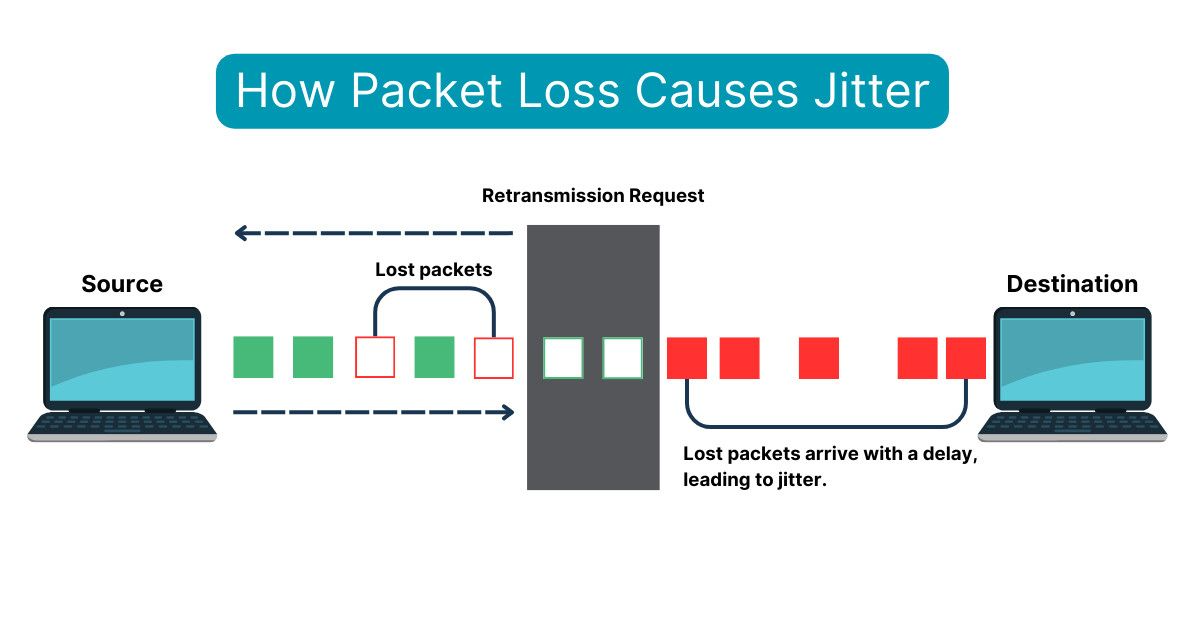
But in real networks, packets arrive unevenly
📌 This variation in packet arrival time is called jitter.
🧠 Simple Definition
📌 Jitter is the variation in delay between consecutive packets received over a network.
🧠 One-Line Understanding
Jitter = “Uneven packet arrival timing.”
🧠 Real-Life Analogy
🚌 Bus Arrival Example
Bus should arrive every 10 minutes
Sometimes it arrives in 2 minutes
Sometimes after 25 minutes
👉 This irregular arrival = jitter
🧭 Where Does Jitter Occur?
Jitter occurs mainly in:
Congested networks
Wireless networks
Long-distance connections
📌 Especially noticeable in packet-switched networks.
🎯 Why Jitter Is a Problem
Jitter causes:
📞 Choppy voice
🎥 Jerky video
🎮 Lag in gaming
😕 Poor user experience
📌 Real-time applications are very sensitive to jitter.
🧩 Main Causes of Jitter
🚦 1. Network Congestion
Packets take different paths
Queuing delays vary
📌 Congestion is the most common cause.
🔁 2. Route Changes
Packets follow different routes
Each route has different delay
📌 Causes inconsistent arrival times.
📡 3. Wireless Interference
Signal strength fluctuates
Retransmissions occur
📌 Wireless = higher jitter 📶
⚙️ 4. Improper QoS Configuration
No priority for voice/video
All traffic treated equally
📌 Leads to delay variation.
🖥️ 5. Hardware Limitations
Slow routers
CPU overload
📌 Processing time varies packet-to-packet.
🧠 How Jitter is Measured
📌 Jitter is measured in:
Milliseconds (ms)
🧮 Basic Jitter Calculation (Conceptual)
Jitter = |Delay of Packet2 − Delay of Packet1|📌 Calculated over multiple packets as average variation.
📊 Acceptable Jitter Values
Application | Acceptable Jitter |
|---|---|
VoIP calls | < 30 ms |
Video conferencing | < 30–50 ms |
Online gaming | < 20 ms |
Web browsing | Not critical |
📌 Lower jitter = smoother experience ✔️
⚖️ Jitter vs Delay vs Packet Loss
Metric | Meaning |
|---|---|
Delay | Time taken by packet |
Jitter | Variation in delay |
Packet Loss | Packets dropped |
📌 All three together define network quality.
🧠 Effects of Jitter on Different Protocols
🔁 TCP and Jitter
TCP retransmits packets
Jitter mainly increases delay
📌 TCP can handle jitter better.
⚡ UDP and Jitter
No retransmission
Jitter directly affects quality
📌 UDP apps suffer more.
🛠️ How to Reduce Jitter
✅ 1. Use QoS (Priority Scheduling)
Give voice/video higher priority
Reduce waiting time
✅ 2. Traffic Shaping
Smooth packet flow
Reduce bursts
✅ 3. Increase Bandwidth
Reduces queuing delays
✅ 4. Use Jitter Buffers
📌 Jitter buffer:
Stores packets temporarily
Sends them at regular intervals
👉 Very common in VoIP systems.
✅ 5. Improve Network Hardware
Faster routers
Better wireless access points
🧠 Jitter Buffer
📌 A jitter buffer:
Collects packets
Reorders them
Delivers smoothly
📌 Trade-off:
Reduces jitter
Adds small delay
🧠 Jitter in Real-Life Applications
WhatsApp call breaks 📞
Zoom audio stutters 🎥
Online game lags 🎮
👉 These are classic jitter symptoms.
🧠 Memory Tricks
Jitter = Uneven timing 🔄
Voice hates jitter 📞
Jitter buffer smooths packets 🧺
⭐ One-Line Summary
🔹 Jitter is the variation in packet arrival time that mainly affects real-time applications like voice and video, causing choppy communication.