🤔 What is Supernetting? (Basic Idea)
Supernetting means combining multiple small networks into one large network.
📌 In simple words:
Subnetting divides networks, Supernetting joins networks.
🧠 Real-Life Analogy
🧩 Puzzle Example
Many small puzzle pieces 🧩 → one big picture
Many small networks → one large network
👉 That process is Supernetting.
🧠 Simple Definition
📌 Supernetting is the process of combining multiple contiguous IP networks into a single larger network by borrowing bits from the network portion.
🔄 Subnetting vs Supernetting (Quick Recall)
Subnetting | Supernetting |
|---|---|
One network → many | Many networks → one |
Borrow host bits | Borrow network bits |
Smaller networks | Larger network |
Used in LANs | Used by ISPs |
🎯 Why Do We Need Supernetting?
Supernetting is mainly used to:
📉 Reduce routing table size
🚀 Improve routing efficiency
🌍 Support CIDR
📡 Simplify Internet routing
🧠 Aggregate multiple networks
📌 Especially important for Internet Service Providers (ISPs).
🧭 Where is Supernetting Used?
At the Network Layer
In CIDR (Classless Inter-Domain Routing)
In route aggregation
🔑 Golden Rule of Supernetting
👉 Supernetting borrows bits from the NETWORK portion to create fewer, larger networks.
🧩 Basic Requirements for Supernetting
To combine networks using supernetting:
✔️ Networks must be contiguous (continuous)
✔️ Networks must have same subnet mask
✔️ Number of networks must be a power of 2
🧠 Simple Example (Without Math)
Given networks:
192.168.0.0/24192.168.1.0/24
👉 These can be combined into:
192.168.0.0/23📌 Two Class C networks → one larger network.
🪜 Supernetting Step-by-Step
✅ Step 1: Write All Network Addresses
Example:
192.168.0.0/24
192.168.1.0/24
✅ Step 2: Convert Network Portion to Binary
192.168.0.0
192.168.1.0
Binary (last octet):
00000000
00000001
📌 Only 1 bit differs.
✅ Step 3: Reduce Network Bits
Original: /24
Remove 1 network bit → New prefix = /23
✅ Step 4: New Supernet Address
192.168.0.0/23Subnet Mask:
255.255.254.0📦 Address Range of the Supernet
For 192.168.0.0/23:
Network Address:
192.168.0.0First Host:
192.168.0.1Last Host:
192.168.1.254Broadcast:
192.168.1.255
📌 Total hosts:
2⁹ − 2 = 510🧠 Another Example (4 Networks Combined)
Networks:
200.10.0.0/24200.10.1.0/24200.10.2.0/24200.10.3.0/24
👉 Combine 4 networks:
/24 → /22Supernet:
200.10.0.0/22Subnet Mask:
255.255.252.0📊 Subnetting vs Supernetting
Feature | Subnetting | Supernetting |
|---|---|---|
Direction | Split | Combine |
Borrowed Bits | Host bits | Network bits |
Network Count | Increases | Decreases |
Host Count | Decreases | Increases |
Usage | LAN design | ISP routing |
🌐 Supernetting & Route Aggregation
Supernetting is also called Route Aggregation or Route Summarization.
📌 Instead of advertising:
192.168.0.0/24
192.168.1.0/24
👉 Router advertises:
192.168.0.0/23✔️ Smaller routing table
✔️ Faster routing decisions
🧠 Diagram View (Conceptual)
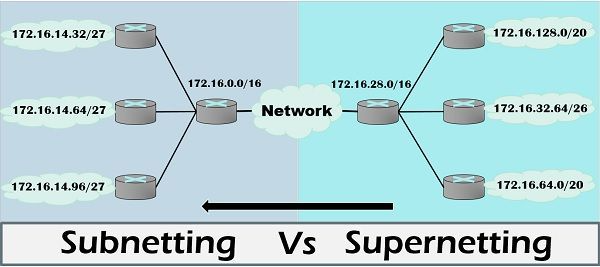
⚠️ Limitations of Supernetting
Requires careful planning
Wrong aggregation can misroute traffic
Only contiguous networks allowed
🧠 Memory Trick
SUBnetting → SUBdivide
SUPERnetting → SUPER size (bigger network)
⭐ One-Line Summary
🔹 Supernetting combines multiple smaller networks into a single larger network by borrowing network bits, mainly to simplify routing.