🌐 Accessing AWS: Console, CLI, and SDK
So far we've used the AWS Management Console — the web interface. But there are actually three ways to access AWS.
<div class="infographic-awsflow">
<style>
.infographic-awsflow {
  --ink:        #1a1a1a;
  --ink-soft:   #5c5c5c;
  --paper:      #ffffff;
  --paper-alt:  #f6f4ef;
  --accent:     #2563eb;
  --accent-soft:#e3ebfd;
  --line:       #ddd6c9;
  --ok:         #1e8e5a;
  --ok-soft:    #e2f6ec;
  --display-font: Georgia, 'Iowan Old Style', serif;
  --mono-font: 'SF Mono', Menlo, Consolas, monospace;

  font-family: -apple-system, BlinkMacSystemFont, 'Segoe UI', Roboto, sans-serif;
  color: var(--ink);
  background: var(--paper);
  max-width: 1000px;
  margin: 0 auto;
  border-radius: 14px;
  box-sizing: border-box;
}
.infographic-awsflow[data-theme="dark"] {
  --ink:        #e8e6e1;
  --ink-soft:   #9a968c;
  --paper:      #121212;
  --paper-alt:  #1e1e26;
  --accent:     #6f9bff;
  --accent-soft:#1c2740;
  --line:       #2c313d;
  --ok:         #4fbf87;
  --ok-soft:    #143024;
}
.infographic-awsflow * { box-sizing: border-box; }
.af-eyebrow { font-size: 0.75rem; letter-spacing: 0.08em; text-transform: uppercase;
  color: var(--ink-soft); margin: 0 0 0.35rem; text-align: center; }
.af-title { font-family: var(--display-font); font-size: 1.5rem; margin: 0 0 0.4rem; line-height: 1.2;
  text-align: center; }
.af-sub { color: var(--ink-soft); font-size: 0.88rem; margin: 0 auto 1.75rem; max-width: 55ch; text-align: center; }

/* --- Entry points, converging --- */
.af-entries { display: flex; justify-content: center; gap: 2.2rem; margin-bottom: 0.4rem; }
.af-entry { display: flex; flex-direction: column; align-items: center; gap: 0.3rem; cursor: pointer;
  padding: 0.4rem; border-radius: 8px; }
.af-entry .icon { font-size: 1.5rem; }
.af-entry .lbl { font-size: 0.72rem; font-weight: 700; color: var(--ink-soft); }
.af-entry.is-active .lbl { color: var(--accent); }
.af-entry.is-active .icon { transform: scale(1.15); }
.af-entry .icon { transition: transform 0.15s; }

.af-converge { text-align: center; color: var(--line); font-size: 1.1rem; margin-bottom: 1.5rem; letter-spacing: 0.3rem; }

/* --- Flow --- */
.af-flow { display: flex; gap: 0; align-items: stretch; }
@media (max-width: 780px) { .af-flow { flex-direction: column; } }

.af-step { flex: 1 1 0; background: var(--paper-alt); border: 1px solid var(--line);
  padding: 1.1rem 0.9rem; position: relative; cursor: pointer; text-align: center;
  border-radius: 10px; margin-right: 1.9rem; transition: border-color 0.15s; }
.af-flow > .af-step:last-child { margin-right: 0; }
.af-step::after { content: "→"; position: absolute; right: -1.6rem; top: 50%;
  transform: translateY(-50%); color: var(--line); font-size: 1.4rem; }
.af-flow > .af-step:last-child::after { content: none; }
.af-step.is-open { border-color: var(--accent); }
.af-step .num { font-family: var(--mono-font); color: var(--accent); font-size: 0.8rem; font-weight: 700; }
.af-step .icon { font-size: 1.6rem; margin: 0.35rem 0; }
.af-step .lbl { font-size: 0.78rem; font-weight: 700; line-height: 1.25; }
.af-step .step-detail { display: none; margin-top: 0.55rem; font-size: 0.72rem; color: var(--ink-soft);
  line-height: 1.35; }
.af-step.is-open .step-detail { display: block; }

@media (max-width: 780px) {
  .af-step { margin-right: 0; margin-bottom: 2.1rem; }
  .af-step::after { content: "↓"; right: 50%; top: auto; bottom: -1.75rem; transform: translateX(50%); }
  .af-flow > .af-step:last-child { margin-bottom: 0; }
}

.af-result { display: flex; justify-content: center; margin-top: 1.75rem; }
.af-result-badge { font-weight: 700; font-size: 0.9rem; padding: 0.5rem 1.1rem; border-radius: 999px;
  border: 1.5px solid var(--ok); color: var(--ok); background: var(--ok-soft); text-align: center; }

@media (prefers-reduced-motion: reduce) {
  .infographic-awsflow * { transition-duration: 0.001ms !important; }
}
</style>

<p class="af-eyebrow">AWS Access</p>
<h2 class="af-title">Every request follows the same path</h2>
<p class="af-sub">Console, CLI, or SDK — only the first step changes. Tap a stage to see what happens there.</p>

<div class="af-entries">
  <div class="af-entry" data-e="console"><span class="icon">🖥️</span><span class="lbl">Console</span></div>
  <div class="af-entry" data-e="cli"><span class="icon">⌨️</span><span class="lbl">CLI</span></div>
  <div class="af-entry" data-e="sdk"><span class="icon">🧩</span><span class="lbl">SDK</span></div>
</div>
<div class="af-converge">↘ ↓ ↙</div>

<div class="af-flow">
  <div class="af-step" data-s="1">
    <div class="num">1</div>
    <div class="icon">📤</div>
    <div class="lbl">Request sent</div>
    <div class="step-detail">Browser, terminal, or app code — it becomes one API call.</div>
  </div>
  <div class="af-step" data-s="2">
    <div class="num">2</div>
    <div class="icon">☁️</div>
    <div class="lbl">Reaches AWS API</div>
    <div class="step-detail">The call lands on AWS's public API over the internet.</div>
  </div>
  <div class="af-step" data-s="3">
    <div class="num">3</div>
    <div class="icon">🪪</div>
    <div class="lbl">Who are you?</div>
    <div class="step-detail">AWS authenticates you against your credentials.</div>
  </div>
  <div class="af-step" data-s="4">
    <div class="num">4</div>
    <div class="icon">📋</div>
    <div class="lbl">Are you allowed?</div>
    <div class="step-detail">AWS authorizes the action against your permissions.</div>
  </div>
  <div class="af-step" data-s="5">
    <div class="num">5</div>
    <div class="icon">✅</div>
    <div class="lbl">Done</div>
    <div class="step-detail">The service performs the action and sends back a response.</div>
  </div>
</div>

<div class="af-result">
  <span class="af-result-badge">Same pipeline. Different door in.</span>
</div>

<script>
(function () {
  const wrapper = document.currentScript.closest('.infographic-awsflow')
    || document.querySelector('.infographic-awsflow');
  const bodyAttr = document.body.getAttribute('data-darkmode');
  let dark;
  if (bodyAttr === 'true') { dark = true; }
  else if (bodyAttr === 'false') { dark = false; }
  else {
    const match = document.cookie.match(/(?:^|;\s*)darkMode=([^;]+)/);
    dark = match ? match[1] === 'true' : false;
  }
  if (dark) wrapper.setAttribute('data-theme', 'dark');

  wrapper.querySelectorAll('.af-step').forEach(step => {
    step.addEventListener('click', () => {
      const wasOpen = step.classList.contains('is-open');
      wrapper.querySelectorAll('.af-step').forEach(s => s.classList.remove('is-open'));
      if (!wasOpen) step.classList.add('is-open');
    });
  });

  wrapper.querySelectorAll('.af-entry').forEach(entry => {
    entry.addEventListener('click', () => {
      const wasActive = entry.classList.contains('is-active');
      wrapper.querySelectorAll('.af-entry').forEach(e => e.classList.remove('is-active'));
      if (!wasActive) entry.classList.add('is-active');
    });
  });
})();
</script>
</div>
.demo {
font-family: system-ui, sans-serif;
padding: 16px;
}
.demo h1 {
color: #2563eb;
margin: 0 0 8px;
}
.demo p {
color: #4b5563;
margin: 0;
}document.querySelector('.demo h1')?.addEventListener('click', () => {
alert('Hello from live preview!');
});1. AWS Management Console
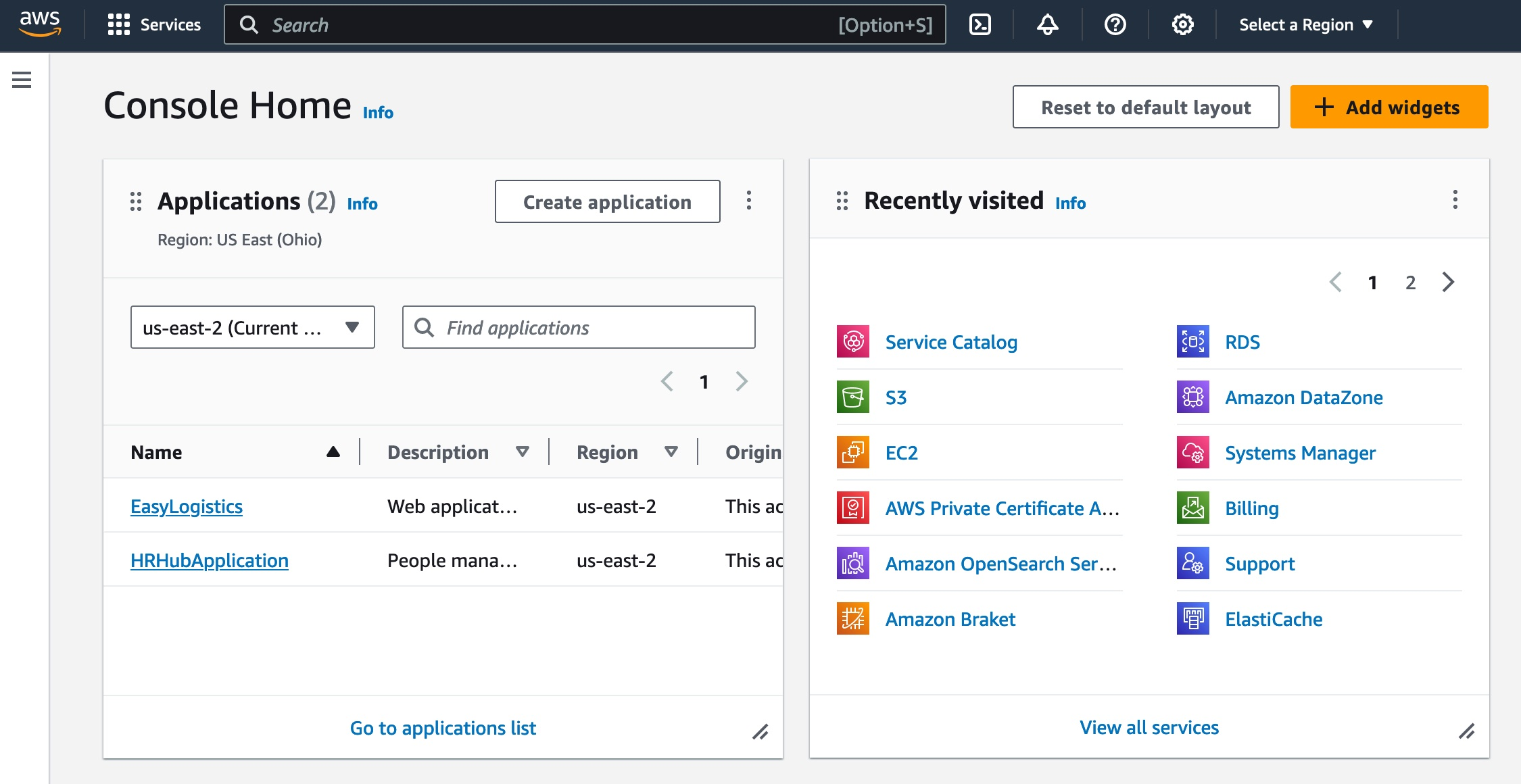
The web interface in your browser. Protected by username, password, and (ideally) MFA. Every button click is really just AWS calling its own APIs behind the scenes — the Console is a graphical wrapper around the same API calls.
2. AWS CLI (Command Line Interface)
<div class="infographic-clidemo">
<style>
.infographic-clidemo {
--ink: #1a1a1a;
--ink-soft: #5c5c5c;
--paper: #ffffff;
--paper-alt: #f6f4ef;
--accent: #2563eb;
--accent-soft:#e3ebfd;
--line: #ddd6c9;
--ok: #1e8e5a;
--ok-soft: #e2f6ec;
--term-bg: #1e1e26;
--term-ink: #d7d7dd;
--term-green: #4fbf87;
--display-font: Georgia, 'Iowan Old Style', serif;
--mono-font: 'SF Mono', Menlo, Consolas, monospace;
font-family: -apple-system, BlinkMacSystemFont, 'Segoe UI', Roboto, sans-serif;
color: var(--ink);
background: var(--paper);
padding: 2rem 1.25rem 2.5rem;
max-width: 900px;
margin: 0 auto;
border-radius: 14px;
box-sizing: border-box;
}
.infographic-clidemo[data-theme="dark"] {
--ink: #e8e6e1;
--ink-soft: #9a968c;
--paper: #121212;
--paper-alt: #1e1e26;
--accent: #6f9bff;
--accent-soft:#1c2740;
--line: #2c313d;
--ok: #4fbf87;
--ok-soft: #143024;
--term-bg: #0b0b0f;
}
.infographic-clidemo * { box-sizing: border-box; }
.cl-eyebrow { font-size: 0.75rem; letter-spacing: 0.08em; text-transform: uppercase;
color: var(--ink-soft); margin: 0 0 0.35rem; text-align: center; }
.cl-title { font-family: var(--display-font); font-size: 1.5rem; margin: 0 0 2rem; line-height: 1.2;
text-align: center; }
/* --- Terminal + flow --- */
.cl-terminal { background: var(--term-bg); border-radius: 10px; padding: 0.9rem 1rem; font-family: var(--mono-font);
font-size: 0.85rem; color: var(--term-ink); max-width: 380px; margin: 0 auto 1.1rem; }
.cl-terminal .dots { display: flex; gap: 0.35rem; margin-bottom: 0.6rem; }
.cl-terminal .dot { width: 9px; height: 9px; border-radius: 50%; background: #4a4a55; }
.cl-terminal .line { display: flex; gap: 0.4rem; }
.cl-terminal .prompt { color: var(--term-green); }
.cl-terminal .out { margin-top: 0.4rem; color: var(--ink-soft); min-height: 1.1em; opacity: 0.5; transition: opacity 0.3s; }
.cl-terminal .out.show { opacity: 1; }
.cl-run { display: flex; justify-content: center; margin-bottom: 1.6rem; }
.cl-run button { font: inherit; font-size: 0.85rem; font-weight: 700; padding: 0.5rem 1.2rem; border-radius: 999px;
border: none; background: var(--ink); color: var(--paper); cursor: pointer; }
.cl-run button:hover { opacity: 0.85; }
.cl-flow { display: flex; justify-content: center; gap: 0; margin-bottom: 2.25rem; flex-wrap: wrap; }
.cl-node { display: flex; flex-direction: column; align-items: center; gap: 0.3rem; padding: 0 0.9rem;
position: relative; opacity: 0.35; transition: opacity 0.25s; }
.cl-node.is-lit { opacity: 1; }
.cl-node .icon-box { width: 46px; height: 46px; border-radius: 10px; border: 1.5px solid var(--line);
display: flex; align-items: center; justify-content: center; font-size: 1.3rem; background: var(--paper-alt);
transition: border-color 0.25s, background 0.25s; }
.cl-node.is-lit .icon-box { border-color: var(--accent); background: var(--accent-soft); }
.cl-node .lbl { font-size: 0.68rem; font-weight: 700; color: var(--ink-soft); text-align: center; max-width: 70px; }
.cl-arrow { align-self: center; color: var(--line); font-size: 1.1rem; margin-top: -1.2rem; }
/* --- Access key anatomy --- */
.cl-keys { display: grid; grid-template-columns: 1fr 1fr; gap: 1rem; margin-bottom: 1.75rem; }
@media (max-width: 560px) { .cl-keys { grid-template-columns: 1fr; } }
.cl-key { border: 1.5px solid var(--line); border-radius: 10px; padding: 1rem; text-align: center;
background: var(--paper-alt); cursor: pointer; transition: border-color 0.15s; }
.cl-key:hover { border-color: var(--accent); }
.cl-key.is-open { border-color: var(--accent); }
.cl-key .icon { font-size: 1.6rem; }
.cl-key .name { font-weight: 700; font-size: 0.85rem; margin-top: 0.4rem; }
.cl-key .as { font-size: 0.72rem; color: var(--ink-soft); }
.cl-key .detail { display: none; margin-top: 0.5rem; font-size: 0.74rem; color: var(--ink-soft); }
.cl-key.is-open .detail { display: block; }
/* --- Trait chips --- */
.cl-chips { display: flex; justify-content: center; gap: 0.6rem; flex-wrap: wrap; }
.cl-chip { font-size: 0.76rem; font-weight: 600; padding: 0.4rem 0.85rem; border-radius: 999px;
border: 1.5px solid var(--line); background: var(--paper-alt); color: var(--ink-soft); }
@media (prefers-reduced-motion: reduce) {
.infographic-clidemo * { transition-duration: 0.001ms !important; }
}
</style>
<p class="cl-eyebrow">AWS Access</p>
<h2 class="cl-title">⌨️ AWS CLI — same AWS, no browser</h2>
<div class="cl-terminal">
<div class="dots"><span class="dot"></span><span class="dot"></span><span class="dot"></span></div>
<div class="line"><span class="prompt">$</span><span id="cl-cmd">aws s3 ls</span></div>
<div class="out" id="cl-out">my-app-bucket my-backup-bucket</div>
</div>
<div class="cl-run"><button id="cl-run-btn">▶ Run it</button></div>
<div class="cl-flow" id="cl-flow">
<div class="cl-node" data-n="1"><div class="icon-box">⌨️</div><span class="lbl">You type</span></div>
<span class="cl-arrow">→</span>
<div class="cl-node" data-n="2"><div class="icon-box">📤</div><span class="lbl">CLI sends</span></div>
<span class="cl-arrow">→</span>
<div class="cl-node" data-n="3"><div class="icon-box">🪪</div><span class="lbl">AWS auths</span></div>
<span class="cl-arrow">→</span>
<div class="cl-node" data-n="4"><div class="icon-box">⚙️</div><span class="lbl">Processed</span></div>
<span class="cl-arrow">→</span>
<div class="cl-node" data-n="5"><div class="icon-box">📋</div><span class="lbl">Result prints</span></div>
</div>
<div class="cl-keys">
<div class="cl-key" data-k="id">
<div class="icon">🆔</div>
<div class="name">Access Key ID</div>
<div class="as">like a username</div>
<div class="detail">Identifies who's calling AWS.</div>
</div>
<div class="cl-key" data-k="secret">
<div class="icon">🔑</div>
<div class="name">Secret Access Key</div>
<div class="as">like a password</div>
<div class="detail">Never shared. Never committed to code.</div>
</div>
</div>
<div class="cl-chips">
<span class="cl-chip">Replaces the Console</span>
<span class="cl-chip">Scripts & automation</span>
<span class="cl-chip">Open source</span>
</div>
<script>
(function () {
const wrapper = document.currentScript.closest('.infographic-clidemo')
|| document.querySelector('.infographic-clidemo');
const bodyAttr = document.body.getAttribute('data-darkmode');
let dark;
if (bodyAttr === 'true') { dark = true; }
else if (bodyAttr === 'false') { dark = false; }
else {
const match = document.cookie.match(/(?:^|;\s*)darkMode=([^;]+)/);
dark = match ? match[1] === 'true' : false;
}
if (dark) wrapper.setAttribute('data-theme', 'dark');
const nodes = Array.from(wrapper.querySelectorAll('.cl-node'));
const out = wrapper.querySelector('#cl-out');
const runBtn = wrapper.querySelector('#cl-run-btn');
let running = false;
function reset() {
nodes.forEach(n => n.classList.remove('is-lit'));
out.classList.remove('show');
}
runBtn.addEventListener('click', () => {
if (running) return;
running = true;
reset();
nodes.forEach((node, i) => {
setTimeout(() => {
nodes.forEach(n => n.classList.remove('is-lit'));
node.classList.add('is-lit');
if (i === nodes.length - 1) {
out.classList.add('show');
running = false;
}
}, i * 450);
});
});
wrapper.querySelectorAll('.cl-key').forEach(card => {
card.addEventListener('click', () => {
const wasOpen = card.classList.contains('is-open');
wrapper.querySelectorAll('.cl-key').forEach(c => c.classList.remove('is-open'));
if (!wasOpen) card.classList.add('is-open');
});
});
})();
</script>
</div>.demo {
font-family: system-ui, sans-serif;
padding: 16px;
}
.demo h1 {
color: #2563eb;
margin: 0 0 8px;
}
.demo p {
color: #4b5563;
margin: 0;
}document.querySelector('.demo h1')?.addEventListener('click', () => {
alert('Hello from live preview!');
});A tool you install locally and run from your terminal instead of clicking around.
aws s3 lsType a command → CLI sends it to AWS → AWS authenticates and processes it → result prints in your terminal.
Authentication: Access Keys — an Access Key ID (like a username) and a Secret Access Key (like a password).
Never share these, never treat them casually, and give each user their own.
The CLI can fully replace the Console, works great in scripts and automation, and is open-source. Some people use nothing else.
3. AWS SDK (Software Development Kit)
<div class="infographic-sdkdemo">
<style>
.infographic-sdkdemo {
  --ink:        #1a1a1a;
  --ink-soft:   #5c5c5c;
  --paper:      #ffffff;
  --paper-alt:  #f6f4ef;
  --accent:     #2563eb;
  --accent-soft:#e3ebfd;
  --line:       #ddd6c9;
  --display-font: Georgia, 'Iowan Old Style', serif;
  --mono-font: 'SF Mono', Menlo, Consolas, monospace;

  font-family: -apple-system, BlinkMacSystemFont, 'Segoe UI', Roboto, sans-serif;
  color: var(--ink);
  background: var(--paper);
  padding: 2rem 1.25rem 2.5rem;
  max-width: 900px;
  margin: 0 auto;
  border-radius: 14px;
  box-sizing: border-box;
}
.infographic-sdkdemo[data-theme="dark"] {
  --ink:        #e8e6e1;
  --ink-soft:   #9a968c;
  --paper:      #121212;
  --paper-alt:  #1e1e26;
  --accent:     #6f9bff;
  --accent-soft:#1c2740;
  --line:       #2c313d;
}
.infographic-sdkdemo * { box-sizing: border-box; }
.sd-eyebrow { font-size: 0.75rem; letter-spacing: 0.08em; text-transform: uppercase;
  color: var(--ink-soft); margin: 0 0 0.35rem; text-align: center; }
.sd-title { font-family: var(--display-font); font-size: 1.5rem; margin: 0 0 2rem; line-height: 1.2;
  text-align: center; }

/* --- Use case cards --- */
.sd-cases { display: grid; grid-template-columns: repeat(3, 1fr); gap: 0.9rem; margin-bottom: 2.25rem; }
@media (max-width: 620px) { .sd-cases { grid-template-columns: 1fr; } }
.sd-case { border: 1.5px solid var(--line); border-radius: 12px; padding: 1rem 0.8rem; text-align: center;
  background: var(--paper-alt); cursor: pointer; transition: border-color 0.15s; }
.sd-case:hover { border-color: var(--accent); }
.sd-case.is-open { border-color: var(--accent); background: var(--accent-soft); }
.sd-case .pair { display: flex; align-items: center; justify-content: center; gap: 0.5rem; font-size: 1.5rem; }
.sd-case .pair .arrow { font-size: 1rem; color: var(--ink-soft); }
.sd-case .lbl { font-size: 0.78rem; font-weight: 700; margin-top: 0.5rem; }
.sd-case .detail { display: none; margin-top: 0.4rem; font-size: 0.72rem; color: var(--ink-soft); }
.sd-case.is-open .detail { display: block; }

/* --- Language chips --- */
.sd-langs { display: flex; justify-content: center; gap: 0.5rem; flex-wrap: wrap; margin-bottom: 2.25rem; }
.sd-chip { font-size: 0.74rem; font-weight: 600; padding: 0.35rem 0.75rem; border-radius: 999px;
  border: 1.5px solid var(--line); background: var(--paper-alt); color: var(--ink-soft); }
.sd-chip.extra { border-style: dashed; }

/* --- SDK / CLI relationship --- */
.sd-stack { display: flex; flex-direction: column; align-items: center; gap: 0; cursor: pointer; }
.sd-cli-box { border: 1.5px solid var(--accent); border-radius: 10px; padding: 0.6rem 1.4rem;
  background: var(--accent-soft); font-weight: 700; font-size: 0.85rem; color: var(--accent); z-index: 2; }
.sd-connector { width: 1.5px; height: 1.4rem; background: var(--line); }
.sd-sdk-box { border: 1.5px solid var(--line); border-radius: 12px; padding: 1rem 2.4rem;
  background: var(--paper-alt); font-weight: 700; font-size: 0.9rem; text-align: center; }
.sd-sdk-box .sub { display: block; font-weight: 400; font-size: 0.72rem; color: var(--ink-soft); margin-top: 0.2rem; }
.sd-stack-detail { display: none; margin-top: 0.8rem; font-size: 0.78rem; color: var(--ink-soft);
  text-align: center; max-width: 40ch; margin-left: auto; margin-right: auto; }
.sd-stack.is-open .sd-stack-detail { display: block; }

@media (prefers-reduced-motion: reduce) {
  .infographic-sdkdemo * { transition-duration: 0.001ms !important; }
}
</style>

<p class="sd-eyebrow">AWS Access</p>
<h2 class="sd-title">🧩 SDK — AWS from inside your code</h2>

<div class="sd-cases">
  <div class="sd-case" data-c="web">
    <div class="pair">🌐<span class="arrow">→</span>🪣</div>
    <div class="lbl">Web app → S3</div>
    <div class="detail">Uploads files straight from your app.</div>
  </div>
  <div class="sd-case" data-c="server">
    <div class="pair">🖥️<span class="arrow">→</span>🖴</div>
    <div class="lbl">Server → EC2</div>
    <div class="detail">Launches instances from your backend code.</div>
  </div>
  <div class="sd-case" data-c="mobile">
    <div class="pair">📱<span class="arrow">→</span>🗄️</div>
    <div class="lbl">Mobile app → DynamoDB</div>
    <div class="detail">Writes data directly from the app.</div>
  </div>
</div>

<div class="sd-langs">
  <span class="sd-chip">Python (Boto3)</span>
  <span class="sd-chip">JavaScript</span>
  <span class="sd-chip">Java</span>
  <span class="sd-chip">Go</span>
  <span class="sd-chip">Ruby</span>
  <span class="sd-chip">PHP</span>
  <span class="sd-chip">.NET</span>
  <span class="sd-chip">Node.js</span>
  <span class="sd-chip extra">+ Mobile</span>
  <span class="sd-chip extra">+ IoT</span>
</div>

<div class="sd-stack" id="sd-stack">
  <div class="sd-cli-box">⌨️ CLI</div>
  <div class="sd-connector"></div>
  <div class="sd-sdk-box">🧩 SDK<span class="sub">the underlying library</span></div>
  <div class="sd-stack-detail">The CLI itself is built on the Python SDK — SDK is the library, CLI is a tool made from it.</div>
</div>

<script>
(function () {
  const wrapper = document.currentScript.closest('.infographic-sdkdemo')
    || document.querySelector('.infographic-sdkdemo');
  const bodyAttr = document.body.getAttribute('data-darkmode');
  let dark;
  if (bodyAttr === 'true') { dark = true; }
  else if (bodyAttr === 'false') { dark = false; }
  else {
    const match = document.cookie.match(/(?:^|;\s*)darkMode=([^;]+)/);
    dark = match ? match[1] === 'true' : false;
  }
  if (dark) wrapper.setAttribute('data-theme', 'dark');

  wrapper.querySelectorAll('.sd-case').forEach(card => {
    card.addEventListener('click', () => {
      const wasOpen = card.classList.contains('is-open');
      wrapper.querySelectorAll('.sd-case').forEach(c => c.classList.remove('is-open'));
      if (!wasOpen) card.classList.add('is-open');
    });
  });

  const stack = wrapper.querySelector('#sd-stack');
  stack.addEventListener('click', () => stack.classList.toggle('is-open'));
})();
</script>
</div>
.demo {
font-family: system-ui, sans-serif;
padding: 16px;
}
.demo h1 {
color: #2563eb;
margin: 0 0 8px;
}
.demo p {
color: #4b5563;
margin: 0;
}document.querySelector('.demo h1')?.addEventListener('click', () => {
alert('Hello from live preview!');
});Built for use inside your application code, not a terminal. Your app calls AWS APIs directly — a web app uploading to S3, a server launching EC2 instances, a mobile app writing to DynamoDB.
It's language-specific (Python/Boto3, JavaScript, Java, Go, Ruby, PHP, .NET, Node.js, plus mobile and IoT variants), embedded in your code, and authenticates with the same Access Keys as the CLI. In fact, the CLI itself is built on the Python SDK — so SDK = the underlying library, CLI = a tool built from it.
A real example: uploading a profile picture
Say you're building a React + Node app and want uploaded profile pictures stored in S3 instead of on your own server. Your Node backend uses the AWS SDK to send the file straight to S3:
import { S3Client, PutObjectCommand } from "@aws-sdk/client-s3";
import fs from "fs";

const s3 = new S3Client({
  region: "ap-south-1",
  credentials: {
    accessKeyId: "YOUR_ACCESS_KEY",
    secretAccessKey: "YOUR_SECRET_KEY",
  },
});

async function uploadFile() {
  const fileStream = fs.createReadStream("profile.png");
  const command = new PutObjectCommand({
    Bucket: "my-app-bucket",
    Key: "users/user123/profile.png",
    Body: fileStream,
    ContentType: "image/png",
  });
  await s3.send(command);
}
Flow: user uploads from the frontend → backend receives it → SDK sends it to S3 → S3 stores it → you save the file's URL in your database. This is the standard pattern behind profile pictures, product images, invoices, and media uploads everywhere.
⚠️ Never put AWS credentials in frontend code. Upload through your backend, or use pre-signed URLs.
Bottom line: the SDK is the bridge between your code and AWS. Without it, you'd be crafting raw API calls by hand — with it, it's just a few lines like above.