🌉 AWS Storage Gateway — Simplified
Many organizations run a hybrid cloud — part on-premises, part AWS. Storage Gateway is the bridge connecting the two.
💡 Exam Tip: AWS Storage Gateway connects on-premises storage with AWS cloud storage — that's the one-liner to remember.
🌐 What's a Hybrid Cloud?
An environment where part of your infrastructure stays on-premises while the rest runs in AWS — rather than migrating everything at once, you keep what you have and adopt AWS gradually.
Why go hybrid?
🏢 Already have an on-prem data center
🚚 Mid-migration to AWS
🔒 Compliance requires certain workloads to stay local
📋 Business strategy calls for a mixed approach
📦 AWS Storage Options
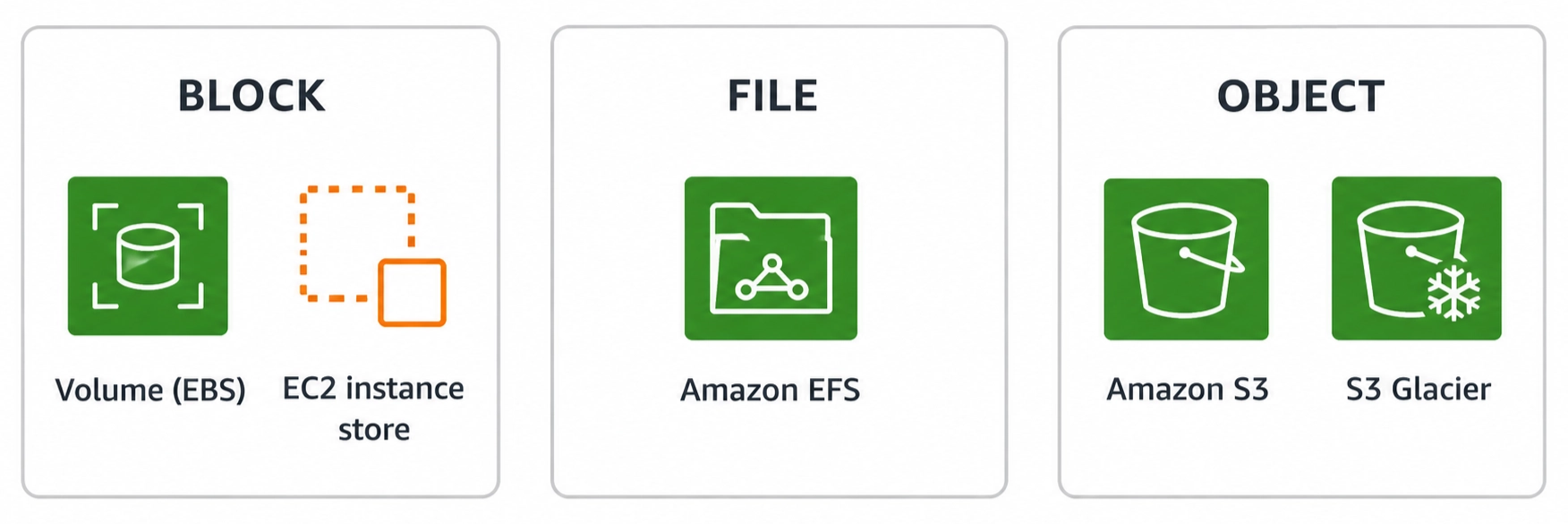
Before seeing why Storage Gateway is needed, know the three storage shapes AWS offers:
Type | Used For | Examples |
|---|---|---|
💾 Block | VM storage | EBS, EC2 Instance Store |
📁 File | Shared file systems | Amazon EFS |
🪣 Object | Images, videos, backups, docs | S3, S3 Glacier |
🪣 Why Can't On-Prem Just Access S3 Directly?
S3 is object storage built on its own AWS APIs — unlike NFS or EFS, it isn't designed to be mounted as a standard network file system by local servers. That gap is exactly what Storage Gateway closes.
🔗 What Storage Gateway Does
It sits between your on-prem environment and AWS storage services, letting local applications read/write data that's seamlessly synced to the cloud — with little to no change to your existing systems. Under the hood, it taps into:
<div class="infographic-sgw">
  <style>
    .infographic-sgw {
      --ink:    #1a1a1a;
      --badge:  #1f7a4d;
      --paper:  #ffffff;
      max-width: 780px;
      margin: 0 auto;
      box-sizing: border-box;
      font-family: 'Inter', system-ui, sans-serif;
      color: var(--ink);
      background: var(--paper);
    }
    .infographic-sgw[data-theme="dark"] {
      --ink:    #e8e6e1;
      --badge:  #2f9e63;
      --paper:  #121212;
    }
    .infographic-sgw * { box-sizing: border-box; }
    .sgw-scroller { overflow-x: auto; -webkit-overflow-scrolling: touch; padding: 0.5rem 0; }
    .sgw-canvas { width: 100%; height: auto; display: block; min-width: 540px; }

    .sgw-badge { fill: var(--badge); }
    .sgw-icon { fill: none; stroke: #ffffff; stroke-width: 3; stroke-linejoin: round; stroke-linecap: round; }
    .sgw-title { font-size: 30px; font-weight: 700; fill: var(--ink); text-anchor: middle; }
    .sgw-label { font-size: 24px; font-weight: 700; fill: var(--ink); text-anchor: middle; }
    .sgw-connector { fill: none; stroke: var(--ink); stroke-width: 3; }
  </style>

  <div class="sgw-scroller">
    <svg class="sgw-canvas" viewBox="0 0 800 520" xmlns="http://www.w3.org/2000/svg">
      <!-- gateway badge -->
      <rect class="sgw-badge" x="330" y="10" width="140" height="140" rx="6"/>
      <g class="sgw-icon" transform="translate(375,45)">
        <path d="M0,55 V25 a25,25 0 0 1 50,0 V55"/>
        <path d="M14,55 V27 a11,11 0 0 1 22,0 V55"/>
      </g>
      <text class="sgw-title" x="400" y="185">AWS Storage Gateway</text>

      <!-- connector arc: EBS top to Glacier top -->
      <path class="sgw-connector" d="M 150 330 Q 400 270 650 330"/>

      <!-- EBS -->
      <rect class="sgw-badge" x="95" y="330" width="110" height="110" rx="6"/>
      <g class="sgw-icon" transform="translate(135,355)">
        <ellipse cx="15" cy="10" rx="12" ry="4.5"/>
        <path d="M3,10 V38 a12,4.5 0 0 0 24,0 V10"/>
      </g>
      <g class="sgw-icon" stroke-width="2.4">
        <path d="M110,348 L118,340 M110,340 H118 M118,340 V348" transform="translate(0,0)"/>
        <path d="M186,348 L178,340 M186,340 H178 M178,340 V348"/>
        <path d="M110,415 L118,423 M110,423 H118 M118,423 V415"/>
        <path d="M186,415 L178,423 M186,423 H178 M178,423 V415"/>
      </g>
      <text class="sgw-label" x="150" y="475">Amazon EBS</text>

      <!-- S3 -->
      <rect class="sgw-badge" x="345" y="330" width="110" height="110" rx="6"/>
      <g class="sgw-icon" transform="translate(370,352)">
        <ellipse cx="30" cy="6" rx="22" ry="6"/>
        <path d="M8,6 L15,52 Q30,60 45,52 L52,6"/>
        <path d="M45,26 Q60,26 60,35 Q60,42 47,40"/>
      </g>
      <text class="sgw-label" x="400" y="475">S3</text>

      <!-- Glacier -->
      <rect class="sgw-badge" x="595" y="330" width="110" height="110" rx="6"/>
      <g class="sgw-icon" transform="translate(620,352)">
        <ellipse cx="30" cy="6" rx="22" ry="6"/>
        <path d="M8,6 L15,52 Q30,60 45,52 L52,6"/>
        <path d="M45,26 Q60,26 60,35 Q60,42 47,40"/>
      </g>
      <g class="sgw-icon" transform="translate(659,378)" stroke-width="2.2">
        <line x1="0" y1="-7" x2="0" y2="7"/>
        <line x1="-6" y1="-3.5" x2="6" y2="3.5"/>
        <line x1="6" y1="-3.5" x2="-6" y2="3.5"/>
      </g>
      <text class="sgw-label" x="650" y="475">Glacier</text>
    </svg>
  </div>

  <script>
    (function () {
      const wrapper = document.currentScript.closest('.infographic-sgw')
        || document.querySelector('.infographic-sgw');
      const bodyAttr = document.body.getAttribute('data-darkmode');
      let dark;
      if (bodyAttr === 'true') { dark = true; }
      else if (bodyAttr === 'false') { dark = false; }
      else {
        const match = document.cookie.match(/(?:^|;\s*)darkMode=([^;]+)/);
        dark = match ? match[1] === 'true' : false;
      }
      if (dark) wrapper.setAttribute('data-theme', 'dark');
    })();
  </script>
</div>
🪣 Amazon S3
💾 Amazon EBS
🧊 S3 Glacier
🎯 Common use cases
💾 Backup & Restore
🚨 Disaster Recovery
📦 Tiered Storage
🌐 Hybrid Cloud Storage
📂 Types of Storage Gateway
<div class="infographic-sgwtypes">
  <style>
    .infographic-sgwtypes {
      --ink:    #1a1a1a;
      --badge:  #1f7a4d;
      --paper:  #ffffff;
      max-width: 780px;
      margin: 0 auto;
      box-sizing: border-box;
      font-family: 'Inter', system-ui, sans-serif;
      color: var(--ink);
      background: var(--paper);
    }
    .infographic-sgwtypes[data-theme="dark"] {
      --ink:    #e8e6e1;
      --badge:  #2f9e63;
      --paper:  #121212;
    }
    .infographic-sgwtypes * { box-sizing: border-box; }
    .sgwt-scroller { overflow-x: auto; -webkit-overflow-scrolling: touch; padding: 0.5rem 0; }
    .sgwt-canvas { width: 100%; height: auto; display: block; min-width: 540px; }

    .sgwt-icon { fill: none; stroke: var(--ink); stroke-width: 3; stroke-linejoin: round; stroke-linecap: round; }
    .sgwt-badge { fill: var(--badge); }
    .sgwt-badge-icon { fill: none; stroke: #ffffff; stroke-width: 3; stroke-linejoin: round; }
    .sgwt-label { font-size: 24px; font-weight: 700; fill: var(--ink); text-anchor: middle; }
    .sgwt-title { font-size: 30px; font-weight: 700; fill: var(--ink); text-anchor: middle; }
    .sgwt-connector { fill: none; stroke: var(--ink); stroke-width: 3; }
  </style>

  <div class="sgwt-scroller">
    <svg class="sgwt-canvas" viewBox="0 0 800 600" xmlns="http://www.w3.org/2000/svg">
      <!-- Files -->
      <g class="sgwt-icon" transform="translate(105,30)">
        <path d="M6,20 H60 V70 H0 V26 a4,4 0 0 1 4,-4 H30 L36,20 H56 a4,4 0 0 1 4,4"/>
        <path d="M10,14 H50 V20"/>
        <path d="M14,8 H44 V14"/>
      </g>
      <text class="sgwt-label" x="150" y="128">Files</text>

      <!-- Volumes -->
      <g class="sgwt-icon" transform="translate(365,25)">
        <ellipse cx="35" cy="12" rx="35" ry="12"/>
        <path d="M0,12 V70 a35,12 0 0 0 70,0 V12"/>
      </g>
      <text class="sgwt-label" x="400" y="128">Volumes</text>

      <!-- Tapes -->
      <g class="sgwt-icon" transform="translate(590,35)">
        <circle cx="30" cy="30" r="30"/>
        <circle cx="30" cy="30" r="5" fill="var(--ink)" stroke="none"/>
        <line x1="30" y1="8" x2="30" y2="16"/>
        <line x1="30" y1="44" x2="30" y2="52"/>
        <circle cx="90" cy="30" r="30"/>
        <circle cx="90" cy="30" r="5" fill="var(--ink)" stroke="none"/>
        <line x1="90" y1="8" x2="90" y2="16"/>
        <line x1="90" y1="44" x2="90" y2="52"/>
        <line x1="58" y1="30" x2="62" y2="30"/>
      </g>
      <text class="sgwt-label" x="650" y="128">Tapes</text>

      <!-- connector arc dipping toward gateway -->
      <path class="sgwt-connector" d="M 150 170 Q 400 280 650 170"/>

      <!-- gateway badge -->
      <rect class="sgwt-badge" x="330" y="290" width="140" height="140" rx="6"/>
      <g class="sgwt-badge-icon" transform="translate(375,325)">
        <path d="M0,55 V25 a25,25 0 0 1 50,0 V55"/>
        <path d="M14,55 V27 a11,11 0 0 1 22,0 V55"/>
      </g>
      <text class="sgwt-title" x="400" y="465">AWS Storage Gateway</text>
    </svg>
  </div>

  <script>
    (function () {
      const wrapper = document.currentScript.closest('.infographic-sgwtypes')
        || document.querySelector('.infographic-sgwtypes');
      const bodyAttr = document.body.getAttribute('data-darkmode');
      let dark;
      if (bodyAttr === 'true') { dark = true; }
      else if (bodyAttr === 'false') { dark = false; }
      else {
        const match = document.cookie.match(/(?:^|;\s*)darkMode=([^;]+)/);
        dark = match ? match[1] === 'true' : false;
      }
      if (dark) wrapper.setAttribute('data-theme', 'dark');
    })();
  </script>
</div>
📁 File Gateway
💽 Volume Gateway
📼 Tape Gateway
💡 Cloud Practitioner Note: No need to distinguish between these for the exam — just know Storage Gateway links on-prem storage to AWS cloud storage.
✅ Takeaway
Storage Gateway lets you keep your existing on-prem setup while tapping into AWS storage (S3, EBS, Glacier) behind the scenes — the bridge that makes hybrid cloud work without ripping out what you already have.