👶 Before we begin with Coding, let’s do the setup:
Create a new file named
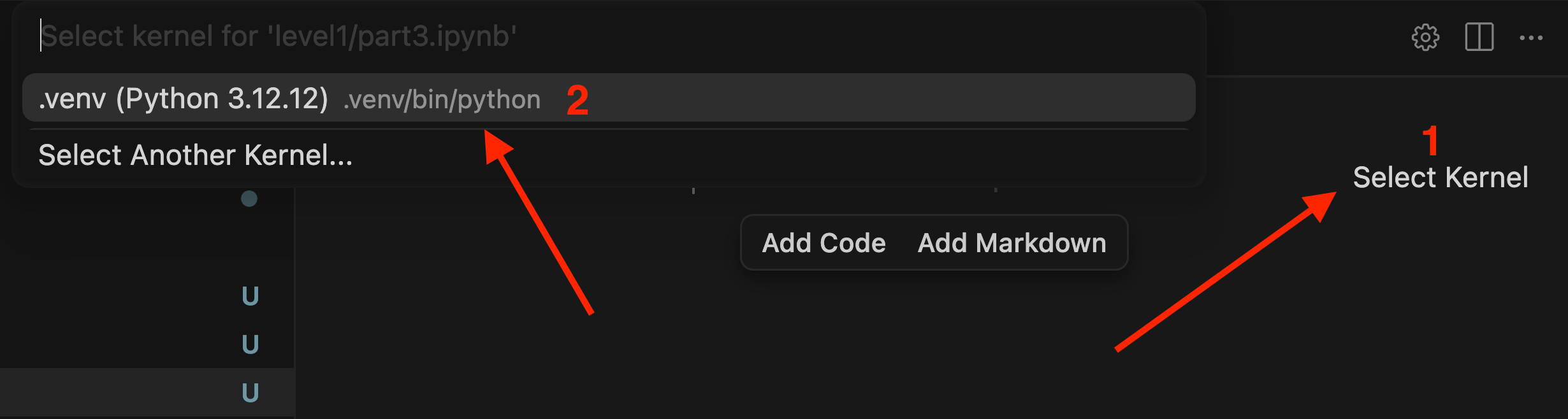
part1.ipynbinside thelevel2folder.Open the file and make sure a Python kernel is selected. If no kernel is selected, choose the appropriate one before proceeding.
💡Hope you've already added your API keys to the
.envfile! If not, you can follow along this tutorial . And if you're all set — you're in for a great learning experience! 🎉
▶️ Create a new code cell and run it:
# imports
import os
import requests
from dotenv import load_dotenv
from openai import OpenAI
from IPython.display import Markdown, display
▶️ Create a new code cell and run it:
# checking .env file for api keys
load_dotenv(override=True)
# override=True ensures your .env file values always overwrite any existing environment variables already loaded in the session.
openai_api_key = os.getenv('OPENAI_API_KEY')
anthropic_api_key = os.getenv('ANTHROPIC_API_KEY')
google_api_key = os.getenv('GOOGLE_API_KEY')
deepseek_api_key = os.getenv('DEEPSEEK_API_KEY')
groq_api_key = os.getenv('GROQ_API_KEY')
grok_api_key = os.getenv('GROK_API_KEY')
openrouter_api_key = os.getenv('OPENROUTER_API_KEY')
if openai_api_key:
print(f"OpenAI API Key exists and begins {openai_api_key[:8]}")
else:
print("OpenAI API Key not set")
if anthropic_api_key:
print(f"Anthropic API Key exists and begins {anthropic_api_key[:7]}")
else:
print("Anthropic API Key not set (and this is optional)")
if google_api_key:
print(f"Google API Key exists and begins {google_api_key[:2]}")
else:
print("Google API Key not set (and this is optional)")
if deepseek_api_key:
print(f"DeepSeek API Key exists and begins {deepseek_api_key[:3]}")
else:
print("DeepSeek API Key not set (and this is optional)")
if groq_api_key:
print(f"Groq API Key exists and begins {groq_api_key[:4]}")
else:
print("Groq API Key not set (and this is optional)")
if grok_api_key:
print(f"Grok API Key exists and begins {grok_api_key[:4]}")
else:
print("Grok API Key not set (and this is optional)")
if openrouter_api_key:
print(f"OpenRouter API Key exists and begins {openrouter_api_key[:3]}")
else:
print("OpenRouter API Key not set (and this is optional)")
▶️ Create a new code cell and run it:
# Connect to OpenAI client library
# A thin wrapper around calls to HTTP endpoints

openai = OpenAI()

# For Gemini, DeepSeek and Groq, we can use the OpenAI python client
# Because Google and DeepSeek have endpoints compatible with OpenAI
# And OpenAI allows you to change the base_url

anthropic_url = "<https://api.anthropic.com/v1/>"
gemini_url = "<https://generativelanguage.googleapis.com/v1beta/openai/>"
deepseek_url = "<https://api.deepseek.com>"
groq_url = "<https://api.groq.com/openai/v1>"
grok_url = "<https://api.x.ai/v1>"
openrouter_url = "<https://openrouter.ai/api/v1>"
ollama_url = "<http://localhost:11434/v1>"

anthropic = OpenAI(api_key=anthropic_api_key, base_url=anthropic_url)
gemini = OpenAI(api_key=google_api_key, base_url=gemini_url)
deepseek = OpenAI(api_key=deepseek_api_key, base_url=deepseek_url)
groq = OpenAI(api_key=groq_api_key, base_url=groq_url)
grok = OpenAI(api_key=grok_api_key, base_url=grok_url)
openrouter = OpenAI(base_url=openrouter_url, api_key=openrouter_api_key)
ollama = OpenAI(api_key="ollama", base_url=ollama_url)
🤖 What Is a Client Object?
When we write:
from openai import OpenAI
openai = OpenAI()
We're creating a lightweight Python interface that handles all the API communication for us:
Your Code → Client Library → API Endpoint → AI Model
No need to write raw HTTP requests — the client takes care of it.
♻️ Reusing the OpenAI Client for Other Providers
Here's a powerful trick — many providers offer OpenAI-compatible endpoints, so you can use the same OpenAI() client for all of them, just pointing it to a different URL:
client = OpenAI(
    api_key="provider_key",
    base_url="provider_endpoint"
)
This works for OpenAI, DeepSeek, Groq, Grok, OpenRouter, and even Ollama locally.
Without this: you'd need to learn a separate SDK for every provider.
With this: one client, many models. ✅
📌 Two Ways to Connect to a Provider
Approach | When to Use |
|---|---|
Dedicated SDK (e.g. Anthropic SDK, Gemini SDK) | When you need provider-specific features |
OpenAI-compatible API | When you want simplicity and portability |
The OpenAI-compatible approach is increasingly the industry standard.
🦙 Ollama — Local Models, Same Interface
ollama = OpenAI(api_key="ollama", base_url="<http://localhost:11434/v1>")Same client, but pointing to your local machine. Benefits:
💸 No API costs
🔒 Complete privacy
✈️ Works offline
▶️ Create a new code cell and run it:
# Message
tell_a_joke = [
    {"role": "user", "content": "Tell a joke for a student on the journey to becoming an expert in LLM Engineering"},
]
💡A system prompt is optional — only use it when you need specific behavior, since models are already helpful by default.2
▶️ Create a new code cell and run it:
# Calling OpenAi and Printing the Response
response = openai.chat.completions.create(model="gpt-4.1-mini", messages=tell_a_joke)
display(Markdown(response.choices[0].message.content))
✅ Example Response

▶️ Create a new code cell and run it:
# Calling Claude and Printing the Response
response = anthropic.chat.completions.create(model="claude-sonnet-4-5-20250929", messages=tell_a_joke)
display(Markdown(response.choices[0].message.content))
✅ Example Response

📊 GPT-4.1 Mini vs Claude Sonnet — Same Prompt, Different Results
Prompt: "Tell a joke for a student becoming an expert in LLM engineering."
GPT-4.1 Mini | Claude Sonnet | |
|---|---|---|
Length | Short | Long |
Style | Simple | Story-like |
Humor | Basic | Nuanced |
Detail | Minimal | Rich |
GPT kept it brief. Claude built an elaborate joke around API costs, temperature settings, and token limits — clearly more aware of its audience.
💡Results may vary when you try this yourself — what we're sharing here is simply what we got during our own test run.