In Node.js, REPL stands for Read-Eval-Print Loop. It is a simple, interactive computer programming environment that takes single user inputs, executes them, and returns the result to the user.
Think of it like the Console in your web browser's DevTools, but for the backend.
👀 The Four Stages
The name describes exactly what the environment does in a continuous loop:
Read: It reads the JavaScript code you type into the terminal.
Eval: It evaluates (executes) that code.
Print: It prints the result of the execution back to you.
Loop: It waits for your next command and starts over.
🧪 Why is REPL useful?
✅ For testing small bits of code quickly without writing a full file
✅ To explore Node.js features interactively
✅ Great for debugging
✅ Beginner-friendly sandbox to experiment with JS concepts
<!DOCTYPE html>
<html lang="en">
<head>
<meta charset="UTF-8">
<meta name="viewport" content="width=device-width, initial-scale=1.0">
<title>REPL — Read, Eval, Print, Loop</title>
</head>
<body>
<div class="infographic-repl" id="repl">
<style>
.infographic-repl {
--ink: #1a1a1a;
--ink-soft: #5c5c5c;
--paper: #ffffff;
--paper-alt: #f0ece4;
--accent: #2563eb;
--accent-soft: #e3ebfd;
--line: #ddd6c9;
--err: #dc2626;
--display-font: 'Fraunces', Georgia, serif;
--body-font: 'Inter', system-ui, sans-serif;
--mono-font: 'IBM Plex Mono', monospace;
max-width: 880px;
margin: 0 auto;
box-sizing: border-box;
padding: 0 clamp(1rem, 4vw, 1.5rem);
font-family: var(--body-font);
color: var(--ink);
background: var(--paper);
}
.infographic-repl[data-theme="dark"] {
--ink: #e8e6e1;
--ink-soft: #9a968c;
--paper: #121212;
--paper-alt: #1c212b;
--accent: #5b8def;
--accent-soft: #202942;
--line: #2c313d;
--err: #f87171;
}
.infographic-repl * { box-sizing: border-box; }
.repl-eyebrow {
font-family: var(--mono-font); font-size: 0.68rem; letter-spacing: 0.14em; text-transform: uppercase;
color: var(--accent); text-align: center; margin: 1.5rem 0 0.25rem;
}
.repl-title {
font-family: var(--display-font); font-size: clamp(1.5rem, 5vw, 2rem); text-align: center;
margin: 0 0 1.4rem; letter-spacing: -0.01em;
}
/* ===== circular diagram ===== */
.repl-circle-wrap { display: flex; justify-content: center; margin-bottom: 3rem; }
.repl-circle { position: relative; width: min(260px, 78vw); aspect-ratio: 1 / 1; }
.repl-circle > svg { position: absolute; inset: 0; width: 100%; height: 100%; overflow: visible; }
.repl-arc { fill: none; stroke: var(--line); stroke-width: 2.5; marker-end: url(#repl-arrow); transition: stroke 0.2s; }
.repl-arc.is-live { stroke: var(--accent); }
.repl-arrow-fill { fill: var(--line); transition: fill 0.2s; }
.repl-arc.is-live + marker .repl-arrow-fill { fill: var(--accent); }
.repl-center {
position: absolute; top: 50%; left: 50%; transform: translate(-50%, -50%);
font-family: var(--mono-font); font-size: 0.68rem; font-weight: 600; letter-spacing: 0.1em;
color: var(--ink-soft); text-transform: uppercase; transition: color 0.2s;
}
.repl-center.is-active { color: var(--accent); }
.repl-node {
position: absolute; width: 0; height: 0;
}
.repl-node-badge {
position: absolute; left: 0; top: 0; transform: translate(-50%, -50%);
width: 32px; height: 32px;
display: flex; align-items: center; justify-content: center;
transition: transform 0.2s;
}
.repl-node-badge svg { display: block; width: 28px; height: 28px; color: var(--ink-soft); transition: color 0.2s; }
.repl-node.is-active .repl-node-badge { transform: translate(-50%, -50%) scale(1.2); }
.repl-node.is-active .repl-node-badge svg { color: var(--accent); }
.repl-node-label {
position: absolute; left: 0; top: 26px; transform: translateX(-50%);
white-space: nowrap; font-size: 0.72rem; font-weight: 700; color: var(--ink-soft); transition: color 0.2s;
}
.repl-node.is-active .repl-node-label { color: var(--accent); }
/* ===== terminal ===== */
.repl-term {
border-radius: 8px; overflow: hidden; box-shadow: 0 14px 34px -16px rgba(0,0,0,0.4);
border: 1px solid #1e1e1e; font-family: var(--mono-font); margin-bottom: 1rem;
}
.repl-term-bar { background: #323233; display: flex; align-items: center; gap: 0.4rem; padding: 0.5rem 0.8rem; }
.repl-term-bar span { width: 9px; height: 9px; border-radius: 50%; display: block; }
.repl-term-bar span:nth-child(1) { background: #ff5f56; }
.repl-term-bar span:nth-child(2) { background: #ffbd2e; }
.repl-term-bar span:nth-child(3) { background: #27c93f; }
.repl-term-body { background: #181818; padding: 0.85rem 1rem; min-height: 170px; max-height: 260px; overflow-y: auto; font-size: 0.82rem; line-height: 1.7; }
.repl-line { white-space: pre-wrap; word-break: break-word; opacity: 0; transform: translateY(2px); animation: repl-in 0.2s ease forwards; }
@keyframes repl-in { to { opacity: 1; transform: none; } }
.repl-line.echo { color: #d4d4d4; }
.repl-line.result { color: #7ee787; }
.repl-line.error { color: #ff6b6b; }
.repl-prompt-row { display: flex; align-items: center; gap: 0.45rem; }
.repl-prompt-sym { color: #7ee787; flex-shrink: 0; }
.repl-input {
flex: 1; background: transparent; border: none; outline: none; color: #d4d4d4;
font-family: var(--mono-font); font-size: 0.82rem; padding: 0;
}
.repl-input::placeholder { color: #6b6b6b; }
.repl-hint { text-align: center; font-size: 0.78rem; color: var(--ink-soft); margin: 0 0 1.6rem; }
.repl-hint kbd { font-family: var(--mono-font); background: var(--paper-alt); border: 1px solid var(--line); border-radius: 3px; padding: 0.05rem 0.35rem; font-size: 0.72rem; }
@media (prefers-reduced-motion: reduce) {
.infographic-repl *, .infographic-repl *::before, .infographic-repl *::after {
transition-duration: 0.001ms !important; animation-duration: 0.001ms !important;
}
}
</style>
<div class="repl-eyebrow">Node.js</div>
<div class="repl-circle-wrap">
<div class="repl-circle">
<svg viewBox="0 0 240 240" aria-hidden="true">
<defs>
<marker id="repl-arrow" markerWidth="7" markerHeight="7" refX="5.5" refY="2.5" orient="auto">
<path d="M0,0 L5,2.5 L0,5 Z" class="repl-arrow-fill"></path>
</marker>
</defs>
<path class="repl-arc" data-arc="0" d="M120,20 A100,100 0 0,1 220,120"></path>
<path class="repl-arc" data-arc="1" d="M220,120 A100,100 0 0,1 120,220"></path>
<path class="repl-arc" data-arc="2" d="M120,220 A100,100 0 0,1 20,120"></path>
<path class="repl-arc" data-arc="3" d="M20,120 A100,100 0 0,1 120,20"></path>
</svg>
<div class="repl-center" id="replCenter">Ready</div>
<div class="repl-node" data-stage="read" style="left:50%; top:8.33%;">
<div class="repl-node-badge"><svg xmlns="http://www.w3.org/2000/svg" viewBox="0 0 24 24" fill="none" stroke="currentColor" stroke-width="2" stroke-linecap="round" stroke-linejoin="round"><path d="M10 8h.01"/><path d="M12 12h.01"/><path d="M14 8h.01"/><path d="M16 12h.01"/><path d="M18 8h.01"/><path d="M6 8h.01"/><path d="M7 16h10"/><path d="M8 12h.01"/><rect width="20" height="16" x="2" y="4" rx="2"/></svg></div>
<span class="repl-node-label">Read</span>
</div>
<div class="repl-node" data-stage="eval" style="left:91.67%; top:50%;">
<div class="repl-node-badge"><svg xmlns="http://www.w3.org/2000/svg" viewBox="0 0 24 24" fill="none" stroke="currentColor" stroke-width="2" stroke-linecap="round" stroke-linejoin="round"><path d="M12 20v2"/><path d="M12 2v2"/><path d="M17 20v2"/><path d="M17 2v2"/><path d="M2 12h2"/><path d="M2 17h2"/><path d="M2 7h2"/><path d="M20 12h2"/><path d="M20 17h2"/><path d="M20 7h2"/><path d="M7 20v2"/><path d="M7 2v2"/><rect x="4" y="4" width="16" height="16" rx="2"/><rect x="8" y="8" width="8" height="8" rx="1"/></svg></div>
<span class="repl-node-label">Eval</span>
</div>
<div class="repl-node" data-stage="print" style="left:50%; top:91.67%;">
<div class="repl-node-badge"><svg xmlns="http://www.w3.org/2000/svg" viewBox="0 0 24 24" fill="none" stroke="currentColor" stroke-width="2" stroke-linecap="round" stroke-linejoin="round"><rect width="20" height="14" x="2" y="3" rx="2"/><line x1="8" x2="16" y1="21" y2="21"/><line x1="12" x2="12" y1="17" y2="21"/></svg></div>
<span class="repl-node-label">Print</span>
</div>
<div class="repl-node" data-stage="loop" style="left:8.33%; top:50%;">
<div class="repl-node-badge"><svg xmlns="http://www.w3.org/2000/svg" viewBox="0 0 24 24" fill="none" stroke="currentColor" stroke-width="2" stroke-linecap="round" stroke-linejoin="round"><path d="M21 12a9 9 0 0 0-9-9 9.75 9.75 0 0 0-6.74 2.74L3 8"/><path d="M3 3v5h5"/><path d="M3 12a9 9 0 0 0 9 9 9.75 9.75 0 0 0 6.74-2.74L21 16"/><path d="M16 16h5v5"/></svg></div>
<span class="repl-node-label">Loop</span>
</div>
</div>
</div>
<div class="repl-term">
<div class="repl-term-bar"><span></span><span></span><span></span></div>
<div class="repl-term-body" id="replBody">
<div class="repl-prompt-row" id="replPromptRow">
<span class="repl-prompt-sym">></span>
<input type="text" class="repl-input" id="replInput" value="2 + 2" spellcheck="false" autocomplete="off">
</div>
</div>
</div>
<p class="repl-hint">Type an expression, press <kbd>Enter</kbd> — watch it go around.</p>
</div>
<link rel="preconnect" href="https://fonts.googleapis.com">
<link href="https://fonts.googleapis.com/css2?family=Fraunces:wght@500;600&family=Inter:wght@400;500;600;700&family=IBM+Plex+Mono:wght@400;500&display=swap" rel="stylesheet">
<script>
(function () {
var root = document.getElementById('repl');
if (!root) return;
var bodyAttr = document.body.getAttribute('data-darkmode');
var dark;
if (bodyAttr === 'true') dark = true;
else if (bodyAttr === 'false') dark = false;
else {
var match = document.cookie.match(/(?:^|;\s*)darkMode=([^;]+)/);
dark = match ? match[1] === 'true' : false;
}
if (dark) root.setAttribute('data-theme', 'dark');
var body = root.querySelector('#replBody');
var promptRow = root.querySelector('#replPromptRow');
var input = root.querySelector('#replInput');
var centerEl = root.querySelector('#replCenter');
var nodes = root.querySelectorAll('.repl-node');
var arcs = root.querySelectorAll('.repl-arc');
var busy = false;
function setStage(stage) {
nodes.forEach(function (n) { n.classList.toggle('is-active', n.getAttribute('data-stage') === stage); });
if (stage) {
centerEl.textContent = stage.charAt(0).toUpperCase() + stage.slice(1);
centerEl.classList.add('is-active');
} else {
centerEl.textContent = 'Ready';
centerEl.classList.remove('is-active');
}
}
function setArc(idx, on) {
arcs.forEach(function (a) {
if (parseInt(a.getAttribute('data-arc'), 10) === idx) a.classList.toggle('is-live', on);
});
}
function addLine(text, cls) {
var div = document.createElement('div');
div.className = 'repl-line ' + cls;
div.textContent = text;
body.insertBefore(div, promptRow);
body.scrollTop = body.scrollHeight;
}
function formatResult(v) {
if (v === undefined) return 'undefined';
if (typeof v === 'string') return JSON.stringify(v);
try {
var s = JSON.stringify(v);
return s === undefined ? String(v) : s;
} catch (e) {
return String(v);
}
}
function run(expr) {
if (busy) return;
if (!expr.trim()) return;
busy = true;
input.disabled = true;
addLine('> ' + expr, 'echo');
setStage('read');
setTimeout(function () {
setArc(0, true);
setStage('eval');
setArc(0, false);
var resultText, isError = false;
try {
/* eslint-disable no-eval */
var value = (0, eval)(expr);
resultText = formatResult(value);
} catch (err) {
resultText = 'Uncaught ' + (err && err.message ? err.message : String(err));
isError = true;
}
setTimeout(function () {
setArc(1, true);
setStage('print');
setArc(1, false);
addLine(resultText, isError ? 'error' : 'result');
setTimeout(function () {
setArc(2, true);
setStage('loop');
setArc(2, false);
setTimeout(function () {
setArc(3, true);
setStage(null);
setArc(3, false);
busy = false;
input.disabled = false;
input.value = '';
input.focus();
}, 420);
}, 420);
}, 420);
}, 420);
}
input.addEventListener('keydown', function (e) {
if (e.key === 'Enter') {
run(input.value);
}
});
})();
</script>
</body>
</html>🚀 How to Open REPL
Open Command Prompt or Terminal
Type:
nodeThis will enter you into the Node.js REPL environment.
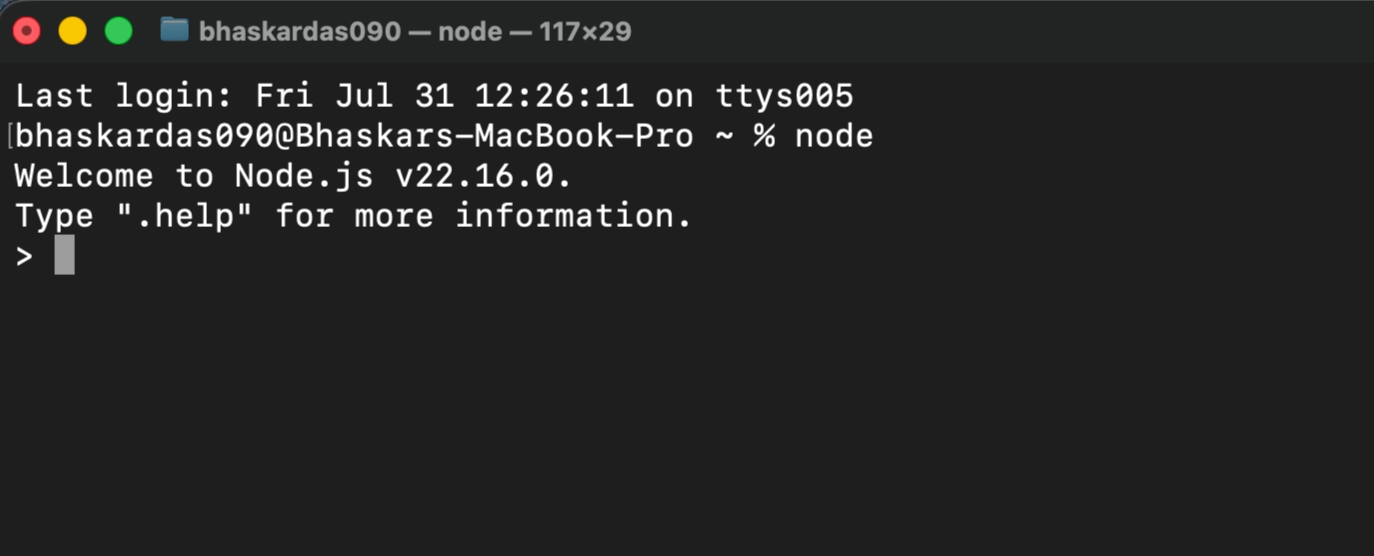
Now you can type JavaScript code directly!
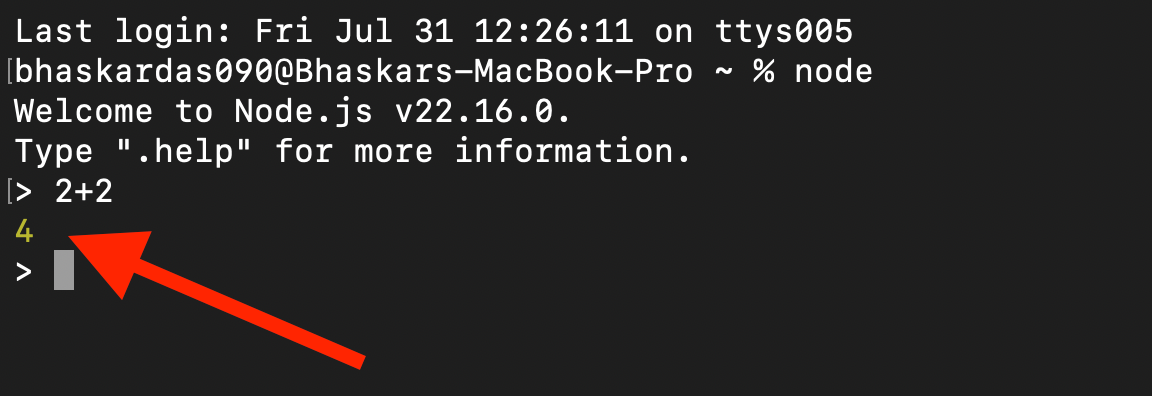
🔁 Example of REPL in Action:
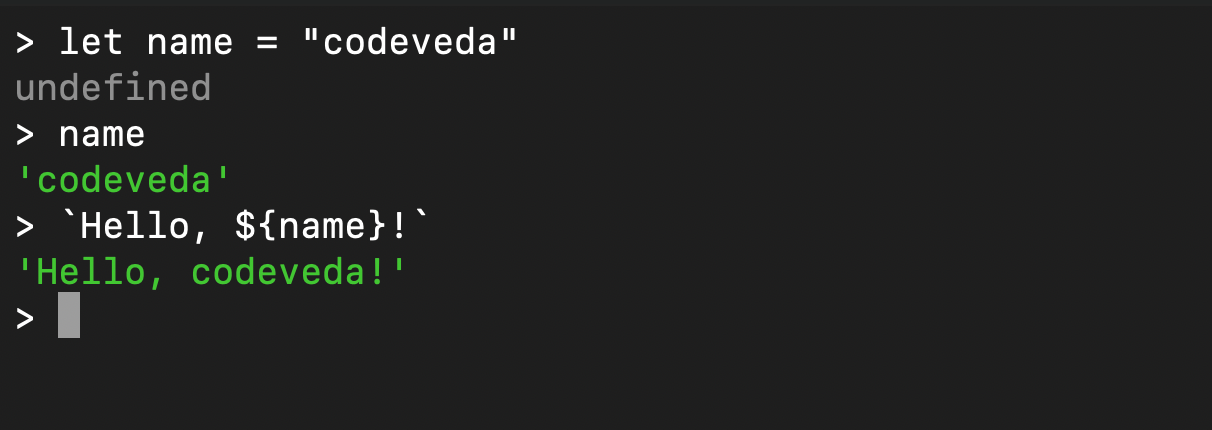
🔁 Example: Variables
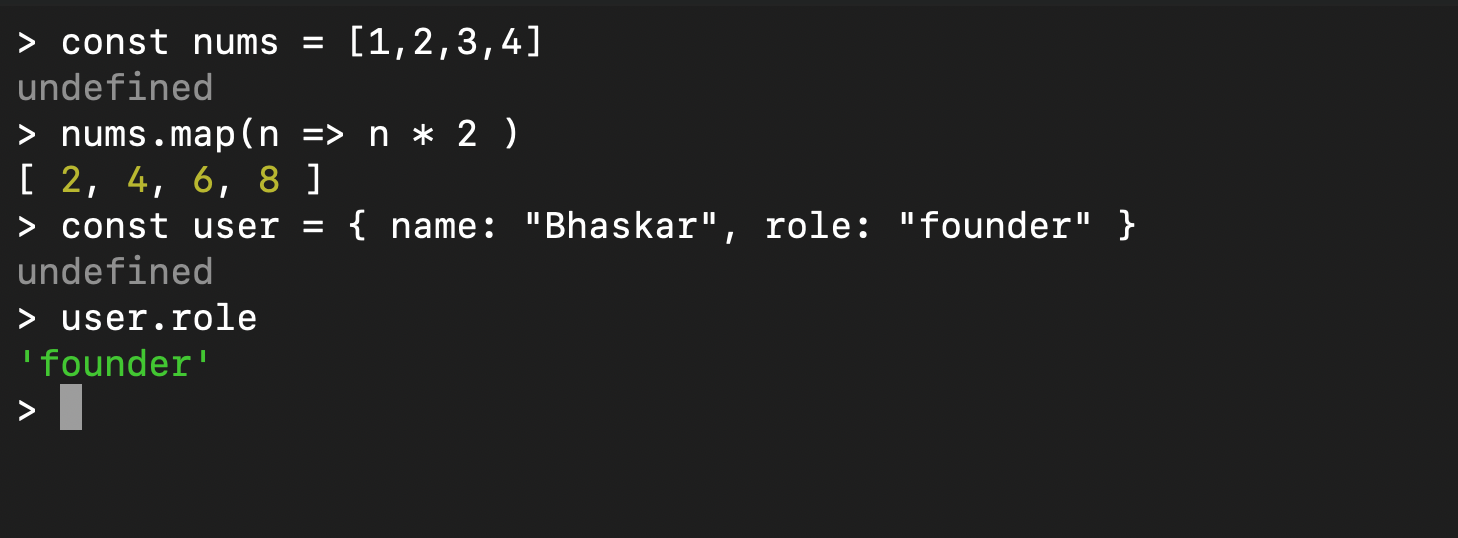
🔁 Example: Arrays & Objects
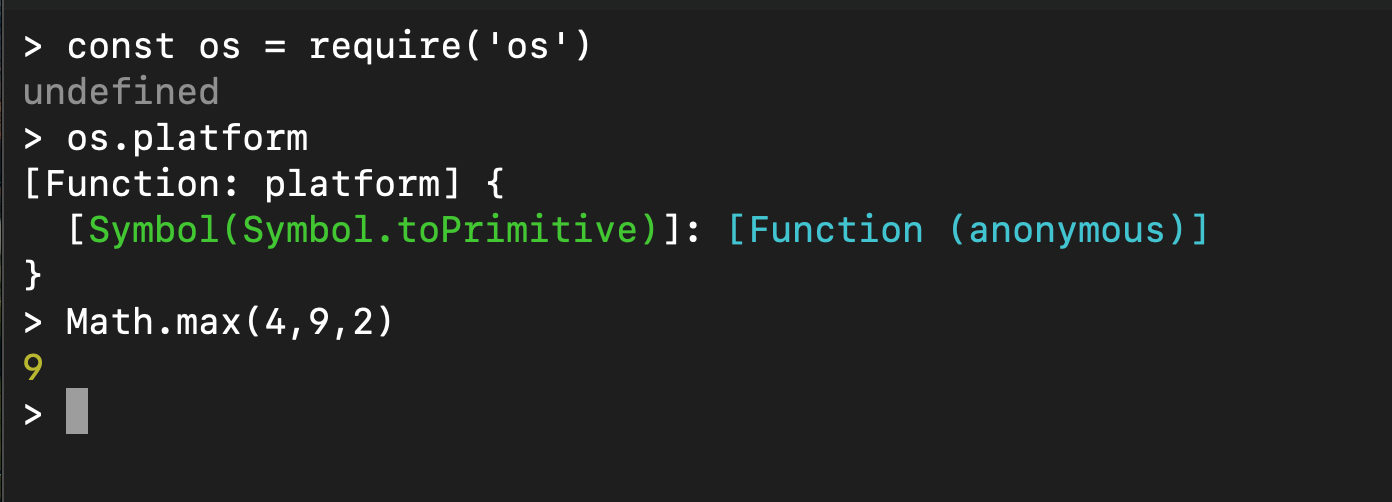
🔁 Example: Built-in Modules
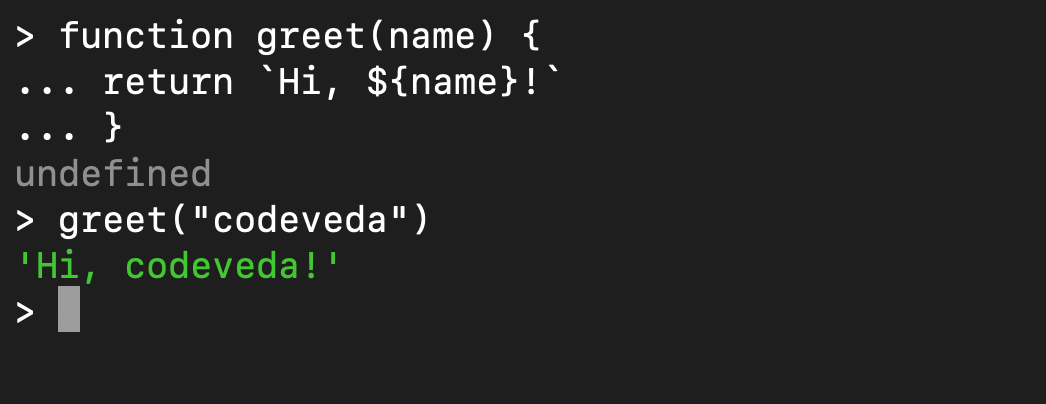
🔁 Example: Multi-line Input
REPL detects when a block isn't finished and lets you keep typing:
🛠️ Useful Shortcuts in REPL
Command | Purpose |
|---|---|
| Exit the REPL |
| Quit or cancel current input |
| Exit the REPL |
| Show REPL commands |
| Clears REPL screen |