🎯 Goal of This Note
<!DOCTYPE html>
<html lang="en">
<head>
<meta charset="UTF-8">
<meta name="viewport" content="width=device-width, initial-scale=1.0">
<title>Chaining async fs calls</title>
</head>
<body>
<div class="fs-info" id="fsinfo">
<style>
.fs-info {
--ink: #1a1a1a;
--ink-soft: #5c5c5c;
--paper: #ffffff;
--paper-alt: #f0ece4;
--accent: #2563eb;
--accent-soft: #e3ebfd;
--line: #ddd6c9;
--display-font: 'Fraunces', Georgia, serif;
--body-font: 'Inter', system-ui, sans-serif;
--mono-font: 'IBM Plex Mono', monospace;
max-width: 880px;
margin: 0 auto;
box-sizing: border-box;
padding: 2rem;
font-family: var(--body-font);
color: var(--ink);
background: var(--paper);
}
.fs-info[data-theme="dark"] {
--ink: #e8e6e1;
--ink-soft: #9a968c;
--paper: #121212;
--paper-alt: #1c212b;
--accent: #5b8def;
--accent-soft: #202942;
--line: #2c313d;
}
.fs-info * { box-sizing: border-box; }
.fs-eyebrow {
font-family: var(--mono-font); font-size: 0.68rem; letter-spacing: 0.14em; text-transform: uppercase;
color: var(--accent); text-align: center; margin: 1.5rem 0 0.3rem;
}
.fs-title {
font-family: var(--display-font); font-size: clamp(1.35rem, 5vw, 1.8rem); text-align: center;
margin: 0 0 0.5rem; letter-spacing: -0.01em;
}
.fs-sub { color: var(--ink-soft); font-size: 0.88rem; text-align: center; margin: 0 0 1.3rem; max-width: 480px; margin-left: auto; margin-right: auto; }
/* ---- code panel ---- */
.fs-code-wrap { background: #1e1e1e; border-radius: 8px; padding: 0.7rem 0; margin-bottom: 1rem; overflow-x: auto; }
.fs-code-line { display: flex; gap: 0.9rem; padding: 0.1rem 1rem; font-family: var(--mono-font); font-size: 0.73rem; line-height: 1.65; white-space: pre; transition: background 0.25s; }
.fs-code-line.is-current { background: rgba(97, 175, 239, 0.16); }
.fs-ln { color: #5a5a5a; user-select: none; width: 16px; text-align: right; flex-shrink: 0; }
.fs-code-line.is-current .fs-ln { color: #61afef; }
.fs-src { color: #d4d4d8; }
.tok-kw { color: #c678dd; }
.tok-fn { color: #61afef; }
.tok-str { color: #98c379; }
.tok-punc { color: #6b7280; }
.tok-comment { color: #6a9955; font-style: italic; }
/* ---- depth + output panels ---- */
.fs-panels { display: flex; gap: 0.8rem; margin-bottom: 1rem; flex-wrap: wrap; }
.fs-panel { flex: 1 1 220px; border: 1px solid var(--line); border-radius: 8px; background: var(--paper-alt); padding: 0.75rem 0.9rem; }
.fs-panel-label { font-size: 0.64rem; font-weight: 700; letter-spacing: 0.06em; text-transform: uppercase; color: var(--ink-soft); margin-bottom: 0.55rem; }
.fs-depth-row { display: flex; flex-direction: column; gap: 0.3rem; }
.fs-depth-item { display: flex; align-items: center; gap: 0.4rem; font-family: var(--mono-font); font-size: 0.68rem; color: var(--ink-soft); padding-left: 0; transition: color 0.2s, padding-left 0.25s; }
.fs-depth-item.is-active { color: var(--accent); font-weight: 700; }
.fs-depth-item[data-d="1"] { padding-left: 0.7rem; }
.fs-depth-item[data-d="2"] { padding-left: 1.4rem; }
.fs-depth-item[data-d="3"] { padding-left: 2.1rem; }
.fs-depth-dot { width: 6px; height: 6px; border-radius: 50%; background: var(--line); flex-shrink: 0; transition: background 0.2s; }
.fs-depth-item.is-active .fs-depth-dot { background: var(--accent); }
.fs-out-line { font-family: var(--mono-font); font-size: 0.72rem; color: var(--ink); opacity: 0; transform: translateY(-3px); animation: fs-in 0.25s ease forwards; }
@keyframes fs-in { to { opacity: 1; transform: none; } }
.fs-out-line.is-hl { color: var(--accent); font-weight: 700; }
.fs-caption { text-align: center; font-size: 0.84rem; color: var(--ink-soft); line-height: 1.5; min-height: 2.6em; margin-bottom: 1rem; }
.fs-caption b { color: var(--ink); }
.fs-controls { display: flex; justify-content: center; align-items: center; gap: 0.7rem; margin-bottom: 0.5rem; }
.fs-btn {
font-family: var(--mono-font); font-size: 0.82rem; font-weight: 600; padding: 0.55rem 1.1rem;
border-radius: 5px; border: 1px solid var(--accent); background: var(--accent); color: #fff; cursor: pointer;
}
.fs-btn.is-ghost { background: var(--paper); color: var(--ink-soft); border-color: var(--line); }
.fs-btn:disabled { opacity: 0.4; cursor: default; }
.fs-step-count { font-family: var(--mono-font); font-size: 0.74rem; color: var(--ink-soft); }
.fs-hint { text-align: center; font-size: 0.78rem; color: var(--ink-soft); margin: 0.8rem 0 2rem; }
@media (prefers-reduced-motion: reduce) {
.fs-info *, .fs-info *::before, .fs-info *::after { transition-duration: 0.001ms !important; animation-duration: 0.001ms !important; }
}
</style>
<div class="fs-code-wrap" id="fsCode">
<div class="fs-code-line" data-line="1"><span class="fs-ln">1</span><span class="fs-src"><span class="tok-kw">const</span> fs = <span class="tok-fn">require</span><span class="tok-punc">(</span><span class="tok-str">'fs'</span><span class="tok-punc">);</span></span></div>
<div class="fs-code-line" data-line="2"><span class="fs-ln">2</span><span class="fs-src"> </span></div>
<div class="fs-code-line" data-line="3"><span class="fs-ln">3</span><span class="fs-src">fs.<span class="tok-fn">readFile</span><span class="tok-punc">(</span><span class="tok-str">'./starter.txt'</span><span class="tok-punc">,</span> <span class="tok-str">'utf-8'</span><span class="tok-punc">, (err, data) =></span> <span class="tok-punc">{</span></span></div>
<div class="fs-code-line" data-line="4"><span class="fs-ln">4</span><span class="fs-src"> <span class="tok-kw">if</span> <span class="tok-punc">(</span>err<span class="tok-punc">)</span> <span class="tok-kw">return</span> console.<span class="tok-fn">log</span><span class="tok-punc">(</span><span class="tok-str">'ERROR!'</span><span class="tok-punc">);</span></span></div>
<div class="fs-code-line" data-line="5"><span class="fs-ln">5</span><span class="fs-src"> <span class="tok-kw">const</span> upper = data.<span class="tok-fn">toUpperCase</span><span class="tok-punc">();</span></span></div>
<div class="fs-code-line" data-line="6"><span class="fs-ln">6</span><span class="fs-src"> </span></div>
<div class="fs-code-line" data-line="7"><span class="fs-ln">7</span><span class="fs-src"> fs.<span class="tok-fn">writeFile</span><span class="tok-punc">(</span><span class="tok-str">'./output.txt'</span><span class="tok-punc">,</span> upper<span class="tok-punc">, (err) =></span> <span class="tok-punc">{</span></span></div>
<div class="fs-code-line" data-line="8"><span class="fs-ln">8</span><span class="fs-src"> <span class="tok-kw">if</span> <span class="tok-punc">(</span>err<span class="tok-punc">)</span> <span class="tok-kw">return</span> console.<span class="tok-fn">log</span><span class="tok-punc">(</span><span class="tok-str">'ERROR!'</span><span class="tok-punc">);</span></span></div>
<div class="fs-code-line" data-line="9"><span class="fs-ln">9</span><span class="fs-src"> </span></div>
<div class="fs-code-line" data-line="10"><span class="fs-ln">10</span><span class="fs-src"> fs.<span class="tok-fn">readFile</span><span class="tok-punc">(</span><span class="tok-str">'./output.txt'</span><span class="tok-punc">,</span> <span class="tok-str">'utf-8'</span><span class="tok-punc">, (err, data2) =></span> <span class="tok-punc">{</span></span></div>
<div class="fs-code-line" data-line="11"><span class="fs-ln">11</span><span class="fs-src"> <span class="tok-kw">if</span> <span class="tok-punc">(</span>err<span class="tok-punc">)</span> <span class="tok-kw">return</span> console.<span class="tok-fn">log</span><span class="tok-punc">(</span><span class="tok-str">'ERROR!'</span><span class="tok-punc">);</span></span></div>
<div class="fs-code-line" data-line="12"><span class="fs-ln">12</span><span class="fs-src"> console.<span class="tok-fn">log</span><span class="tok-punc">(</span>data2<span class="tok-punc">);</span></span></div>
<div class="fs-code-line" data-line="13"><span class="fs-ln">13</span><span class="fs-src"> <span class="tok-punc">});</span></span></div>
<div class="fs-code-line" data-line="14"><span class="fs-ln">14</span><span class="fs-src"> <span class="tok-punc">});</span></span></div>
<div class="fs-code-line" data-line="15"><span class="fs-ln">15</span><span class="fs-src"><span class="tok-punc">});</span></span></div>
<div class="fs-code-line" data-line="16"><span class="fs-ln">16</span><span class="fs-src"> </span></div>
<div class="fs-code-line" data-line="17"><span class="fs-ln">17</span><span class="fs-src">console.<span class="tok-fn">log</span><span class="tok-punc">(</span><span class="tok-str">'Reading file...'</span><span class="tok-punc">);</span></span></div>
</div>
<div class="fs-panels">
<div class="fs-panel">
<div class="fs-panel-label">Callback depth</div>
<div class="fs-depth-row" id="fsDepth">
<div class="fs-depth-item is-active" data-d="0"><span class="fs-depth-dot"></span>top-level</div>
<div class="fs-depth-item" data-d="1"><span class="fs-depth-dot"></span>readFile callback</div>
<div class="fs-depth-item" data-d="2"><span class="fs-depth-dot"></span>writeFile callback</div>
<div class="fs-depth-item" data-d="3"><span class="fs-depth-dot"></span>readFile callback #2</div>
</div>
</div>
<div class="fs-panel">
<div class="fs-panel-label">Console output</div>
<div id="fsOutput"></div>
</div>
</div>
<p class="fs-caption" id="fsCaption">Press Next to run the first line.</p>
<div class="fs-controls">
<button type="button" class="fs-btn is-ghost" id="fsResetBtn">↻ Restart</button>
<button type="button" class="fs-btn" id="fsNextBtn">Next step →</button>
</div>
<div class="fs-controls">
<span class="fs-step-count" id="fsStepCount">Step 0 / 11</span>
</div>
<p class="fs-hint">Each nested call only exists because it depends on the one before it finishing.</p>
</div>
<link rel="preconnect" href="https://fonts.googleapis.com">
<link href="https://fonts.googleapis.com/css2?family=Fraunces:wght@500;600&family=Inter:wght@400;500;600;700&family=IBM+Plex+Mono:wght@400;500&display=swap" rel="stylesheet">
<script>
(function () {
var root = document.getElementById('fsinfo');
if (!root) return;
var bodyAttr = document.body.getAttribute('data-darkmode');
var dark;
if (bodyAttr === 'true') dark = true;
else if (bodyAttr === 'false') dark = false;
else {
var match = document.cookie.match(/(?:^|;\s*)darkMode=([^;]+)/);
dark = match ? match[1] === 'true' : false;
}
if (dark) root.setAttribute('data-theme', 'dark');
var codeLines = root.querySelectorAll('.fs-code-line');
var depthItems = root.querySelectorAll('.fs-depth-item');
var output = root.querySelector('#fsOutput');
var caption = root.querySelector('#fsCaption');
var nextBtn = root.querySelector('#fsNextBtn');
var resetBtn = root.querySelector('#fsResetBtn');
var stepCount = root.querySelector('#fsStepCount');
function highlightLine(n) {
codeLines.forEach(function (l) {
l.classList.toggle('is-current', l.getAttribute('data-line') === String(n));
});
}
function setDepth(d) {
depthItems.forEach(function (item) {
item.classList.toggle('is-active', parseInt(item.getAttribute('data-d'), 10) <= d);
});
}
function addOutput(text, hl) {
var div = document.createElement('div');
div.className = 'fs-out-line' + (hl ? ' is-hl' : '');
div.textContent = text;
output.appendChild(div);
}
var steps = [
{ line: 3, depth: 0, caption: '<b>fs.readFile</b> starts reading starter.txt in the background \u2014 non-blocking, returns immediately.' },
{ line: 17, depth: 0, caption: 'This line runs <b>right away</b> \u2014 Node didn\u2019t wait for the file at all.', action: function () { addOutput('Reading file...', true); } },
{ line: null, depth: 0, caption: 'Meanwhile, off the main thread, the disk read finishes\u2026' },
{ line: 4, depth: 1, caption: 'The <b>readFile callback</b> fires. Its result arrives as <b>data</b>.' },
{ line: 5, depth: 1, caption: 'We transform it \u2014 this line could only run once we actually had the content.' },
{ line: 7, depth: 1, caption: '<b>fs.writeFile</b> starts \u2014 nested here because it needs <b>upper</b>, which only just existed.' },
{ line: null, depth: 1, caption: 'The write happens in the background\u2026' },
{ line: 8, depth: 2, caption: 'The <b>writeFile callback</b> fires \u2014 confirms the save worked.' },
{ line: 10, depth: 2, caption: 'A third async call \u2014 reading the file back, nested one level deeper still.' },
{ line: null, depth: 2, caption: 'That read happens in the background\u2026' },
{ line: 12, depth: 3, caption: 'The final callback fires \u2014 now it\u2019s safe to print the confirmed content.', action: function () { addOutput('HELLO FROM THE STARTER FILE!', true); } }
];
var stepIndex = 0;
var total = steps.length;
function reset() {
stepIndex = 0;
codeLines.forEach(function (l) { l.classList.remove('is-current'); });
setDepth(0);
output.innerHTML = '';
caption.innerHTML = 'Press Next to run the first line.';
stepCount.textContent = 'Step 0 / ' + total;
nextBtn.disabled = false;
nextBtn.textContent = 'Next step \u2192';
}
nextBtn.addEventListener('click', function () {
if (stepIndex >= total) return;
var s = steps[stepIndex];
highlightLine(s.line);
setDepth(s.depth);
caption.innerHTML = s.caption;
if (s.action) s.action();
stepIndex++;
stepCount.textContent = 'Step ' + stepIndex + ' / ' + total;
if (stepIndex >= total) {
nextBtn.disabled = true;
nextBtn.textContent = 'Done';
highlightLine(null);
}
});
resetBtn.addEventListener('click', reset);
reset();
})();
</script>
</body>
</html>Learn how to read and write files using the asynchronous (non-blocking) versions of fs functions, and understand how to chain multiple dependent async steps using callbacks.
👷♂️ Setup
📥 Grab the starter files for this section and open the project folder.
Download the Repo & Open
starterfolder inside :1-node-farm
https://github.com/codevedadev/complete-node-bootcamp📄 Create a new file:
index.jsIf you already have it open, skip this step.
📥 Step 1: Reading a File Asynchronously
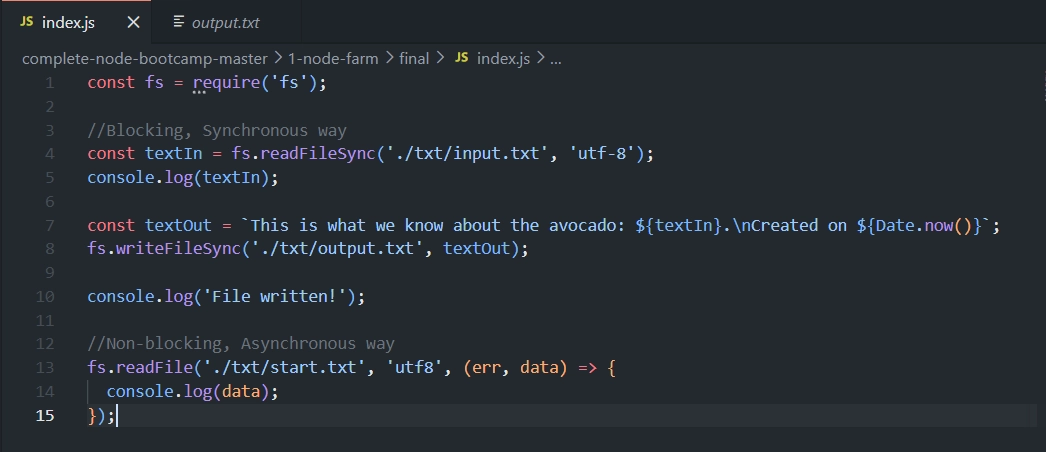
Add this Code block
fs.readFile('./txt/start.txt','utf8',(err, data)=>{
   console.log(data);
});
In Terminal Type:
node index.js
The avocado 🥑 is popular in vegetarian cuisine as a substitute for meats in sandwiches and salads because of its high fat content 😄
File written!
read-this
🔍 Breakdown
We still use the
fsmodule, but this time the function isreadFile(notreadFileSync).Arguments passed to
readFile:📁 Path to the file — e.g.
./txt/start.txt🔤 Character encoding — e.g.
'utf8'(recommended to include, to be safe)🔁 Callback function — runs once the file has finished reading
🔄 The Callback Function Pattern
(err, data)=>{...}The callback receives two arguments:
❌
err— the error, if one occurred📄
data— the actual file content
This is called the "error-first callback" style — extremely common in Node.js.
The error is always the first parameter, and the actual result (data) comes second.
🚀 Step 2: Proving It's Non-Blocking
To demonstrate that readFile doesn't block execution, add logs before and after:
fs.readFile('./txt/start.txt','utf8',(err, data)=>{
  console.log('Read this!');
});

console.log('Will read file!');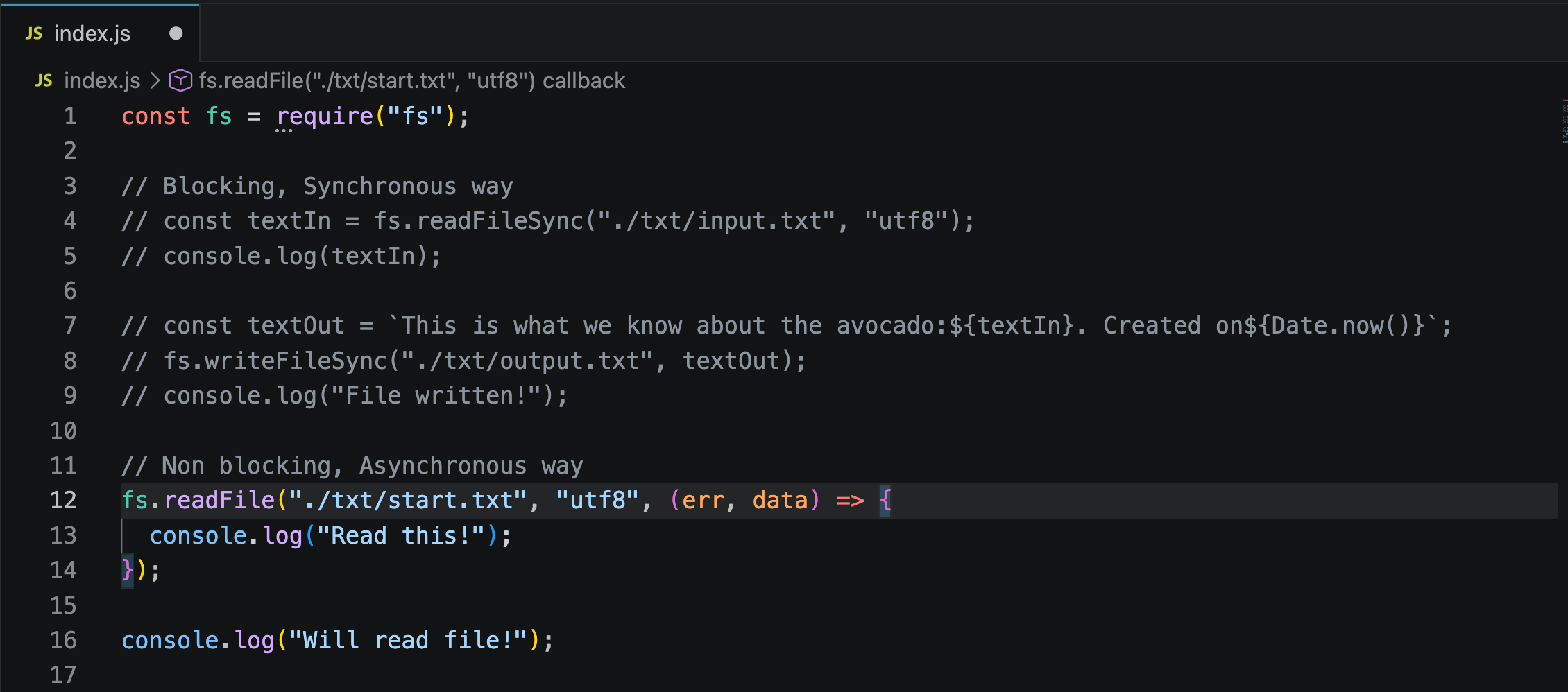
What do you think will be printed first❓
Type
node index.jsin terminal
Will read file!
Read this!
🔗 Step 3: Chaining Multiple Async Steps (Dependent Reads)
Sometimes one file read depends on the result of a previous one. Example scenario:
📄 Read
start.txt→ its content tells you the name of the next file to read.📖 Read that file → its content needs to be combined with another file's content.
✍️ Write the final combined result into a new output file.
💻 Code
fs.readFile('./txt/start.txt', 'utf8', (err, data1) => {
  fs.readFile(`./txt/${data1}.txt`, 'utf8', (err, data2) => {
    console.log(data2);

    fs.readFile('./txt/append.txt', 'utf8', (err, data3) => {
      console.log(data3);

      fs.writeFile('./txt/final.txt', `${data2}\n${data3}`, 'utf8', (err) => {
        console.log('Your file has been written 🎉');
      });
    });
  });
});

console.log('Will read file!');
Terminal Output
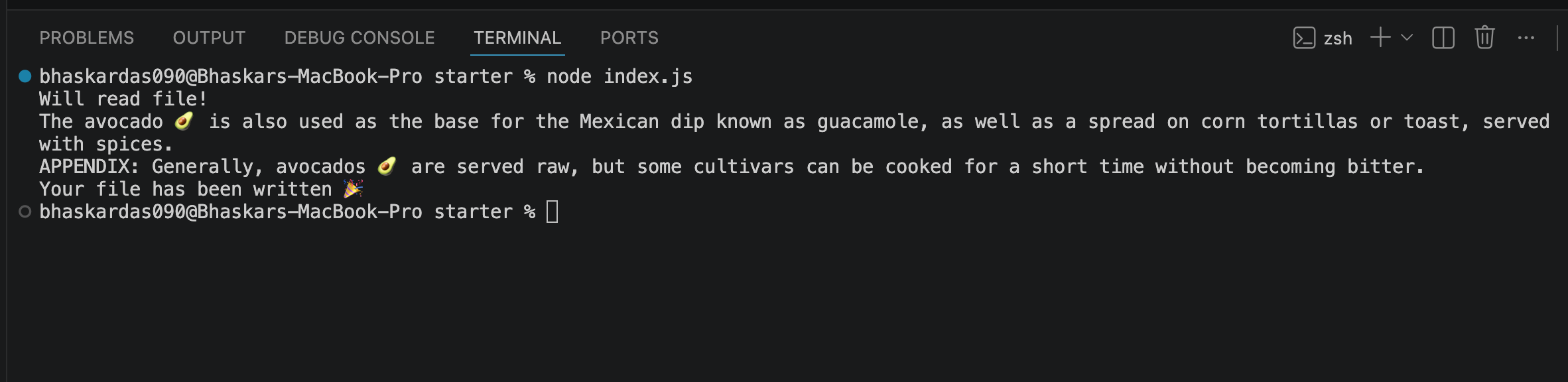
final.txtOutput
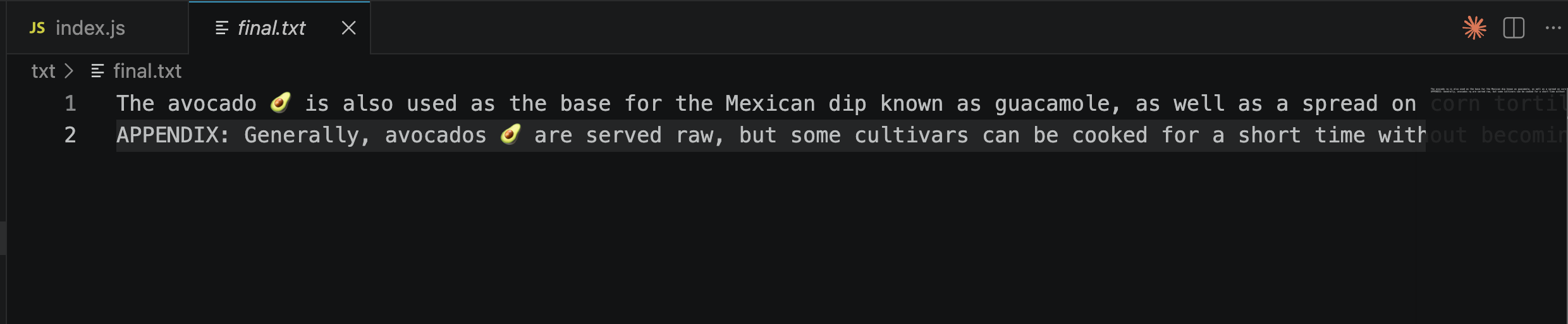
🔄 How It Works Step-by-Step
📄 First read:
start.txtis read → result stored asdata1data1contains the name of another file (e.g.,read-this)📖 Second read: Using
data1, Node reads./txt/read-this.txt
(built dynamically using a template string) → result stored asdata2.📑 Third read: Reads
append.txt→ result stored asdata3.✍️ Write step: Combines
data2anddata3(with a newline\nbetween them) and writes it tofinal.txt.
📌 Important Notes
Each step is nested inside the callback of the previous step — this is necessary because each step depends on data from the one before it.
This nested pattern is called "callback hell" (mentioned in the previous note) — it works, but becomes hard to read as more steps are added.
📤 Step 4: Writing a File Asynchronously
💻 Code
fs.writeFile('./txt/final.txt', textToWrite,'utf8',(err)=>{
  console.log('Your file has been written 🎉');
});
🔍 Breakdown
Just like
readFile, we use the asynchronous version:writeFile(notwriteFileSync).Arguments:
📁 Path to the file to write —
./txt/final.txt📝 The content to write into the file
🔤 Encoding —
'utf8'🔁 Callback function — runs once writing is complete
⚖️ Difference from readFile's Callback
writeFile's callback only receives one argument:err(the error, if any).There's no
datato receive here, since we're writing, not reading.
⚠️ Step 5: Handling Errors
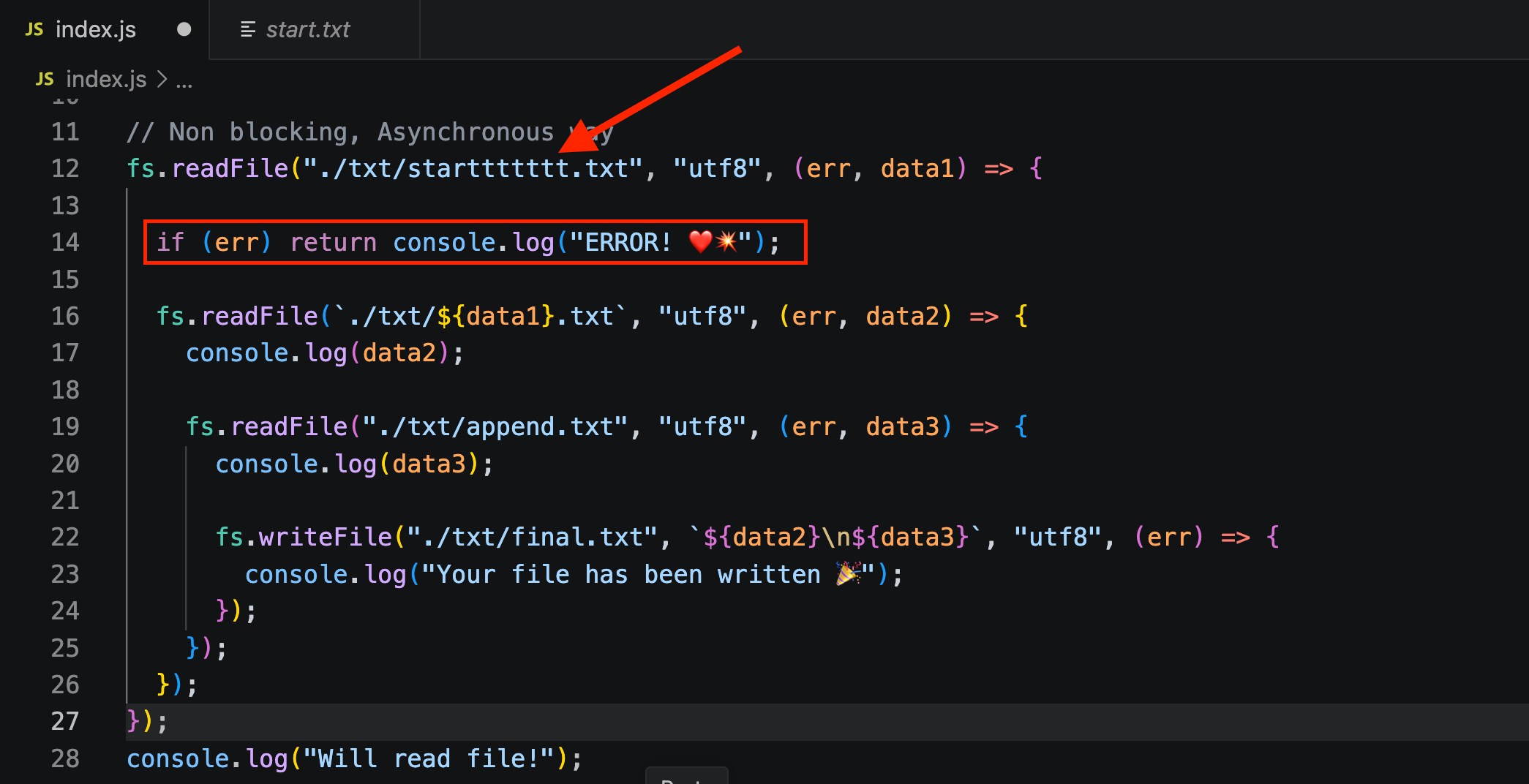
It's good practice to check for errors inside callbacks:
fs.readFile('./txt/start.txt', 'utf8', (err, data1) => {
  if (err) {
    console.log('ERROR 💥');
    return;
  }
  ......
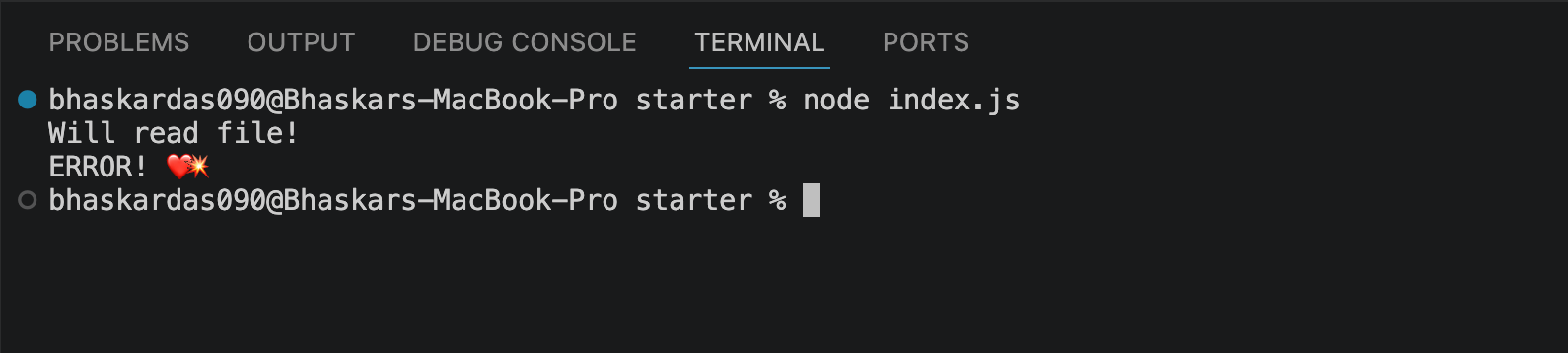
Let’s simulate an error:
Rename
start.txttostarttttt.txt.Run the application again.
Observe the error output in the terminal.
Terminal Output
💡 Why This Matters
❌ If the file doesn't exist (or another error occurs),
errwill contain error details.🛑 Using
returnafter logging the error stops the rest of the callback from running — preventing your code from trying to usedata1when it doesn't actually exist.🧪 Test this by temporarily giving a wrong file name — you'll see the error log instead of a crash, and the rest of the code will be skipped safely.
✅ Full Code
const fs = require("fs");

// Blocking, Synchronous way
// const textIn = fs.readFileSync("./txt/input.txt", "utf8");
// console.log(textIn);

// const textOut = `This is what we know about the avocado:${textIn}. Created on${Date.now()}`;
// fs.writeFileSync("./txt/output.txt", textOut);
// console.log("File written!");

// Non blocking, Asynchronous way

fs.readFile("./txt/start.txt", "utf8", (err, data1) => {
  fs.readFile(`./txt/${data1}.txt`, "utf8", (err, data2) => {
    console.log(data2);

    fs.readFile("./txt/append.txt", "utf8", (err, data3) => {
      console.log(data3);

      fs.writeFile("./txt/final.txt", `${data2}\n${data3}`, "utf8", (err) => {
        console.log("Your file has been written 🎉");
      });
    });
  });
});

console.log("Will read file!");
const fs = require("fs");
// Blocking, Synchronous way
// const textIn = fs.readFileSync("./txt/input.txt", "utf8");
// console.log(textIn);
// const textOut = `This is what we know about the avocado:${textIn}. Created on${Date.now()}`;
// fs.writeFileSync("./txt/output.txt", textOut);
// console.log("File written!");
// Non blocking, Asynchronous way
fs.readFile("./txt/starttttttt.txt", "utf8", (err, data1) => {
if (err) return console.log("ERROR! ❤️💥");
fs.readFile(`./txt/${data1}.txt`, "utf8", (err, data2) => {
console.log(data2);
fs.readFile("./txt/append.txt", "utf8", (err, data3) => {
console.log(data3);
fs.writeFile("./txt/final.txt", `${data2}\n${data3}`, "utf8", (err) => {
console.log("Your file has been written 🎉");
});
});
});
});
console.log("Will read file!");