📌 Definition
JDBC (Java Database Connectivity) is a Java API that enables Java applications to connect to and interact with databases.
It provides a standardized interface for querying and updating relational databases using SQL.
🧱 JDBC Architecture
🔌 What is a JDBC Driver?
A JDBC Driver is a software component that acts as a translator between Java applications and a specific database.
It implements the JDBC interfaces to send SQL queries from Java to the database and return results back to the application.
✅ Role of the JDBC Driver:
Converts Java calls (like
executeQuery()) into database-specific calls (like MySQL or Oracle-specific queries).Handles communication with the database over the network or locally.
📦 Types of JDBC Drivers:
Type | Description | Usage |
|---|---|---|
Type 1 | JDBC-ODBC Bridge | Legacy, rarely used now |
Type 2 | Native-API Driver | Requires native DB libraries |
Type 3 | Network Protocol Driver | Uses a middleware server |
Type 4 | Thin Driver (Pure Java) | Most commonly used today |
⚙️ What is the JDBC API?
The JDBC API (Application Programming Interface) is a set of Java classes and interfaces provided by Java to interact with databases.
✅ Purpose of JDBC API:
Enables Java programs to send SQL statements, retrieve results, and perform CRUD operations on databases.
Makes database operations database-independent (you can switch from MySQL to Oracle without changing your Java code much).
🧩 Common JDBC API Interfaces:
Interface | Description |
|---|---|
| Connects Java to the appropriate JDBC driver |
| Opens a link between Java and the database |
| Sends static SQL queries |
| Sends parameterized SQL queries |
| Stores data returned from the database |
| Handles database-related errors |
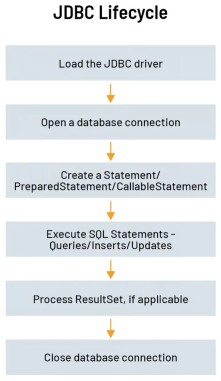
🔗 JDBC Workflow
Load the JDBC driver
Establish a connection to the database
Create a
StatementorPreparedStatementExecute SQL queries
Process the
ResultSet(for SELECT queries)Close the connection
📦 JDBC Driver Types
Type | Description |
|---|---|
Type 1 | JDBC-ODBC Bridge driver (legacy) |
Type 2 | Native-API driver (uses DB-specific native libraries) |
Type 3 | Network Protocol driver (uses middleware server) |
Type 4 | Thin driver (pure Java driver, widely used today) |
💡 Advantages of JDBC
Platform-independent
Supports all major relational databases (MySQL, Oracle, PostgreSQL, etc.)
Enables real-time data access from Java apps
Works with both desktop and web applications
⚠️ Limitations of JDBC
Verbose and boilerplate code
No ORM support (requires manual mapping)
Difficult to manage complex object-relational mappings
(That's why frameworks like Hibernate and JPA are often used with JDBC.)
✅ Use Cases
Java desktop applications needing to store or retrieve data
Backend systems connecting to MySQL, Oracle, or other databases
Real-time data validation and reporting tools