🆔 Naming Conventions
File name must match the public class name (e.g.,
Hello.java)Class names →
PascalCase(e.g.,MyFirstProgram)Method and variable names →
camelCase(e.g.,printMessage())
🌀 How Java Code Runs (Behind the Scenes)
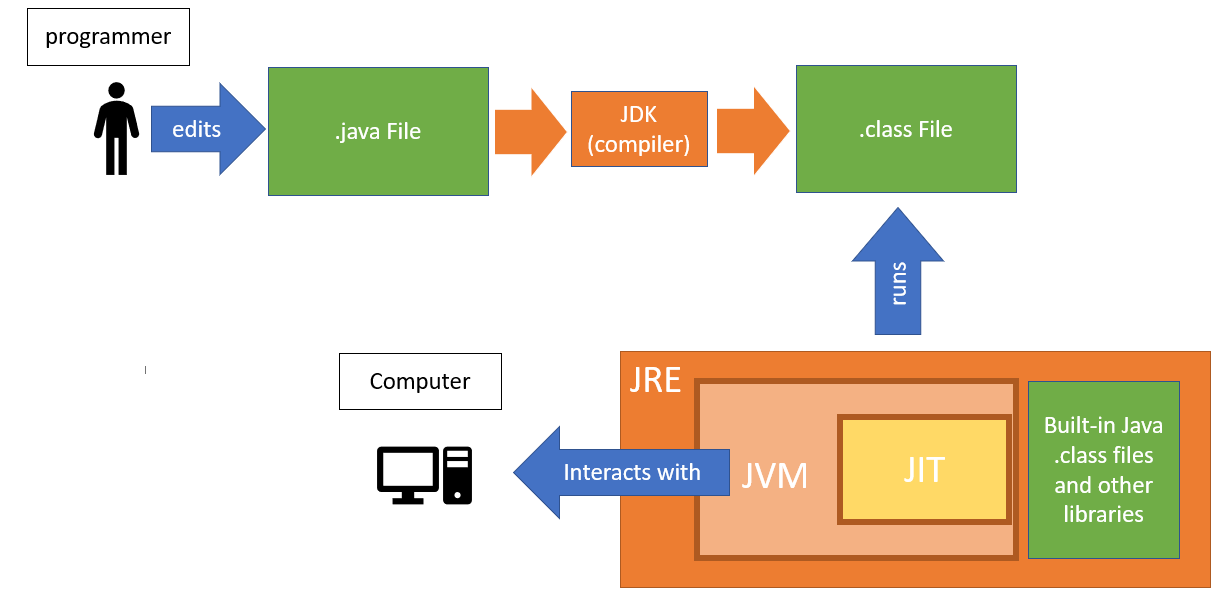
✅ Programmer Writes Code
The programmer creates a file like
Hello.java.This file contains Java source code—human-readable instructions.
📁 File Created: Hello.java
🧠 You: Write the code using an editor (like VS Code, IntelliJ, or Notepad).
✅ Compilation using JDK
The JDK (Java Development Kit) includes a compiler (
javac) that converts.javainto.class.
🛠️ javac Hello.java → Produces → Hello.class
🔹 .class file contains bytecode, which is platform-independent.
✅ Running the Code using JRE
You run the code using the
java Hellocommand.This sends the
.classfile (bytecode) to the JRE (Java Runtime Environment).
✅ JRE – What Happens Inside
The JRE contains:
🔸 JVM (Java Virtual Machine):
It reads the
.classbytecode.Converts it to machine-specific code (native code).
This is where the actual execution happens.
🔸 JIT Compiler (Just-In-Time):
JIT improves performance by converting frequently-used bytecode into machine code just in time for execution.
🔸 Built-in Libraries:
JRE also includes core Java libraries (.class files, APIs) required during execution.
✅ Execution on the Computer
The JVM executes the machine code on your computer hardware (CPU, memory).
Finally, you see the output on your screen.
⚠️ Common Output Issue
If you see nothing or an error:
Check that the file name matches the class name.
Make sure the main method is spelled exactly like:
public static void main(String[] args)