🔗 Understanding Path Parameters in FastAPI
As discussed earlier, a path parameter allows FastAPI to determine where and how an application should respond based on the URL.
Understanding path parameters is essential because they are widely used when building real-world applications.
📘 Starting Point: Our Initial Function
Initially, we had a function that returned all books:
async def read_all_books():
	return BOOKS
Now, let’s expand this concept by introducing path parameters.
🧩 Creating Endpoints with Path Parameters
Below is an example FastAPI application with both static and dynamic endpoints.
from fastapi import FastAPI

app = FastAPI()

BOOKS = [
    {"title": "Title One", "author": "Author One", "category": "science"},
    {"title": "Title Two", "author": "Author Two", "category": "science"},
    {"title": "Title Three", "author": "Author Three", "category": "history"},
    {"title": "Title Four", "author": "Author Four", "category": "math"},
    {"title": "Title Five", "author": "Author Five", "category": "math"}
]

# Static endpoint → returns all books
@app.get("/books")
async def read_all_books():
    return BOOKS

# Dynamic endpoint → returns the parameter value
@app.get("/books/{dynamic_param}")
async def read_book(dynamic_param: str):
    return {"dynamic_param": dynamic_param}
🧠 How Dynamic Path Parameters Work
The path parameter defined in the URL
👉 /books/{dynamic_param}
Must match the function parameter name
👉 dynamic_param
🏷️ Type Enforcement
You can control what kind of values are allowed:
dynamic_param: str→ accepts text (default behavior)dynamic_param: int→ accepts numbers only
🧩 Example
@app.get("/books/{dynamic_param}")
async def read_all_books(dynamic_param: str):
    return {"dynamic_param": dynamic_param}
👉 The name inside {} and the function parameter must match.
👉 The type (str, int, etc.) decides what values are valid.
🔄 What This Means in Practice
Path parameters make endpoints flexible by allowing values to come from the URL.
They allow us to:
🔹 Pass dynamic values in the URL
/books/{dynamic_param}🔹 Receive that value inside the function
async def read_book_dynamic(dynamic_param):🔹 Use or return the value in the response
return {"dynamic_param": dynamic_param}
▶️ Run the Application
Start the server from the terminal:
uvicorn main:app --reload🌐 Open Swagger UI
After the server starts, go to:
🔗 127.0.0.1:8000/docs
Swagger UI will show all available API endpoints.
📘 Available GET Endpoints
You will see two endpoints:
/books→ Returns all books/books/{dynamic_param}→ Returns data based on the value in the URL
Test both endpoints interactively.
⚠️ Static vs Dynamic Path Conflicts
Now let’s add a static path endpoint:
from fastapi import FastAPI

app = FastAPI()

BOOKS = ...

@app.get("/books")
async def read_all_books():
    return BOOKS

@app.get("/books/{dynamic_param}")
async def read_book(dynamic_param: str):
    return {"dynamic_param": dynamic_param}

@app.get('/books/mybooks')
async def read_all_books():
		return {'book_title': 'My Favorite Book'}
Let’s try it out to see what happens in the browser.
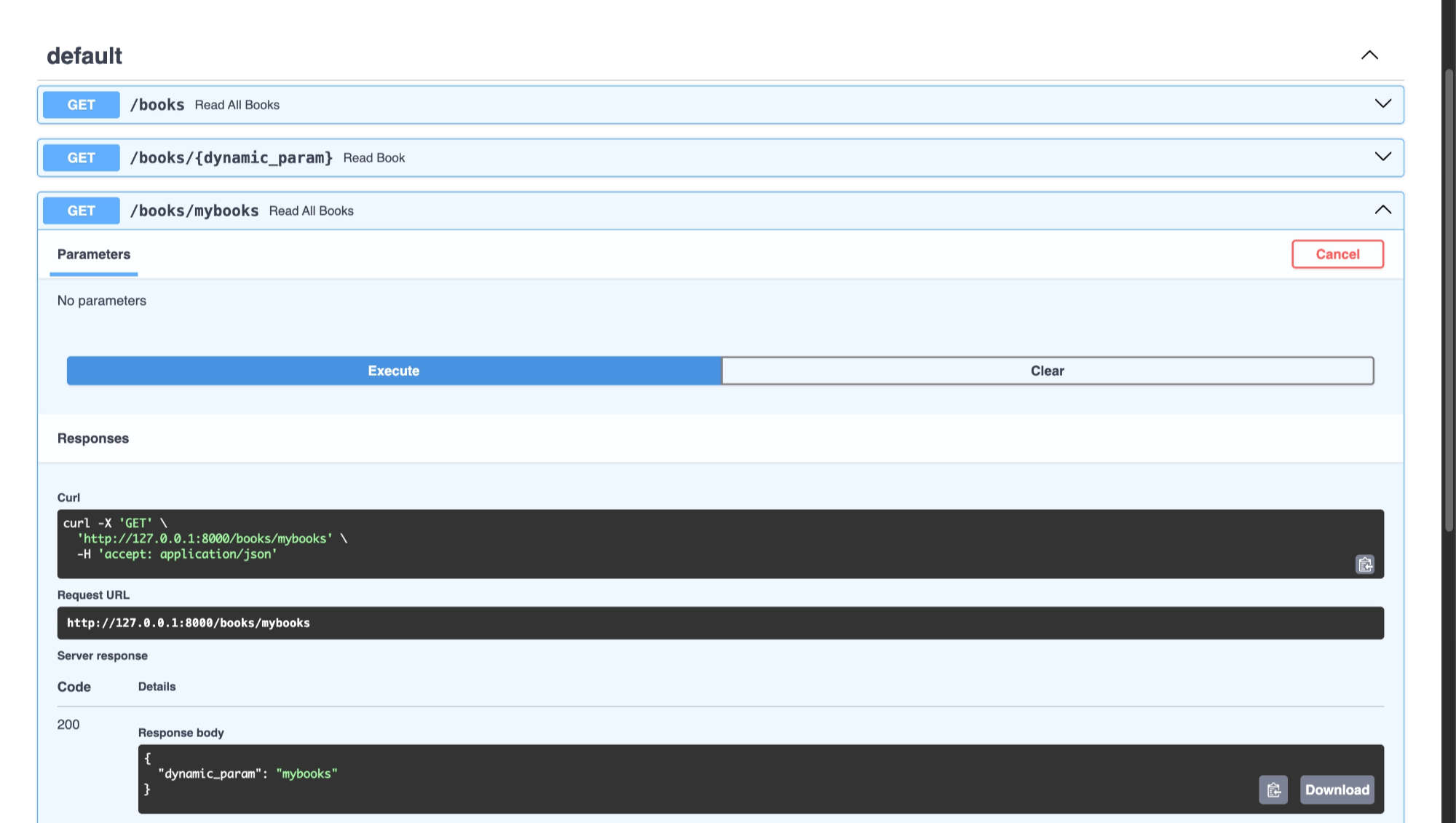
If you navigate to:
127.0.0.1:8000/books/mybooksYou may see this response:
{
"dynamic_param":"mybooks"
}

### **Expected Output ###**

{
"book_title":"My Favorite Book"
}
This happens because FastAPI matches routes from top to bottom.
Since /books/{dynamic_param} appears before /books/mybooks, FastAPI treats mybooks as a dynamic parameter.
To avoid this, define static routes before dynamic ones:
@app.get('/books/mybooks')
async def read_all_books():
		return {'book_title': 'My Favorite Book'}

@app.get('/books/{dynamic_param}')
async def read_all_books(dynamic_param: str):
		return {'dynamic_param': 'dynamic_param'}
Now lets see the output
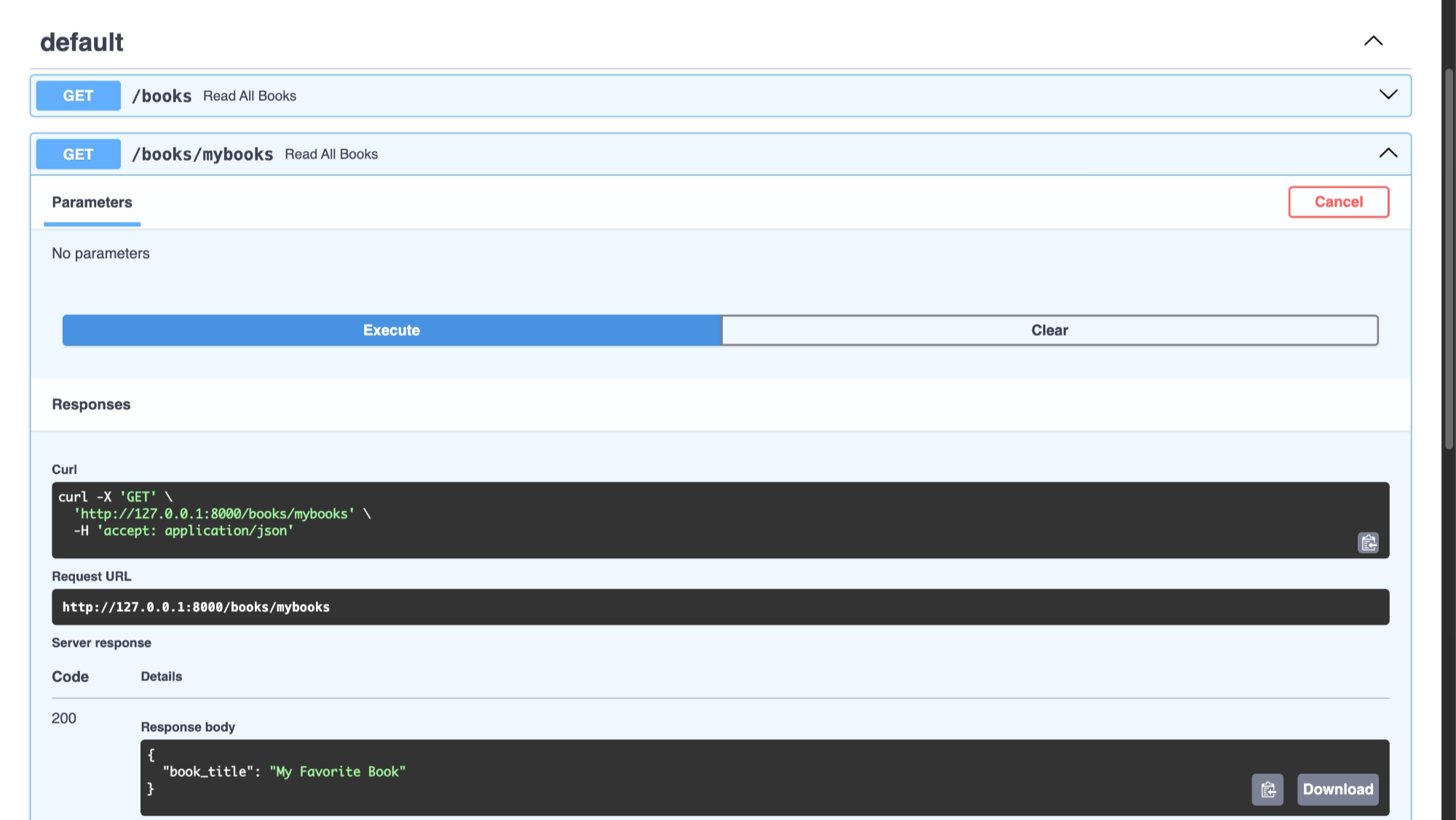
❌ Avoid this order:
@app.get('/books/{dynamic_param}')
async def read_all_books(dynamic_param: str):
		return {'dynamic_param': 'dynamic_param'}

@app.get('/books/mybooks')
async def read_all_books():
		return {'book_title': 'My Favorite Book'}
The static endpoint was only used to demonstrate route matching order and can now be removed.
📚 Find a Book by Title Using a Path Parameter
Now let’s improve our API so it can return one specific book based on its title.
from fastapi import FastAPI
app = FastAPI()

BOOKS = ...

@app.get("/books")
async def read_all_books():
    return BOOKS

@app.get('/books/{dynamic_param}')
async def read_all_books(dynamic_param: str):
		return {'dynamic_param': 'dynamic_param'}

@app.get('/books/{book_title}')
async def read_book(book_title: str):
		for book in BOOKS:
				if book.get('title').casefold() == book_title.casefold():
						return book
🔎 How It Works
/books→ returns all books/books/{book_title}→ searches for a book by its titleThe comparison uses
.casefold()to ignore uppercase/lowercase differences
🌐 Try Endpoint in Swagger UI
Let’s go back to our browser and try to find a book by its title in Swagger
Hoorah!! we got the correct book 🥳
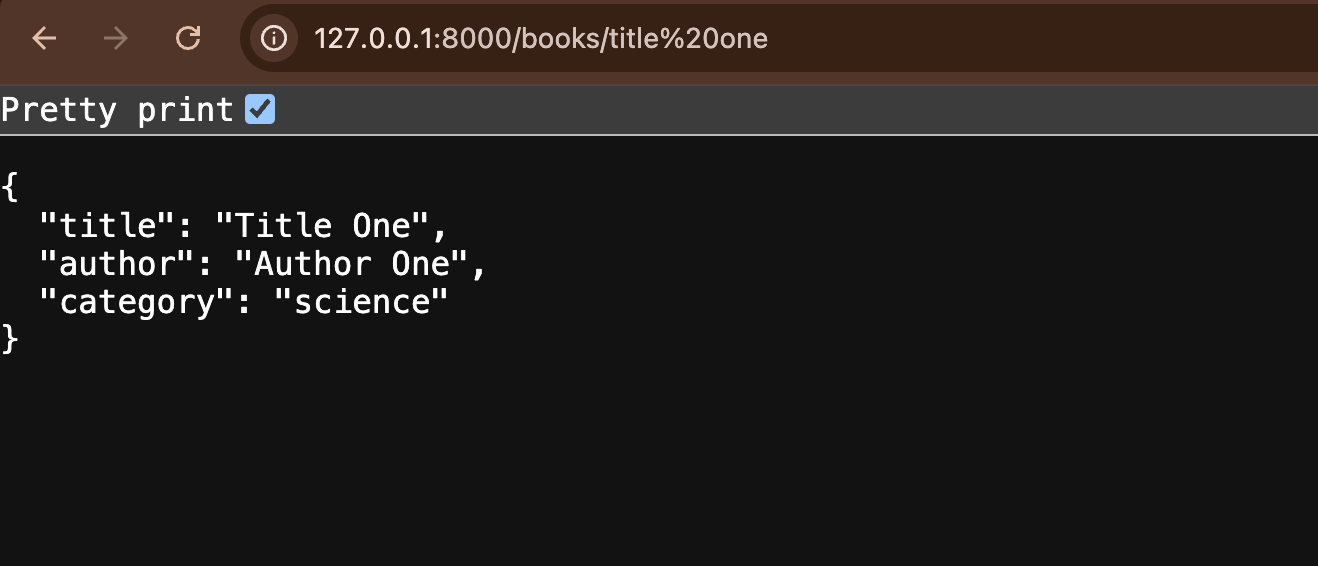
❓ Why Do You See %20?

When searching for a book by title, you may notice %20 in the Request URL.
%20 is the URL-encoded form of a space.
Browsers automatically replace spaces with %20 in URLs.
🔗 Example URL
127.0.0.1:8000/books/title%20oneOpen your browser and enter a book title in the URL:
✅ Current Full Code
from fastapi import FastAPI
app = FastAPI()

BOOKS = [
    {"title": "Title One", "author": "Author One", "category": "science"},
    {"title": "Title Two", "author": "Author Two", "category": "science"},
    {"title": "Title Three", "author": "Author Three", "category": "history"},
    {"title": "Title Four", "author": "Author Four", "category": "math"},
    {"title": "Title Five", "author": "Author Five", "category": "math"},
]

@app.get("/books")
async def read_all_books():
    return BOOKS

@app.get('/books/{book_title}')
async def read_book(book_title: str):
    for book in BOOKS:
        if book.get('title').casefold() == book_title.casefold():
            return book