📖 Context
Now that middleware and the request-response cycle concept have been covered, it's time to actually write custom middleware functions in code.
🔄 Recap: Middleware Already Used
express.json() was already used earlier via app.use(). Calling express.json() returns a function, and that function gets added to the middleware stack. app.use() is the method used to add any middleware to the stack.
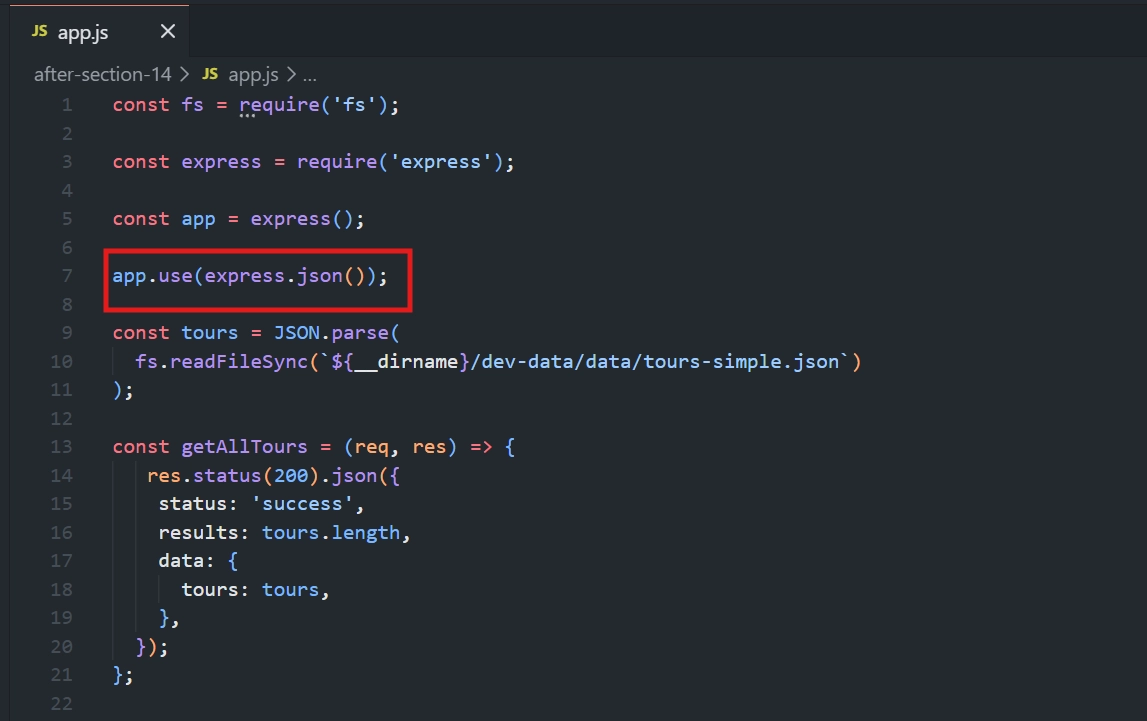
🔹 Step 1: Writing a Basic Custom Middleware Function
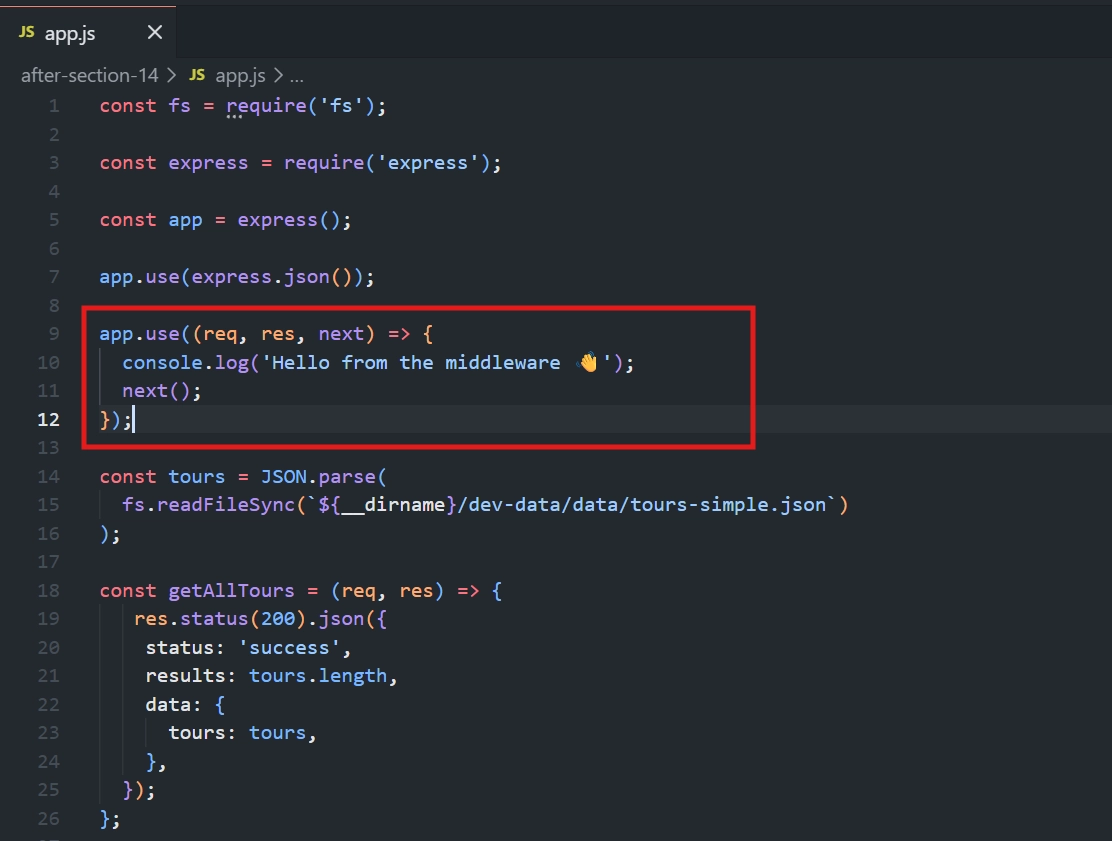
app.use((req, res, next) => {
  console.log('Hello from the middleware 👋');
  next();
});
💡 Why each part works:
🧩
app.use()— registers this function as middleware, adding it to the middleware stack.📦 The function takes three arguments:
req,res, andnext. Having a third argument is what tells Express "this is middleware" — Express automatically passes thenextfunction as the third argument.🏷️ Naming conventions (
req,res,next) aren't mandatory — the arguments could technically be named anything (e.g.x,n) — but sticking to convention avoids confusion for anyone reading the code.🖨️
console.log(...)— just some placeholder code to prove the middleware runs on each request.⚠️
next()— critical: without callingnext(), the request-response cycle would get stuck at this point. The app would never move on to send a response back to the client. Forgetting to callnext()is one of the most important mistakes to avoid in Express.
🔹 Step 2: Testing — Middleware Applies to Every Request
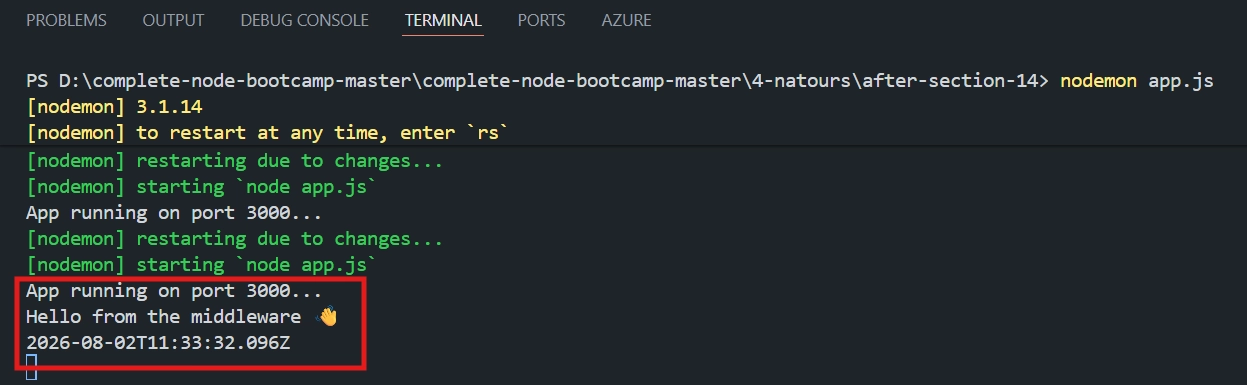
📤 Sending a request to any route (e.g. Get All Tours) — the console logs:
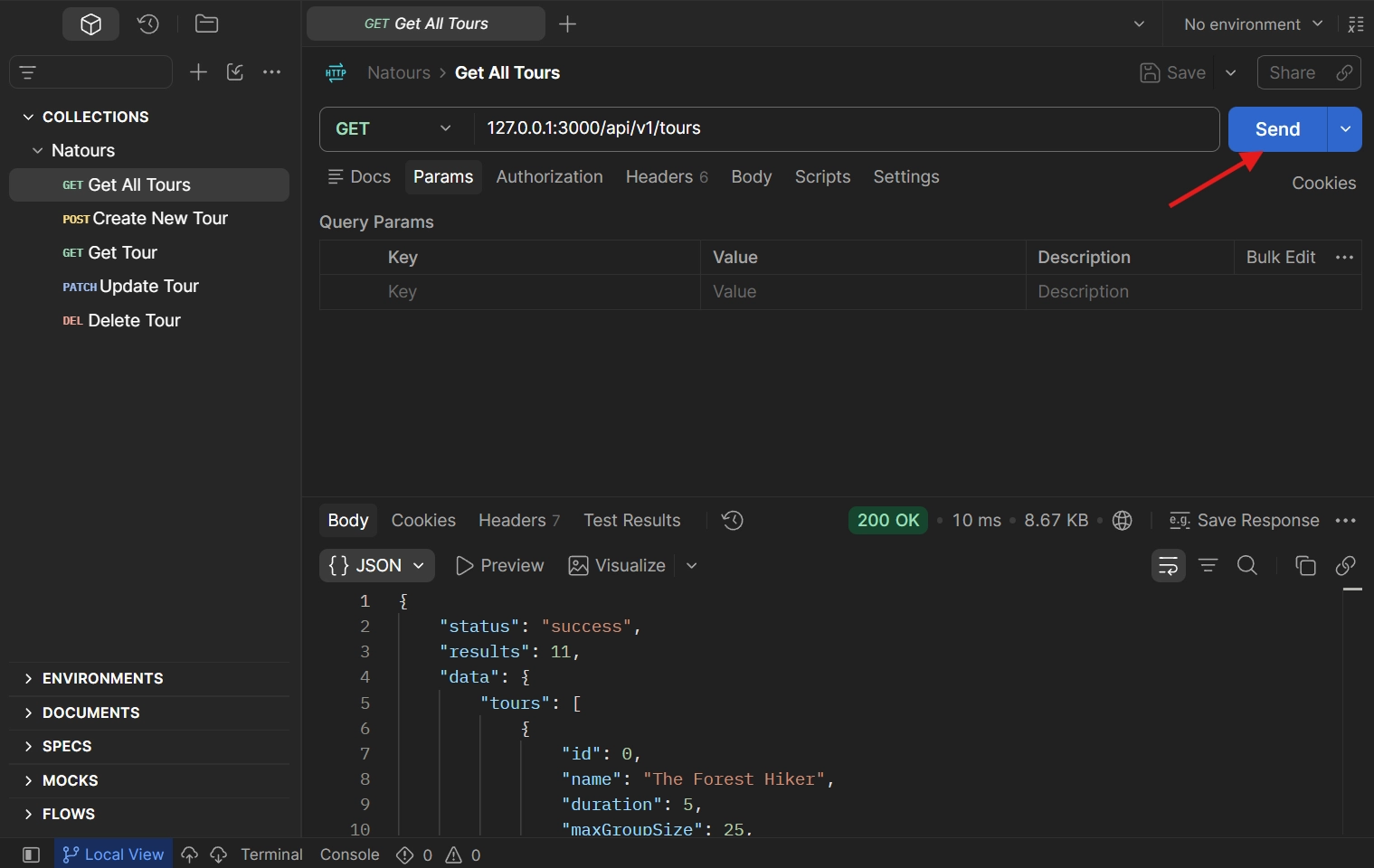
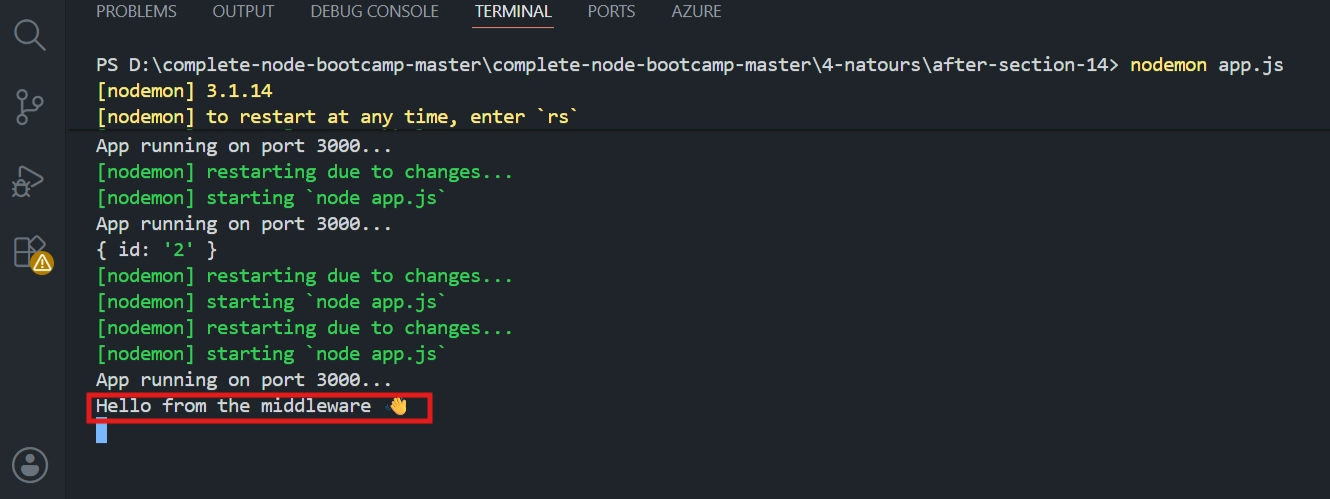
✅ This confirms that this middleware (defined without a specific route) applies to every single request — but only if it's positioned before the relevant route handler in the code.
🔹 Step 3: Understanding Order — Moving the Middleware After a Route Handler
🧪 Demonstration
The middleware function is moved to after the getAllTours route handler in the code.
📋 Result
Sending a request to that same route → Hello from the middleware 👋 is not logged anymore.
💡 Why this happens:
Route handlers are themselves a type of middleware — just middleware limited to a specific URL.
getAllTourscallsres.json(...), which ends the request-response cycle right there.Since the cycle has already finished by the time it would reach the custom middleware, that middleware is simply never called.
This proves that order matters fundamentally in Express — middleware placed after a route handler that sends a response will never run for that route.
✅ Confirming with Another Route
📤 Sending a request to a different route (e.g. Get Tour, Update Tour, or Delete Tour) — Hello from the middleware 👋 does appear, because for this route, the middleware still comes before its handler in the overall stack.
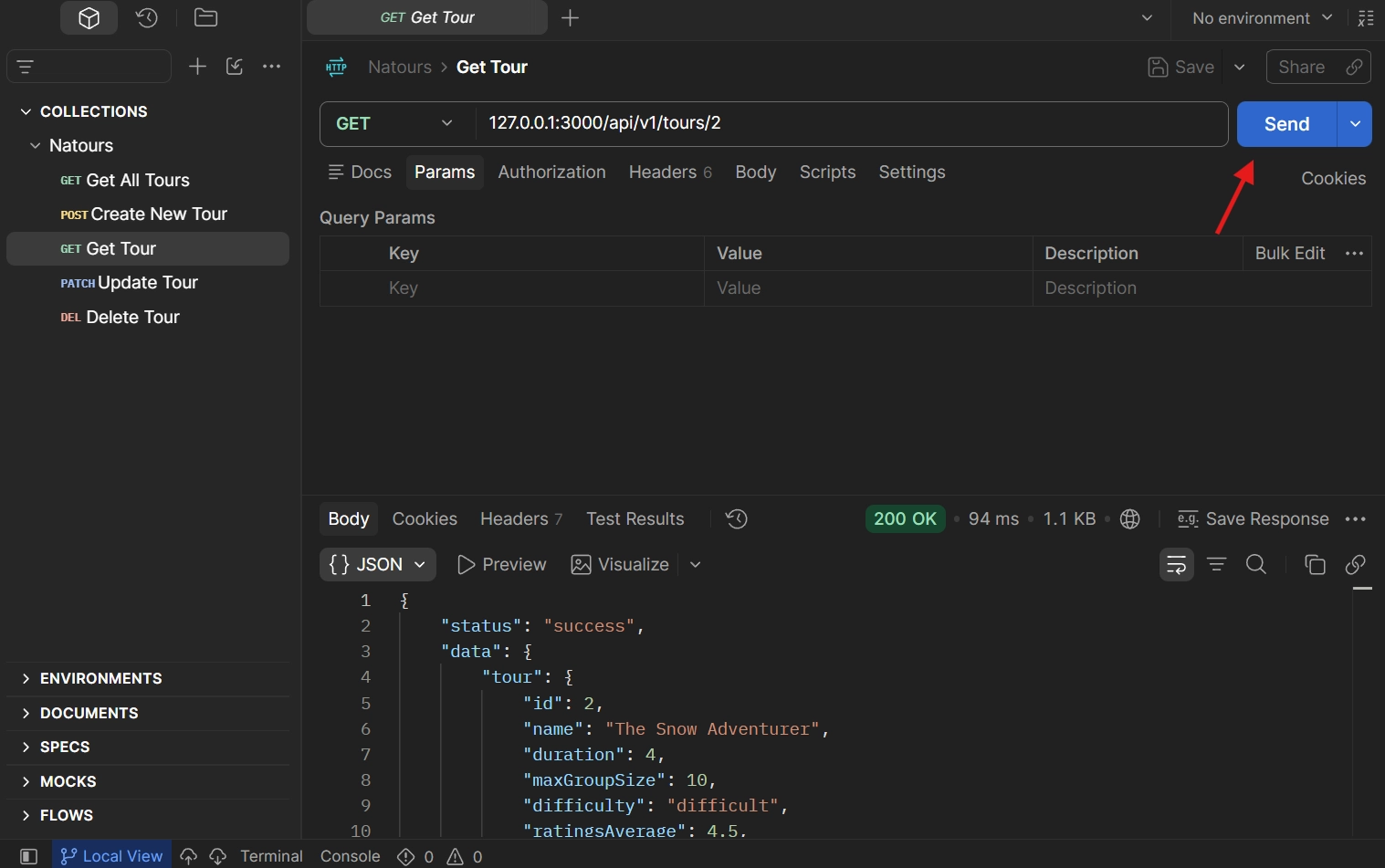
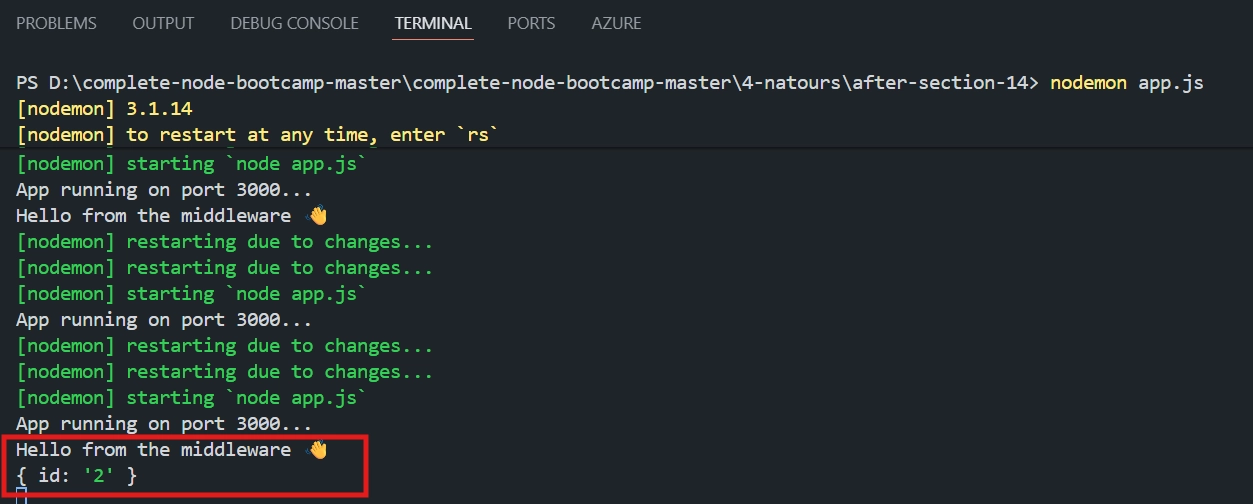
Send back the middleware to the previous place
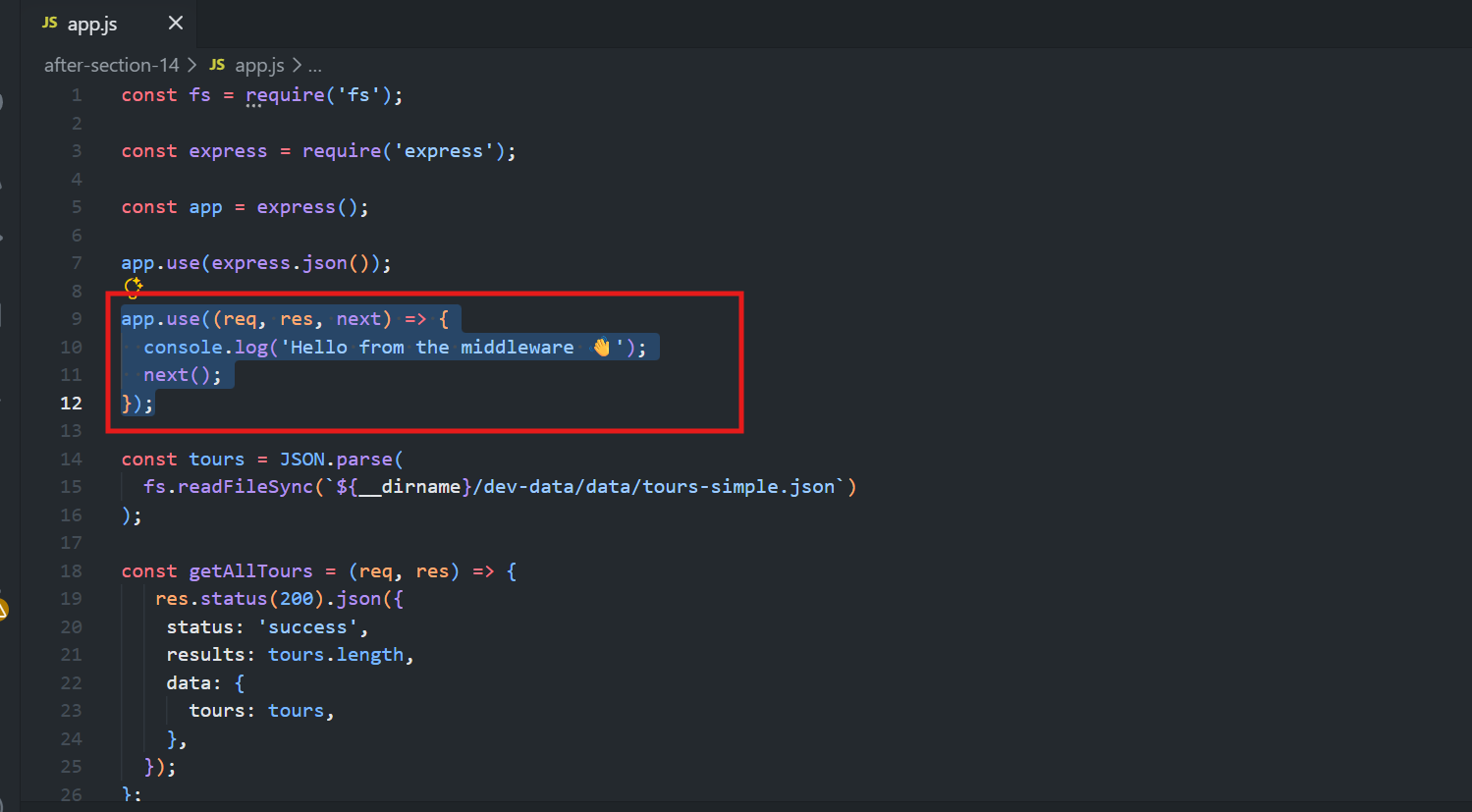
⭐ Best Practice
Global middleware like this should generally be defined before all route handlers, so it consistently runs for every request.
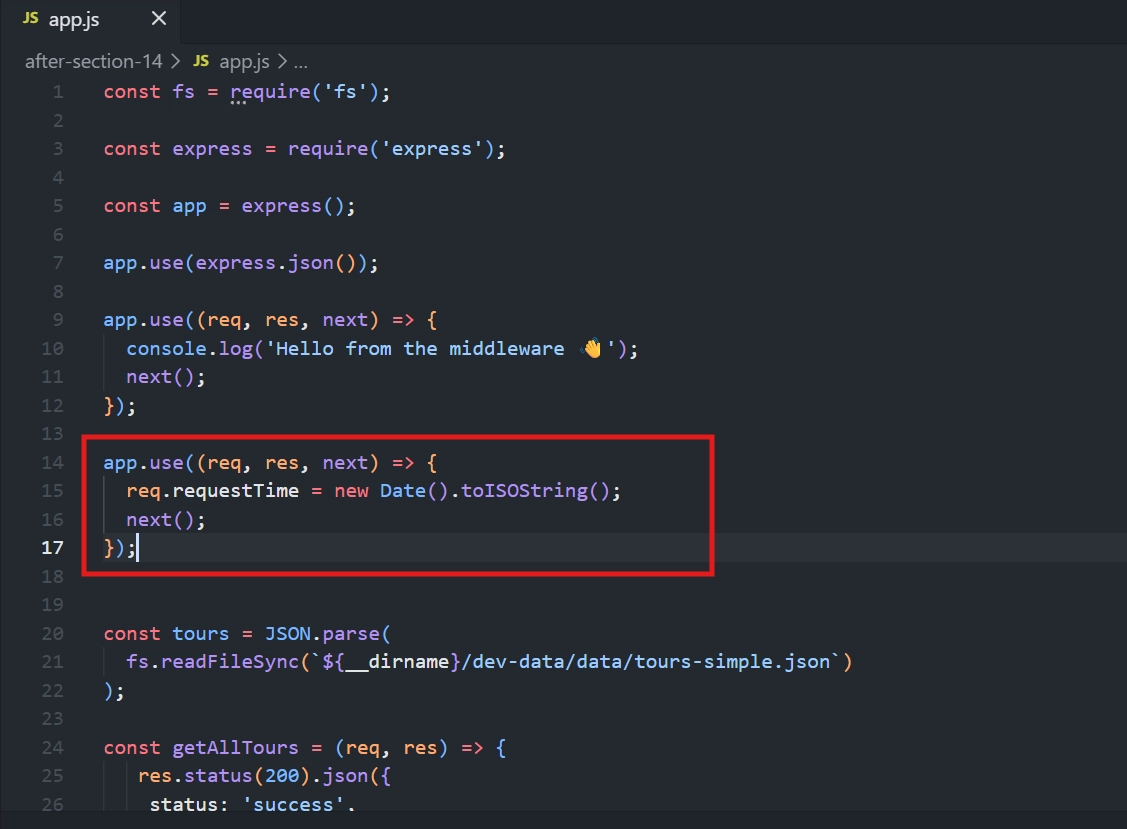
🔹 Step 4: A Second Middleware — Manipulating the Request Object
This middleware adds a custom property to the request object: a timestamp of when the request occurred.
app.use((req, res, next) => {
  req.requestTime = new Date().toISOString();
  next();
});
💡 Why it works
📦 Uses the standard middleware signature:
req,res,next.🏷️
req.requestTime = new Date().toISOString()adds a custom timestamp to the request object.🕒
.toISOString()converts the date into a readable string.⚠️
next()passes control to the next middleware or route handler.
🔹 Step 5: Using the Custom Request Property in a Route Handler
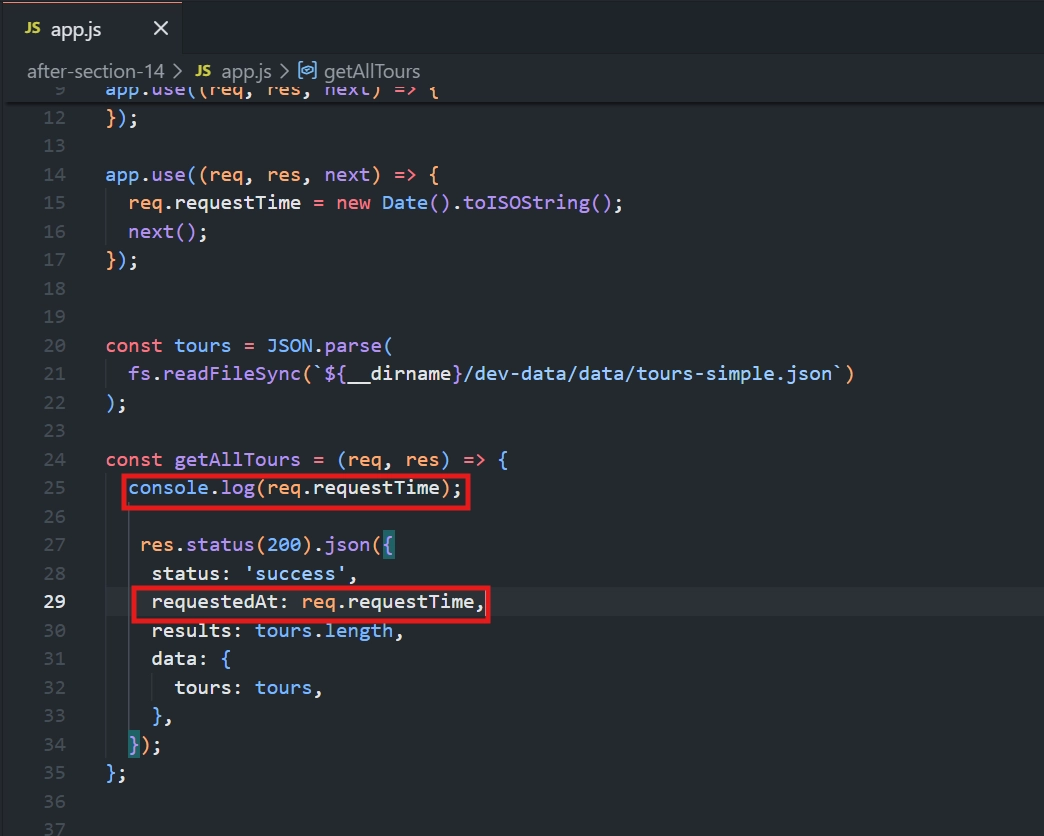
Inside getAllTours, the injected requestTime can now be logged or included in the response:
const getAllTours = (req, res) => {
  console.log(req.requestTime);

  res.status(200).json({
    status: 'success',
    requestedAt: req.requestTime,
    // ...existing response data
  });
};
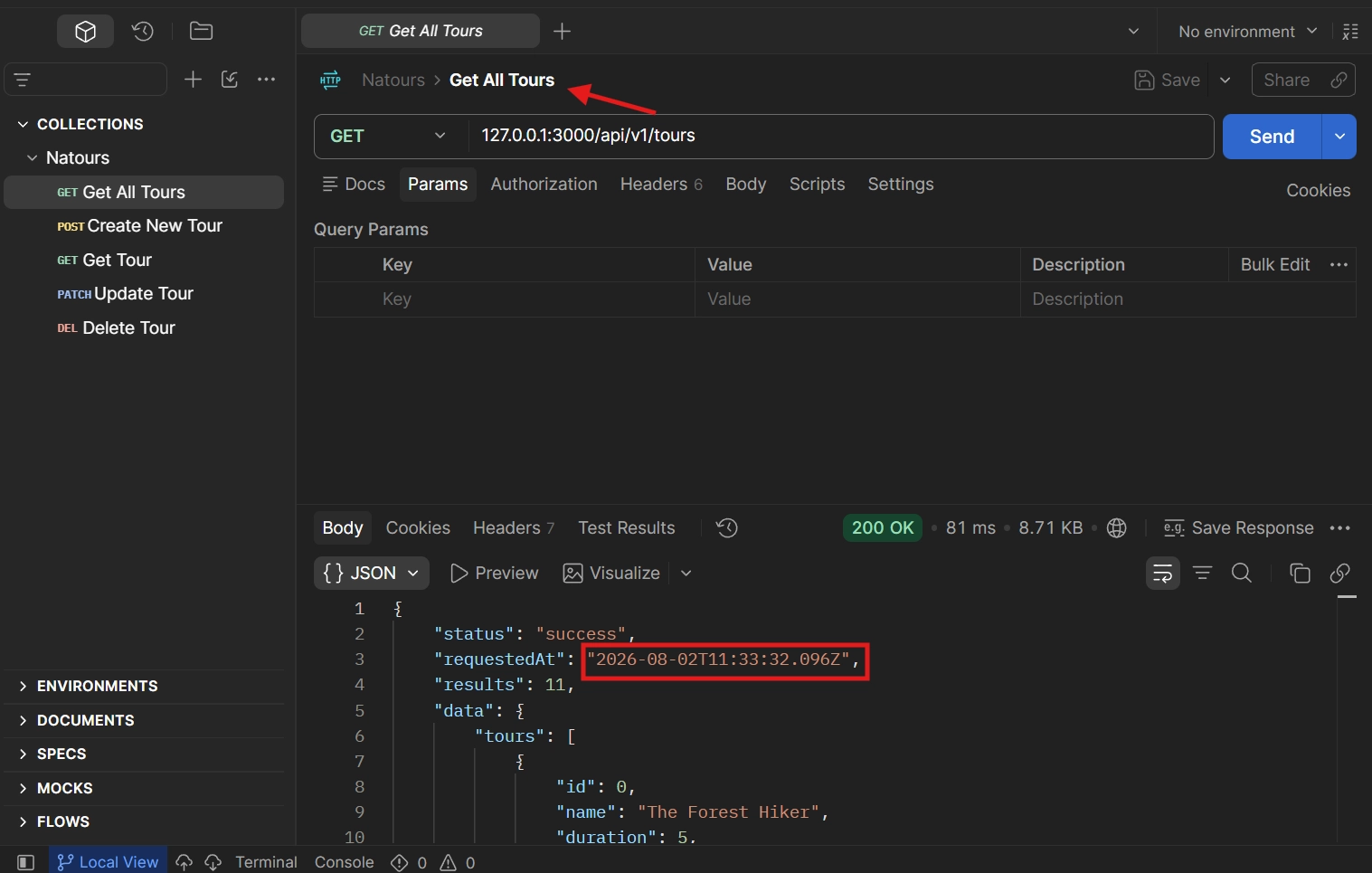
🧪 Testing Result
The response correctly includes requestedAt with the current date/time — proving the value came from the custom middleware, since it was never defined inside the route handler itself.
🔑 Key Takeaways
🧩 Use
app.use()to register middleware.⚙️ Middleware functions use the
(req, res, next)signature.⚠️ Always call
next()to continue the request-response cycle.📋 Middleware executes in the order it's defined.
🏷️ Middleware can modify the
reqobject (e.g., addrequestTime).📍 Place global middleware before your route handlers.
<div class="infographic-vscodeterm" id="vt">
<style>
.infographic-vscodeterm {
--ink: #1a1a1a;
--ink-soft: #5c5c5c;
--paper: #ffffff;
--paper-alt: #f0ece4;
--accent: #2563eb;
--accent-deep: #1942a8;
--accent-soft: #e3ebfd;
--line: #ddd6c9;
--radius: 8px;
--display-font: 'Fraunces', Georgia, serif;
--body-font: 'Inter', system-ui, sans-serif;
--mono-font: 'IBM Plex Mono', monospace;
max-width: 880px;
margin: 0 auto;
box-sizing: border-box;
background: transparent;
color: var(--ink);
font-family: var(--body-font);
}
.infographic-vscodeterm[data-theme="dark"] {
--ink: #e8e6e1;
--ink-soft: #9a968c;
--paper: #13171f;
--paper-alt: #1c212b;
--accent: #5b8def;
--accent-deep: #8fb4ff;
--accent-soft: #20293f;
--line: #2c313d;
}
.infographic-vscodeterm * { box-sizing: border-box; min-width: 0; }
.vt-eyebrow {
font-family: var(--mono-font); font-size: 0.72rem; letter-spacing: 0.1em;
text-transform: uppercase; color: var(--accent); margin: 0 0 0.45rem;
display: flex; align-items: center; justify-content: center; gap: 0.4rem;
}
.vt-eyebrow::before { content: ""; width: 14px; height: 2px; background: var(--accent); display: inline-block; }
.vt-title {
font-family: var(--display-font); font-size: clamp(1.5rem, 4vw, 2.3rem); text-align: center;
margin: 0 0 0.5rem; line-height: 1.14; letter-spacing: -0.01em;
}
.vt-sub { color: var(--ink-soft); font-size: 0.95rem; text-align: center; margin: 0 0 1.7rem; }
/* ===== VS Code window — fixed dark theme regardless of page mode ===== */
.vt-window { border-radius: 8px; overflow: hidden; box-shadow: 0 16px 40px -14px rgba(0,0,0,0.45); border: 1px solid #1e1e1e; font-family: var(--mono-font); }
.vt-titlebar { background: #323233; display: flex; align-items: center; padding: 0.5rem 0.8rem; position: relative; }
.vt-dots { display: flex; gap: 0.4rem; }
.vt-dots span { width: 10px; height: 10px; border-radius: 50%; display: block; }
.vt-dots span:nth-child(1) { background: #ff5f56; }
.vt-dots span:nth-child(2) { background: #ffbd2e; }
.vt-dots span:nth-child(3) { background: #27c93f; }
.vt-titlebar-text { position: absolute; left: 50%; transform: translateX(-50%); font-size: 0.72rem; color: #cccccc; }
.vt-body { display: flex; height: 416px; }
.vt-resize-h { width: 5px; cursor: col-resize; background: transparent; flex-shrink: 0; transition: background 0.15s; touch-action: none; }
.vt-resize-h:hover, .vt-resize-h.is-dragging { background: #0078d4; }
.vt-resize-v { height: 5px; cursor: row-resize; background: transparent; flex-shrink: 0; transition: background 0.15s; touch-action: none; }
.vt-resize-v:hover, .vt-resize-v.is-dragging { background: #0078d4; }
.vt-window-resize {
height: 9px; background: #252526; cursor: row-resize; display: flex; align-items: center;
justify-content: center; border-top: 1px solid #1e1e1e; touch-action: none;
}
.vt-window-resize span { width: 30px; height: 3px; border-radius: 2px; background: #4a4a52; }
.vt-window-resize:hover span, .vt-window-resize.is-dragging span { background: #0078d4; }
.vt-toggle-btn {
background: none; border: none; color: #9a9a9a; cursor: pointer; display: flex; align-items: center;
padding: 0.3rem; border-radius: 3px; flex-shrink: 0;
}
.vt-toggle-btn:hover { background: #2a2d2e; color: #fff; }
.vt-toggle-btn svg { width: 13px; height: 13px; }
.vt-sidebar.is-hidden { width: 0 !important; overflow: hidden; border-right: none; }
.vt-terminal.is-collapsed { height: auto !important; }
.vt-terminal.is-collapsed .vt-term-body { display: none; }
.vt-terminal.is-collapsed .vt-term-toggle svg { transform: rotate(-90deg); }
.vt-activitybar { width: 40px; background: #333333; display: flex; flex-direction: column; align-items: center; padding-top: 0.7rem; gap: 1.1rem; flex-shrink: 0; }
.vt-activitybar svg { width: 18px; height: 18px; opacity: 0.55; }
.vt-activitybar svg.is-on { opacity: 1; }
.vt-sidebar { width: 180px; background: #252526; flex-shrink: 0; overflow-y: auto; border-right: 1px solid #1e1e1e; }
.vt-sidebar-head { font-size: 0.65rem; font-weight: 700; letter-spacing: 0.06em; color: #bbbbbb; padding: 0.6rem 0.8rem 0.3rem; }
.vt-sidebar-root { font-size: 0.74rem; color: #cccccc; padding: 0.2rem 0.7rem; display: flex; align-items: center; gap: 0.3rem; }
.vt-sidebar-folder { font-size: 0.74rem; color: #cccccc; padding: 0.2rem 0.7rem 0.2rem 1.4rem; display: flex; align-items: center; gap: 0.3rem; }
.vt-sidebar-folder.lvl2 { padding-left: 2.6rem; }
.vt-sidebar-folder.is-highlighted { color: #ffffff; font-weight: 600; }
.vt-folder-toggle {
background: none; border: none; font: inherit; width: 100%; text-align: left; cursor: pointer;
font-size: 0.74rem; color: #cccccc; padding: 0.2rem 0.7rem 0.2rem 1.4rem; display: flex; align-items: center; gap: 0.3rem;
}
.vt-folder-toggle:hover { background: #2a2d2e; }
.vt-folder-toggle.is-highlighted { color: #ffffff; font-weight: 600; }
.vt-folder-children.is-collapsed { display: none; }
.vt-row {
display: flex; align-items: center; gap: 0.35rem; width: 100%; background: none; border: none;
color: #cccccc; font: inherit; font-size: 0.74rem; padding: 0.24rem 0.7rem 0.24rem 1.4rem;
cursor: pointer; text-align: left; border-left: 2px solid transparent;
}
.vt-row.lvl2 { padding-left: 3.4rem; }
.vt-row:hover { background: #2a2d2e; }
.vt-row.is-selected { background: #37373d; border-left-color: #0078d4; }
.vt-row-disabled { cursor: default; opacity: 0.78; }
.vt-row-disabled:hover { background: none; }
.vt-badge { width: 15px; height: 15px; border-radius: 3px; flex-shrink: 0; display: flex; align-items: center; justify-content: center; font-size: 0.44rem; font-weight: 700; color: #1a1a1a; background: #29b6f6; }
.vt-badge.json { background: #cbcb41; font-size: 0.5rem; }
.vt-main { flex: 1; display: flex; flex-direction: column; min-width: 0; }
.vt-tabbar { display: flex; background: #252526; border-bottom: 1px solid #1e1e1e; overflow-x: auto; }
.vt-tab {
display: flex; align-items: center; gap: 0.35rem; background: #1e1e1e; color: #808080; font: inherit;
font-size: 0.72rem; padding: 0.45rem 0.8rem; border: none; border-right: 1px solid #1e1e1e;
border-top: 2px solid transparent; cursor: pointer; white-space: nowrap;
}
.vt-tab.is-active { color: #d4d4d4; border-top-color: #0078d4; background: #1e1e1e; }
.vt-tab .vt-badge { width: 13px; height: 13px; font-size: 0.4rem; }
.vt-code-wrap { flex: 1; background: #1e1e1e; overflow: auto; padding: 0.85rem 1rem; }
.vt-code-wrap pre { margin: 0; }
.vt-code-wrap code { font-family: var(--mono-font); font-size: 0.72rem; line-height: 1.7; color: #d4d4d8; white-space: pre; }
.tok-kw { color: #c678dd; }
.tok-tag { color: #e06c75; }
.tok-type { color: #61afef; }
.tok-attr { color: #d19a66; }
.tok-str { color: #98c379; }
.tok-expr { color: #56b6c2; }
.tok-punc { color: #6b7280; }
.vt-flash { background: rgba(220,38,38,0.22); }
/* ===== terminal ===== */
.vt-terminal { background: #181818; border-top: 1px solid #2c2c2c; display: flex; flex-direction: column; height: 150px; flex-shrink: 0; }
.vt-term-head { display: flex; align-items: center; gap: 0.4rem; font-size: 0.62rem; letter-spacing: 0.05em; color: #9a9a9a; padding: 0.35rem 0.8rem; border-bottom: 1px solid #262626; text-transform: uppercase; }
.vt-term-body { flex: 1; overflow-y: auto; padding: 0.5rem 0.9rem; font-size: 0.72rem; line-height: 1.65; }
.vt-term-line { color: #d4d4d4; white-space: pre; opacity: 0; transform: translateY(2px); animation: vt-line-in 0.25s ease forwards; }
@keyframes vt-line-in { to { opacity: 1; transform: none; } }
.vt-term-line.is-cmd { color: #7ee787; }
.vt-term-line.is-ok { color: #7ee787; font-weight: 600; }
.vt-term-prompt { color: #7ee787; }
.vt-run-row { display: flex; align-items: center; gap: 0.5rem; margin-top: 0.2rem; }
.vt-run-btn {
font: inherit; font-size: 0.68rem; font-weight: 600; color: #1a1a1a; background: #7ee787;
border: none; border-radius: 4px; padding: 0.3rem 0.7rem; cursor: pointer; display: flex; align-items: center; gap: 0.3rem;
}
.vt-run-btn:disabled { opacity: 0.5; cursor: default; }
.vt-run-btn svg { width: 9px; height: 9px; }
.vt-run-hint { color: #6b7280; font-size: 0.68rem; }
@media (max-width: 620px) {
.vt-sidebar { width: 140px; }
.vt-body { height: 442px; }
}
@media (max-width: 480px) { .vt-activitybar { display: none; } }
/* ===== browser output ===== */
.vt-output-label {
font-family: var(--mono-font); font-size: 0.68rem; letter-spacing: 0.1em; text-transform: uppercase;
color: var(--ink-soft); text-align: center; margin: 1.5rem 0 0.7rem;
}
.vt-browser {
border: 1px solid var(--line); border-radius: var(--radius); overflow: hidden; max-width: 660px; margin: 0 auto;
box-shadow: 0 10px 24px -12px rgba(26,26,26,0.18);
opacity: 0; transform: translateY(8px); transition: opacity 0.4s ease, transform 0.4s ease; pointer-events: none;
}
.vt-browser.is-shown { opacity: 1; transform: none; pointer-events: auto; }
.vt-browser-bar { background: #e9e9e9; padding: 0.5rem 0.7rem; display: flex; align-items: center; gap: 0.5rem; }
.vt-browser-bar .vt-dots span { width: 8px; height: 8px; }
.vt-method-group { display: flex; gap: 0.3rem; flex-shrink: 0; }
.vt-method-btn {
font-family: var(--mono-font); font-size: 0.6rem; font-weight: 700; letter-spacing: 0.03em;
border: 1px solid transparent; border-radius: 4px; padding: 0.18rem 0.4rem; cursor: pointer;
background: #fff; color: #888;
}
.vt-method-btn[data-method="get"].is-active { background: #e3ebfd; color: #1942a8; border-color: #b7cbfa; }
.vt-method-btn[data-method="post"].is-active { background: #ffe9d6; color: #b5540a; border-color: #f6c393; }
.vt-browser-url { font-family: var(--mono-font); font-size: 0.65rem; color: #555; background: #fff; border-radius: 4px; padding: 0.2rem 0.5rem; flex: 1; }
.vt-browser-page { background: #fff; padding: 1rem 1.1rem; text-align: left; font-family: var(--mono-font); }
.vt-resp { display: none; }
.vt-resp.is-active { display: block; }
.vt-post-label { font-size: 0.62rem; letter-spacing: 0.05em; text-transform: uppercase; color: #888; margin: 0 0 0.35rem; }
.vt-post-label-resp { margin-top: 0.85rem; color: #1a7f37; }
.vt-chip-group { display: flex; gap: 0.4rem; margin-bottom: 0.75rem; }
.vt-chip {
font-family: var(--mono-font); font-size: 0.62rem; border: 1px solid #ddd; border-radius: 12px;
padding: 0.16rem 0.6rem; cursor: pointer; background: #f4f4f4; color: #555;
}
.vt-chip.is-active { background: #1a1a1a; color: #fff; border-color: #1a1a1a; }
.vt-json-pre { margin: 0; font-size: 0.76rem; line-height: 1.65; white-space: pre-wrap; word-break: break-word; }
.vt-json-key { color: #881391; }
.vt-json-str { color: #c41a16; }
.vt-json-punc { color: #1a1a1a; }
.vt-json-null { color: #0000ff; }
.vt-highlight-field { background: rgba(37,99,235,0.14); border-radius: 3px; padding: 0 3px; margin: 0 -3px; transition: background 0.3s ease; }
.vt-highlight-field.is-pulsing { animation: vt-highlight-pulse 0.9s ease; }
@keyframes vt-highlight-pulse {
0% { background: rgba(220,38,38,0.35); }
100% { background: rgba(37,99,235,0.14); }
}
.vt-output-placeholder { text-align: center; font-size: 0.82rem; color: var(--ink-soft); }
.vt-takeaway {
margin-top: 1.7rem; padding: 0.95rem 1.2rem; background: var(--accent-soft); border-left: 3px solid var(--accent);
border-radius: 4px; font-size: 0.9rem; color: var(--ink); line-height: 1.5; max-width: 660px; margin-left: auto; margin-right: auto;
}
.vt-takeaway b { color: var(--accent-deep); }
@media (prefers-reduced-motion: reduce) {
.infographic-vscodeterm *, .infographic-vscodeterm *::before, .infographic-vscodeterm *::after {
transition-duration: 0.001ms !important; animation-duration: 0.001ms !important;
}
}
</style>
<div class="vt-window">
<div class="vt-titlebar">
<div class="vt-dots"><span></span><span></span><span></span></div>
<div class="vt-titlebar-text">starter — Visual Studio Code</div>
</div>
<div class="vt-body">
<div class="vt-activitybar">
<svg class="is-on" viewBox="0 0 24 24" fill="none" aria-hidden="true"><rect x="3" y="4" width="7" height="7" rx="1" stroke="#fff" stroke-width="1.6"/><rect x="14" y="4" width="7" height="7" rx="1" stroke="#fff" stroke-width="1.6"/><rect x="3" y="15" width="7" height="7" rx="1" stroke="#fff" stroke-width="1.6"/><rect x="14" y="15" width="7" height="7" rx="1" stroke="#fff" stroke-width="1.6"/></svg>
<svg viewBox="0 0 24 24" fill="none" aria-hidden="true"><circle cx="10" cy="10" r="6.5" stroke="#fff" stroke-width="1.6"/><line x1="15" y1="15" x2="20" y2="20" stroke="#fff" stroke-width="1.6" stroke-linecap="round"/></svg>
</div>
<div class="vt-sidebar">
<div class="vt-sidebar-head">EXPLORER</div>
<div class="vt-sidebar-root">▾ STARTER</div>
<button class="vt-folder-toggle is-highlighted" id="vtDevDataToggle" type="button"><span id="vtDevDataChevron">▸</span> dev-data</button>
<div class="vt-folder-children is-collapsed" id="vtDevDataChildren">
<div class="vt-sidebar-folder lvl2 is-highlighted">▾ data</div>
<button class="vt-row lvl2" data-file="tours" type="button"><span class="vt-badge json">{}</span><span>tours-simple.json</span></button>
</div>
<div class="vt-sidebar-folder">▸ node_modules</div>
<div class="vt-sidebar-folder">▸ public</div>
<button class="vt-row vt-row-disabled" type="button"><span class="vt-badge json">{}</span><span>.eslintrc.json</span></button>
<button class="vt-row vt-row-disabled" type="button"><span class="vt-badge json">{}</span><span>.prettierrc</span></button>
<button class="vt-row is-selected" data-file="app" type="button"><span class="vt-badge">JS</span><span>app.js</span></button>
<button class="vt-row vt-row-disabled" type="button"><span class="vt-badge json">{}</span><span>package-lock.json</span></button>
<button class="vt-row vt-row-disabled" type="button"><span class="vt-badge json">{}</span><span>package.json</span></button>
</div>
<div class="vt-resize-h" id="vtSidebarHandle" title="Drag to resize sidebar"></div>
<div class="vt-main">
<div class="vt-tabbar">
<button class="vt-toggle-btn" id="vtToggleSidebar" type="button" aria-label="Toggle sidebar" title="Toggle sidebar">
<svg viewBox="0 0 16 16" fill="none" aria-hidden="true"><rect x="1.5" y="2" width="13" height="12" rx="1.5" stroke="currentColor" stroke-width="1.3"/><line x1="6" y1="2" x2="6" y2="14" stroke="currentColor" stroke-width="1.3"/></svg>
</button>
<button class="vt-tab is-active" data-file="app" type="button"><span class="vt-badge">JS</span><span>app.js</span></button>
<button class="vt-tab" data-file="tours" type="button"><span class="vt-badge json">{}</span><span>tours-simple.json</span></button>
</div>
<div class="vt-code-wrap">
<pre><code id="vtCode"></code></pre>
</div>
<div class="vt-resize-v" id="vtTerminalHandle" title="Drag to resize terminal"></div>
<div class="vt-terminal">
<div class="vt-term-head">
<button class="vt-toggle-btn vt-term-toggle" id="vtToggleTerminal" type="button" aria-label="Toggle terminal" title="Toggle terminal">
<svg viewBox="0 0 16 16" fill="none" aria-hidden="true"><path d="M4 6l4 4 4-4" stroke="currentColor" stroke-width="1.6" stroke-linecap="round" stroke-linejoin="round"/></svg>
</button>
<span>Terminal</span>
</div>
<div class="vt-term-body">
<div id="vtTermLines"><div class="vt-term-line" style="animation-delay:0s;"><span class="vt-term-prompt">$</span> </div></div>
<div class="vt-run-row">
<button class="vt-run-btn" id="vtRunBtn" type="button">
<svg viewBox="0 0 12 12" aria-hidden="true"><path d="M2.5 1.5v9l7-4.5z" fill="currentColor"/></svg>
<span id="vtRunLabel">npm start</span>
</button>
<span class="vt-run-hint" id="vtRunHint">starts the API</span>
</div>
</div>
</div>
</div>
</div>
<div class="vt-window-resize" id="vtWindowHandle" title="Drag to resize window"><span></span></div>
</div>
<div class="vt-output-label">Output</div>
<div id="vtOutputArea">
<p class="vt-output-placeholder">Run <code style="font-family:var(--mono-font)">npm start</code> above, then try <code style="font-family:var(--mono-font)">GET</code> or <code style="font-family:var(--mono-font)">POST /api/v1/tours</code>.</p>
<div class="vt-browser" id="vtBrowser">
<div class="vt-browser-bar">
<div class="vt-method-group">
<button class="vt-method-btn is-active" id="vtMethodGet" data-method="get" type="button">GET</button>
<button class="vt-method-btn" id="vtMethodId" data-method="id" type="button">GET /:id</button>
<button class="vt-method-btn" id="vtMethodPost" data-method="post" type="button">POST</button>
<button class="vt-method-btn" id="vtMethodPatch" data-method="patch" type="button">PATCH /:id</button>
<button class="vt-method-btn" id="vtMethodDelete" data-method="delete" type="button">DELETE /:id</button>
</div>
<div class="vt-browser-url" id="vtBrowserUrl">localhost:3000/api/v1/tours</div>
</div>
<div class="vt-browser-page">
<div class="vt-resp is-active" id="vtRespGet">
<pre class="vt-json-pre"><span class="vt-json-punc">{</span>
<span class="vt-json-key">"status"</span><span class="vt-json-punc">:</span> <span class="vt-json-str">"success"</span><span class="vt-json-punc">,</span>
<span class="vt-highlight-field" id="vtRequestedAtLine"><span class="vt-json-key">"requestedAt"</span><span class="vt-json-punc">:</span> <span class="vt-json-str" id="vtRequestedAtValue">"2026-08-20T10:12:03.114Z"</span></span><span class="vt-json-punc">,</span>
<span class="vt-json-key">"results"</span><span class="vt-json-punc">:</span> 9<span class="vt-json-punc">,</span>
<span class="vt-json-key">"data"</span><span class="vt-json-punc">:</span> <span class="vt-json-punc">{</span>
<span class="vt-json-key">"tours"</span><span class="vt-json-punc">:</span> <span class="vt-json-punc">[</span>
<span class="vt-json-punc">{</span> <span class="vt-json-key">"id"</span><span class="vt-json-punc">:</span> 0<span class="vt-json-punc">,</span> <span class="vt-json-key">"name"</span><span class="vt-json-punc">:</span> <span class="vt-json-str">"The Forest Hiker"</span><span class="vt-json-punc">, </span>…<span class="vt-json-punc"> },</span>
<span class="vt-json-punc">{</span> <span class="vt-json-key">"id"</span><span class="vt-json-punc">:</span> 1<span class="vt-json-punc">,</span> <span class="vt-json-key">"name"</span><span class="vt-json-punc">:</span> <span class="vt-json-str">"The Sea Explorer"</span><span class="vt-json-punc">, </span>…<span class="vt-json-punc"> },</span>
<span class="vt-json-punc" style="opacity:0.6">// 7 more tours</span>
<span class="vt-json-punc">]</span>
<span class="vt-json-punc">}</span>
<span class="vt-json-punc">}</span></pre>
</div>
<div class="vt-resp" id="vtRespId">
<div class="vt-chip-group" id="vtIdChips">
<button class="vt-chip is-active" data-id="valid" type="button">id: 2 (valid)</button>
<button class="vt-chip" data-id="invalid" type="button">id: 99 (invalid)</button>
</div>
<div class="vt-resp is-active" id="vtIdValid">
<pre class="vt-json-pre"><span class="vt-json-punc">{</span>
<span class="vt-json-key">"status"</span><span class="vt-json-punc">:</span> <span class="vt-json-str">"success"</span><span class="vt-json-punc">,</span>
<span class="vt-json-key">"data"</span><span class="vt-json-punc">:</span> <span class="vt-json-punc">{</span>
<span class="vt-json-key">"tour"</span><span class="vt-json-punc">:</span> <span class="vt-json-punc">{</span>
<span class="vt-json-key">"id"</span><span class="vt-json-punc">:</span> 2<span class="vt-json-punc">,</span>
<span class="vt-json-key">"name"</span><span class="vt-json-punc">:</span> <span class="vt-json-str">"The Snow Adventurer"</span><span class="vt-json-punc">,</span>
<span class="vt-json-key">"duration"</span><span class="vt-json-punc">:</span> 4<span class="vt-json-punc">,</span>
<span class="vt-json-key">"difficulty"</span><span class="vt-json-punc">:</span> <span class="vt-json-str">"difficult"</span><span class="vt-json-punc">, </span>…
<span class="vt-json-punc">}</span>
<span class="vt-json-punc">}</span>
<span class="vt-json-punc">}</span></pre>
</div>
<div class="vt-resp" id="vtIdInvalid">
<pre class="vt-json-pre"><span class="vt-json-punc">{</span>
<span class="vt-json-key">"status"</span><span class="vt-json-punc">:</span> <span class="vt-json-str">"fail"</span><span class="vt-json-punc">,</span>
<span class="vt-json-key">"message"</span><span class="vt-json-punc">:</span> <span class="vt-json-str">"Invalid ID"</span>
<span class="vt-json-punc">}</span></pre>
</div>
</div>
<div class="vt-resp" id="vtRespPost">
<div class="vt-post-label">Request Body</div>
<pre class="vt-json-pre"><span class="vt-json-punc">{</span>
<span class="vt-json-key">"name"</span><span class="vt-json-punc">:</span> <span class="vt-json-str">"Test Tour"</span><span class="vt-json-punc">,</span>
<span class="vt-json-key">"duration"</span><span class="vt-json-punc">:</span> 10<span class="vt-json-punc">,</span>
<span class="vt-json-key">"difficulty"</span><span class="vt-json-punc">:</span> <span class="vt-json-str">"easy"</span>
<span class="vt-json-punc">}</span></pre>
<div class="vt-post-label vt-post-label-resp">Response · 201 Created</div>
<pre class="vt-json-pre"><span class="vt-json-punc">{</span>
<span class="vt-json-key">"status"</span><span class="vt-json-punc">:</span> <span class="vt-json-str">"success"</span><span class="vt-json-punc">,</span>
<span class="vt-json-key">"data"</span><span class="vt-json-punc">:</span> <span class="vt-json-punc">{</span>
<span class="vt-json-key">"tour"</span><span class="vt-json-punc">:</span> <span class="vt-json-punc">{</span>
<span class="vt-json-key">"id"</span><span class="vt-json-punc">:</span> 9<span class="vt-json-punc">,</span>
<span class="vt-json-key">"name"</span><span class="vt-json-punc">:</span> <span class="vt-json-str">"Test Tour"</span><span class="vt-json-punc">,</span>
<span class="vt-json-key">"duration"</span><span class="vt-json-punc">:</span> 10<span class="vt-json-punc">,</span>
<span class="vt-json-key">"difficulty"</span><span class="vt-json-punc">:</span> <span class="vt-json-str">"easy"</span>
<span class="vt-json-punc">}</span>
<span class="vt-json-punc">}</span>
<span class="vt-json-punc">}</span></pre>
</div>
<div class="vt-resp" id="vtRespPatch">
<div class="vt-chip-group" id="vtPatchChips">
<button class="vt-chip is-active" data-id="valid" type="button">id: 2 (valid)</button>
<button class="vt-chip" data-id="invalid" type="button">id: 99 (invalid)</button>
</div>
<div class="vt-resp is-active" id="vtPatchValid">
<pre class="vt-json-pre"><span class="vt-json-punc">{</span>
<span class="vt-json-key">"status"</span><span class="vt-json-punc">:</span> <span class="vt-json-str">"success"</span><span class="vt-json-punc">,</span>
<span class="vt-json-key">"data"</span><span class="vt-json-punc">:</span> <span class="vt-json-punc">{</span>
<span class="vt-json-key">"tour"</span><span class="vt-json-punc">:</span> <span class="vt-json-str">"<Updated tour here...>"</span>
<span class="vt-json-punc">}</span>
<span class="vt-json-punc">}</span></pre>
</div>
<div class="vt-resp" id="vtPatchInvalid">
<pre class="vt-json-pre"><span class="vt-json-punc">{</span>
<span class="vt-json-key">"status"</span><span class="vt-json-punc">:</span> <span class="vt-json-str">"fail"</span><span class="vt-json-punc">,</span>
<span class="vt-json-key">"message"</span><span class="vt-json-punc">:</span> <span class="vt-json-str">"Invalid ID"</span>
<span class="vt-json-punc">}</span></pre>
</div>
</div>
<div class="vt-resp" id="vtRespDelete">
<div class="vt-chip-group" id="vtDeleteChips">
<button class="vt-chip is-active" data-id="valid" type="button">id: 2 (valid)</button>
<button class="vt-chip" data-id="invalid" type="button">id: 99 (invalid)</button>
</div>
<div class="vt-resp is-active" id="vtDeleteValid">
<div class="vt-post-label">Response · 204 No Content</div>
<pre class="vt-json-pre"><span class="vt-json-punc">{</span>
<span class="vt-json-key">"status"</span><span class="vt-json-punc">:</span> <span class="vt-json-str">"success"</span><span class="vt-json-punc">,</span>
<span class="vt-json-key">"data"</span><span class="vt-json-punc">:</span> <span class="vt-json-null">null</span>
<span class="vt-json-punc">}</span></pre>
</div>
<div class="vt-resp" id="vtDeleteInvalid">
<pre class="vt-json-pre"><span class="vt-json-punc">{</span>
<span class="vt-json-key">"status"</span><span class="vt-json-punc">:</span> <span class="vt-json-str">"fail"</span><span class="vt-json-punc">,</span>
<span class="vt-json-key">"message"</span><span class="vt-json-punc">:</span> <span class="vt-json-str">"Invalid ID"</span>
<span class="vt-json-punc">}</span></pre>
</div>
</div>
</div>
</div>
</div>
</div>
<link rel="preconnect" href="https://fonts.googleapis.com">
<link href="https://fonts.googleapis.com/css2?family=Fraunces:wght@500;600&family=Inter:wght@400;500;600;700&family=IBM+Plex+Mono:wght@400;500&display=swap" rel="stylesheet">
<script>
(function () {
var root = document.getElementById('vt');
if (!root) return;
/* --- dark mode detection: body attribute > cookie > postMessage > light --- */
function applyDark(dark) {
if (dark) root.setAttribute('data-theme', 'dark');
else root.removeAttribute('data-theme');
}
var bodyAttr = document.body.getAttribute('data-darkmode');
var dark;
if (bodyAttr === 'true') dark = true;
else if (bodyAttr === 'false') dark = false;
else {
var match = document.cookie.match(/(?:^|;\s*)darkMode=([^;]+)/);
dark = match ? match[1] === 'true' : false;
}
applyDark(dark);
window.addEventListener('message', function (e) {
if (e.data && e.data.type === 'darkMode') applyDark(!!e.data.value);
});
/* --- file switching --- */
var files = {
app:
'<span class="tok-kw">const</span> fs <span class="tok-punc">=</span> require<span class="tok-punc">(</span><span class="tok-str">\'fs\'</span><span class="tok-punc">);</span>\n' +
'<span class="tok-kw">const</span> express <span class="tok-punc">=</span> require<span class="tok-punc">(</span><span class="tok-str">\'express\'</span><span class="tok-punc">);</span>\n' +
'<span class="tok-kw">const</span> app <span class="tok-punc">=</span> express<span class="tok-punc">();</span>\n' +
'\n' +
'app<span class="tok-punc">.</span><span class="tok-attr">use</span><span class="tok-punc">(</span>express<span class="tok-punc">.</span><span class="tok-attr">json</span><span class="tok-punc">());</span>\n' +
'\n' +
'app<span class="tok-punc">.</span><span class="tok-attr">use</span><span class="tok-punc">((</span>req<span class="tok-punc">,</span> res<span class="tok-punc">,</span> next<span class="tok-punc">) => {</span>\n' +
' console<span class="tok-punc">.</span><span class="tok-attr">log</span><span class="tok-punc">(</span><span class="tok-str">\'Hello from the middleware 👋\'</span><span class="tok-punc">);</span>\n' +
' next<span class="tok-punc">();</span>\n' +
'<span class="tok-punc">});</span>\n' +
'\n' +
'app<span class="tok-punc">.</span><span class="tok-attr">use</span><span class="tok-punc">((</span>req<span class="tok-punc">,</span> res<span class="tok-punc">,</span> next<span class="tok-punc">) => {</span>\n' +
' req<span class="tok-punc">.</span>requestTime <span class="tok-punc">=</span> <span class="tok-kw">new</span> Date<span class="tok-punc">().</span><span class="tok-attr">toISOString</span><span class="tok-punc">();</span>\n' +
' next<span class="tok-punc">();</span>\n' +
'<span class="tok-punc">});</span>\n' +
'\n' +
'<span class="tok-kw">const</span> tours <span class="tok-punc">=</span> JSON<span class="tok-punc">.</span><span class="tok-attr">parse</span><span class="tok-punc">(</span>\n' +
' fs<span class="tok-punc">.</span><span class="tok-attr">readFileSync</span><span class="tok-punc">(</span><span class="tok-expr">`${__dirname}/dev-data/data/tours-simple.json`</span><span class="tok-punc">)</span>\n' +
'<span class="tok-punc">);</span>\n' +
'\n' +
'<span class="tok-kw">const</span> getAllTours <span class="tok-punc">=</span> <span class="tok-punc">(</span>req<span class="tok-punc">,</span> res<span class="tok-punc">) => {</span>\n' +
' console<span class="tok-punc">.</span><span class="tok-attr">log</span><span class="tok-punc">(</span>req<span class="tok-punc">.</span>requestTime<span class="tok-punc">);</span>\n' +
'\n' +
' res<span class="tok-punc">.</span><span class="tok-attr">status</span><span class="tok-punc">(</span>200<span class="tok-punc">)</span><span class="tok-punc">.</span><span class="tok-attr">json</span><span class="tok-punc">({</span>\n' +
' status<span class="tok-punc">:</span> <span class="tok-str">\'success\'</span><span class="tok-punc">,</span>\n' +
' requestedAt<span class="tok-punc">:</span> req<span class="tok-punc">.</span>requestTime<span class="tok-punc">,</span>\n' +
' results<span class="tok-punc">:</span> tours<span class="tok-punc">.</span>length<span class="tok-punc">,</span>\n' +
' data<span class="tok-punc">:</span> <span class="tok-punc">{</span>\n' +
' tours<span class="tok-punc">:</span> tours<span class="tok-punc">,</span>\n' +
' <span class="tok-punc">},</span>\n' +
' <span class="tok-punc">});</span>\n' +
'<span class="tok-punc">};</span>\n' +
'\n' +
'<span class="tok-kw">const</span> getTour <span class="tok-punc">=</span> <span class="tok-punc">(</span>req<span class="tok-punc">,</span> res<span class="tok-punc">) => {</span>\n' +
' console<span class="tok-punc">.</span><span class="tok-attr">log</span><span class="tok-punc">(</span>req<span class="tok-punc">.</span>params<span class="tok-punc">);</span>\n' +
'\n' +
' <span class="tok-kw">const</span> id <span class="tok-punc">=</span> req<span class="tok-punc">.</span>params<span class="tok-punc">.</span>id <span class="tok-punc">*</span> 1<span class="tok-punc">;</span> <span class="tok-punc">// string → number conversion trick</span>\n' +
'\n' +
' <span class="tok-kw">const</span> tour <span class="tok-punc">=</span> tours<span class="tok-punc">.</span><span class="tok-attr">find</span><span class="tok-punc">((</span>el<span class="tok-punc">) =></span> el<span class="tok-punc">.</span>id <span class="tok-punc">===</span> id<span class="tok-punc">);</span>\n' +
'\n' +
' <span class="tok-punc">// if(id > tours.length) {</span>\n' +
' <span class="tok-kw">if</span><span class="tok-punc">(</span><span class="tok-punc">!</span>tour<span class="tok-punc">) {</span>\n' +
' <span class="tok-kw">return</span> res<span class="tok-punc">.</span><span class="tok-attr">status</span><span class="tok-punc">(</span>404<span class="tok-punc">)</span><span class="tok-punc">.</span><span class="tok-attr">json</span><span class="tok-punc">({</span>\n' +
' status<span class="tok-punc">:</span> <span class="tok-str">\'fail\'</span><span class="tok-punc">,</span>\n' +
' message<span class="tok-punc">:</span> <span class="tok-str">\'Invalid ID\'</span><span class="tok-punc">,</span>\n' +
' <span class="tok-punc">});</span>\n' +
' <span class="tok-punc">}</span>\n' +
'\n' +
' res<span class="tok-punc">.</span><span class="tok-attr">status</span><span class="tok-punc">(</span>200<span class="tok-punc">)</span><span class="tok-punc">.</span><span class="tok-attr">json</span><span class="tok-punc">({</span>\n' +
' status<span class="tok-punc">:</span> <span class="tok-str">\'success\'</span><span class="tok-punc">,</span>\n' +
' data<span class="tok-punc">:</span> <span class="tok-punc">{</span>\n' +
' tour<span class="tok-punc">,</span>\n' +
' <span class="tok-punc">},</span>\n' +
' <span class="tok-punc">});</span>\n' +
'<span class="tok-punc">};</span>\n' +
'\n' +
'<span class="tok-kw">const</span> createTour <span class="tok-punc">=</span> <span class="tok-punc">(</span>req<span class="tok-punc">,</span> res<span class="tok-punc">) => {</span>\n' +
' <span class="tok-punc">// console.log(req.body);</span>\n' +
'\n' +
' <span class="tok-kw">const</span> newId <span class="tok-punc">=</span> tours<span class="tok-punc">[</span>tours<span class="tok-punc">.</span>length <span class="tok-punc">-</span> 1<span class="tok-punc">].</span>id <span class="tok-punc">+</span> 1<span class="tok-punc">;</span>\n' +
' <span class="tok-kw">const</span> newTour <span class="tok-punc">=</span> Object<span class="tok-punc">.</span><span class="tok-attr">assign</span><span class="tok-punc">({</span> id<span class="tok-punc">:</span> newId <span class="tok-punc">},</span> req<span class="tok-punc">.</span>body<span class="tok-punc">);</span>\n' +
'\n' +
' tours<span class="tok-punc">.</span><span class="tok-attr">push</span><span class="tok-punc">(</span>newTour<span class="tok-punc">);</span>\n' +
'\n' +
' fs<span class="tok-punc">.</span><span class="tok-attr">writeFile</span><span class="tok-punc">(</span>\n' +
' <span class="tok-expr">`${__dirname}/dev-data/data/tours-simple.json`</span><span class="tok-punc">,</span>\n' +
' JSON<span class="tok-punc">.</span><span class="tok-attr">stringify</span><span class="tok-punc">(</span>tours<span class="tok-punc">),</span>\n' +
' <span class="tok-punc">(</span>err<span class="tok-punc">) => {</span>\n' +
' res<span class="tok-punc">.</span><span class="tok-attr">status</span><span class="tok-punc">(</span>201<span class="tok-punc">)</span><span class="tok-punc">.</span><span class="tok-attr">json</span><span class="tok-punc">({</span>\n' +
' status<span class="tok-punc">:</span> <span class="tok-str">\'success\'</span><span class="tok-punc">,</span>\n' +
' data<span class="tok-punc">:</span> <span class="tok-punc">{</span>\n' +
' tour<span class="tok-punc">:</span> newTour<span class="tok-punc">,</span>\n' +
' <span class="tok-punc">},</span>\n' +
' <span class="tok-punc">});</span>\n' +
' <span class="tok-punc">}</span>\n' +
' <span class="tok-punc">);</span>\n' +
'<span class="tok-punc">};</span>\n' +
'\n' +
'<span class="tok-kw">const</span> updateTour <span class="tok-punc">=</span> <span class="tok-punc">(</span>req<span class="tok-punc">,</span> res<span class="tok-punc">) => {</span>\n' +
' <span class="tok-kw">if</span> <span class="tok-punc">(</span>req<span class="tok-punc">.</span>params<span class="tok-punc">.</span>id <span class="tok-punc">*</span> 1 <span class="tok-punc">></span> tours<span class="tok-punc">.</span>length<span class="tok-punc">) {</span>\n' +
' <span class="tok-kw">return</span> res<span class="tok-punc">.</span><span class="tok-attr">status</span><span class="tok-punc">(</span>404<span class="tok-punc">)</span><span class="tok-punc">.</span><span class="tok-attr">json</span><span class="tok-punc">({</span> status<span class="tok-punc">:</span> <span class="tok-str">\'fail\'</span><span class="tok-punc">,</span> message<span class="tok-punc">:</span> <span class="tok-str">\'Invalid ID\'</span> <span class="tok-punc">});</span>\n' +
' <span class="tok-punc">}</span>\n' +
' res<span class="tok-punc">.</span><span class="tok-attr">status</span><span class="tok-punc">(</span>200<span class="tok-punc">)</span><span class="tok-punc">.</span><span class="tok-attr">json</span><span class="tok-punc">({</span> status<span class="tok-punc">:</span> <span class="tok-str">\'success\'</span><span class="tok-punc">,</span> data<span class="tok-punc">:</span> <span class="tok-punc">{</span> tour<span class="tok-punc">:</span> <span class="tok-str">\'<Updated tour here...>\'</span> <span class="tok-punc">} });</span>\n' +
'<span class="tok-punc">};</span>\n' +
'\n' +
'<span class="tok-kw">const</span> deleteTour <span class="tok-punc">=</span> <span class="tok-punc">(</span>req<span class="tok-punc">,</span> res<span class="tok-punc">) => {</span>\n' +
' <span class="tok-kw">if</span> <span class="tok-punc">(</span>req<span class="tok-punc">.</span>params<span class="tok-punc">.</span>id <span class="tok-punc">*</span> 1 <span class="tok-punc">></span> tours<span class="tok-punc">.</span>length<span class="tok-punc">) {</span>\n' +
' <span class="tok-kw">return</span> res<span class="tok-punc">.</span><span class="tok-attr">status</span><span class="tok-punc">(</span>404<span class="tok-punc">)</span><span class="tok-punc">.</span><span class="tok-attr">json</span><span class="tok-punc">({</span> status<span class="tok-punc">:</span> <span class="tok-str">\'fail\'</span><span class="tok-punc">,</span> message<span class="tok-punc">:</span> <span class="tok-str">\'Invalid ID\'</span> <span class="tok-punc">});</span>\n' +
' <span class="tok-punc">}</span>\n' +
' res<span class="tok-punc">.</span><span class="tok-attr">status</span><span class="tok-punc">(</span>204<span class="tok-punc">)</span><span class="tok-punc">.</span><span class="tok-attr">json</span><span class="tok-punc">({</span> status<span class="tok-punc">:</span> <span class="tok-str">\'success\'</span><span class="tok-punc">,</span> data<span class="tok-punc">:</span> <span class="tok-kw">null</span> <span class="tok-punc">});</span>\n' +
'<span class="tok-punc">};</span>\n' +
'\n' +
'<span class="tok-punc">// app.get(\'/api/v1/tours\', getAllTours);</span>\n' +
'<span class="tok-punc">// app.get(\'/api/v1/tours/:id\', getTour);</span>\n' +
'<span class="tok-punc">// app.post(\'/api/v1/tours\', createTour);</span>\n' +
'<span class="tok-punc">// app.patch(\'/api/v1/tours/:id\', updateTour);</span>\n' +
'<span class="tok-punc">// app.delete(\'/api/v1/tours/:id\', deleteTour);</span>\n' +
'\n' +
'app\n' +
' <span class="tok-punc">.</span><span class="tok-attr">route</span><span class="tok-punc">(</span><span class="tok-str">\'/api/v1/tours\'</span><span class="tok-punc">)</span>\n' +
' <span class="tok-punc">.</span><span class="tok-attr">get</span><span class="tok-punc">(</span>getAllTours<span class="tok-punc">)</span>\n' +
' <span class="tok-punc">.</span><span class="tok-attr">post</span><span class="tok-punc">(</span>createTour<span class="tok-punc">);</span>\n' +
'\n' +
'app\n' +
' <span class="tok-punc">.</span><span class="tok-attr">route</span><span class="tok-punc">(</span><span class="tok-str">\'/api/v1/tours/:id\'</span><span class="tok-punc">)</span>\n' +
' <span class="tok-punc">.</span><span class="tok-attr">get</span><span class="tok-punc">(</span>getTour<span class="tok-punc">)</span>\n' +
' <span class="tok-punc">.</span><span class="tok-attr">patch</span><span class="tok-punc">(</span>updateTour<span class="tok-punc">)</span>\n' +
' <span class="tok-punc">.</span><span class="tok-attr">delete</span><span class="tok-punc">(</span>deleteTour<span class="tok-punc">);</span>\n' +
'\n' +
'<span class="tok-kw">const</span> port <span class="tok-punc">=</span> 3000<span class="tok-punc">;</span>\n' +
'app<span class="tok-punc">.</span><span class="tok-attr">listen</span><span class="tok-punc">(</span>port<span class="tok-punc">, () => {</span>\n' +
' console<span class="tok-punc">.</span><span class="tok-attr">log</span><span class="tok-punc">(</span><span class="tok-expr">`App running on port ${port}...`</span><span class="tok-punc">);</span>\n' +
'<span class="tok-punc">});</span>',
tours:
`<span class="tok-punc">[</span>\n <span class="tok-punc">{</span>\n <span class="tok-attr">"id"</span><span class="tok-punc">:</span> 0<span class="tok-punc">,</span>\n <span class="tok-attr">"name"</span><span class="tok-punc">:</span> <span class="tok-str">"The Forest Hiker"</span><span class="tok-punc">,</span>\n <span class="tok-attr">"duration"</span><span class="tok-punc">:</span> 5<span class="tok-punc">,</span>\n <span class="tok-attr">"maxGroupSize"</span><span class="tok-punc">:</span> 25<span class="tok-punc">,</span>\n <span class="tok-attr">"difficulty"</span><span class="tok-punc">:</span> <span class="tok-str">"easy"</span><span class="tok-punc">,</span>\n <span class="tok-attr">"ratingsAverage"</span><span class="tok-punc">:</span> 4.7<span class="tok-punc">,</span>\n <span class="tok-attr">"ratingsQuantity"</span><span class="tok-punc">:</span> 37<span class="tok-punc">,</span>\n <span class="tok-attr">"price"</span><span class="tok-punc">:</span> 397<span class="tok-punc">,</span>\n <span class="tok-attr">"summary"</span><span class="tok-punc">:</span> <span class="tok-str">"Breathtaking hike through the Canadian Banff National Park"</span><span class="tok-punc">,</span>\n <span class="tok-attr">"imageCover"</span><span class="tok-punc">:</span> <span class="tok-str">"tour-1-cover.jpg"</span><span class="tok-punc">,</span>\n <span class="tok-attr">"images"</span><span class="tok-punc">:</span> <span class="tok-punc">[</span>\n <span class="tok-str">"tour-1-1.jpg"</span><span class="tok-punc">,</span>\n <span class="tok-str">"tour-1-2.jpg"</span><span class="tok-punc">,</span>\n <span class="tok-str">"tour-1-3.jpg"</span>\n <span class="tok-punc">]</span><span class="tok-punc">,</span>\n <span class="tok-attr">"startDates"</span><span class="tok-punc">:</span> <span class="tok-punc">[</span>\n <span class="tok-str">"2021-04-25,10:00"</span><span class="tok-punc">,</span>\n <span class="tok-str">"2021-07-20,10:00"</span><span class="tok-punc">,</span>\n <span class="tok-str">"2021-10-05,10:00"</span>\n <span class="tok-punc">]</span>\n <span class="tok-punc">}</span><span class="tok-punc">,</span>\n <span class="tok-punc">{</span>\n <span class="tok-attr">"id"</span><span class="tok-punc">:</span> 1<span class="tok-punc">,</span>\n <span class="tok-attr">"name"</span><span class="tok-punc">:</span> <span class="tok-str">"The Sea Explorer"</span><span class="tok-punc">,</span>\n <span class="tok-attr">"duration"</span><span class="tok-punc">:</span> 7<span class="tok-punc">,</span>\n <span class="tok-attr">"maxGroupSize"</span><span class="tok-punc">:</span> 15<span class="tok-punc">,</span>\n <span class="tok-attr">"difficulty"</span><span class="tok-punc">:</span> <span class="tok-str">"medium"</span><span class="tok-punc">,</span>\n <span class="tok-attr">"ratingsAverage"</span><span class="tok-punc">:</span> 4.8<span class="tok-punc">,</span>\n <span class="tok-attr">"ratingsQuantity"</span><span class="tok-punc">:</span> 23<span class="tok-punc">,</span>\n <span class="tok-attr">"price"</span><span class="tok-punc">:</span> 497<span class="tok-punc">,</span>\n <span class="tok-attr">"summary"</span><span class="tok-punc">:</span> <span class="tok-str">"Exploring the jaw-dropping US east coast by foot and by boat"</span><span class="tok-punc">,</span>\n <span class="tok-attr">"imageCover"</span><span class="tok-punc">:</span> <span class="tok-str">"tour-2-cover.jpg"</span><span class="tok-punc">,</span>\n <span class="tok-attr">"images"</span><span class="tok-punc">:</span> <span class="tok-punc">[</span>\n <span class="tok-str">"tour-2-1.jpg"</span><span class="tok-punc">,</span>\n <span class="tok-str">"tour-2-2.jpg"</span><span class="tok-punc">,</span>\n <span class="tok-str">"tour-2-3.jpg"</span>\n <span class="tok-punc">]</span><span class="tok-punc">,</span>\n <span class="tok-attr">"startDates"</span><span class="tok-punc">:</span> <span class="tok-punc">[</span>\n <span class="tok-str">"2021-06-19,10:00"</span><span class="tok-punc">,</span>\n <span class="tok-str">"2021-07-20,10:00"</span><span class="tok-punc">,</span>\n <span class="tok-str">"2021-08-18,10:00"</span>\n <span class="tok-punc">]</span>\n <span class="tok-punc">}</span><span class="tok-punc">,</span>\n <span class="tok-punc">{</span>\n <span class="tok-attr">"id"</span><span class="tok-punc">:</span> 2<span class="tok-punc">,</span>\n <span class="tok-attr">"name"</span><span class="tok-punc">:</span> <span class="tok-str">"The Snow Adventurer"</span><span class="tok-punc">,</span>\n <span class="tok-attr">"duration"</span><span class="tok-punc">:</span> 4<span class="tok-punc">,</span>\n <span class="tok-attr">"maxGroupSize"</span><span class="tok-punc">:</span> 10<span class="tok-punc">,</span>\n <span class="tok-attr">"difficulty"</span><span class="tok-punc">:</span> <span class="tok-str">"difficult"</span><span class="tok-punc">,</span>\n <span class="tok-attr">"ratingsAverage"</span><span class="tok-punc">:</span> 4.5<span class="tok-punc">,</span>\n <span class="tok-attr">"ratingsQuantity"</span><span class="tok-punc">:</span> 13<span class="tok-punc">,</span>\n <span class="tok-attr">"price"</span><span class="tok-punc">:</span> 997<span class="tok-punc">,</span>\n <span class="tok-attr">"summary"</span><span class="tok-punc">:</span> <span class="tok-str">"Exciting adventure in the snow with snowboarding and skiing"</span><span class="tok-punc">,</span>\n <span class="tok-attr">"imageCover"</span><span class="tok-punc">:</span> <span class="tok-str">"tour-3-cover.jpg"</span><span class="tok-punc">,</span>\n <span class="tok-attr">"images"</span><span class="tok-punc">:</span> <span class="tok-punc">[</span>\n <span class="tok-str">"tour-3-1.jpg"</span><span class="tok-punc">,</span>\n <span class="tok-str">"tour-3-2.jpg"</span><span class="tok-punc">,</span>\n <span class="tok-str">"tour-3-3.jpg"</span>\n <span class="tok-punc">]</span><span class="tok-punc">,</span>\n <span class="tok-attr">"startDates"</span><span class="tok-punc">:</span> <span class="tok-punc">[</span>\n <span class="tok-str">"2022-01-05,10:00"</span><span class="tok-punc">,</span>\n <span class="tok-str">"2022-02-12,10:00"</span><span class="tok-punc">,</span>\n <span class="tok-str">"2023-01-06,10:00"</span>\n <span class="tok-punc">]</span>\n <span class="tok-punc">}</span><span class="tok-punc">,</span>\n <span class="tok-punc">{</span>\n <span class="tok-attr">"id"</span><span class="tok-punc">:</span> 3<span class="tok-punc">,</span>\n <span class="tok-attr">"name"</span><span class="tok-punc">:</span> <span class="tok-str">"The City Wanderer"</span><span class="tok-punc">,</span>\n <span class="tok-attr">"duration"</span><span class="tok-punc">:</span> 9<span class="tok-punc">,</span>\n <span class="tok-attr">"maxGroupSize"</span><span class="tok-punc">:</span> 20<span class="tok-punc">,</span>\n <span class="tok-attr">"difficulty"</span><span class="tok-punc">:</span> <span class="tok-str">"easy"</span><span class="tok-punc">,</span>\n <span class="tok-attr">"ratingsAverage"</span><span class="tok-punc">:</span> 4.6<span class="tok-punc">,</span>\n <span class="tok-attr">"ratingsQuantity"</span><span class="tok-punc">:</span> 54<span class="tok-punc">,</span>\n <span class="tok-attr">"price"</span><span class="tok-punc">:</span> 1197<span class="tok-punc">,</span>\n <span class="tok-attr">"summary"</span><span class="tok-punc">:</span> <span class="tok-str">"Living the life of Wanderlust in the US' most beatiful cities"</span><span class="tok-punc">,</span>\n <span class="tok-attr">"imageCover"</span><span class="tok-punc">:</span> <span class="tok-str">"tour-4-cover.jpg"</span><span class="tok-punc">,</span>\n <span class="tok-attr">"images"</span><span class="tok-punc">:</span> <span class="tok-punc">[</span>\n <span class="tok-str">"tour-4-1.jpg"</span><span class="tok-punc">,</span>\n <span class="tok-str">"tour-4-2.jpg"</span><span class="tok-punc">,</span>\n <span class="tok-str">"tour-4-3.jpg"</span>\n <span class="tok-punc">]</span><span class="tok-punc">,</span>\n <span class="tok-attr">"startDates"</span><span class="tok-punc">:</span> <span class="tok-punc">[</span>\n <span class="tok-str">"2021-03-11,10:00"</span><span class="tok-punc">,</span>\n <span class="tok-str">"2021-05-02,10:00"</span><span class="tok-punc">,</span>\n <span class="tok-str">"2021-06-09,10:00"</span>\n <span class="tok-punc">]</span>\n <span class="tok-punc">}</span><span class="tok-punc">,</span>\n <span class="tok-punc">{</span>\n <span class="tok-attr">"id"</span><span class="tok-punc">:</span> 4<span class="tok-punc">,</span>\n <span class="tok-attr">"name"</span><span class="tok-punc">:</span> <span class="tok-str">"The Park Camper"</span><span class="tok-punc">,</span>\n <span class="tok-attr">"duration"</span><span class="tok-punc">:</span> 10<span class="tok-punc">,</span>\n <span class="tok-attr">"maxGroupSize"</span><span class="tok-punc">:</span> 15<span class="tok-punc">,</span>\n <span class="tok-attr">"difficulty"</span><span class="tok-punc">:</span> <span class="tok-str">"medium"</span><span class="tok-punc">,</span>\n <span class="tok-attr">"ratingsAverage"</span><span class="tok-punc">:</span> 4.9<span class="tok-punc">,</span>\n <span class="tok-attr">"ratingsQuantity"</span><span class="tok-punc">:</span> 19<span class="tok-punc">,</span>\n <span class="tok-attr">"price"</span><span class="tok-punc">:</span> 1497<span class="tok-punc">,</span>\n <span class="tok-attr">"summary"</span><span class="tok-punc">:</span> <span class="tok-str">"Breathing in Nature in America's most spectacular National Parks"</span><span class="tok-punc">,</span>\n <span class="tok-attr">"imageCover"</span><span class="tok-punc">:</span> <span class="tok-str">"tour-5-cover.jpg"</span><span class="tok-punc">,</span>\n <span class="tok-attr">"images"</span><span class="tok-punc">:</span> <span class="tok-punc">[</span>\n <span class="tok-str">"tour-5-1.jpg"</span><span class="tok-punc">,</span>\n <span class="tok-str">"tour-5-2.jpg"</span><span class="tok-punc">,</span>\n <span class="tok-str">"tour-5-3.jpg"</span>\n <span class="tok-punc">]</span><span class="tok-punc">,</span>\n <span class="tok-attr">"startDates"</span><span class="tok-punc">:</span> <span class="tok-punc">[</span>\n <span class="tok-str">"2021-08-05,10:00"</span><span class="tok-punc">,</span>\n <span class="tok-str">"2022-03-20,10:00"</span><span class="tok-punc">,</span>\n <span class="tok-str">"2022-08-12,10:00"</span>\n <span class="tok-punc">]</span>\n <span class="tok-punc">}</span><span class="tok-punc">,</span>\n <span class="tok-punc">{</span>\n <span class="tok-attr">"id"</span><span class="tok-punc">:</span> 5<span class="tok-punc">,</span>\n <span class="tok-attr">"name"</span><span class="tok-punc">:</span> <span class="tok-str">"The Sports Lover"</span><span class="tok-punc">,</span>\n <span class="tok-attr">"duration"</span><span class="tok-punc">:</span> 14<span class="tok-punc">,</span>\n <span class="tok-attr">"maxGroupSize"</span><span class="tok-punc">:</span> 8<span class="tok-punc">,</span>\n <span class="tok-attr">"difficulty"</span><span class="tok-punc">:</span> <span class="tok-str">"difficult"</span><span class="tok-punc">,</span>\n <span class="tok-attr">"ratingsAverage"</span><span class="tok-punc">:</span> 4.7<span class="tok-punc">,</span>\n <span class="tok-attr">"ratingsQuantity"</span><span class="tok-punc">:</span> 28<span class="tok-punc">,</span>\n <span class="tok-attr">"price"</span><span class="tok-punc">:</span> 2997<span class="tok-punc">,</span>\n <span class="tok-attr">"summary"</span><span class="tok-punc">:</span> <span class="tok-str">"Surfing, skating, parajumping, rock climbing and more, all in one tour"</span><span class="tok-punc">,</span>\n <span class="tok-attr">"imageCover"</span><span class="tok-punc">:</span> <span class="tok-str">"tour-6-cover.jpg"</span><span class="tok-punc">,</span>\n <span class="tok-attr">"images"</span><span class="tok-punc">:</span> <span class="tok-punc">[</span>\n <span class="tok-str">"tour-6-1.jpg"</span><span class="tok-punc">,</span>\n <span class="tok-str">"tour-6-2.jpg"</span><span class="tok-punc">,</span>\n <span class="tok-str">"tour-6-3.jpg"</span>\n <span class="tok-punc">]</span><span class="tok-punc">,</span>\n <span class="tok-attr">"startDates"</span><span class="tok-punc">:</span> <span class="tok-punc">[</span>\n <span class="tok-str">"2021-07-19,10:00"</span><span class="tok-punc">,</span>\n <span class="tok-str">"2021-09-06,10:00"</span><span class="tok-punc">,</span>\n <span class="tok-str">"2022-03-18,10:00"</span>\n <span class="tok-punc">]</span>\n <span class="tok-punc">}</span><span class="tok-punc">,</span>\n <span class="tok-punc">{</span>\n <span class="tok-attr">"id"</span><span class="tok-punc">:</span> 6<span class="tok-punc">,</span>\n <span class="tok-attr">"name"</span><span class="tok-punc">:</span> <span class="tok-str">"The Wine Taster"</span><span class="tok-punc">,</span>\n <span class="tok-attr">"duration"</span><span class="tok-punc">:</span> 5<span class="tok-punc">,</span>\n <span class="tok-attr">"maxGroupSize"</span><span class="tok-punc">:</span> 8<span class="tok-punc">,</span>\n <span class="tok-attr">"difficulty"</span><span class="tok-punc">:</span> <span class="tok-str">"easy"</span><span class="tok-punc">,</span>\n <span class="tok-attr">"ratingsAverage"</span><span class="tok-punc">:</span> 4.5<span class="tok-punc">,</span>\n <span class="tok-attr">"ratingsQuantity"</span><span class="tok-punc">:</span> 35<span class="tok-punc">,</span>\n <span class="tok-attr">"price"</span><span class="tok-punc">:</span> 1997<span class="tok-punc">,</span>\n <span class="tok-attr">"summary"</span><span class="tok-punc">:</span> <span class="tok-str">"Exquisite wines, scenic views, exclusive barrel tastings, and much more"</span><span class="tok-punc">,</span>\n <span class="tok-attr">"imageCover"</span><span class="tok-punc">:</span> <span class="tok-str">"tour-7-cover.jpg"</span><span class="tok-punc">,</span>\n <span class="tok-attr">"images"</span><span class="tok-punc">:</span> <span class="tok-punc">[</span>\n <span class="tok-str">"tour-7-1.jpg"</span><span class="tok-punc">,</span>\n <span class="tok-str">"tour-7-2.jpg"</span><span class="tok-punc">,</span>\n <span class="tok-str">"tour-7-3.jpg"</span>\n <span class="tok-punc">]</span><span class="tok-punc">,</span>\n <span class="tok-attr">"startDates"</span><span class="tok-punc">:</span> <span class="tok-punc">[</span>\n <span class="tok-str">"2021-02-12,10:00"</span><span class="tok-punc">,</span>\n <span class="tok-str">"2021-04-14,10:00"</span><span class="tok-punc">,</span>\n <span class="tok-str">"2021-09-01,10:00"</span>\n <span class="tok-punc">]</span>\n <span class="tok-punc">}</span><span class="tok-punc">,</span>\n <span class="tok-punc">{</span>\n <span class="tok-attr">"id"</span><span class="tok-punc">:</span> 7<span class="tok-punc">,</span>\n <span class="tok-attr">"name"</span><span class="tok-punc">:</span> <span class="tok-str">"The Star Gazer"</span><span class="tok-punc">,</span>\n <span class="tok-attr">"duration"</span><span class="tok-punc">:</span> 9<span class="tok-punc">,</span>\n <span class="tok-attr">"maxGroupSize"</span><span class="tok-punc">:</span> 8<span class="tok-punc">,</span>\n <span class="tok-attr">"difficulty"</span><span class="tok-punc">:</span> <span class="tok-str">"medium"</span><span class="tok-punc">,</span>\n <span class="tok-attr">"ratingsAverage"</span><span class="tok-punc">:</span> 4.7<span class="tok-punc">,</span>\n <span class="tok-attr">"ratingsQuantity"</span><span class="tok-punc">:</span> 28<span class="tok-punc">,</span>\n <span class="tok-attr">"price"</span><span class="tok-punc">:</span> 2997<span class="tok-punc">,</span>\n <span class="tok-attr">"summary"</span><span class="tok-punc">:</span> <span class="tok-str">"The most remote and stunningly beautiful places for seeing the night sky"</span><span class="tok-punc">,</span>\n <span class="tok-attr">"imageCover"</span><span class="tok-punc">:</span> <span class="tok-str">"tour-8-cover.jpg"</span><span class="tok-punc">,</span>\n <span class="tok-attr">"images"</span><span class="tok-punc">:</span> <span class="tok-punc">[</span>\n <span class="tok-str">"tour-8-1.jpg"</span><span class="tok-punc">,</span>\n <span class="tok-str">"tour-8-2.jpg"</span><span class="tok-punc">,</span>\n <span class="tok-str">"tour-8-3.jpg"</span>\n <span class="tok-punc">]</span><span class="tok-punc">,</span>\n <span class="tok-attr">"startDates"</span><span class="tok-punc">:</span> <span class="tok-punc">[</span>\n <span class="tok-str">"2021-03-23,10:00"</span><span class="tok-punc">,</span>\n <span class="tok-str">"2021-10-25,10:00"</span><span class="tok-punc">,</span>\n <span class="tok-str">"2022-01-30,10:00"</span>\n <span class="tok-punc">]</span>\n <span class="tok-punc">}</span><span class="tok-punc">,</span>\n <span class="tok-punc">{</span>\n <span class="tok-attr">"id"</span><span class="tok-punc">:</span> 8<span class="tok-punc">,</span>\n <span class="tok-attr">"name"</span><span class="tok-punc">:</span> <span class="tok-str">"The Northern Lights"</span><span class="tok-punc">,</span>\n <span class="tok-attr">"duration"</span><span class="tok-punc">:</span> 3<span class="tok-punc">,</span>\n <span class="tok-attr">"maxGroupSize"</span><span class="tok-punc">:</span> 12<span class="tok-punc">,</span>\n <span class="tok-attr">"difficulty"</span><span class="tok-punc">:</span> <span class="tok-str">"easy"</span><span class="tok-punc">,</span>\n <span class="tok-attr">"ratingsAverage"</span><span class="tok-punc">:</span> 4.9<span class="tok-punc">,</span>\n <span class="tok-attr">"ratingsQuantity"</span><span class="tok-punc">:</span> 33<span class="tok-punc">,</span>\n <span class="tok-attr">"price"</span><span class="tok-punc">:</span> 1497<span class="tok-punc">,</span>\n <span class="tok-attr">"summary"</span><span class="tok-punc">:</span> <span class="tok-str">"Enjoy the Northern Lights in one of the best places in the world"</span><span class="tok-punc">,</span>\n <span class="tok-attr">"imageCover"</span><span class="tok-punc">:</span> <span class="tok-str">"tour-9-cover.jpg"</span><span class="tok-punc">,</span>\n <span class="tok-attr">"images"</span><span class="tok-punc">:</span> <span class="tok-punc">[</span>\n <span class="tok-str">"tour-9-1.jpg"</span><span class="tok-punc">,</span>\n <span class="tok-str">"tour-9-2.jpg"</span><span class="tok-punc">,</span>\n <span class="tok-str">"tour-9-3.jpg"</span>\n <span class="tok-punc">]</span><span class="tok-punc">,</span>\n <span class="tok-attr">"startDates"</span><span class="tok-punc">:</span> <span class="tok-punc">[</span>\n <span class="tok-str">"2021-12-16,10:00"</span><span class="tok-punc">,</span>\n <span class="tok-str">"2022-01-16,10:00"</span><span class="tok-punc">,</span>\n <span class="tok-str">"2022-12-12,10:00"</span>\n <span class="tok-punc">]</span>\n <span class="tok-punc">}</span>\n<span class="tok-punc">]</span>`
};
var codeEl = root.querySelector('#vtCode');
/* --- dev-data folder expand/collapse --- */
var devDataToggle = root.querySelector('#vtDevDataToggle');
var devDataChildren = root.querySelector('#vtDevDataChildren');
var devDataChevron = root.querySelector('#vtDevDataChevron');
devDataToggle.addEventListener('click', function () {
var collapsed = devDataChildren.classList.toggle('is-collapsed');
devDataChevron.textContent = collapsed ? '\u25b8' : '\u25be';
});
var rows = root.querySelectorAll('.vt-row[data-file]');
var tabs = root.querySelectorAll('.vt-tab[data-file]');
function selectFile(id) {
codeEl.innerHTML = files[id];
rows.forEach(function (r) { r.classList.toggle('is-selected', r.getAttribute('data-file') === id); });
tabs.forEach(function (t) { t.classList.toggle('is-active', t.getAttribute('data-file') === id); });
}
rows.forEach(function (r) { r.addEventListener('click', function () { selectFile(r.getAttribute('data-file')); }); });
tabs.forEach(function (t) { t.addEventListener('click', function () { selectFile(t.getAttribute('data-file')); }); });
selectFile('app');
/* --- GET / GET :id / POST / PATCH :id response toggle --- */
var methodBtns = root.querySelectorAll('.vt-method-btn');
var respGet = root.querySelector('#vtRespGet');
var respId = root.querySelector('#vtRespId');
var respPost = root.querySelector('#vtRespPost');
var respPatch = root.querySelector('#vtRespPatch');
var respDelete = root.querySelector('#vtRespDelete');
var urlBar = root.querySelector('#vtBrowserUrl');
var idChips = root.querySelectorAll('#vtIdChips .vt-chip');
var idValid = root.querySelector('#vtIdValid');
var idInvalid = root.querySelector('#vtIdInvalid');
var currentIdState = 'valid';
var patchChips = root.querySelectorAll('#vtPatchChips .vt-chip');
var patchValid = root.querySelector('#vtPatchValid');
var patchInvalid = root.querySelector('#vtPatchInvalid');
var currentPatchState = 'valid';
var deleteChips = root.querySelectorAll('#vtDeleteChips .vt-chip');
var deleteValid = root.querySelector('#vtDeleteValid');
var deleteInvalid = root.querySelector('#vtDeleteInvalid');
var currentDeleteState = 'valid';
function updateUrlBar() {
var active = root.querySelector('.vt-method-btn.is-active');
var method = active ? active.getAttribute('data-method') : 'get';
if (method === 'id') {
urlBar.textContent = 'localhost:3000/api/v1/tours/' + (currentIdState === 'valid' ? '2' : '99');
} else if (method === 'patch') {
urlBar.textContent = 'localhost:3000/api/v1/tours/' + (currentPatchState === 'valid' ? '2' : '99');
} else if (method === 'delete') {
urlBar.textContent = 'localhost:3000/api/v1/tours/' + (currentDeleteState === 'valid' ? '2' : '99');
} else {
urlBar.textContent = 'localhost:3000/api/v1/tours';
}
}
var termLines = root.querySelector('#vtTermLines');
var termBody = root.querySelector('.vt-term-body');
function logToTerminal(lines) {
lines.forEach(function (line, i) {
setTimeout(function () {
var div = document.createElement('div');
div.className = 'vt-term-line' + (line.cls ? ' ' + line.cls : '');
div.style.animationDelay = '0s';
div.textContent = line.text;
termLines.appendChild(div);
termBody.scrollTop = termBody.scrollHeight;
}, i * 180);
});
}
methodBtns.forEach(function (btn) {
btn.addEventListener('click', function () {
var method = btn.getAttribute('data-method');
methodBtns.forEach(function (b) { b.classList.toggle('is-active', b === btn); });
respGet.classList.toggle('is-active', method === 'get');
respId.classList.toggle('is-active', method === 'id');
respPost.classList.toggle('is-active', method === 'post');
respPatch.classList.toggle('is-active', method === 'patch');
respDelete.classList.toggle('is-active', method === 'delete');
updateUrlBar();
if (browser.classList.contains('is-shown')) {
if (method === 'get') {
var now = new Date().toISOString();
logToTerminal([
{ text: 'Hello from the middleware 👋' },
{ text: now, cls: 'is-ok' }
]);
var reqAtValue = root.querySelector('#vtRequestedAtValue');
if (reqAtValue) reqAtValue.textContent = '"' + now + '"';
var reqAtLine = root.querySelector('#vtRequestedAtLine');
if (reqAtLine) {
reqAtLine.classList.remove('is-pulsing');
void reqAtLine.offsetWidth;
reqAtLine.classList.add('is-pulsing');
}
} else {
logToTerminal([{ text: 'Hello from the middleware 👋' }]);
}
}
});
});
idChips.forEach(function (chip) {
chip.addEventListener('click', function () {
currentIdState = chip.getAttribute('data-id');
idChips.forEach(function (c) { c.classList.toggle('is-active', c === chip); });
idValid.classList.toggle('is-active', currentIdState === 'valid');
idInvalid.classList.toggle('is-active', currentIdState === 'invalid');
updateUrlBar();
});
});
patchChips.forEach(function (chip) {
chip.addEventListener('click', function () {
currentPatchState = chip.getAttribute('data-id');
patchChips.forEach(function (c) { c.classList.toggle('is-active', c === chip); });
patchValid.classList.toggle('is-active', currentPatchState === 'valid');
patchInvalid.classList.toggle('is-active', currentPatchState === 'invalid');
updateUrlBar();
});
});
deleteChips.forEach(function (chip) {
chip.addEventListener('click', function () {
currentDeleteState = chip.getAttribute('data-id');
deleteChips.forEach(function (c) { c.classList.toggle('is-active', c === chip); });
deleteValid.classList.toggle('is-active', currentDeleteState === 'valid');
deleteInvalid.classList.toggle('is-active', currentDeleteState === 'invalid');
updateUrlBar();
});
});
/* --- terminal run simulation --- */
var termLines = root.querySelector('#vtTermLines');
var runBtn = root.querySelector('#vtRunBtn');
var runLabel = root.querySelector('#vtRunLabel');
var runHint = root.querySelector('#vtRunHint');
var browser = root.querySelector('#vtBrowser');
var placeholder = root.querySelector('.vt-output-placeholder');
var running = false;
var lines = [
{ text: '$ npm start', cls: 'is-cmd', delay: 0 },
{ text: '> starter@1.0.0 start', cls: '', delay: 500 },
{ text: '> node app.js', cls: '', delay: 800 },
{ text: 'App running on port 3000...', cls: 'is-ok', delay: 1500 }
];
runBtn.addEventListener('click', function () {
if (running) return;
running = true;
runBtn.disabled = true;
runLabel.textContent = 'running\u2026';
browser.classList.remove('is-shown');
placeholder.style.display = 'block';
termLines.innerHTML = '';
methodBtns.forEach(function (b) { b.classList.toggle('is-active', b.getAttribute('data-method') === 'get'); });
respGet.classList.add('is-active');
respId.classList.remove('is-active');
respPost.classList.remove('is-active');
respPatch.classList.remove('is-active');
respDelete.classList.remove('is-active');
currentIdState = 'valid';
idChips.forEach(function (c) { c.classList.toggle('is-active', c.getAttribute('data-id') === 'valid'); });
idValid.classList.add('is-active');
idInvalid.classList.remove('is-active');
currentPatchState = 'valid';
patchChips.forEach(function (c) { c.classList.toggle('is-active', c.getAttribute('data-id') === 'valid'); });
patchValid.classList.add('is-active');
patchInvalid.classList.remove('is-active');
currentDeleteState = 'valid';
deleteChips.forEach(function (c) { c.classList.toggle('is-active', c.getAttribute('data-id') === 'valid'); });
deleteValid.classList.add('is-active');
deleteInvalid.classList.remove('is-active');
updateUrlBar();
lines.forEach(function (line) {
setTimeout(function () {
var div = document.createElement('div');
div.className = 'vt-term-line ' + line.cls;
div.textContent = line.text;
termLines.appendChild(div);
}, line.delay);
});
setTimeout(function () {
placeholder.style.display = 'none';
browser.classList.add('is-shown');
runBtn.disabled = false;
runLabel.textContent = 'npm start';
runHint.textContent = 'server running \u2014 rerun anytime';
running = false;
}, 2200);
});
/* --- resize handles (pointer-capture drag) --- */
function makeResizable(handle, opts) {
var dragging = false, startPos = 0, startSize = 0;
handle.addEventListener('pointerdown', function (e) {
dragging = true;
handle.classList.add('is-dragging');
startPos = opts.axis === 'x' ? e.clientX : e.clientY;
startSize = opts.target.getBoundingClientRect()[opts.axis === 'x' ? 'width' : 'height'];
handle.setPointerCapture(e.pointerId);
e.preventDefault();
});
handle.addEventListener('pointermove', function (e) {
if (!dragging) return;
var pos = opts.axis === 'x' ? e.clientX : e.clientY;
var delta = pos - startPos;
if (opts.invert) delta = -delta;
var size = Math.min(opts.max, Math.max(opts.min, startSize + delta));
opts.target.style[opts.prop] = size + 'px';
if (opts.onResize) opts.onResize(size);
});
function stop() { dragging = false; handle.classList.remove('is-dragging'); }
handle.addEventListener('pointerup', stop);
handle.addEventListener('pointercancel', stop);
}
var sidebar = root.querySelector('.vt-sidebar');
var sidebarHandle = root.querySelector('#vtSidebarHandle');
var lastSidebarWidth = sidebar.getBoundingClientRect().width || 180;
makeResizable(sidebarHandle, {
axis: 'x', target: sidebar, prop: 'width', min: 110, max: 300, invert: false,
onResize: function (s) { lastSidebarWidth = s; }
});
var terminal = root.querySelector('.vt-terminal');
var terminalHandle = root.querySelector('#vtTerminalHandle');
var lastTerminalHeight = terminal.getBoundingClientRect().height || 150;
makeResizable(terminalHandle, {
axis: 'y', target: terminal, prop: 'height', min: 60, max: 280, invert: true,
onResize: function (s) { lastTerminalHeight = s; }
});
var vtBody = root.querySelector('.vt-body');
var windowHandle = root.querySelector('#vtWindowHandle');
makeResizable(windowHandle, {
axis: 'y', target: vtBody, prop: 'height', min: 300, max: 620, invert: false
});
/* --- show/hide toggles --- */
var toggleSidebarBtn = root.querySelector('#vtToggleSidebar');
var sidebarHidden = false;
toggleSidebarBtn.addEventListener('click', function () {
sidebarHidden = !sidebarHidden;
if (sidebarHidden) {
var w = sidebar.getBoundingClientRect().width;
if (w > 0) lastSidebarWidth = w;
sidebar.classList.add('is-hidden');
sidebarHandle.style.display = 'none';
} else {
sidebar.classList.remove('is-hidden');
sidebar.style.width = lastSidebarWidth + 'px';
sidebarHandle.style.display = '';
}
});
var toggleTerminalBtn = root.querySelector('#vtToggleTerminal');
var terminalCollapsed = false;
toggleTerminalBtn.addEventListener('click', function () {
terminalCollapsed = !terminalCollapsed;
if (terminalCollapsed) {
var h = terminal.getBoundingClientRect().height;
if (h > 30) lastTerminalHeight = h;
terminal.classList.add('is-collapsed');
terminalHandle.style.display = 'none';
} else {
terminal.classList.remove('is-collapsed');
terminal.style.height = lastTerminalHeight + 'px';
terminalHandle.style.display = '';
}
});
})();
</script>