📖 Context
Up until now, only one middleware function has been passed per route (e.g. createTour for handling POST requests). This lecture covers how to run multiple middleware functions in sequence, for the same route — a technique that will be used constantly throughout the rest of the course.
💡 Why do this?
Similar to the earlier checkID param middleware (which kept ID validation out of the route handlers), it's useful to validate the incoming request body before it ever reaches the createTour handler — keeping that handler focused only on the job of actually creating a tour.
🎯 The Challenge
Build a checkBody middleware that:
✅ Checks whether
req.bodycontains both anameproperty and apriceproperty.❌ If either is missing, sends back a 400 (Bad Request) response.
➡️ If both are present, calls
next()to proceed tocreateTour.
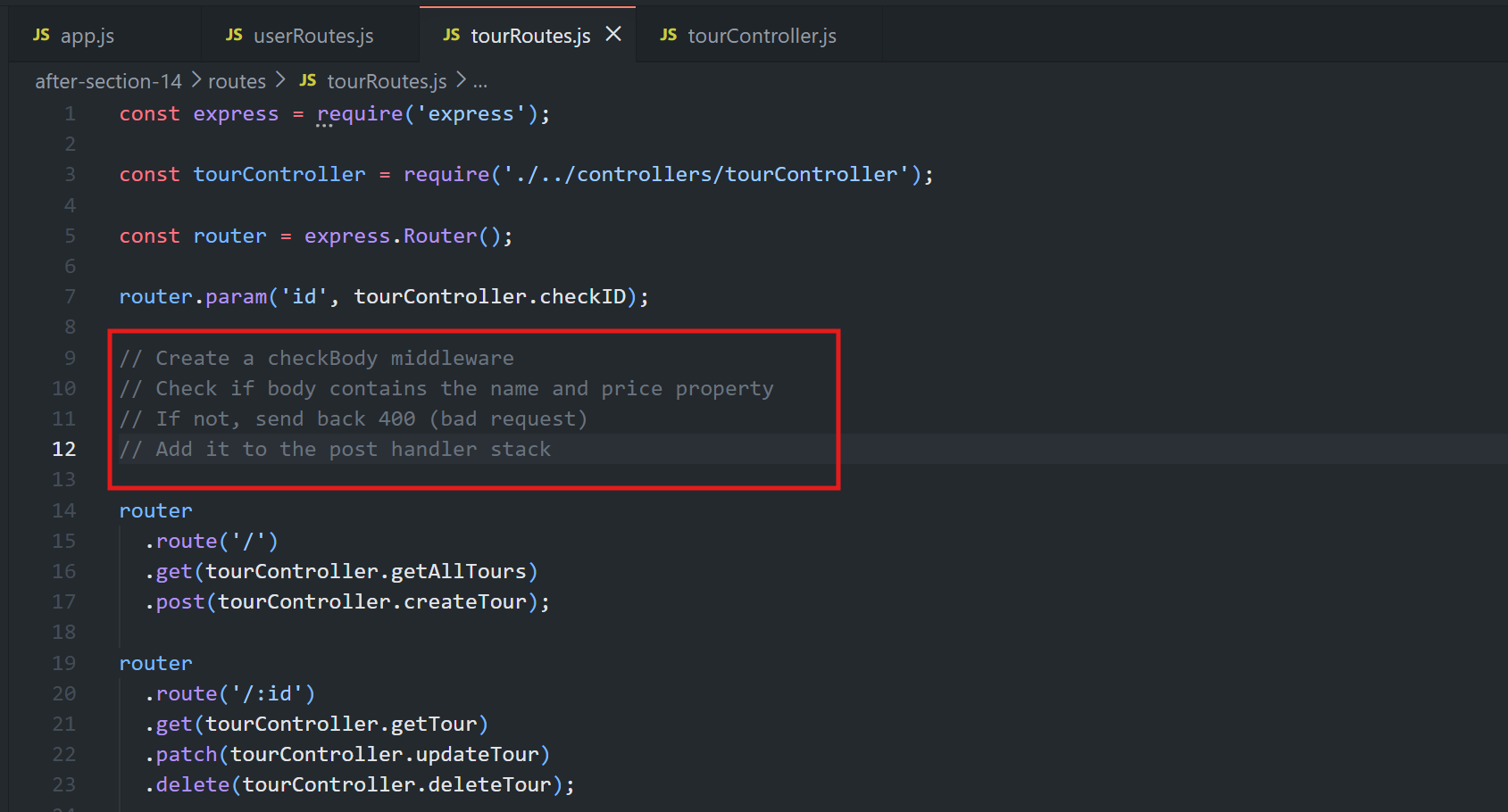
🔹 Step 1: Chaining Middleware Syntax
router
  .route('/')
  .get(tourController.getAllTours)
  .post(checkBody, tourController.createTour);
💡 Why this works:
🔗 Multiple functions can simply be passed as additional arguments, separated by commas.
➡️ Express runs them in order:
checkBodyexecutes first, and only if it callsnext()doescreateTourrun afterward.⚙️ This is the same chaining mechanism already used implicitly with global middleware — just applied directly at the route level, for a single route.
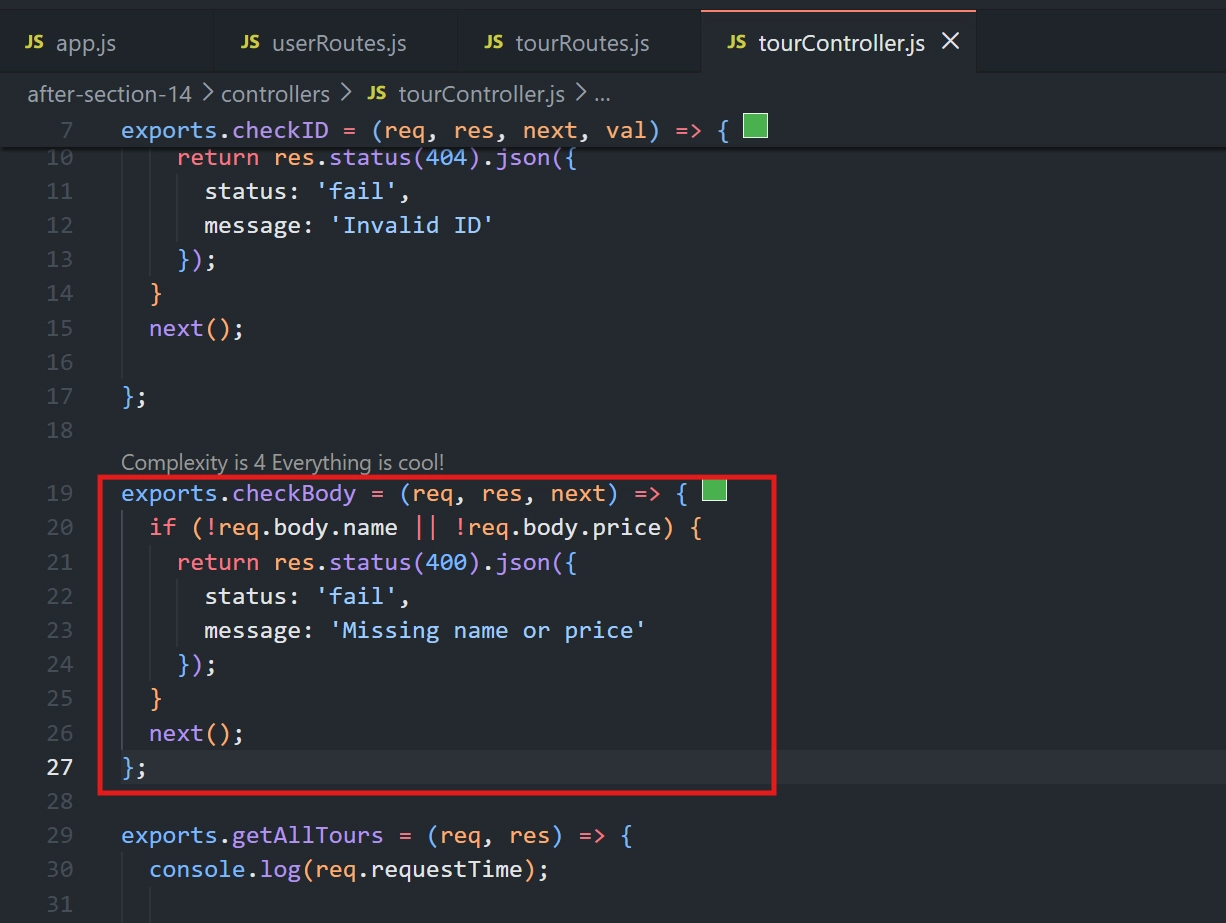
🔹 Step 2: Implementing checkBody in tourController.js file:
exports.checkBody = (req, res, next) => {
  if (!req.body.name || !req.body.price) {
    return res.status(400).json({
      status: 'fail',
      message: 'Missing name or price'
    });
  }
  next();
};
💡 Why each part works:
✅
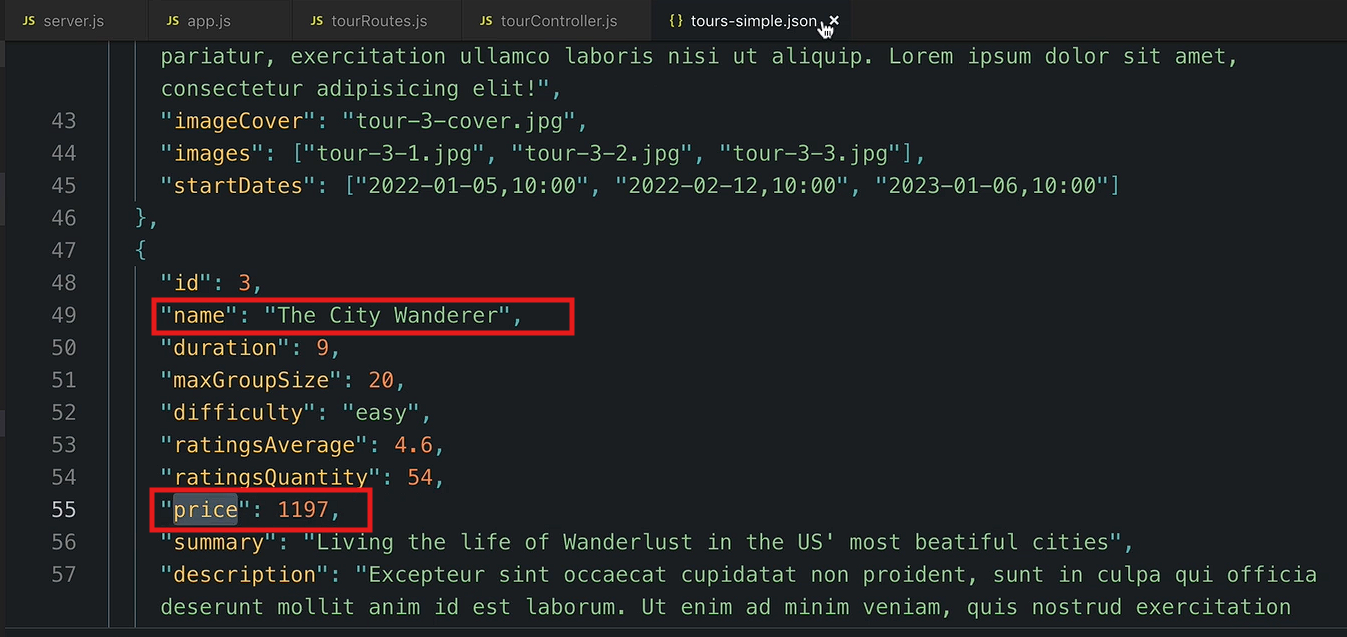
!req.body.name || !req.body.pricechecks if either required field is missing.
🚫
400 Bad Requestindicates the client sent invalid data.⚠️
status: 'fail'is used for client-side errors.🛑
returnprevents the code from continuing after sending the response.➡️
next()runs only when bothnameandpriceare provided.
🔹 Step 3: Wiring It into the Router in tourRoutes.js file:
router
  .route('/')
  .get(tourController.getAllTours)
  .post(tourController.checkBody, tourController.createTour);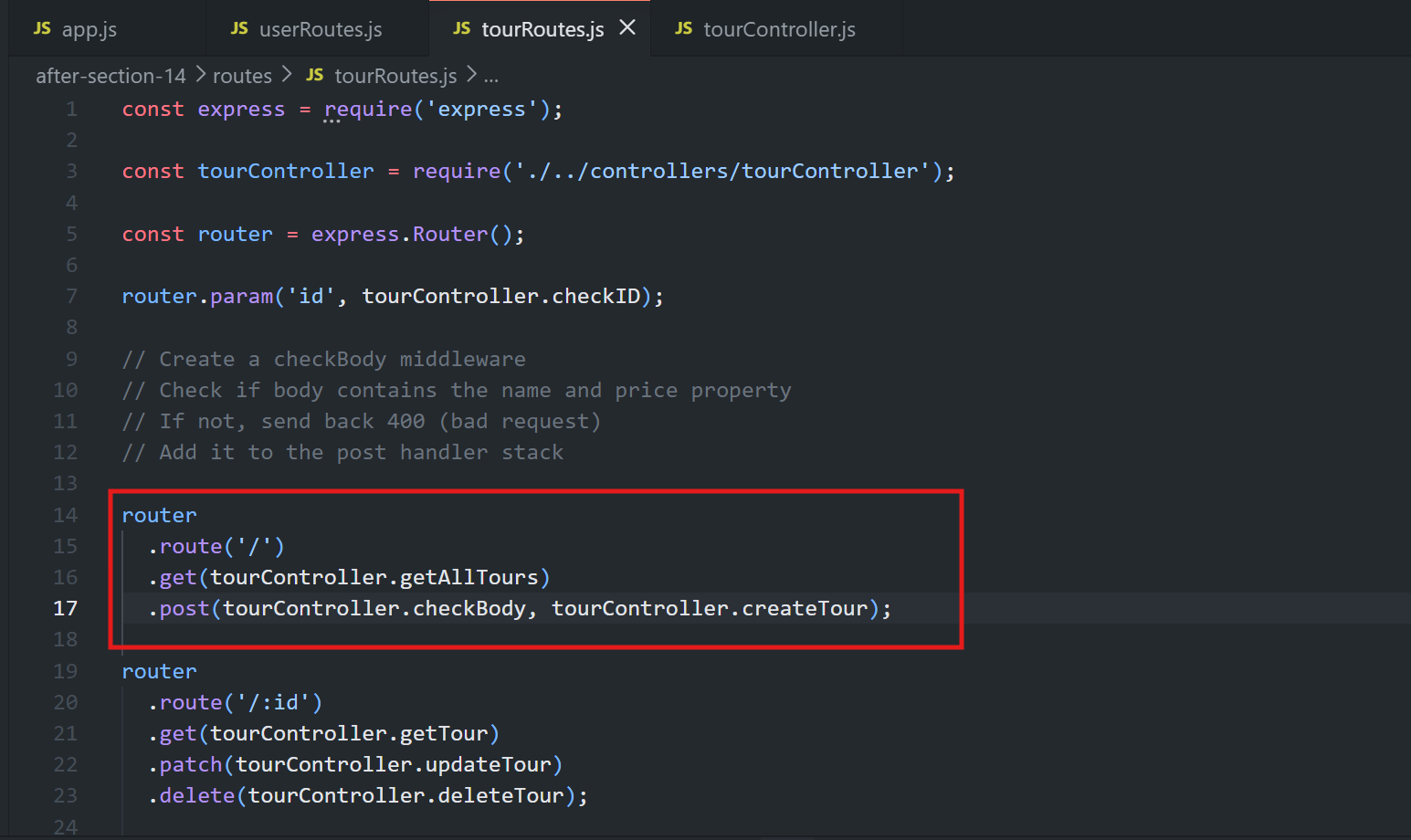
🔹 Step 4: Testing
🧪 Test 1 — Missing Price
📤 Sending a POST request with name, duration, and difficulty, but no price →
✅ Response:
🚫 400 Bad Request
💬
"Missing name or price"
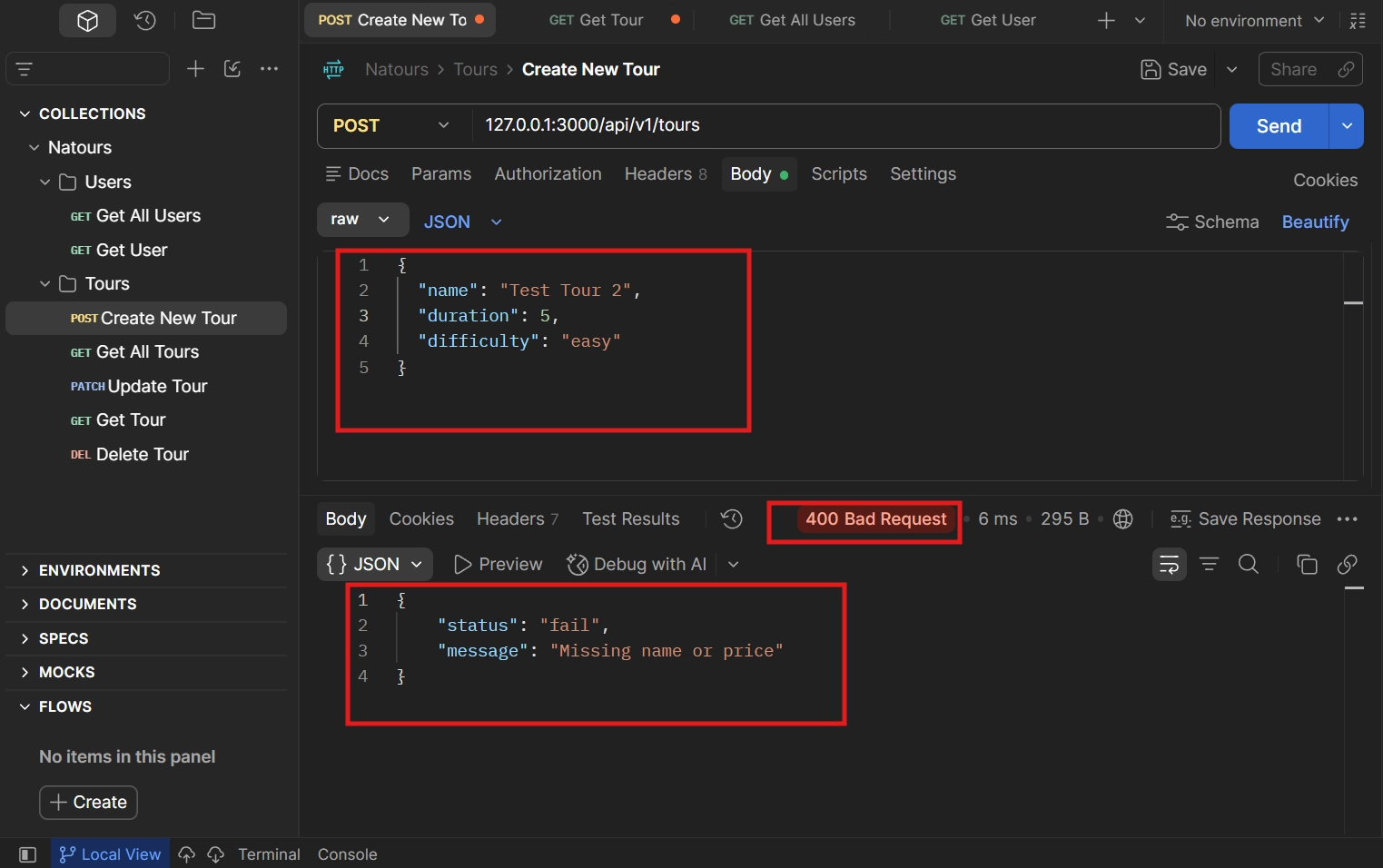
This confirms checkBody ran, caught the missing field, and stopped the request from ever reaching createTour.
🧪 Test 2 — With Price Included
📤 Sending the same request but now including a price value →
✅ checkBody's condition is no longer true, so it calls next(), which passes control to createTour
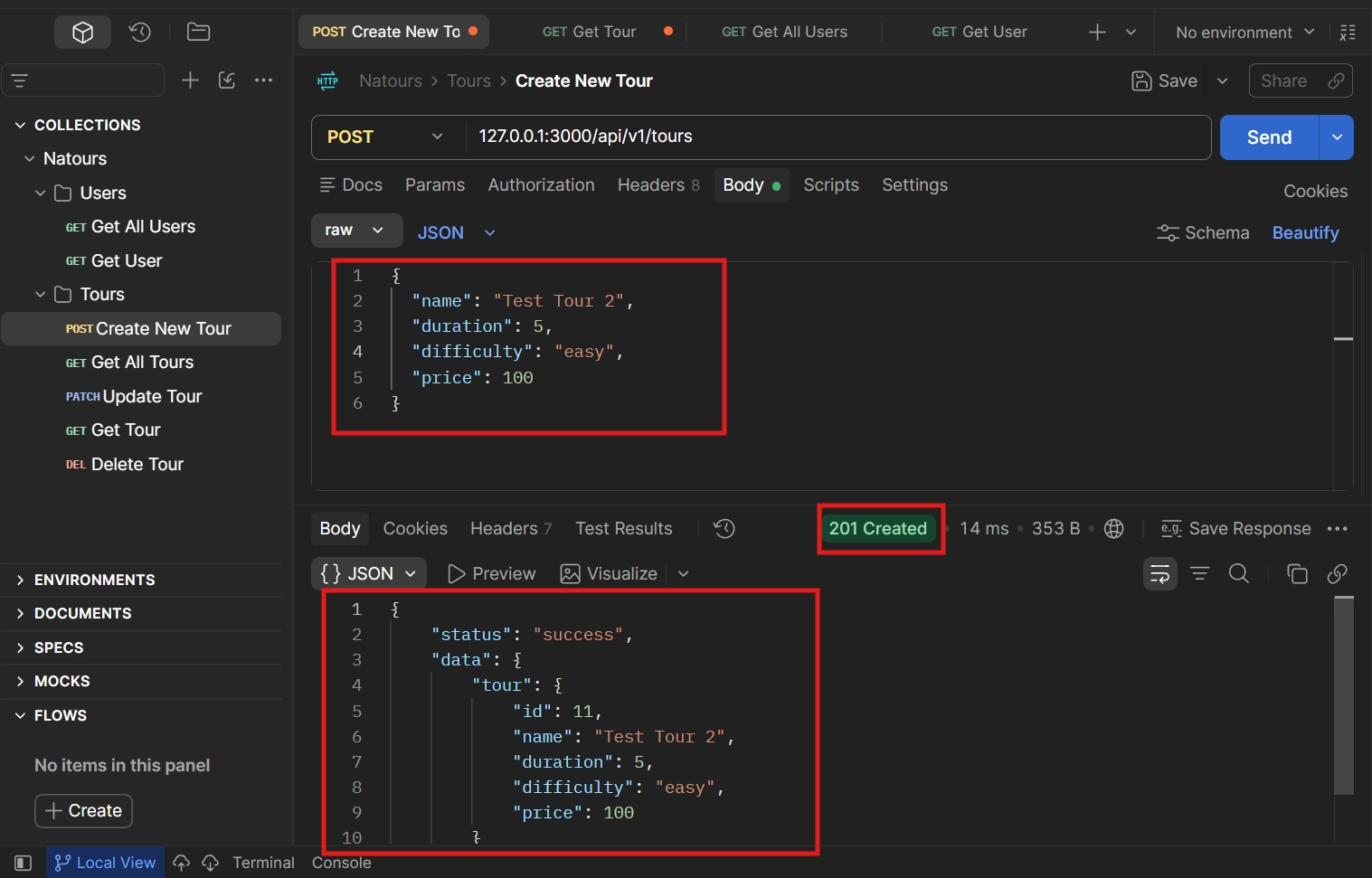
🎉 The tour is created successfully, returning:
✅ 201 Created
💡 Why This Pattern Matters
This same chaining approach can be extended for many other use cases before a resource is created or modified — for example:
🔐 Checking if a user is logged in.
🛡️ Checking if a user has the correct permissions/access rights to perform the action.
✅ Any other validation that shouldn't clutter the main handler.
🎯 Core Principle
Logic unrelated to a handler's core responsibility should live in separate middleware functions, chained before the handler — keeping each handler function narrowly focused on doing exactly one thing (e.g. createTour should only be concerned with creating a tour, not validating input).
✅ Key Takeaway
🔗 A route can have multiple middleware functions, executed in the order they're listed.
➡️ Each middleware must call
next()to continue the request.⚠️ Use
returnwhen sending a response to prevent further execution.⚙️ Express uses this middleware chaining pattern throughout the app.
🚀 The same approach will be used later for features like authentication and authorization.
<div class="infographic-vscodeterm" id="vt">
<style>
.infographic-vscodeterm {
--ink: #1a1a1a;
--ink-soft: #5c5c5c;
--paper: #ffffff;
--paper-alt: #f0ece4;
--accent: #2563eb;
--accent-deep: #1942a8;
--accent-soft: #e3ebfd;
--line: #ddd6c9;
--radius: 8px;
--display-font: 'Fraunces', Georgia, serif;
--body-font: 'Inter', system-ui, sans-serif;
--mono-font: 'IBM Plex Mono', monospace;
max-width: 880px;
margin: 0 auto;
box-sizing: border-box;
background: transparent;
color: var(--ink);
font-family: var(--body-font);
}
.infographic-vscodeterm[data-theme="dark"] {
--ink: #e8e6e1;
--ink-soft: #9a968c;
--paper: #13171f;
--paper-alt: #1c212b;
--accent: #5b8def;
--accent-deep: #8fb4ff;
--accent-soft: #20293f;
--line: #2c313d;
}
.infographic-vscodeterm * { box-sizing: border-box; min-width: 0; }
.vt-eyebrow {
font-family: var(--mono-font); font-size: 0.72rem; letter-spacing: 0.1em;
text-transform: uppercase; color: var(--accent); margin: 0 0 0.45rem;
display: flex; align-items: center; justify-content: center; gap: 0.4rem;
}
.vt-eyebrow::before { content: ""; width: 14px; height: 2px; background: var(--accent); display: inline-block; }
.vt-title {
font-family: var(--display-font); font-size: clamp(1.5rem, 4vw, 2.3rem); text-align: center;
margin: 0 0 0.5rem; line-height: 1.14; letter-spacing: -0.01em;
}
.vt-sub { color: var(--ink-soft); font-size: 0.95rem; text-align: center; margin: 0 0 1.7rem; }
/* ===== VS Code window — fixed dark theme regardless of page mode ===== */
.vt-window { border-radius: 8px; overflow: hidden; box-shadow: 0 16px 40px -14px rgba(0,0,0,0.45); border: 1px solid #1e1e1e; font-family: var(--mono-font); }
.vt-titlebar { background: #323233; display: flex; align-items: center; padding: 0.5rem 0.8rem; position: relative; }
.vt-dots { display: flex; gap: 0.4rem; }
.vt-dots span { width: 10px; height: 10px; border-radius: 50%; display: block; }
.vt-dots span:nth-child(1) { background: #ff5f56; }
.vt-dots span:nth-child(2) { background: #ffbd2e; }
.vt-dots span:nth-child(3) { background: #27c93f; }
.vt-titlebar-text { position: absolute; left: 50%; transform: translateX(-50%); font-size: 0.72rem; color: #cccccc; }
.vt-body { display: flex; height: 416px; }
.vt-resize-h { width: 5px; cursor: col-resize; background: transparent; flex-shrink: 0; transition: background 0.15s; touch-action: none; }
.vt-resize-h:hover, .vt-resize-h.is-dragging { background: #0078d4; }
.vt-resize-v { height: 5px; cursor: row-resize; background: transparent; flex-shrink: 0; transition: background 0.15s; touch-action: none; }
.vt-resize-v:hover, .vt-resize-v.is-dragging { background: #0078d4; }
.vt-window-resize {
height: 9px; background: #252526; cursor: row-resize; display: flex; align-items: center;
justify-content: center; border-top: 1px solid #1e1e1e; touch-action: none;
}
.vt-window-resize span { width: 30px; height: 3px; border-radius: 2px; background: #4a4a52; }
.vt-window-resize:hover span, .vt-window-resize.is-dragging span { background: #0078d4; }
.vt-toggle-btn {
background: none; border: none; color: #9a9a9a; cursor: pointer; display: flex; align-items: center;
padding: 0.3rem; border-radius: 3px; flex-shrink: 0;
}
.vt-toggle-btn:hover { background: #2a2d2e; color: #fff; }
.vt-toggle-btn svg { width: 13px; height: 13px; }
.vt-sidebar.is-hidden { width: 0 !important; overflow: hidden; border-right: none; }
.vt-terminal.is-collapsed { height: auto !important; }
.vt-terminal.is-collapsed .vt-term-body { display: none; }
.vt-terminal.is-collapsed .vt-term-toggle svg { transform: rotate(-90deg); }
.vt-activitybar { width: 40px; background: #333333; display: flex; flex-direction: column; align-items: center; padding-top: 0.7rem; gap: 1.1rem; flex-shrink: 0; }
.vt-activitybar svg { width: 18px; height: 18px; opacity: 0.55; }
.vt-activitybar svg.is-on { opacity: 1; }
.vt-sidebar { width: 180px; background: #252526; flex-shrink: 0; overflow-y: auto; border-right: 1px solid #1e1e1e; }
.vt-sidebar-head { font-size: 0.65rem; font-weight: 700; letter-spacing: 0.06em; color: #bbbbbb; padding: 0.6rem 0.8rem 0.3rem; }
.vt-sidebar-root { font-size: 0.74rem; color: #cccccc; padding: 0.2rem 0.7rem; display: flex; align-items: center; gap: 0.3rem; }
.vt-sidebar-folder { font-size: 0.74rem; color: #cccccc; padding: 0.2rem 0.7rem 0.2rem 1.4rem; display: flex; align-items: center; gap: 0.3rem; }
.vt-sidebar-folder.lvl2 { padding-left: 2.6rem; }
.vt-sidebar-folder.is-highlighted { color: #ffffff; font-weight: 600; }
.vt-folder-toggle {
background: none; border: none; font: inherit; width: 100%; text-align: left; cursor: pointer;
font-size: 0.74rem; color: #cccccc; padding: 0.2rem 0.7rem 0.2rem 1.4rem; display: flex; align-items: center; gap: 0.3rem;
}
.vt-folder-toggle:hover { background: #2a2d2e; }
.vt-folder-toggle.is-highlighted { color: #ffffff; font-weight: 600; }
.vt-folder-children.is-collapsed { display: none; }
.vt-row {
display: flex; align-items: center; gap: 0.35rem; width: 100%; background: none; border: none;
color: #cccccc; font: inherit; font-size: 0.74rem; padding: 0.24rem 0.7rem 0.24rem 1.4rem;
cursor: pointer; text-align: left; border-left: 2px solid transparent;
}
.vt-row.lvl2 { padding-left: 3.4rem; }
.vt-row:hover { background: #2a2d2e; }
.vt-row.is-selected { background: #37373d; border-left-color: #0078d4; }
.vt-row-disabled { cursor: default; opacity: 0.78; }
.vt-row-disabled:hover { background: none; }
.vt-badge { width: 15px; height: 15px; border-radius: 3px; flex-shrink: 0; display: flex; align-items: center; justify-content: center; font-size: 0.44rem; font-weight: 700; color: #1a1a1a; background: #29b6f6; }
.vt-badge.json { background: #cbcb41; font-size: 0.5rem; }
.vt-main { flex: 1; display: flex; flex-direction: column; min-width: 0; }
.vt-tabbar { display: flex; background: #252526; border-bottom: 1px solid #1e1e1e; overflow-x: auto; }
.vt-tab {
display: flex; align-items: center; gap: 0.35rem; background: #1e1e1e; color: #808080; font: inherit;
font-size: 0.72rem; padding: 0.45rem 0.8rem; border: none; border-right: 1px solid #1e1e1e;
border-top: 2px solid transparent; cursor: pointer; white-space: nowrap;
}
.vt-tab.is-active { color: #d4d4d4; border-top-color: #0078d4; background: #1e1e1e; }
.vt-tab .vt-badge { width: 13px; height: 13px; font-size: 0.4rem; }
.vt-tab-close {
display: flex; align-items: center; justify-content: center; width: 14px; height: 14px;
border-radius: 3px; font-size: 0.85rem; line-height: 1; color: #9a9a9a; margin-left: 0.1rem;
}
.vt-tab-close:hover { background: #4a4a52; color: #fff; }
.vt-code-wrap { flex: 1; background: #1e1e1e; overflow: auto; padding: 0.85rem 1rem; }
.vt-code-wrap pre { margin: 0; }
.vt-code-wrap code { font-family: var(--mono-font); font-size: 0.72rem; line-height: 1.7; color: #d4d4d8; white-space: pre; }
.tok-kw { color: #c678dd; }
.tok-tag { color: #e06c75; }
.tok-type { color: #61afef; }
.tok-attr { color: #d19a66; }
.tok-str { color: #98c379; }
.tok-expr { color: #56b6c2; }
.tok-punc { color: #6b7280; }
.vt-flash { background: rgba(220,38,38,0.22); }
/* ===== terminal ===== */
.vt-terminal { background: #181818; border-top: 1px solid #2c2c2c; display: flex; flex-direction: column; height: 150px; flex-shrink: 0; }
.vt-term-head { display: flex; align-items: center; gap: 0.4rem; font-size: 0.62rem; letter-spacing: 0.05em; color: #9a9a9a; padding: 0.35rem 0.8rem; border-bottom: 1px solid #262626; text-transform: uppercase; }
.vt-term-body { flex: 1; overflow-y: auto; padding: 0.5rem 0.9rem; font-size: 0.72rem; line-height: 1.65; }
.vt-term-line { color: #d4d4d4; white-space: pre; opacity: 0; transform: translateY(2px); animation: vt-line-in 0.25s ease forwards; }
@keyframes vt-line-in { to { opacity: 1; transform: none; } }
.vt-term-line.is-cmd { color: #7ee787; }
.vt-term-line.is-ok { color: #7ee787; font-weight: 600; }
.vt-term-line.is-warn { color: #e5c07b; font-weight: 600; }
.vt-term-line.is-error { color: #ff7b72; font-weight: 600; }
.vt-term-prompt { color: #7ee787; }
.vt-run-row { display: flex; align-items: center; gap: 0.5rem; margin-top: 0.2rem; }
.vt-run-btn {
font: inherit; font-size: 0.68rem; font-weight: 600; color: #1a1a1a; background: #7ee787;
border: none; border-radius: 4px; padding: 0.3rem 0.7rem; cursor: pointer; display: flex; align-items: center; gap: 0.3rem;
}
.vt-run-btn:disabled { opacity: 0.5; cursor: default; }
.vt-run-btn svg { width: 9px; height: 9px; }
.vt-run-hint { color: #6b7280; font-size: 0.68rem; }
@media (max-width: 620px) {
.vt-sidebar { width: 140px; }
.vt-body { height: 442px; }
}
@media (max-width: 480px) { .vt-activitybar { display: none; } }
/* ===== browser output ===== */
.vt-output-label {
font-family: var(--mono-font); font-size: 0.68rem; letter-spacing: 0.1em; text-transform: uppercase;
color: var(--ink-soft); text-align: center; margin: 1.5rem 0 0.7rem;
}
.vt-browser {
border: 1px solid var(--line); border-radius: var(--radius); overflow: hidden; max-width: 660px; margin: 0 auto;
box-shadow: 0 10px 24px -12px rgba(26,26,26,0.18);
opacity: 0; transform: translateY(8px); transition: opacity 0.4s ease, transform 0.4s ease; pointer-events: none;
}
.vt-browser.is-shown { opacity: 1; transform: none; pointer-events: auto; }
.vt-browser-bar { background: #e9e9e9; padding: 0.5rem 0.7rem; display: flex; align-items: center; gap: 0.5rem; flex-wrap: wrap; }
.vt-browser-bar .vt-dots span { width: 8px; height: 8px; }
.vt-method-group { display: flex; gap: 0.3rem; flex-shrink: 0; }
.vt-resource-group { display: flex; gap: 0.3rem; flex-shrink: 0; margin-right: 0.4rem; }
.vt-resource-btn {
font-family: var(--mono-font); font-size: 0.6rem; font-weight: 700; letter-spacing: 0.03em;
border: 1px solid transparent; border-radius: 4px; padding: 0.18rem 0.5rem; cursor: pointer;
background: #fff; color: #888;
}
.vt-resource-btn.is-active { background: #f3e8ff; color: #7e22ce; border-color: #e2b8ff; }
.vt-method-btn {
font-family: var(--mono-font); font-size: 0.6rem; font-weight: 700; letter-spacing: 0.03em;
border: 1px solid transparent; border-radius: 4px; padding: 0.18rem 0.4rem; cursor: pointer;
background: #fff; color: #888;
}
.vt-method-btn[data-method="get"].is-active { background: #e3ebfd; color: #1942a8; border-color: #b7cbfa; }
.vt-method-btn[data-method="post"].is-active { background: #ffe9d6; color: #b5540a; border-color: #f6c393; }
.vt-browser-url { font-family: var(--mono-font); font-size: 0.65rem; color: #555; background: #fff; border-radius: 4px; padding: 0.2rem 0.5rem; flex: 1; min-width: 180px; white-space: nowrap; overflow-x: auto; }
.vt-browser-page { background: #fff; padding: 1rem 1.1rem; text-align: left; font-family: var(--mono-font); }
.vt-resp { display: none; }
.vt-resp.is-active { display: block; }
.vt-post-label { font-size: 0.62rem; letter-spacing: 0.05em; text-transform: uppercase; color: #888; margin: 0 0 0.35rem; }
.vt-post-label-resp { margin-top: 0.85rem; color: #1a7f37; }
.vt-chip-group { display: flex; gap: 0.4rem; margin-bottom: 0.75rem; }
.vt-chip {
font-family: var(--mono-font); font-size: 0.62rem; border: 1px solid #ddd; border-radius: 12px;
padding: 0.16rem 0.6rem; cursor: pointer; background: #f4f4f4; color: #555;
}
.vt-chip.is-active { background: #1a1a1a; color: #fff; border-color: #1a1a1a; }
.vt-json-pre { margin: 0; font-size: 0.76rem; line-height: 1.65; white-space: pre-wrap; word-break: break-word; }
.vt-json-key { color: #881391; }
.vt-json-str { color: #c41a16; }
.vt-json-punc { color: #1a1a1a; }
.vt-json-null { color: #0000ff; }
.vt-highlight-field { border-radius: 3px; padding: 0 3px; margin: 0 -3px; }
.vt-output-placeholder { text-align: center; font-size: 0.82rem; color: var(--ink-soft); }
.vt-takeaway {
margin-top: 1.7rem; padding: 0.95rem 1.2rem; background: var(--accent-soft); border-left: 3px solid var(--accent);
border-radius: 4px; font-size: 0.9rem; color: var(--ink); line-height: 1.5; max-width: 660px; margin-left: auto; margin-right: auto;
}
.vt-takeaway b { color: var(--accent-deep); }
@media (prefers-reduced-motion: reduce) {
.infographic-vscodeterm *, .infographic-vscodeterm *::before, .infographic-vscodeterm *::after {
transition-duration: 0.001ms !important; animation-duration: 0.001ms !important;
}
}
</style>
<div class="vt-window">
<div class="vt-titlebar">
<div class="vt-dots"><span></span><span></span><span></span></div>
<div class="vt-titlebar-text">project — Visual Studio Code</div>
</div>
<div class="vt-body">
<div class="vt-activitybar">
<svg class="is-on" viewBox="0 0 24 24" fill="none" aria-hidden="true"><rect x="3" y="4" width="7" height="7" rx="1" stroke="#fff" stroke-width="1.6"/><rect x="14" y="4" width="7" height="7" rx="1" stroke="#fff" stroke-width="1.6"/><rect x="3" y="15" width="7" height="7" rx="1" stroke="#fff" stroke-width="1.6"/><rect x="14" y="15" width="7" height="7" rx="1" stroke="#fff" stroke-width="1.6"/></svg>
<svg viewBox="0 0 24 24" fill="none" aria-hidden="true"><circle cx="10" cy="10" r="6.5" stroke="#fff" stroke-width="1.6"/><line x1="15" y1="15" x2="20" y2="20" stroke="#fff" stroke-width="1.6" stroke-linecap="round"/></svg>
</div>
<div class="vt-sidebar">
<div class="vt-sidebar-head">EXPLORER</div>
<div class="vt-sidebar-root">▾ PROJECT</div>
<button class="vt-folder-toggle is-highlighted" id="vtControllersToggle" type="button"><span id="vtControllersChevron">▸</span> controllers</button>
<div class="vt-folder-children is-collapsed" id="vtControllersChildren">
<button class="vt-row lvl2" data-file="tourController" type="button"><span class="vt-badge">JS</span><span>tourController.js</span></button>
<button class="vt-row lvl2" data-file="userController" type="button"><span class="vt-badge">JS</span><span>userController.js</span></button>
</div>
<button class="vt-folder-toggle is-highlighted" id="vtRoutesToggle" type="button"><span id="vtRoutesChevron">▸</span> routes</button>
<div class="vt-folder-children is-collapsed" id="vtRoutesChildren">
<button class="vt-row lvl2" data-file="tourRoutes" type="button"><span class="vt-badge">JS</span><span>tourRoutes.js</span></button>
<button class="vt-row lvl2" data-file="userRoutes" type="button"><span class="vt-badge">JS</span><span>userRoutes.js</span></button>
</div>
<button class="vt-folder-toggle is-highlighted" id="vtDevDataToggle" type="button"><span id="vtDevDataChevron">▸</span> dev-data</button>
<div class="vt-folder-children is-collapsed" id="vtDevDataChildren">
<div class="vt-sidebar-folder lvl2 is-highlighted">▾ data</div>
<button class="vt-row lvl2" data-file="tours" type="button"><span class="vt-badge json">{}</span><span>tours-simple.json</span></button>
</div>
<div class="vt-sidebar-folder">▸ node_modules</div>
<button class="vt-row is-selected" data-file="app" type="button"><span class="vt-badge">JS</span><span>app.js</span></button>
<button class="vt-row" data-file="server" type="button"><span class="vt-badge">JS</span><span>server.js</span></button>
<button class="vt-row vt-row-disabled" type="button"><span class="vt-badge json">{}</span><span>package-lock.json</span></button>
<button class="vt-row" data-file="packageJson" type="button"><span class="vt-badge json">{}</span><span>package.json</span></button>
</div>
<div class="vt-resize-h" id="vtSidebarHandle" title="Drag to resize sidebar"></div>
<div class="vt-main">
<div class="vt-tabbar" id="vtTabbar">
<button class="vt-toggle-btn" id="vtToggleSidebar" type="button" aria-label="Toggle sidebar" title="Toggle sidebar">
<svg viewBox="0 0 16 16" fill="none" aria-hidden="true"><rect x="1.5" y="2" width="13" height="12" rx="1.5" stroke="currentColor" stroke-width="1.3"/><line x1="6" y1="2" x2="6" y2="14" stroke="currentColor" stroke-width="1.3"/></svg>
</button>
<button class="vt-tab is-active" data-file="app" type="button"><span class="vt-badge">JS</span><span>app.js</span></button>
<button class="vt-tab" data-file="server" type="button"><span class="vt-badge">JS</span><span>server.js</span></button>
</div>
<div class="vt-code-wrap">
<pre><code id="vtCode"></code></pre>
</div>
<div class="vt-resize-v" id="vtTerminalHandle" title="Drag to resize terminal"></div>
<div class="vt-terminal">
<div class="vt-term-head">
<button class="vt-toggle-btn vt-term-toggle" id="vtToggleTerminal" type="button" aria-label="Toggle terminal" title="Toggle terminal">
<svg viewBox="0 0 16 16" fill="none" aria-hidden="true"><path d="M4 6l4 4 4-4" stroke="currentColor" stroke-width="1.6" stroke-linecap="round" stroke-linejoin="round"/></svg>
</button>
<span>Terminal</span>
</div>
<div class="vt-term-body">
<div id="vtTermLines"><div class="vt-term-line" style="animation-delay:0s;"><span class="vt-term-prompt">$</span> </div></div>
<div class="vt-run-row">
<button class="vt-run-btn" id="vtRunBtn" type="button">
<svg viewBox="0 0 12 12" aria-hidden="true"><path d="M2.5 1.5v9l7-4.5z" fill="currentColor"/></svg>
<span id="vtRunLabel">npm start</span>
</button>
<span class="vt-run-hint" id="vtRunHint">starts the API</span>
</div>
</div>
</div>
</div>
</div>
<div class="vt-window-resize" id="vtWindowHandle" title="Drag to resize window"><span></span></div>
</div>
<div class="vt-output-label">Output</div>
<div id="vtOutputArea">
<p class="vt-output-placeholder">Run <code style="font-family:var(--mono-font)">npm start</code> above, then try <code style="font-family:var(--mono-font)">GET</code> or <code style="font-family:var(--mono-font)">POST /api/v1/tours</code>.</p>
<div class="vt-browser" id="vtBrowser">
<div class="vt-browser-bar">
<div class="vt-resource-group" id="vtResourceGroup">
<button class="vt-resource-btn is-active" data-resource="tours" type="button">Tours</button>
<button class="vt-resource-btn" data-resource="users" type="button">Users</button>
</div>
<div class="vt-method-group">
<button class="vt-method-btn is-active" id="vtMethodGet" data-method="get" type="button">GET</button>
<button class="vt-method-btn" id="vtMethodId" data-method="id" type="button">GET /:id</button>
<button class="vt-method-btn" id="vtMethodPost" data-method="post" type="button">POST</button>
<button class="vt-method-btn" id="vtMethodPatch" data-method="patch" type="button">PATCH /:id</button>
<button class="vt-method-btn" id="vtMethodDelete" data-method="delete" type="button">DELETE /:id</button>
</div>
<div class="vt-browser-url" id="vtBrowserUrl">localhost:3000/api/v1/tours</div>
</div>
<div class="vt-browser-page">
<div class="vt-resp is-active" id="vtRespGet">
<pre class="vt-json-pre"><span class="vt-json-punc">{</span>
<span class="vt-json-key">"status"</span><span class="vt-json-punc">:</span> <span class="vt-json-str">"success"</span><span class="vt-json-punc">,</span>
<span class="vt-highlight-field" id="vtRequestedAtLine"><span class="vt-json-key">"requestedAt"</span><span class="vt-json-punc">:</span> <span class="vt-json-str" id="vtRequestedAtValue">"2026-08-20T10:12:03.114Z"</span></span><span class="vt-json-punc">,</span>
<span class="vt-json-key">"results"</span><span class="vt-json-punc">:</span> 9<span class="vt-json-punc">,</span>
<span class="vt-json-key">"data"</span><span class="vt-json-punc">:</span> <span class="vt-json-punc">{</span>
<span class="vt-json-key">"tours"</span><span class="vt-json-punc">:</span> <span class="vt-json-punc">[</span>
<span class="vt-json-punc">{</span> <span class="vt-json-key">"id"</span><span class="vt-json-punc">:</span> 0<span class="vt-json-punc">,</span> <span class="vt-json-key">"name"</span><span class="vt-json-punc">:</span> <span class="vt-json-str">"The Forest Hiker"</span><span class="vt-json-punc">, </span>…<span class="vt-json-punc"> },</span>
<span class="vt-json-punc">{</span> <span class="vt-json-key">"id"</span><span class="vt-json-punc">:</span> 1<span class="vt-json-punc">,</span> <span class="vt-json-key">"name"</span><span class="vt-json-punc">:</span> <span class="vt-json-str">"The Sea Explorer"</span><span class="vt-json-punc">, </span>…<span class="vt-json-punc"> },</span>
<span class="vt-json-punc" style="opacity:0.6">// 7 more tours</span>
<span class="vt-json-punc">]</span>
<span class="vt-json-punc">}</span>
<span class="vt-json-punc">}</span></pre>
</div>
<div class="vt-resp" id="vtRespId">
<div class="vt-chip-group" id="vtIdChips">
<button class="vt-chip is-active" data-id="valid" type="button">id: 2 (valid)</button>
<button class="vt-chip" data-id="invalid" type="button">id: 99 (invalid)</button>
</div>
<div class="vt-resp is-active" id="vtIdValid">
<pre class="vt-json-pre"><span class="vt-json-punc">{</span>
<span class="vt-json-key">"status"</span><span class="vt-json-punc">:</span> <span class="vt-json-str">"success"</span><span class="vt-json-punc">,</span>
<span class="vt-json-key">"data"</span><span class="vt-json-punc">:</span> <span class="vt-json-punc">{</span>
<span class="vt-json-key">"tour"</span><span class="vt-json-punc">:</span> <span class="vt-json-punc">{</span>
<span class="vt-json-key">"id"</span><span class="vt-json-punc">:</span> 2<span class="vt-json-punc">,</span>
<span class="vt-json-key">"name"</span><span class="vt-json-punc">:</span> <span class="vt-json-str">"The Snow Adventurer"</span><span class="vt-json-punc">,</span>
<span class="vt-json-key">"duration"</span><span class="vt-json-punc">:</span> 4<span class="vt-json-punc">,</span>
<span class="vt-json-key">"difficulty"</span><span class="vt-json-punc">:</span> <span class="vt-json-str">"difficult"</span><span class="vt-json-punc">, </span>…
<span class="vt-json-punc">}</span>
<span class="vt-json-punc">}</span>
<span class="vt-json-punc">}</span></pre>
</div>
<div class="vt-resp" id="vtIdInvalid">
<pre class="vt-json-pre"><span class="vt-json-punc">{</span>
<span class="vt-json-key">"status"</span><span class="vt-json-punc">:</span> <span class="vt-json-str">"fail"</span><span class="vt-json-punc">,</span>
<span class="vt-json-key">"message"</span><span class="vt-json-punc">:</span> <span class="vt-json-str">"Invalid ID"</span>
<span class="vt-json-punc">}</span></pre>
</div>
</div>
<div class="vt-resp" id="vtRespPost">
<div class="vt-chip-group" id="vtPostChips">
<button class="vt-chip is-active" data-id="valid" type="button">valid body</button>
<button class="vt-chip" data-id="invalid" type="button">missing price</button>
</div>
<div class="vt-resp is-active" id="vtPostValid">
<div class="vt-post-label">Request Body</div>
<pre class="vt-json-pre"><span class="vt-json-punc">{</span>
<span class="vt-json-key">"name"</span><span class="vt-json-punc">:</span> <span class="vt-json-str">"Test Tour"</span><span class="vt-json-punc">,</span>
<span class="vt-json-key">"price"</span><span class="vt-json-punc">:</span> 397<span class="vt-json-punc">,</span>
<span class="vt-json-key">"duration"</span><span class="vt-json-punc">:</span> 10<span class="vt-json-punc">,</span>
<span class="vt-json-key">"difficulty"</span><span class="vt-json-punc">:</span> <span class="vt-json-str">"easy"</span>
<span class="vt-json-punc">}</span></pre>
<div class="vt-post-label vt-post-label-resp">Response · 201 Created</div>
<pre class="vt-json-pre"><span class="vt-json-punc">{</span>
<span class="vt-json-key">"status"</span><span class="vt-json-punc">:</span> <span class="vt-json-str">"success"</span><span class="vt-json-punc">,</span>
<span class="vt-json-key">"data"</span><span class="vt-json-punc">:</span> <span class="vt-json-punc">{</span>
<span class="vt-json-key">"tour"</span><span class="vt-json-punc">:</span> <span class="vt-json-punc">{</span>
<span class="vt-json-key">"id"</span><span class="vt-json-punc">:</span> 9<span class="vt-json-punc">,</span>
<span class="vt-json-key">"name"</span><span class="vt-json-punc">:</span> <span class="vt-json-str">"Test Tour"</span><span class="vt-json-punc">,</span>
<span class="vt-json-key">"price"</span><span class="vt-json-punc">:</span> 397<span class="vt-json-punc">,</span>
<span class="vt-json-key">"duration"</span><span class="vt-json-punc">:</span> 10<span class="vt-json-punc">,</span>
<span class="vt-json-key">"difficulty"</span><span class="vt-json-punc">:</span> <span class="vt-json-str">"easy"</span>
<span class="vt-json-punc">}</span>
<span class="vt-json-punc">}</span>
<span class="vt-json-punc">}</span></pre>
</div>
<div class="vt-resp" id="vtPostInvalid">
<div class="vt-post-label">Request Body</div>
<pre class="vt-json-pre"><span class="vt-json-punc">{</span>
<span class="vt-json-key">"duration"</span><span class="vt-json-punc">:</span> 10<span class="vt-json-punc">,</span>
<span class="vt-json-key">"difficulty"</span><span class="vt-json-punc">:</span> <span class="vt-json-str">"easy"</span>
<span class="vt-json-punc">}</span></pre>
<div class="vt-post-label vt-post-label-resp" style="color:#b91c1c">Response · 400 Bad Request</div>
<pre class="vt-json-pre"><span class="vt-json-punc">{</span>
<span class="vt-json-key">"status"</span><span class="vt-json-punc">:</span> <span class="vt-json-str">"fail"</span><span class="vt-json-punc">,</span>
<span class="vt-json-key">"message"</span><span class="vt-json-punc">:</span> <span class="vt-json-str">"Missing name or price"</span>
<span class="vt-json-punc">}</span></pre>
</div>
</div>
<div class="vt-resp" id="vtRespPatch">
<div class="vt-chip-group" id="vtPatchChips">
<button class="vt-chip is-active" data-id="valid" type="button">id: 2 (valid)</button>
<button class="vt-chip" data-id="invalid" type="button">id: 99 (invalid)</button>
</div>
<div class="vt-resp is-active" id="vtPatchValid">
<pre class="vt-json-pre"><span class="vt-json-punc">{</span>
<span class="vt-json-key">"status"</span><span class="vt-json-punc">:</span> <span class="vt-json-str">"success"</span><span class="vt-json-punc">,</span>
<span class="vt-json-key">"data"</span><span class="vt-json-punc">:</span> <span class="vt-json-punc">{</span>
<span class="vt-json-key">"tour"</span><span class="vt-json-punc">:</span> <span class="vt-json-str">"<Updated tour here...>"</span>
<span class="vt-json-punc">}</span>
<span class="vt-json-punc">}</span></pre>
</div>
<div class="vt-resp" id="vtPatchInvalid">
<pre class="vt-json-pre"><span class="vt-json-punc">{</span>
<span class="vt-json-key">"status"</span><span class="vt-json-punc">:</span> <span class="vt-json-str">"fail"</span><span class="vt-json-punc">,</span>
<span class="vt-json-key">"message"</span><span class="vt-json-punc">:</span> <span class="vt-json-str">"Invalid ID"</span>
<span class="vt-json-punc">}</span></pre>
</div>
</div>
<div class="vt-resp" id="vtRespDelete">
<div class="vt-chip-group" id="vtDeleteChips">
<button class="vt-chip is-active" data-id="valid" type="button">id: 2 (valid)</button>
<button class="vt-chip" data-id="invalid" type="button">id: 99 (invalid)</button>
</div>
<div class="vt-resp is-active" id="vtDeleteValid">
<div class="vt-post-label">Response · 204 No Content</div>
<pre class="vt-json-pre"><span class="vt-json-punc">{</span>
<span class="vt-json-key">"status"</span><span class="vt-json-punc">:</span> <span class="vt-json-str">"success"</span><span class="vt-json-punc">,</span>
<span class="vt-json-key">"data"</span><span class="vt-json-punc">:</span> <span class="vt-json-null">null</span>
<span class="vt-json-punc">}</span></pre>
</div>
<div class="vt-resp" id="vtDeleteInvalid">
<pre class="vt-json-pre"><span class="vt-json-punc">{</span>
<span class="vt-json-key">"status"</span><span class="vt-json-punc">:</span> <span class="vt-json-str">"fail"</span><span class="vt-json-punc">,</span>
<span class="vt-json-key">"message"</span><span class="vt-json-punc">:</span> <span class="vt-json-str">"Invalid ID"</span>
<span class="vt-json-punc">}</span></pre>
</div>
</div>
<div class="vt-resp" id="vtRespUsers">
<pre class="vt-json-pre"><span class="vt-json-punc">{</span>
<span class="vt-json-key">"status"</span><span class="vt-json-punc">:</span> <span class="vt-json-str">"error"</span><span class="vt-json-punc">,</span>
<span class="vt-json-key">"message"</span><span class="vt-json-punc">:</span> <span class="vt-json-str">"This route is not yet defined"</span>
<span class="vt-json-punc">}</span></pre>
</div>
</div>
</div>
</div>
</div>
<link rel="preconnect" href="https://fonts.googleapis.com">
<link href="https://fonts.googleapis.com/css2?family=Fraunces:wght@500;600&family=Inter:wght@400;500;600;700&family=IBM+Plex+Mono:wght@400;500&display=swap" rel="stylesheet">
<script>
(function () {
var root = document.getElementById('vt');
if (!root) return;
/* --- dark mode detection: body attribute > cookie > postMessage > light --- */
function applyDark(dark) {
if (dark) root.setAttribute('data-theme', 'dark');
else root.removeAttribute('data-theme');
}
var bodyAttr = document.body.getAttribute('data-darkmode');
var dark;
if (bodyAttr === 'true') dark = true;
else if (bodyAttr === 'false') dark = false;
else {
var match = document.cookie.match(/(?:^|;\s*)darkMode=([^;]+)/);
dark = match ? match[1] === 'true' : false;
}
applyDark(dark);
window.addEventListener('message', function (e) {
if (e.data && e.data.type === 'darkMode') applyDark(!!e.data.value);
});
/* --- file switching --- */
var files = {
app:
'<span class="tok-kw">const</span> express <span class="tok-punc">=</span> require<span class="tok-punc">(</span><span class="tok-str">\'express\'</span><span class="tok-punc">);</span>\n' +
'<span class="tok-kw">const</span> morgan <span class="tok-punc">=</span> require<span class="tok-punc">(</span><span class="tok-str">\'morgan\'</span><span class="tok-punc">);</span>\n' +
'\n' +
'<span class="tok-kw">const</span> tourRouter <span class="tok-punc">=</span> require<span class="tok-punc">(</span><span class="tok-str">\'./routes/tourRoutes\'</span><span class="tok-punc">);</span>\n' +
'<span class="tok-kw">const</span> userRouter <span class="tok-punc">=</span> require<span class="tok-punc">(</span><span class="tok-str">\'./routes/userRoutes\'</span><span class="tok-punc">);</span>\n' +
'\n' +
'<span class="tok-kw">const</span> app <span class="tok-punc">=</span> express<span class="tok-punc">();</span>\n' +
'<span class="tok-punc">// 1) Middleware</span>\n' +
'\n' +
'app<span class="tok-punc">.</span><span class="tok-attr">use</span><span class="tok-punc">(</span>morgan<span class="tok-punc">(</span><span class="tok-str">\'dev\'</span><span class="tok-punc">));</span>\n' +
'\n' +
'app<span class="tok-punc">.</span><span class="tok-attr">use</span><span class="tok-punc">(</span>express<span class="tok-punc">.</span><span class="tok-attr">json</span><span class="tok-punc">());</span>\n' +
'\n' +
'app<span class="tok-punc">.</span><span class="tok-attr">use</span><span class="tok-punc">((</span>req<span class="tok-punc">,</span> res<span class="tok-punc">,</span> next<span class="tok-punc">) => {</span>\n' +
' console<span class="tok-punc">.</span><span class="tok-attr">log</span><span class="tok-punc">(</span><span class="tok-str">\'Hello from the middleware 👋\'</span><span class="tok-punc">);</span>\n' +
' next<span class="tok-punc">();</span>\n' +
'<span class="tok-punc">});</span>\n' +
'\n' +
'app<span class="tok-punc">.</span><span class="tok-attr">use</span><span class="tok-punc">((</span>req<span class="tok-punc">,</span> res<span class="tok-punc">,</span> next<span class="tok-punc">) => {</span>\n' +
' req<span class="tok-punc">.</span>requestTime <span class="tok-punc">=</span> <span class="tok-kw">new</span> Date<span class="tok-punc">().</span><span class="tok-attr">toISOString</span><span class="tok-punc">();</span>\n' +
' next<span class="tok-punc">();</span>\n' +
'<span class="tok-punc">});</span>\n' +
'\n' +
'<span class="tok-punc">// 3) Routes</span>\n' +
'\n' +
'app<span class="tok-punc">.</span><span class="tok-attr">use</span><span class="tok-punc">(</span><span class="tok-str">\'/api/v1/tours\'</span><span class="tok-punc">,</span> tourRouter<span class="tok-punc">);</span>\n' +
'app<span class="tok-punc">.</span><span class="tok-attr">use</span><span class="tok-punc">(</span><span class="tok-str">\'/api/v1/users\'</span><span class="tok-punc">,</span> userRouter<span class="tok-punc">);</span>\n' +
'\n' +
'module<span class="tok-punc">.</span>exports <span class="tok-punc">=</span> app<span class="tok-punc">;</span>',
server:
'<span class="tok-kw">const</span> app <span class="tok-punc">=</span> require<span class="tok-punc">(</span><span class="tok-str">\'./app\'</span><span class="tok-punc">);</span>\n' +
'\n' +
'<span class="tok-kw">const</span> port <span class="tok-punc">=</span> 3000<span class="tok-punc">;</span>\n' +
'app<span class="tok-punc">.</span><span class="tok-attr">listen</span><span class="tok-punc">(</span>port<span class="tok-punc">, () => {</span>\n' +
' console<span class="tok-punc">.</span><span class="tok-attr">log</span><span class="tok-punc">(</span><span class="tok-expr">`App running on port ${port}...`</span><span class="tok-punc">);</span>\n' +
'<span class="tok-punc">});</span>',
tourRoutes:
'<span class="tok-kw">const</span> express <span class="tok-punc">=</span> require<span class="tok-punc">(</span><span class="tok-str">\'express\'</span><span class="tok-punc">);</span>\n' +
'\n' +
'<span class="tok-kw">const</span> tourController <span class="tok-punc">=</span> require<span class="tok-punc">(</span><span class="tok-str">\'./../controllers/tourController\'</span><span class="tok-punc">);</span>\n' +
'\n' +
'<span class="tok-kw">const</span> router <span class="tok-punc">=</span> express<span class="tok-punc">.</span><span class="tok-attr">Router</span><span class="tok-punc">();</span>\n' +
'\n' +
'router<span class="tok-punc">.</span><span class="tok-attr">param</span><span class="tok-punc">(</span><span class="tok-str">\'id\'</span><span class="tok-punc">,</span> tourController<span class="tok-punc">.</span>checkID<span class="tok-punc">);</span>\n' +
'\n' +
'<span class="tok-punc">// Create a checkBody middleware</span>\n' +
'<span class="tok-punc">// Check if body contains the name and price property</span>\n' +
'<span class="tok-punc">// If not, send back 400 (bad request)</span>\n' +
'<span class="tok-punc">// Add it to the post handler stack</span>\n' +
'\n' +
'router\n' +
' <span class="tok-punc">.</span><span class="tok-attr">route</span><span class="tok-punc">(</span><span class="tok-str">\'/\'</span><span class="tok-punc">)</span>\n' +
' <span class="tok-punc">.</span><span class="tok-attr">get</span><span class="tok-punc">(</span>tourController<span class="tok-punc">.</span>getAllTours<span class="tok-punc">)</span>\n' +
' <span class="tok-punc">.</span><span class="tok-attr">post</span><span class="tok-punc">(</span>tourController<span class="tok-punc">.</span>checkBody<span class="tok-punc">,</span> tourController<span class="tok-punc">.</span>createTour<span class="tok-punc">);</span>\n' +
'\n' +
'router\n' +
' <span class="tok-punc">.</span><span class="tok-attr">route</span><span class="tok-punc">(</span><span class="tok-str">\'/:id\'</span><span class="tok-punc">)</span>\n' +
' <span class="tok-punc">.</span><span class="tok-attr">get</span><span class="tok-punc">(</span>tourController<span class="tok-punc">.</span>getTour<span class="tok-punc">)</span>\n' +
' <span class="tok-punc">.</span><span class="tok-attr">patch</span><span class="tok-punc">(</span>tourController<span class="tok-punc">.</span>updateTour<span class="tok-punc">)</span>\n' +
' <span class="tok-punc">.</span><span class="tok-attr">delete</span><span class="tok-punc">(</span>tourController<span class="tok-punc">.</span>deleteTour<span class="tok-punc">);</span>\n' +
'\n' +
'module<span class="tok-punc">.</span>exports <span class="tok-punc">=</span> router<span class="tok-punc">;</span>',
userRoutes:
'<span class="tok-kw">const</span> express <span class="tok-punc">=</span> require<span class="tok-punc">(</span><span class="tok-str">\'express\'</span><span class="tok-punc">);</span>\n' +
'\n' +
'<span class="tok-kw">const</span> userController <span class="tok-punc">=</span> require<span class="tok-punc">(</span><span class="tok-str">\'./../controllers/userController\'</span><span class="tok-punc">);</span>\n' +
'\n' +
'<span class="tok-kw">const</span> router <span class="tok-punc">=</span> express<span class="tok-punc">.</span><span class="tok-attr">Router</span><span class="tok-punc">();</span>\n' +
'\n' +
'router\n' +
' <span class="tok-punc">.</span><span class="tok-attr">route</span><span class="tok-punc">(</span><span class="tok-str">\'/\'</span><span class="tok-punc">)</span>\n' +
' <span class="tok-punc">.</span><span class="tok-attr">get</span><span class="tok-punc">(</span>userController<span class="tok-punc">.</span>getAllUsers<span class="tok-punc">)</span>\n' +
' <span class="tok-punc">.</span><span class="tok-attr">post</span><span class="tok-punc">(</span>userController<span class="tok-punc">.</span>createUser<span class="tok-punc">);</span>\n' +
'\n' +
'router\n' +
' <span class="tok-punc">.</span><span class="tok-attr">route</span><span class="tok-punc">(</span><span class="tok-str">\'/:id\'</span><span class="tok-punc">)</span>\n' +
' <span class="tok-punc">.</span><span class="tok-attr">get</span><span class="tok-punc">(</span>userController<span class="tok-punc">.</span>getUser<span class="tok-punc">)</span>\n' +
' <span class="tok-punc">.</span><span class="tok-attr">patch</span><span class="tok-punc">(</span>userController<span class="tok-punc">.</span>updateUser<span class="tok-punc">)</span>\n' +
' <span class="tok-punc">.</span><span class="tok-attr">delete</span><span class="tok-punc">(</span>userController<span class="tok-punc">.</span>deleteUser<span class="tok-punc">);</span>\n' +
'\n' +
'module<span class="tok-punc">.</span>exports <span class="tok-punc">=</span> router<span class="tok-punc">;</span>',
tourController:
'<span class="tok-kw">const</span> fs <span class="tok-punc">=</span> require<span class="tok-punc">(</span><span class="tok-str">\'fs\'</span><span class="tok-punc">);</span>\n' +
'\n' +
'<span class="tok-kw">const</span> tours <span class="tok-punc">=</span> JSON<span class="tok-punc">.</span><span class="tok-attr">parse</span><span class="tok-punc">(</span>\n' +
' fs<span class="tok-punc">.</span><span class="tok-attr">readFileSync</span><span class="tok-punc">(</span><span class="tok-expr">`${__dirname}/../dev-data/data/tours-simple.json`</span><span class="tok-punc">)</span>\n' +
'<span class="tok-punc">);</span>\n' +
'\n' +
'exports<span class="tok-punc">.</span>checkID <span class="tok-punc">=</span> <span class="tok-punc">(</span>req<span class="tok-punc">,</span> res<span class="tok-punc">,</span> next<span class="tok-punc">,</span> val<span class="tok-punc">) => {</span>\n' +
' console<span class="tok-punc">.</span><span class="tok-attr">log</span><span class="tok-punc">(</span><span class="tok-expr">`Tour id is ${val}`</span><span class="tok-punc">);</span>\n' +
' <span class="tok-kw">if</span> <span class="tok-punc">(</span>req<span class="tok-punc">.</span>params<span class="tok-punc">.</span>id <span class="tok-punc">*</span> 1 <span class="tok-punc">></span> tours<span class="tok-punc">.</span>length<span class="tok-punc">) {</span>\n' +
' <span class="tok-kw">return</span> res<span class="tok-punc">.</span><span class="tok-attr">status</span><span class="tok-punc">(</span>404<span class="tok-punc">)</span><span class="tok-punc">.</span><span class="tok-attr">json</span><span class="tok-punc">({</span>\n' +
' status<span class="tok-punc">:</span> <span class="tok-str">\'fail\'</span><span class="tok-punc">,</span>\n' +
' message<span class="tok-punc">:</span> <span class="tok-str">\'Invalid ID\'</span>\n' +
' <span class="tok-punc">});</span>\n' +
' <span class="tok-punc">}</span>\n' +
' next<span class="tok-punc">();</span>\n' +
'\n' +
'<span class="tok-punc">};</span>\n' +
'\n' +
'exports<span class="tok-punc">.</span>checkBody <span class="tok-punc">=</span> <span class="tok-punc">(</span>req<span class="tok-punc">,</span> res<span class="tok-punc">,</span> next<span class="tok-punc">) => {</span>\n' +
' <span class="tok-kw">if</span> <span class="tok-punc">(</span><span class="tok-punc">!</span>req<span class="tok-punc">.</span>body<span class="tok-punc">.</span>name <span class="tok-punc">||</span> <span class="tok-punc">!</span>req<span class="tok-punc">.</span>body<span class="tok-punc">.</span>price<span class="tok-punc">) {</span>\n' +
' <span class="tok-kw">return</span> res<span class="tok-punc">.</span><span class="tok-attr">status</span><span class="tok-punc">(</span>400<span class="tok-punc">)</span><span class="tok-punc">.</span><span class="tok-attr">json</span><span class="tok-punc">({</span>\n' +
' status<span class="tok-punc">:</span> <span class="tok-str">\'fail\'</span><span class="tok-punc">,</span>\n' +
' message<span class="tok-punc">:</span> <span class="tok-str">\'Missing name or price\'</span>\n' +
' <span class="tok-punc">});</span>\n' +
' <span class="tok-punc">}</span>\n' +
' next<span class="tok-punc">();</span>\n' +
'<span class="tok-punc">};</span>\n' +
'\n' +
'exports<span class="tok-punc">.</span>getAllTours <span class="tok-punc">=</span> <span class="tok-punc">(</span>req<span class="tok-punc">,</span> res<span class="tok-punc">) => {</span>\n' +
' console<span class="tok-punc">.</span><span class="tok-attr">log</span><span class="tok-punc">(</span>req<span class="tok-punc">.</span>requestTime<span class="tok-punc">);</span>\n' +
'\n' +
' res<span class="tok-punc">.</span><span class="tok-attr">status</span><span class="tok-punc">(</span>200<span class="tok-punc">)</span><span class="tok-punc">.</span><span class="tok-attr">json</span><span class="tok-punc">({</span>\n' +
' status<span class="tok-punc">:</span> <span class="tok-str">\'success\'</span><span class="tok-punc">,</span>\n' +
' requestedAt<span class="tok-punc">:</span> req<span class="tok-punc">.</span>requestTime<span class="tok-punc">,</span>\n' +
' results<span class="tok-punc">:</span> tours<span class="tok-punc">.</span>length<span class="tok-punc">,</span>\n' +
' data<span class="tok-punc">:</span> <span class="tok-punc">{</span>\n' +
' tours<span class="tok-punc">:</span> tours<span class="tok-punc">,</span>\n' +
' <span class="tok-punc">},</span>\n' +
' <span class="tok-punc">});</span>\n' +
'<span class="tok-punc">};</span>\n' +
'\n' +
'exports<span class="tok-punc">.</span>getTour <span class="tok-punc">=</span> <span class="tok-punc">(</span>req<span class="tok-punc">,</span> res<span class="tok-punc">) => {</span>\n' +
' console<span class="tok-punc">.</span><span class="tok-attr">log</span><span class="tok-punc">(</span>req<span class="tok-punc">.</span>params<span class="tok-punc">);</span>\n' +
'\n' +
' <span class="tok-kw">const</span> id <span class="tok-punc">=</span> req<span class="tok-punc">.</span>params<span class="tok-punc">.</span>id <span class="tok-punc">*</span> 1<span class="tok-punc">;</span> <span class="tok-punc">// string → number conversion trick</span>\n' +
'\n' +
' <span class="tok-kw">const</span> tour <span class="tok-punc">=</span> tours<span class="tok-punc">.</span><span class="tok-attr">find</span><span class="tok-punc">((</span>el<span class="tok-punc">) =></span> el<span class="tok-punc">.</span>id <span class="tok-punc">===</span> id<span class="tok-punc">);</span>\n' +
'\n' +
' res<span class="tok-punc">.</span><span class="tok-attr">status</span><span class="tok-punc">(</span>200<span class="tok-punc">)</span><span class="tok-punc">.</span><span class="tok-attr">json</span><span class="tok-punc">({</span>\n' +
' status<span class="tok-punc">:</span> <span class="tok-str">\'success\'</span><span class="tok-punc">,</span>\n' +
' data<span class="tok-punc">:</span> <span class="tok-punc">{</span>\n' +
' tour<span class="tok-punc">,</span>\n' +
' <span class="tok-punc">},</span>\n' +
' <span class="tok-punc">});</span>\n' +
'<span class="tok-punc">};</span>\n' +
'\n' +
'exports<span class="tok-punc">.</span>createTour <span class="tok-punc">=</span> <span class="tok-punc">(</span>req<span class="tok-punc">,</span> res<span class="tok-punc">) => {</span>\n' +
' <span class="tok-punc">// console.log(req.body);</span>\n' +
'\n' +
' <span class="tok-kw">const</span> newId <span class="tok-punc">=</span> tours<span class="tok-punc">[</span>tours<span class="tok-punc">.</span>length <span class="tok-punc">-</span> 1<span class="tok-punc">].</span>id <span class="tok-punc">+</span> 1<span class="tok-punc">;</span>\n' +
' <span class="tok-kw">const</span> newTour <span class="tok-punc">=</span> Object<span class="tok-punc">.</span><span class="tok-attr">assign</span><span class="tok-punc">({</span> id<span class="tok-punc">:</span> newId <span class="tok-punc">},</span> req<span class="tok-punc">.</span>body<span class="tok-punc">);</span>\n' +
'\n' +
' tours<span class="tok-punc">.</span><span class="tok-attr">push</span><span class="tok-punc">(</span>newTour<span class="tok-punc">);</span>\n' +
'\n' +
' fs<span class="tok-punc">.</span><span class="tok-attr">writeFile</span><span class="tok-punc">(</span>\n' +
' <span class="tok-expr">`${__dirname}/dev-data/data/tours-simple.json`</span><span class="tok-punc">,</span>\n' +
' JSON<span class="tok-punc">.</span><span class="tok-attr">stringify</span><span class="tok-punc">(</span>tours<span class="tok-punc">),</span>\n' +
' <span class="tok-punc">(</span>err<span class="tok-punc">) => {</span>\n' +
' res<span class="tok-punc">.</span><span class="tok-attr">status</span><span class="tok-punc">(</span>201<span class="tok-punc">)</span><span class="tok-punc">.</span><span class="tok-attr">json</span><span class="tok-punc">({</span>\n' +
' status<span class="tok-punc">:</span> <span class="tok-str">\'success\'</span><span class="tok-punc">,</span>\n' +
' data<span class="tok-punc">:</span> <span class="tok-punc">{</span>\n' +
' tour<span class="tok-punc">:</span> newTour<span class="tok-punc">,</span>\n' +
' <span class="tok-punc">},</span>\n' +
' <span class="tok-punc">});</span>\n' +
' <span class="tok-punc">}</span>\n' +
' <span class="tok-punc">);</span>\n' +
'<span class="tok-punc">};</span>\n' +
'\n' +
'exports<span class="tok-punc">.</span>updateTour <span class="tok-punc">=</span> <span class="tok-punc">(</span>req<span class="tok-punc">,</span> res<span class="tok-punc">) => {</span>\n' +
'\n' +
' res<span class="tok-punc">.</span><span class="tok-attr">status</span><span class="tok-punc">(</span>200<span class="tok-punc">)</span><span class="tok-punc">.</span><span class="tok-attr">json</span><span class="tok-punc">({</span>\n' +
' status<span class="tok-punc">:</span> <span class="tok-str">\'success\'</span><span class="tok-punc">,</span>\n' +
' data<span class="tok-punc">:</span> <span class="tok-punc">{</span>\n' +
' tour<span class="tok-punc">:</span> <span class="tok-str">\'<Updated tour here...>\'</span>\n' +
' <span class="tok-punc">}</span>\n' +
' <span class="tok-punc">});</span>\n' +
'<span class="tok-punc">};</span>\n' +
'\n' +
'exports<span class="tok-punc">.</span>deleteTour <span class="tok-punc">=</span> <span class="tok-punc">(</span>req<span class="tok-punc">,</span> res<span class="tok-punc">) => {</span>\n' +
'\n' +
' res<span class="tok-punc">.</span><span class="tok-attr">status</span><span class="tok-punc">(</span>204<span class="tok-punc">)</span><span class="tok-punc">.</span><span class="tok-attr">json</span><span class="tok-punc">({</span>\n' +
' status<span class="tok-punc">:</span> <span class="tok-str">\'success\'</span><span class="tok-punc">,</span>\n' +
' data<span class="tok-punc">:</span> <span class="tok-kw">null</span>\n' +
' <span class="tok-punc">});</span>\n' +
'<span class="tok-punc">};</span>',
userController:
'exports<span class="tok-punc">.</span>getAllUsers <span class="tok-punc">=</span> <span class="tok-punc">(</span>req<span class="tok-punc">,</span> res<span class="tok-punc">) => {</span>\n' +
' res<span class="tok-punc">.</span><span class="tok-attr">status</span><span class="tok-punc">(</span>500<span class="tok-punc">)</span><span class="tok-punc">.</span><span class="tok-attr">json</span><span class="tok-punc">({</span>\n' +
' status<span class="tok-punc">:</span> <span class="tok-str">\'error\'</span><span class="tok-punc">,</span>\n' +
' message<span class="tok-punc">:</span> <span class="tok-str">\'This route is not yet defined\'</span>\n' +
' <span class="tok-punc">});</span>\n' +
'<span class="tok-punc">};</span>\n' +
'\n' +
'exports<span class="tok-punc">.</span>getUser <span class="tok-punc">=</span> <span class="tok-punc">(</span>req<span class="tok-punc">,</span> res<span class="tok-punc">) => {</span>\n' +
' res<span class="tok-punc">.</span><span class="tok-attr">status</span><span class="tok-punc">(</span>500<span class="tok-punc">)</span><span class="tok-punc">.</span><span class="tok-attr">json</span><span class="tok-punc">({</span>\n' +
' status<span class="tok-punc">:</span> <span class="tok-str">\'error\'</span><span class="tok-punc">,</span>\n' +
' message<span class="tok-punc">:</span> <span class="tok-str">\'This route is not yet defined\'</span>\n' +
' <span class="tok-punc">});</span>\n' +
'<span class="tok-punc">};</span>\n' +
'\n' +
'exports<span class="tok-punc">.</span>createUser <span class="tok-punc">=</span> <span class="tok-punc">(</span>req<span class="tok-punc">,</span> res<span class="tok-punc">) => {</span>\n' +
' res<span class="tok-punc">.</span><span class="tok-attr">status</span><span class="tok-punc">(</span>500<span class="tok-punc">)</span><span class="tok-punc">.</span><span class="tok-attr">json</span><span class="tok-punc">({</span>\n' +
' status<span class="tok-punc">:</span> <span class="tok-str">\'error\'</span><span class="tok-punc">,</span>\n' +
' message<span class="tok-punc">:</span> <span class="tok-str">\'This route is not yet defined\'</span>\n' +
' <span class="tok-punc">});</span>\n' +
'<span class="tok-punc">};</span>\n' +
'\n' +
'exports<span class="tok-punc">.</span>updateUser <span class="tok-punc">=</span> <span class="tok-punc">(</span>req<span class="tok-punc">,</span> res<span class="tok-punc">) => {</span>\n' +
' res<span class="tok-punc">.</span><span class="tok-attr">status</span><span class="tok-punc">(</span>500<span class="tok-punc">)</span><span class="tok-punc">.</span><span class="tok-attr">json</span><span class="tok-punc">({</span>\n' +
' status<span class="tok-punc">:</span> <span class="tok-str">\'error\'</span><span class="tok-punc">,</span>\n' +
' message<span class="tok-punc">:</span> <span class="tok-str">\'This route is not yet defined\'</span>\n' +
' <span class="tok-punc">});</span>\n' +
'<span class="tok-punc">};</span>\n' +
'\n' +
'exports<span class="tok-punc">.</span>deleteUser <span class="tok-punc">=</span> <span class="tok-punc">(</span>req<span class="tok-punc">,</span> res<span class="tok-punc">) => {</span>\n' +
' res<span class="tok-punc">.</span><span class="tok-attr">status</span><span class="tok-punc">(</span>500<span class="tok-punc">)</span><span class="tok-punc">.</span><span class="tok-attr">json</span><span class="tok-punc">({</span>\n' +
' status<span class="tok-punc">:</span> <span class="tok-str">\'error\'</span><span class="tok-punc">,</span>\n' +
' message<span class="tok-punc">:</span> <span class="tok-str">\'This route is not yet defined\'</span>\n' +
' <span class="tok-punc">});</span>\n' +
'<span class="tok-punc">};</span>',
packageJson:
'<span class="tok-punc">{</span>\n' +
' <span class="tok-attr">"name"</span><span class="tok-punc">:</span> <span class="tok-str">"natours"</span><span class="tok-punc">,</span>\n' +
' <span class="tok-attr">"version"</span><span class="tok-punc">:</span> <span class="tok-str">"1.0.0"</span><span class="tok-punc">,</span>\n' +
' <span class="tok-attr">"description"</span><span class="tok-punc">:</span> <span class="tok-str">"Learning Node.js, Express, MongoDB"</span><span class="tok-punc">,</span>\n' +
' <span class="tok-attr">"main"</span><span class="tok-punc">:</span> <span class="tok-str">"server.js"</span><span class="tok-punc">,</span>\n' +
' <span class="tok-attr">"scripts"</span><span class="tok-punc">:</span> <span class="tok-punc">{</span>\n' +
' <span class="tok-attr">"start"</span><span class="tok-punc">:</span> <span class="tok-str">"node server.js"</span>\n' +
' <span class="tok-punc">},</span>\n' +
' <span class="tok-attr">"author"</span><span class="tok-punc">:</span> <span class="tok-str">"Jonas Schmedtmann"</span><span class="tok-punc">,</span>\n' +
' <span class="tok-attr">"license"</span><span class="tok-punc">:</span> <span class="tok-str">"ISC"</span><span class="tok-punc">,</span>\n' +
' <span class="tok-attr">"dependencies"</span><span class="tok-punc">:</span> <span class="tok-punc">{</span>\n' +
' <span class="tok-attr">"express"</span><span class="tok-punc">:</span> <span class="tok-str">"^4.18.2"</span><span class="tok-punc">,</span>\n' +
' <span class="tok-attr">"morgan"</span><span class="tok-punc">:</span> <span class="tok-str">"^1.10.0"</span>\n' +
' <span class="tok-punc">}</span>\n' +
'<span class="tok-punc">}</span>',
tours:
`<span class="tok-punc">[</span>\n <span class="tok-punc">{</span>\n <span class="tok-attr">"id"</span><span class="tok-punc">:</span> 0<span class="tok-punc">,</span>\n <span class="tok-attr">"name"</span><span class="tok-punc">:</span> <span class="tok-str">"The Forest Hiker"</span><span class="tok-punc">,</span>\n <span class="tok-attr">"duration"</span><span class="tok-punc">:</span> 5<span class="tok-punc">,</span>\n <span class="tok-attr">"maxGroupSize"</span><span class="tok-punc">:</span> 25<span class="tok-punc">,</span>\n <span class="tok-attr">"difficulty"</span><span class="tok-punc">:</span> <span class="tok-str">"easy"</span><span class="tok-punc">,</span>\n <span class="tok-attr">"ratingsAverage"</span><span class="tok-punc">:</span> 4.7<span class="tok-punc">,</span>\n <span class="tok-attr">"ratingsQuantity"</span><span class="tok-punc">:</span> 37<span class="tok-punc">,</span>\n <span class="tok-attr">"price"</span><span class="tok-punc">:</span> 397<span class="tok-punc">,</span>\n <span class="tok-attr">"summary"</span><span class="tok-punc">:</span> <span class="tok-str">"Breathtaking hike through the Canadian Banff National Park"</span><span class="tok-punc">,</span>\n <span class="tok-attr">"imageCover"</span><span class="tok-punc">:</span> <span class="tok-str">"tour-1-cover.jpg"</span><span class="tok-punc">,</span>\n <span class="tok-attr">"images"</span><span class="tok-punc">:</span> <span class="tok-punc">[</span>\n <span class="tok-str">"tour-1-1.jpg"</span><span class="tok-punc">,</span>\n <span class="tok-str">"tour-1-2.jpg"</span><span class="tok-punc">,</span>\n <span class="tok-str">"tour-1-3.jpg"</span>\n <span class="tok-punc">]</span><span class="tok-punc">,</span>\n <span class="tok-attr">"startDates"</span><span class="tok-punc">:</span> <span class="tok-punc">[</span>\n <span class="tok-str">"2021-04-25,10:00"</span><span class="tok-punc">,</span>\n <span class="tok-str">"2021-07-20,10:00"</span><span class="tok-punc">,</span>\n <span class="tok-str">"2021-10-05,10:00"</span>\n <span class="tok-punc">]</span>\n <span class="tok-punc">}</span><span class="tok-punc">,</span>\n <span class="tok-punc">{</span>\n <span class="tok-attr">"id"</span><span class="tok-punc">:</span> 1<span class="tok-punc">,</span>\n <span class="tok-attr">"name"</span><span class="tok-punc">:</span> <span class="tok-str">"The Sea Explorer"</span><span class="tok-punc">,</span>\n <span class="tok-attr">"duration"</span><span class="tok-punc">:</span> 7<span class="tok-punc">,</span>\n <span class="tok-attr">"maxGroupSize"</span><span class="tok-punc">:</span> 15<span class="tok-punc">,</span>\n <span class="tok-attr">"difficulty"</span><span class="tok-punc">:</span> <span class="tok-str">"medium"</span><span class="tok-punc">,</span>\n <span class="tok-attr">"ratingsAverage"</span><span class="tok-punc">:</span> 4.8<span class="tok-punc">,</span>\n <span class="tok-attr">"ratingsQuantity"</span><span class="tok-punc">:</span> 23<span class="tok-punc">,</span>\n <span class="tok-attr">"price"</span><span class="tok-punc">:</span> 497<span class="tok-punc">,</span>\n <span class="tok-attr">"summary"</span><span class="tok-punc">:</span> <span class="tok-str">"Exploring the jaw-dropping US east coast by foot and by boat"</span><span class="tok-punc">,</span>\n <span class="tok-attr">"imageCover"</span><span class="tok-punc">:</span> <span class="tok-str">"tour-2-cover.jpg"</span><span class="tok-punc">,</span>\n <span class="tok-attr">"images"</span><span class="tok-punc">:</span> <span class="tok-punc">[</span>\n <span class="tok-str">"tour-2-1.jpg"</span><span class="tok-punc">,</span>\n <span class="tok-str">"tour-2-2.jpg"</span><span class="tok-punc">,</span>\n <span class="tok-str">"tour-2-3.jpg"</span>\n <span class="tok-punc">]</span><span class="tok-punc">,</span>\n <span class="tok-attr">"startDates"</span><span class="tok-punc">:</span> <span class="tok-punc">[</span>\n <span class="tok-str">"2021-06-19,10:00"</span><span class="tok-punc">,</span>\n <span class="tok-str">"2021-07-20,10:00"</span><span class="tok-punc">,</span>\n <span class="tok-str">"2021-08-18,10:00"</span>\n <span class="tok-punc">]</span>\n <span class="tok-punc">}</span><span class="tok-punc">,</span>\n <span class="tok-punc">{</span>\n <span class="tok-attr">"id"</span><span class="tok-punc">:</span> 2<span class="tok-punc">,</span>\n <span class="tok-attr">"name"</span><span class="tok-punc">:</span> <span class="tok-str">"The Snow Adventurer"</span><span class="tok-punc">,</span>\n <span class="tok-attr">"duration"</span><span class="tok-punc">:</span> 4<span class="tok-punc">,</span>\n <span class="tok-attr">"maxGroupSize"</span><span class="tok-punc">:</span> 10<span class="tok-punc">,</span>\n <span class="tok-attr">"difficulty"</span><span class="tok-punc">:</span> <span class="tok-str">"difficult"</span><span class="tok-punc">,</span>\n <span class="tok-attr">"ratingsAverage"</span><span class="tok-punc">:</span> 4.5<span class="tok-punc">,</span>\n <span class="tok-attr">"ratingsQuantity"</span><span class="tok-punc">:</span> 13<span class="tok-punc">,</span>\n <span class="tok-attr">"price"</span><span class="tok-punc">:</span> 997<span class="tok-punc">,</span>\n <span class="tok-attr">"summary"</span><span class="tok-punc">:</span> <span class="tok-str">"Exciting adventure in the snow with snowboarding and skiing"</span><span class="tok-punc">,</span>\n <span class="tok-attr">"imageCover"</span><span class="tok-punc">:</span> <span class="tok-str">"tour-3-cover.jpg"</span><span class="tok-punc">,</span>\n <span class="tok-attr">"images"</span><span class="tok-punc">:</span> <span class="tok-punc">[</span>\n <span class="tok-str">"tour-3-1.jpg"</span><span class="tok-punc">,</span>\n <span class="tok-str">"tour-3-2.jpg"</span><span class="tok-punc">,</span>\n <span class="tok-str">"tour-3-3.jpg"</span>\n <span class="tok-punc">]</span><span class="tok-punc">,</span>\n <span class="tok-attr">"startDates"</span><span class="tok-punc">:</span> <span class="tok-punc">[</span>\n <span class="tok-str">"2022-01-05,10:00"</span><span class="tok-punc">,</span>\n <span class="tok-str">"2022-02-12,10:00"</span><span class="tok-punc">,</span>\n <span class="tok-str">"2023-01-06,10:00"</span>\n <span class="tok-punc">]</span>\n <span class="tok-punc">}</span><span class="tok-punc">,</span>\n <span class="tok-punc">{</span>\n <span class="tok-attr">"id"</span><span class="tok-punc">:</span> 3<span class="tok-punc">,</span>\n <span class="tok-attr">"name"</span><span class="tok-punc">:</span> <span class="tok-str">"The City Wanderer"</span><span class="tok-punc">,</span>\n <span class="tok-attr">"duration"</span><span class="tok-punc">:</span> 9<span class="tok-punc">,</span>\n <span class="tok-attr">"maxGroupSize"</span><span class="tok-punc">:</span> 20<span class="tok-punc">,</span>\n <span class="tok-attr">"difficulty"</span><span class="tok-punc">:</span> <span class="tok-str">"easy"</span><span class="tok-punc">,</span>\n <span class="tok-attr">"ratingsAverage"</span><span class="tok-punc">:</span> 4.6<span class="tok-punc">,</span>\n <span class="tok-attr">"ratingsQuantity"</span><span class="tok-punc">:</span> 54<span class="tok-punc">,</span>\n <span class="tok-attr">"price"</span><span class="tok-punc">:</span> 1197<span class="tok-punc">,</span>\n <span class="tok-attr">"summary"</span><span class="tok-punc">:</span> <span class="tok-str">"Living the life of Wanderlust in the US' most beatiful cities"</span><span class="tok-punc">,</span>\n <span class="tok-attr">"imageCover"</span><span class="tok-punc">:</span> <span class="tok-str">"tour-4-cover.jpg"</span><span class="tok-punc">,</span>\n <span class="tok-attr">"images"</span><span class="tok-punc">:</span> <span class="tok-punc">[</span>\n <span class="tok-str">"tour-4-1.jpg"</span><span class="tok-punc">,</span>\n <span class="tok-str">"tour-4-2.jpg"</span><span class="tok-punc">,</span>\n <span class="tok-str">"tour-4-3.jpg"</span>\n <span class="tok-punc">]</span><span class="tok-punc">,</span>\n <span class="tok-attr">"startDates"</span><span class="tok-punc">:</span> <span class="tok-punc">[</span>\n <span class="tok-str">"2021-03-11,10:00"</span><span class="tok-punc">,</span>\n <span class="tok-str">"2021-05-02,10:00"</span><span class="tok-punc">,</span>\n <span class="tok-str">"2021-06-09,10:00"</span>\n <span class="tok-punc">]</span>\n <span class="tok-punc">}</span><span class="tok-punc">,</span>\n <span class="tok-punc">{</span>\n <span class="tok-attr">"id"</span><span class="tok-punc">:</span> 4<span class="tok-punc">,</span>\n <span class="tok-attr">"name"</span><span class="tok-punc">:</span> <span class="tok-str">"The Park Camper"</span><span class="tok-punc">,</span>\n <span class="tok-attr">"duration"</span><span class="tok-punc">:</span> 10<span class="tok-punc">,</span>\n <span class="tok-attr">"maxGroupSize"</span><span class="tok-punc">:</span> 15<span class="tok-punc">,</span>\n <span class="tok-attr">"difficulty"</span><span class="tok-punc">:</span> <span class="tok-str">"medium"</span><span class="tok-punc">,</span>\n <span class="tok-attr">"ratingsAverage"</span><span class="tok-punc">:</span> 4.9<span class="tok-punc">,</span>\n <span class="tok-attr">"ratingsQuantity"</span><span class="tok-punc">:</span> 19<span class="tok-punc">,</span>\n <span class="tok-attr">"price"</span><span class="tok-punc">:</span> 1497<span class="tok-punc">,</span>\n <span class="tok-attr">"summary"</span><span class="tok-punc">:</span> <span class="tok-str">"Breathing in Nature in America's most spectacular National Parks"</span><span class="tok-punc">,</span>\n <span class="tok-attr">"imageCover"</span><span class="tok-punc">:</span> <span class="tok-str">"tour-5-cover.jpg"</span><span class="tok-punc">,</span>\n <span class="tok-attr">"images"</span><span class="tok-punc">:</span> <span class="tok-punc">[</span>\n <span class="tok-str">"tour-5-1.jpg"</span><span class="tok-punc">,</span>\n <span class="tok-str">"tour-5-2.jpg"</span><span class="tok-punc">,</span>\n <span class="tok-str">"tour-5-3.jpg"</span>\n <span class="tok-punc">]</span><span class="tok-punc">,</span>\n <span class="tok-attr">"startDates"</span><span class="tok-punc">:</span> <span class="tok-punc">[</span>\n <span class="tok-str">"2021-08-05,10:00"</span><span class="tok-punc">,</span>\n <span class="tok-str">"2022-03-20,10:00"</span><span class="tok-punc">,</span>\n <span class="tok-str">"2022-08-12,10:00"</span>\n <span class="tok-punc">]</span>\n <span class="tok-punc">}</span><span class="tok-punc">,</span>\n <span class="tok-punc">{</span>\n <span class="tok-attr">"id"</span><span class="tok-punc">:</span> 5<span class="tok-punc">,</span>\n <span class="tok-attr">"name"</span><span class="tok-punc">:</span> <span class="tok-str">"The Sports Lover"</span><span class="tok-punc">,</span>\n <span class="tok-attr">"duration"</span><span class="tok-punc">:</span> 14<span class="tok-punc">,</span>\n <span class="tok-attr">"maxGroupSize"</span><span class="tok-punc">:</span> 8<span class="tok-punc">,</span>\n <span class="tok-attr">"difficulty"</span><span class="tok-punc">:</span> <span class="tok-str">"difficult"</span><span class="tok-punc">,</span>\n <span class="tok-attr">"ratingsAverage"</span><span class="tok-punc">:</span> 4.7<span class="tok-punc">,</span>\n <span class="tok-attr">"ratingsQuantity"</span><span class="tok-punc">:</span> 28<span class="tok-punc">,</span>\n <span class="tok-attr">"price"</span><span class="tok-punc">:</span> 2997<span class="tok-punc">,</span>\n <span class="tok-attr">"summary"</span><span class="tok-punc">:</span> <span class="tok-str">"Surfing, skating, parajumping, rock climbing and more, all in one tour"</span><span class="tok-punc">,</span>\n <span class="tok-attr">"imageCover"</span><span class="tok-punc">:</span> <span class="tok-str">"tour-6-cover.jpg"</span><span class="tok-punc">,</span>\n <span class="tok-attr">"images"</span><span class="tok-punc">:</span> <span class="tok-punc">[</span>\n <span class="tok-str">"tour-6-1.jpg"</span><span class="tok-punc">,</span>\n <span class="tok-str">"tour-6-2.jpg"</span><span class="tok-punc">,</span>\n <span class="tok-str">"tour-6-3.jpg"</span>\n <span class="tok-punc">]</span><span class="tok-punc">,</span>\n <span class="tok-attr">"startDates"</span><span class="tok-punc">:</span> <span class="tok-punc">[</span>\n <span class="tok-str">"2021-07-19,10:00"</span><span class="tok-punc">,</span>\n <span class="tok-str">"2021-09-06,10:00"</span><span class="tok-punc">,</span>\n <span class="tok-str">"2022-03-18,10:00"</span>\n <span class="tok-punc">]</span>\n <span class="tok-punc">}</span><span class="tok-punc">,</span>\n <span class="tok-punc">{</span>\n <span class="tok-attr">"id"</span><span class="tok-punc">:</span> 6<span class="tok-punc">,</span>\n <span class="tok-attr">"name"</span><span class="tok-punc">:</span> <span class="tok-str">"The Wine Taster"</span><span class="tok-punc">,</span>\n <span class="tok-attr">"duration"</span><span class="tok-punc">:</span> 5<span class="tok-punc">,</span>\n <span class="tok-attr">"maxGroupSize"</span><span class="tok-punc">:</span> 8<span class="tok-punc">,</span>\n <span class="tok-attr">"difficulty"</span><span class="tok-punc">:</span> <span class="tok-str">"easy"</span><span class="tok-punc">,</span>\n <span class="tok-attr">"ratingsAverage"</span><span class="tok-punc">:</span> 4.5<span class="tok-punc">,</span>\n <span class="tok-attr">"ratingsQuantity"</span><span class="tok-punc">:</span> 35<span class="tok-punc">,</span>\n <span class="tok-attr">"price"</span><span class="tok-punc">:</span> 1997<span class="tok-punc">,</span>\n <span class="tok-attr">"summary"</span><span class="tok-punc">:</span> <span class="tok-str">"Exquisite wines, scenic views, exclusive barrel tastings, and much more"</span><span class="tok-punc">,</span>\n <span class="tok-attr">"imageCover"</span><span class="tok-punc">:</span> <span class="tok-str">"tour-7-cover.jpg"</span><span class="tok-punc">,</span>\n <span class="tok-attr">"images"</span><span class="tok-punc">:</span> <span class="tok-punc">[</span>\n <span class="tok-str">"tour-7-1.jpg"</span><span class="tok-punc">,</span>\n <span class="tok-str">"tour-7-2.jpg"</span><span class="tok-punc">,</span>\n <span class="tok-str">"tour-7-3.jpg"</span>\n <span class="tok-punc">]</span><span class="tok-punc">,</span>\n <span class="tok-attr">"startDates"</span><span class="tok-punc">:</span> <span class="tok-punc">[</span>\n <span class="tok-str">"2021-02-12,10:00"</span><span class="tok-punc">,</span>\n <span class="tok-str">"2021-04-14,10:00"</span><span class="tok-punc">,</span>\n <span class="tok-str">"2021-09-01,10:00"</span>\n <span class="tok-punc">]</span>\n <span class="tok-punc">}</span><span class="tok-punc">,</span>\n <span class="tok-punc">{</span>\n <span class="tok-attr">"id"</span><span class="tok-punc">:</span> 7<span class="tok-punc">,</span>\n <span class="tok-attr">"name"</span><span class="tok-punc">:</span> <span class="tok-str">"The Star Gazer"</span><span class="tok-punc">,</span>\n <span class="tok-attr">"duration"</span><span class="tok-punc">:</span> 9<span class="tok-punc">,</span>\n <span class="tok-attr">"maxGroupSize"</span><span class="tok-punc">:</span> 8<span class="tok-punc">,</span>\n <span class="tok-attr">"difficulty"</span><span class="tok-punc">:</span> <span class="tok-str">"medium"</span><span class="tok-punc">,</span>\n <span class="tok-attr">"ratingsAverage"</span><span class="tok-punc">:</span> 4.7<span class="tok-punc">,</span>\n <span class="tok-attr">"ratingsQuantity"</span><span class="tok-punc">:</span> 28<span class="tok-punc">,</span>\n <span class="tok-attr">"price"</span><span class="tok-punc">:</span> 2997<span class="tok-punc">,</span>\n <span class="tok-attr">"summary"</span><span class="tok-punc">:</span> <span class="tok-str">"The most remote and stunningly beautiful places for seeing the night sky"</span><span class="tok-punc">,</span>\n <span class="tok-attr">"imageCover"</span><span class="tok-punc">:</span> <span class="tok-str">"tour-8-cover.jpg"</span><span class="tok-punc">,</span>\n <span class="tok-attr">"images"</span><span class="tok-punc">:</span> <span class="tok-punc">[</span>\n <span class="tok-str">"tour-8-1.jpg"</span><span class="tok-punc">,</span>\n <span class="tok-str">"tour-8-2.jpg"</span><span class="tok-punc">,</span>\n <span class="tok-str">"tour-8-3.jpg"</span>\n <span class="tok-punc">]</span><span class="tok-punc">,</span>\n <span class="tok-attr">"startDates"</span><span class="tok-punc">:</span> <span class="tok-punc">[</span>\n <span class="tok-str">"2021-03-23,10:00"</span><span class="tok-punc">,</span>\n <span class="tok-str">"2021-10-25,10:00"</span><span class="tok-punc">,</span>\n <span class="tok-str">"2022-01-30,10:00"</span>\n <span class="tok-punc">]</span>\n <span class="tok-punc">}</span><span class="tok-punc">,</span>\n <span class="tok-punc">{</span>\n <span class="tok-attr">"id"</span><span class="tok-punc">:</span> 8<span class="tok-punc">,</span>\n <span class="tok-attr">"name"</span><span class="tok-punc">:</span> <span class="tok-str">"The Northern Lights"</span><span class="tok-punc">,</span>\n <span class="tok-attr">"duration"</span><span class="tok-punc">:</span> 3<span class="tok-punc">,</span>\n <span class="tok-attr">"maxGroupSize"</span><span class="tok-punc">:</span> 12<span class="tok-punc">,</span>\n <span class="tok-attr">"difficulty"</span><span class="tok-punc">:</span> <span class="tok-str">"easy"</span><span class="tok-punc">,</span>\n <span class="tok-attr">"ratingsAverage"</span><span class="tok-punc">:</span> 4.9<span class="tok-punc">,</span>\n <span class="tok-attr">"ratingsQuantity"</span><span class="tok-punc">:</span> 33<span class="tok-punc">,</span>\n <span class="tok-attr">"price"</span><span class="tok-punc">:</span> 1497<span class="tok-punc">,</span>\n <span class="tok-attr">"summary"</span><span class="tok-punc">:</span> <span class="tok-str">"Enjoy the Northern Lights in one of the best places in the world"</span><span class="tok-punc">,</span>\n <span class="tok-attr">"imageCover"</span><span class="tok-punc">:</span> <span class="tok-str">"tour-9-cover.jpg"</span><span class="tok-punc">,</span>\n <span class="tok-attr">"images"</span><span class="tok-punc">:</span> <span class="tok-punc">[</span>\n <span class="tok-str">"tour-9-1.jpg"</span><span class="tok-punc">,</span>\n <span class="tok-str">"tour-9-2.jpg"</span><span class="tok-punc">,</span>\n <span class="tok-str">"tour-9-3.jpg"</span>\n <span class="tok-punc">]</span><span class="tok-punc">,</span>\n <span class="tok-attr">"startDates"</span><span class="tok-punc">:</span> <span class="tok-punc">[</span>\n <span class="tok-str">"2021-12-16,10:00"</span><span class="tok-punc">,</span>\n <span class="tok-str">"2022-01-16,10:00"</span><span class="tok-punc">,</span>\n <span class="tok-str">"2022-12-12,10:00"</span>\n <span class="tok-punc">]</span>\n <span class="tok-punc">}</span>\n<span class="tok-punc">]</span>`
};
var codeEl = root.querySelector('#vtCode');
/* --- folder expand/collapse (controllers, routes, dev-data) --- */
function wireFolderToggle(toggleId, childrenId, chevronId) {
var toggle = root.querySelector('#' + toggleId);
var children = root.querySelector('#' + childrenId);
var chevron = root.querySelector('#' + chevronId);
if (!toggle || !children || !chevron) return;
toggle.addEventListener('click', function () {
var collapsed = children.classList.toggle('is-collapsed');
chevron.textContent = collapsed ? '\u25b8' : '\u25be';
});
}
wireFolderToggle('vtControllersToggle', 'vtControllersChildren', 'vtControllersChevron');
wireFolderToggle('vtRoutesToggle', 'vtRoutesChildren', 'vtRoutesChevron');
wireFolderToggle('vtDevDataToggle', 'vtDevDataChildren', 'vtDevDataChevron');
var fileMeta = {
app: { label: 'app.js', badge: 'JS', badgeClass: '' },
server: { label: 'server.js', badge: 'JS', badgeClass: '' },
tourRoutes: { label: 'tourRoutes.js', badge: 'JS', badgeClass: '' },
userRoutes: { label: 'userRoutes.js', badge: 'JS', badgeClass: '' },
tourController: { label: 'tourController.js', badge: 'JS', badgeClass: '' },
userController: { label: 'userController.js', badge: 'JS', badgeClass: '' },
packageJson: { label: 'package.json', badge: '{}', badgeClass: 'json' },
tours: { label: 'tours-simple.json', badge: '{}', badgeClass: 'json' }
};
var permanentTabs = { app: true, server: true };
var tabbar = root.querySelector('#vtTabbar');
var rows = root.querySelectorAll('.vt-row[data-file]');
function makeTab(id) {
var meta = fileMeta[id];
var closable = !permanentTabs[id];
var btn = document.createElement('button');
btn.className = 'vt-tab';
btn.type = 'button';
btn.setAttribute('data-file', id);
var badgeCls = meta.badgeClass ? ' ' + meta.badgeClass : '';
btn.innerHTML = '<span class="vt-badge' + badgeCls + '">' + meta.badge + '</span><span>' + meta.label + '</span>' +
(closable ? '<span class="vt-tab-close" data-close="' + id + '">\u00d7</span>' : '');
return btn;
}
function selectFile(id) {
codeEl.innerHTML = files[id];
root.querySelectorAll('.vt-row[data-file]').forEach(function (r) { r.classList.toggle('is-selected', r.getAttribute('data-file') === id); });
tabbar.querySelectorAll('.vt-tab[data-file]').forEach(function (t) { t.classList.toggle('is-active', t.getAttribute('data-file') === id); });
}
function openFile(id) {
var existing = tabbar.querySelector('.vt-tab[data-file="' + id + '"]');
if (!existing) {
tabbar.appendChild(makeTab(id));
}
selectFile(id);
}
function closeTab(id) {
var tab = tabbar.querySelector('.vt-tab[data-file="' + id + '"]');
if (!tab) return;
var wasActive = tab.classList.contains('is-active');
tab.remove();
if (wasActive) {
var remaining = tabbar.querySelectorAll('.vt-tab[data-file]');
var fallback = remaining.length ? remaining[remaining.length - 1].getAttribute('data-file') : 'app';
selectFile(fallback);
}
}
rows.forEach(function (r) { r.addEventListener('click', function () { openFile(r.getAttribute('data-file')); }); });
tabbar.addEventListener('click', function (e) {
var closeBtn = e.target.closest('.vt-tab-close');
if (closeBtn) {
e.stopPropagation();
closeTab(closeBtn.getAttribute('data-close'));
return;
}
var tab = e.target.closest('.vt-tab[data-file]');
if (tab) selectFile(tab.getAttribute('data-file'));
});
selectFile('app');
/* --- GET / GET :id / POST / PATCH :id response toggle --- */
var methodBtns = root.querySelectorAll('.vt-method-btn');
var respGet = root.querySelector('#vtRespGet');
var respId = root.querySelector('#vtRespId');
var respPost = root.querySelector('#vtRespPost');
var respPatch = root.querySelector('#vtRespPatch');
var respDelete = root.querySelector('#vtRespDelete');
var urlBar = root.querySelector('#vtBrowserUrl');
var idChips = root.querySelectorAll('#vtIdChips .vt-chip');
var idValid = root.querySelector('#vtIdValid');
var idInvalid = root.querySelector('#vtIdInvalid');
var currentIdState = 'valid';
var postChips = root.querySelectorAll('#vtPostChips .vt-chip');
var postValid = root.querySelector('#vtPostValid');
var postInvalid = root.querySelector('#vtPostInvalid');
var currentPostState = 'valid';
var patchChips = root.querySelectorAll('#vtPatchChips .vt-chip');
var patchValid = root.querySelector('#vtPatchValid');
var patchInvalid = root.querySelector('#vtPatchInvalid');
var currentPatchState = 'valid';
var deleteChips = root.querySelectorAll('#vtDeleteChips .vt-chip');
var deleteValid = root.querySelector('#vtDeleteValid');
var deleteInvalid = root.querySelector('#vtDeleteInvalid');
var currentDeleteState = 'valid';
var respUsers = root.querySelector('#vtRespUsers');
var resourceBtns = root.querySelectorAll('.vt-resource-btn');
var currentResource = 'tours';
function updateResponseDisplay() {
var active = root.querySelector('.vt-method-btn.is-active');
var method = active ? active.getAttribute('data-method') : 'get';
if (currentResource === 'users') {
respGet.classList.remove('is-active');
respId.classList.remove('is-active');
respPost.classList.remove('is-active');
respPatch.classList.remove('is-active');
respDelete.classList.remove('is-active');
respUsers.classList.add('is-active');
} else {
respUsers.classList.remove('is-active');
respGet.classList.toggle('is-active', method === 'get');
respId.classList.toggle('is-active', method === 'id');
respPost.classList.toggle('is-active', method === 'post');
respPatch.classList.toggle('is-active', method === 'patch');
respDelete.classList.toggle('is-active', method === 'delete');
}
}
function updateUrlBar() {
var active = root.querySelector('.vt-method-btn.is-active');
var method = active ? active.getAttribute('data-method') : 'get';
var base = 'localhost:3000/api/v1/' + currentResource;
if (currentResource === 'users') {
if (method === 'id' || method === 'patch' || method === 'delete') {
urlBar.textContent = base + '/5';
} else {
urlBar.textContent = base;
}
return;
}
if (method === 'id') {
urlBar.textContent = base + '/' + (currentIdState === 'valid' ? '2' : '99');
} else if (method === 'patch') {
urlBar.textContent = base + '/' + (currentPatchState === 'valid' ? '2' : '99');
} else if (method === 'delete') {
urlBar.textContent = base + '/' + (currentDeleteState === 'valid' ? '2' : '99');
} else {
urlBar.textContent = base;
}
}
var termLines = root.querySelector('#vtTermLines');
var termBody = root.querySelector('.vt-term-body');
function logToTerminal(lines) {
lines.forEach(function (line, i) {
setTimeout(function () {
var div = document.createElement('div');
div.className = 'vt-term-line' + (line.cls ? ' ' + line.cls : '');
div.style.animationDelay = '0s';
div.textContent = line.text;
termLines.appendChild(div);
termBody.scrollTop = termBody.scrollHeight;
}, i * 180);
});
}
function getRequestInfo(method) {
if (currentResource === 'users') {
var hasId = method === 'id' || method === 'patch' || method === 'delete';
var httpMethod = method === 'get' ? 'GET' : method === 'id' ? 'GET' : method === 'post' ? 'POST' : method === 'patch' ? 'PATCH' : 'DELETE';
var url = '/api/v1/users' + (hasId ? '/5' : '');
return { httpMethod: httpMethod, url: url, status: 500, size: '64' };
}
if (method === 'get') return { httpMethod: 'GET', url: '/api/v1/tours', status: 200, size: '4021' };
if (method === 'id') {
return currentIdState === 'valid'
? { httpMethod: 'GET', url: '/api/v1/tours/2', status: 200, size: '312' }
: { httpMethod: 'GET', url: '/api/v1/tours/99', status: 404, size: '40' };
}
if (method === 'post') {
return currentPostState === 'valid'
? { httpMethod: 'POST', url: '/api/v1/tours', status: 201, size: '110' }
: { httpMethod: 'POST', url: '/api/v1/tours', status: 400, size: '54' };
}
if (method === 'patch') {
return currentPatchState === 'valid'
? { httpMethod: 'PATCH', url: '/api/v1/tours/2', status: 200, size: '58' }
: { httpMethod: 'PATCH', url: '/api/v1/tours/99', status: 404, size: '40' };
}
if (method === 'delete') {
return currentDeleteState === 'valid'
? { httpMethod: 'DELETE', url: '/api/v1/tours/2', status: 204, size: '-' }
: { httpMethod: 'DELETE', url: '/api/v1/tours/99', status: 404, size: '40' };
}
}
function statusClass(status) {
if (status >= 500) return 'is-error';
if (status >= 400) return 'is-warn';
return 'is-ok';
}
function simulateRequest(method) {
if (!browser.classList.contains('is-shown')) return;
var lines = [{ text: 'Hello from the middleware 👋' }];
if (method === 'get' && currentResource === 'tours') {
var now = new Date().toISOString();
lines.push({ text: now, cls: 'is-ok' });
var reqAtValue = root.querySelector('#vtRequestedAtValue');
if (reqAtValue) reqAtValue.textContent = '"' + now + '"';
}
if (currentResource === 'tours' && (method === 'id' || method === 'patch' || method === 'delete')) {
var idState = method === 'id' ? currentIdState : method === 'patch' ? currentPatchState : currentDeleteState;
var idValue = idState === 'valid' ? '2' : '99';
lines.push({ text: 'Tour id is ' + idValue });
}
var info = getRequestInfo(method);
var responseTime = (Math.random() * 8 + 1).toFixed(3);
var morganText = info.httpMethod + ' ' + info.url + ' ' + info.status + ' ' + responseTime + ' ms - ' + info.size;
lines.push({ text: morganText, cls: statusClass(info.status) });
logToTerminal(lines);
}
methodBtns.forEach(function (btn) {
btn.addEventListener('click', function () {
var method = btn.getAttribute('data-method');
methodBtns.forEach(function (b) { b.classList.toggle('is-active', b === btn); });
updateResponseDisplay();
updateUrlBar();
simulateRequest(method);
});
});
resourceBtns.forEach(function (btn) {
btn.addEventListener('click', function () {
currentResource = btn.getAttribute('data-resource');
resourceBtns.forEach(function (b) { b.classList.toggle('is-active', b === btn); });
updateResponseDisplay();
updateUrlBar();
var active = root.querySelector('.vt-method-btn.is-active');
var method = active ? active.getAttribute('data-method') : 'get';
simulateRequest(method);
});
});
idChips.forEach(function (chip) {
chip.addEventListener('click', function () {
currentIdState = chip.getAttribute('data-id');
idChips.forEach(function (c) { c.classList.toggle('is-active', c === chip); });
idValid.classList.toggle('is-active', currentIdState === 'valid');
idInvalid.classList.toggle('is-active', currentIdState === 'invalid');
updateUrlBar();
simulateRequest('id');
});
});
postChips.forEach(function (chip) {
chip.addEventListener('click', function () {
currentPostState = chip.getAttribute('data-id');
postChips.forEach(function (c) { c.classList.toggle('is-active', c === chip); });
postValid.classList.toggle('is-active', currentPostState === 'valid');
postInvalid.classList.toggle('is-active', currentPostState === 'invalid');
simulateRequest('post');
});
});
patchChips.forEach(function (chip) {
chip.addEventListener('click', function () {
currentPatchState = chip.getAttribute('data-id');
patchChips.forEach(function (c) { c.classList.toggle('is-active', c === chip); });
patchValid.classList.toggle('is-active', currentPatchState === 'valid');
patchInvalid.classList.toggle('is-active', currentPatchState === 'invalid');
updateUrlBar();
simulateRequest('patch');
});
});
deleteChips.forEach(function (chip) {
chip.addEventListener('click', function () {
currentDeleteState = chip.getAttribute('data-id');
deleteChips.forEach(function (c) { c.classList.toggle('is-active', c === chip); });
deleteValid.classList.toggle('is-active', currentDeleteState === 'valid');
deleteInvalid.classList.toggle('is-active', currentDeleteState === 'invalid');
updateUrlBar();
simulateRequest('delete');
});
});
/* --- terminal run simulation --- */
var termLines = root.querySelector('#vtTermLines');
var runBtn = root.querySelector('#vtRunBtn');
var runLabel = root.querySelector('#vtRunLabel');
var runHint = root.querySelector('#vtRunHint');
var browser = root.querySelector('#vtBrowser');
var placeholder = root.querySelector('.vt-output-placeholder');
var running = false;
var lines = [
{ text: '$ npm start', cls: 'is-cmd', delay: 0 },
{ text: '> natours@1.0.0 start', cls: '', delay: 500 },
{ text: '> node server.js', cls: '', delay: 800 },
{ text: 'App running on port 3000...', cls: 'is-ok', delay: 1500 }
];
runBtn.addEventListener('click', function () {
if (running) return;
running = true;
runBtn.disabled = true;
runLabel.textContent = 'running\u2026';
browser.classList.remove('is-shown');
placeholder.style.display = 'block';
termLines.innerHTML = '';
methodBtns.forEach(function (b) { b.classList.toggle('is-active', b.getAttribute('data-method') === 'get'); });
respGet.classList.add('is-active');
respId.classList.remove('is-active');
respPost.classList.remove('is-active');
respPatch.classList.remove('is-active');
respDelete.classList.remove('is-active');
currentIdState = 'valid';
idChips.forEach(function (c) { c.classList.toggle('is-active', c.getAttribute('data-id') === 'valid'); });
idValid.classList.add('is-active');
idInvalid.classList.remove('is-active');
currentPostState = 'valid';
postChips.forEach(function (c) { c.classList.toggle('is-active', c.getAttribute('data-id') === 'valid'); });
postValid.classList.add('is-active');
postInvalid.classList.remove('is-active');
currentPatchState = 'valid';
patchChips.forEach(function (c) { c.classList.toggle('is-active', c.getAttribute('data-id') === 'valid'); });
patchValid.classList.add('is-active');
patchInvalid.classList.remove('is-active');
currentDeleteState = 'valid';
deleteChips.forEach(function (c) { c.classList.toggle('is-active', c.getAttribute('data-id') === 'valid'); });
deleteValid.classList.add('is-active');
deleteInvalid.classList.remove('is-active');
currentResource = 'tours';
resourceBtns.forEach(function (b) { b.classList.toggle('is-active', b.getAttribute('data-resource') === 'tours'); });
respUsers.classList.remove('is-active');
updateUrlBar();
lines.forEach(function (line) {
setTimeout(function () {
var div = document.createElement('div');
div.className = 'vt-term-line ' + line.cls;
div.textContent = line.text;
termLines.appendChild(div);
}, line.delay);
});
setTimeout(function () {
placeholder.style.display = 'none';
browser.classList.add('is-shown');
runBtn.disabled = false;
runLabel.textContent = 'npm start';
runHint.textContent = 'server running \u2014 rerun anytime';
running = false;
}, 2200);
});
/* --- resize handles (pointer-capture drag) --- */
function makeResizable(handle, opts) {
var dragging = false, startPos = 0, startSize = 0;
handle.addEventListener('pointerdown', function (e) {
dragging = true;
handle.classList.add('is-dragging');
startPos = opts.axis === 'x' ? e.clientX : e.clientY;
startSize = opts.target.getBoundingClientRect()[opts.axis === 'x' ? 'width' : 'height'];
handle.setPointerCapture(e.pointerId);
e.preventDefault();
});
handle.addEventListener('pointermove', function (e) {
if (!dragging) return;
var pos = opts.axis === 'x' ? e.clientX : e.clientY;
var delta = pos - startPos;
if (opts.invert) delta = -delta;
var size = Math.min(opts.max, Math.max(opts.min, startSize + delta));
opts.target.style[opts.prop] = size + 'px';
if (opts.onResize) opts.onResize(size);
});
function stop() { dragging = false; handle.classList.remove('is-dragging'); }
handle.addEventListener('pointerup', stop);
handle.addEventListener('pointercancel', stop);
}
var sidebar = root.querySelector('.vt-sidebar');
var sidebarHandle = root.querySelector('#vtSidebarHandle');
var lastSidebarWidth = sidebar.getBoundingClientRect().width || 180;
makeResizable(sidebarHandle, {
axis: 'x', target: sidebar, prop: 'width', min: 110, max: 300, invert: false,
onResize: function (s) { lastSidebarWidth = s; }
});
var terminal = root.querySelector('.vt-terminal');
var terminalHandle = root.querySelector('#vtTerminalHandle');
var lastTerminalHeight = terminal.getBoundingClientRect().height || 150;
makeResizable(terminalHandle, {
axis: 'y', target: terminal, prop: 'height', min: 60, max: 280, invert: true,
onResize: function (s) { lastTerminalHeight = s; }
});
var vtBody = root.querySelector('.vt-body');
var windowHandle = root.querySelector('#vtWindowHandle');
makeResizable(windowHandle, {
axis: 'y', target: vtBody, prop: 'height', min: 300, max: 620, invert: false
});
/* --- show/hide toggles --- */
var toggleSidebarBtn = root.querySelector('#vtToggleSidebar');
var sidebarHidden = false;
toggleSidebarBtn.addEventListener('click', function () {
sidebarHidden = !sidebarHidden;
if (sidebarHidden) {
var w = sidebar.getBoundingClientRect().width;
if (w > 0) lastSidebarWidth = w;
sidebar.classList.add('is-hidden');
sidebarHandle.style.display = 'none';
} else {
sidebar.classList.remove('is-hidden');
sidebar.style.width = lastSidebarWidth + 'px';
sidebarHandle.style.display = '';
}
});
var toggleTerminalBtn = root.querySelector('#vtToggleTerminal');
var terminalCollapsed = false;
toggleTerminalBtn.addEventListener('click', function () {
terminalCollapsed = !terminalCollapsed;
if (terminalCollapsed) {
var h = terminal.getBoundingClientRect().height;
if (h > 30) lastTerminalHeight = h;
terminal.classList.add('is-collapsed');
terminalHandle.style.display = 'none';
} else {
terminal.classList.remove('is-collapsed');
terminal.style.height = lastTerminalHeight + 'px';
terminalHandle.style.display = '';
}
});
})();
</script>