A transaction goes through several states from beginning to end. Understanding these states helps you know when changes are temporary or permanent, and when things can go wrong.
🔄 Active State
The transaction has started.
It is executing SQL commands like
SELECT,UPDATE,INSERT, orDELETE.
🟢 Example: You start transferring money. Debit from one account is in progress.
⏳ Partially Committed State
The transaction has completed its final operation.
It is ready to commit, but the changes are not yet saved permanently to the database.
🟡 Example: ₹500 has been deducted but not yet credited. You're about to hit "Confirm".
✅ Committed State
The transaction is successfully completed.
All changes are saved permanently in the database.
🟢 Example: ₹500 is debited from A and credited to B. Confirmation received.
After this, the transaction cannot be undone, even if a system crash occurs.
❌ Failed State
Something went wrong before completion.
This could be due to:
System crash
Power failure
Constraint violation
Software error
🔴 Example: While crediting the amount, the system crashes or connection drops.
🔁 Aborted State
The failed transaction is rolled back.
The database is restored to its original state (before the transaction began).
The transaction may be restarted or discarded.
🟠 Example: ₹500 is re-added to A's account, and the transaction is canceled.
🧭 Transaction State Diagram (Text Format)
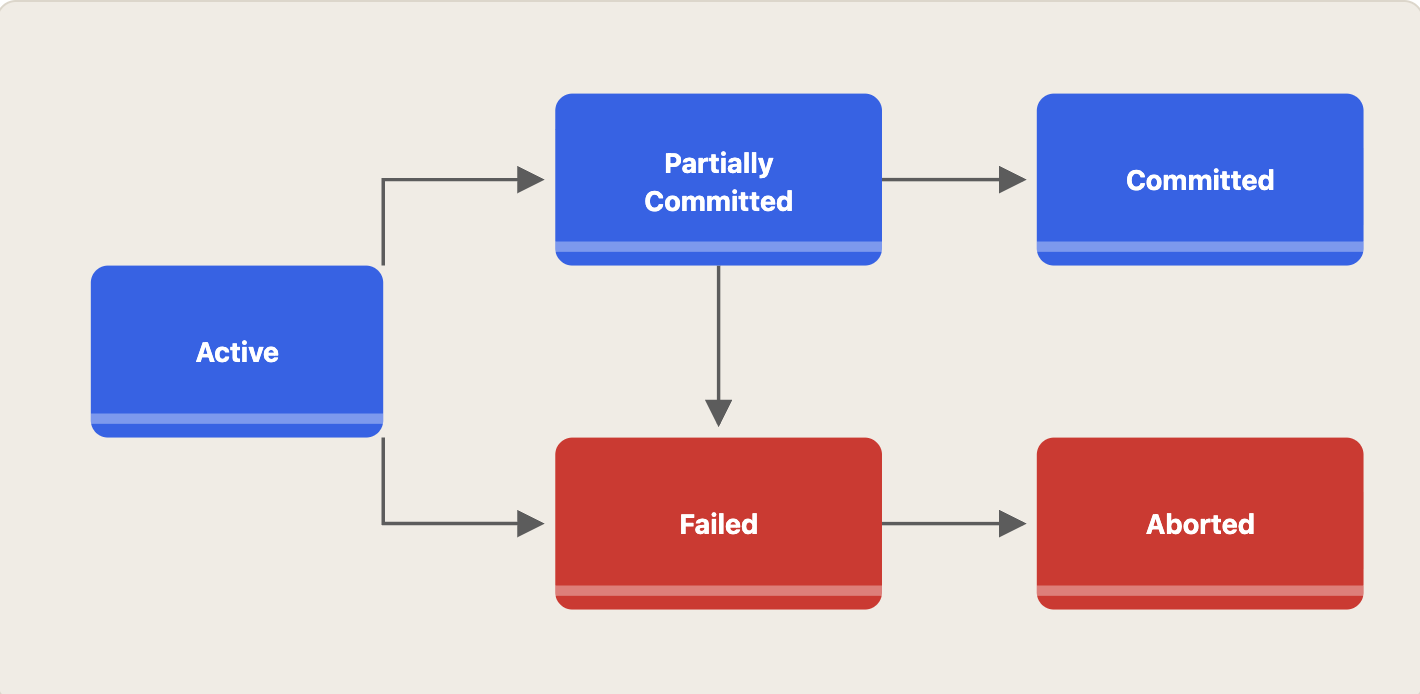
📌 Summary Table
State | Description |
|---|---|
Active | Transaction is running |
Partially Committed | All operations done, waiting to commit |
Committed | All changes saved permanently |
Failed | Error or crash occurred |
Aborted | Changes rolled back, DB restored |