📄 Difference Between Text and Binary Files
Feature | Text Files ( | Binary Files ( |
|---|---|---|
Format | Human-readable (ASCII characters) | Non-human-readable (raw bytes) |
Size | Slightly larger (extra formatting) | Smaller (raw representation) |
Precision (how accurately numeric data is stored and retrieved) | Loss of precision possible | No loss of precision |
Tools to Open | Any text editor (Notepad, Vim) | Specialized programs or custom readers |
Use Cases | Configs, logs, user input | Images, audio, structs, serialized data |
📝 Text File I/O: Reading & Writing
✍️ Writing to a Text File
FILE *fp = fopen("D:\\Mrigank Programs\\C Programs\\textfile.txt", "w");
if (fp == NULL) {
    printf("Error opening file.\\n");
    return 1;
}

fprintf(fp, "Name: %s\\nAge: %d\\n", "CodeVeda", 25);
fputs("This is a simple line.\\n", fp);
fclose(fp);
🗂️ File: textfile.txt (before writing)
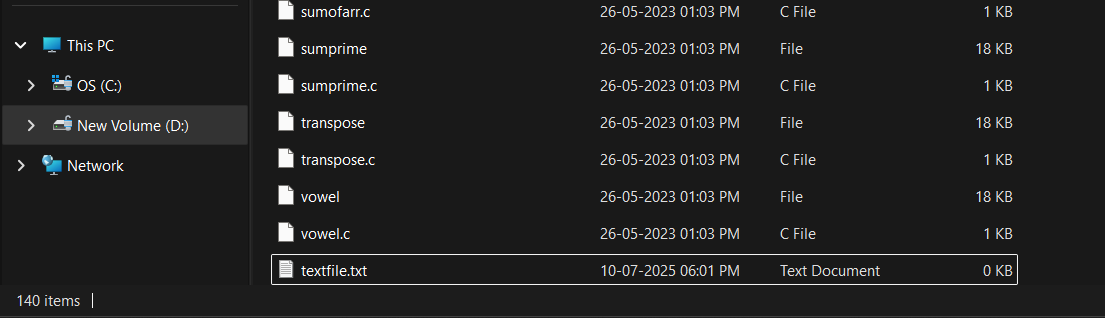
🗂️ File: textfile.txt (after writing)

📖 Reading from a Text File
FILE *fp = fopen("D:\\Mrigank Programs\\C Programs\\textfile.txt", "r");
char line[100];

while (fgets(line, sizeof(line), fp) != NULL) {
    printf("%s", line);  // Print each line
}
fclose(fp);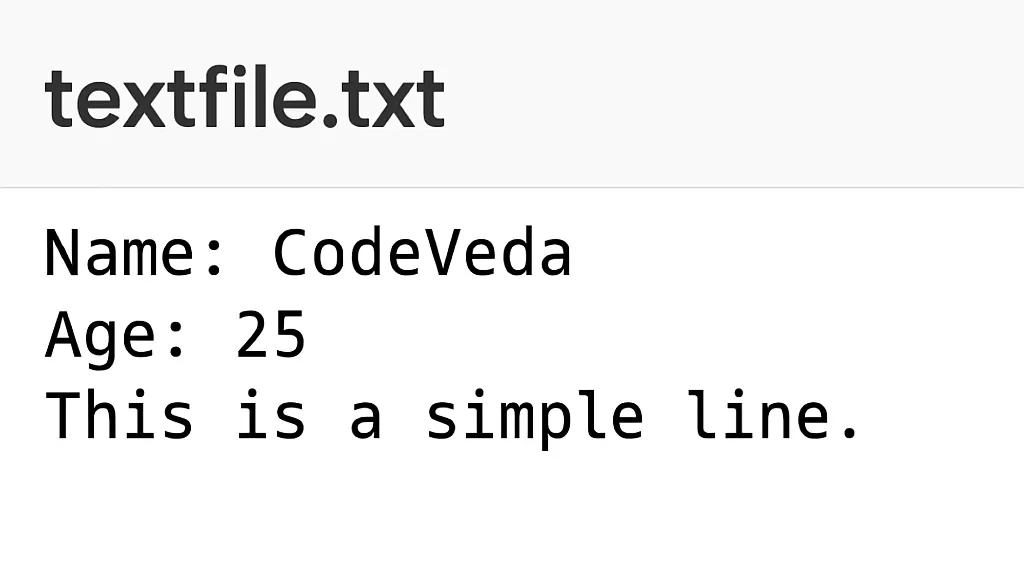
🔍 Text File Functions Recap:
Function | Purpose |
|---|---|
| Print formatted data |
| Read formatted data |
| Read a line from file |
| Write a string |
| Read one character |
| Write one character |
🧱 Binary File I/O: Reading & Writing
Binary files store data as raw bytes. Useful when:
You work with
struct, images, executables.Performance and precision matter.
✍️ Writing to a Binary File with fwrite()
#include <stdio.h>

struct Student {
    int id;
    float marks;
};

int main() {
    FILE *fp = fopen("student.dat", "wb");
    struct Student s1 = {1, 89.5};

    if (fp == NULL) {
        printf("Error creating binary file.\\n");
        return 1;
    }

    fwrite(&s1, sizeof(s1), 1, fp);
    fclose(fp);

    return 0;
}
📖 Reading from a Binary File with fread()
#include <stdio.h>

struct Student {
    int id;
    float marks;
};

int main() {
    FILE *fp = fopen("student.dat", "rb");
    struct Student s2;

    if (fp == NULL) {
        printf("Error opening binary file.\\n");
        return 1;
    }

    fread(&s2, sizeof(s2), 1, fp);
    printf("ID: %d, Marks: %.2f\\n", s2.id, s2.marks);
    fclose(fp);

    return 0;
}
<div class="infographic-cbinio2">
<style>
.infographic-cbinio2 {
--ink: #1a1a1a;
--ink-soft: #5c5c5c;
--paper: #ffffff;
--paper-alt: #f0ece4;
--accent: #2563eb;
--accent-soft:#e3ebfd;
--line: #ddd6c9;
--code-bg: #1e1e2e;
--code-text: #d4d4e0;
--syn-keyword: #c586c0;
--syn-func: #dcdcaa;
--ok: #1a7f4e;
--ok-soft: #e3f5ec;
}
.infographic-cbinio2[data-theme="dark"] {
--ink: #e8e6e1;
--ink-soft: #9a968c;
--paper: #121212;
--paper-alt: #1e1e26;
--accent: #5b8def;
--accent-soft:#202942;
--line: #2c313d;
--code-bg: #0d0d14;
--code-text: #d4d4e0;
--ok: #5cd6a0;
--ok-soft: #16342a;
}
.infographic-cbinio2 {
box-sizing: border-box;
max-width: 880px;
margin: 0 auto;
background: var(--paper);
color: var(--ink);
font-family: 'Inter', -apple-system, sans-serif;
padding: 0 clamp(1rem, 4vw, 2.25rem) 1.25rem;
}
.infographic-cbinio2 *, .infographic-cbinio2 *::before, .infographic-cbinio2 *::after {
box-sizing: border-box;
}
.infographic-cbinio2 h1 {
font-family: 'Fraunces', Georgia, serif;
font-weight: 600;
font-size: clamp(1.3rem, 3.5vw, 1.7rem);
margin: 1.25rem 0 0.2rem;
text-align: center;
}
.infographic-cbinio2 .subhead { color: var(--ink-soft); font-size: 0.85rem; margin-bottom: 1.2rem; text-align: center; }
.infographic-cbinio2 .code-panel {
background: var(--code-bg);
color: var(--code-text);
border-radius: 8px;
padding: 0.6rem 0.9rem;
font-family: 'IBM Plex Mono', monospace;
font-size: 0.8rem;
line-height: 1.55;
text-align: center;
margin-bottom: 1.1rem;
}
.infographic-cbinio2 .code-panel .code-line { display: block; }
.infographic-cbinio2 .syn-keyword { color: var(--syn-keyword); }
.infographic-cbinio2 .syn-func { color: var(--syn-func); }
.infographic-cbinio2 .field-row { display: flex; align-items: center; justify-content: center; gap: 0.6rem; margin-bottom: 1.1rem; flex-wrap: wrap; }
.infographic-cbinio2 .field-row label { font-family: 'IBM Plex Mono', monospace; font-size: 0.82rem; color: var(--ink-soft); }
.infographic-cbinio2 .field-row input {
font-family: 'IBM Plex Mono', monospace;
font-size: 0.9rem;
padding: 0.35rem 0.55rem;
border-radius: 6px;
border: 1px solid var(--line);
background: var(--paper);
color: var(--ink);
width: 5.5rem;
}
.infographic-cbinio2 .flow {
display: flex;
align-items: center;
justify-content: center;
gap: 1rem;
margin-bottom: 1.1rem;
flex-wrap: wrap;
}
.infographic-cbinio2 .step-btn {
all: unset; cursor: pointer;
font-family: 'IBM Plex Mono', monospace;
font-size: 0.8rem; font-weight: 600;
padding: 0.5rem 1rem;
border-radius: 999px;
background: var(--accent);
color: #fff;
text-align: center;
}
.infographic-cbinio2 .step-btn:hover { opacity: 0.88; }
.infographic-cbinio2 .step-btn.secondary { background: var(--paper-alt); color: var(--ink); border: 1px solid var(--line); }
.infographic-cbinio2 .flow-arrow { font-size: 1.1rem; color: var(--ink-soft); }
.infographic-cbinio2 .file-box {
border: 2px solid var(--line);
border-radius: 10px;
padding: 0.7rem 0.9rem;
text-align: center;
margin-bottom: 1.1rem;
transition: border-color 0.3s, background 0.3s;
}
.infographic-cbinio2 .file-box.has-data { border-color: var(--accent); background: var(--accent-soft); }
.infographic-cbinio2 .file-box .fb-icon { font-size: 1.6rem; }
.infographic-cbinio2 .file-box .fb-label { font-family: 'IBM Plex Mono', monospace; font-size: 0.72rem; color: var(--ink-soft); margin-top: 0.3rem; }
.infographic-cbinio2 .file-box .fb-status { font-family: 'IBM Plex Mono', monospace; font-size: 0.78rem; color: var(--ink-soft); margin-top: 0.2rem; }
.infographic-cbinio2 .file-box.has-data .fb-status { color: var(--accent); font-weight: 700; }
.infographic-cbinio2 .result-panel {
text-align: center;
padding: 0.7rem 0.9rem;
background: var(--paper-alt);
border-radius: 8px;
font-family: 'IBM Plex Mono', monospace;
font-size: 0.85rem;
color: var(--ink-soft);
min-height: 2.3rem;
}
.infographic-cbinio2 .result-panel.is-ready { color: var(--ok); font-weight: 700; }
.infographic-cbinio2 .takeaway {
font-size: 0.82rem; color: var(--ink-soft);
margin-top: 1.3rem; border-top: 1px solid var(--line); padding-top: 0.9rem;
}
.infographic-cbinio2 .takeaway strong { color: var(--ink); }
@media (prefers-reduced-motion: reduce) {
.infographic-cbinio2 * { transition: none !important; }
}
</style>
<h1>💾 fwrite() & fread()</h1>
<p class="subhead">Save a struct to disk, then load it back.</p>
<div class="code-panel">
<span class="code-line"><span class="syn-keyword">struct</span> Student { <span class="syn-keyword">int</span> id; <span class="syn-keyword">float</span> marks; };</span>
</div>
<div class="field-row">
<label>s1.id</label><input type="number" id="bio-id" value="1">
<label>s1.marks</label><input type="number" id="bio-marks" value="89.5" step="0.1">
</div>
<div class="flow">
<button class="step-btn" id="bio-write">▶ fwrite(&s1, …)</button>
<span class="flow-arrow">→</span>
<button class="step-btn secondary" id="bio-read">▶ fread(&s2, …)</button>
</div>
<div class="file-box" id="bio-filebox">
<div class="fb-icon">📄</div>
<div class="fb-label">student.dat</div>
<div class="fb-status" id="bio-status">empty</div>
</div>
<div class="result-panel" id="bio-result">s2 hasn't been read yet.</div>
<p class="takeaway"><strong>What you save is what you get back:</strong> fwrite copies s1's exact memory into the file, and fread copies it right back out into s2 — no conversion, no formatting, just the same bytes twice.</p>
</div>
<script>
(function () {
const wrapper = document.currentScript.closest('.infographic-cbinio2')
|| document.querySelector('.infographic-cbinio2');
const bodyAttr = document.body.getAttribute('data-darkmode');
let dark;
if (bodyAttr === 'true') { dark = true; }
else if (bodyAttr === 'false') { dark = false; }
else {
const match = document.cookie.match(/(?:^|;\s*)darkMode=([^;]+)/);
dark = match ? match[1] === 'true' : false;
}
if (dark) wrapper.setAttribute('data-theme', 'dark');
function $(sel) { return wrapper.querySelector(sel); }
const idInput = $('#bio-id'), marksInput = $('#bio-marks');
const fileBox = $('#bio-filebox');
const statusEl = $('#bio-status');
const resultEl = $('#bio-result');
let savedId = null, savedMarks = null;
$('#bio-write').addEventListener('click', () => {
savedId = Math.trunc(Number(idInput.value)) || 0;
savedMarks = Number(marksInput.value) || 0;
fileBox.classList.add('has-data');
statusEl.textContent = 'saved ✓';
resultEl.className = 'result-panel';
resultEl.textContent = 's2 hasn\u2019t been read yet.';
});
$('#bio-read').addEventListener('click', () => {
if (savedId === null) {
resultEl.className = 'result-panel';
resultEl.textContent = 'student.dat is empty — run fwrite() first.';
return;
}
resultEl.className = 'result-panel is-ready';
resultEl.textContent = 'ID: ' + savedId + ', Marks: ' + savedMarks.toFixed(2);
});
})();
</script>🧠 fread() vs fwrite() – Breakdown
fwrite(&data, size_of_data, count, file_pointer);
fread(&data, size_of_data, count, file_pointer);size_of_data=sizeof(variable or structure)count= number of items to write or readUsed for arrays of structures, binary formats, etc.
🧭 Binary File Use Case – Array of Structures
struct Employee emp[2] = { {1, "John"}, {2, "Doe"} };
fwrite(emp, sizeof(struct Employee), 2, fp);
To read them:
fread(emp, sizeof(struct Employee), 2, fp);🛠️ File Modes Summary (Text vs Binary)
Mode | Meaning |
|---|---|
| Read text |
| Write text (overwrite) |
| Append text |
| Read binary |
| Write binary |
| Append binary |
| Read + Write (text) |
| Read + Write (binary) |
📄 Text vs Binary File Methods in C
Operation | Text File Functions | Binary File Functions |
|---|---|---|
Open File |
|
|
Write One Char |
|
|
Read One Char |
|
|
Write String |
| N/A (write as raw bytes) |
Read String |
| N/A |
Formatted Write |
| N/A |
Formatted Read |
| N/A |
Write Raw Data | N/A |
|
Read Raw Data | N/A |
|
Close File |
|
|
🚫 Common Mistakes in File I/O
❌ Mistake | 💡 Correction |
|---|---|
Not checking if | Always check if the file opened successfully |
Writing text with | Use |
Forgetting to | Always close your files |
Using | Use |
Writing structs with padding | Use |