🔹 What Is Amazon FSx?

When EFS or S3 don't fit your needs, Amazon FSx gives you fully managed, high-performance third-party file systems on AWS.
Two flavors matter for the exam:
🪟 FSx for Windows File Server
⚡ FSx for Lustre
🪟 FSx for Windows File Server
<!DOCTYPE html>
<html lang="en">
<head>
<meta charset="UTF-8">
<meta name="viewport" content="width=device-width, initial-scale=1.0">
<title>FSx for Windows File Server — Architecture</title>
<style>
  .infographic-fsxarch {
    --ink:      #1a1a1a;
    --paper:    #ffffff;
    --region:   #1E73E8;
    --fsx1:     #3E8E3E;
    --fsx2:     #1F5C1F;
    --ec2-org:  #ED7100;
    --corp:     #37474F;
    --arrow:    #1a1a1a;
    font-family: -apple-system, "Inter", Arial, sans-serif;
    background: var(--paper);
    max-width: 900px;
    margin: 0 auto;
    padding: clamp(0.75rem, 3vw, 1.5rem);
    box-sizing: border-box;
  }
  .infographic-fsxarch[data-theme="dark"] {
    --ink:      #eee;
    --paper:    #121212;
    --region:   #5b9cff;
    --fsx1:     #5aa85a;
    --fsx2:     #2f6b2f;
    --ec2-org:  #ff9a3c;
    --corp:     #8fa3ad;
    --arrow:    #d8d8d8;
  }
  .infographic-fsxarch svg { display: block; width: 100%; height: auto; }

  .region-box { fill: none; stroke: var(--region); stroke-width: 3; stroke-dasharray: 8 6; }
  .az-box     { fill: none; stroke: var(--region); stroke-width: 2.5; stroke-dasharray: 7 5; }
  .region-title, .az-title { fill: var(--region); font-weight: 600; }
  .ec2-icon rect, .ec2-icon path { stroke: var(--ec2-org); stroke-width: 3.2; fill: none; }
  .label { fill: var(--ink); }
  .arrow-line { stroke: var(--arrow); stroke-width: 3; fill: none; }
  .arrow-head { fill: var(--arrow); }
  .unc-text { fill: var(--ink); font-family: "Courier New", monospace; }
  .corp-box { fill: none; stroke: var(--corp); stroke-width: 3; }
  .corp-header { fill: var(--corp); }
</style>
</head>
<body>

<div class="infographic-fsxarch">
<svg viewBox="0 0 1120 1420" xmlns="http://www.w3.org/2000/svg">
  <defs>
    <linearGradient id="fsxGrad1" x1="0" y1="0" x2="1" y2="1">
      <stop offset="0" stop-color="var(--fsx1)"/><stop offset="1" stop-color="var(--fsx2)"/>
    </linearGradient>
  </defs>

  <!-- Region -->
  <rect class="region-box" x="20" y="20" width="1080" height="650" rx="4"/>
  <rect x="40" y="40" width="66" height="66" fill="var(--region)"/>
  <g transform="translate(56,54)" stroke="white" stroke-width="2.5" fill="none" stroke-linecap="round" stroke-linejoin="round">
    <path d="M2 0v38"/>
    <path d="M2 3c8-6 16 3 24-3v18c-8 6-16-3-24 3z"/>
  </g>
  <text x="126" y="90" font-size="34" class="region-title">Region</text>

  <!-- AZ 1 -->
  <rect class="az-box" x="360" y="110" width="330" height="420" rx="4"/>
  <text x="525" y="160" text-anchor="middle" font-size="27" class="az-title">Availability Zone 1</text>
  <rect x="460" y="200" width="130" height="130" fill="url(#fsxGrad1)"/>
  <text x="470" y="278" font-size="46" fill="white" font-weight="600">FSx</text>
  <rect x="548" y="285" width="30" height="20" rx="2" fill="none" stroke="white" stroke-width="2.5"/>
  <path d="M548 305l-10 8h50l-10-8" fill="none" stroke="white" stroke-width="2.5" stroke-linejoin="round"/>
  <text x="525" y="380" text-anchor="middle" font-size="27" class="label">FSx for Windows</text>
  <text x="525" y="415" text-anchor="middle" font-size="27" class="label">File Server</text>

  <!-- AZ 2 -->
  <rect class="az-box" x="720" y="110" width="330" height="420" rx="4"/>
  <text x="885" y="160" text-anchor="middle" font-size="27" class="az-title">Availability Zone 2</text>
  <rect x="820" y="200" width="130" height="130" fill="url(#fsxGrad1)"/>
  <text x="830" y="278" font-size="46" fill="white" font-weight="600">FSx</text>
  <rect x="908" y="285" width="30" height="20" rx="2" fill="none" stroke="white" stroke-width="2.5"/>
  <path d="M908 305l-10 8h50l-10-8" fill="none" stroke="white" stroke-width="2.5" stroke-linejoin="round"/>
  <text x="885" y="380" text-anchor="middle" font-size="27" class="label">FSx for Windows</text>
  <text x="885" y="415" text-anchor="middle" font-size="27" class="label">File Server</text>

  <!-- EC2 instance -->
  <g class="ec2-icon" transform="translate(90,290)">
    <rect x="20" y="20" width="70" height="70"/>
    <path d="M32 20V4 M50 20V4 M68 20V4 M32 90v16 M50 90v16 M68 90v16 M20 32H4 M20 50H4 M20 68H4 M90 32h16 M90 50h16 M90 68h16"/>
  </g>
  <text x="145" y="440" text-anchor="middle" font-size="27" class="label">EC2 instance</text>

  <!-- EC2 -> UNC arrow -->
  <path class="arrow-line" d="M215 360 L455 545"/>
  <polygon class="arrow-head" points="440,530 462,552 434,554"/>

  <!-- UNC path -->
  <text x="60" y="600" font-size="30" class="unc-text">\\fs-0123456789abcdef0.example.com\share</text>

  <!-- over SMB label -->
  <text x="360" y="820" font-size="32" class="label">over <tspan font-weight="700">SMB</tspan></text>

  <!-- Corp -> UNC arrow -->
  <path class="arrow-line" d="M640 1120 L575 690"/>
  <polygon class="arrow-head" points="567,706 573,682 590,700"/>

  <!-- Corporate data center -->
  <rect class="corp-box" x="270" y="880" width="520" height="440"/>
  <rect x="270" y="880" width="70" height="70" class="corp-header"/>
  <g transform="translate(285,893)" fill="none" stroke="white" stroke-width="2.5" stroke-linecap="round" stroke-linejoin="round">
    <rect x="6" y="0" width="28" height="42"/>
    <path d="M12 8h4M22 8h4M12 16h4M22 16h4M12 24h4M22 24h4M16 42v-8h4v8"/>
  </g>
  <text x="358" y="928" font-size="30" font-weight="600" class="label">Corporate data center</text>

  <!-- Windows client icon -->
  <g transform="translate(465,1000)">
    <rect x="0" y="0" width="150" height="105" rx="6" fill="none" stroke="var(--ink)" stroke-width="5"/>
    <rect x="60" y="120" width="30" height="10" fill="var(--ink)"/>
    <rect x="35" y="130" width="80" height="12" rx="4" fill="var(--ink)"/>
    <g transform="translate(50,25)">
      <rect x="0" y="0" width="23" height="23" fill="#1E88E5"/>
      <rect x="27" y="0" width="23" height="23" fill="#1E88E5"/>
      <rect x="0" y="27" width="23" height="23" fill="#1E88E5"/>
      <rect x="27" y="27" width="23" height="23" fill="#1E88E5"/>
    </g>
  </g>
  <text x="540" y="1195" text-anchor="middle" font-size="27" class="label">Windows client</text>

</svg>
</div>

<script>
(function () {
  const wrapper = document.currentScript.closest('.infographic-fsxarch')
    || document.querySelector('.infographic-fsxarch');
  const bodyAttr = document.body.getAttribute('data-darkmode');
  let dark;
  if (bodyAttr === 'true') {
    dark = true;
  } else if (bodyAttr === 'false') {
    dark = false;
  } else {
    const match = document.cookie.match(/(?:^|;\s*)darkMode=([^;]+)/);
    dark = match ? match[1] === 'true' : false;
  }
  if (dark) wrapper.setAttribute('data-theme', 'dark');
})();
</script>

</body>
</html>
.demo {
font-family: system-ui, sans-serif;
padding: 16px;
}
.demo h1 {
color: #2563eb;
margin: 0 0 8px;
}
.demo p {
color: #4b5563;
margin: 0;
}document.querySelector('.demo h1')?.addEventListener('click', () => {
alert('Hello from live preview!');
});A fully managed, Windows-native shared file system.
Key features:
Built on Windows File Server
Multi-AZ deployment for high reliability
Supports Windows protocols — SMB and NTFS
Integrates with Microsoft Active Directory
Accessible from Windows EC2 instances and on-prem Windows clients
Use case: Extend your corporate Windows file server setup into AWS seamlessly.
📌 Exam cue: Windows workloads, SMB, NTFS, AD integration.
⚡ FSx for Lustre
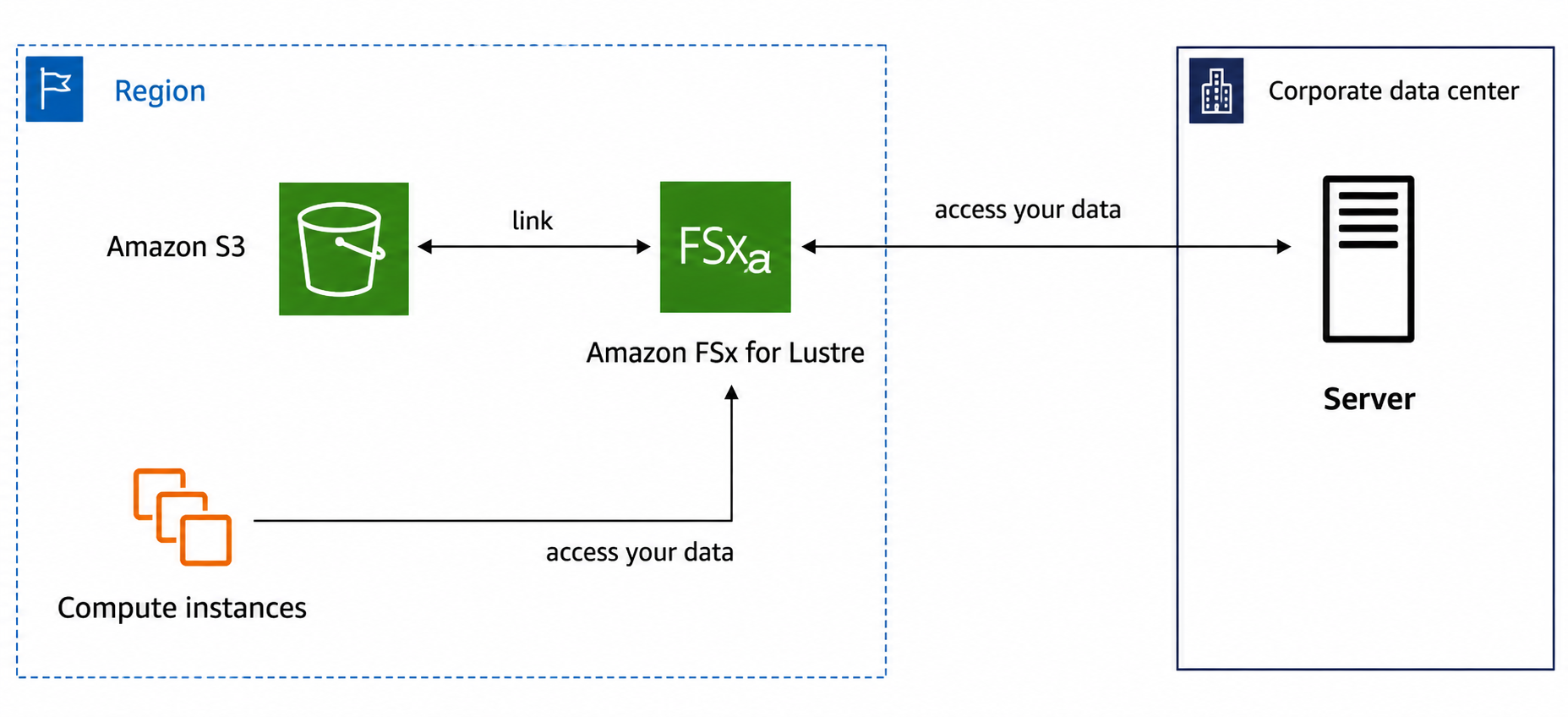
A fully managed, high-performance file system for HPC workloads.
"Lustre" = Linux + Cluster — built for distributed computing.
Key features:
Massive scale: hundreds of GB/s throughput, millions of IOPS, sub-millisecond latency
Built for HPC use cases — machine learning, analytics, video processing, financial modeling
Connects to both corporate data centers and AWS compute
Can use Amazon S3 as backend storage
Use case: Training ML models or processing huge datasets fast.
📌 Exam cue: HPC, Linux clusters, high-speed storage.
📊 Quick Comparison
FSx Flavor | Purpose | Protocols / Integration | Best For |
|---|---|---|---|
🪟 Windows File Server | Windows-native file sharing | SMB, NTFS, Active Directory | Corporate Windows workloads |
⚡ Lustre | High-performance computing | Linux clusters, S3 backend | ML, analytics, HPC |
🎯 Exam Tip
FSx = managed — AWS handles the infrastructure, you just use the file system
🪟 Windows → SMB/NTFS/AD
⚡ Lustre → HPC/Linux/throughput