🧠 So far, you've learned:
🔌 Calling OpenAI APIs
🌐 Summarizing websites
🤖 Understanding LLMs
⚡ Transformers
🔤 Tokens & Tokenization
🪟 Context Windows
💰 API Costs
🎭 The Illusion of Memory
🚀 Today, things get real.
Forget theory — you're building an actual AI-powered product that solves a business problem.
By the end, you'll know how to ship a commercial AI application using the OpenAI API. 🎯
👶 Before we begin with Coding, let’s do the setup:
Create a new file named
part4.ipynbinside thelevel1folder.Open the file and make sure a Python kernel is selected. If no kernel is selected, choose the appropriate one before proceeding.
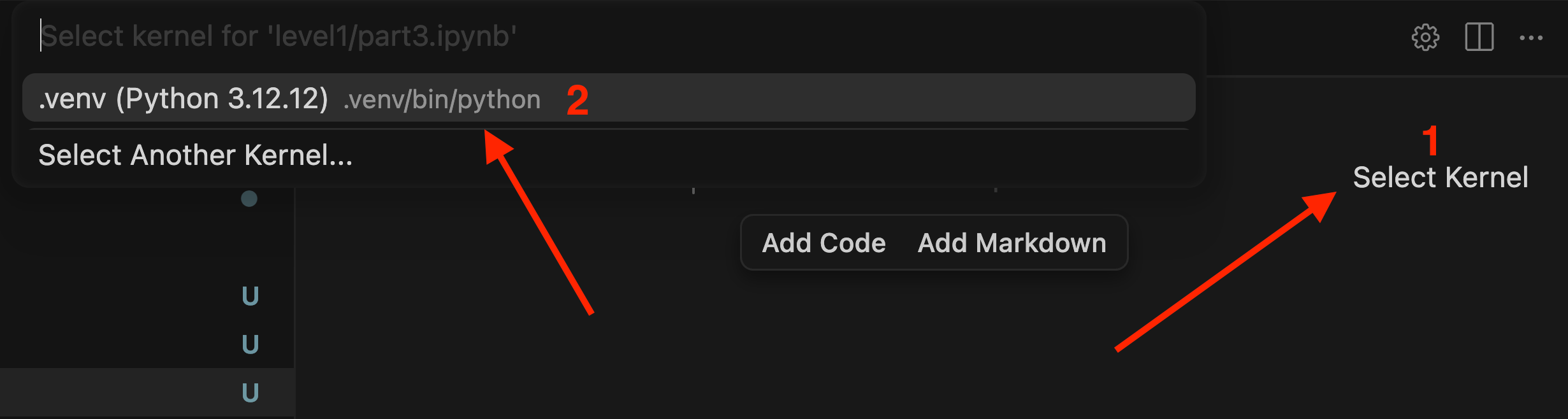
🔷 Step 1: Importing Packages and Setup Constants
▶️ Create a new code cell and run it:
import os
import json
from dotenv import load_dotenv
from IPython.display import Markdown, display, update_display
from scraper import fetch_website_links, fetch_website_contents
from openai import OpenAI
▶️ Create a new code cell and run it:
# Initialize and constants

load_dotenv(override=True)
api_key = os.getenv('OPENAI_API_KEY')

if api_key and api_key.startswith('sk-proj-') and len(api_key)>10:
    print("API key looks good so far")
else:
    print("There might be a problem with your API key? Please visit the troubleshooting notebook!")

MODEL = 'gpt-5-nano'
openai = OpenAI()
▶️ Create a new code cell and run it:
links = fetch_website_links("<https://codeveda.dev>")
links # print links for a urls website
Remember the Scraper.py file from Section 1 → Build First LLM Product → Website Summarizer Project? 🧠
It had a function called fetch_website_links — which takes a URL and automatically extracts all the links found on that website.
We'll be using that same function here. ♻️
from bs4 import BeautifulSoup
import requests

# Standard headers to fetch a website
headers = {
    "User-Agent": "Mozilla/5.0 (Windows NT 10.0; Win64; x64) AppleWebKit/537.36 (KHTML, like Gecko) Chrome/117.0.0.0 Safari/537.36"
}

def fetch_website_contents(url):
    """
    Return the title and contents of the website at the given url;
    truncate to 2,000 characters as a sensible limit
    """
    response = requests.get(url, headers=headers)
    soup = BeautifulSoup(response.content, "html.parser")
    title = soup.title.string if soup.title else "No title found"
    if soup.body:
        for irrelevant in soup.body(["script", "style", "img", "input"]):
            irrelevant.decompose()
        text = soup.body.get_text(separator="\n", strip=True)
    else:
        text = ""
    return (title + "\n\n" + text)[:2_000]

def fetch_website_links(url):
    """
    Return the links on the webiste at the given url
    I realize this is inefficient as we're parsing twice! This is to keep the code in the lab simple.
    Feel free to use a class and optimize it!
    """
    response = requests.get(url, headers=headers)
    soup = BeautifulSoup(response.content, "html.parser")
    links = [link.get("href") for link in soup.find_all("a")]
    return [link for link in links if link]
😭 Current Challenge
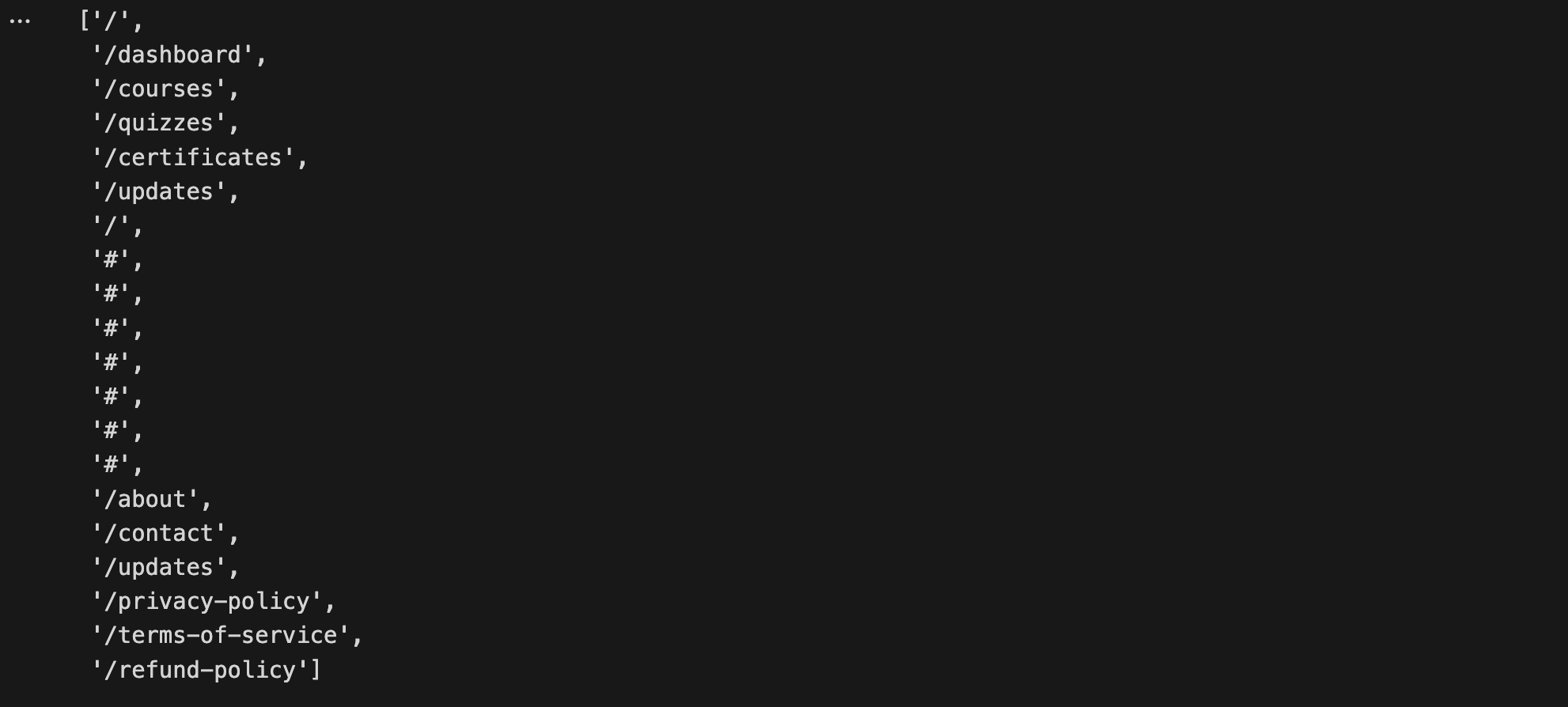
Above is the links we got from scrapping. We'll make a call to GPT-5o-nano to analyze the links on a webpage and return a clean, structured JSON response. 🤖📋
The model will:
✅ Filter only the relevant links and ❌ Discard irreverent links like
#🔗 Fix relative links — converting
/about→https://codeveda.de /about
We'll also use "One-Shot Prompting" — giving the model a single example of the expected output right inside the prompt, so it knows exactly how to respond. 🎯
💡 This is a perfect use case for an LLM — filtering and understanding links requires nuanced judgment. Try doing this with traditional code and you'll quickly realize how painful it gets! 😅
🔷 Step 2: Have GPT-5-nano figure out which links are relevant
▶️ Create a new code cell and run it: (System Prompt : One-Shot Prompting)
link_system_prompt = """
You are provided with a list of links found on a webpage.
You are able to decide which of the links would be most relevant to include in a brochure about the company,
such as links to an About page, or a Company page, or Careers/Jobs pages.
You should respond in JSON as in this example:

{
    "links": [
        {"type": "about page", "url": "<https://full.url/goes/here/about>"},
        {"type": "careers page", "url": "<https://another.full.url/careers>"}
    ]
}
"""
📦 Why JSON as Output?
LLMs are trained on massive amounts of three types of data:
🗣️ Natural Language — articles, books, documents in English, Spanish, French and more
📝 Markdown — since much web content is converted to markdown, LLMs are extremely familiar with it
🔧 JSON — LLMs see enormous amounts of it during training
Because of this, LLMs naturally understand, reliably generate, and better maintain JSON structure — making it the best format for exchanging structured data with an LLM. 🎯
🎯 Custom JSON Structure
The model doesn't just return URLs — it also categorizes each link by type:
{
  "links": [
    {"type": "About Page", "url": "<https://company.com/about>"},
    {"type": "Careers Page", "url": "<https://company.com/careers>"}
  ]
}
💡 Why This Matters
Without AI, building this would require:
😰 Manually parsing HTML
🔍 Writing regex patterns
🧠 Hardcoding rules to guess what each link is about
With AI, you simply ask for it — and the model uses its understanding of language and context to figure it out automatically. ✨
This is a perfect example of AI doing what it does best — nuanced understanding that would be painful to replicate with traditional code. 🚀
▶️ Create a new code cell and run it:
def get_links_user_prompt(url):
    user_prompt = f"""
Here is the list of links on the website {url} -
Please decide which of these are relevant web links for a brochure about the company,
respond with the full https URL in JSON format.
Do not include Terms of Service, Privacy, email links.

Links (some might be relative links):

"""
    links = fetch_website_links(url)
    user_prompt += "\n".join(links)
    return user_prompt
We create a function that builds the full prompt by:
🔗 Setting the URL from the function parameter
📋 Fetching all links from that URL at the end
➕ Appending the links list directly into the prompt before sending it to the model 🚀
❌ Negative Prompting
Alongside showing the model what good output looks like, we can also tell it what to avoid:
Do not include:
- Privacy Policy
- Terms of Service
- Email Links
This is essentially the opposite of One-Shot Prompting — instead of showing good examples, you're explicitly calling out bad ones. 🚫
🤔 Why Was This Added?
During testing, the model kept picking Privacy Policy and Terms of Service as "important" links — which makes sense from a pattern perspective, but isn't useful for a sales brochure.
So the prompt was refined to explicitly exclude them. ✂️
💡 This is a crucial AI engineering principle — prompt writing is iterative. You test, observe unexpected behavior, and refine. That back-and-forth process is a core part of building reliable AI products. 🔄🚀
▶️ Create a new code cell and run it:
Calls get_links_user_prompt() and prints the complete user prompt — including the instructions and all the scraped links attached at the bottom. 🖨️
print(get_links_user_prompt("<https://codeveda.dev>"))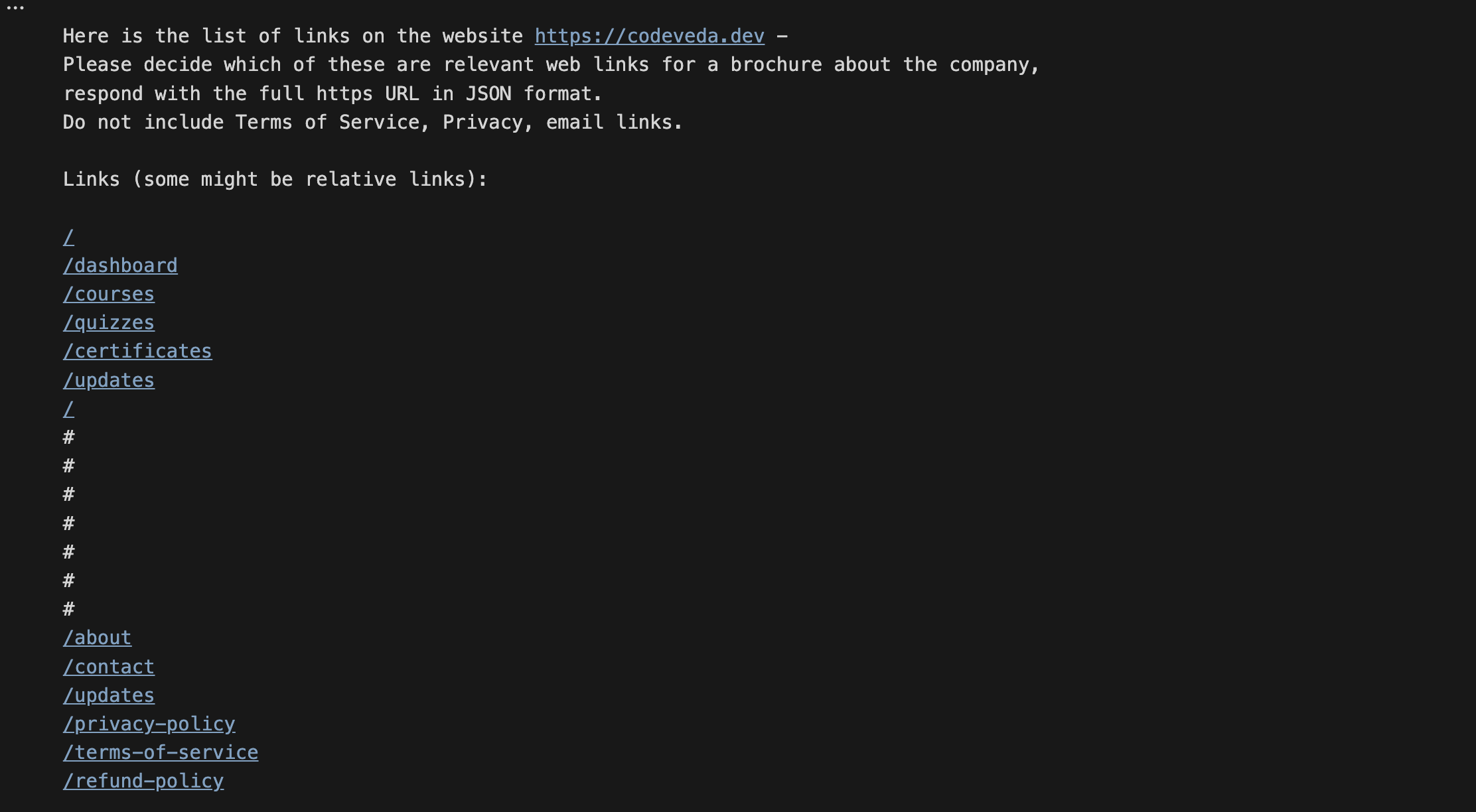
▶️ Create a new code cell and run it: ( First GPT Call)
def select_relevant_links(url):
    response = openai.chat.completions.create(
        model=MODEL,
        messages=[
            {"role": "system", "content": link_system_prompt},
            {"role": "user", "content": get_links_user_prompt(url)}
        ],
        response_format={"type": "json_object"}
        # forces the llms to return the result as JSON
    )
    result = response.choices[0].message.content
    links = json.loads(result)
    return links
▶️ Create a new code cell and run it:
select_relevant_links("<https://codeveda.dev>")Returns response with structured JSON as mentioned above

🔷 Step 3: Finally Making the Boucher
▶️ Create a new code cell and run it:
def fetch_page_and_all_relevant_links(url):
    contents = fetch_website_contents(url)
    # Getting Content of the Website (From Scapper.py file)
    relevant_links = select_relevant_links(url)
    # Getting relevent links
    result = f"## Landing Page:\n\n{contents}\n## Relevant Links:\n"
    for link in relevant_links['links']:
        result += f"\n\n### Link: {link['type']}\n"
        result += fetch_website_contents(link["url"])
    return result
This function does three things:
🌐 Fetches the main page content using
fetch_website_contents()fromScraper.py🔗 Gets all relevant links using
select_relevant_links()and loops through them📋 Fetches the content of each relevant link and bundles everything into one single structured result. ( To have context of all the relevant pages)
The final output is a clean, combined document containing the landing page + all relevant subpages — ready to be sent to the LLM for brochure generation. 🚀
▶️ Create a new code cell and run it:
print(fetch_page_and_all_relevant_links("<https://codeveda.dev>"))▶️ Create a new code cell and run it:
brochure_system_prompt = """
You are an assistant that analyzes the contents of several relevant pages from a company website
and creates a short brochure about the company for prospective customers, investors and recruits.
Respond in markdown without code blocks.
Include details of company culture, customers and careers/jobs if you have the information.
"""
▶️ Create a new code cell and run it:
def get_brochure_user_prompt(company_name, url):
    user_prompt = f"""
You are looking at a company called: {company_name}
Here are the contents of its landing page and other relevant pages;
use this information to build a short brochure of the company in markdown without code blocks.\n\n
"""
    user_prompt += fetch_page_and_all_relevant_links(url)
    user_prompt = user_prompt[:5_000] # Truncate if more than 5,000 characters
    return user_prompt
▶️ Create a new code cell and run it:
get_brochure_user_prompt("Codeveda", "<https://codeveda.dev>")
▶️ Create a new code cell and run it: ( Second GPT Call)
def create_brochure(company_name, url):
    response = openai.chat.completions.create(
        model="gpt-4.1-mini",
        messages=[
            {"role": "system", "content": brochure_system_prompt},
            {"role": "user", "content": get_brochure_user_prompt(company_name, url)}
        ],
    )
    result = response.choices[0].message.content
    display(Markdown(result)) # Renders Markdown in Presentable Way
▶️ Create a new code cell and run it:
create_brochure("Codeveda", "<https://codeveda.dev>")And after all that work — the final output is ready! 🎉
Phew… that was quite the journey, but we made it! 💪
One-Shot Prompting is simple — give the model one example of the desired output, and it learns the expected pattern instantly.
Input:  Website Links
Output: {"links": [...]}2
💡 Why It Works
Remember, LLMs predict the most likely next token. When you provide an example, you're essentially saying:
"This is what good output looks like — now continue the pattern."
This single example dramatically improves the quality and consistency of results. 🎯
Prompt Type | Examples | When to Use |
|---|---|---|
Zero-Shot | 0 | Simple, straightforward tasks |
One-Shot | 1 | When format or structure matters |
Multi-Shot | 2+ | Complex patterns needing reinforcement |
💡 The more examples you provide, the clearer the pattern — and the better the output. But even just one example can make a huge difference. 📈