🍪 Cookie
A cookie is a small piece of data that a server sends to your browser.
The browser stores it on your computer and sends it back to the same server on future requests.
Also called web cookie or browser cookie.
<div class="infographic-cookieflow">
<style>
.infographic-cookieflow {
--ink: #1a1a1a;
--ink-soft: #5c5c5c;
--paper: #ffffff;
--paper-alt: #f0ece4;
--accent: #2563eb;
--accent-soft:#e3ebfd;
--line: #ddd6c9;
--good: #1a8a5f;
--good-soft: #e1f2ea;
--mono-font: 'IBM Plex Mono', monospace;
--display-font: 'Fraunces', Georgia, serif;
box-sizing: border-box;
max-width: 880px;
margin: 0 auto;
font-family: 'Inter', system-ui, sans-serif;
color: var(--ink);
background: var(--paper);
overflow-x: hidden;
}
.infographic-cookieflow[data-theme="dark"] {
--ink: #e8e6e1;
--ink-soft: #9a968c;
--paper: #121212;
--paper-alt: #1e1e26;
--accent: #5b8def;
--accent-soft:#202942;
--line: #2c313d;
--good: #4fbf8f;
--good-soft: #16281f;
}
.infographic-cookieflow * { box-sizing: border-box; }
.infographic-cookieflow h1 { font-family: var(--display-font); font-weight: 600; margin: 0; }
.infographic-cookieflow p { margin: 0; }
.infographic-cookieflow button { font-family: inherit; }
.cf-icon { width: 1em; height: 1em; display: inline-block; vertical-align: -0.15em; stroke: currentColor; flex-shrink: 0; }
.cf-icon svg { width: 100%; height: 100%; display: block; }
.cf-wrap { padding: clamp(1.25rem, 5vw, 2.5rem) clamp(1.1rem, 5vw, 3rem) 2rem; }
.cf-hero { text-align: center; margin-bottom: 1.4rem; }
.cf-hero h1 { font-size: clamp(1.35rem, 4.5vw, 1.85rem); }
.cf-hero p { color: var(--ink-soft); margin-top: 0.4rem; font-size: 0.86rem; }
/* --- rail --- */
.cf-rail-row { display: flex; align-items: center; gap: 0.6rem; max-width: 620px; margin: 0 auto 0.5rem; }
.cf-endpoint { display: flex; flex-direction: column; align-items: center; gap: 0.35rem; flex-shrink: 0; width: 62px; }
.cf-endpoint-icon { width: 42px; height: 42px; border: 2px solid var(--line); border-radius: 10px; background: var(--paper-alt);
display: flex; align-items: center; justify-content: center; color: var(--ink-soft); transition: border-color 0.2s, color 0.2s, background 0.2s; }
.cf-endpoint-icon.is-active { border-color: var(--accent); color: var(--accent); background: var(--accent-soft); }
.cf-endpoint-icon svg { width: 22px; height: 22px; }
.cf-endpoint-label { font-family: var(--mono-font); font-size: 0.62rem; color: var(--ink-soft); text-transform: uppercase; letter-spacing: 0.03em; }
.cf-rail { position: relative; flex: 1; height: 42px; }
.cf-rail-line { position: absolute; left: 0; right: 0; top: 50%; height: 2px; background: var(--line); transform: translateY(-50%); }
.cf-rail-arrow { position: absolute; top: 50%; font-size: 1.1rem; color: var(--accent); opacity: 0; transition: opacity 0.2s ease, left 0.35s ease, transform 0.2s ease; transform: translate(-50%, -50%); }
.cf-rail-arrow.is-shown { opacity: 1; }
.cf-packet { position: absolute; top: 50%; width: 30px; height: 30px; border-radius: 8px; background: var(--accent); color: #fff;
display: flex; align-items: center; justify-content: center; transform: translate(-50%, -50%); transition: left 0.5s cubic-bezier(.4,0,.2,1), background 0.2s ease; }
.cf-packet svg { width: 17px; height: 17px; }
/* --- step selector --- */
.cf-steps { display: flex; justify-content: center; gap: 0.4rem; flex-wrap: wrap; margin: 1.3rem 0 1.2rem; }
.cf-step-btn { display: flex; flex-direction: column; align-items: center; gap: 0.3rem; background: none; border: 1px solid var(--line);
border-radius: 8px; padding: 0.5rem 0.7rem 0.4rem; cursor: pointer; color: var(--ink-soft); min-width: 70px; }
.cf-step-btn .cf-icon { width: 18px; height: 18px; }
.cf-step-btn span.label { font-size: 0.64rem; font-weight: 600; }
.cf-step-btn.is-active { border-color: var(--accent); background: var(--accent-soft); color: var(--accent); }
/* --- detail card --- */
.cf-detail { max-width: 460px; margin: 0 auto; text-align: center; background: var(--paper-alt); border-left: 3px solid var(--accent);
border-radius: 4px; padding: 0.85rem 1.1rem; min-height: 5.6rem; display: flex; flex-direction: column; justify-content: center; gap: 0.4rem; }
.cf-detail-title { font-family: var(--display-font); font-size: 1rem; font-weight: 600; }
.cf-detail-code { font-family: var(--mono-font); font-size: 0.74rem; color: var(--ink); background: #1e1e1e; color: #d4d4d4;
border-radius: 4px; padding: 0.4rem 0.6rem; display: inline-block; }
.cf-detail-desc { font-size: 0.78rem; color: var(--ink-soft); }
.cf-tags { display: flex; gap: 0.35rem; justify-content: center; }
.cf-tag { font-family: var(--mono-font); font-size: 0.6rem; font-weight: 700; padding: 0.15rem 0.4rem; border-radius: 3px;
background: var(--good-soft); color: var(--good); }
/* --- play control --- */
.cf-play-row { display: flex; justify-content: center; margin-top: 1.2rem; }
.cf-play-btn { display: flex; align-items: center; gap: 0.4rem; background: var(--accent); color: #fff; border: none;
border-radius: 5px; padding: 0.5rem 1.05rem; font-size: 0.8rem; font-weight: 600; cursor: pointer; }
.cf-play-btn:disabled { opacity: 0.55; cursor: default; }
.cf-play-btn .cf-icon { width: 15px; height: 15px; }
@media (max-width: 560px) {
.cf-rail-row { gap: 0.3rem; }
.cf-endpoint { width: 48px; }
.cf-endpoint-icon { width: 34px; height: 34px; }
.cf-endpoint-icon svg { width: 18px; height: 18px; }
.cf-endpoint-label { font-size: 0.54rem; }
}
@media (prefers-reduced-motion: reduce) {
.infographic-cookieflow *, .infographic-cookieflow *::before, .infographic-cookieflow *::after {
animation-duration: 0.001ms !important; transition-duration: 0.001ms !important;
}
}
</style>
<div class="cf-wrap">
<div class="cf-hero">
<h1>🍪 How a Cookie Works</h1>
<p>a small piece of data the server hands you, and your browser hands right back</p>
</div>
<div class="cf-rail-row">
<div class="cf-endpoint">
<div class="cf-endpoint-icon" id="cfBrowserIcon">
<span class="cf-icon">
<svg xmlns="http://www.w3.org/2000/svg" viewBox="0 0 24 24" fill="none" stroke="currentColor" stroke-width="2" stroke-linecap="round" stroke-linejoin="round"><rect width="20" height="16" x="2" y="4" rx="2"/><path d="M6 8h.01"/><path d="M10 8h.01"/><path d="M14 8h.01"/></svg>
</span>
</div>
<span class="cf-endpoint-label">browser</span>
</div>
<div class="cf-rail" id="cfRail">
<div class="cf-rail-line"></div>
<div class="cf-rail-arrow" id="cfArrow">→</div>
<div class="cf-packet" id="cfPacket">
<span class="cf-icon" id="cfPacketIcon">
<svg xmlns="http://www.w3.org/2000/svg" viewBox="0 0 24 24" fill="none" stroke="currentColor" stroke-width="2" stroke-linecap="round" stroke-linejoin="round"><path d="M20 11v6"/><path d="M20 13h2"/><path d="M3 21v-2a4 4 0 0 1 4-4h6a4 4 0 0 1 2.072.578"/><circle cx="10" cy="7" r="4"/><circle cx="20" cy="19" r="2"/></svg>
</span>
</div>
</div>
<div class="cf-endpoint">
<div class="cf-endpoint-icon" id="cfServerIcon">
<span class="cf-icon">
<svg xmlns="http://www.w3.org/2000/svg" viewBox="0 0 24 24" fill="none" stroke="currentColor" stroke-width="2" stroke-linecap="round" stroke-linejoin="round"><rect width="20" height="8" x="2" y="2" rx="2" ry="2"/><rect width="20" height="8" x="2" y="14" rx="2" ry="2"/><line x1="6" x2="6.01" y1="6" y2="6"/><line x1="6" x2="6.01" y1="18" y2="18"/></svg>
</span>
</div>
<span class="cf-endpoint-label">server</span>
</div>
</div>
<div class="cf-steps" id="cfSteps">
<button class="cf-step-btn is-active" data-step="0" type="button">
<span class="cf-icon"><svg xmlns="http://www.w3.org/2000/svg" viewBox="0 0 24 24" fill="none" stroke="currentColor" stroke-width="2" stroke-linecap="round" stroke-linejoin="round"><path d="M20 11v6"/><path d="M20 13h2"/><path d="M3 21v-2a4 4 0 0 1 4-4h6a4 4 0 0 1 2.072.578"/><circle cx="10" cy="7" r="4"/><circle cx="20" cy="19" r="2"/></svg></span>
<span class="label">Login</span>
</button>
<button class="cf-step-btn" data-step="1" type="button">
<span class="cf-icon"><svg xmlns="http://www.w3.org/2000/svg" viewBox="0 0 24 24" fill="none" stroke="currentColor" stroke-width="2" stroke-linecap="round" stroke-linejoin="round"><rect width="18" height="11" x="3" y="11" rx="2" ry="2"/><path d="M7 11V7a5 5 0 0 1 10 0v4"/></svg></span>
<span class="label">Set-Cookie</span>
</button>
<button class="cf-step-btn" data-step="2" type="button">
<span class="cf-icon"><svg xmlns="http://www.w3.org/2000/svg" viewBox="0 0 24 24" fill="none" stroke="currentColor" stroke-width="2" stroke-linecap="round" stroke-linejoin="round"><path d="M12 2a10 10 0 1 0 10 10 4 4 0 0 1-5-5 4 4 0 0 1-5-5"/><path d="M8.5 8.5v.01"/><path d="M16 15.5v.01"/><path d="M12 12v.01"/><path d="M11 17v.01"/><path d="M7 14v.01"/></svg></span>
<span class="label">Stored</span>
</button>
<button class="cf-step-btn" data-step="3" type="button">
<span class="cf-icon"><svg xmlns="http://www.w3.org/2000/svg" viewBox="0 0 24 24" fill="none" stroke="currentColor" stroke-width="2" stroke-linecap="round" stroke-linejoin="round"><path d="M12 2a10 10 0 1 0 10 10 4 4 0 0 1-5-5 4 4 0 0 1-5-5"/><path d="M8.5 8.5v.01"/><path d="M16 15.5v.01"/><path d="M12 12v.01"/><path d="M11 17v.01"/><path d="M7 14v.01"/></svg></span>
<span class="label">Sent again</span>
</button>
<button class="cf-step-btn" data-step="4" type="button">
<span class="cf-icon"><svg xmlns="http://www.w3.org/2000/svg" viewBox="0 0 24 24" fill="none" stroke="currentColor" stroke-width="2" stroke-linecap="round" stroke-linejoin="round"><path d="M21.801 10A10 10 0 1 1 17 3.335"/><path d="m9 11 3 3L22 4"/></svg></span>
<span class="label">Recognized</span>
</button>
</div>
<div class="cf-detail" id="cfDetail">
<div class="cf-detail-title" id="cfDetailTitle">User logs in</div>
<div class="cf-detail-code" id="cfDetailCode">POST /login</div>
<div class="cf-detail-desc" id="cfDetailDesc">Credentials sent to the server.</div>
<div class="cf-tags" id="cfDetailTags"></div>
</div>
<div class="cf-play-row">
<button class="cf-play-btn" id="cfPlayBtn" type="button">
<span class="cf-icon"><svg xmlns="http://www.w3.org/2000/svg" viewBox="0 0 24 24" fill="currentColor" stroke="none"><polygon points="6 3 20 12 6 21 6 3"/></svg></span>
<span id="cfPlayLabel">Play the flow</span>
</button>
</div>
</div>
</div>
<script>
(function () {
const wrapper = document.currentScript.closest('.infographic-cookieflow')
|| document.querySelector('.infographic-cookieflow');
const bodyAttr = document.body.getAttribute('data-darkmode');
let dark;
if (bodyAttr === 'true') {
dark = true;
} else if (bodyAttr === 'false') {
dark = false;
} else {
const match = document.cookie.match(/(?:^|;\s*)darkMode=([^;]+)/);
dark = match ? match[1] === 'true' : false;
}
if (dark) wrapper.setAttribute('data-theme', 'dark');
const packet = wrapper.querySelector('#cfPacket');
const packetIcon = wrapper.querySelector('#cfPacketIcon');
const arrow = wrapper.querySelector('#cfArrow');
const browserIcon = wrapper.querySelector('#cfBrowserIcon');
const serverIcon = wrapper.querySelector('#cfServerIcon');
const stepBtns = wrapper.querySelectorAll('.cf-step-btn');
const detailTitle = wrapper.querySelector('#cfDetailTitle');
const detailCode = wrapper.querySelector('#cfDetailCode');
const detailDesc = wrapper.querySelector('#cfDetailDesc');
const detailTags = wrapper.querySelector('#cfDetailTags');
const playBtn = wrapper.querySelector('#cfPlayBtn');
const playLabel = wrapper.querySelector('#cfPlayLabel');
const KEY_ICON = '<svg xmlns="http://www.w3.org/2000/svg" viewBox="0 0 24 24" fill="none" stroke="currentColor" stroke-width="2" stroke-linecap="round" stroke-linejoin="round"><path d="M20 11v6"/><path d="M20 13h2"/><path d="M3 21v-2a4 4 0 0 1 4-4h6a4 4 0 0 1 2.072.578"/><circle cx="10" cy="7" r="4"/><circle cx="20" cy="19" r="2"/></svg>';
const LOCK_ICON = '<svg xmlns="http://www.w3.org/2000/svg" viewBox="0 0 24 24" fill="none" stroke="currentColor" stroke-width="2" stroke-linecap="round" stroke-linejoin="round"><rect width="18" height="11" x="3" y="11" rx="2" ry="2"/><path d="M7 11V7a5 5 0 0 1 10 0v4"/></svg>';
const COOKIE_ICON = '<svg xmlns="http://www.w3.org/2000/svg" viewBox="0 0 24 24" fill="none" stroke="currentColor" stroke-width="2" stroke-linecap="round" stroke-linejoin="round"><path d="M12 2a10 10 0 1 0 10 10 4 4 0 0 1-5-5 4 4 0 0 1-5-5"/><path d="M8.5 8.5v.01"/><path d="M16 15.5v.01"/><path d="M12 12v.01"/><path d="M11 17v.01"/><path d="M7 14v.01"/></svg>';
const CHECK_ICON = '<svg xmlns="http://www.w3.org/2000/svg" viewBox="0 0 24 24" fill="none" stroke="currentColor" stroke-width="2" stroke-linecap="round" stroke-linejoin="round"><path d="M21.801 10A10 10 0 1 1 17 3.335"/><path d="m9 11 3 3L22 4"/></svg>';
const STEPS = [
{
title: 'User logs in',
code: 'POST /login',
desc: 'Credentials sent to the server.',
icon: KEY_ICON,
packetPos: '100%',
arrow: 'right',
active: 'browser',
tags: []
},
{
title: 'Server sends a cookie',
code: 'Set-Cookie: sessionId=ABCD1234',
desc: 'A new session ID comes back with the response.',
icon: LOCK_ICON,
packetPos: '0%',
arrow: 'left',
active: 'server',
tags: ['HttpOnly', 'Secure']
},
{
title: 'Browser stores it',
code: '\u2014',
desc: 'Saved quietly, tied to this site.',
icon: COOKIE_ICON,
packetPos: '0%',
arrow: 'none',
active: 'browser',
tags: []
},
{
title: 'Cookie goes out again',
code: 'Cookie: sessionId=ABCD1234',
desc: 'Attached automatically to every later request.',
icon: COOKIE_ICON,
packetPos: '100%',
arrow: 'right',
active: 'server',
tags: []
},
{
title: 'Server recognizes you',
code: '\u2014',
desc: 'Same session, no login form needed.',
icon: CHECK_ICON,
packetPos: '100%',
arrow: 'none',
active: 'server',
tags: []
}
];
let current = 0;
let playing = false;
function render(i) {
const s = STEPS[i];
packet.style.left = s.packetPos;
packetIcon.innerHTML = s.icon;
packet.style.background = (s.arrow === 'none' && i > 0) ? 'var(--good)' : 'var(--accent)';
if (s.arrow === 'none') {
arrow.classList.remove('is-shown');
} else {
arrow.classList.add('is-shown');
arrow.style.left = s.arrow === 'right' ? '50%' : '50%';
arrow.innerHTML = s.arrow === 'right' ? '→' : '←';
}
browserIcon.classList.toggle('is-active', s.active === 'browser');
serverIcon.classList.toggle('is-active', s.active === 'server');
detailTitle.textContent = s.title;
detailCode.textContent = s.code;
detailDesc.textContent = s.desc;
detailTags.innerHTML = s.tags.map(t => '<span class="cf-tag">' + t + '</span>').join('');
stepBtns.forEach(b => b.classList.toggle('is-active', Number(b.dataset.step) === i));
current = i;
}
stepBtns.forEach(btn => {
btn.addEventListener('click', () => {
if (playing) return;
render(Number(btn.dataset.step));
});
});
playBtn.addEventListener('click', () => {
if (playing) return;
playing = true;
playBtn.disabled = true;
playLabel.textContent = 'Playing\u2026';
let i = 0;
render(0);
const interval = setInterval(() => {
i += 1;
if (i >= STEPS.length) {
clearInterval(interval);
playing = false;
playBtn.disabled = false;
playLabel.textContent = 'Play the flow';
return;
}
render(i);
}, 1300);
});
render(0);
})();
</script>Example
🧑💻 1. User logs into a website
You open amazon.com and log in.
The server checks your credentials and responds with:
HTTP/1.1 200 OK
Set-Cookie: sessionId=ABCD1234; HttpOnly; Secure
Content-Type: text/html
👉 What this means:
sessionId=ABCD1234→ A unique ID created for your login sessionBrowser stores this cookie secretly
HttpOnly→ JavaScript cannot access it (security)Secure→ Only sent over HTTPS
📤 2. Browser automatically sends the cookie later
Now you click “My Orders”, the browser sends:
GET /my-orders HTTP/1.1
Cookie: sessionId=ABCD1234
👉 What the server does:
Looks at the cookie
Recognizes: “Oh, this is the same logged-in user”
Shows your orders without asking you to log in again
❓Why cookies
HTTP is stateless → Every request is treated separately.
The server cannot tell if two requests are from the same user.
Cookies solve this by letting the server identify the browser across multiple requests.
In practice, cookies serve the following purposes :
Session management → Keep users logged in, store cart items, remember ongoing sessions.
Tracking → Understand user activity (mostly used in ads/analytics).
Personalization → Save user preferences like theme, language, layout, etc.
🚧 Cookie details
A cookie stored by the browser has the following parts:
Name → Unique identifier (case-insensitive).
Value → The data stored (must be URL-encoded).
Domain → Which website the cookie belongs to.
Path → Which pages of the website can access the cookie.
Expiration → When the cookie should be deleted (stored even after the browser closes).
Secure flag → Cookie is sent only over HTTPS.
Set-Cookie: user=john;
expire=Tue, 12-December-2030 12:10:00 GMT;
domain=javascripttutorial.net;
path=/dom;
secure
👀 Cookies in JavaScript
You can get, set, and delete cookies in JavaScript using the document.cookie property.
1️⃣ Get Cookies
const str = document.cookie;This returns a string like:
name1=value1;
name2=value2;
name3=value3
If values are encoded, use:
decodeURIComponent(value)2️⃣ Set a Cookie
Format:
name=value;
expires=date;
path=/;
domain=example.com;
secure
Basic example:
document.cookie = "username=admin";This creates a cookie named
usernamewith valueadmin.No expiry → cookie is deleted when the browser closes (session cookie).
Good practice (always encode):
document.cookie = `${encodeURIComponent("username")}=${encodeURIComponent("admin")}`;3️⃣ Remove a Cookie
To delete a cookie → set the same cookie again but with an expiration date in the past.
Example:
document.cookie = "username=; expires=Thu, 01 Jan 1970 00:00:00 GMT";🟫 View cookies with web browsers
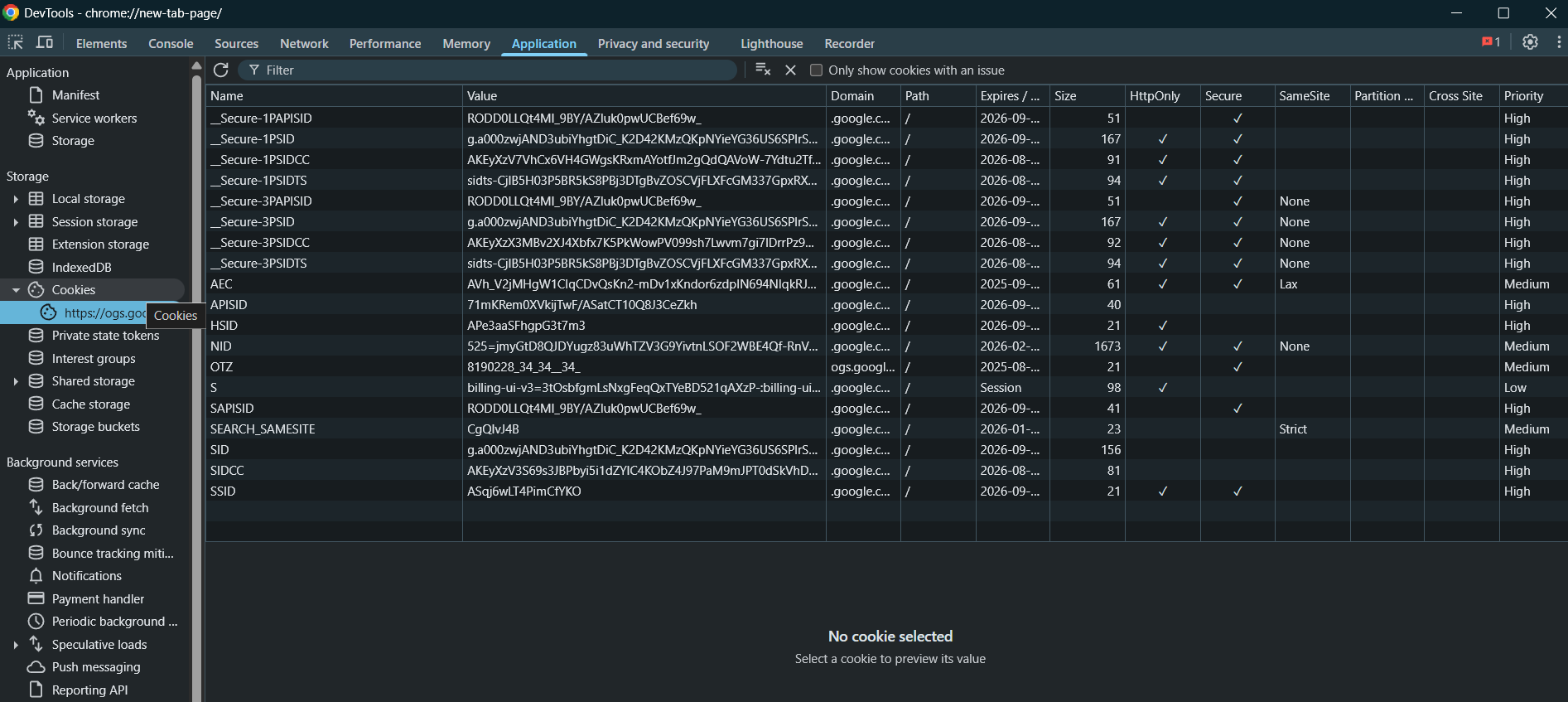
To view the cookies on the web browser, you use the devtools.
First, inspect the browser
Second, click the application tab.
Third, select Cookies node under the Storage.
The following picture shows the cookies of Google.com :