In JavaScript, [[Prototype]] is a built-in object that every function and object gets.
It is used to share properties and methods so they are not copied for every object — saving memory.
[[Prototype]] is the foundation of OOP in JavaScript. Unlike class-based languages (Java, C++), JS uses:
✅ prototype-based inheritance
❌ not classical inheritance
🧠 What is a Prototype?
In JavaScript, objects can inherit features from one another via their internal [[Prototype]].
Every object has an internal hidden property called [[Prototype]] (often accessed as __proto__). Because [[Prototype]] is itself an object, it has its own [[Prototype]].
This forms what is known as the prototype chain. The chain ends when an object’s [[Prototype]] is null.
✅ Simple Example
Suppose you have an object person with a property called name:
let person = {'name' : 'John'}When examining the person object in the console, you’ll find that the person object has a property called prototype denoted by the [[Prototype]]:
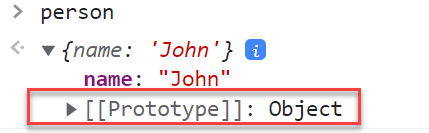
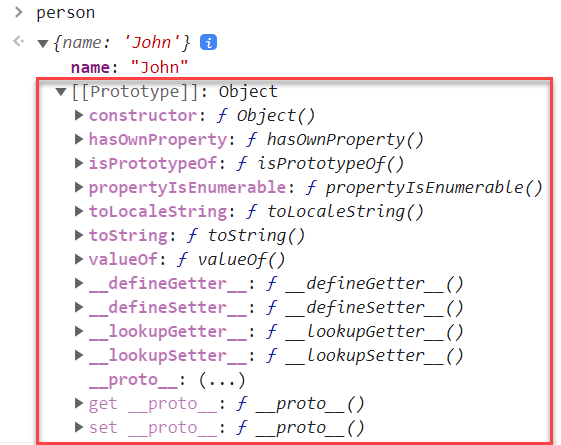
The [[Prototype]] itself is an object with its own properties:
✅ How Property Lookup Works
When you access a property of an object, if the object has that property, it’ll return the value.
Example:
let person = {'name' : 'John'}
console.log(person.name)
It returns "John" as expected.
However, if you try to access a property that doesn’t exist, the JavaScript engine will:
Search in the object’s
[[Prototype]]If not found, search the prototype’s prototype
Continue until:
the property is found ✅
or reaches the end of the chain (
null) ❌
For example, calling:
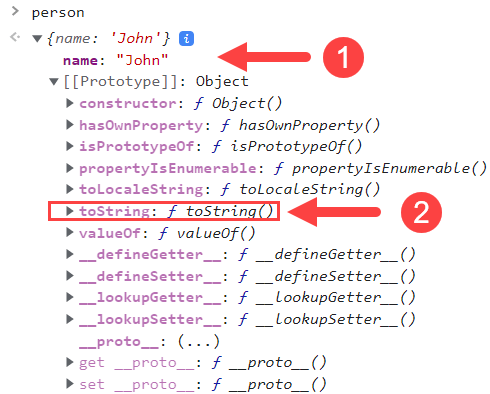
person.toString();The toString() method returns a string representation of the object — by default:
[object Object]Since the person object doesn’t have toString(), JavaScript searches in its prototype and finds it there.
A method is simply a property whose value is a function.
<div class="infographic-protoslot">
<style>
.infographic-protoslot {
  --ink:        #1a1a1a;
  --ink-soft:   #5c5c5c;
  --paper:      #ffffff;
  --paper-alt:  #f0ece4;
  --accent:     #2563eb;
  --accent-soft:#e3ebfd;
  --line:       #ddd6c9;
  --good:       #1a8a5f;
  --bad:        #c8452e;
  box-sizing: border-box;
  max-width: 880px;
  margin: 0 auto;
  font-family: 'Inter', system-ui, sans-serif;
  color: var(--ink);
  background: var(--paper);
  overflow-x: hidden;
}
.infographic-protoslot[data-theme="dark"] {
  --ink:        #e8e6e1;
  --ink-soft:   #9a968c;
  --paper:      #121212;
  --paper-alt:  #1e1e26;
  --accent:     #5b8def;
  --accent-soft:#202942;
  --line:       #2c313d;
  --good:       #4fbf8f;
  --bad:        #e0715a;
}
.infographic-protoslot * { box-sizing: border-box; }
.infographic-protoslot h1 { font-family: 'Fraunces', Georgia, serif; font-weight: 600; margin: 0; }
.infographic-protoslot p { margin: 0; }
.infographic-protoslot button { font-family: inherit; }

.ps-wrap { padding: clamp(1.25rem, 5vw, 2.5rem) clamp(1.1rem, 5vw, 3rem) 2rem; }

.ps-hero { text-align: center; margin-bottom: 1.4rem; }
.ps-hero h1 { font-size: clamp(1.35rem, 4.5vw, 1.8rem); }
.ps-hero p { color: var(--ink-soft); margin-top: 0.45rem; font-size: 0.88rem; }

/* chain */
.ps-chain { display: flex; flex-direction: column; align-items: center; }
.ps-box {
  width: min(320px, 100%); border: 1.5px solid var(--line); background: var(--paper-alt);
  padding: 0.6rem 0.85rem; transition: border-color 0.3s ease, background 0.3s ease, transform 0.3s ease;
  position: relative;
}
.ps-box-top { display: flex; align-items: baseline; justify-content: space-between; gap: 0.5rem; }
.ps-box .ps-name { font-family: 'IBM Plex Mono', monospace; font-weight: 700; font-size: 0.8rem; }
.ps-box .ps-props { font-family: 'IBM Plex Mono', monospace; font-size: 0.68rem; color: var(--ink-soft); margin-top: 0.15rem; }
.ps-box .ps-mark { font-size: 0.85rem; font-weight: 700; opacity: 0; transition: opacity 0.25s ease; flex-shrink: 0; }
.ps-box.is-checking { border-color: var(--accent); animation: psPulse 0.6s ease; }
.ps-box.is-checking .ps-mark.checking { opacity: 1; color: var(--accent); }
.ps-box.is-miss .ps-mark.miss { opacity: 1; color: var(--bad); }
.ps-box.is-hit { border-color: var(--good); background: color-mix(in srgb, var(--good) 12%, var(--paper-alt)); }
.ps-box.is-hit .ps-mark.hit { opacity: 1; color: var(--good); }
@keyframes psPulse { 0% { transform: scale(1); } 40% { transform: scale(1.03); } 100% { transform: scale(1); } }

.ps-link { display: flex; flex-direction: column; align-items: center; height: 44px; justify-content: center; position: relative; }
.ps-link-line { width: 2px; height: 34px; background: var(--line); position: relative; }
.ps-link-fill { position: absolute; left: 0; top: 0; width: 2px; height: 0%; background: var(--accent); transition: height 0.45s ease; }
.ps-link-label { font-family: 'IBM Plex Mono', monospace; font-size: 0.6rem; color: var(--ink-soft); margin-top: 0.15rem; opacity: 0.6; transition: opacity 0.3s ease, color 0.3s ease; white-space: nowrap; }
.ps-link.is-lit .ps-link-label { opacity: 1; color: var(--accent); font-weight: 600; }

.ps-null { font-family: 'IBM Plex Mono', monospace; font-size: 0.75rem; color: var(--ink-soft); border: 1.5px dashed var(--line); padding: 0.35rem 0.9rem; opacity: 0.5; transition: opacity 0.3s ease, border-color 0.3s ease, color 0.3s ease; }
.ps-null.is-hit { opacity: 1; border-color: var(--bad); color: var(--bad); border-style: solid; }

.ps-controls { display: flex; flex-wrap: wrap; gap: 0.5rem; justify-content: center; margin-top: 1.3rem; }
.ps-btn { border: 1px solid var(--line); background: var(--paper-alt); color: var(--ink); padding: 0.4rem 0.85rem; font-family: 'IBM Plex Mono', monospace; font-size: 0.72rem; cursor: pointer; }
.ps-btn:hover { border-color: var(--accent); color: var(--accent); }
.ps-btn.is-active { border-color: var(--accent); background: var(--accent-soft); color: var(--accent); }

.ps-result { text-align: center; font-size: 0.82rem; color: var(--ink-soft); padding: 1rem; min-height: 1.4em; }
.ps-result strong { color: var(--ink); }

.ps-note { text-align: center; font-size: 0.78rem; color: var(--ink-soft); margin-top: 1.4rem; padding-top: 1rem; border-top: 1px dashed var(--line); }
.ps-note strong { color: var(--ink); }

@media (prefers-reduced-motion: reduce) {
  .infographic-protoslot *, .infographic-protoslot *::before, .infographic-protoslot *::after {
    animation-duration: 0.001ms !important; transition-duration: 0.001ms !important;
  }
}
</style>

<div class="ps-wrap">

  <div class="ps-hero">
    <p>The hidden link every object carries — followed only when a property is missing.</p>
  </div>

  <div class="ps-chain">
    <div class="ps-box" id="boxP1" data-props="name">
      <div class="ps-box-top">
        <span class="ps-name">p1</span>
        <span class="ps-mark checking">…</span>
        <span class="ps-mark miss">✕</span>
        <span class="ps-mark hit">✓</span>
      </div>
      <div class="ps-props">own: name</div>
    </div>

    <div class="ps-link" id="linkA">
      <div class="ps-link-line"><div class="ps-link-fill" id="fillA"></div></div>
      <div class="ps-link-label">[[Prototype]]</div>
    </div>

    <div class="ps-box" id="boxProto" data-props="sayHello">
      <div class="ps-box-top">
        <span class="ps-name">Person.prototype</span>
        <span class="ps-mark checking">…</span>
        <span class="ps-mark miss">✕</span>
        <span class="ps-mark hit">✓</span>
      </div>
      <div class="ps-props">own: sayHello</div>
    </div>

    <div class="ps-link" id="linkB">
      <div class="ps-link-line"><div class="ps-link-fill" id="fillB"></div></div>
      <div class="ps-link-label">[[Prototype]]</div>
    </div>

    <div class="ps-box" id="boxObjProto" data-props="toString,hasOwnProperty">
      <div class="ps-box-top">
        <span class="ps-name">Object.prototype</span>
        <span class="ps-mark checking">…</span>
        <span class="ps-mark miss">✕</span>
        <span class="ps-mark hit">✓</span>
      </div>
      <div class="ps-props">own: toString, hasOwnProperty…</div>
    </div>

    <div class="ps-link" id="linkC">
      <div class="ps-link-line"><div class="ps-link-fill" id="fillC"></div></div>
      <div class="ps-link-label">[[Prototype]]</div>
    </div>

    <div class="ps-null" id="boxNull">null — chain ends</div>
  </div>

  <div class="ps-controls">
    <button class="ps-btn" data-prop="name" type="button">p1.name</button>
    <button class="ps-btn" data-prop="sayHello" type="button">p1.sayHello()</button>
    <button class="ps-btn" data-prop="toString" type="button">p1.toString()</button>
    <button class="ps-btn" data-prop="fly" type="button">p1.fly()</button>
  </div>

  <p class="ps-result" id="psResult">Pick a lookup above to trace it.</p>

  <p class="ps-note"><strong>__proto__</strong> is just the door to peek through it. <strong>[[Prototype]]</strong> is the actual link the engine walks — you never touch it directly.</p>

</div>
</div>

<script>
(function () {
  const wrapper = document.currentScript.closest('.infographic-protoslot')
    || document.querySelector('.infographic-protoslot');
  const bodyAttr = document.body.getAttribute('data-darkmode');
  let dark;
  if (bodyAttr === 'true') { dark = true; }
  else if (bodyAttr === 'false') { dark = false; }
  else {
    const match = document.cookie.match(/(?:^|;\s*)darkMode=([^;]+)/);
    dark = match ? match[1] === 'true' : false;
  }
  if (dark) wrapper.setAttribute('data-theme', 'dark');

  const boxes = [
    wrapper.querySelector('#boxP1'),
    wrapper.querySelector('#boxProto'),
    wrapper.querySelector('#boxObjProto'),
  ];
  const links = [
    wrapper.querySelector('#linkA'),
    wrapper.querySelector('#linkB'),
    wrapper.querySelector('#linkC'),
  ];
  const fills = [
    wrapper.querySelector('#fillA'),
    wrapper.querySelector('#fillB'),
    wrapper.querySelector('#fillC'),
  ];
  const nullBox = wrapper.querySelector('#boxNull');
  const result = wrapper.querySelector('#psResult');
  const names = ['p1', 'Person.prototype', 'Object.prototype'];

  function reset() {
    boxes.forEach(b => b.classList.remove('is-checking', 'is-miss', 'is-hit'));
    links.forEach(l => l.classList.remove('is-lit'));
    fills.forEach(f => { f.style.transition = 'none'; f.style.height = '0%'; void f.offsetWidth; f.style.transition = 'height 0.45s ease'; });
    nullBox.classList.remove('is-hit');
    result.innerHTML = 'Pick a lookup above to trace it.';
  }

  function run(prop) {
    reset();
    let delay = 100;
    const STEP = 620;
    let foundAt = -1;

    boxes.forEach((box, i) => {
      const props = box.dataset.props.split(',');
      const found = props.includes(prop);
      setTimeout(() => box.classList.add('is-checking'), delay);
      if (found && foundAt === -1) foundAt = i;
      if (found) {
        setTimeout(() => {
          box.classList.remove('is-checking');
          box.classList.add('is-hit');
          result.innerHTML = '<strong>' + prop + '</strong> found on <strong>' + names[i] + '</strong>.';
        }, delay + 380);
      } else if (foundAt === -1) {
        setTimeout(() => {
          box.classList.remove('is-checking');
          box.classList.add('is-miss');
        }, delay + 380);
        if (i < links.length) {
          setTimeout(() => {
            links[i].classList.add('is-lit');
            fills[i].style.height = '100%';
          }, delay + 420);
        }
      }
      delay += STEP;
    });

    if (foundAt === -1) {
      setTimeout(() => {
        nullBox.classList.add('is-hit');
        result.innerHTML = '<strong>' + prop + '</strong> not found anywhere → <strong>undefined</strong>.';
      }, delay);
    }
  }

  wrapper.querySelectorAll('.ps-btn').forEach(btn => {
    btn.addEventListener('click', () => {
      wrapper.querySelectorAll('.ps-btn').forEach(b => b.classList.remove('is-active'));
      btn.classList.add('is-active');
      run(btn.dataset.prop);
    });
  });
})();
</script>
✅ Prototypal inheritance
In programming, we often want to take something and extend it.
For instance, we have a user object with its properties and methods, and want to make admin and guest as slightly modified variants of it. We’d like to reuse what we have in user, not copy/reimplement its methods, just build a new object on top of it.
Prototypal inheritance is a language feature that helps in that.
<div class="infographic-protoinherit">
<style>
.infographic-protoinherit {
  --ink:        #1a1a1a;
  --ink-soft:   #5c5c5c;
  --paper:      #ffffff;
  --paper-alt:  #f0ece4;
  --accent:     #2563eb;
  --accent-soft:#e3ebfd;
  --line:       #ddd6c9;
  --good:       #1a8a5f;
  --bad:        #c8452e;
  box-sizing: border-box;
  max-width: 880px;
  margin: 0 auto;
  font-family: 'Inter', system-ui, sans-serif;
  color: var(--ink);
  background: var(--paper);
  overflow-x: hidden;
}
.infographic-protoinherit[data-theme="dark"] {
  --ink:        #e8e6e1;
  --ink-soft:   #9a968c;
  --paper:      #121212;
  --paper-alt:  #1e1e26;
  --accent:     #5b8def;
  --accent-soft:#202942;
  --line:       #2c313d;
  --good:       #4fbf8f;
  --bad:        #e0715a;
}
.infographic-protoinherit * { box-sizing: border-box; }
.infographic-protoinherit h1 { font-family: 'Fraunces', Georgia, serif; font-weight: 600; margin: 0; }
.infographic-protoinherit p { margin: 0; }
.infographic-protoinherit button { font-family: inherit; }

.pi-wrap { padding: clamp(1.25rem, 5vw, 2.5rem) clamp(1.1rem, 5vw, 3rem) 2rem; }

.pi-hero { text-align: center; margin-bottom: 1.5rem; }
.pi-hero h1 { font-size: clamp(1.4rem, 4.5vw, 1.9rem); }
.pi-hero p { color: var(--ink-soft); margin-top: 0.45rem; font-size: 0.88rem; }

.pi-base {
  width: min(230px, 100%); margin: 0 auto; text-align: center;
  border: 1.5px solid var(--accent); background: var(--accent-soft); padding: 0.6rem 0.8rem;
}
.pi-base .pi-name { font-family: 'IBM Plex Mono', monospace; font-weight: 700; font-size: 0.85rem; }
.pi-base .pi-props { font-family: 'IBM Plex Mono', monospace; font-size: 0.68rem; color: var(--ink-soft); margin-top: 0.15rem; }

.pi-fan { display: flex; justify-content: center; gap: 2.4rem; margin-top: 0.4rem; position: relative; }
@media (max-width: 480px) { .pi-fan { gap: 1rem; } }
.pi-branch { display: flex; flex-direction: column; align-items: center; width: 150px; }
.pi-link { width: 2px; height: 34px; background: var(--line); position: relative; }
.pi-link-fill { position: absolute; left: 0; top: 0; width: 2px; height: 0%; background: var(--accent); transition: height 0.5s ease; }
.pi-link-label { font-family: 'IBM Plex Mono', monospace; font-size: 0.58rem; color: var(--ink-soft); margin-top: 0.1rem; opacity: 0; transition: opacity 0.4s ease; text-align: center; }
.pi-branch.is-linked .pi-link-label { opacity: 1; color: var(--accent); }

.pi-child {
  width: 100%; text-align: center; border: 1.5px solid var(--line); background: var(--paper-alt);
  padding: 0.55rem 0.5rem; opacity: 0.35; transform: scale(0.94); transition: opacity 0.4s ease, transform 0.4s ease, border-color 0.3s ease;
  position: relative;
}
.pi-branch.is-linked .pi-child { opacity: 1; transform: scale(1); border-color: var(--accent); }
.pi-child .pi-name { font-family: 'IBM Plex Mono', monospace; font-weight: 700; font-size: 0.78rem; }
.pi-child .pi-props { font-family: 'IBM Plex Mono', monospace; font-size: 0.64rem; color: var(--ink-soft); margin-top: 0.1rem; }
.pi-child .pi-mark { position: absolute; top: -9px; right: -9px; width: 20px; height: 20px; border-radius: 50%; background: var(--paper); border: 1.5px solid var(--line); display: flex; align-items: center; justify-content: center; font-size: 0.66rem; font-weight: 700; opacity: 0; transition: opacity 0.25s ease, border-color 0.25s ease, color 0.25s ease; }
.pi-child .pi-mark.hit { color: var(--good); border-color: var(--good); }
.pi-child .pi-mark.miss { color: var(--bad); border-color: var(--bad); }
.pi-child.mark-own .pi-mark.hit { opacity: 1; }
.pi-child.mark-chain .pi-mark.miss { opacity: 1; }
.pi-child.mark-chain { animation: piShake 0.4s ease; }
@keyframes piShake { 20% { transform: translateX(-4px); } 40% { transform: translateX(4px); } 60% { transform: translateX(-3px); } 80% { transform: translateX(3px); } 100% { transform: translateX(0); } }

.pi-base { position: relative; }
.pi-base .pi-mark {
  position: absolute; top: -9px; right: -9px; width: 20px; height: 20px; border-radius: 50%; background: var(--paper);
  border: 1.5px solid var(--line); display: flex; align-items: center; justify-content: center; font-size: 0.66rem; font-weight: 700;
  color: var(--accent); opacity: 0; transform: scale(0.7);
  transition: opacity 0.25s ease, transform 0.25s ease, border-color 0.25s ease;
}
.pi-base.is-hit .pi-mark { opacity: 1; transform: scale(1); border-color: var(--accent); }

.pi-make { display: block; margin: 1.1rem auto 0; border: none; background: var(--accent); color: #fff; padding: 0.5rem 1.2rem; font-size: 0.8rem; font-weight: 600; cursor: pointer; }
.pi-make:active { transform: scale(0.96); }
.pi-make:disabled { opacity: 0.4; cursor: default; }

.pi-controls { display: flex; flex-wrap: wrap; gap: 0.5rem; justify-content: center; margin-top: 1.1rem; }
.pi-btn { border: 1px solid var(--line); background: var(--paper-alt); color: var(--ink); padding: 0.38rem 0.8rem; font-family: 'IBM Plex Mono', monospace; font-size: 0.7rem; cursor: pointer; }
.pi-btn:hover:not(:disabled) { border-color: var(--accent); color: var(--accent); }
.pi-btn:disabled { opacity: 0.35; cursor: default; }

.pi-result { text-align: center; font-size: 0.8rem; color: var(--ink-soft); padding: 0.9rem; min-height: 1.4em; }
.pi-result strong { color: var(--ink); }

.pi-note { text-align: center; font-size: 0.78rem; color: var(--ink-soft); padding: 1.4rem; padding-top: 1rem; border-top: 1px dashed var(--line); }
.pi-note strong { color: var(--ink); }

@media (prefers-reduced-motion: reduce) {
  .infographic-protoinherit *, .infographic-protoinherit *::before, .infographic-protoinherit *::after {
    animation-duration: 0.001ms !important; transition-duration: 0.001ms !important;
  }
}
</style>

<div class="pi-wrap">

  <div class="pi-hero">
    <p>Objects inherit straight from other objects. No class in sight.</p>
  </div>

  <div class="pi-base" id="piBase">
    <div class="pi-mark">✓</div>
    <div class="pi-name">animal</div>
    <div class="pi-props">own: speak</div>
  </div>

  <div class="pi-fan">
    <div class="pi-branch" id="branchDog">
      <div class="pi-link"><div class="pi-link-fill" id="fillDog"></div></div>
      <div class="pi-link-label">[[Prototype]]</div>
      <div class="pi-child" id="childDog">
        <div class="pi-mark hit">✓</div>
        <div class="pi-mark miss">✕</div>
        <div class="pi-name">dog</div>
        <div class="pi-props">own: bark</div>
      </div>
    </div>
    <div class="pi-branch" id="branchCat">
      <div class="pi-link"><div class="pi-link-fill" id="fillCat"></div></div>
      <div class="pi-link-label">[[Prototype]]</div>
      <div class="pi-child" id="childCat">
        <div class="pi-mark hit">✓</div>
        <div class="pi-mark miss">✕</div>
        <div class="pi-name">cat</div>
        <div class="pi-props">own: meow</div>
      </div>
    </div>
  </div>

  <button class="pi-make" id="piMake" type="button">Object.create(animal)</button>

  <div class="pi-controls">
    <button class="pi-btn" data-obj="dog" data-prop="bark" disabled type="button">dog.bark()</button>
    <button class="pi-btn" data-obj="dog" data-prop="speak" disabled type="button">dog.speak()</button>
    <button class="pi-btn" data-obj="cat" data-prop="meow" disabled type="button">cat.meow()</button>
    <button class="pi-btn" data-obj="cat" data-prop="speak" disabled type="button">cat.speak()</button>
  </div>

  <p class="pi-result" id="piResult">Create dog and cat, then try calling their methods.</p>

  <p class="pi-note">Neither <strong>dog</strong> nor <strong>cat</strong> has its own copy of <strong>speak</strong> — both just link to the same <strong>animal</strong> object and borrow it.</p>

</div>
</div>

<script>
(function () {
  const wrapper = document.currentScript.closest('.infographic-protoinherit')
    || document.querySelector('.infographic-protoinherit');
  const bodyAttr = document.body.getAttribute('data-darkmode');
  let dark;
  if (bodyAttr === 'true') { dark = true; }
  else if (bodyAttr === 'false') { dark = false; }
  else {
    const match = document.cookie.match(/(?:^|;\s*)darkMode=([^;]+)/);
    dark = match ? match[1] === 'true' : false;
  }
  if (dark) wrapper.setAttribute('data-theme', 'dark');

  const makeBtn = wrapper.querySelector('#piMake');
  const branches = { dog: wrapper.querySelector('#branchDog'), cat: wrapper.querySelector('#branchCat') };
  const fills = { dog: wrapper.querySelector('#fillDog'), cat: wrapper.querySelector('#fillCat') };
  const children = { dog: wrapper.querySelector('#childDog'), cat: wrapper.querySelector('#childCat') };
  const ownProps = { dog: 'bark', cat: 'meow' };
  const result = wrapper.querySelector('#piResult');
  let step = 0;
  const order = ['dog', 'cat'];

  function makeNext() {
    if (step >= order.length) return;
    const key = order[step];
    branches[key].classList.add('is-linked');
    fills[key].style.height = '100%';
    result.innerHTML = 'Linked <strong>' + key + '</strong> to <strong>animal</strong> via [[Prototype]].';
    wrapper.querySelectorAll('.pi-btn[data-obj="' + key + '"]').forEach(b => b.disabled = false);
    step += 1;
    if (step >= order.length) makeBtn.disabled = true;
  }

  makeBtn.addEventListener('click', makeNext);

  const base = wrapper.querySelector('#piBase');

  wrapper.querySelectorAll('.pi-btn').forEach(btn => {
    btn.addEventListener('click', () => {
      const obj = btn.dataset.obj;
      const prop = btn.dataset.prop;
      const child = children[obj];
      child.classList.remove('mark-own', 'mark-chain');
      base.classList.remove('is-hit');
      void child.offsetWidth;
      if (prop === ownProps[obj]) {
        child.classList.add('mark-own');
        result.innerHTML = '<strong>' + obj + '.' + prop + '()</strong> found directly on <strong>' + obj + '</strong>.';
      } else {
        child.classList.add('mark-chain');
        setTimeout(() => base.classList.add('is-hit'), 300);
        result.innerHTML = '<strong>' + obj + '.' + prop + '()</strong> not on ' + obj + ' — found via [[Prototype]] on <strong>animal</strong>.';
      }
    });
  });
})();
</script>
The property [[Prototype]] is internal and hidden, but there are many ways to set it.
One of them is to use the special name __proto__, like this:
let animal = {
  eats: true
};
let rabbit = {
  jumps: true
};

rabbit.__proto__ = animal; // (*)

// we can find both properties in rabbit now:
console.log( rabbit.eats ); // true (**)
console.log( rabbit.jumps ); // true
Now if we read a property from rabbit, and it’s missing, JavaScript will automatically take it from animal.
Here the line
(*)setsanimalto be the prototype ofrabbit.Then, when
consoletries to read propertyrabbit.eats(**), it’s not inrabbit, so JavaScript follows the[[Prototype]]reference and finds it inanimal(look from the bottom up).Here we can say that “
animalis the prototype ofrabbit” or “rabbitprototypically inherits fromanimal”.So if
animalhas a lot of useful properties and methods, then they become automatically available inrabbit. Such properties are called “inherited”.
If we have a method in animal, it can be called on rabbit:
let animal = {
  eats: true,
  walk() {
    alert("Animal walk");
  }
};

let rabbit = {
  jumps: true,
  __proto__: animal
};

// walk is taken from the prototype
rabbit.walk(); // Animal walk
The method is automatically taken from the prototype, like this:
The prototype chain can be longer:
let animal = {
  eats: true,
  walk() {
    alert("Animal walk");
  }
};

let rabbit = {
  jumps: true,
  __proto__: animal
};

let longEar = {
  earLength: 10,
  __proto__: rabbit
};

// walk is taken from the prototype chain
longEar.walk(); // Animal walk
alert(longEar.jumps); // true (from rabbit)
Now if we read something from longEar, and it’s missing, JavaScript will look for it in rabbit, and then in animal.
There are only two limitations:
The references can’t go in circles. JavaScript will throw an error if we try to assign
__proto__in a circle.The value of
__proto__can be either an object ornull. Other types are ignored.
✅ Modern Prototype Methods
Setting or reading the prototype with obj.__proto__ is considered outdated and somewhat deprecated (moved to the so-called “Annex B” of the JavaScript standard, meant for browsers only).
The modern methods to get/set a prototype are:
Object.getPrototypeOf(obj) – returns the
[[Prototype]]ofobj.Object.setPrototypeOf(obj, proto) – sets the
[[Prototype]]ofobjtoproto.
The only time using __proto__ is acceptable is when you’re creating an object literal, like this:
let rabbit = {
  __proto__: animal
};
Although, there’s a special method for this too:
Object.create(proto[, descriptors]) – creates an empty object with given proto as [[Prototype]] and optional property descriptors.
For instance:
let animal = {
  eats: true
};

// create a new object with animal as a prototype
let rabbit = Object.create(animal); // same as {__proto__: animal}

alert(rabbit.eats); // true

alert(Object.getPrototypeOf(rabbit) === animal); // true

Object.setPrototypeOf(rabbit, {}); // change the prototype of rabbit to {}
The Object.create method is a bit more powerful, as it has an optional second argument: property descriptors.
We can provide additional properties to the new object there, like this:
let animal = {
  eats: true
};

let rabbit = Object.create(animal, {
  jumps: {
    value: true
  }
});

alert(rabbit.jumps); // true
jumps: { value: true} gets stored in rabbit object itself, not prototype (animal)