The Promise object represents the eventual completion (or failure) of an asynchronous operation and its resulting value. A promise object has a state that can be one of the following:
Pending
Fulfilled with a value
Rejected for a reason
Lets Understand these states in details:
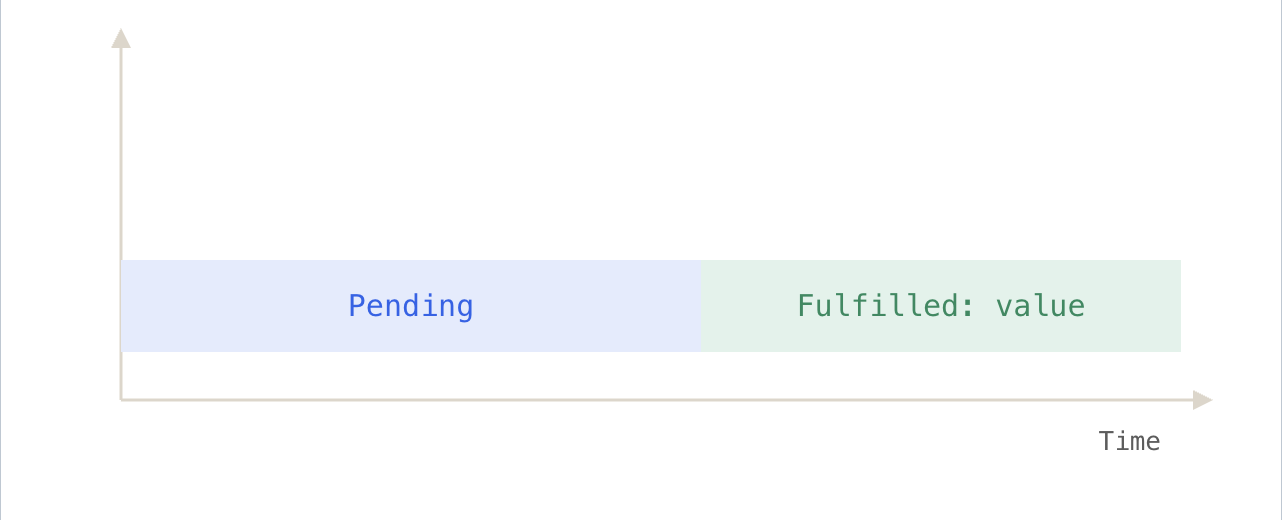
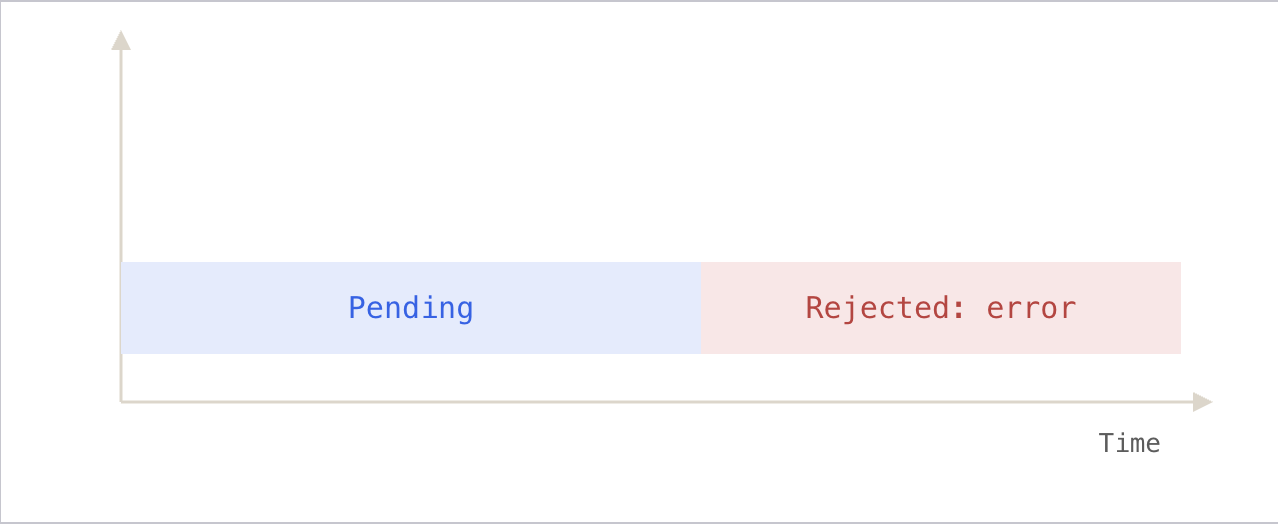
In the beginning, the state of a promise is pending, indicating that the asynchronous operation is in progress( the result is undefined). Depending on the result of the asynchronous operation, the state changes to either fulfilled or rejected.
The fulfilled state indicates that the asynchronous operation was completed successfully.
The rejected state indicates that the asynchronous operation failed.
🪧 Creating a promise
To create a promise object, you use the Promise() constructor:
const promise = new Promise((resolve, reject) => {
  // contain an operation
  // ...

  // return the state
  if (success) {
    resolve(value);
  } else {
    reject(error);
  }
});
The
Promise()constructor takes a function called the executor.The executor receives two functions:
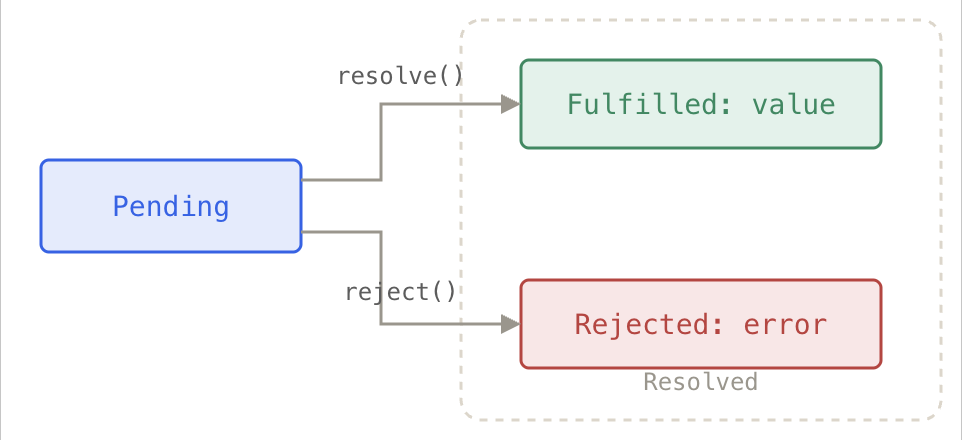
resolve() → call this when things go right
reject() → call this when something goes wrong
These names (
resolve,reject) are just convention, you can name them anything.
<div class="infographic-promisecreate">
<style>
.infographic-promisecreate {
--ink: #1a1a1a;
--ink-soft: #5c5c5c;
--paper: #ffffff;
--paper-alt: #f0ece4;
--accent: #2563eb;
--accent-soft:#e3ebfd;
--line: #ddd6c9;
--good: #1a8a5f;
--good-soft: #e1f2ea;
--bad: #c8452e;
--bad-soft: #f7e3df;
--amber: #a4720a;
--amber-soft: #faf1de;
box-sizing: border-box;
max-width: 880px;
margin: 0 auto;
font-family: 'Inter', system-ui, sans-serif;
color: var(--ink);
background: var(--paper);
overflow-x: hidden;
}
.infographic-promisecreate[data-theme="dark"] {
--ink: #e8e6e1;
--ink-soft: #9a968c;
--paper: #121212;
--paper-alt: #1e1e26;
--accent: #5b8def;
--accent-soft:#202942;
--line: #2c313d;
--good: #4fbf8f;
--good-soft: #16281f;
--bad: #e0715a;
--bad-soft: #2e211d;
--amber: #d9a94a;
--amber-soft: #2c2413;
}
.infographic-promisecreate * { box-sizing: border-box; }
.infographic-promisecreate h1 { font-family: 'Fraunces', Georgia, serif; font-weight: 600; margin: 0; }
.infographic-promisecreate p { margin: 0; }
.infographic-promisecreate button { font-family: inherit; }
.pc-wrap { padding: clamp(1.25rem, 5vw, 2.5rem) clamp(1.1rem, 5vw, 3rem) 2rem; }
.pc-hero { text-align: center; margin-bottom: 1.4rem; }
.pc-hero h1 { font-size: clamp(1.35rem, 4.5vw, 1.85rem); }
.pc-hero p { color: var(--ink-soft); margin-top: 0.45rem; font-size: 0.86rem; }
.pc-code { border: 1.5px solid var(--line); background: var(--paper-alt); padding: 0.65rem 0.85rem; font-family: 'IBM Plex Mono', monospace; font-size: 0.72rem; line-height: 1.75; margin-bottom: 1.3rem; }
.pc-code .ln { display: flex; gap: 0.6rem; padding: 0.05rem 0.3rem; border-radius: 3px; transition: background 0.3s ease, color 0.3s ease; color: var(--ink-soft); white-space: pre; }
.pc-code .ln.is-good { background: var(--good-soft); color: var(--good); font-weight: 600; }
.pc-code .ln.is-bad { background: var(--bad-soft); color: var(--bad); font-weight: 600; }
/* promise object */
.pc-stage { display: flex; flex-direction: column; align-items: center; gap: 0.9rem; }
.pc-obj {
width: min(260px, 100%); text-align: center; border: 1.5px solid var(--line); background: var(--paper-alt);
padding: 0.8rem 0.9rem; transition: border-color 0.4s ease, background 0.4s ease;
}
.pc-obj .pc-name { font-family: 'IBM Plex Mono', monospace; font-weight: 700; font-size: 0.82rem; }
.pc-obj .pc-badge {
display: inline-flex; align-items: center; gap: 0.3rem; margin-top: 0.55rem;
font-family: 'IBM Plex Mono', monospace; font-size: 0.68rem; font-weight: 700;
padding: 0.25rem 0.6rem; border: 1.5px solid var(--line); color: var(--ink-soft);
transition: border-color 0.35s ease, color 0.35s ease, background 0.35s ease;
}
.pc-obj .pc-badge svg { width: 13px; height: 13px; }
.pc-obj.state-pending .pc-badge { border-color: var(--amber); color: var(--amber); background: var(--amber-soft); }
.pc-obj.state-fulfilled .pc-badge { border-color: var(--good); color: var(--good); background: var(--good-soft); }
.pc-obj.state-rejected .pc-badge { border-color: var(--bad); color: var(--bad); background: var(--bad-soft); }
.pc-obj .pc-value { margin-top: 0.4rem; font-family: 'IBM Plex Mono', monospace; font-size: 0.66rem; color: var(--ink-soft); opacity: 0; transition: opacity 0.3s ease; }
.pc-obj .pc-value.is-shown { opacity: 1; }
.pc-buttons { display: flex; gap: 0.6rem; flex-wrap: wrap; justify-content: center; }
.pc-btn { border: none; padding: 0.5rem 1rem; font-size: 0.78rem; font-weight: 600; cursor: pointer; color: #fff; }
.pc-btn.resolve { background: var(--good); }
.pc-btn.reject { background: var(--bad); }
.pc-btn:active { transform: scale(0.96); }
.pc-reset { display: block; margin: 0.9rem auto 0; border: 1px solid var(--line); background: var(--paper-alt); color: var(--ink-soft); padding: 0.35rem 0.8rem; font-size: 0.7rem; cursor: pointer; }
.pc-reset:hover { border-color: var(--accent); color: var(--accent); }
.pc-note { text-align: center; font-size: 0.8rem; color: var(--ink-soft); margin-top: 1.5rem; padding-top: 1.1rem; border-top: 1px dashed var(--line); }
.pc-note strong { color: var(--ink); }
@media (prefers-reduced-motion: reduce) {
.infographic-promisecreate *, .infographic-promisecreate *::before, .infographic-promisecreate *::after {
animation-duration: 0.001ms !important; transition-duration: 0.001ms !important;
}
}
</style>
<div class="pc-wrap">
<div class="pc-code" id="pcCode">
<div class="ln" data-line="ctor">const promise = new Promise((resolve, reject) => {</div>
<div class="ln" data-line="check"> if (success) {</div>
<div class="ln" data-line="resolve"> resolve(value);</div>
<div class="ln" data-line="else"> } else {</div>
<div class="ln" data-line="reject"> reject(error);</div>
<div class="ln" data-line="end"> }
});</div>
</div>
<div class="pc-stage">
<div class="pc-obj state-pending" id="pcObj">
<div class="pc-name">promise</div>
<div class="pc-badge" id="pcBadge">
<svg xmlns="http://www.w3.org/2000/svg" viewBox="0 0 24 24" fill="none" stroke="currentColor" stroke-width="2" stroke-linecap="round" stroke-linejoin="round"><circle cx="12" cy="12" r="10"/><path d="M12 6v6l4 2"/></svg>
pending
</div>
<div class="pc-value" id="pcValue"></div>
</div>
<div class="pc-buttons">
<button class="pc-btn resolve" id="pcResolve" type="button">call resolve("done!")</button>
<button class="pc-btn reject" id="pcReject" type="button">call reject("failed")</button>
</div>
<button class="pc-reset" id="pcReset" type="button">reset</button>
</div>
<p class="pc-note">Only one of these can ever fire — whichever runs first <strong>settles</strong> the promise. Naming them <strong>resolve</strong> and <strong>reject</strong> is just convention; the executor could call its parameters anything.</p>
</div>
</div>
<script>
(function () {
const wrapper = document.currentScript.closest('.infographic-promisecreate')
|| document.querySelector('.infographic-promisecreate');
const bodyAttr = document.body.getAttribute('data-darkmode');
let dark;
if (bodyAttr === 'true') { dark = true; }
else if (bodyAttr === 'false') { dark = false; }
else {
const match = document.cookie.match(/(?:^|;\s*)darkMode=([^;]+)/);
dark = match ? match[1] === 'true' : false;
}
if (dark) wrapper.setAttribute('data-theme', 'dark');
const lines = wrapper.querySelectorAll('.pc-code .ln');
const obj = wrapper.querySelector('#pcObj');
const badge = wrapper.querySelector('#pcBadge');
const value = wrapper.querySelector('#pcValue');
const resolveBtn = wrapper.querySelector('#pcResolve');
const rejectBtn = wrapper.querySelector('#pcReject');
const resetBtn = wrapper.querySelector('#pcReset');
const iconPending = '<svg xmlns="http://www.w3.org/2000/svg" viewBox="0 0 24 24" fill="none" stroke="currentColor" stroke-width="2" stroke-linecap="round" stroke-linejoin="round"><circle cx="12" cy="12" r="10"/><path d="M12 6v6l4 2"/></svg>pending';
const iconFulfilled = '<svg xmlns="http://www.w3.org/2000/svg" viewBox="0 0 24 24" fill="none" stroke="currentColor" stroke-width="2" stroke-linecap="round" stroke-linejoin="round"><path d="M20 6 9 17l-5-5"/></svg>fulfilled';
const iconRejected = '<svg xmlns="http://www.w3.org/2000/svg" viewBox="0 0 24 24" fill="none" stroke="currentColor" stroke-width="2" stroke-linecap="round" stroke-linejoin="round"><path d="M18 6 6 18"/><path d="m6 6 12 12"/></svg>rejected';
function highlightLines(active) {
lines.forEach(l => {
l.classList.remove('is-good', 'is-bad');
if (active.good && l.dataset.line === active.good) l.classList.add('is-good');
if (active.bad && l.dataset.line === active.bad) l.classList.add('is-bad');
});
}
function settle(kind) {
if (obj.classList.contains('state-fulfilled') || obj.classList.contains('state-rejected')) return;
resolveBtn.disabled = true;
rejectBtn.disabled = true;
if (kind === 'resolve') {
highlightLines({ good: 'check' });
setTimeout(() => highlightLines({ good: 'resolve' }), 350);
setTimeout(() => {
obj.classList.remove('state-pending');
obj.classList.add('state-fulfilled');
badge.innerHTML = iconFulfilled;
value.textContent = 'value: "done!"';
value.classList.add('is-shown');
}, 700);
} else {
highlightLines({ bad: 'else' });
setTimeout(() => highlightLines({ bad: 'reject' }), 350);
setTimeout(() => {
obj.classList.remove('state-pending');
obj.classList.add('state-rejected');
badge.innerHTML = iconRejected;
value.textContent = 'reason: "failed"';
value.classList.add('is-shown');
}, 700);
}
}
resolveBtn.addEventListener('click', () => settle('resolve'));
rejectBtn.addEventListener('click', () => settle('reject'));
resetBtn.addEventListener('click', () => {
obj.classList.remove('state-fulfilled', 'state-rejected');
obj.classList.add('state-pending');
badge.innerHTML = iconPending;
value.classList.remove('is-shown');
value.textContent = '';
highlightLines({});
resolveBtn.disabled = false;
rejectBtn.disabled = false;
});
})();
</script>If the async task succeeds, the executor calls
resolve()→ promise becomes fulfilled.If the task fails, it calls
reject()→ promise becomes rejected.Once a promise is fulfilled or rejected, its state cannot change.
It can’t switch between fulfilled ↔ rejected, and can’t go back to pending.
Every promise starts as pending, and once it becomes fulfilled or rejected, it is considered resolved.
🧩 Consuming a Promise: then, catch, finally
1. The then( ) method
To get the value of a promise when it’s fulfilled, you call the then() method of the promise object. The following shows the syntax of the then() method:
promise.then(onFulfilled,onRejected);→ The then() method accepts two callback functions: onFulfilled and onRejected.
Example :
// A function that returns users after 1 second
function getUsers() {
  return new Promise((resolve) => {
    setTimeout(() => {
      resolve([
        { username: "john", email: "john@test.com" },
        { username: "jane", email: "jane@test.com" }
      ]);
    }, 1000);
  });
}

// Use the promise
getUsers().then((users) => {
  console.log(users);
});
[
{ username: 'john', email: 'john@test.com'},
{ username: 'jane', email: 'jane@test.com}
]You call
getUsers().This immediately returns a Promise (not the users yet).
JS continues running without waiting (because promises are async).
After 1 second, the promise resolves with the users array.
.then()waits for the promise to resolve.When the promise resolves, the callback inside
.then()runs.That callback receives the
usersand prints them.
2. The catch( ) method
If you want to get the error only when the state of the promise is rejected, you can use the catch() method of the Promise object:
promise.catch(onRejected);→ Internally, the catch() method invokes the then(**undefined**, **onRejected**) method.
Example :
The following example changes the success flag to false to simulate the error scenario:
let success = false;
function getUsers() {
return new Promise((resolve, reject) => {
setTimeout(() => {
success
? resolve([
{ username: "john", email: "john@test.com" },
{ username: "jane", email: "jane@test.com" }
])
: reject("Failed to fetch the user list");
}, 1000);
});
}
getUsers().catch((error) => console.log(error));
❌ If success = false
Failed to fetch the user list✅ If success = true
[
	{ username: 'john', email: 'john@test.com'},
	{ username: 'jane', email: 'jane@test.com}
]getUsers()returns a Promise.After 1 second, it checks the
successvariable.If
successis true → the promise resolves (gives user data).If
successis false → the promise rejects (throws an error)..catch()receives that error and prints it.
3) The finally( ) method
Sometimes, you want to execute the same piece of code whether the promise is fulfilled or rejected.
Removes duplication
Improves readability
Separates concerns cleanly
Example:
let success = false;

function getUsers() {
  return new Promise((resolve, reject) => {
    setTimeout(() => {
      success
        ? resolve("User data fetched successfully")
        : reject("Failed to fetch the user list");
    }, 1000);
  });
}

getUsers()
  .then((data) => console.log(data))
  .catch((error) => console.log(error))
  .finally(() => console.log("Task completed"));
User data fetched successfully
Task completedRuns whether the promise succeeds or fails.
Useful for cleanup tasks (loading stop, closing spinner, etc.).
<div class="infographic-promiseconsume">
<style>
.infographic-promiseconsume {
  --ink:        #1a1a1a;
  --ink-soft:   #5c5c5c;
  --paper:      #ffffff;
  --paper-alt:  #f0ece4;
  --accent:     #2563eb;
  --accent-soft:#e3ebfd;
  --line:       #ddd6c9;
  --good:       #1a8a5f;
  --good-soft:  #e1f2ea;
  --bad:        #c8452e;
  --bad-soft:   #f7e3df;
  --amber:      #a4720a;
  --amber-soft: #faf1de;
  box-sizing: border-box;
  max-width: 880px;
  margin: 0 auto;
  font-family: 'Inter', system-ui, sans-serif;
  color: var(--ink);
  background: var(--paper);
  overflow-x: hidden;
}
.infographic-promiseconsume[data-theme="dark"] {
  --ink:        #e8e6e1;
  --ink-soft:   #9a968c;
  --paper:      #121212;
  --paper-alt:  #1e1e26;
  --accent:     #5b8def;
  --accent-soft:#202942;
  --line:       #2c313d;
  --good:       #4fbf8f;
  --good-soft:  #16281f;
  --bad:        #e0715a;
  --bad-soft:   #2e211d;
  --amber:      #d9a94a;
  --amber-soft: #2c2413;
}
.infographic-promiseconsume * { box-sizing: border-box; }
.infographic-promiseconsume h1 { font-family: 'Fraunces', Georgia, serif; font-weight: 600; margin: 0; }
.infographic-promiseconsume p { margin: 0; }
.infographic-promiseconsume button { font-family: inherit; }

.pu-wrap { padding: clamp(1.25rem, 5vw, 2.5rem) clamp(1.1rem, 5vw, 3rem) 2rem; }

.pu-hero { text-align: center; margin-bottom: 1.3rem; }
.pu-hero h1 { font-size: clamp(1.35rem, 4.5vw, 1.85rem); }
.pu-hero p { color: var(--ink-soft); margin-top: 0.45rem; font-size: 0.86rem; }

.pu-code { border: 1.5px solid var(--line); background: var(--paper-alt); padding: 0.6rem 0.8rem; font-family: 'IBM Plex Mono', monospace; font-size: 0.68rem; line-height: 1.7; margin-bottom: 1.1rem; white-space: pre; overflow-x: auto; }

/* success toggle */
.pu-toggle-row { display: flex; align-items: center; justify-content: center; gap: 0.6rem; margin-bottom: 1.2rem; }
.pu-toggle-label { font-family: 'IBM Plex Mono', monospace; font-size: 0.72rem; color: var(--ink-soft); }
.pu-toggle { display: flex; border: 1.5px solid var(--line); overflow: hidden; }
.pu-toggle button { border: none; background: var(--paper-alt); color: var(--ink-soft); padding: 0.35rem 0.8rem; font-size: 0.7rem; font-weight: 700; cursor: pointer; font-family: 'IBM Plex Mono', monospace; }
.pu-toggle button.is-on-true.is-active { background: var(--good-soft); color: var(--good); }
.pu-toggle button.is-on-false.is-active { background: var(--bad-soft); color: var(--bad); }

/* timeline */
.pu-timeline { position: relative; height: 30px; margin-bottom: 0.4rem; }
.pu-timeline-track { position: absolute; left: 0; right: 0; top: 10px; height: 10px; background: var(--paper-alt); border: 1px solid var(--line); overflow: hidden; }
.pu-timeline-fill { position: absolute; left: 0; top: 0; bottom: 0; width: 0%; background: var(--amber); transition: width linear; }
.pu-timeline-fill.done-good { background: var(--good); }
.pu-timeline-fill.done-bad { background: var(--bad); }

/* chain */
.pu-chain { display: flex; justify-content: center; gap: 0.6rem; flex-wrap: wrap; margin: 1rem 0 0.4rem; }
.pu-link {
  width: 150px; text-align: center; border: 1.5px solid var(--line); background: var(--paper-alt);
  padding: 0.5rem 0.5rem; opacity: 0.35; transition: opacity 0.35s ease, border-color 0.35s ease, background 0.35s ease, transform 0.35s ease;
}
.pu-link .pu-link-name { font-family: 'IBM Plex Mono', monospace; font-weight: 700; font-size: 0.74rem; }
.pu-link .pu-link-sub { font-size: 0.6rem; color: var(--ink-soft); margin-top: 0.15rem; }
.pu-link.is-run { opacity: 1; transform: scale(1.03); }
.pu-link.is-run.good { border-color: var(--good); background: var(--good-soft); }
.pu-link.is-run.bad { border-color: var(--bad); background: var(--bad-soft); }
.pu-link.is-run.neutral { border-color: var(--accent); background: var(--accent-soft); }
.pu-link.is-skipped { opacity: 0.25; }
.pu-link .pu-skip-tag { display: none; font-size: 0.58rem; color: var(--ink-soft); margin-top: 0.15rem; }
.pu-link.is-skipped .pu-skip-tag { display: block; }

.pu-play { display: block; margin: 1.1rem auto 0; border: none; background: var(--accent); color: #fff; padding: 0.5rem 1.2rem; font-size: 0.8rem; font-weight: 600; cursor: pointer; }
.pu-play:active { transform: scale(0.96); }
.pu-play:disabled { opacity: 0.45; cursor: default; }

.pu-console {
  margin: 1rem auto 0; max-width: 340px; text-align: left;
  border: 1.5px solid var(--line); background: var(--paper-alt); padding: 0.5rem 0.75rem;
  font-family: 'IBM Plex Mono', monospace; font-size: 0.7rem; min-height: 3em;
}
.pu-console .pu-cline { opacity: 0; transition: opacity 0.25s ease; }
.pu-console .pu-cline.is-shown { opacity: 1; }
.pu-console .pu-cline.good { color: var(--good); }
.pu-console .pu-cline.bad { color: var(--bad); }
.pu-console .pu-cline.neutral { color: var(--accent); }

.pu-note { text-align: center; font-size: 0.8rem; color: var(--ink-soft); margin-top: 1.6rem; padding-top: 1.1rem; border-top: 1px dashed var(--line); }
.pu-note strong { color: var(--ink); }

@media (prefers-reduced-motion: reduce) {
  .infographic-promiseconsume *, .infographic-promiseconsume *::before, .infographic-promiseconsume *::after {
    animation-duration: 0.001ms !important; transition-duration: 0.001ms !important;
  }
}
</style>

<div class="pu-wrap">

  <div class="pu-hero">
    <h1>Consuming a Promise</h1>
    <p>.then(), .catch(), .finally() — only some of these run, depending on the outcome.</p>
  </div>

  <div class="pu-code">getUsers()
  .then((users) => console.log(users))
  .catch((error) => console.log(error))
  .finally(() => console.log("Task completed"));</div>

  <div class="pu-toggle-row">
    <span class="pu-toggle-label">success =</span>
    <div class="pu-toggle">
      <button class="is-on-true is-active" id="puTrue" type="button">true</button>
      <button class="is-on-false" id="puFalse" type="button">false</button>
    </div>
  </div>

  <div class="pu-timeline">
    <div class="pu-timeline-track"><div class="pu-timeline-fill" id="puFill"></div></div>
  </div>

  <div class="pu-chain">
    <div class="pu-link" id="linkThen">
      <div class="pu-link-name">.then()</div>
      <div class="pu-link-sub">runs on fulfilled</div>
      <div class="pu-skip-tag">skipped</div>
    </div>
    <div class="pu-link" id="linkCatch">
      <div class="pu-link-name">.catch()</div>
      <div class="pu-link-sub">runs on rejected</div>
      <div class="pu-skip-tag">skipped</div>
    </div>
    <div class="pu-link" id="linkFinally">
      <div class="pu-link-name">.finally()</div>
      <div class="pu-link-sub">runs either way</div>
    </div>
  </div>

  <button class="pu-play" id="puPlay" type="button">getUsers()...</button>

  <div class="pu-console">
    <div class="pu-cline good" id="cGood">[ { username: "john", ... }, { username: "jane", ... } ]</div>
    <div class="pu-cline bad" id="cBad">Failed to fetch the user list</div>
    <div class="pu-cline neutral" id="cFinally">Task completed</div>
  </div>

  <p class="pu-note">Only <strong>one</strong> of .then() and .catch() ever fires for a given call. <strong>.finally()</strong> doesn't care which — it always runs once the promise settles.</p>

</div>
</div>

<script>
(function () {
  const wrapper = document.currentScript.closest('.infographic-promiseconsume')
    || document.querySelector('.infographic-promiseconsume');
  const bodyAttr = document.body.getAttribute('data-darkmode');
  let dark;
  if (bodyAttr === 'true') { dark = true; }
  else if (bodyAttr === 'false') { dark = false; }
  else {
    const match = document.cookie.match(/(?:^|;\s*)darkMode=([^;]+)/);
    dark = match ? match[1] === 'true' : false;
  }
  if (dark) wrapper.setAttribute('data-theme', 'dark');

  let success = true;
  const trueBtn = wrapper.querySelector('#puTrue');
  const falseBtn = wrapper.querySelector('#puFalse');
  trueBtn.addEventListener('click', () => { success = true; trueBtn.classList.add('is-active'); falseBtn.classList.remove('is-active'); });
  falseBtn.addEventListener('click', () => { success = false; falseBtn.classList.add('is-active'); trueBtn.classList.remove('is-active'); });

  const DUR = 1200;
  const fill = wrapper.querySelector('#puFill');
  const linkThen = wrapper.querySelector('#linkThen');
  const linkCatch = wrapper.querySelector('#linkCatch');
  const linkFinally = wrapper.querySelector('#linkFinally');
  const cGood = wrapper.querySelector('#cGood');
  const cBad = wrapper.querySelector('#cBad');
  const cFinally = wrapper.querySelector('#cFinally');
  const playBtn = wrapper.querySelector('#puPlay');

  playBtn.addEventListener('click', () => {
    playBtn.disabled = true;
    [linkThen, linkCatch, linkFinally].forEach(l => l.classList.remove('is-run', 'is-skipped', 'good', 'bad', 'neutral'));
    [cGood, cBad, cFinally].forEach(c => c.classList.remove('is-shown'));
    fill.classList.remove('done-good', 'done-bad');
    fill.style.transition = 'none';
    fill.style.width = '0%';
    void fill.offsetWidth;
    fill.style.transition = 'width ' + DUR + 'ms linear';
    fill.style.width = '100%';

    setTimeout(() => {
      if (success) {
        fill.classList.add('done-good');
        linkThen.classList.add('is-run', 'good');
        linkCatch.classList.add('is-skipped');
        cGood.classList.add('is-shown');
      } else {
        fill.classList.add('done-bad');
        linkCatch.classList.add('is-run', 'bad');
        linkThen.classList.add('is-skipped');
        cBad.classList.add('is-shown');
      }
    }, DUR);

    setTimeout(() => {
      linkFinally.classList.add('is-run', 'neutral');
      cFinally.classList.add('is-shown');
      playBtn.disabled = false;
    }, DUR + 500);
  });
})();
</script>
🔗 Promise Chaining
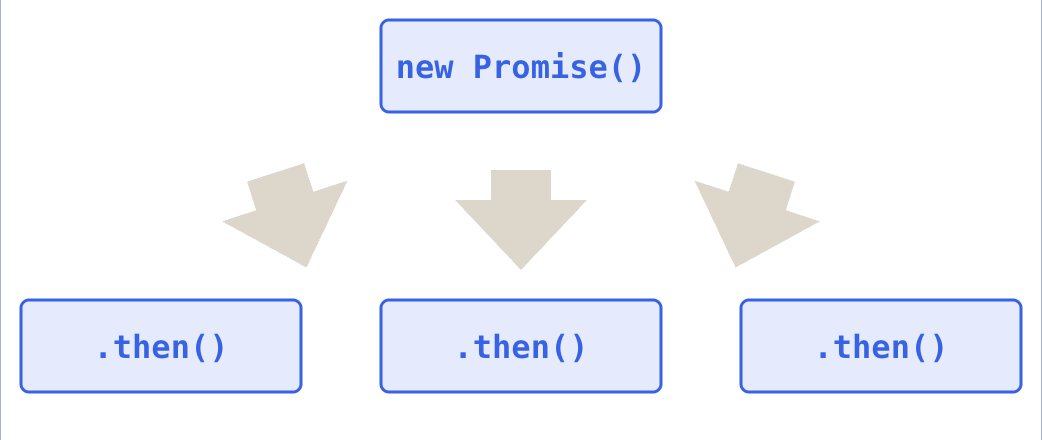
Chain multiple .then() calls to handle sequential operations. Return values flow through the chain, and errors propagate.
The following picture illustrates a promise that has multiple handlers .
1️⃣ Syntax
step1()
.then(result => step2(result))
.then(result => step3(result))
...
2️⃣ Example
<div class="infographic-promisechain">
<style>
.infographic-promisechain {
--ink: #1a1a1a;
--ink-soft: #5c5c5c;
--paper: #ffffff;
--paper-alt: #f0ece4;
--accent: #2563eb;
--accent-soft:#e3ebfd;
--line: #ddd6c9;
--good: #1a8a5f;
--good-soft: #e1f2ea;
--bad: #c8452e;
--bad-soft: #f7e3df;
--amber: #a4720a;
--amber-soft: #faf1de;
box-sizing: border-box;
max-width: 880px;
margin: 0 auto;
font-family: 'Inter', system-ui, sans-serif;
color: var(--ink);
background: var(--paper);
overflow-x: hidden;
}
.infographic-promisechain[data-theme="dark"] {
--ink: #e8e6e1;
--ink-soft: #9a968c;
--paper: #121212;
--paper-alt: #1e1e26;
--accent: #5b8def;
--accent-soft:#202942;
--line: #2c313d;
--good: #4fbf8f;
--good-soft: #16281f;
--bad: #e0715a;
--bad-soft: #2e211d;
--amber: #d9a94a;
--amber-soft: #2c2413;
}
.infographic-promisechain * { box-sizing: border-box; }
.infographic-promisechain h1 { font-family: 'Fraunces', Georgia, serif; font-weight: 600; margin: 0; }
.infographic-promisechain p { margin: 0; }
.infographic-promisechain button { font-family: inherit; }
.pk-wrap { padding: clamp(1.25rem, 5vw, 2.5rem) clamp(1.1rem, 5vw, 3rem) 2rem; }
.pk-hero { text-align: center; margin-bottom: 1.3rem; }
.pk-hero h1 { font-size: clamp(1.35rem, 4.5vw, 1.85rem); }
.pk-hero p { color: var(--ink-soft); margin-top: 0.45rem; font-size: 0.86rem; }
.pk-code { border: 1.5px solid var(--line); background: var(--paper-alt); padding: 0.6rem 0.8rem; font-family: 'IBM Plex Mono', monospace; font-size: 0.68rem; line-height: 1.7; margin-bottom: 1.2rem; white-space: pre; overflow-x: auto; }
.pk-toggle-row { display: flex; align-items: center; justify-content: center; gap: 0.6rem; margin-bottom: 1.3rem; }
.pk-toggle-label { font-family: 'IBM Plex Mono', monospace; font-size: 0.7rem; color: var(--ink-soft); }
.pk-toggle { display: flex; border: 1.5px solid var(--line); overflow: hidden; }
.pk-toggle button { border: none; background: var(--paper-alt); color: var(--ink-soft); padding: 0.32rem 0.7rem; font-size: 0.68rem; font-weight: 700; cursor: pointer; font-family: 'IBM Plex Mono', monospace; }
.pk-toggle button.on.is-active { background: var(--good-soft); color: var(--good); }
.pk-toggle button.off.is-active { background: var(--bad-soft); color: var(--bad); }
/* chain */
.pk-chain { display: flex; flex-direction: column; align-items: center; }
.pk-node {
width: min(320px, 100%); border: 1.5px solid var(--line); background: var(--paper-alt);
padding: 0.5rem 0.75rem; opacity: 0.35; transform: translateY(-4px);
transition: opacity 0.35s ease, transform 0.35s ease, border-color 0.35s ease, background 0.35s ease;
display: flex; align-items: center; justify-content: space-between; gap: 0.6rem;
}
.pk-node .pk-expr { font-family: 'IBM Plex Mono', monospace; font-size: 0.7rem; color: var(--ink); }
.pk-node .pk-val { font-family: 'IBM Plex Mono', monospace; font-size: 0.72rem; font-weight: 700; color: var(--ink-soft); flex-shrink: 0; opacity: 0; transition: opacity 0.3s ease, color 0.3s ease; }
.pk-node.is-run { opacity: 1; transform: translateY(0); border-color: var(--accent); background: var(--accent-soft); }
.pk-node.is-run .pk-val { opacity: 1; color: var(--accent); }
.pk-node.is-error { border-color: var(--bad); background: var(--bad-soft); }
.pk-node.is-error .pk-val { color: var(--bad); }
.pk-node.is-skipped { opacity: 0.2; }
.pk-node.is-catch.is-run { border-color: var(--bad); background: var(--bad-soft); }
.pk-node.is-catch.is-run .pk-val { color: var(--bad); }
.pk-link { width: 2px; height: 20px; background: var(--line); position: relative; }
.pk-link-fill { position: absolute; left: 0; top: 0; width: 2px; height: 0%; background: var(--accent); transition: height 0.35s ease; }
.pk-link.is-error-link .pk-link-fill { background: var(--bad); }
.pk-play { display: block; margin: 1.3rem auto 0; border: none; background: var(--accent); color: #fff; padding: 0.5rem 1.2rem; font-size: 0.8rem; font-weight: 600; cursor: pointer; }
.pk-play:active { transform: scale(0.96); }
.pk-play:disabled { opacity: 0.45; cursor: default; }
.pk-note { text-align: center; font-size: 0.8rem; color: var(--ink-soft); margin-top: 1.6rem; padding-top: 1.1rem; border-top: 1px dashed var(--line); }
.pk-note strong { color: var(--ink); }
@media (prefers-reduced-motion: reduce) {
.infographic-promisechain *, .infographic-promisechain *::before, .infographic-promisechain *::after {
animation-duration: 0.001ms !important; transition-duration: 0.001ms !important;
}
}
</style>
<div class="pk-wrap">
<div class="pk-code">new Promise(res => setTimeout(() => res(5), 500))
.then(val => val * 2)
.then(val => val + 5)
.then(val => console.log(val))
.catch(err => console.error(err));</div>
<div class="pk-toggle-row">
<span class="pk-toggle-label">Throws an error?</span>
<div class="pk-toggle">
<button class="off is-active" id="pkOff" type="button">no</button>
<button class="on" id="pkOn" type="button">yes</button>
</div>
</div>
<div class="pk-chain">
<div class="pk-node" id="n0"><span class="pk-expr">res(5)</span><span class="pk-val">5</span></div>
<div class="pk-link" id="l0"><div class="pk-link-fill"></div></div>
<div class="pk-node" id="n1"><span class="pk-expr">.then(val => val * 2)</span><span class="pk-val">10</span></div>
<div class="pk-link" id="l1"><div class="pk-link-fill"></div></div>
<div class="pk-node" id="n2"><span class="pk-expr">.then(val => val + 5)</span><span class="pk-val">15</span></div>
<div class="pk-link" id="l2"><div class="pk-link-fill"></div></div>
<div class="pk-node" id="n3"><span class="pk-expr">.then(val => console.log(val))</span><span class="pk-val">logs 15</span></div>
<div class="pk-link" id="l3"><div class="pk-link-fill"></div></div>
<div class="pk-node is-catch" id="n4"><span class="pk-expr">.catch(err => console.error(err))</span><span class="pk-val">—</span></div>
</div>
<button class="pk-play" id="pkPlay" type="button">run the chain</button>
<p class="pk-note">A value returned from one <strong>.then()</strong> becomes the input to the next. Throw anywhere in the chain, and every remaining <strong>.then()</strong> is skipped — control jumps straight to <strong>.catch()</strong>.</p>
</div>
</div>
<script>
(function () {
const wrapper = document.currentScript.closest('.infographic-promisechain')
|| document.querySelector('.infographic-promisechain');
const bodyAttr = document.body.getAttribute('data-darkmode');
let dark;
if (bodyAttr === 'true') { dark = true; }
else if (bodyAttr === 'false') { dark = false; }
else {
const match = document.cookie.match(/(?:^|;\s*)darkMode=([^;]+)/);
dark = match ? match[1] === 'true' : false;
}
if (dark) wrapper.setAttribute('data-theme', 'dark');
let willThrow = false;
const offBtn = wrapper.querySelector('#pkOff');
const onBtn = wrapper.querySelector('#pkOn');
offBtn.addEventListener('click', () => { willThrow = false; offBtn.classList.add('is-active'); onBtn.classList.remove('is-active'); });
onBtn.addEventListener('click', () => { willThrow = true; onBtn.classList.add('is-active'); offBtn.classList.remove('is-active'); });
const nodes = [0, 1, 2, 3, 4].map(i => wrapper.querySelector('#n' + i));
const links = [0, 1, 2, 3].map(i => wrapper.querySelector('#l' + i));
const playBtn = wrapper.querySelector('#pkPlay');
const n1val = wrapper.querySelector('#n1 .pk-val');
const n2val = wrapper.querySelector('#n2 .pk-val');
const n2expr = wrapper.querySelector('#n2 .pk-expr');
const n4val = wrapper.querySelector('#n4 .pk-val');
playBtn.addEventListener('click', () => {
playBtn.disabled = true;
nodes.forEach(n => n.classList.remove('is-run', 'is-skipped', 'is-error'));
links.forEach(l => { l.classList.remove('is-error-link'); l.querySelector('.pk-link-fill').style.height = '0%'; });
n2expr.textContent = '.then(val => val + 5)';
n2val.textContent = '15';
n4val.textContent = '—';
const STEP = 500;
let t = 500; // matches the 500ms setTimeout in the promise itself
setTimeout(() => { nodes[0].classList.add('is-run'); links[0].querySelector('.pk-link-fill').style.height = '100%'; }, t);
setTimeout(() => { nodes[1].classList.add('is-run'); }, t += STEP);
setTimeout(() => {
links[1].querySelector('.pk-link-fill').style.height = '100%';
if (willThrow) {
n2expr.textContent = '.then(val => { throw new Error(...) })';
n2val.textContent = 'throws!';
nodes[2].classList.add('is-run', 'is-error');
links[2].classList.add('is-error-link');
} else {
nodes[2].classList.add('is-run');
}
}, t += STEP);
if (willThrow) {
setTimeout(() => {
links[2].querySelector('.pk-link-fill').style.height = '100%';
nodes[3].classList.add('is-skipped');
}, t += STEP);
setTimeout(() => {
links[3].classList.add('is-error-link');
links[3].querySelector('.pk-link-fill').style.height = '100%';
n4val.textContent = 'Error(...)';
nodes[4].classList.add('is-run');
playBtn.disabled = false;
}, t += STEP);
} else {
setTimeout(() => {
links[2].querySelector('.pk-link-fill').style.height = '100%';
nodes[3].classList.add('is-run');
}, t += STEP);
setTimeout(() => {
links[3].querySelector('.pk-link-fill').style.height = '100%';
nodes[4].classList.add('is-skipped');
playBtn.disabled = false;
}, t += STEP);
}
});
})();
</script>🌀Promise.all( ) method
The Promise.all() static method takes an iterable of promises:
🚩Syntax
Promise.all(iterable);The Promise.all() method returns a single promise that resolves when all the input promises have been resolved. The returned promise resolves to an array of the results of the input promises:
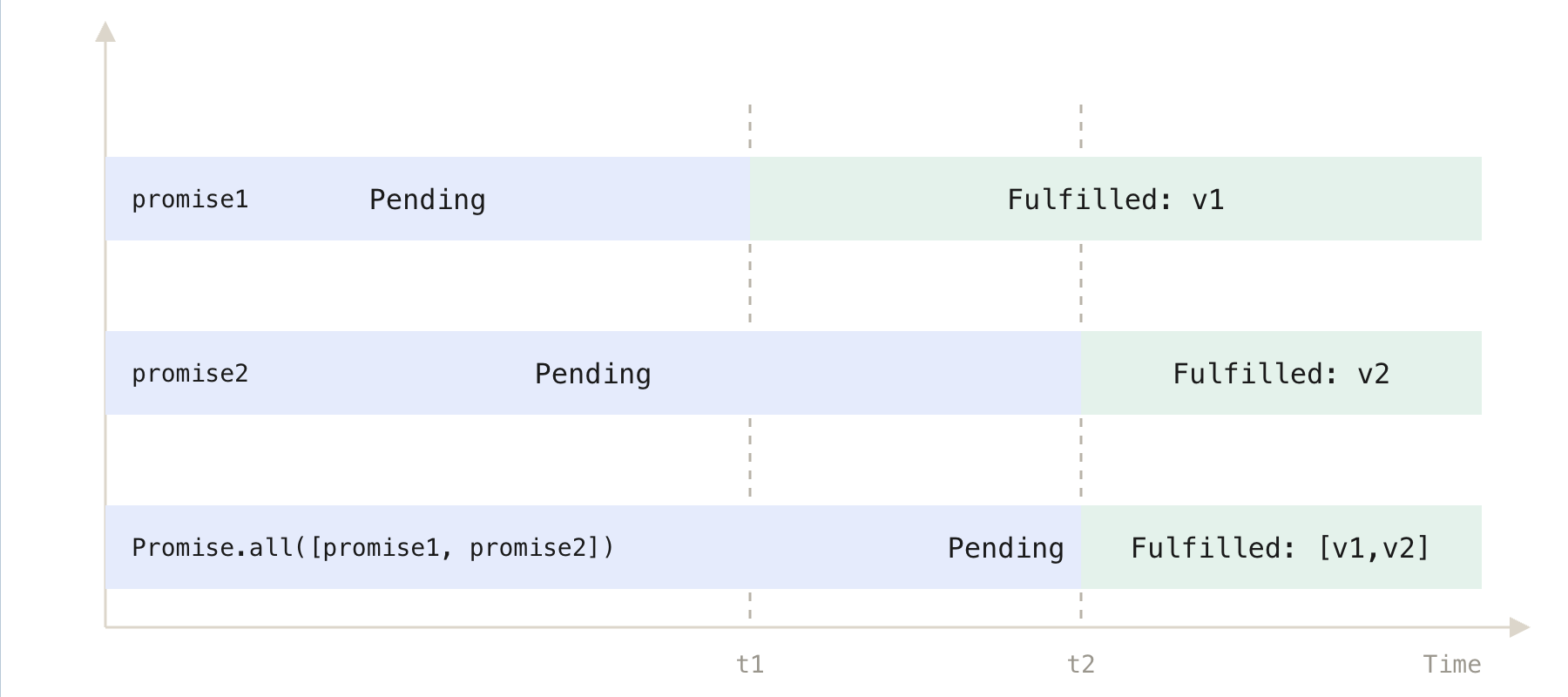
promise1resolves to valuev1at timet1.promise2resolves to valuev2at timet2.Since
Promise.all()waits for all promises to resolve:It does not resolve at
t1, even ifpromise1is already done.It waits until the last promise (
promise2) resolves att2.
At time
t2, bothpromise1andpromise2have resolved.Therefore:
Promise.all([promise1, promise2])resolves att2.It returns an array with both values:
👉
[v1, v2]
➡️ If one of the input promises is rejected, the Promise.all() method immediately returns a promise that is rejected with an error of the first rejected promise:
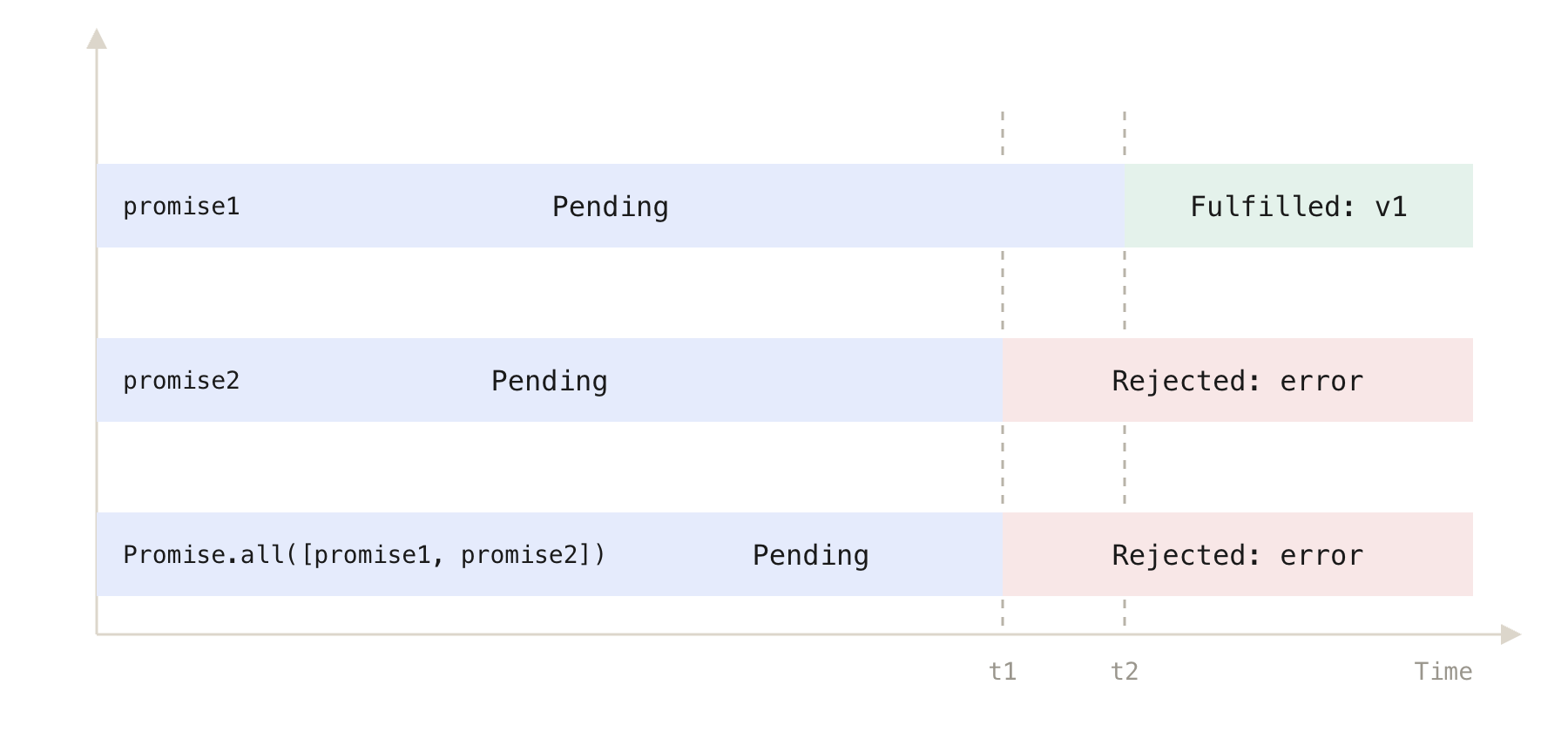
Suppose
promise2rejects at timet1with an error.Promise.all([promise1, promise2])will:✅ Immediately reject at
t1with the same error frompromise2.Promise.all():Does not wait for
promise1or other promises to resolve.Ignores all remaining input promises once any one rejects.
Even if:
promise1is still pending,or it eventually resolves/rejects,
their results are discarded.
<div class="infographic-promiseall">
<style>
.infographic-promiseall {
  --ink:        #1a1a1a;
  --ink-soft:   #5c5c5c;
  --paper:      #ffffff;
  --paper-alt:  #f0ece4;
  --accent:     #2563eb;
  --accent-soft:#e3ebfd;
  --line:       #ddd6c9;
  --good:       #1a8a5f;
  --good-soft:  #e1f2ea;
  --bad:        #c8452e;
  --bad-soft:   #f7e3df;
  box-sizing: border-box;
  max-width: 880px;
  margin: 0 auto;
  font-family: 'Inter', system-ui, sans-serif;
  color: var(--ink);
  background: var(--paper);
  overflow-x: hidden;
}
.infographic-promiseall[data-theme="dark"] {
  --ink:        #e8e6e1;
  --ink-soft:   #9a968c;
  --paper:      #121212;
  --paper-alt:  #1e1e26;
  --accent:     #5b8def;
  --accent-soft:#202942;
  --line:       #2c313d;
  --good:       #4fbf8f;
  --good-soft:  #16281f;
  --bad:        #e0715a;
  --bad-soft:   #2e211d;
}
.infographic-promiseall * { box-sizing: border-box; }
.infographic-promiseall h1 { font-family: 'Fraunces', Georgia, serif; font-weight: 600; margin: 0; }
.infographic-promiseall p { margin: 0; }
.infographic-promiseall button { font-family: inherit; }

.pa-wrap { padding: clamp(1.25rem, 5vw, 2.5rem) clamp(1.1rem, 5vw, 3rem) 2rem; }

.pa-hero { text-align: center; margin-bottom: 1.3rem; }
.pa-hero h1 { font-size: clamp(1.35rem, 4.5vw, 1.85rem); }
.pa-hero p { color: var(--ink-soft); margin-top: 0.45rem; font-size: 0.86rem; }

.pa-code { border: 1.5px solid var(--line); background: var(--paper-alt); padding: 0.6rem 0.8rem; font-family: 'IBM Plex Mono', monospace; font-size: 0.68rem; line-height: 1.7; margin-bottom: 1.2rem; white-space: pre; overflow-x: auto; }

.pa-toggle-row { display: flex; align-items: center; justify-content: center; gap: 0.6rem; margin-bottom: 1.3rem; flex-wrap: wrap; text-align: center; }
.pa-toggle-label { font-family: 'IBM Plex Mono', monospace; font-size: 0.7rem; color: var(--ink-soft); }
.pa-toggle { display: flex; border: 1.5px solid var(--line); overflow: hidden; }
.pa-toggle button { border: none; background: var(--paper-alt); color: var(--ink-soft); padding: 0.32rem 0.7rem; font-size: 0.68rem; font-weight: 700; cursor: pointer; font-family: 'IBM Plex Mono', monospace; }
.pa-toggle button.on.is-active { background: var(--bad-soft); color: var(--bad); }
.pa-toggle button.off.is-active { background: var(--good-soft); color: var(--good); }

/* task bars */
.pa-timeline { display: flex; flex-direction: column; gap: 0.55rem; margin-bottom: 1.1rem; }
.pa-task { display: flex; align-items: center; gap: 0.5rem; }
.pa-task-label { width: 78px; flex-shrink: 0; font-family: 'IBM Plex Mono', monospace; font-size: 0.66rem; color: var(--ink-soft); }
.pa-task-track { flex: 1; height: 16px; background: var(--paper-alt); border: 1px solid var(--line); position: relative; overflow: hidden; }
.pa-task-bar { position: absolute; left: 0; top: 0; bottom: 0; width: 0%; background: var(--accent); transition: width linear; }
.pa-task.done .pa-task-bar { background: var(--good); }
.pa-task.errored .pa-task-bar { background: var(--bad); }
.pa-task.ignored .pa-task-bar { background: var(--ink-soft); opacity: 0.35; }
.pa-task-mark { width: 18px; flex-shrink: 0; text-align: center; font-size: 0.72rem; font-weight: 700; opacity: 0; transition: opacity 0.2s ease; }
.pa-task.done .pa-task-mark.check { opacity: 1; color: var(--good); }
.pa-task.errored .pa-task-mark.cross { opacity: 1; color: var(--bad); }
.pa-task.ignored .pa-task-mark.ignore { opacity: 1; color: var(--ink-soft); font-size: 0.58rem; }

/* result */
.pa-result {
  width: min(340px, 100%); margin: 0 auto; text-align: center; border: 1.5px solid var(--line); background: var(--paper-alt);
  padding: 0.6rem 0.8rem; transition: border-color 0.35s ease, background 0.35s ease;
}
.pa-result .pa-rname { font-family: 'IBM Plex Mono', monospace; font-weight: 700; font-size: 0.78rem; }
.pa-result .pa-rval { font-family: 'IBM Plex Mono', monospace; font-size: 0.68rem; color: var(--ink-soft); margin-top: 0.3rem; opacity: 0; transition: opacity 0.3s ease; }
.pa-result .pa-rval.is-shown { opacity: 1; }
.pa-result.fulfilled { border-color: var(--good); background: var(--good-soft); }
.pa-result.fulfilled .pa-rval { color: var(--good); }
.pa-result.rejected { border-color: var(--bad); background: var(--bad-soft); }
.pa-result.rejected .pa-rval { color: var(--bad); }

.pa-play { display: block; margin: 1.2rem auto 0; border: none; background: var(--accent); color: #fff; padding: 0.5rem 1.2rem; font-size: 0.8rem; font-weight: 600; cursor: pointer; }
.pa-play:active { transform: scale(0.96); }
.pa-play:disabled { opacity: 0.45; cursor: default; }

.pa-note { text-align: center; font-size: 0.8rem; color: var(--ink-soft); margin-top: 1.6rem; padding-top: 1.1rem; border-top: 1px dashed var(--line); }
.pa-note strong { color: var(--ink); }

@media (prefers-reduced-motion: reduce) {
  .infographic-promiseall *, .infographic-promiseall *::before, .infographic-promiseall *::after {
    animation-duration: 0.001ms !important; transition-duration: 0.001ms !important;
  }
}
</style>

<div class="pa-wrap">

  <div class="pa-hero">
    <p>Runs every promise at once, and waits for the slowest one — unless something fails first.</p>
  </div>

  <div class="pa-code">Promise.all([taskA, taskB, taskC])
  .then((results) => console.log(results))
  .catch((err) => console.error(err));</div>

  <div class="pa-toggle-row">
    <span class="pa-toggle-label">taskB rejects instead?</span>
    <div class="pa-toggle">
      <button class="off is-active" id="paOff" type="button">no</button>
      <button class="on" id="paOn" type="button">yes</button>
    </div>
  </div>

  <div class="pa-timeline">
    <div class="pa-task" id="taskA">
      <div class="pa-task-label">taskA (1s)</div>
      <div class="pa-task-track"><div class="pa-task-bar" id="barA"></div></div>
      <div class="pa-task-mark check">✓</div>
    </div>
    <div class="pa-task" id="taskB">
      <div class="pa-task-label">taskB (2s)</div>
      <div class="pa-task-track"><div class="pa-task-bar" id="barB"></div></div>
      <div class="pa-task-mark check">✓</div>
      <div class="pa-task-mark cross">✕</div>
    </div>
    <div class="pa-task" id="taskC">
      <div class="pa-task-label">taskC (1.5s)</div>
      <div class="pa-task-track"><div class="pa-task-bar" id="barC"></div></div>
      <div class="pa-task-mark check">✓</div>
      <div class="pa-task-mark ignore">ignored</div>
    </div>
  </div>

  <div class="pa-result" id="paResult">
    <div class="pa-rname">Promise.all([...])</div>
    <div class="pa-rval" id="paResultVal"></div>
  </div>

  <button class="pa-play" id="paPlay" type="button">run all three</button>

  <p class="pa-note">Normally, <strong>Promise.all()</strong> settles when the <strong>last</strong> one finishes. But the moment <strong>any</strong> promise rejects, it rejects immediately — the others keep running, but their results are thrown away.</p>

</div>
</div>

<script>
(function () {
  const wrapper = document.currentScript.closest('.infographic-promiseall')
    || document.querySelector('.infographic-promiseall');
  const bodyAttr = document.body.getAttribute('data-darkmode');
  let dark;
  if (bodyAttr === 'true') { dark = true; }
  else if (bodyAttr === 'false') { dark = false; }
  else {
    const match = document.cookie.match(/(?:^|;\s*)darkMode=([^;]+)/);
    dark = match ? match[1] === 'true' : false;
  }
  if (dark) wrapper.setAttribute('data-theme', 'dark');

  let bFails = false;
  const offBtn = wrapper.querySelector('#paOff');
  const onBtn = wrapper.querySelector('#paOn');
  offBtn.addEventListener('click', () => { bFails = false; offBtn.classList.add('is-active'); onBtn.classList.remove('is-active'); });
  onBtn.addEventListener('click', () => { bFails = true; onBtn.classList.add('is-active'); offBtn.classList.remove('is-active'); });

  const DUR_A = 700, DUR_B_FAIL = 900, DUR_B_OK = 1400, DUR_C = 1050;

  const taskA = wrapper.querySelector('#taskA');
  const taskB = wrapper.querySelector('#taskB');
  const taskC = wrapper.querySelector('#taskC');
  const barA = wrapper.querySelector('#barA');
  const barB = wrapper.querySelector('#barB');
  const barC = wrapper.querySelector('#barC');
  const result = wrapper.querySelector('#paResult');
  const resultVal = wrapper.querySelector('#paResultVal');
  const playBtn = wrapper.querySelector('#paPlay');

  function resetTask(task, bar) {
    task.classList.remove('done', 'errored', 'ignored');
    bar.style.transition = 'none';
    bar.style.width = '0%';
    void bar.offsetWidth;
  }
  function growBar(bar, ms) {
    bar.style.transition = 'width ' + ms + 'ms linear';
    requestAnimationFrame(() => { bar.style.width = '100%'; });
  }

  playBtn.addEventListener('click', () => {
    playBtn.disabled = true;
    [taskA, taskB, taskC].forEach((t, i) => resetTask(t, [barA, barB, barC][i]));
    result.classList.remove('fulfilled', 'rejected');
    resultVal.classList.remove('is-shown');
    resultVal.textContent = '';

    growBar(barA, DUR_A);
    growBar(barC, DUR_C);
    growBar(barB, bFails ? DUR_B_FAIL : DUR_B_OK);

    setTimeout(() => taskA.classList.add('done'), DUR_A);

    if (bFails) {
      setTimeout(() => {
        taskB.classList.add('errored');
      }, DUR_B_FAIL);
      setTimeout(() => {
        result.classList.add('rejected');
        resultVal.textContent = 'rejected → "taskB failed"';
        resultVal.classList.add('is-shown');
      }, DUR_B_FAIL + 100);
      setTimeout(() => {
        taskC.classList.add('ignored');
      }, DUR_B_FAIL + 150);
      setTimeout(() => { playBtn.disabled = false; }, DUR_C + 300);
    } else {
      setTimeout(() => taskC.classList.add('done'), DUR_C);
      setTimeout(() => taskB.classList.add('done'), DUR_B_OK);
      setTimeout(() => {
        result.classList.add('fulfilled');
        resultVal.textContent = 'fulfilled → [ resultA, resultB, resultC ]';
        resultVal.classList.add('is-shown');
        playBtn.disabled = false;
      }, DUR_B_OK + 150);
    }
  });
})();
</script>
♨️Promise.all( ) method examples
Let’s take some examples to understand how the Promise.all() method works.
1) Resolved promises example
The following promises resolve to 10, 20, and 30 after 1, 2, and 3 seconds. We use the setTimeout() to simulate the asynchronous operations:
<div class="code-terminal-demo">
<style>
.code-terminal-demo {
--win-red: #ff5f57;
--win-yellow: #febc2e;
--win-green: #28c840;
max-width: 880px;
margin: 0 auto;
font-family: 'Inter', system-ui, sans-serif;
}
.code-terminal-demo * { box-sizing: border-box; }
.ctd-window {
border-radius: 10px;
overflow: hidden;
box-shadow: 0 8px 30px rgba(0,0,0,0.35);
margin-bottom: 1.5rem;
}
.ctd-titlebar {
background: #2b2b2b;
padding: 0.6rem 0.8rem;
display: flex;
align-items: center;
gap: 0.5rem;
}
.ctd-dot { width: 11px; height: 11px; border-radius: 50%; }
.ctd-dot.red { background: var(--win-red); }
.ctd-dot.yellow { background: var(--win-yellow); }
.ctd-dot.green { background: var(--win-green); }
.ctd-filename {
flex: 1;
text-align: center;
color: #9a9a9a;
font-family: 'IBM Plex Mono', monospace;
font-size: 0.75rem;
margin-right: 3.4rem;
}
.ctd-code {
background: #1e1e1e;
color: #d4d4d4;
margin: 0;
padding: 1rem 1.1rem;
font-family: 'IBM Plex Mono', 'Fira Code', monospace;
font-size: 0.78rem;
line-height: 1.65;
overflow-x: auto;
white-space: pre;
}
/* manual JS token colors, vscode dark-plus palette */
.tok-kw { color: #569cd6; } /* const, new, function */
.tok-fn { color: #dcdcaa; } /* function/method names */
.tok-str { color: #ce9178; } /* strings/template literals */
.tok-num { color: #b5cea8; } /* numbers */
.tok-com { color: #6a9955; } /* comments */
.tok-var { color: #9cdcfe; } /* identifiers/params */
.tok-punc { color: #d4d4d4; }
.tok-prop { color: #9cdcfe; }
.ctd-term {
background: #0c0c0c;
color: #e5e5e5;
padding: 1rem 1.1rem;
font-family: 'IBM Plex Mono', 'Fira Code', monospace;
font-size: 0.78rem;
line-height: 1.9;
}
.ctd-term .prompt { color: #6ee7b7; }
.ctd-term .path { color: #7dd3fc; }
.ctd-term .out { color: #e5e5e5; }
.ctd-term .out.result { color: #f4bf75; font-weight: 600; }
.ctd-term .line { display: block; opacity: 0; transition: opacity 0.25s ease; }
.ctd-term .line.is-shown { opacity: 1; }
.ctd-run {
display: block;
margin: 0 auto 1.5rem;
border: none;
background: #2563eb;
color: #fff;
padding: 0.55rem 1.3rem;
font-family: 'Inter', system-ui, sans-serif;
font-size: 0.85rem;
font-weight: 600;
border-radius: 6px;
cursor: pointer;
}
.ctd-run:active { transform: scale(0.97); }
.ctd-run:disabled { opacity: 0.5; cursor: default; }
.ctd-term .cursor {
display: inline-block;
width: 7px;
height: 1em;
background: #e5e5e5;
vertical-align: text-bottom;
margin-left: 2px;
animation: ctd-blink 1s steps(1) infinite;
}
@keyframes ctd-blink { 50% { opacity: 0; } }
</style>
<div class="ctd-window">
<div class="ctd-titlebar">
<div class="ctd-dot red"></div>
<div class="ctd-dot yellow"></div>
<div class="ctd-dot green"></div>
<div class="ctd-filename">script.js</div>
</div>
<pre class="ctd-code"><span class="tok-kw">const</span> <span class="tok-var">p1</span> <span class="tok-punc">=</span> <span class="tok-kw">new</span> <span class="tok-fn">Promise</span><span class="tok-punc">((</span><span class="tok-var">resolve</span><span class="tok-punc">,</span> <span class="tok-var">reject</span><span class="tok-punc">) => {</span>
<span class="tok-fn">setTimeout</span><span class="tok-punc">(() => {</span>
<span class="tok-var">console</span><span class="tok-punc">.</span><span class="tok-fn">log</span><span class="tok-punc">(</span><span class="tok-str">'The first promise has resolved'</span><span class="tok-punc">);</span>
<span class="tok-fn">resolve</span><span class="tok-punc">(</span><span class="tok-num">10</span><span class="tok-punc">);</span>
<span class="tok-punc">},</span> <span class="tok-num">1</span> <span class="tok-punc">*</span> <span class="tok-num">1000</span><span class="tok-punc">);</span>
<span class="tok-punc">});</span>
<span class="tok-kw">const</span> <span class="tok-var">p2</span> <span class="tok-punc">=</span> <span class="tok-kw">new</span> <span class="tok-fn">Promise</span><span class="tok-punc">((</span><span class="tok-var">resolve</span><span class="tok-punc">,</span> <span class="tok-var">reject</span><span class="tok-punc">) => {</span>
<span class="tok-fn">setTimeout</span><span class="tok-punc">(() => {</span>
<span class="tok-var">console</span><span class="tok-punc">.</span><span class="tok-fn">log</span><span class="tok-punc">(</span><span class="tok-str">'The second promise has resolved'</span><span class="tok-punc">);</span>
<span class="tok-fn">resolve</span><span class="tok-punc">(</span><span class="tok-num">20</span><span class="tok-punc">);</span>
<span class="tok-punc">},</span> <span class="tok-num">2</span> <span class="tok-punc">*</span> <span class="tok-num">1000</span><span class="tok-punc">);</span>
<span class="tok-punc">});</span>
<span class="tok-kw">const</span> <span class="tok-var">p3</span> <span class="tok-punc">=</span> <span class="tok-kw">new</span> <span class="tok-fn">Promise</span><span class="tok-punc">((</span><span class="tok-var">resolve</span><span class="tok-punc">,</span> <span class="tok-var">reject</span><span class="tok-punc">) => {</span>
<span class="tok-fn">setTimeout</span><span class="tok-punc">(() => {</span>
<span class="tok-var">console</span><span class="tok-punc">.</span><span class="tok-fn">log</span><span class="tok-punc">(</span><span class="tok-str">'The third promise has resolved'</span><span class="tok-punc">);</span>
<span class="tok-fn">resolve</span><span class="tok-punc">(</span><span class="tok-num">30</span><span class="tok-punc">);</span>
<span class="tok-punc">},</span> <span class="tok-num">3</span> <span class="tok-punc">*</span> <span class="tok-num">1000</span><span class="tok-punc">);</span>
<span class="tok-punc">});</span>
<span class="tok-var">Promise</span><span class="tok-punc">.</span><span class="tok-fn">all</span><span class="tok-punc">([</span><span class="tok-var">p1</span><span class="tok-punc">,</span> <span class="tok-var">p2</span><span class="tok-punc">,</span> <span class="tok-var">p3</span><span class="tok-punc">]).</span><span class="tok-fn">then</span><span class="tok-punc">((</span><span class="tok-var">results</span><span class="tok-punc">) => {</span>
<span class="tok-kw">const</span> <span class="tok-var">total</span> <span class="tok-punc">=</span> <span class="tok-var">results</span><span class="tok-punc">.</span><span class="tok-fn">reduce</span><span class="tok-punc">((</span><span class="tok-var">p</span><span class="tok-punc">,</span> <span class="tok-var">c</span><span class="tok-punc">) => </span><span class="tok-var">p</span> <span class="tok-punc">+</span> <span class="tok-var">c</span><span class="tok-punc">);</span>
<span class="tok-var">console</span><span class="tok-punc">.</span><span class="tok-fn">log</span><span class="tok-punc">(</span><span class="tok-str">`Results: ${</span><span class="tok-var">results</span><span class="tok-str">}`</span><span class="tok-punc">);</span>
<span class="tok-var">console</span><span class="tok-punc">.</span><span class="tok-fn">log</span><span class="tok-punc">(</span><span class="tok-str">`Total: ${</span><span class="tok-var">total</span><span class="tok-str">}`</span><span class="tok-punc">);</span>
<span class="tok-punc">});</span></pre>
</div>
<div class="ctd-window">
<div class="ctd-titlebar">
<div class="ctd-dot red"></div>
<div class="ctd-dot yellow"></div>
<div class="ctd-dot green"></div>
<div class="ctd-filename">zsh — node</div>
</div>
<div class="ctd-term" id="ctdTerm">
<span class="line is-shown"><span class="prompt">➜</span> <span class="path">~</span> node script.js</span>
<span class="line out" id="tline1">The first promise has resolved</span>
<span class="line out" id="tline2">The second promise has resolved</span>
<span class="line out" id="tline3">The third promise has resolved</span>
<span class="line out result" id="tline4">Results: 10,20,30</span>
<span class="line out result" id="tline5">Total: 60</span>
<span class="line is-shown" id="tlinePrompt"><span class="prompt">➜</span> <span class="path">~</span> <span class="cursor"></span></span>
</div>
</div>
<button class="ctd-run" id="ctdRun" type="button">▶ Run script.js</button>
</div>
<script>
(function () {
const scope = document.currentScript.closest('.code-terminal-demo') || document;
const runBtn = scope.querySelector('#ctdRun');
const lineIds = ['tline1', 'tline2', 'tline3', 'tline4', 'tline5'];
const promptLine = scope.querySelector('#tlinePrompt');
runBtn.addEventListener('click', () => {
runBtn.disabled = true;
lineIds.forEach(id => scope.querySelector('#' + id).classList.remove('is-shown'));
promptLine.classList.remove('is-shown');
const DUR1 = 700, DUR2 = 1400, DUR3 = 2100;
setTimeout(() => scope.querySelector('#tline1').classList.add('is-shown'), DUR1);
setTimeout(() => scope.querySelector('#tline2').classList.add('is-shown'), DUR2);
setTimeout(() => scope.querySelector('#tline3').classList.add('is-shown'), DUR3);
setTimeout(() => scope.querySelector('#tline4').classList.add('is-shown'), DUR3 + 250);
setTimeout(() => scope.querySelector('#tline5').classList.add('is-shown'), DUR3 + 450);
setTimeout(() => {
promptLine.classList.add('is-shown');
runBtn.disabled = false;
}, DUR3 + 650);
});
})();
</script>When all promises have been resolved, the values from these promises are passed into the callback of the
then()method as an array.Inside the callback, we use the Array’s
reduce()method to calculate the total value and use theconsole.logto display the array of values as well as the total.
2) Rejected promises example
The Promise.all() returns a Promise that is rejected if any of the input promises are rejected.
<div class="code-terminal-demo">
<style>
.code-terminal-demo {
--win-red: #ff5f57;
--win-yellow: #febc2e;
--win-green: #28c840;
max-width: 880px;
margin: 0 auto;
font-family: 'Inter', system-ui, sans-serif;
}
.code-terminal-demo * { box-sizing: border-box; }
.ctd-window {
border-radius: 10px;
overflow: hidden;
box-shadow: 0 8px 30px rgba(0,0,0,0.35);
margin-bottom: 1.5rem;
}
.ctd-titlebar {
background: #2b2b2b;
padding: 0.6rem 0.8rem;
display: flex;
align-items: center;
gap: 0.5rem;
}
.ctd-dot { width: 11px; height: 11px; border-radius: 50%; }
.ctd-dot.red { background: var(--win-red); }
.ctd-dot.yellow { background: var(--win-yellow); }
.ctd-dot.green { background: var(--win-green); }
.ctd-filename {
flex: 1;
text-align: center;
color: #9a9a9a;
font-family: 'IBM Plex Mono', monospace;
font-size: 0.75rem;
margin-right: 3.4rem;
}
.ctd-code {
background: #1e1e1e;
color: #d4d4d4;
margin: 0;
padding: 1rem 1.1rem;
font-family: 'IBM Plex Mono', 'Fira Code', monospace;
font-size: 0.78rem;
line-height: 1.65;
overflow-x: auto;
white-space: pre;
}
.tok-kw { color: #569cd6; }
.tok-fn { color: #dcdcaa; }
.tok-str { color: #ce9178; }
.tok-num { color: #b5cea8; }
.tok-com { color: #6a9955; }
.tok-var { color: #9cdcfe; }
.tok-punc { color: #d4d4d4; }
.ctd-run {
display: block;
margin: 0 auto 1.5rem;
border: none;
background: #2563eb;
color: #fff;
padding: 0.55rem 1.3rem;
font-family: 'Inter', system-ui, sans-serif;
font-size: 0.85rem;
font-weight: 600;
border-radius: 6px;
cursor: pointer;
}
.ctd-run:active { transform: scale(0.97); }
.ctd-run:disabled { opacity: 0.5; cursor: default; }
.ctd-term {
background: #0c0c0c;
color: #e5e5e5;
padding: 1rem 1.1rem;
font-family: 'IBM Plex Mono', 'Fira Code', monospace;
font-size: 0.78rem;
line-height: 1.9;
}
.ctd-term .line { display: block; opacity: 0; transition: opacity 0.25s ease; }
.ctd-term .line.is-shown { opacity: 1; }
.ctd-term .prompt { color: #6ee7b7; }
.ctd-term .path { color: #7dd3fc; }
.ctd-term .out { color: #e5e5e5; }
.ctd-term .out.reject-line { color: #f97583; }
.ctd-term .out.catch-line { color: #f4bf75; font-weight: 600; }
.ctd-term .cursor {
display: inline-block;
width: 7px;
height: 1em;
background: #e5e5e5;
vertical-align: text-bottom;
margin-left: 2px;
animation: ctd-blink 1s steps(1) infinite;
}
@keyframes ctd-blink { 50% { opacity: 0; } }
</style>
<div class="ctd-window">
<div class="ctd-titlebar">
<div class="ctd-dot red"></div>
<div class="ctd-dot yellow"></div>
<div class="ctd-dot green"></div>
<div class="ctd-filename">script.js</div>
</div>
<pre class="ctd-code"><span class="tok-kw">const</span> <span class="tok-var">p1</span> <span class="tok-punc">=</span> <span class="tok-kw">new</span> <span class="tok-fn">Promise</span><span class="tok-punc">((</span><span class="tok-var">resolve</span><span class="tok-punc">,</span> <span class="tok-var">reject</span><span class="tok-punc">) => {</span>
<span class="tok-fn">setTimeout</span><span class="tok-punc">(() => {</span>
<span class="tok-var">console</span><span class="tok-punc">.</span><span class="tok-fn">log</span><span class="tok-punc">(</span><span class="tok-str">'The first promise has resolved'</span><span class="tok-punc">);</span>
<span class="tok-fn">resolve</span><span class="tok-punc">(</span><span class="tok-num">10</span><span class="tok-punc">);</span>
<span class="tok-punc">},</span> <span class="tok-num">1</span> <span class="tok-punc">*</span> <span class="tok-num">1000</span><span class="tok-punc">);</span>
<span class="tok-punc">});</span>
<span class="tok-kw">const</span> <span class="tok-var">p2</span> <span class="tok-punc">=</span> <span class="tok-kw">new</span> <span class="tok-fn">Promise</span><span class="tok-punc">((</span><span class="tok-var">resolve</span><span class="tok-punc">,</span> <span class="tok-var">reject</span><span class="tok-punc">) => {</span>
<span class="tok-fn">setTimeout</span><span class="tok-punc">(() => {</span>
<span class="tok-var">console</span><span class="tok-punc">.</span><span class="tok-fn">log</span><span class="tok-punc">(</span><span class="tok-str">'The second promise has rejected'</span><span class="tok-punc">);</span>
<span class="tok-fn">reject</span><span class="tok-punc">(</span><span class="tok-str">'Failed'</span><span class="tok-punc">);</span>
<span class="tok-punc">},</span> <span class="tok-num">2</span> <span class="tok-punc">*</span> <span class="tok-num">1000</span><span class="tok-punc">);</span>
<span class="tok-punc">});</span>
<span class="tok-kw">const</span> <span class="tok-var">p3</span> <span class="tok-punc">=</span> <span class="tok-kw">new</span> <span class="tok-fn">Promise</span><span class="tok-punc">((</span><span class="tok-var">resolve</span><span class="tok-punc">,</span> <span class="tok-var">reject</span><span class="tok-punc">) => {</span>
<span class="tok-fn">setTimeout</span><span class="tok-punc">(() => {</span>
<span class="tok-var">console</span><span class="tok-punc">.</span><span class="tok-fn">log</span><span class="tok-punc">(</span><span class="tok-str">'The third promise has resolved'</span><span class="tok-punc">);</span>
<span class="tok-fn">resolve</span><span class="tok-punc">(</span><span class="tok-num">30</span><span class="tok-punc">);</span>
<span class="tok-punc">},</span> <span class="tok-num">3</span> <span class="tok-punc">*</span> <span class="tok-num">1000</span><span class="tok-punc">);</span>
<span class="tok-punc">});</span>
<span class="tok-var">Promise</span><span class="tok-punc">.</span><span class="tok-fn">all</span><span class="tok-punc">([</span><span class="tok-var">p1</span><span class="tok-punc">,</span> <span class="tok-var">p2</span><span class="tok-punc">,</span> <span class="tok-var">p3</span><span class="tok-punc">])</span>
<span class="tok-punc">.</span><span class="tok-fn">then</span><span class="tok-punc">(</span><span class="tok-var">console</span><span class="tok-punc">.</span><span class="tok-var">log</span><span class="tok-punc">)</span><span class="tok-com">// never execute</span>
<span class="tok-punc">.</span><span class="tok-fn">catch</span><span class="tok-punc">(</span><span class="tok-var">console</span><span class="tok-punc">.</span><span class="tok-var">log</span><span class="tok-punc">);</span></pre>
</div>
<button class="ctd-run" id="ctdRun" type="button">▶ Run script.js</button>
<div class="ctd-window">
<div class="ctd-titlebar">
<div class="ctd-dot red"></div>
<div class="ctd-dot yellow"></div>
<div class="ctd-dot green"></div>
<div class="ctd-filename">zsh — node</div>
</div>
<div class="ctd-term" id="ctdTerm">
<span class="line is-shown"><span class="prompt">➜</span> <span class="path">~</span> node script.js</span>
<span class="line out" id="tline1">The first promise has resolved</span>
<span class="line out reject-line" id="tline2">The second promise has rejected</span>
<span class="line out catch-line" id="tline3">Failed</span>
<span class="line out" id="tline4">The third promise has resolved</span>
<span class="line is-shown" id="tlinePrompt"><span class="prompt">➜</span> <span class="path">~</span> <span class="cursor"></span></span>
</div>
</div>
</div>
<script>
(function () {
const scope = document.currentScript.closest('.code-terminal-demo') || document;
const runBtn = scope.querySelector('#ctdRun');
const lineIds = ['tline1', 'tline2', 'tline3', 'tline4'];
const promptLine = scope.querySelector('#tlinePrompt');
runBtn.addEventListener('click', () => {
runBtn.disabled = true;
lineIds.forEach(id => scope.querySelector('#' + id).classList.remove('is-shown'));
promptLine.classList.remove('is-shown');
const DUR1 = 700; // p1 resolves — 1s
const DUR2 = 1400; // p2 rejects — 2s, Promise.all fails fast here
const DUR3 = 2100; // p3's own timer still finishes — 3s, but its result is ignored
setTimeout(() => scope.querySelector('#tline1').classList.add('is-shown'), DUR1);
setTimeout(() => scope.querySelector('#tline2').classList.add('is-shown'), DUR2);
setTimeout(() => scope.querySelector('#tline3').classList.add('is-shown'), DUR2 + 150);
setTimeout(() => scope.querySelector('#tline4').classList.add('is-shown'), DUR3);
setTimeout(() => {
promptLine.classList.add('is-shown');
runBtn.disabled = false;
}, DUR3 + 250);
});
})();
</script>There are three promises:
✅ The first promise resolves after 1 second
❌ The second promise rejects after 2 seconds
✅ The third promise resolves after 3 seconds
You use
Promise.all([p1, p2, p3])to run them together.Promise.all():Fails immediately when any one promise is rejected.
So, when the second promise rejects after 2 seconds:
The entire
Promise.all()rejects.The
.catch()block runs.
Even though the other promises may eventually resolve, their results are ignored.